Lolipop! Review [2025 Latest]: What Speed Testing Revealed, Plus the Real Pros and Cons
LOLIPOP, GMO Pepabo, Inc. tarafından işletilen köklü bir barındırma hizmetidir. Kurulduğu 2001 yılından bu yana kişisel bloglardan kurumsal web sitelerine kadar geniş bir müşteri kitlesi tarafından kullanılmış olup sektördeki en iyi sicil ve güvenilirlik seviyelerinden birine sahiptir.

The reasons I recommend LOLIPOP to WordPress'i ilk kez kullanan veya uygun fiyatlı bir sunucu arayan kişiler are:
- You can start WordPress easily
- It has a reputation for being slow, but in reality it is a very fast sunucu
- Even though it is a major hosting brand, the price is low
That is why. You are olası to be satisfied. There is a 10-gün ücretsiz trial.

A competing service is Sakura Rental Server. Şuna kıyasla kurumsal ve ticari kullanıma daha uygundur: LOLIPOP, so consider it alongside this service.
| Server tür | Shared hosting |
| Speed (TTFB) | 80ms |
| Recommended plan and term | Hafif, 12 months |
| Trial / refund policy | 10-gün ücretsiz trial |
| Monthly price (12-month contract) | 495 yen |
| Initial setup fee | Ücretsiz |
| Ücretsiz domain | 1 ücretsiz forever |
| Support | Sohbet ve e-posta (hafta içi 10:00-18:00) |
| Uptime | 99.99% |
| Storage | 350GB |
| Number of databases | 50 |
| Security measures | Overseas Attack Guard, WAF, virus scanning |
| SSL | Ücretsiz dedicated SSL, dedicated SSL (Pro) |
| Backup / restore | Standard plan ve altında yedekleme yok, 7 nesil yedekleme (ücretli) |
| Email accounts | Unlimited |
| Email security | POP/POP over SSL, IMAP/IMAP over SSL, SMTP/SMTP over SSL, spam filter |
| Server / website migration service | 33,000 yen |
| WordPress preinstall | Yes |
| CDN | None |

Lolipop!, WordPress ile kullandığım ilk sunucuydu. Fiyatı hala düşük ancak WordPress'e başlamak eskisinden daha kolay hale geldi.
Sunucu teknik özellikleri birkaç yıl öncesine göre gelişti ve artık ultra hızlı sunuculardan biri haline geldi.
Lolipop! compared with other providers
- Overall rating★★★★★
- Server speed ★★★★★
- Pricing ★★★★★
- Stability ★★★★★
- Ease of getting started with WordPress* ★★★★★
- Domain management, SSL setup, and other operational tasks* ★★★☆☆
* These ratings are based on my own hands-on use.

- Based on market research as of November 4, 2025, sorted by speed
- Aylık fiyatlar, WordPress'i çalıştırabilen en ucuz planın ilk yıl maliyetidir
- Speed is the Time to First Byte for demo sites built under the same conditions
“Lolipop!”, düşük fiyata sunulan popüler ve köklü bir barındırma hizmetidir. Kararlı %99,99 çalışma süresine rağmen, WordPress çalıştırabilen Light planı aylık 264 yenden başlar. Fiyat-performans oranı tüm planlarda mükemmeldir.
21 Aralık tarihine kadar, bir yıldan daha kısa süre önce kurulmuş olan şirketler High Speed planını 12 ay boyunca ücretsiz kullanabilirler ve 12 ay veya daha uzun süreli bir sözleşmeyle sonsuza kadar bir ücretsiz alan adının yanı sıra 10 günlük ücretsiz deneme sürümüne sahip olabilirler.
What Is Lolipop? The Appeal and Capability of a Long-Established Hosting Service

Lolipop genel bakış: uygun fiyatlı ve kararlı, köklü bir sunucu
Aylık 99 yenden başlayan planlar mevcuttur, bu da barındırma hizmetini ilk kez kullanan veya maliyetleri düşük tutmak isteyen herkes için onu çok cazip bir seçenek haline getirir.
Uzun yıllara dayanan işletim tecrübesiyle biriken bilgi birikimi sayesinde yalnızca kararlı sunucu performansı sunmakla kalmaz, aynı zamanda WordPress gibi CMS kurulumu, özel alan adı yapılandırması ve e-posta özellikleri dahil olmak üzere bir web sitesini çalıştırmak için gereken tüm işlevleri sağlar. Ayrıca yeni başlayanların kullanması kolay bir kontrol paneline sahiptir, böylece barındırma hizmetini ilk kez kullananlar bile rahatça kullanabilir.
Why Lolipop is chosen: from beginners to advanced users
The reasons LOLIPOP is supported by such a wide range of users include the following.
- Overwhelmingly low pricing: Planlar aylık 99 yenden başlar, kurulum maliyetleri düşüktür ve bir web sitesi kurmak kolaydır. WordPress'i çalıştırabilen planlar bile aylık 264 yen gibi düşük bir ücretten başlar.
- High stability: Its long track record provides a stable sunucu environment that keeps website downtime to a minimum.
- Plenty of features: Basit WordPress kurulumu, SSL yapılandırması ve yedekleme işlevi gibi bir web sitesini çalıştırmak için gereken özellikleri içerir.
- Solid support: İhtiyaç duyduğunuzda destek sistemi yanınızdadır, böylece yeni başlayanlar bile güvenle kullanabilir.
- Flexible plans: Kişisel bloglardan büyük kurumsal sitelere kadar çeşitli ihtiyaçlara uygun planlar mevcuttur.
For these reasons, LOLIPOP continues to be chosen by a wide range of users, from beginners to advanced users.
Lolipop reviews and reputation: real user voices

When you are considering LOLIPOP, bilmek istediğiniz şey gerçek kullanıcıların bunu aslında nasıl değerlendirdiğidir. Burada hem olumlu hem de olumsuz incelemeleri kapsamlı bir şekilde inceleyeceğim ve gerçek kullanıcı seslerini kullanarak şunun ne olduğunu netleştireceğim: LOLIPOP is really like.
Positive reviews: pricing, speed, stability, and support
The positive reviews of LOLIPOP en sık aşağıdaki noktalara vurgu yapmaktadır.
These comments suggest that LOLIPOP hala sağlam performans ve kararlılık sunan düşük maliyetli bir barındırma hizmetidir. Özellikle web sitesi başlatmayı kolaylaştırdığı için yeni başlayanlar ve bireysel blog yazarları için son derece cazip görünmektedir.
Negative reviews: lower-plan speed, support response, and WordPress errors
On the other hand, there are also negative reviews of LOLIPOP like the following.
Bu incelemeler, bazı kullanıcıların alt düzey planların görüntülenme hızından memnun olmadığını, destek sisteminde iyileştirilmesi gereken alanlar olduğunu ve WordPress hatalarının meydana gelebileceğini göstermektedir. Bu noktaları aklınızda bulundurarak, web sitenizin ölçeğine ve amacına göre doğru planı seçmeniz gerekir.
The advantages and drawbacks that emerge from the reviews
Taking both the positive and negative reviews together, it is fair to say that LOLIPOP has the following strengths and weaknesses.
- Advantages:
- Overwhelmingly low pricing: Aylık ücretler son derece düşüktür ve ön maliyetleri de düşük tutmak kolaydır.
- Easy to get started: Even beginners can launch a website easily.
- Stable sunucu environment: Server stability is high, keeping website downtime to a minimum.
- Plenty of features: Basit WordPress kurulumu ve SSL kurulumu gibi bir web sitesini işletmek için gereken işlevleri içerir.
- The reassurance of a long-established host: Uzun bir işletim geçmişine ve yüksek düzeyde güvenilirliğe sahiptir.
- Drawbacks:
- Display speed on the lower plans: Lower plans can feel slow in some cases.
- Support sistem: Responses can take time, and some issues may not be fully handled.
- WordPress errors: Errors can occur when installing or using WordPress.
- Restrictions on plan changes: Downgrading to a lower plan may not be possible.
- Backup feature: Backups are paid on some plans.
Four features of Lolipop: compared with other hosting services

The appeal of LOLIPOP is not just that it is inexpensive. Here I will dig into four major features that Lolipop offers and examine its real strengths while comparing it with other hosting services.
Hız teknolojilerine yakından bir bakış
LOLIPOP web sitesi yükleme hızını artırmak için en son teknolojileri kullanır. En belirgin örnekler, yüksek performanslı web sunucusu yazılımı LiteSpeed ve Lolipop! Accelerator adlı tescilli hız özelliğidir.
- What is LiteSpeed? LiteSpeed, web sayfalarını Apache'den daha hızlı işleyebilen bir web sunucusu yazılımıdır. Çok sayıda eşzamanlı erişimi verimli bir şekilde yönetebilir ve yükleme hızını önemli ölçüde artırabilir. Özellikle WordPress gibi dinamik web siteleri için etkilidir.
- What is Lolipop! Accelerator? Lolipop! Accelerator is a proprietary speed-enhancement feature developed by LOLIPOP. Web sitesi içeriğini önbelleğe alarak sunucu yükünü azaltır ve görüntülenme sürelerini hızlandırır. Bu, çok sayıda görsel içeren veya trafikte ani yükselmeler yaşayan sitelerde bile rahat bir performans sürdürülmesine yardımcı olur.
★ What Is Cache? Use Temporary Data Storage to Speed Up Websites
Actual speed comparison data: how it differs from other hosts
Below is the data comparing the display speed of LOLIPOP with other popular hosting services.
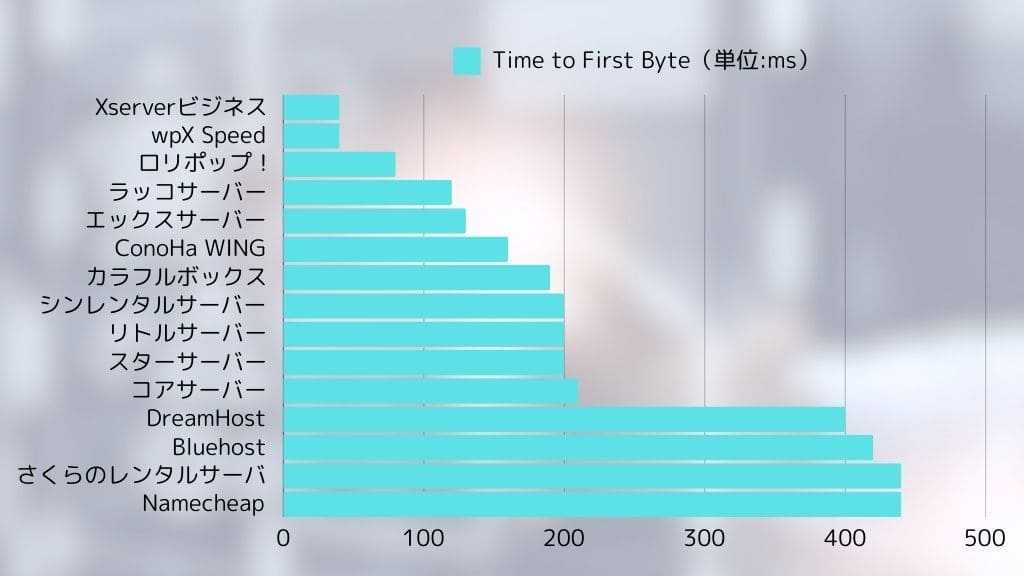
Lolipop posted an extremely fast display speed of 80ms.
As the data shows, LOLIPOP performs well in display speed compared with other providers. In particular, its fast initial response is extremely important for reducing user drop-off.

Detailed comparison of the pricing plans
LOLIPOP offers multiple pricing plans to match different needs. The table below summarizes the prices and specifications of each plan.
| Plan name | Monthly price | Disk space | Databases | WordPress | Features |
| Economy | 99 yen | 120GB | None | No | En ucuz plan. Statik web siteleri veya e-posta kullanımı için en iyisidir. |
| Hafif | 264 yen | 350GB | 50 | Yes | WordPress çalıştırabilen en ucuz plan. Kişisel bloglar için idealdir. |
| Standart | 495 yen | 450GB | 100 | Yes | Pek çok site türünü kaldırabilecek dengeli bir plan. Kişisel bloglar ve küçük ila orta ölçekli web siteleri için en iyisidir. |
| High Speed | 550 yen | 700GB | Unlimited | Yes | A plan specialized for fast display. Recommended for high-traffic sites and larger websites. |
| Kurumsal | 2,200 yen | 1.2TB | Unlimited | Yes | Büyük ölçekli web siteleri ve kurumsal kullanım için önerilir. Ağır yükler ve kararlı bir sunucu ortamı için tasarlanmıştır. |
*The figures above are for selected plans only and may vary depending on contract term and campaign conditions.
Kullanım senaryosuna göre önerilen plan nasıl seçilir: kişisel bloglar, şirket siteleri ve büyük ölçekli siteler
- Personal bkayıts: Yeni başlayan biriyseniz veya maliyetleri düşük tutmak istiyorsanız Light planı önerilir. WordPress'i çalıştırabilir ve çoğu ihtiyaç için yeterli özellik içerir. Belirli bir trafik düzeyi bekliyorsanız, High Speed planını da düşünebilirsiniz.
- Company websites: Küçük ve orta ölçekli ticari siteler için High Speed planı önerilir. Kurumsal kullanımı tamamen destekleyebilecek kararlı bir ortam sağlar.
- Large-scale sites: Yoğun trafik bekliyorsanız veya yüksek yüke dayanmanız gerekiyorsa, High Speed planını veya Enterprise planını değerlendirin.
Advantages and cautions of long-term contracts
With LOLIPOP uzun vadeli bir sözleşme imzalayarak aylık ücret üzerinden indirim alabilirsiniz. Uzun vadeli bir sözleşme düşünüyorsanız, indirim tutarını ve sözleşme süresini karşılaştırın ve kullanımınıza en uygun dönemi seçin. Ancak sözleşme süresi içinde iptal etmenin iptal cezasına yol açabileceğini unutmayın.
Stable operation and security: peace of mind through up-to-date features
LOLIPOP, uzun yıllara dayanan işletim tecrübesiyle desteklenen yüksek düzeyde bir kararlılığa sahiptir. %99,99 çalışma süresi bu güvenilirliği kanıtlar niteliktedir. Geçmişteki sunucu kesintilerine bakıldığında, çoğunun planlı bakım olduğu ve ani beklenmedik arızaların çok nadir yaşandığı görülmektedir.
Even if a sunucu issue does occur, LOLIPOP web sitelerini geri yüklemek için hızla çalışır. İzleme sistemi de güçlendirilmiştir ve sunucular yılda 365 gün, günde 24 saat izlenmektedir.
Website security is extremely important. LOLIPOP implements the following security measures.
- Ücretsiz SSL: Encrypts website communication and helps prevent data interception and tampering.
- WAF (Web Application Firewall): Protects your site against attacks that target web application vulnerabilities.
- Protection against unauthorized access: Detects suspicious access and prevents intrusions into your website.
These security measures help users operate their websites with peace of mind.
★ What Are SSL and TLS? How Encryption Protects Information and Why It Matters
Plenty of features and ease of use: WordPress works smoothly
LOLIPOP yeni başlayanların bile kolayca web siteleri oluşturmasına yardımcı olacak çeşitli özellikler sunar. En kullanışlı olanlardan biri basit WordPress kurulum işlevidir.
- Easy WordPress install: From the Lolipop! control panel, you can install WordPress in just a few clicks. Database setup and WordPress installation are handled automatically, so even beginners can launch a WordPress site easily.
- Easy WordPress migration: Moving from another provider is smooth. If you already run a WordPress site elsewhere, you can move it easily with Lolipop!'s Easy WordPress Migration feature.
- Easy-to-use control panel: Kontrol paneli basit ve sezgiseldir, bu nedenle yeni başlayanlar bile yollarını kaybetmeden bir web sitesini çalıştırmak için gereken ayarları yapılandırabilir. Ayrıca kendi tercih ettiğiniz iş akışına uyacak şekilde özelleştirilebilir.
Looking at these puan together, LOLIPOP is an extremely attractive hosting service that balances low pricing with speed, stability, security, and ease of use.
Lolipop drawbacks and cautions: what to know before signing up

Although LOLIPOP birçok avantaja sahip olsa da bazı dezavantajları ve dikkat gerektiren noktaları da vardır. Kaydolduktan sonra “Beklediğim gibi çıkmadı...” diye düşünmemek için bu dezavantajları ve uyarıları burada ayrıntılı olarak açıklıyorum. Sözleşme imzalamadan önce bunları iyice kontrol ettiğinizden emin olun.
Limitations of backup functions on lower-tier plans: details of the backup option
Among LOLIPOP planlarında, Economy ve Light planları standart özellik olarak otomatik yedekleme içermez. Bu, web sitenizde bir sorun oluşursa kendiniz yedek almadığınız sürece kurtarmanın zor olabileceği anlamına gelir.
- High Speed plan and above: High Speed ve Enterprise planları standart özellik olarak otomatik yedeklemeleri içerir.
- Economy, Light ve Standard planları: You need to subscribe separately to the “7-generation automatic backup” service as an optional add-on.
- Price: 330 yen per month (tax included)
- Backup frequency: You can decide it freely
- Retention period: The past 7 backups
- Restore: Can be restored easily from the control panel in just a few clicks
- Puan to note: Economy veya Light planını kullanıyorsanız, yedekleme seçeneğinin maliyetini göz önünde bulundurmanız gerekir.
- If you do not set up automatic backups, you need to create manual backups on a regular basis.
- Recommended approach: Economy veya Light planını kullanıyorsanız, yedekleme seçeneğine abone olmayı düşünün.
- It is also advisable to take layered precautions, such as combining that with manual backups.
- For important data, try to spread risk by backing up to a local environment or using WordPress backup plugins.

Feature limitations on some plans: differences from higher-tier plans
Depending on the LOLIPOP plan, some functions may be limited. In particular, lower-tier plans have more restrictions than higher-tier plans, so you need to be careful.
- Examples of feature limits:
- Simultaneous access limits: Lolipop, her plan için web sitelerine aynı anda yapılacak erişimlere bir üst sınır koyar. Light planı ve üzerinde, Lolipop! Accelerator kullanımı bazı durumlarda eşzamanlı erişimin neden olduğu 503 hatalarını önleyebilir. Standard plan ve üzerinde, “Eşzamanlı Erişim Genişletme” erişim limitini geçici olarak yükseltebilir. High Speed planı ve üzerindekiler ise sınırsız eşzamanlı erişime sahiptir.
- Number of databases: Economy planı veritabanı kullanamaz. Light ve Standard planlar kullanılabilir veritabanı sayısını sınırlar. Birden fazla site işletiyorsanız Light planı veya üzerini değerlendirmeniz gerekir.
- Speed features: Lolipop! Accelerator, Light planı ve üzerinde mevcuttur. LiteSpeed Önbelleği ise yalnızca High Speed planı ve üzerinde kullanılabilir.
- Support: Telefon desteği yalnızca Standard plan ve üzerinde mevcuttur. E-posta desteği; Economy, Light ve Standard planlarda 48 saat içinde, High Speed ve Enterprise planlarda ise 24 saat içinde yanıt vermeyi amaçlamaktadır.
- Domains: High Speed planı ve üzerinde, sözleşmeniz aktif olduğu sürece iki alan adı sonsuza kadar ücretsizdir.
- Puan to note: Before signing up, make sure you understand the functions and limitations of each plan.
- If the lower plans do not include the features you need, you will need to consider a higher plan.
- Recommended approach: Şuradaki resmi plan karşılaştırma tablosunu kontrol edin: LOLIPOP website in advance.
- Ücretsiz deneme süresini kullanın, bizzat deneyin ve ihtiyacınız olan özelliklerin mevcut olup olmadığını doğrulayın.
- If you are unsure which plan to choose, I recommend the High Speed plan because it offers high performance and becomes less expensive with a long-term contract.
Destek sistemi: e-posta ve sohbet desteğinin değerlendirilmesi
Şunun destek sistemi: LOLIPOP is centered on email support and chat support. Phone support is not provided.
- Email support:
- Hours: 24/7 reception (responses are sent during iş hours)
- High Speed plan and above: Aims to reply within 24 hours
- Standard, Light ve Economy planları: Aims to reply within 48 hours
- AI chat support:
- Hours: Available 24/7
- Scope: Nispeten basit sorular ve kurulum rehberliği
- Puan to note: Depending on the question and how busy support is, it can take time to receive an answer.
- The content of replies may vary depending on the support representative. That is true of hosting providers in general.
Recommended approach:
- Bir soru sormadan önce resmi SSS ve kılavuzu kontrol edin.
- If the issue is urgent, prioritize phone support.
- Sorunu spesifik olarak tanımlayıp ekran görüntüleri eklerseniz daha hızlı bir yanıt alabilirsiniz.
- Take support hours into account and contact them with enough time to spare.
Comparison with other hosting services: speed, features, and pricing
LOLIPOP düşük maliyetli ve dengeli bir barındırma hizmetidir ancak diğer sağlayıcılarla karşılaştırıldığında hız veya özellikler açısından geride kaldığı alanlar vardır.
*The table above is only one example of a comparison, and features and pricing vary by plan for each provider.
In-depth comparison with other hosts: Lolipop vs Star Server vs CoreServer vs ConoHa WING

When choosing a hosting service, you have many options besides LOLIPOP. Here I pick out three popular alternatives that are often compared with it: Star Server, CoreServer, and ConoHa WING, and compare their features, pricing, and functions in detail.
Her sunucunun fiyatlandırmasını, teknik özelliklerini ve özelliklerini karşılaştırın
Her sunucunun fiyatlandırmasını, teknik özelliklerini ve temel özelliklerini karşılaştırmak için aşağıdaki tabloyu kullanın.
*The comparison above uses representative plans from each provider. Pricing and specifications vary depending on the plan.
Lolipop'u ne zaman seçmelisiniz: fiyat-performans oranına, özelliklere ve kararlılığa değer veriyorsanız
LOLIPOP aşağıdaki gibi durumlarda en iyi seçimdir.
- You want to prioritize website speed above all else: Lolipop! is extremely fast, so if high display speed is important to you, it is worth choosing.
- You want to keep maliyets as low as possible: WordPress'i çalıştırabilen aylık 264 yen gibi çok düşük fiyatlı planlara sahip olduğundan, maliyetleri en aza indirmek isteyenler için idealdir.
- You are a beginner who wants to start a website easily: The control panel is easy to use, and WordPress setup is straightforward.
If these conditions apply to you, LOLIPOP muhtemelen en uygun maliyetli seçenek olacaktır.
When you should choose another provider: if you value speed, support, or specific features
On the other hand, in the following situations, you may need to consider a provider other than LOLIPOP.
- You want more extensive support: On lower Lolipop! plans, phone support may not be available and email responses may take longer.
- You need specific features: If you require features that Lolipop! does not offer, such as more advanced security functions or support tailored to a specific CMS, consider another provider.
- You run a large-scale website: If your site handles heavy load and requires stronger resources, compare higher-end alternatives as well.
- Puan for choosing each provider:
- Star Rental Server: Fiyat-performans oranı ile hız arasında iyi bir dengeye sahip bir sunucu. Yeni başlayanlardan orta seviye kullanıcılara kadar önerilir.
- CoreServer: High-performance hosting aimed at advanced users. Recommended if you prioritize speed and stability.
- ConoHa WING: Yeni teknolojilerle donatılmış hızlı bir sunucu. WordPress ile yönetimi kolaydır ve yeni başlayanlar için önerilir. Ayrıca büyük siteler için veya görüntüleme hızı ile trafik toleransına en yüksek önceliği veriyorsanız değerlendirmeye değerdir.
LOLIPOP web sitesini düşük maliyetle kolayca başlatmak isteyen ve temel özelliklerle yetinen kişiler için önerilir. Ancak daha hızlı bir sunucuya veya daha kapsamlı bir desteğe ihtiyacınız varsa diğer sağlayıcıları da değerlendirmeye değerdir.



Lolipop kimler için önerilir? Yeni başlayanlar, bireysel blog yazarları ve küçük ila orta ölçekli işletmeler

People who should consider Lolipop!
- Beginners using hosting for the first time: Web sitesini düşük maliyetle kolayca başlatmak, WordPress'i kolayca kurmak ve kullanımı basit bir kontrol paneliyle çalışmak isteyen kişiler.
- People running personal bkayıts: Maliyetleri düşük tutarak blog yazmaya başlamak isteyen, kararlı bir sunucu ortamı arayan ve makul miktarda trafiği kaldırabilecek bir sunucu isteyen kişiler.
- Companies running small to midsize websites: İşes that want low-maliyet hosting that is still practical for iş use.
People for whom Lolipop is not a good fit
- People who put absolute priority on website stability: Özellikle alt düzey planlarda, trafik arttıkça site daha yavaş hissettirebilir. Daha hızlı bir sunucuya ihtiyacınız varsa başka bir sağlayıcıyı değerlendirin.
- People who need extensive support: If support response speed is important to you, other providers may suit you better.
- People who need advanced features: If you need functions that Lolipop does not offer, consider another host.
Four steps to start a WordPress website with Lolipop right now
- STEP.1LOLIPOP resmi web sitesine erişin
“10 günlük ücretsiz denemeyle başlayın” seçeneğine tıklayın.
- STEP.2Apply
Bir plan seçin. WordPress çalıştırabilen makul fiyatlı Light planını öneririm.
Enter your account information. Set the initial Lolipop domain that will become your account. Enter any string you like.
Create a strong password.
Enter the email address you normally use as your contact address.
Başvururken ücretsiz olarak özel bir alan adı alabileceğiniz mesajını görüyorsanız, ya kampanya dönemindesinizdir ya da daha yüksek bir plan seçiyorsunuzdur. Görünürse kutuyu işaretleyin ve “Edin” seçeneğini seçin. Bu durumda 10 günlük ücretsiz deneme süresi kullanılamaz. Yine de WordPress'e bu şekilde başlamak daha kolay olduğundan bunu seçmenizi öneririm.
Enter the custom domain you want to obtain.
★ Alan Adı Nedir? İnternet Adresi Olarak Rolü ve Nasıl Alınacağı
Bir alan adı almak için MuuMuu hesabına ihtiyacınız vardır. Bir kullanıcı adı (ID) ve şifre belirleyin. Notları okuyun ve “Kabul Et” seçeneğini işaretleyin.
There is SMS verification by phone, and voice call verification is also available. Once you receive the verification code, enter it and click “Verify.”
Next, complete Lolipop user registration. Enter your name, address, and the other required details.
Kayıt ekranının alt kısmındaki “Başvururken aynı zamanda WordPress'i de kur” kutucuğunu işaretlediğinizden emin olun. Bunu kullanmazsanız WordPress kurulumu çok daha zor hale gelir. (10 günlük ücretsiz deneme süresi artık geçerli olmayacaktır. Yine de bu seçeneği kullanmak daha iyidir.)
I also recommend enabling automatic contract renewal. Renewal procedures are tedious, and if you forget, your data may be deleted.
Enter the information required for WordPress.
- Site title: anything is fine
- Username: anything is fine
- Password: make it as strong as possible
You can change the site name later, so if you have not decided yet, enter a temporary name.
Your WordPress username and WordPress password are important. Bunları not edin. WordPress ile oluşturduğunuz web sitesine giriş yapmak için bunlara ihtiyacınız olacak.
Choose a WordPress theme. I recommend Cocoon. (This site also uses Cocoon.)
Başvuru detaylarınızın onay sayfası görünecektir. Her şey yolundaysa “Ücretsiz denemeyi başlat” seçeneğine tıklayın. Başvurunuz artık tamamlanmıştır.
- STEP.3Initial WordPress setup
Başvurunuzu tamamladıktan sonra ekranda “Kullanıcı sayfasına giriş yap” seçeneğine tıklayın.
Under “Create a site,” you will see the message “WordPress is currently being installed. Please wait a little longer until installation is complete.” It can take around 10 minutes for the installation to finish.
Kurulum tamamlandığında “WordPress'i Kontrol Et” mesajı görünecektir. Buna tıklayın. Ardından WordPress kurulum geçmişinizde gösterilen “Yönetici URL'si”ne tıklayın. Açılan giriş ekranında daha önce not ettiğiniz kullanıcı adını ve şifreyi girip “Giriş yap” seçeneğine tıklayın.
*“Bu siteye erişilemiyor” şeklinde bir uyarı görüyorsanız DNS ayarları henüz yayılmamıştır. Bu durumda beklemekten başka seçeneğiniz yoktur, bu nedenle saatte bir giriş yapmayı deneyin.
★ What Are DNS and Name Servers?
WordPress'e giriş yaptıktan sonra kalıcı bağlantılarınızı ayarlayın. WordPress yönetici ekranında “Ayarlar” ve ardından “Kalıcı Bağlantılar” yolunu izleyin. “Yazı ismi”ni seçin, ardından “Değişiklikleri kaydet” seçeneğine tıklayın.
When you choose “Post name,” you can enter any string you like in the URL when publishing articles. I recommend short strings that help readers imagine the content of the article. If a URL is too long, some visitors may feel uneasy and think it looks suspicious.
- STEP.4Install plugins
WordPress yönetici ekranına dönün, “Eklentiler” ve ardından “Yeni Ekle” bölümüne gidin ve ihtiyacınız olan eklentileri kurun.
When you find a plugin you want by searching, click “Install Now” and then “Activate.” After that, follow the instructions for each plugin.
Make sure to install security and backup plugins.
- 5 WordPress Plugins to Strengthen Security and How to Choose Them
- 5 Powerful WordPress Backup Plugins to Help You Get Your Data Back
Once you have installed your plugins, your WordPress website is ready to go.
Frequently asked questions about Lolipop: friendly for beginners

This SSS summarizes questions that people considering LOLIPOP veya yeni kullanmaya başlayan kişilerin kafasında oluşabilecek sorular. Açıklamalar, yeni başlayanların bile Lolipop!'u rahatça kullanabilmesi için hazırlanmıştır.
Which plan is recommended?
Şundaki en iyi plan: LOLIPOP depends on your purpose and budget.
- Barındırma hizmetini ilk kez kullanan veya kişisel bir blog işleten kişiler:Hafif plan: recommended because it is inexpensive and can run WordPress.
- Belirli düzeyde trafik beklenen kişisel bir blog veya küçük bir şirket sitesi işletmek isteyenler:Standart plan: recommended because it offers a stable environment and can handle many sites.
- People who expect heavier traffic:High Speed plan: recommended because of its stronger speed and higher resources.
Her planı kendiniz bizzat test etmek için ücretsiz deneme süresini kullanmanızı öneririm.
Can I use a custom domain?
Yes, you can use a custom domain with LOLIPOP.
- If you obtain it through Lolipop!: You can obtain a domain easily from the Lolipop! control panel.
- If you obtain it elsewhere: Başka bir sağlayıcıdan alınan bir alan adı Lolipop! ile de kullanılabilir. Bu durumda ad sunucularını (name servers) yapılandırmanız gerekir.
Can I use WordPress?
Yes, you can use WordPress with LOLIPOP. However, note that the Economy plan cannot run WordPress.
- Easy install feature: You can install WordPress easily from the Lolipop! control panel.
- Easy WordPress migration feature: You can easily migrate a WordPress site from another hosting provider.
What kind of user support is available?
A: Lolipop! offers the following user support options.
- Phone support: Weekgün 09:30-13:00, 14:00-17:30
- Standard plan ve üzeri: Available
- Light ve Economy planları: Not available
- Email support: Reception 24/7 (responses during iş hours)
- High Speed plan and above: Aims to reply within 24 hours
- Standard, Light ve Economy planları: Aims to reply within 48 hours
- Chat support: Available 24/7 for relatively basit questions
- SSS ve kılavuz: Kapsamlı bir SSS sayfası ve kullanım kılavuzları sunulmaktadır.
I want to compare the pricing plans
Her planın fiyatlandırmasını ve teknik özelliklerini resmi şu adresten karşılaştırabilirsiniz: LOLIPOP website.
You can also refer to the section “Four features of Lolipop: compared with other hosting services” in this article, where the prices and specifications of each plan are compared.
Can I move from a lower-tier plan to a higher-tier plan?
Yes, LOLIPOP lets you upgrade your plan.
- You can complete the plan change procedure easily from the control panel.
- The plan change is reflected immediately.
- You can change to a higher-tier plan at any time, but you cannot switch to a lower-tier plan.
How are backups handled?
How backups are handled on LOLIPOP depends on the plan.
- High Speed plan and above: Automatic backups are included as standart.
- Economy, Light ve Standard planları: Automatic backups are available as an option (330 yen per month).
I recommend taking backups on a regular basis.
How do I switch from another provider?
If you want to move to LOLIPOP from another provider, you have the following options.
- Easy WordPress migration feature: If your site uses WordPress, you can migrate it easily with this feature.
- Manual migration: Dosyaları FTP yazılımıyla yüklemeniz ve veritabanını manuel olarak taşımanız gerekir.
Summary: Is Lolipop really worth buying? Review the pros and cons again

In this article, I have thoroughly explained LOLIPOP itibar, incelemeler, özellikler, dezavantajlar, diğer sağlayıcılarla karşılaştırmalar, kurulum prosedürü ve sıkça sorulan sorular dahil olmak üzere her açıdan. Kapatırken genel değerlendirmesini tekrar gözden geçirelim ve en çok kimler için uygun olduğunu özetleyelim.
- Advantages:
- Overwhelmingly low pricing: Planlar aylık 99 yenden başlar ve ön maliyetleri düşük tutmak kolaydır.
- Easy to get started: Basit WordPress kurulumu ve kullanımı kolay bir kontrol paneli sunar, böylece yeni başlayanlar bile fazla zorluk çekmeden bir web sitesi açabilir.
- Stable sunucu environment: It has a long operating track record and high uptime.
- Plenty of features: It includes the features needed to run a website, such as WordPress support, SSL setup, and email functionality.
- The reassurance of a long-established provider: It has been used by many customers for years and has high reliability.
- Drawbacks:
- Traffic tolerance on lower plans: Economy, Light ve Standard planlar eşzamanlı erişimi sınırlandırır.
- Support sistem: Email replies can take time.
- Some feature restrictions: Lower plans have limitations on the functions you can use.
- Backups: On some plans, automatic backups are a paid option.
If you also want to consider other hosting services, read the article below.
32 WordPress barındırma hizmetinin tam karşılaştırması: bireysel kullanıcılar, şirketler ve yurt dışı kullanım için öneriler

“WordPress kullanmaya başlamak istiyorum” diye düşünüp “önerilen WordPress barındırma” araması yaptığınızda, bireyler ve küçük ila orta ölçekli işletmeler için hizmetlerden yurt dışı barındırma firmalarına ve ucuz sunuculara kadar her türlü makaleyi bulursunuz. Dürüst olmak gerekirse şunu hissedebilirsiniz:
- Which site should I even look at?
- I just want to choose a hosting service in a basit, easy-to-understand way.
- Please show me how I can start WordPress right away.
If that sounds familiar, this article introduces a carefully selected set of recommended providers from 32 hosting services for individuals, corporations, and overseas use. It is explained by an SEO specialist at an uygulama geliştirme company that uses hosting services every gün.