5 Ağustos 2025 tarihine kadar sunucu ücretlerinde %53'e varan indirim, ayrıca sonsuza kadar iki alan adı ücretsiz ve ilk ay ücretsiz
PR
Sunucular
ConoHa adına üzülüyorum, ancak büyük saygı gören Blog Creator'ı 2024'ün en güçlü üç yapay zeka deviyle karşı karşıya getiriyorum
Yayınlandı: 2025.01.30
Güncellendi: 2025.01.30

Sorry, but our company uses ChatGPT-4o, Claude 3, and Gemini 1.5 Pro.
As you probably know, ConoHa WING offers "Bkayıt Creator", aylık 330 yenden başlayan fiyatlarla sunulan bir yapay zeka makale yazma aracıdır. Sadece birkaç yıl öncesine kadar bir makale yazmak için 10 saatten fazla zaman harcayan biri olarak, bunun bu kadar pratik olması beni neredeyse depresif hissettiriyor. Yine de zamana karşı direnmenin bir anlamı yok, bu yüzden yapılacak en iyi şeyin bunu iyi kullanmayı öğrenmek olduğunu düşünüyorum.
Ancak, biz bir sistem geliştirme şirketiyiz ve aktif olarak üç çeşit yapay zeka kullanıyoruz.
- ChatGPT-4o
- Claude 3
- Gemini 1.5 Pro
The AI industry changes so quickly that some jaw-dropping new tool could Boom!Ancak 1 Ocak 2025 itibarıyla bile bu üçü Japoncayı çok iyi işleyen güçlü yapay zekalardır. (Dürüst olmak gerekirse oldukça pahalı araçlar, bu yüzden ana işimde sıkı çalışmaya devam etmeliyim.)
"Bkayıt Creator probably cannot beat these three, but let's make it compete on that one-percent chance."

Bkayıt Creator honestly did not inspire high expectations, and the competition was so strong that I felt bad for ConoHa. Sorry. Still, I wanted to make them compete, so I had each AI create and publish an article on "Building a WordPress Theme from Scratch." I deliberately made the four articles cannibalize each other.
Cannibalize does not mean carnival. In SEO, cannibalization refers to a situation where similar articles on the same site overlap and compete with one another. It is bad for SEO. This experiment affects our own SEO too, but I am doing it anyway.
The result was that Bkayıt Creator was overwhelmingly good, so everyone, please sign up for ConoHa WING. If you do, you can use Bkayıt Creator for one month ücretsiz.

" ConoHa WING", GMO Internet Group'un kullanıcı sayısı hızla artan yüksek hızlı bir sunucusudur ve bizim de kullandığımız bir servistir. Sunucuya kaydolduğunuzda WordPress önceden yüklenmiş olarak geldiği için herkes kolayca başlayabilir. İyi bir fiyat-performans dengesi sunar ve biz de bunu kendimiz kullanıyoruz.

★ Build a Website in 10 Minutes! ConoHa WING Review and How to Start WordPress
Blog Creator Nedir? Hem Sıfırdan SEO Uyumlu Makaleler Yazabilir Hem de Mevcut Olanları Yeniden Yazabilir

Bkayıt Creator is an AI tool recommended for people whose traffic is not growing or who do not know how to write articles. You can have AI handle both writing SEO-friendly articles from scratch and rewriting existing ones.
Bkayıt Creator Investigates Four Keyword Types in One Click
What keyword are you trying to rank for? With Bkayıt Creator, the keyword research begins as soon as you enter it.
- Suggested keywords: search suggestions shown when you tür a keyword into Google's search box
- İlgili search keywords: Google'da anahtar kelimeyi aradıktan sonra arama sonuçlarında gösterilen ilgili anahtar kelimeler
- Co-occurring terms research: words that frequently appear together with the keyword
- Heading research for top-ranking sites: headings used by sites that rank highly for the keyword
Once you can do this research, you have all the ingredients you need for SEO-friendly wording and headings. From there, you can either write the article yourself using those materials or have Bkayıt Creator write the article for you.

Long-Tail Keyword Strategy Explained by a 7-Year SEO Veteran: 3 Steps to Explode Traffic in Niche Markets
Long-Tail Keyword Strategy Explained by a 7-Year SEO Veteran: 3 Steps to Explode Traffic in Niche Markets
serverfield.org
AI Writes Articles Based on SEO-Friendly Keywords
Bkayıt Creator is a tool that lets AI write articles for you.
What makes it different from generic AI is that uzman denetimindeki bir araç, SEO açısından güçlü anahtar kelime sonuçları üretir ve ardından makale bunlara dayanarak ChatGPT-4o veya ChatGPT-4o mini kullanılarak yazılırThis means it does not have AI write an article out of nowhere. Instead, it has AI write based on keyword sonuçlar built for SEO, so you can aim for stronger search rankings.
In other words, it is a tool that lets you create strong articles efficiently while still taking advantage of AI.
Support for Rewriting Published Articles
Bkayıt Creator can even rewrite articles you have already published.Sadece blog yazısının URL'sini ve anahtar kelimeyi girin; makalede hangi önemli anahtar kelimelerin eksik olduğunu size söyleyecektir.
Bkayıt Creator Pricing Plans
There are three plans. Since Lite is ücretsiz for one month, I recommend starting by trying Lite.
| Plan | Lite | Standart | İş |
|---|---|---|---|
| Price | 330 yen | 1,980 yen | 4,980 yen |
| Outline generation | 24 times | 184 times | 700 times |
| Body generation | 12 times | 92 times | 350 times |
| Title generation | 12 times | 92 times | 350 times |
| Introduction generation | 12 times | 92 times | 350 times |
- Option
- Price: 550 yen
- Üretim kapasitesi: 24 taslak üretimi, 12 gövde üretimi, 12 başlık üretimi ve 12 giriş üretimi
Blog Creator'ı Kullanmaya Nasıl Başlayacağınızı ve Nasıl Kullanacağınızı İnceleyelim
Steps to Start Using Bkayıt Creator
Blog Creator ile Başlarken
- STEP.1Resmi siteyi ziyaret edin: ConoHa WING
Bkayıt Creator Blog Creator'ı kullanmak için bir ConoHa hesabına ihtiyacınız vardır. Resmi siteden bir hesap oluşturun ve WordPress ile başlayın. Halihazırda bir ConoHa hesabınız varsa giriş yapın.
- STEP.2Yapay Zeka Blog Oluşturma Aracını Açın
Kontrol panelinden, "Site Yönetimi" altındaki "Yapay Zeka Blog Oluşturma Aracı" seçeneğini açın. Ardından "+ Blog Creator" seçeneğine tıklayın.
- STEP.3Choose a plan
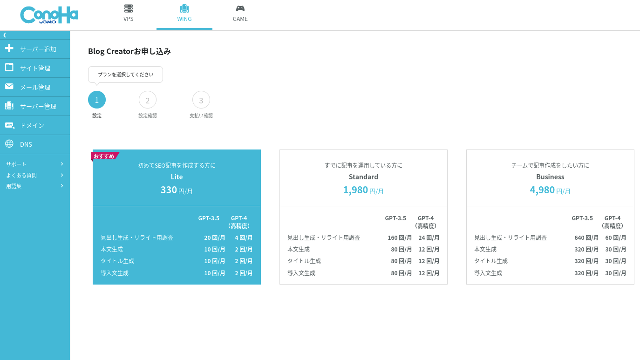
Choose a plan. The Lite plan is fine. Its functions are the same as the higher plans. The higher plans simply give you more AI generations. Since all you need at first is a trial, go with the Lite plan at 330 yen per month.
- STEP.4Payment
A payment confirmation ekran will appear. Click "Confirm." Your application is now complete.
Blog Creator ile Makale Oluşturma Adımları
Bir makale oluşturma prosedürü, resmi sitedeki bu makalede, Wapu-katsu'da açıklanmaktadır. Ancak fiilen kullandığım yöntemi gösterirsem anlaşılmasının daha kolay olacağını düşünüyorum, bu yüzden lütfen şuraya göz atın: this article.
Blog Creator ile Makale Oluşturma
- STEP.1Choose Bkayıt Creator
"AI Blog Generation Tool" (Yapay Zeka Blog Oluşturma Aracı) kısmından "Blog Creator" (Blog Oluşturucu) sekmesini seçin.
- STEP.2Enter the keyword you want to rank for
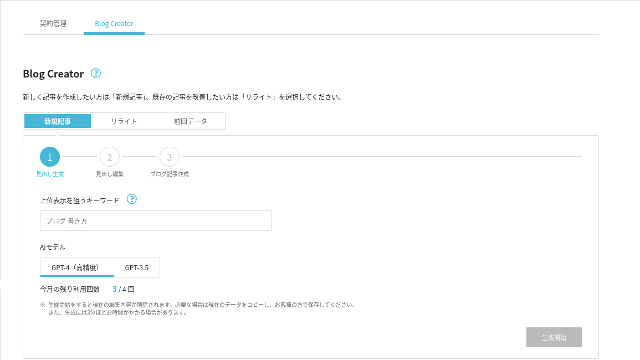
Blog Creator yeniden yazma işlemlerini de yapabilir, ancak bu sefer yeni bir makale oluşturuyorum. Sıralamaya girmek istediğiniz anahtar kelimeyi girin: "sıfırdan bir WordPress teması oluşturmak." (Elbette kişisel olarak sıralamaya girmek istediğiniz anahtar kelimeyi kullanmalısınız.)
Choose the AI model. Let's go with the highly accurate GPT-4.
Click "Start Generation."
- STEP.3Edit the headings based on the keyword research
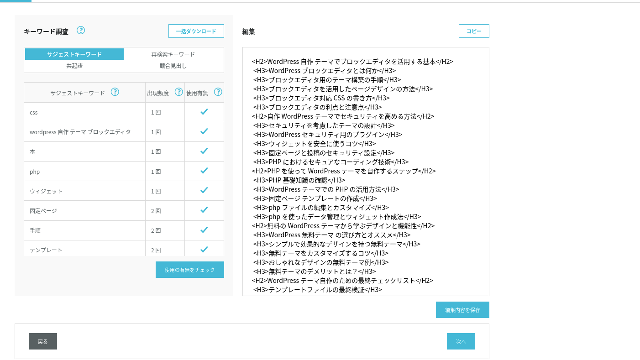
Anahtar kelime araştırması görüntülenecektir. Dört araştırma türünün sonuçlarını kontrol edin. Bunlardan ne kadar çok yararlanırsanız, SEO o kadar güçlü olma eğiliminde olur.
Düzenleme ekranında, oluşturulan başlıklarda kullanılmayan anahtar kelimeleri ekleyin. Düzenlemeyi bitirdiğinizde "Düzenlemeleri Kaydet" seçeneğine tıklayın. Bu kaydedildikten sonra "İleri" seçeneğine tıklayarak devam edin.
- STEP.4Create the body, title, and introduction
Using the headings you created earlier as a base, have AI generate the body, title, and introduction. Click "AI Generate" for each item.
Choose whether to use GPT-4 or GPT-3.5. I chose GPT-4.
Her birini yapay zeka ile oluşturduktan sonra "Save Edits" (Düzenlemeleri Kaydet) seçeneğine tıklayın. Bu, Blog Creator oluşturma sürecini tamamlar.
Several title candidates will be displayed, so compare them against the headings and body and choose the most appropriate one.
Once everything is complete, copy each part, paste it into a new WordPress post, and publish the article.
Oluşturabileceği metin miktarında bir sınır var gibi görünüyor. Bu "sıfırdan bir WordPress teması oluşturmak" makalesi için oluşturulan metin yeterince uzun değildi. Bu yüzden yarıda durduktan sonra, durduğu noktadan sonraki başlıklar üzerinde gövde metnini oluşturmak için tekrar "AI Generate" seçeneğini kullandım.
Four Articles I Made Cannibalize Each Other for the Keyword "Building a WordPress Theme from Scratch"
Aynı anahtar kelimeyi ve aynı prosedürü kullanarak bunları yapay zekaya oluşturdum. Tamamlanan dört makale aşağıdadır. Hepsini bu siteye yükledim. Birbirlerini tamamen baltalıyorlar.
Blog Creator ile Oluşturulan Makale
Complete Guide to Building a WordPress Theme from Scratch: Steps and a Checklist for Building a Strong Site
Complete Guide to Building a WordPress Theme from Scratch: Steps and a Checklist for Building a Strong Site
serverfield.org
Article Created with ChatGPT-4o

Beginner-Friendly! How to Create a Custom Theme in WordPress
Beginner-Friendly! How to Create a Custom Theme in WordPress
serverfield.org
Article Created with Claude 3
Build Your Own WordPress Theme and Create a Site Full of Originality!
Build Your Own WordPress Theme and Create a Site Full of Originality!
serverfield.org
Article Created with Gemini 1.5 Pro
Break Out of the Rut! How to Build Your Ideal Site by Creating Your Own WordPress Theme
Break Out of the Rut! How to Build Your Ideal Site by Creating Your Own WordPress Theme
serverfield.org
Yapay Zeka Kazanacak Gibi Göründüğü İçin, Blog Creator'ın Avantajlarını Tanıtmak İstiyorum
AI looks like it might win. So, as insurance so that ConoHa WING does not get mad at me, Bkayıt Creator's advantages are what I want to introduce here. (I am a timid person.)
Tamamen Yapay Zekaya veya Araçlara Güvenmeden Yazımınızı ve SEO'nuzu Geliştirebilirsiniz
Bkayıt Creator yapay zeka kullanır. Ancak, araştırılan anahtar kelime sonuçlarını kontrol ederken içeriği kendiniz daha da geliştirmeye teşvik edilirsiniz. Uygulamada bunu yapmak, tamamen yapay zekaya veya araçlara bağımlı kalmanızı önler. Bunu ustaca kullanarak, yazma becerilerinizi ve SEO anlayışınızı istikrarlı bir şekilde geliştirebilirsiniz.
Bkayıt Creator can, so to speak, help you grow like a partner running alongside you.

Boost Your SEO: Web Writing Techniques That Win Users Over With Highly Readable Copy
Boost Your SEO: Web Writing Techniques That Win Users Over With Highly Readable Copy
serverfield.org
The Heading Structure and Body Length Are Already Optimized, So No Corrections Are Needed
Bkayıt Creator optimizes the heading structure and body length better than generic AI. As a result, you can publish the article by copying and pasting it without making corrections.(That said, you still need to fact-check the content.)
With generic AI, corrections were necessary and time-consuming.
- The headings start from H4, so they need to be corrected.
- If you generate the full body all at once after creating the headings, it does not write properly.
- You need to delete unnecessary words such as "Introduction:" and "Body:".
Creating body text from the headings and doing everything else manually is simply too much work.
As an AI Article Writing Tool, It Is More Keyword-Focused Than What Other Companies Offer
Other sunucu companies also offer AI article-generation tools.
Sakura Rental Server offers "User Local AI Writer," which lets you use ChatGPT-4 for ücretsiz. In addition to ChatGPT-4, it also uses its own local AI.
Value Server offers "Value AI Writer," which starts at 1,650 yen per month. That one uses ChatGPT-4o.
Yani bu araçlar bunları ücretsiz kullanmanıza izin verebilir veya en son yapay zekaya erişim sağlayabilir, ancak they are not built around SEO-strong keywords.Bkayıt Creator first builds around SEO-strong keywords and then uses AI to write the article.
Sonuçta, bir blog yazdığınızda sıralama almak istediğiniz hedef bir anahtar kelimeniz vardır, değil mi?Bkayıt Creator defines that target first and then creates the article.AI sprints properly toward a clearly defined goal is what it does. It is not just running blindly.
This is the major difference between other AI article-generation tools and Bkayıt Creator.
Summary: Please Search and Check the Result of the Match Yourself
So what happened in the end?
The answer is not for me to decide. Let's submit it to Google, just as we always do. "WordPress özel tema" araması yapın ve sitemizi arayın (https://serverfield.org). Aşağıdaki makalelerden birinin orada görünmesi gerekir.
- Bkayıt Creator article: Complete Guide to Building a WordPress Theme from Scratch: Steps and a Checklist for Building a Strong Site
- ChatGPT-4o article:Beginner-Friendly! How to Create a Custom Theme in WordPress
- Claude 3 article: Build Your Own WordPress Theme and Create a Site Full of Originality!
- Gemini 1.5 Pro article: Break Out of the Rut! How to Build Your Ideal Site by Creating Your Own WordPress Theme
O anda arama yaptığınızda karşınıza çıkan makale, o anki en iyi araç olacaktır.
Bkayıt Creator is better than I imagined. Its article keeps showing up.
If you want to try it, ConoHa WING is where you should sign up.
" ConoHa WING", GMO Internet Group'un kullanıcı sayısı hızla artan yüksek hızlı bir sunucusudur ve bizim de kullandığımız bir servistir. Sunucuya kaydolduğunuzda WordPress önceden yüklenmiş olarak geldiği için herkes kolayca başlayabilir. İyi bir fiyat-performans dengesi sunar ve biz de bunu kendimiz kullanıyoruz.
5 Ağustos 2025 tarihine kadar sunucu ücretlerinde %53'e varan indirim, ayrıca sonsuza kadar iki alan adı ücretsiz ve ilk ay ücretsiz
32 WordPress Kiralık Sunucusunun Tam Karşılaştırması: Bireyler, İşletmeler ve Yurt Dışı Kullanım İçin Öneriler

"WordPress başlatmak istiyorum" diye düşünüp "önerilen WordPress barındırma" araması yaptığınızda, kişisel kullanım sunucularından, işletmeler ve küçük şirketler için olan seçeneklere, yurt dışı sunucularına ve düşük maliyetli sunuculara kadar çok geniş bir yelpazede makale bulursunuz. Dürüst olmak gerekirse,
- Which site should I trust?
- I just want to choose a sunucu in a basit, easy-to-understand way!
- Show me how to start WordPress right now.
Doesn't that sound familiar? That is why this article bireyler, işletmeler, yurt içi kullanım ve yurt dışı kullanım için 32 kiralık sunucu şirketinden önerilen seçenekleri özenle seçer. Açıklama, her gün kiralık sunucular kullanan bir uygulama geliştirme şirketinin SEO uzmanından gelmektedir.