
Безкоштовне налаштування до 30 вересня 2025 року, знижка 20% на плату за сервер для тарифу Little Plan та 20-денний безкоштовний пробний період
PR
Сервери
Огляд Little Server: детальний посібник із бюджетного хостингу, готового для WordPress, від 165 єн на місяць
Опубліковано: 2025.04.18
Оновлено: 2025.04.18
Rating: 4.0
Little Server — це бюджетний хостинг, готовий для WordPress.

We recommend Little Server to people looking for affordable hosting because:
- It offers fast сервер speed.
- Its monthly price is extremely low.
- You can run multiple sites.
That is why. You are likely to be satisfied. You can try it free for 20 days.
A competing service is Value Server. Its flexible hourly-based pricing is even better than Little Server's. Consider it as well.
★ Value Server Огляд [2025 Latest]: Start WordPress at a Bargain ціна
| Server type | Shared hosting |
| Response speed (TTFB) | 200ms |
| Рекомендований тарифний план та термін | Mini, 12 months |
| Trial / refund policy | 20-day free trial |
| Monthly price (12-month contract) | 165 yen |
| Initial setup fee | 920 yen |
| безкоштовний domain | No |
| підтримка | електронна пошта (hours not disclosed) |
| Uptime | Not disclosed |
| Storage | 20GB |
| Number of databases | 3 |
| безпека features | IMP |
| SSL | Безкоштовний SSL, виділений SSL (для тарифного плану Little та вище) |
| резервне копіювання / restore | Резервне копіювання за останні сім днів є безкоштовним, відновлення даних також безкоштовне. |
| Number of email accounts | Unlimited |
| електронна пошта security | Spam filter |
| Server / website migration service | No |
| WordPress preinstalled | Yes |
| CDN | No |

Hikaru Ono
I was able to start WordPress at the same time I signed up for Little Server. It was surprising how smooth the process was at a price level this low, which is among the cheapest in the industry.
The carefully written official manuals also left a good impression.
Little Server vs. Other сервіси
- Overall rating★★★★☆
- Server speed ★★★★☆
- Pricing ★★★★★
- Stability ★★★★☆
- Ease of starting WordPress* ★★★★★
- Ease of domain management, SSL setup, and related operations* ★★★☆☆
* These ratings reflect my own hands-on experience using the service.

повний Порівняння of 21 рекомендовані хостинг WordPress сервіси for приватних користувачів
повний Порівняння of 21 рекомендовані хостинг WordPress сервіси for приватних користувачів
serverfield.org
- Based on market research as of November 4, 2025, sorted by speed
- Monthly price means the first-year cost of the cheapest plan that supports WordPress
- Швидкість — це показник часу до першого байта (TTFB), виміряний на демо-сайтах за однакових умов
Little Server — це бюджетний орендний сервер. Навіть серед платних хостингів (за винятком безкоштовних серверів) це один із найдешевших варіантів для приватних осіб. Незважаючи на це, він використовує NVMe SSD для підвищення швидкості.
Шість ключових переваг Little Server

Швидкість роботи сервера є дуже високою
According to this site's independent tests, Little Server is very fast. Take a look at the comparative speed results below.
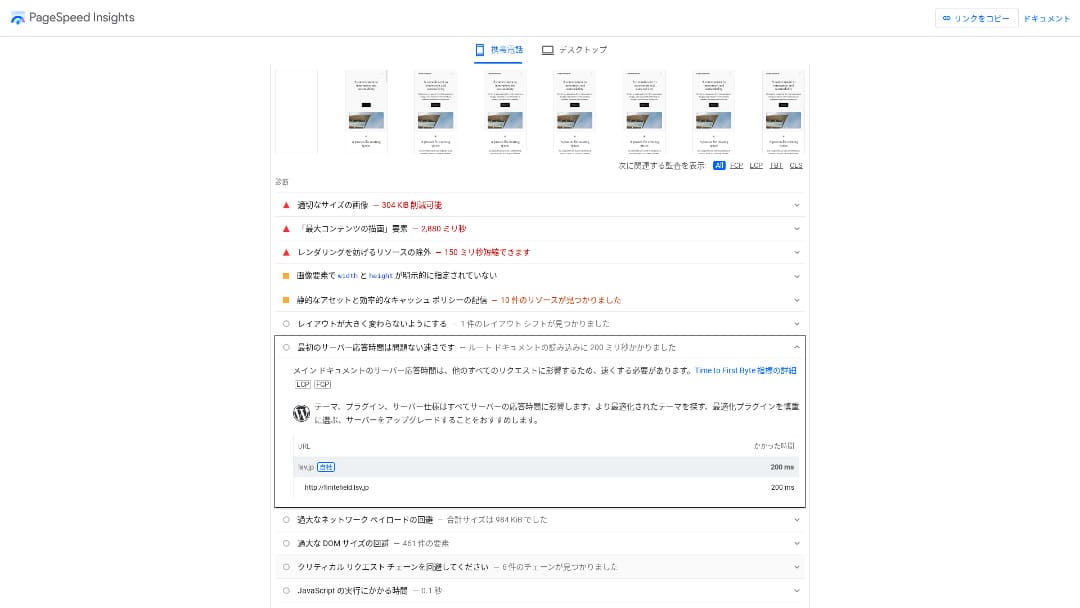
Для бюджетного сервера в ціновому діапазоні близько 100 єн на місяць, це один із найшвидших доступних варіантів. Час відгуку сервера (TTFB) склав 200 мс.
Google рекомендує тримати час відгуку сервера нижче 200 мс. З Little Server, speed is unlikely to become a problem.
Server response time should be kept under 200 milliseconds.https://developers.google.com/server/speed/docs/insights/Server?hl=en
Якщо швидкість сервера висока, ваш сайт завантажується швидше, а відвідувачі можуть переглядати його з більшим комфортом. Як результат, це може зміцнити позиції вашого сайту в SEO та сприяти продажам товарів.
★ швидкість Test: Comparing 11 сервіси хостингу in a продуктивність Ranking
Ціна є низькою
Little Server is inexpensive. There is an initial setup fee, but because the monthly price is low, the annual cost of running a website is far lower than with major hosts. We compared it under the following conditions.
- Initial setup fee
- A 12-month сервер contract
- The first-year cost of the domain
- The cheapest plan that can run WordPress
Навіть порівняно з Lolipop!, який вважається недорогим серед великих хостингів, Little Server виділяється своєю дешевизною. Його вартість становить лише близько 60% від вартості конкурента. Це ідеальний вибір для тих, хто хоче звести витрати на сервер до мінімуму.
You Can Use WordPress
Some cheap hosting services do not support WordPress. Even major hosts such as Lolipop! and Sakura Rental Server do not allow WordPress on their cheapest plans.
However, Little Server supports WordPress on every plan. With WordPress, you can build a multi-page website and also create a blog within that website.
★ Що таке WordPress? Система, яка використовується для запуску сайту, та на що слід звернути увагу
You Can Run Multiple Сайтs
Little Server can host multiple sites. Even its lowest-cost Mini plan lets you create up to three WordPress installations.
Besides your company website, you can also create a hobby blog of your own.
Automatic резервні копії
Little Server includes seven days of automatic backups.
If you have backups, you can restore your website even if a security breach causes problems. You also do not need to configure backups yourself.
If restoration becomes necessary, you only need to contact the company operating the service.
You Can Use електронна пошта
Little Server supports email even at this low price. You can create unlimited addresses on your own domain. That is welcome news for companies that want business email addresses.
★ Що таке домен? Його роль як адреси в інтернеті та як його зареєструвати
The Drawback of Little Server: Its Uptime Is Not Public

Little Server не розкриває свій показник аптайму. Через це користувачі не мають можливості дізнатися, чи справді сервер стабільний.
Якщо сервер працює нестабільно, відображення вашого вебсайту також буде нестабільним. Якщо ваш сайт часто не завантажується, це марна трата коштів на оренду сервера. Це також означає втрату можливостей для розширення бізнесу, поки користувачі не мають доступу до сайту.
When you think about it that way, uptime is extremely important. Because it is not disclosed here, some uncertainty remains.
★ Посібник для початківців щодо показників аптайму хостингу та угод про рівень послуг (SLA)
Порівняння Little Server із двома схожими сервісами
Value Server
Value Server and Little Server cost almost the same per year. Value Server includes 15 generations of backups, so it is stronger than Little Server when it comes to backup features.
Проте тарифний план Value Server Marutto за вказаною нижче ціною може розмістити лише один сайт на WordPress. Якщо ви хочете створити другий сайт, вам доведеться замовити ще один сервер. Якщо ви плануєте запускати кілька сайтів, кращим вибором буде Little Server.

Value Server Огляд [2025 Latest]: Start WordPress at a Bargain ціна
Value Server Огляд [2025 Latest]: Start WordPress at a Bargain ціна
serverfield.org
Star Rental Server
Star Rental Server costs a little more than Little Server. However, its storage capacity and transfer allowance are much larger, so you are likely to appreciate that difference as your website grows and traffic increases.
That said, Star Rental Server has no automatic backup function. This is one area where Little Server is better. It offers a setup that is kinder to people who have never used hosting before or are running a website for the first time.

Огляд Star Rental Server [останнє видання 2024 року]: наднизькі ціни та детальний аналіз реальних переваг та недоліків
Огляд Star Rental Server [останнє видання 2024 року]: наднизькі ціни та детальний аналіз реальних переваг та недоліків
serverfield.org
Шість Кроки to Start a WordPress сайт on Little Server Right Now
Let's launch a website with Little Server.
- STEP.1Visit the official Little Server website
Click “Apply for a free trial.”
Agree to the terms of use and the handling of personal information, then click “Yes” for the free trial application.
- STEP.2Apply for the free trial period
Enter your customer information, such as your name and address.
Select a plan. The Mini plan is recommended. If you later need more resources, you can upgrade your plan.
Then enter your сервер account information.
- Preferred user ID: Anything is fine. It cannot be changed later.
- Preferred account name: Anything is fine. It cannot be changed later.
- Password: Make it as complex as possible.
Click “Next page” and confirm the details. If everything is correct, click “Submit with the above information.”
A temporary registration email will arrive at your contact email address. Then you will receive an authentication email titled “Application accepted.” Click the authentication URL. Once the authentication is complete, the free trial registration is finished.
- STEP.3Зареєструйте власний домен за допомогою MuuMuu Domain і додайте його на Little Server
Відкрийте офіційний сайт MuuMuu Domain, введіть у полі пошуку доменів рядок, який хочете використовувати як домен свого сайту, і натисніть «Пошук».
★ Що таке домен? Його роль як адреси в інтернеті та як його зареєструвати
You can choose a top-level domain such as “.com” or “.co.jp”. The acquisition fee and renewal fee vary depending on the top-level domain. If you are unsure, a company should choose “.co.jp” whenever possible. For individuals, “.com” or “.net” is recommended. These are familiar to many people, so visitors are less likely to find them suspicious and are more likely to click through.
Confirm again that it is the domain you want. If it is correct, proceed to the application page.
Create a new MuuMuu ID. Enter your ID (email address) and password, then click “Agree to the terms and proceed to identity verification.”
Пройдіть верифікацію особи за допомогою SMS.
Next comes the application for domain settings and other options. Set the domain options like this:
- WHOIS disclosure: If you are a company, publish the information. If you are an individual, “Use the provider’s proxy information” is recommended.
- Name сервер (DNS): Use name серверs other than GMO Pepabo’s.
If you make WHOIS information public, the name, address, and other details of the person who registered the domain become public. Because that exposes personal information, anyone other than a company or sole proprietor may prefer proxy disclosure.
Little Server використовує два наступні сервери імен. Specify both of them.
- Name сервер 1: ns1.lsv.jp
- Name сервер 2: ns2.lsv.jp
You do not need to apply for linked services, optional services, or MuuMuu Mail. If a company wants to use email, Little Server can provide email service.
Pay by credit card or another method. Click “Next step,” skip the advertisements, and enter your user information. After you correctly enter your name, address, and the rest, proceed to “Next step.”
Перевірте деталі заявки, поставте галочку навпроти «Я згоден з умовами використання» та натисніть «Зареєструватися». З цього моменту ваш домен вважається придбаним.
Тепер додайте домен, отриманий на MuuMuu Domain, щоб його можна було використовувати з Little Server.
Return to the Little Server control panel. Log in with the user ID and password you registered for the free trial.
Клацніть «Налаштування домену» в меню налаштувань. Введіть доменне ім’я, позначте пункт «Створити каталог із назвою домену та використовувати його як шлях» та натисніть «Додати домен».
That completes the custom domain setup in Little Server.
- STEP.4Install WordPress
In the Little Server control panel, click “Easy Install” under “Settings.” For WordPress, choose the installation option marked as ultra-easy and beginner-friendly. That choice saves you from having to create the database manually.
★ What Is a Database? An Essential Management System for WordPress
Enter your WordPress information.
- Database to use: Leave it as it is.
- Install destination: Leave it as it is.
- Display address: It is recommended to leave the checkbox checked.
- Сайт name: Anything is fine. You can change it later very easily.
- User name: Anything is fine, but changing it later is troublesome.
- Password: Make it as complex as possible. You can change it later quite easily.
- електронна пошта address: Use the email address you normally use. For companies, the administrator’s business email is recommended.
The user name and password are used when you log in to WordPress. Be sure to write them down.
Check “I agree” and click “Ultra Easy Install!” Your login information will then be displayed. Click the displayed login page and sign in.
- STEP.5Initial WordPress setup
On the WordPress login screen that appears, enter the user name and password you set during installation and click “Log in.”
If you see a warning saying the site cannot be reached, the DNS settings have not propagated yet. In that case, all you can do is wait and try logging in again every few hours.
★ What Are DNS and Name Servers?
After logging in to WordPress, set up your permalinks. In the WordPress admin screen, go to “Settings” and then “Permalinks.” Choose “Post name,” and then click “Save changes.”
When you select “Post name,” you can enter any string you like in the URL when publishing articles. Short strings that help readers imagine the article content are recommended because they are easier for visitors to understand. If a URL is too long, some people may feel uneasy and think, “Is this a dangerous site?”
- STEP.6Install plugins
Go back to the WordPress admin screen, open “Plugins,” then “Add New,” and install the plugins you need.
When you find a plugin you want through search, click “Install Now,” then “Activate.” After that, follow the instructions provided for each plugin.
Be sure to install plugins for security and backups.
- П’ять плагінів WordPress для підвищення безпеки та як вибрати один із них
- П’ять Powerful WordPress резервне копіювання Plugins That Help You Recover Your Data
Once you have installed your plugins, your WordPress website is ready to go.
Підсумок
Little Server — це бюджетний орендний сервер. Навіть серед платних хостингів (за винятком безкоштовних серверів) це один із найдешевших варіантів для приватних осіб. Незважаючи на це, він використовує NVMe SSD для підвищення швидкості.
Безкоштовне підключення до 30 вересня 2025 року, знижка 20% на плату за сервер тарифу Little Plan та 20-денна безкоштовна пробна версія
Little Server is a budget hosting service. Although it has some drawbacks, even the cheapest Mini plan includes the features needed to launch a WordPress website. Give it a try.
Повне порівняння 32 хостинг-провайдерів для WordPress: найкращий вибір для приватних осіб, компаній та міжнародного використання

Якщо ви шукаєте «рекомендації щодо WordPress», оскільки хочете запустити сайт на цій платформі, ви знайдете найрізноманітніші статті: від персонального та корпоративного хостингу до закордонних серверів і дешевих планів. Чесно кажучи, хіба ви не починаєте думати:
- Which site should I trust?
- I just want to choose a сервер in a simple, easy-to-understand way.
- Show me how to start WordPress right away.
That is exactly why this article introduces carefully selected recommendations from 32 hosting services for individuals, companies, domestic use, and international use. It is explained by the SEO lead at an app development company that uses hosting every day.