
10-day free trial
PR
Сервери
Огляд Value Server [остання версія 2025]: запустіть WordPress за вигідною ціною
Опубліковано: 2025.04.18
Оновлено: 2025.04.18
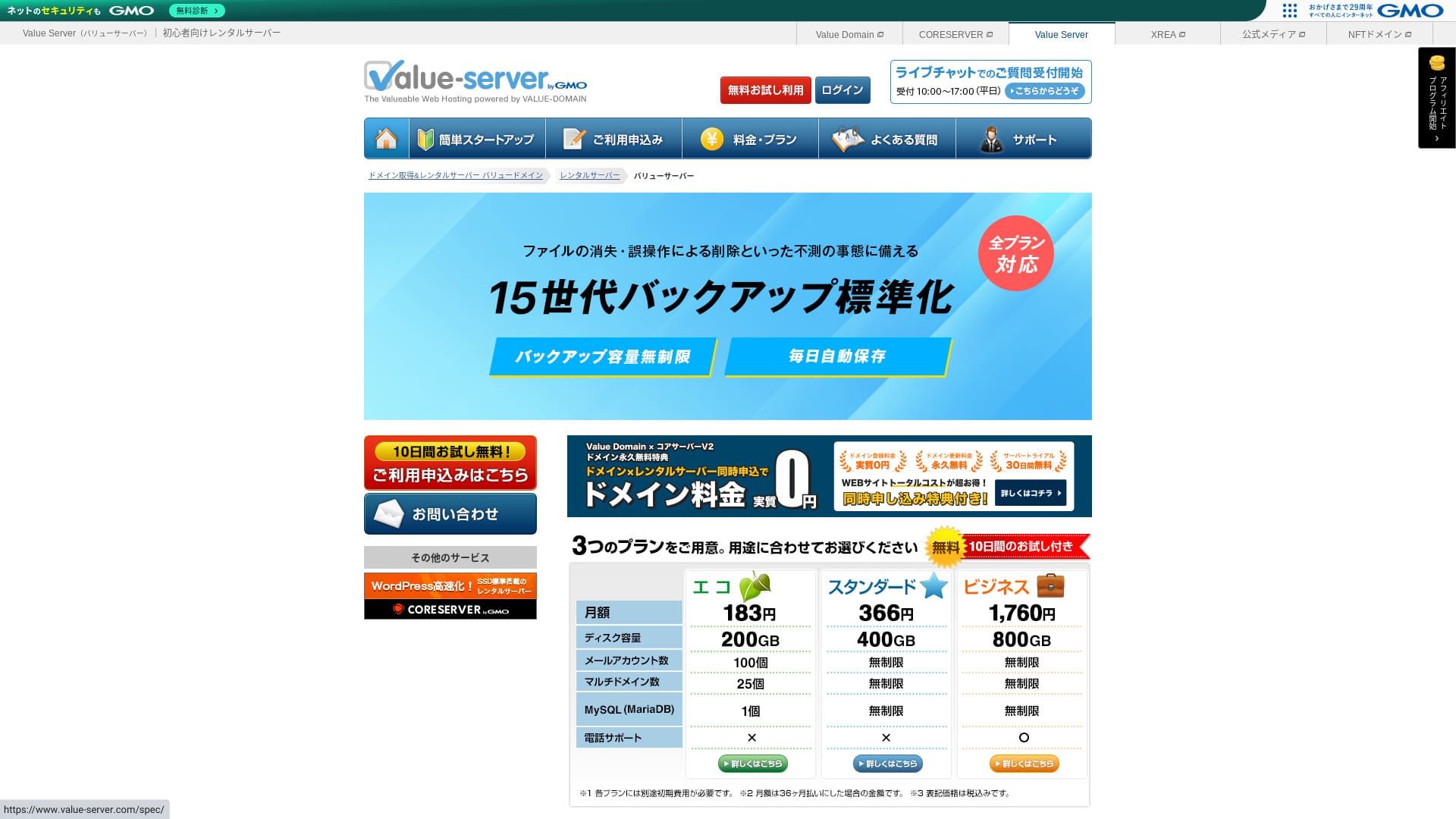
Value Server is a hosting service operated by GMO Digirock, Inc., known for its low pricing, especially its Marutto plan.

Value Server is recommended for people who want to use the cheapest server possible because:
- Один із найдешевших на ринку
- На сервері використовується SSD-сховище
- 15 поколінь резервних копій дають спокій
Саме тому ви, ймовірно, будете задоволені. You can try it free for 10 days.
A competing server is Star Rental Server. It is even stronger than Value Server in that it also offers a free plan. Please consider it as well.
| Server type | Shared server |
| Display speed (TTFB) | Not measured |
| Recommended plan and contract term | Eco 12 months |
| Trial / money-back guarantee | None |
| Щомісячна плата (12-month contract) | 220 yen |
| Початковий внесок за налаштування | Free |
| Free domain | None |
| Support | Email and chat (weekdays 10:00-17:00) |
| Безвідмовність | Not disclosed |
| Storage | 200GB |
| Number of databases | 1 |
| Security measures | None |
| SSL | Free shared SSL, custom SSL |
| Backup / restore | 15 generations of backups free, restoration free |
| Number of email accounts | 3 |
| Email security measures | POP/POP3S, SMTP/SMTPS, IMAP/IMAPS, spam filter, virus filter, custom filters |
| Server / website migration service | None |
| WordPress preinstallation | None |
| CDN | None |

Hikaru Ono
Value Server is operated by GMO Digirock, Inc., a major name in the industry, so even though it is among the cheapest options, there is no need to worry about quality. I personally had no problems while using it.
That said, because it is inexpensive, there are limits on features and capacity, so make sure to review them carefully.
Value Server Compared with Other Servers
- OverallРейтинг★★★☆☆
- Швидкість сервера ★★★☆☆
- Ціна ★★★★★
- Стабільність ★★★☆☆
- Легкість початку роботи з WordPress* ★★★☆☆
- Операції на кшталт керування доменом і налаштування SSL* ★★★☆☆
* На основі мого особистого досвіду використання.

How to Choose from 21 Recommended WordPress Hosting Services for Individuals
How to Choose from 21 Recommended WordPress Hosting Services for Individuals
serverfield.org
- November 4, 2025 market-research data, by speed sorted
- Щомісячна плата - це вартість за перший рік найдешевшого плану, на якому можна запустити WordPress
- Швидкість - це Time to First Byte, виміряний на демосайтах за однакових умов
“Value Server” is a low-cost rental server operated by GMO Digirock, Inc. Even though it is affordably priced for individuals, it offers strong features such as free shared SSL and free 15-generation backups.
Відгуки користувачів про Value Server і пʼять ключових особливостей

План Marutto дозволяє створити сайт WordPress за 3 060 єн на рік
Value Server's Marutto plan lets you have a WordPress website for 3,060 yen per year. It is extremely inexpensive.
Порівняймо його з основними внутрішніми серверами за таких умов.
- Початковий внесок за налаштування
- 12-місячний контракт на сервер
- Вартість домену за один рік
- Найдешевший план, який підтримує WordPress
| Хостинг-компанія | Cost for one year |
|---|---|
| Value Server | 2,310 yen |
| ConoHa WING | 11,292 yen |
| Xserver | 10,560 yen |
| Lolipop! | 5,940 yen |
| Sakura Rental Server | 6,600 yen |
Звісно, у порівнянні з наведеними вище серверами його можливості та характеристики менш вражаючі. Та все ж це має бути сильний варіант для тих, хто хоче створити сайт якомога дешевше.
SSD входить до кожного плану
Value Server includes SSD storage in every plan even though it is inexpensive. With ultra-low-cost servers, it is common to see slow website loading because they rely on cheap hard drives.
Швидкість відображення сайту також впливає на SEO, тож вибір сервера не можна сприймати легковажно. Однак наявність SSD дає більше впевненості.
Note: What Is SEO? The Right Steps and Methods for Search Engine Optimization
Кожен план включає 15 поколінь автоматичних резервних копій
Value Server is inexpensive, yet it still provides 15 generations of automatic backups on every plan.
Якщо немає функції резервного копіювання, ви не зможете відновити сайт, навіть якщо дані зникнуть через атаку або помилку. У Value Server сервер автоматично створює резервну копію щодня, що дає спокій.
These 15 generations of backups are impressive. Even major servers like Lolipop! do not offer this on their low-cost plans. Core Server, which is also operated by GMO Digirock, Inc., does not include backup features on its low-cost plan either.
Seen in that light, Value Server is remarkably service-minded for a low-cost provider because it offers such strong 15-generation backups.
Недоліки Value Server і як із ними впоратися - чесно і відкрито

Попри переваги, Value Server також має недоліки. Обовʼязково зрозумійте їх повністю, перш ніж починати користуватися сервісом.
Немає розширених заходів безпеки, таких як WAF
Value Server does not provide advanced security measures such as a WAF. It does offer a certain level of protection, including support for custom SSL, but it is still somewhat concerning that it is not especially strong against the latest attack methods.
If you want to use a WAF, install security-oriented WordPress plugins.
Note: How to Choose Five WordPress Plugins That Strengthen Security
Безвідмовність Is Not Disclosed
Unfortunately, Value Server does not disclose its uptime. That means it is impossible to know the server's stability in numerical terms. If reliability is a priority, such as for a corporate website, that uncertainty may make you hesitate.
Note: Посібник для початківців щодо аптайму хостингу та угод про рівень послуг (SLA)
If a server becomes unstable because of trouble, your website may fail to appear or become extremely slow to load. In some cases, a 503 error may occur. That is stressful for people visiting your site.
Note: What Is a 503 Error? How to Avoid Web Congestion and Respond in an Emergency
Because you cannot know the uptime, use Value Server only after understanding the risk that it may be unstable.
Плани Marutto та Eco дозволяють створити лише один сайт WordPress
Value Server's Marutto and Eco plans let you create only one WordPress site.
- I want to create an event site in addition to my main website
- I want to create a second blog
If you need a second WordPress site for those reasons, you will have to prepare another server separately.
Порівняйте Value Server із двома схожими серверами
Let's compare Value Server with two competing servers that are similar in terms of low price. Even if they look similar, there are differences, so take the time to compare them carefully.
Core Server
Core Server is run by the same company. It offers high specifications while still being low priced. You can choose the best fit from seven finely divided plans. There is a price-focused V1 lineup and a performance-focused V2 lineup.
Overall, Core Server beats Value Server in features and specifications, so if price is not your top priority, Core Server is the better choice.

Огляд Core Server [найновіше видання 2025 року]: детальний посібник щодо цін, швидкості, переваг та недоліків
Огляд Core Server [найновіше видання 2025 року]: детальний посібник щодо цін, швидкості, переваг та недоліків
serverfield.org
Star Server
Star Rental Server is also inexpensive. At the same time, it resembles Value Server in its commitment to speed, including the use of SSD storage. It is somewhat more expensive than Value Server, but its greater transfer capacity is a strong point because it can keep up even if your website traffic grows.
Star Server does not include automatic backups. That is one area where Value Server comes out ahead.

Star Server Review [2024 Latest]: Amazingly Low-Cost and Thoroughly Tested
Star Server Review [2024 Latest]: Amazingly Low-Cost and Thoroughly Tested
serverfield.org
Start a WordPress Website on Value Server in 6 Steps
Let's start a website with Value Server!
- STEP.1Access the official Value Server website
On the top page, click “Try for Free.”
- STEP.2Apply for the Server and Get a Domain
Choose a plan. Your server account name (the initial domain) can be anything. You will not use this initial domain as the domain for your website. You can use it, but I do not recommend it.
At this point, you cannot yet select simultaneous WordPress installation, but after choosing your domain, you will be able to check it. Be sure to use it. It makes starting a WordPress website much easier.
Under the option to also apply for the domain you will use on this server, choose “Get a domain for free.” Then enter any string you like. From the available top-level domains such as .com and .net, click the one you want.
You can choose root domains such as “.com” and “.co.jp.” Acquisition and renewal fees vary depending on the root domain. If you are unsure which one to choose, I recommend “.co.jp” for companies whenever possible. For individuals, “.com” and “.net” are good choices. Many people are familiar with these domains, so they are less likely to seem suspicious and easier for users to access.
Note: What Is a Domain? Its Role as an Address on the Internet and How to Get One
Once you have selected the domain, check “Install WordPress at the same time.”
Click “Proceed.”
- STEP.3Enter User Information
The user information screen will appear. Click “User Registration,” enter information such as your usage type and name, confirm the details, and click “Register and proceed.”
Complete the required SMS verification, then click “Confirm application.”
Answer the questionnaire or skip it, then click “Go to the control panel.”
- STEP.4Install WordPress
In the management information of the control panel, the “Value Server (1)” you applied for earlier is displayed. Click it and proceed to the “New Control Panel.”
Then select “App Installation” from “Tools” and click “WordPress Blog.”
Click “+ Install this application” and choose a domain. The domain you applied for earlier will appear in the pull-down menu, so select it.
You can leave the version settings as they are.
Use the following settings for WordPress.
- Admin username: Anything is fine.
- Admin password: Make it as complex as possible. You can change it easily later.
- Administrator email: An email address you use regularly. For companies, I recommend the business email of the person who manages the website.
- Website title: Anything is fine. You can change it easily later.
- Website tagline: This is the subtitle. Anything is fine. You can change it easily later.
The admin username and admin password are used when logging in to WordPress. Be sure to write them down.
You can leave the “Advanced” settings as they are.
Once you have entered everything, click “+ Install.” After the installation finishes, click the URL on the screen that ends with “wp-admin/”. That is the URL of your WordPress admin screen.
- STEP.5Initial WordPress Setup
On the WordPress login screen that appears, enter the username and password you set during installation, then click “Log In.”
If you see a warning saying “This site can’t be reached,” the DNS settings have not propagated yet. There is nothing to do but wait, so try logging in again every few hours.
Note: What Are DNS and Name Servers?
After logging in to WordPress, set your permalinks. In the WordPress admin screen, go to “Settings” and then “Permalinks.” Choose “Post name,” then click “Save Changes.”
With “Post name,” you can enter any string you like in the URL when publishing an article. I recommend using a short string that helps readers imagine the content of the article. If it is too long, some people may worry that the site looks suspicious.
- STEP.6Install Plugins
Return to the WordPress admin screen, go to “Plugins” and then “Add New,” and install the plugins you need.
Once you find the plugin you want through search, click “Install Now” and then “Activate.” After that, follow the instructions for each plugin.
Be sure to install security and backup plugins.
- How to Choose Five WordPress Plugins That Strengthen Security
- 5 Powerful WordPress Backup Plugins That Help You Recover Your Data
Once you have installed the plugins as well, your WordPress website is fully ready to go!
Підсумок
“Value Server” is a low-cost rental server operated by GMO Digirock, Inc. While its pricing remains affordable even for individuals, it offers strong features such as free shared SSL and free 15-generation backups.
10-day free trial
Value Server is a low-cost server. Even though its uptime is not disclosed and its security features are on the weaker side, the 15-generation automatic backup feature means you can usually recover in the end. If price matters most to you, give it a try.
Повне порівняння 32 сервісів хостингу WordPress: рекомендації для приватних осіб, компаній і закордонного використання

When you think, “I want to start WordPress,” and search for “recommended WordPress hosting,” you find all kinds of articles, from options for individuals and for companies or small businesses to overseas servers and inexpensive servers. Honestly speaking,
- Which site should I look at?
- I want to choose a server in a simple, easy-to-understand way!
- Please show me how to start WordPress right away.
Have you ever felt that way? That is why this article carefully selects the best choices from 32 hosting services for individuals, companies, domestic use, and overseas use and introduces them. The explanation comes from the SEO lead at an app development company that uses hosting services every day.