Five WordPress Plugins for Dramatic Speed Gains and Additional Performance Improvements

Internet users expect speed. Because website display speed directly affects visitor satisfaction and search-engine rankings, WordPress site owners need to stay conscious of performance optimization at all times.
★ Understand speed improvements in one minute: how to use GTmetrix and what to check
In this article, we explain in detail five plugins that can speed up a WordPress site and the other measures you should take to improve page speed.
Complete Comparison of 32 WordPress Hosting Services for Individuals, Companies, and Overseas Use

“WordPress başlatmak istiyorum” diye düşünüp “WordPress önerileri” araması yaptığınızda, kişisel barındırmayı, şirketler ve küçük işletmeler için olan seçenekleri, yurt dışı barındırmayı ve düşük maliyetli sunucuları kapsayan her türlü makaleyle karşılaşırsınız. Dürüst olmak gerekirse,
- which site should you trust?
- sadece basit ve anlaşılır bir cevap istiyor olabilirsiniz.
- you may want to get started with WordPress right away.
Bu nedenle bu makale; bireyler, şirketler, yurt içi ve yurt dışı kullanım için 32 barındırma sağlayıcısı arasından önerilen seçenekleri özenle seçmektedir. Her gün barındırma hizmeti kullanan bir uygulama geliştirme şirketindeki SEO yöneticisi tarafından açıklanmaktadır.
How to choose acceleration plugins
The plugins you choose must be selected carefully according to the needs of your site. By approaching the problem from different angles such as caching, image optimization, and code optimization, you can improve site speed as a whole.
Five essential plugins
W3 Total Cache
It supports page caching, object caching, database caching, minification of CSS and JavaScript files, and the use of a CDN, significantly reducing load times.
Sayfa yükleme süresini büyük ölçüde kısaltabildiği ve sunucu yükünü azaltabildiği için ziyaretçilere rahat bir gezinme deneyimi sunmaya yardımcı olur.
LiteSpeed Cache
LiteSpeed Cache is one of the powerful plugins used for WordPress speed optimization. It is especially effective for sites running on LiteSpeed Web Server and provides a wide range of caching features and optimization options.
Its automatic page caching can greatly reduce visitor load times, and its broad optimization features, from CSS, JavaScript, and HTML optimization to lazy loading of images, help shrink page size.

WP Super Cache
By generating static HTML files and serving those lightweight files to visitors, it avoids executing PHP scripts and reduces load time.
Basit ve etkili önbelleğe alma sunar ve özellikle yüksek trafikli siteler için oldukça uygundur.

Autoptimize
CSS ve JavaScript dosyalarını sıkıştırıp birleştirir, HTML'yi optimize eder ve tarayıcıda sayfa yüklemesini hızlandırır.
Kod optimizasyonunu basitleştirdiği ve gereksiz betiklerin (script) yüklenmesini azalttığı için sayfa görüntüleme hızını artırır.

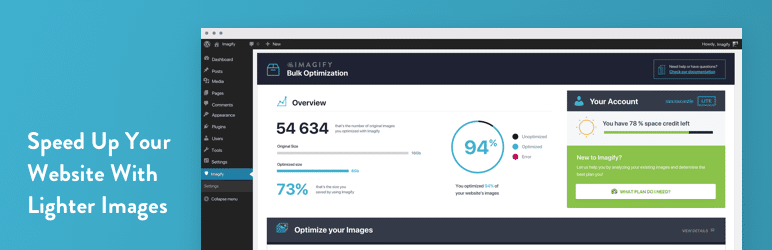
Imagify
It automatically compresses images and reduces page weight. It also supports conversion to WebP format, allowing file sizes to shrink without sacrificing image quality.
Because images have a major impact on page load time, efficient image optimization directly improves performance.
Other ways to improve speed
Choose high-quality hosting
Website performance, especially speed and stability, depends heavily on the hosting service you choose.
Yüksek kaliteli barındırma (hosting), hızlı sunucu yanıt süreleri, mükemmel çalışma süresi ve yoğun yük altında bile güvenilir bir şekilde hizmet vermeye devam etme yeteneği sunar.
More specifically, it is important to choose hosting with the following characteristics:
- Fast SSD storage: read and write performance improves, which shortens page load times.
- Kaynak tahsisi: Paylaşımlı barındırma yerine bir VPS veya özel sunucu (dedicated server) seçerek daha fazla kaynak ve işlem gücü elde edebilirsiniz.
- Konum: Sunucu kullanıcıya fiziksel olarak ne kadar yakınsa, veri aktarım süresi o kadar kısa olur.
- Caching and optimization: hosting that offers automatic caching and optimization tools can improve speed without relying entirely on extra plugins.
Use the latest PHP version
PHP, WordPress ve diğer birçok içerik yönetim sisteminin temelini oluşturan dildir.
PHP versions are updated regularly, and newer versions are generally faster and more secure than older ones. Keeping PHP up to date improves website performance and reduces security risk.
Because many hosting control panels let you upgrade the PHP version easily, check it regularly and use the latest version whenever possible.
Remove unnecessary plugins
WordPress sites often rely on plugins to add many kinds of functionality.
However, plugins you no longer use can hurt load time and may also create security vulnerabilities.
By reviewing plugins regularly and removing ones you do not need, you can improve site performance and strengthen security.
Adopt responsive tasarım
Mobil cihazlardan erişim her yıl artmaktadır, bu nedenle mobil uyumlu bir site şarttır.
Duyarlı tasarım (responsive design), ekran boyutundan bağımsız olarak içeriğin her cihazda düzgün görüntülenmesini sağlar. Bu, mobil kullanıcı deneyimini iyileştirir ve hemen çıkma oranlarını azaltabilir.
When choosing a WordPress theme, make sure it supports responsive tasarım.
Use a CDN
CDN veya İçerik Dağıtım Ağı, dünya geneline dağıtılmış sunucuları kullanarak içerik sunan bir sistemdir.
By using a CDN, you can provide content quickly regardless of the user’s geographic location. This shortens load time and improves user experience.
Using a CDN is especially effective for sites aimed at a global audience.
Summary
WordPress site speed affects both user experience and SEO. By applying the plugins and speed-improvement measures introduced above properly, you can provide a more comfortable and accessible website for everyone who visits.
Speed is an important factor in web technokayıty, which continues to evolve, so make a habit of optimizing your site regularly.