
14-day free trial
PR
Сервери
Огляд Sakura Rental Server [остання версія 2025]: чи страшний він, чи повільний? Ціни, плюси та мінуси для особистого й бізнес-використання
Опубліковано: 2025.04.18
Оновлено: 2025.04.18
Rating: 4.0
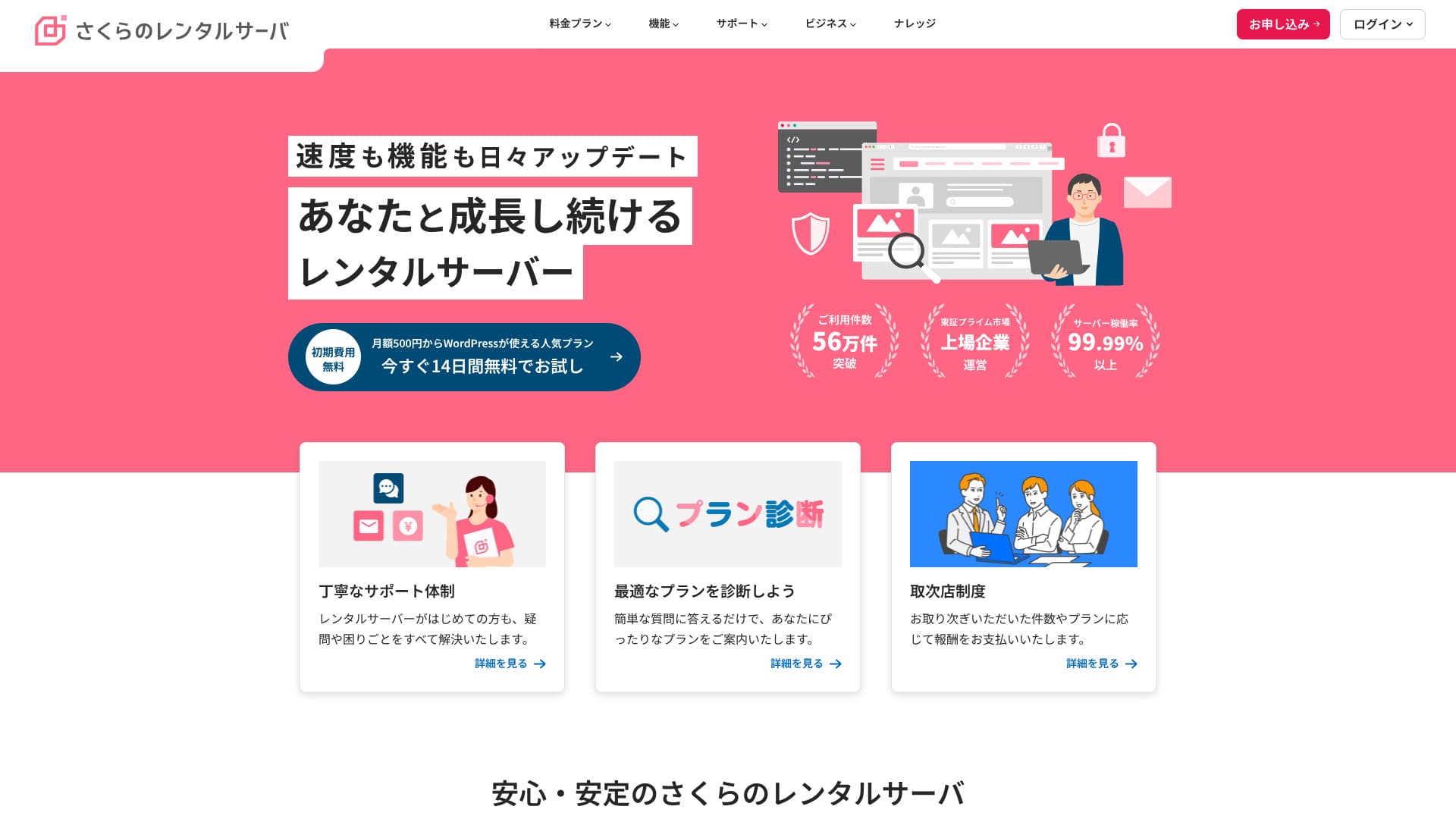
Sakura Rental Server — це сервер відомої японської компанії. У ньому є баланс між швидкістю, ціною та стабільністю, тому він підходить і для приватних користувачів, і для бізнесу.

The reasons I recommend Sakura Rental Server to люди, які шукають доступний за ціною сервер, а також компанії та індивідуальні підприємці are:
- the reassurance of being run by the first domestic company to join the government cloud
- a large number of corporate users
- high-function, large-capacity email services
These are the reasons. There is a strong chance you will be satisfied. You can try it free for 14 days.
A competing service is LOLIPOP. With a long-term contract, it can be used at a lower price than Sakura Rental Server. It is worth considering alongside Sakura.
| Server type | Shared hosting |
| Display speed (TTFB) | 440ms |
| Рекомендований тарифний план та термін | Standard 12 months |
| Trial / refund guarantee | 14-day free trial |
| Monthly price (12-month contract) | 550 yen |
| Initial setup fee | безкоштовний |
| безкоштовний domain | None |
| підтримка | бізнес hours: 10:00-18:00 Phone callback reservations, chat, and email (reply the same day or by the next business day) |
| Uptime | 99.99% |
| Server storage | 300GB |
| Number of databases | Unlimited |
| безпека measures | Сповіщення про несанкціоноване втручання в сайт (платно), WAF (міжмережевий екран), фільтрація зарубіжних IP-адрес, заходи проти зловживання ретрансляцією та шифрування |
| SSL | безкоштовний shared SSL, custom SSL |
| резервне копіювання / restore | 8 backup generations included free, free restoration |
| Number of email accounts | Unlimited |
| електронна пошта security measures | POP3, IMAP4, virus scanning, basic spam filtering, high-accuracy spam filtering |
| WordPress preinstall | None |
| Server / website migration service | None |
| CDN | 100GB/month free |

Hikaru Ono
There are rumors that "Sakura Rental Server is scary," but there is no need to worry about that now.I have used it myself and have never once felt it was scary, and customer feedback about support is generally positive.
Це високоякісний сервер із міцною базою для роботи, яким ви можете впевнено користуватися.
How Sakura Rental Server compares with competitors
- Overallrating★★★★☆
- Server speed ★★☆☆☆
- Pricing ★★★★☆
- Stability ★★★★★
- Ease of starting WordPress* ★★★★☆
- Управління доменом та налаштування SSL* ★★★★☆
* These scores reflect my hands-on experience using the service.

21 рекомендований хостинг для WordPress для приватних осіб: порівняння та правила вибору
21 рекомендований хостинг для WordPress для приватних осіб: порівняння та правила вибору
serverfield.org
- Дані ринкового дослідження станом на 4 листопада 2025 року, відсортовано за швидкістю
- Щомісячні ціни — це вартість за перший рік найдешевшого тарифу, що підтримує WordPress
- Швидкість — це час до першого байта, виміряний на демо-сайтах за однакових умов
"Sakura Rental Server"is a long-established hosting service with more than 480,000 accounts in use. It was once said to be slow, but its platform has now been renewed and sped up. Even so, the affordable pricing has remained unchanged, and the value for money is excellent.
Шість Key Strengths of Sakura Rental Server

Час відгуку є повільним, але результати PageSpeed Insights хороші
Our own testing on this site showed that Sakura Rental Server delivered good Pageшвидкість Insights results. Проте сам час відгуку сервера був не дуже хорошим.
Дійсно, його TTFB повільніший, ніж у багатьох конкурентів, але результати PageSpeed Insights не є поганими. Хоча початковий відгук сервера не є високим, обробка на пізніших етапах виглядає швидкою, що, ймовірно, покращило результати в PageSpeed Insights.
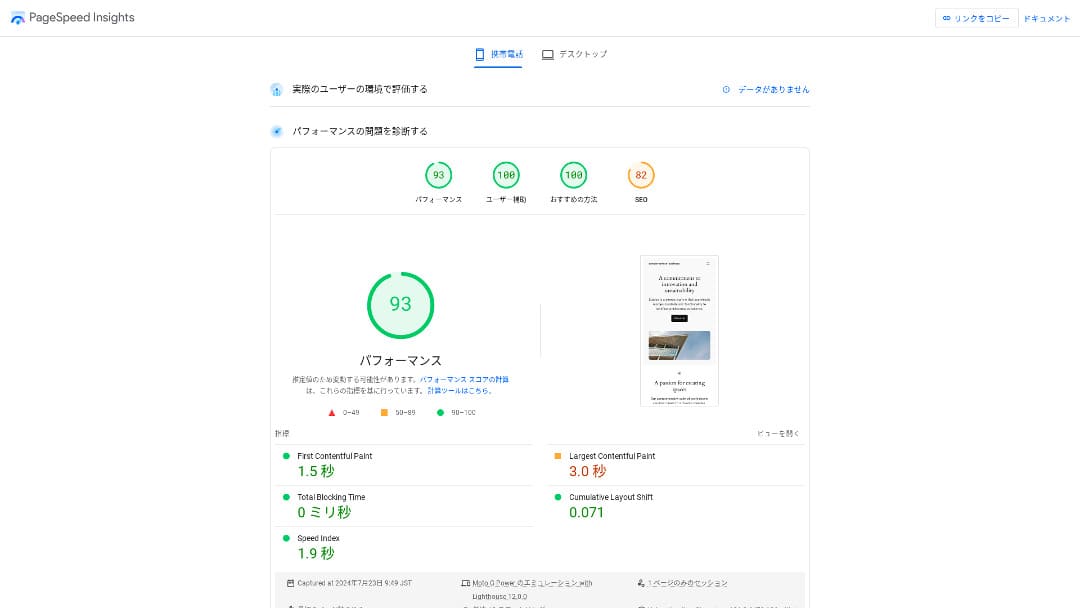
So there is no need to worry that it will be extremely slow in actual use.
★ швидкість-tested: A comparison of 15 hosting services ranked by speed
Ціна є доступною
Sakura Rental Serveroffersmonthly pricing that is affordable even compared with other providers, making it easy to start a website.The comparison below uses the following conditions.
- Initial setup fee
- 12-month сервер contract
- Один year of domain costs
- The lowest-priced plan that supports WordPress
| хостинг provider | Total cost for one year |
|---|---|
| Sakura Rental Server | 6,600 yen |
| ConoHa WING | 11,292 yen |
| Xсервер | 10,560 yen |
| Lolipop! | 5,940 yen |
| heteml | 24,420 yen |
Lolipop! is cheaper, but the features and specs of Sakura's Standard plan are stronger than Lolipop!'s.
Крім того, оскільки послуги доменів від Sakura є дещо дорожчими, ви можете знизити витрати, скориставшись дешевшим доменним сервісом від іншого провайдера.
Stable 99.99% Uptime
Sakura Rental Serveroffers very stable service with 99.99% uptime.Її сервери обслуговуються самостійно та контролюються цілодобово, 365 днів на рік.
★ A beginner's guide to hosting uptime and SLAs
During the 2018 Hokkaido Eastern Iburi earthquake, the Ishikari data center lost external power, but Sakura kept operating on emergency power for 60 hours.It even made it through a large-scale disaster that caused a blackout across all of Hokkaido, which speaks volumes about its stability. That gives you real peace of mind about how stable it is.
The company's communication at that time was also excellent. In addition to delivering the latest information, it continued posting updates every six hours even when there was no major change. It feels like a company you can trust with important data.
A безкоштовний CDN That Helps сайти Load Quickly
Sakura Rental Server offers a CDN for free. This is a feature that helps your website load faster.
★ Що таке CDN? Підвищення швидкості та продуктивності за допомогою розподілених серверів
Using a CDN helps your website appear more quickly, and even when traffic surges it makes it easier to avoid situations where a 503 error prevents the site from being viewed. Because fast page delivery also affects website traffic, having a free CDN available is genuinely valuable.
★ Що таке помилка 503? Перевантаження мережі, заходи запобігання та дії в екстрених випадках
The free CDN allowance is also generous at 100 GB per month on the Standard plan, so it is unlikely to be insufficient for individual use. After you exceed the free allowance, it costs 5 yen per GB.
Strong резервне копіювання Features
Sakura Rental Serverhas excellent backup features.You can use a feature called "Snapshots" to create backups and restore data.You can keep up to eight backups, which is generous.
It is also easy to use.
- У панелі керування перейдіть до розділу «Вебсайт/Дані», а потім — «Резервне копіювання»
- Click "Start using резервне копіювання & Staging".
- Click "Create backup" and wait for the status to change
Коли статус зміниться на «Успішно завершено», резервне копіювання вважається закінченим.
From the same screen, you can also create backup schedules and restore data. It is very easy to use.
Use Leftover Capacity Effectively with Sakura Pocket
When people rent hosting, they often choose more capacity than they immediately need.Sakura Rental Serveroffers a way to use leftover storage effectively instead of wasting itthrough a feature called Sakura Pocket. You can use it much like Google Drive or Dropbox.
Whether for businesses or individuals, using cloud storage has become the norm. It helps save space on PCs and smartphones. That said, the amount of storage available in the free plans of Google Drive and Dropbox is not especially large.
But Sakura Rental Server users can make use of their unused capacity through Sakura Pocket, which helps reduce the cost of paying for another cloud storage service.
A Drawback: You Cannot Move Down to a Lower Plan

Sakura Rental Serverdoes not let you change to a lower plan.If you end up with more capacity than you need, that is wasteful.
That is why it is best to sign up for a lower plan first and scale up only if necessary.
If you want to create a website, choose the Standard plan. The Light plan does not support WordPress. It offers enough capacity not only for individuals but also for many business users.
Проте майте на увазі, що ви не можете перейти з віртуального хостингу (тарифних планів Light або Standard) на керовані сервери (виділені сервери).
★ Що таке хостинг? Сервер, який потрібен для публікації вебсайту
Тарифний план Business пропонує вигідне співвідношення ціни та якості для малого й середнього бізнесу та корпоративних користувачів

「Sakura Rental Server» — це послуга віртуального хостингу від Sakura Internet Co., Ltd., яка також пропонує керовані сервери. Вона добре збалансовує продуктивність, якість послуг та ціну, що робить її чудовим варіантом для багатьох компаній. Безкоштовний ліміт CDN, що входить у вартість, залежить від тарифного плану та допомагає забезпечити безперебійну роботу.
14-day free trial
| Server type | Shared hosting / managed сервер |
| Monthly price (12-month contract) | 2,420 yen* |
| Initial setup fee | безкоштовний |
| .jp domain | Registration 3,982 yen / Renewal 3,982 yen |
| підтримка | Weekdays 10:00-18:00 Callback reservations available |
| Uptime | 99.99% guaranteed |
| Server storage | 600GB* |
| безпека measures | WAF / сайт tampering detection / Overseas IP filtering |
| SSL | безкоштовний SSL / shared SSL / Gehirn MCA OV / domain-validated wildcard / domain-validated / RapidSSL |
| резервне копіювання / restore | 8 backup generations / free restoration |
| Number of email accounts | Unlimited |
| електронна пошта security measures | basic spam filter / high-accuracy spam filter / SPF/DKIM/DMARC support |
| Server / website migration service | No migration agency service No migration tool |
| Easy WordPress install | Yes |
| CDN | 300GB/month free* |
Sakura Rental Serveralso offers business-focused plans under for Biz.Compared with other business-oriented hosting services, its pricing sits in the middle range and offers strong value for money.
Тарифний план Business коштує від 2 420 єн на місяць за 12-місячного контракту та містить технічні характеристики, необхідні компаніям для повсякденної роботи.
- безкоштовний CDN acceleration (up to 300 GB per month)
- Management by multiple users
- Виділена IP-адреса, на яку не впливає трафік інших компаній (для тарифного плану Business Pro та вище)
If you are looking for hosting for an SME or a corporation, it is highly recommended.
There Is No Longer Any Need to Worry That "Sakura Rental Server Is Scary"
Уявлення про те, що «Sakura Rental Server — це складно чи страшно», з’явилося тоді, коли користувач старої послуги виділених серверів понад десять років тому заявив на інформаційному сайті про нещире ставлення підтримки. Спочатку це не стосувалося поточної послуги Sakura Rental Server.
Компанія Sakura Rental Server опублікувала цю заяву у 2019 році й намагалася відповісти щиро. Оскільки скарга стосувалася старої послуги виділених серверів, а не Sakura Rental Server, «About a post on a technical information sharing site regarding our сервер services」the current Sakura Rental Server can be used with confidence.There is no need to worry anymore.
Порівняння Sakura Rental Server із двома серверами-конкурентами
Here we compare Sakura Rental Server with two competing hosting services. As with Sakura, we will compare providers that offer lower-priced plans.
Lolipop!
LOLIPOP can be used at a lower price than Sakura Rental Server. However, Lolipop!'s Light plan is inferior to Sakura Rental Server's Standard plan in both features and support.
- No backup feature (requires a paid option)
- No phone support
- електронна пошта support can take up to 48 hours, which is somewhat slow
Compare these three points together with the price, and you can decide whether Lolipop! or Sakura Rental Server fits you better.

Огляд Lolipop! [останнє видання 2025 року]: що показало тестування швидкості щодо переваг та недоліків
Огляд Lolipop! [останнє видання 2025 року]: що показало тестування швидкості щодо переваг та недоліків
serverfield.org
Star Rental Server
Star Rental Server is also a hosting service popular for its lower price range. However, Star Rental Server's Light plan is inferior to Sakura Rental Server's Standard plan in both features and support.
- No backup feature (must be handled with WordPress plugins)
- No phone support
- You can create only one WordPress website
- You cannot use an advanced WAF security feature
Compare these four points with the pricing before choosing between them.

Огляд Star Server [найновіше видання 2024 року]: неймовірно низькі ціни, аналіз сильних сторін та недоліків
Огляд Star Server [найновіше видання 2024 року]: неймовірно низькі ціни, аналіз сильних сторін та недоліків
serverfield.org
П’ять Кроки to Start a WordPress сайт on Sakura Rental Server Right Now
Start your website with Sakura Rental Server!
- STEP.1Go to the official site
Click "Try it free for 14 days."
- STEP.2Замовте сервер
Choose a plan. The Standard plan is recommended because it supports WordPress.
You can leave the initial domain as it is. This domain will not be used as your public website address. It can be used, but it is better to get your own domain.
★ Що таке домен? Його роль як адреси в інтернеті та як його отримати
If you select "Also acquire a custom domain," it becomes easier to start WordPress right away.
Введіть потрібний рядок і подайте заявку на домен. Якщо він вільний, вкажіть інформацію про реєстранта. Терміну реєстрації в один рік буде цілком достатньо. Потім натисніть «Вибрати спосіб оплати».
Пройдіть перевірку учасника та зареєструйтеся як новий користувач.
Enter your email address, review the privacy statement, and click "Send the registration guidance email."
A registration email will arrive. Open the URL in that email and continue to enter your member information.
Enter your name, address, and other required information, and set a member password.This password is important because it is used to log in to the member menu, so be sure to write it down.
For Sakura user communications, it is fine to choose "Do not receive."
Огляд everything you entered. If there is no problem, click "Register as a member."
Виберіть спосіб оплати. Виберіть термін дії контракту та спосіб оплати. Рекомендується здійснювати оплату кредитною карткою, оскільки ви зможете одразу почати створювати свій сайт на WordPress. Окрім того, він автоматично переходит на платну основу після закінчення пробного періоду, що позбавляє вас додаткових дій. Після вибору терміну дії контракту натисніть «Перевірити деталі заявки».
Огляд the full application details. Check the terms, tick "I agree," and proceed by clicking "Apply with this information."
Коли ви отримаєте електронний лист про завершення тимчасової реєстрації, тимчасовий договір оренди сервера вважається укладеним.
- STEP.3Install WordPress
Log in to the Sakura Rental Server control panel.
- Доменне ім’я: початковий домен, який ви зареєстрували під час замовлення сервера.
- Пароль: пароль, який ви встановили під час замовлення сервера.
Після входу натисніть «Встановити WordPress», виберіть URL-адресу для встановлення та вкажіть власний домен, який ви отримали під час реєстрації сервера.
Enter the database information for WordPress. Since there is no database yet at this stage, click "Create database."
- Database name: Anything is fine
- Database connection password: Make it as complex as possible
Next, enter the information for your WordPress site.
- Сайт title: Anything is fine. You can easily change it later.
- WordPress username: Anything is fine. However, changing it later is troublesome.
- WordPress password: Make it as complex as possible. You can change it later.
- електронна пошта address: Use the email address you normally use. For businesses, it is best to use the company email address of the person managing the website.
- Search engine visibility: Check it if you want to publish the site immediately. Leave it unchecked if you want to publish after the website is finished. You can change this easily later.
Ознайомтеся з ліцензією та умовами використання, поставте галочку навпроти «Згоден» та натисніть «Створити».
The username and password will be used to log in to WordPress. Be sure to write them down.
When installation is complete, click the admin URL shown on the screen and log in.
- STEP.4Initial WordPress setup
On the WordPress login screen, enter the username and password you set during installation and click "Log in."
If you see a warning saying the site cannot be reached, the DNS settings have not propagated yet. In that case, the only thing to do is wait and try logging in again every few hours.
★ Що таке DNS та сервери імен?
After logging in to WordPress, set the permalinks. In the WordPress admin, go to "Settings" and then "Permalinks." Choose "Post name" and then click "Save changes."
With "Post name," you can enter the URL slug you want when publishing an article. It is best to use a short string that reflects the article content so readers can understand it easily. If it is too long, some people may worry that the site is suspicious.
- STEP.5Install plugins
Return to the WordPress admin area, go to "Plugins" and then "Add New," and install the plugins you need.
When you find the plugin you want by searching, click "Install Now" and then "Activate." After that, follow the instructions for each plugin.
Be sure to install security and backup plugins.
- П’ять плагінів безпеки WordPress та як їх вибрати
- П’ять powerful WordPress backup plugins that help you recover your data
Once the plugins are installed, your WordPress website is fully ready to go!
Як Cancel Sakura Rental Server
Як cancel Sakura Rental Server
- STEP.1Log in to the member menu
Enter your member ID and password and log in.
- STEP.2List of contracted services
Click "List of contracted services" under Contract Information on the left side of the screen.
- STEP.3Cancel
Click "Cancel" under "Procedures" in "List of contracted services."
- STEP.4Ознайомтеся з важливими примітками та надішліть запит
На екрані з’являться важливі примітки та попередження щодо скасування підписки. Ознайомтеся з ними уважно. На сторінці «Остаточне підтвердження скасування послуги» натисніть «Скасувати послугу».
- STEP.5Cancellation request receipt email
Once the cancellation is completed, you will receive a cancellation request receipt email.
You can apply for cancellation at any time during the contract period. No matter when you apply, the service ends on the contract end date.
Be careful about the timing of credit card billing.Once the payment is processed, that billing period becomes valid and cannot be canceled. Check the billing schedule on the official site page, "I want to know this month's billing and procedure schedule."
If you want to cancel, it is best to apply as early as possible.
Якщо ви змінюєте сервери, зареєструйтеся на новому перед скасуванням старого
If you want to cancel Sakura Rental Server because you are moving to another сервер, перш ніж скасовувати підписку, обов’язково зареєструйтеся на новому сервері та перенесіть свої дані. Іншими словами, контрактні періоди для Sakura Rental Server та нового сервера мають перекривати один одного.
If you do not do this, there will be a period when your site cannot be displayed.
Questions Related to Sakura Rental Server
When Will Sakura Rental Server End?
"Sakura Dedicated Server" and "Sakura Dedicated Server High-Power Series" will end on June 30, 2026.
Скільки триває безкоштовний пробний період для Sakura Rental Server?
The free trial period for Sakura Rental Server is two weeks. You can try any plan.
However, Sakura Managed Server does not have a trial period, so keep that in mind.
Where Are Sakura Internet's Servers Located?
«Sakura Dedicated Server PHY» має сервери в Ісікарі та Токіо.
Підсумок
「Sakura Rental Server» — це хостинг-провайдер із багаторічною історією, який налічує понад 480 000 активних облікових записів. Колись його вважали повільним, але наразі його швидкість була оптимізована завдяки оновленню серверів. Водночас доступні ціни збереглися, тому це чудовий вибір за співвідношенням ціни та якості.
14-day free trial
Sakura Rental Serveris an appealing hosting service that combines business-grade stability with low pricing.People once rumored that it was scary and slow, but there is really no need for that concern now.
It is a сервер you can use comfortably. Give it a try.
Повне порівняння 32 хостинг-провайдерів для WordPress: рекомендації для приватних осіб, бізнесу та міжнародного використання

Коли ви хочете почати роботу з WordPress і шукаєте «рекомендований хостинг для WordPress», ви знаходите найрізноманітніші статті: від серверів для особистого користування та бізнес-рішень до закордонних провайдерів та бюджетних послуг. Чесно кажучи,
- Which site should I rely on?
- I want to choose a сервер in a simple, easy-to-understand way!
- Show me how to start WordPress right away.
If that sounds familiar, this article is for you. It carefully selects the best options from 32 hosting services for individuals, businesses, and both domestic and overseas useand introduces them with clear explanations from the SEO lead at an app development company that uses hosting every day.