Up to 53% off server fees until August 5, 2025, plus two domains free forever and the first month free
PR
Сервери
Мені шкода ConoHa, але я протиставляю відомий Blog Creator трьом найсильнішим ШІ-гігантам 2024 року
Опубліковано: 2025.01.30
Оновлено: 2025.01.30

Вибачте, але наша компанія використовує ChatGPT-4o, Claude 3 і Gemini 1.5 Pro.
Як ви, мабуть, знаєте, ConoHa WING пропонує "Blog Creator" — це інструмент для написання статей ШІ, який коштує від 330 єн на місяць. Ще кілька років тому я витрачав понад 10 годин на одну статтю, тож зараз мене майже засмучує, наскільки це зручно. Але немає сенсу опиратися часу, тож найкраще — навчитися користуватися ним правильно.
Однак ми є компанією з розробки систем і активно використовуємо три види ШІ.
- ChatGPT-4o
- Claude 3
- Gemini 1.5 Pro
Індустрія ШІ змінюється так швидко, що може з’явитися якийсь приголомшливий новий інструмент Boom!Але навіть станом на 1 січня 2025 року ці три й досі є потужними ШІ, які дуже добре працюють із японською мовою. (Чесно кажучи, це доволі дорогі інструменти, тож мені доводиться наполегливо працювати над основним бізнесом.)
"Blog Creator, мабуть, не зможе перевершити цих трьох, але давайте змусимо його змагатися за той один відсоток шансів."

Blog Creator honestly did not inspire high expectations, and the competition was so strong that I felt bad for ConoHa. Sorry. Still, I wanted to make them compete, so Я доручив кожному штучному інтелекту написати та опублікувати статтю на тему «Створення теми WordPress з нуля». Я навмисно зробив так, щоб ці чотири статті конкурували між собою в пошуку (канібалізували одна одну).
Cannibalize does not mean carnival. In SEO, cannibalization refers to a situation where similar articles on the same site overlap and compete with one another. It is bad for SEO. This experiment affects our own SEO too, but I am doing it anyway.
У результаті Blog Creator виявився просто чудовим, тож усі, будь ласка, зареєструйтеся через ConoHa WING. Якщо ви це зробите, ви зможете користуватися Blog Creator один місяць безкоштовно.

" ConoHa WING", a high-speed server from GMO Internet Group with rapidly growing user numbers, and one we use ourselves. Because WordPress comes preinstalled when you sign up for the server, anyone can get started easily. It offers a good balance of cost and performance, and we use it ourselves too.

★ Build a Website in 10 Minutes! ConoHa WING Review and How to Start WordPress
Що таке Blog Creator? Він може як писати SEO-дружні статті з нуля, так і переписувати наявні.

Blog Creator is an AI tool recommended for people whose traffic is not growing or who do not know how to write articles. You can have AI handle both writing SEO-friendly articles from scratch and rewriting existing ones.
Blog Creator досліджує чотири типи ключових слів одним кліком
What keyword are you trying to rank for? With Blog Creator, the keyword research begins as soon as you enter it.
- Рекомендовані ключові слова: підказки пошуку, які з’являються, коли ви вводите ключове слово в поле пошуку Google
- Пов’язані пошукові ключові слова: пов’язані ключові слова, які показуються в результатах пошуку після введення запиту в Google
- Дослідження супутніх термінів: слова, які часто трапляються разом із ключовим словом
- Дослідження заголовків сайтів із найвищим рейтингом: заголовки, які використовують сайти з високим рейтингом за цим ключовим словом
Once you can do this research, you have all the ingredients you need for SEO-friendly wording and headings. From there, you can either write the article yourself using those materials or have Blog Creator write the article for you.

Long-Tail Keyword Strategy Explained by a 7-Year SEO Veteran: 3 Steps to Explode Traffic in Niche Markets
Long-Tail Keyword Strategy Explained by a 7-Year SEO Veteran: 3 Steps to Explode Traffic in Niche Markets
serverfield.org
ШІ пише статті на основі SEO-дружніх ключових слів
Blog Creator is a tool that lets AI write articles for you.
What makes it different from generic AI is that an expert-supervised tool produces SEO-strong keyword results, and then the article is written based on them using ChatGPT-4o or ChatGPT-4o miniThis means it does not have AI write an article out of nowhere. Instead, it has AI write based on keyword results built for SEO, so you can aim for stronger search rankings.
Іншими словами, це інструмент, який дозволяє ефективно створювати сильні статті, водночас використовуючи можливості ШІ.
Підтримка переписування вже опублікованих статей
Blog Creator can even rewrite articles you have already published.Just enter the URL of the blog post and the keyword, and it will tell you which important keywords are missing from the article.
Тарифні плани Blog Creator
Є три плани. Оскільки Lite безкоштовний протягом одного місяця, я рекомендую спочатку спробувати саме його.
| План | Lite | Standard | Business |
|---|---|---|---|
| Ціна | 330 yen | 1,980 yen | 4,980 yen |
| Генерація плану | 24 times | 184 times | 700 times |
| Генерація основного тексту | 12 times | 92 times | 350 times |
| Генерація заголовка | 12 times | 92 times | 350 times |
| Генерація вступу | 12 times | 92 times | 350 times |
- Опція
- Ціна: 550 yen
- Ліміт генерації: 24 генерації структури, 12 генерацій основного тексту, 12 генерацій заголовків та 12 генерацій вступної частини
Розгляньмо, як почати користуватися Blog Creator і як його використовувати
Кроки, щоб почати користуватися Blog Creator
Початок роботи з Blog Creator
- STEP.1Visit the official site: ConoHa WING
Blog Creator To use Blog Creator, you need a ConoHa account. Create an account from the official site and get started with WordPress. If you already have a ConoHa account, log in.
- STEP.2Відкрийте інструмент генерації блогу ШІ
From the control panel, open "AI Blog Generation Tool" under "Site Management." Then click "+ Blog Creator."
- STEP.3Оберіть план
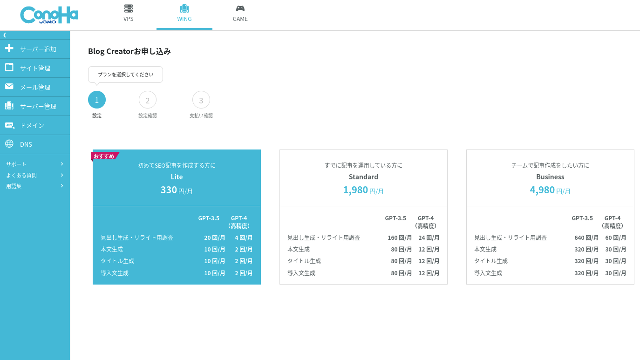
Оберіть тарифний план. Тарифний план Lite цілком підійде. Його функції збігаються з вищими тарифами. Дорожчі плани просто дають більше лімітів на генерацію штучним інтелектом. Оскільки на початку вам потрібен лише пробний період, виберіть план Lite за 330 єн на місяць.
- STEP.4Payment
A payment confirmation screen will appear. Click "Confirm." Your application is now complete.
Кроки створення статті за допомогою Blog Creator
The procedure for creating an article is explained in this article on the official site, Wapu-katsu. However, I think it is easier to understand if I show the method I actually used, so please take a look at this article.
Creating an Article with Blog Creator
- STEP.1Choose Blog Creator
From "AI Blog Generation Tool," choose the "Blog Creator" tab.
- STEP.2Enter the keyword you want to rank for
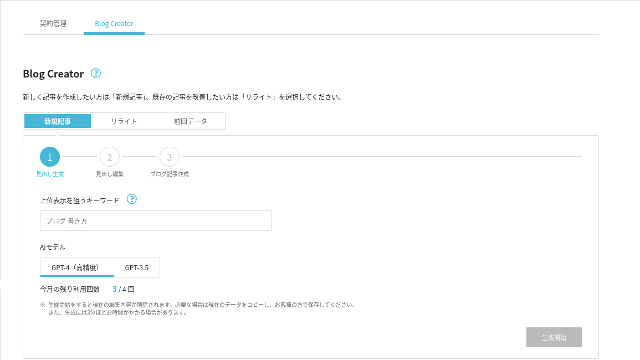
Blog Creator can handle rewrites too, but this time I am creating a new article. Enter the keyword you want to rank for: "building a WordPress theme from scratch." (Of course, you should use the keyword you personally want to rank for.)
Choose the AI model. Let's go with the highly accurate GPT-4.
Click "Start Generation."
- STEP.3Edit the headings based on the keyword research
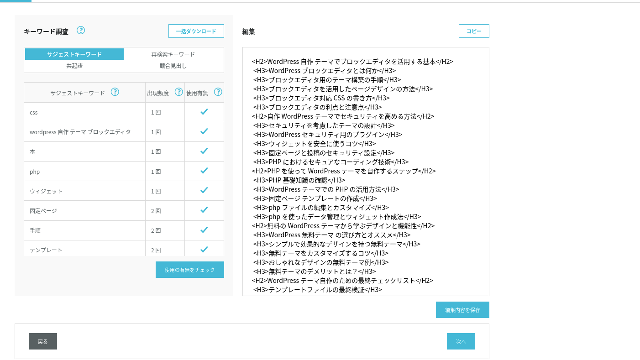
The keyword research will be displayed. Check the results from the four types of research. The more of them you make use of, the stronger the SEO tends to become.
On the editing screen, incorporate keywords that were not used in the generated headings. Once you finish editing, click "Save Edits." After that is saved, move on by clicking "Next."
- STEP.4Create the body, title, and introduction
Using the headings you created earlier as a base, have AI generate the body, title, and introduction. Click "AI Generate" for each item.
Choose whether to use GPT-4 or GPT-3.5. I chose GPT-4.
After generating each one with AI, click "Save Edits." That completes the Blog Creator generation process.
Several title candidates will be displayed, so compare them against the headings and body and choose the most appropriate one.
Once everything is complete, copy each part, paste it into a new WordPress post, and publish the article.
There seems to be a limit to the amount of text it can generate. For this "building a WordPress theme from scratch" article, the generated text was not long enough. So after it stopped partway through, I used "AI Generate" again on the headings that came after the point where it stopped to create the body text.
Чотири статті, які я змусив конкурувати між собою за ключове слово "Створення теми WordPress з нуля"
I had AI create them using the same keyword and the same procedure. The four finished articles are below. I uploaded them all to this site. They are fully cannibalizing one another.
Стаття, створена за допомогою Blog Creator
Повний посібник із створення теми WordPress з нуля: кроки та чек-лист для розробки потужного сайту
Повний посібник із створення теми WordPress з нуля: кроки та чек-лист для розробки потужного сайту
serverfield.org
Стаття, створена за допомогою ChatGPT-4o

Beginner-Friendly! How to Create a Custom Theme in WordPress
Beginner-Friendly! How to Create a Custom Theme in WordPress
serverfield.org
Стаття, створена за допомогою Claude 3
Build Your Own WordPress Theme and Create a Site Full of Originality!
Build Your Own WordPress Theme and Create a Site Full of Originality!
serverfield.org
Стаття, створена за допомогою Gemini 1.5 Pro
Break Out of the Rut! How to Build Your Ideal Site by Creating Your Own WordPress Theme
Break Out of the Rut! How to Build Your Ideal Site by Creating Your Own WordPress Theme
serverfield.org
Оскільки, схоже, ШІ може перемогти, хочу показати переваги Blog Creator
AI looks like it might win. So, as insurance so that ConoHa WING does not get mad at me, Blog Creator's advantages are what I want to introduce here. (Я людина сором’язлива.)
Ви можете покращувати текст і SEO, не покладаючись повністю на ШІ чи інструменти
Blog Creator uses AI. However, while checking the researched keyword results, you are encouraged to polish the content further yourself. In practice, doing so keeps you from relying entirely on AI or tools. By using it skillfully, you can steadily improve your writing skills and your understanding of SEO.
Blog Creator can, so to speak, help you grow like a partner running alongside you.

Boost Your SEO: Web Writing Techniques That Win Users Over With Highly Readable Copy
Boost Your SEO: Web Writing Techniques That Win Users Over With Highly Readable Copy
serverfield.org
Структура заголовків і обсяг основного тексту вже оптимізовані, тож виправлення не потрібні
Blog Creator optimizes the heading structure and body length better than generic AI. As a result, you can publish the article by copying and pasting it without making corrections.(That said, you still need to fact-check the content.)
With generic AI, corrections were necessary and time-consuming.
- The headings start from H4, so they need to be corrected.
- If you generate the full body all at once after creating the headings, it does not write properly.
- You need to delete unnecessary words such as "Introduction:" and "Body:".
Creating body text from the headings and doing everything else manually is simply too much work.
Як інструмент для написання статей ШІ, він більше орієнтований на ключові слова, ніж пропозиції інших компаній
Other server companies also offer AI article-generation tools.
Sakura Rental Server пропонує "User Local AI Writer," which lets you use ChatGPT-4 for free. In addition to ChatGPT-4, it also uses its own local AI.
Value Server пропонує "Value AI Writer," which starts at 1,650 yen per month. That one uses ChatGPT-4o.
So these tools may let you use them for free or give you access to the latest AI, but they are not built around SEO-strong keywords.Blog Creator first builds around SEO-strong keywords and then uses AI to write the article.
In the end, when you write a blog, you have a target keyword you want to rank for, right?Blog Creator defines that target first and then creates the article.AI sprints properly toward a clearly defined goal is what it does. It is not just running blindly.
This is the major difference between other AI article-generation tools and Blog Creator.
Підсумок: будь ласка, самостійно пошукайте й перевірте результат
So what happened in the end?
The answer is not for me to decide. Let's submit it to Google, just as we always do. Search for "WordPress custom theme" and look for our site (https://serverfield.org). One of the following articles should appear there.
- Blog Creator article: Повний посібник із створення теми WordPress з нуля: кроки та чек-лист для розробки потужного сайту
- ChatGPT-4o article:Beginner-Friendly! How to Create a Custom Theme in WordPress
- Claude 3 article: Build Your Own WordPress Theme and Create a Site Full of Originality!
- Gemini 1.5 Pro article: Break Out of the Rut! How to Build Your Ideal Site by Creating Your Own WordPress Theme
Стаття, яка з’являється в пошуку в цей момент, і є найкращим інструментом у цей момент.
Blog Creator is better than I imagined. Його стаття постійно з’являється.
If you want to try it, ConoHa WING is where you should sign up.
" ConoHa WING", a high-speed server from GMO Internet Group with rapidly growing user numbers, and one we use ourselves. Because WordPress comes preinstalled when you sign up for the server, anyone can get started easily. It offers a good balance of cost and performance, and we use it ourselves too.
Up to 53% off server fees until August 5, 2025, plus two domains free forever and the first month free
Повне порівняння 32 орендних серверів для WordPress: рекомендації для індивідуального, корпоративного використання та використання за кордоном

When you think, "I want to start WordPress," and search for "recommended WordPress hosting," you get an enormous range of articles, from personal-use servers and options for businesses and small companies to overseas servers and low-cost servers. Honestly,
- Which site should I trust?
- I just want to choose a server in a simple, easy-to-understand way!
- Show me how to start WordPress right now.
Doesn't that sound familiar? That is why this article carefully selects recommended options from 32 rental server companies for individuals, businesses, domestic use, and overseas use. The explanation comes from the SEO specialist of an app development company that uses rental servers every day.