30-gün money-back guarantee
PR
Sunucular
Kinsta Review: Pros and Cons of the Ultra-Fast Server Recommended by Google, Plus a WordPress Setup Guide
Yayınlandı: 2025.07.13
Güncellendi: 2025.07.13
Rating: 4.0
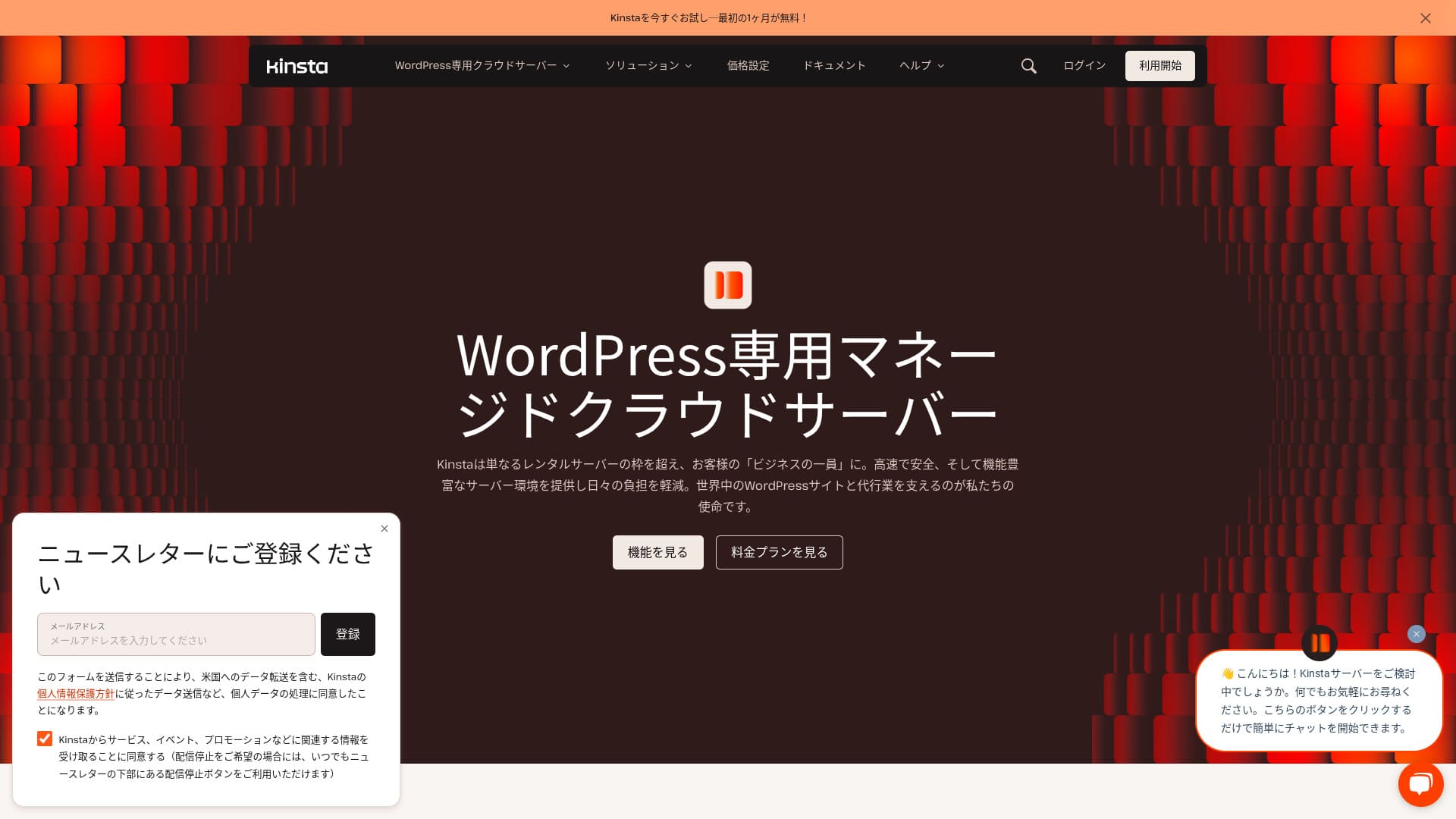
Kinstais an ultra-fast overseas hosting service operated by Kinsta Inc.It is well known as a sunucu recommended by Google.It is built with a strong focus on fast page display speeds.
| Server tür | Dedicated managed sunucu |
| Display speed (TTFB) | 30ms |
| Recommended plan and billing term | Single35k |
| Trial / money-back guarantee | 30-gün money-back guarantee |
| Monthly fee (12-month plan) | 4,407 yen |
| Initial setup fee | Ücretsiz |
| Ücretsiz domain | None |
| Support | 24/7 chat support (available in Japanese) and email |
| Uptime | 99.9% |
| Server storage | 10GB |
| Number of databases | 1 |
| Security | Malware scanning, WAF, firewall, DDoS protection, Google Cloud firewall |
| SSL | Ücretsiz custom SSL |
| Backups | 14 gün of automatic backups |
| Number of email accounts | None |
| Email security features | None |
| Server / website migration service | Ücretsiz |
| WordPress preinstalled | Yes |
| CDN | Ücretsiz (125GB) |
| Data centers | Johannesburg, South Africa; Changhua County, Taiwan; Hong Kong; Tokyo; Osaka; Seoul, South Korea; Mumbai, India; Delhi, India; Jurong West, Singapore; Jakarta, Indonesia; Sydney, Australia; Melbourne, Australia; Warsaw, Poland; Hamina, Finland; Madrid, Spain; Saint-Ghislain, Belgium; London, United Kingdom; Frankfurt, Germany; Eemshaven, Netherlands; Zurich, Switzerland; Milan, Italy; Paris, France; Dammam, Saudi Arabia; Tel Aviv, Israel; Montreal, Canada; Toronto, Canada; Sao Paulo, Brazil; Santiago, Chile; Council Bluffs, Iowa, USA; Moncks Corner, South Carolina, USA; Ashburn, Virginia, USA; Columbus, Ohio, USA; Dallas, Texas, USA; The Dalles, Oregon, USA; Los Angeles, California, USA; Salt Lake City, Utah, USA; Las Vegas, Nevada, USA |

Hikaru Ono
Kinsta genellikle birinci sınıf (top-tier) bir sunucu olarak tanımlanır ve bizzat kullandıktan sonra bu tanımlamanın doğru olduğunu hissettim. Yalnızca hızlı olmakla kalmıyor, aynı zamanda kontrol panelinin kullanımı da kolay ve WordPress ile başlamak son derece basit.
Fiyatını tamamen hak eden, cazibeyle dolu bir sunucudur.
- November 4, 2025 market research data, arranged by speed
- Aylık ücretler, WordPress çalıştırabilen en ucuz planın ilk yıl maliyetidir
- Speed is the Time to First Byte value from demo sites measured under the same conditions
“Kinsta”, dünya çapında 37 konumda veri merkezi bulunan birinci sınıf, sınıfının en hızlı barındırma hizmetidir. Kendi ölçümlerimizde 1. sırada yer aldı. Pahalı olduğu inkar edilemez ancak rahatlığa ve performansa tamamen öncelik veren bir sunucu istiyorsanız, bunu çekinmeden önerebilirim. Canlı sohbet desteği Japonca olarak da mevcuttur.
Kinsta Panosu: Basit, Şık ve Okunması Kolay
Kinsta’s dashboard isson derece basit, şık ve okunması kolay.
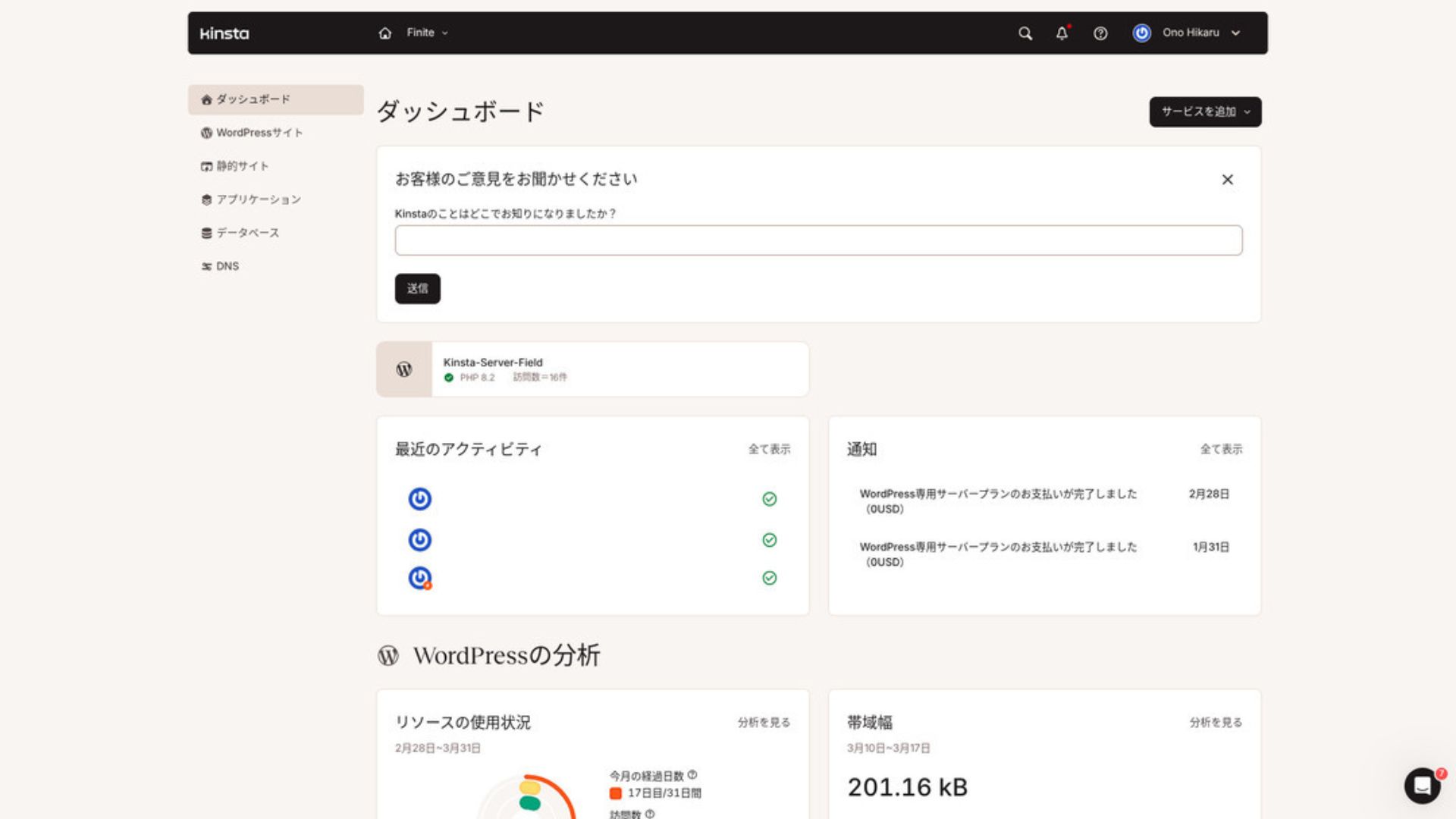
To manage WordPress, click “WordPress Sites” in the menu.
Creating a New WordPress Site or Migrating One Is Easy
Kinstayeni bir site oluşturmayı ve taşımaları gerçekleştirmeyi de kolaylaştırır. Sadece yabancı bir sunucu olduğu için zor olacağından endişelenmenize gerek yoktur.
When you open WordPress Sites and click “Add Site,”
- Create a new site
- Request a site migration
those options appear. Creating a new site is also easy.
Creating a New WordPress Site
- STEP.1Select “WordPress Sites” in MyKinsta
Kayıt in to MyKinsta. Then select “WordPress Sites” from the menu.
- STEP.2Create a new site
Click “Add Site.” Then choose “Create new site.”
- STEP.3WordPress ayarlarıyla devam edin
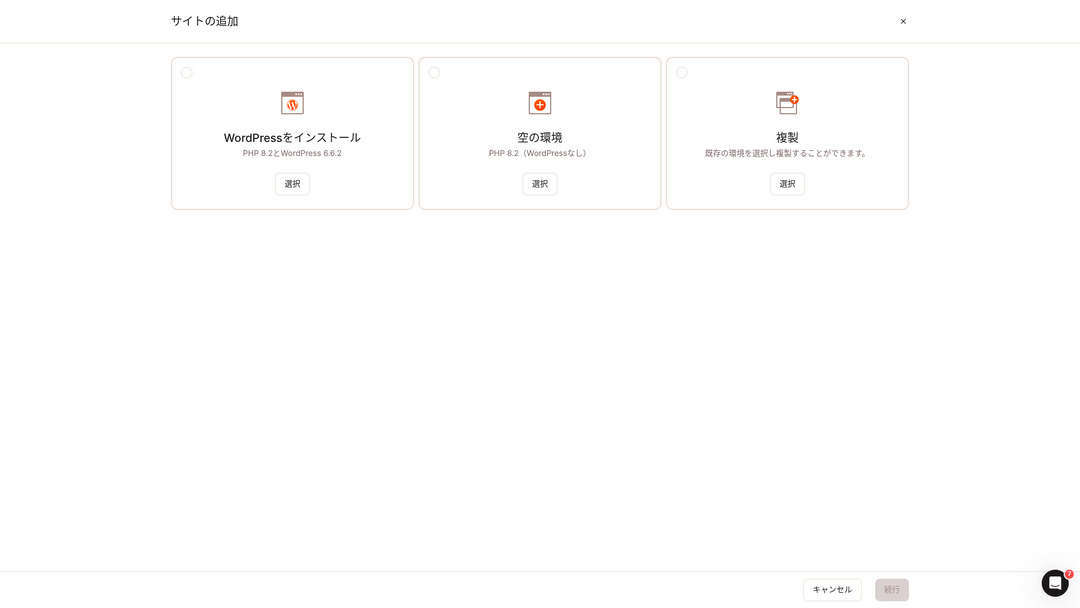
Select “Install WordPress.”
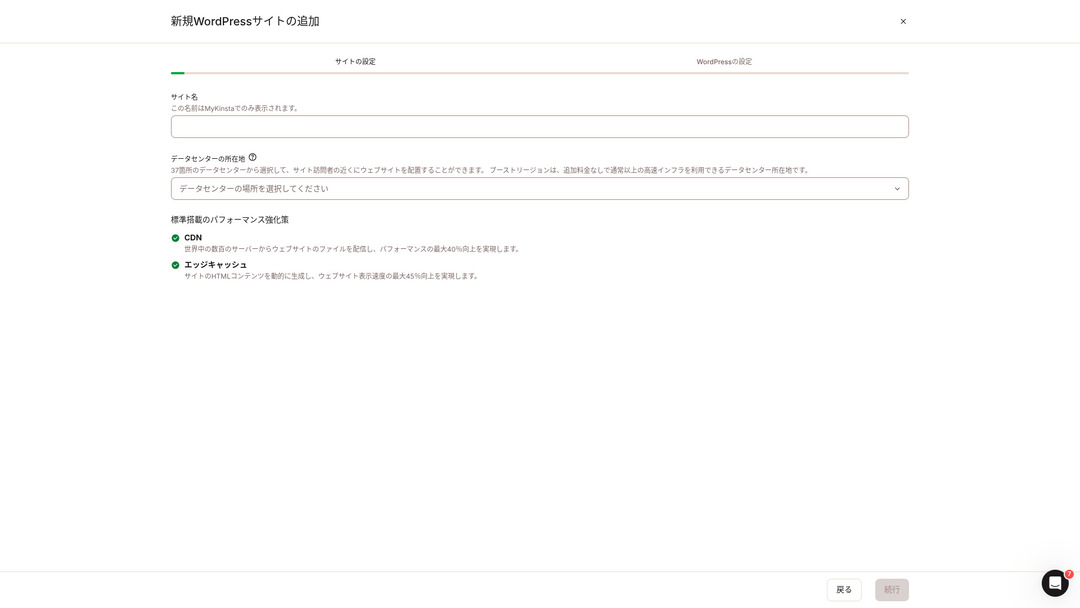
Choose your site name and select a data center location. You can choose from 37 data centers around the world. If most of your visitors are in Japan, choosing Tokyo or Osaka is the safest option.
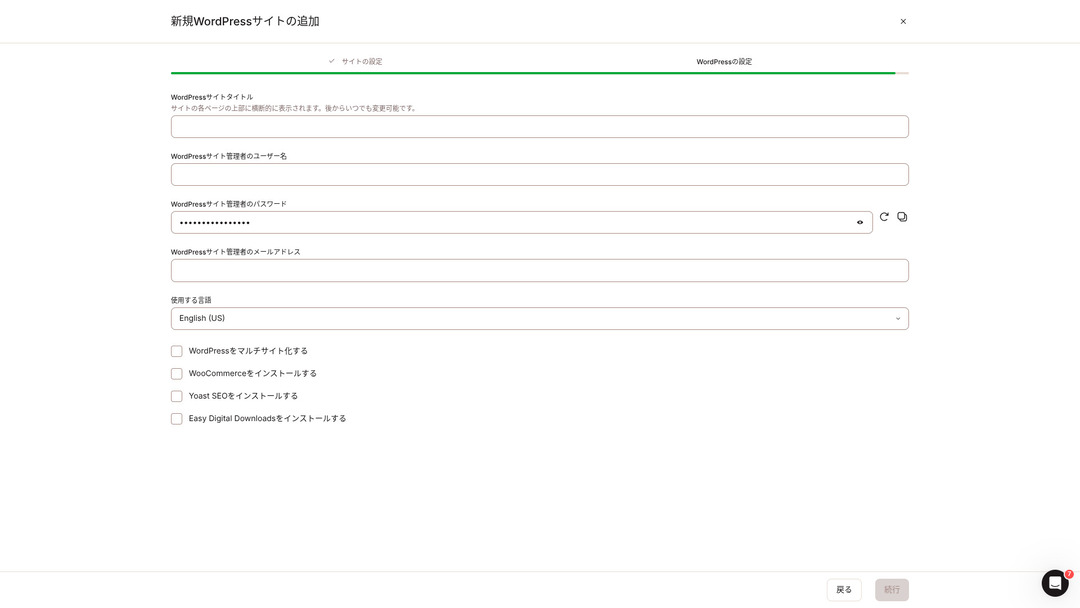
- WordPress site title
- WordPress admin username
- WordPress admin password
- WordPress admin email address
- Language to use
Decide those ayarlar. Once you click “Continue,” your WordPress site setup is complete.
Kinsta Fiyatlandırma Planları: En İyi Seçim, Tek Site İçin Yıllık Plandır
Kinstahas three pricing plans, and each can be paid monthly or annually.One of them is an agency program intended for production agencies.For individuals and companies, the options to use are
- Single-site plan
- Multi-site plan
one of those two.
| Comparison item | Single-site plan | Multi-site plan |
|---|---|---|
| Monthly fee | 4,459 yen (annual billing) 5,202 yen (monthly billing) | 8,769 yen (annual billing) 10,404 yen (monthly billing) |
| WordPress sites | 1 | 2 |
| Visits | 35,000 | 70,000 |
| Storage | 10GB | 20GB |
| CDN | 125GB | 250GB |
Yeni bir blog başlatmak üzereyim diyorsanız, tek site planını öneririm.
Kinsta Reviews and Five Key Features

WordPress Is Fast: No. 1 in Display Speed
Kinstaranked No. 1 in display speed in our own measurements. It truly is a fast sunucu.
Sunucu hızıyla ilgili sorun yaşıyorsanız, şunu seçmenizi söylerim: Kinsta without hesitation.
A CDN Is Available
Kinstadünya genelinde sunucu üsleri olarak 37 veri merkezi kullanırken aynı zamanda 260 CDN konumunu işletmektedir. Bir CDN kullanarak web sitenizi görüntüleyen kişiler, verileri en yakın CDN sunucu, which helps pages load faster.
★ What Is a CDN? Improve Speed and Performance with Distributed Servers
Kinsta ’in en ucuz WordPress barındırma seçeneği olan Starter planı hala 100 GB CDN içerir. Bu, fazlasıyla yeterli aktarım kapasitesi sağlar.
★ What Are Traffic and Data Transfer? Managing and Optimizing Web Traffic
14 Günlük Otomatik Yedekleme ile Birlikte Gelir
Kinsta14 günlük otomatik yedekleme işleviyle birlikte gelir.
Backups are essential.There is always a possibility that data may be deleted by mistake or altered by a cyberattack.In situations like that, backup data lets you restore the site.
KinstaWith bir şeyler ters gitse bile 14 güne kadar olan yedekleme verilerinden her şeyi geri yükleyebilirsiniz, which gives real peace of mind.
24/7 Support from Engineers
Kinstahas a 24/7 support sistem staffed by engineers.
You never know when a situation requiring support will arise.If it is not resolved quickly, it may even become a matter of iş credibility.
Kinstagives peace of mind because engineers are always there to support you.Especially if you do not have engineers inside your company, Kinstathe reassurance of being able to contact engineers at any time, as you can with Kinsta, is extremely valuable.
Ücretsiz Hack-Fix Guarantee
No matter how much efor you put into security, nothing is ever 100 percent guaranteed. Still, Kinsta ücretsiz bir siber saldırı düzeltme garantisiyle birlikte gelir.
If you are hacked,Kinsta will work together with you to repair the damage.
- Ücretsiz site inspection
- Detailed file scans to identify malware
- Repair of core files using a fresh WordPress installation
- Identification and removal of infected plugins and themes
Because the response is so thorough, you do not have to worry that the same hacking damage will happen again.
The Drawback of Kinsta Is Its High Price

Even though it is a top-tier sunucu, Kinsta is expensive.
Fiyat açısından işletmeler tarafından kullanılan sunucular kategorisine aittir. Diğer kurumsal odaklı sunucularla karşılaştırdım.
- Initial setup fee
- 12-month sunucu contract
- One year of domain maliyet
- Plan that supports WordPress
KinstaKinsta'dan daha pahalı olan sunucular da vardır ancak diğerlerinin hepsi Japonya merkezli sunucularıdır. Japonca dil desteği ve çok sayıda kurumsal özellik de sunarlar.
So although it is truly top-tier in sunucu speed, there is no denying that it still feels expensive.
Compare Kinsta with Competing Servers
I compared it with major Japanese hosting services that, like Kinsta, place a strong emphasis on speed.
ConoHa WING
ConoHa WING, WordPress görüntüleme hızına güçlü bir şekilde odaklanılarak oluşturulmuş bir sunucudur. En önemli özelliği WordPress'e başlamanın ne kadar kolay olduğudur. Alan adı satın alma ve yapılandırma, veritabanı oluşturma ve WordPress yükleme gibi işlemler sunucuya kaydolduğunuzda zaten tamamlanmıştır, böylece bir WordPress web sitesi başlatmak için gereken ayarlar sunucu sözleşmesi sırasında tamamlanmış olur.
As a result, even if you have no sunucu knowledge or WordPress skills, you can start your website right away.

ConoHa WING Review: Why 750,000 Users Choose It, Plus a Test of Its Speed, Pros, and Cons
ConoHa WING Review: Why 750,000 Users Choose It, Plus a Test of Its Speed, Pros, and Cons
serverfield.org
XServer
XServer, Japonya'da uzun süredir popüler olan yüksek hızlı bir sunucudur. Yurt içi pazarda 1 numaralı kullanıcı payına sahiptir. Popülerliği yalnızca sunucu hızından değil, aynı zamanda %99,99 çalışma süresiyle kararlılığından ve özenli desteğinden kaynaklanmaktadır.
However, when it comes to speed, Kinsta still comes out ahead of XServer.

XServer Review [2025 Latest]: A Thorough Guide to Speed, Pricing, Pros, and Cons
XServer Review [2025 Latest]: A Thorough Guide to Speed, Pricing, Pros, and Cons
serverfield.org
Start a WordPress Website with Kinsta in 7 Steps
Here, we will start a WordPress website using Kinsta and MuuMuu Domain.
Let’s Start a Website with Kinsta!
- STEP.1Get a custom domain with MuuMuu Domain
Sign up for or kayıt in to MuuMuu Domain.
Henüz bir hesabınız yoksa MuuMuu Domain web sitesinde yeni bir hesap oluşturun. Zaten bir hesabınız varsa sadece giriş yapın.
Search for and purchase your custom domain.
Enter your desired domain name into the MuuMuu Domain search bar and check whether it is available. If it is available, purchase that domain.
- STEP.2Set up a new site on Kinsta
First, sign up for Kinsta. Then add a new site.
Access the Kinsta dashboard and click “Add Site.”
Select the site name and the data center location. Choose “Install WordPress,” then enter the required information such as the site title, admin username, password, and email address.
If necessary, install plugins such as WooCommerce or Yoast SEO.
- STEP.3MuuMuu Domain'deki DNS ayarlarını güncelleyin
MuuMuu Domain panosuna erişin, “Alan Adı Yönetimi” bölümünden satın aldığınız alan adını seçin ve “DNS Ayarları” seçeneğine tıklayın.
Kinsta panosundan, ad sunucuları (name servers) dahil olmak üzere sitenizin DNS bilgilerini kontrol edin. Bu bilgiyi MuuMuu Domain'deki “DNS Ayarları” sayfasına girin ve kaydedin.
- STEP.4Set your custom domain in the Kinsta dashboard
Az önce kullanmakta olduğunuz WordPress sitesinin ayarlar sayfasına gidin.
Go to the “Domains” section and click “Add Domain.” Enter the custom domain name you acquired through MuuMuu Domain and add it.
Ardından, “Araçlar” bölümüne gidin ve SSL sertifikasını yüklemek için “Ücretsiz bir Let's Encrypt SSL sertifikası yükleyin” seçeneğine tıklayın.
- STEP.5Customize your WordPress site
Kinsta panosundan WordPress yönetici alanına giriş yapın. Ardından gerektiğinde temaları ve eklentileri yükleyin ve sitenizi özelleştirin.
Frequently Asked Questions About Kinsta
Can I register a domain with Kinsta?
No, you cannot register a domain through Kinsta.Please register your domain through a domain registration service such as MuuMuu Domain.After that, register the acquired domain in MyKinsta.
Is 10GB of storage on Kinsta too little?
If you are running a WordPress site, 10GB is not a problem at all.As of March 2025, this site with more than 90 articles uses only 1.5GB of storage.Unless you are building something like a portfolio site with an extreme number of images, there is no need to worry.
How do you pronounce “Kinsta”?
“Kinsta” is pronounced “Kin-sta.”
Summary
“Kinsta”, dünya çapında 37 konumda veri merkezleri bulunan en hızlı, birinci sınıf kiralık sunucudur. Kendi ölçümlerimizde 1. sırada yer aldı. Yüksek fiyatı inkar edilemez ancak rahatlığı ve performansı tamamen hedefleyen bir sunucu istiyorsanız, şüphesiz mükemmel bir seçimdir. Japonca sohbet desteği de mevcuttur.
30-gün money-back guarantee
Kinsta birinci sınıf bir sunucudur. Sitenizin görüntülenme hızını güvenle artırmak istiyorsanız, lütfen deneyin.
Yalnızca hız sunmakla kalmaz, aynı zamanda mükemmel bir destek sistemi de sunar, böylece güvenle kullanabilirsiniz.
Comparison of 10 Overseas Hosting Services

Yurt dışı barındırma hizmetlerinde, dil engelleri ve kültürel farklılıklar nedeniyle birçok kişi hangi sunucuyu seçeceğine karar vermekte zorlanıyor.
In this article, we thoroughly compare 10 carefully selected overseas hosting services from around the world and explain each service’s features, pricing plans, and actual user experience in detail.
You will find information that covers a wide range of needs, from selection criteria beginners can rely on to advanced features that engineers look for.