
10 dagars gratis provperiod
PR
Servrar
Value Server-recension [2025 senaste]: Starta WordPress till ett fyndpris
Publicerad: 2025.04.18
Uppdaterad: 2025.04.18
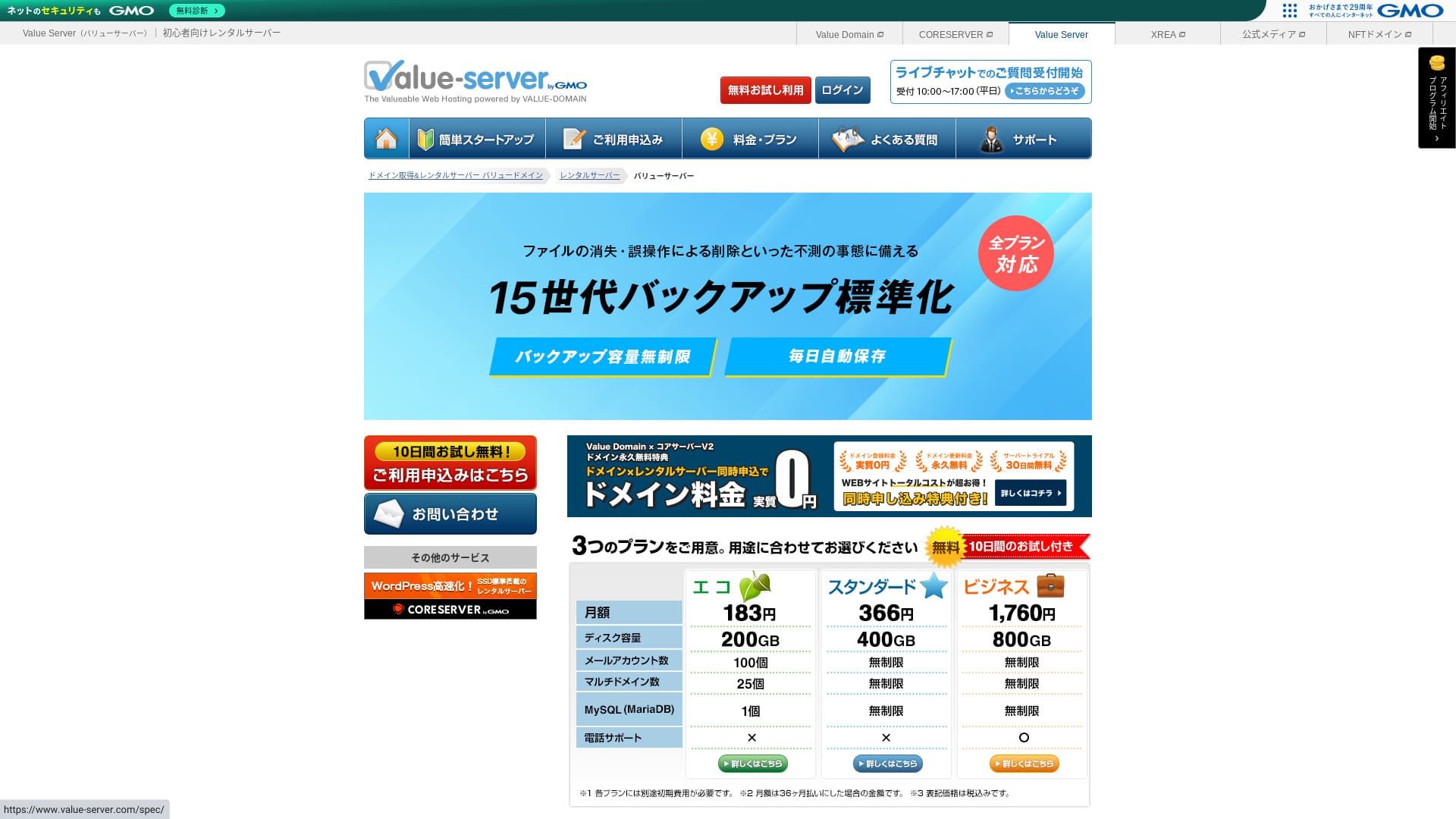
Value Server is a webbhotellstjänst operated by GMO Digirock, Inc., known for its low pricing, especially its Marutto plan.

Value Server rekommenderas för personer som vill använda den billigaste möjliga servern because:
- Bland de billigaste i branschen
- SSD-lagring används på servern
- 15 generations of säkerhetskopior provide peace of mind
Därför blir du sannolikt nöjd. Du kan prova den gratis i 10 dagar.
En konkurrerande server är Star Rental Server. Den är till och med starkare än Value Server in that it also offers a free plan. Please nackdelarider it as well.
| Servertyp | Delad server |
| Visningshastighet (TTFB) | Inte uppmätt |
| Rekommenderad plan och avtalstid | Eco 12 månader |
| Provperiod / pengarna-tillbaka-garanti | None |
| Månadsavgift (12-månadersavtal) | 220 yen |
| Startavgift | Free |
| Gratis domän | None |
| Support | E-post och chatt (vardagar 10:00-17:00) |
| Uptime | Ej offentliggjort |
| Storage | 200GB |
| Antal databaser | 1 |
| Säkerhetsåtgärder | None |
| SSL | Gratis delad SSL, anpassad SSL |
| Säkerhetskopiering / återställning | 15 generations of säkerhetskopior free, restoration free |
| Antal e-postkonton | 3 |
| Säkerhetsåtgärder för e-post | POP/POP3S, SMTP/SMTPS, IMAP/IMAPS, skräppostfilter, virusfilter, anpassade filter |
| Server / webbplats migration service | None |
| Förinstallerad WordPress | None |
| CDN | None |

Hikaru Ono
Value Server drivs av GMO Digirock, Inc., ett stort namn i branschen, så även om det är ett av de billigaste alternativen behöver du inte oroa dig för kvaliteten. Jag hade personligen inga problem när jag använde det.
That said, because it is inexpensive, there are limits on features and capacity, so make sure to recension them carefully.
Value Server jämfört med andra servrar
- OverallRating★★★☆☆
- Serverhastighet ★★★☆☆
- Pricing ★★★★★
- Stability ★★★☆☆
- Enkelt att komma igång med WordPress* ★★★☆☆
- Operations such as domain hanterament and SSL setup* ★★★☆☆
* Baserat på min faktiska erfarenhet av att använda det.

Så väljer du bland 21 rekommenderade WordPress-webbhotell för privatpersoner
Så väljer du bland 21 rekommenderade WordPress-webbhotell för privatpersoner
serverfield.org
- November 4, 2025 marknadsundersökningsdata, efter hastighet sorted
- Månadsavgifter avser kostnaden för första året för den billigaste planen som kan köra WordPress
- Hastighet är Time to First Byte mätt på demosajter under samma villkor
“Value Server” is a low-cost rental server operated by GMO Digirock, Inc. Even though it is affordably priced for individuals, it offers strong features such as free shared SSL and free 15-generation säkerhetskopior.
Användarrecensioner av Value Server och fem nyckelfunktioner

Marutto-planen låter dig bygga en WordPress-webbplats för 3 060 yen per år
Value Server's Marutto plan lets you have a WordPress webbplats for 3,060 yen per year. It is extremely inexpensive.
Låt oss jämföra den med större inhemska servrar under följande villkor.
- Startavgift
- 12 månaders serveravtal
- Kostnaden för ett års domänavgifter
- Billigaste planen som kan använda WordPress
| Webbhotellsleverantör | Kostnad för ett år |
|---|---|
| Value Server | 2,310 yen |
| ConoHa WING | 11,292 yen |
| Xserver | 10,560 yen |
| Lolipop! | 5,940 yen |
| Sakura Rental Server | 6,600 yen |
Of course, compared with the servers above, its features and specifications are less impressive. Even so, it should still be a strong option for people who want to build a webbplats as cheaply as possible.
SSD ingår i alla planer
Value Server includes SSD-lagring i varje plan even though it is inexpensive. With ultra-low-cost servers, it is common to see slow webbplats loading because they rely on cheap hard drives.
Webbplatsens visningshastighet påverkar också SEO, så servervalet är inget du kan ta lätt på. Med SSD på plats kan du dock känna dig tryggare.
Note: Vad är SEO? Rätt steg och metoder för sökmotoroptimering
Alla planer inkluderar 15 generationer automatiska säkerhetskopior
Value Server är billig men erbjuder ändå 15 generations of automatic säkerhetskopior i varje plan.
If there is no säkerhetskopia feature, you cannot restore your site even if data disappears because of an attack or a mistake. With Value Server, the server backs up your data automatically every day, which gives peace of mind.
These 15 generations of säkerhetskopior are impressive. Even major servers like Lolipop! do not offer this on their low-cost plans. Core Server, which is also operated by GMO Digirock, Inc., does not include säkerhetskopia features on its low-cost plan either.
Seen in that light, Value Server is remarkably service-minded for a low-cost provider because it offers such strong 15-generation säkerhetskopior.
Nackdelarna med Value Server och hur du hanterar dem, ärligt sagt

Även om Value Server har fördelar finns det också nackdelar. Se till att du förstår dem helt innan du använder tjänsten.
Det finns inga avancerade säkerhetsåtgärder som en WAF
Value Server erbjuder inte avancerade säkerhetsåtgärder som WAF. Den erbjuder ett visst skydd, inklusive stöd för anpassad SSL, men det är ändå något oroande att den inte är särskilt stark mot de senaste attackmetoderna.
Om du vill använda WAF bör du installera säkerhetsinriktade WordPress-tillägg.
Note: Så väljer du fem WordPress-tillägg som stärker säkerheten
Drifttiden är inte uppgiven
Unfortunately, Value Server does not disclose its uptime. That means it is impossible to know the server's stability in numerical terms. If reliability is a priority, such as for a corporate webbplats, that uncertainty may make you hesitate.
Note: En nybörjarguide till att förstå drifttid och SLA för webbhotell
If a server becomes unstable because of trouble, your webbplats may fail to appear or become extremely slow to load. In some cases, a 503 error may occur. That is stressful for people visiting your site.
Note: Vad är ett 503-fel? Så undviker du överbelastning på webben och agerar i en nödsituation
Eftersom du inte kan känna till drifttiden bör du bara använda Value Server efter att ha förstått risken för att den kan vara instabil.
Marutto- och Eco-planerna låter dig skapa bara en WordPress-webbplats
Value Servers Marutto- och Eco-planer låter dig bara skapa en WordPress-webbplats.
- I want to create an event site in addition to my main webbplats
- Jag vill skapa en andra blogg
Om du behöver en andra WordPress-webbplats av dessa skäl måste du förbereda en annan server separat.
Jämför Value Server med två liknande servrar
Låt oss jämföra Value Server med två konkurrerande servrar som också är billiga. Även om de ser lika ut finns det skillnader, så ta dig tid att jämföra dem noggrant.
Core Server
Core Server is run by the same company. It offers high specifications while still being low priced. You can choose the best fit from seven finely divided plans. There is a price-focused V1 lineup and a prestanda-focused V2 lineup.
Sammantaget slår Core Server Value Server i funktioner och specifikationer, så om priset inte är din högsta prioritet är Core Server det bättre valet.

Core Server-recension [senaste 2025]: komplett guide till pris, hastighet, fördelar och nackdelar
Core Server-recension [senaste 2025]: komplett guide till pris, hastighet, fördelar och nackdelar
serverfield.org
Star Server
Star Rental Server is also inexpensive. At the same time, it resembles Value Server in its commitment to speed, including the use of SSD storage. It is somewhat more expensive than Value Server, but its greater transfer capacity is a strong point because it can keep up even if your webbplats trafik grows.
Star Server does not include automatic säkerhetskopior. That is one area where Value Server comes out ahead.

Star Server-recension [senaste 2024]: otroligt billig och grundligt testad
Star Server-recension [senaste 2024]: otroligt billig och grundligt testad
serverfield.org
Starta en WordPress-webbplats på Value Server i 6 steg
Låt oss starta en webbplats med Value Server!
- STEP.1Access the official Value Server webbplats
Klicka på “Try for Free” på startsidan.
- STEP.2Ansök om servern och skaffa en domän
Choose a plan. Your server account name (the initial domain) can be anything. You will not use this initial domain as the domain for your webbplats. You can use it, but I do not recommend it.
At this point, you cannot yet select simultaneous WordPress installation, but after choosing your domain, you will be able to check it. Be sure to use it. It makes starting a WordPress webbplats much easier.
Under alternativet för att samtidigt ansöka om domänen du ska använda på den här servern väljer du “Get a domain for free”. Ange sedan valfri sträng. Bland tillgängliga toppdomäner som .com och .net klickar du på den du vill ha.
You can choose root domains such as “.com” and “.co.jp.” Acquisition and renewal fees vary depending on the root domain. If you are unsure which one to choose, I recommend “.co.jp” for companies whenever possible. For individuals, “.com” and “.net” are good choices. Many people are familiar with these domains, so they are less likely to seem suspicious and easier for användare to access.
Note: Vad är en domän? Dess roll som adress på internet och hur du skaffar en
Once you have selected the domain, check “Installera WordPress at the same time.”
Klicka på “Proceed”.
- STEP.3Fyll i användaruppgifter
The användare information screen will appear. Click “User Registration,” enter information such as your usage type and name, confirm the details, and click “Register and proceed.”
Slutför den nödvändiga SMS-verifieringen och klicka sedan på “Confirm application”.
Answer the questionnaire or skip it, then click “Go to the kontrollpanel.”
- STEP.4Installera WordPress
In the hanterament information of the kontrollpanel, the “Value Server (1)” you applied for earlier is displayed. Click it and proceed to the “New Control Panel.”
Välj sedan “App Installation” under “Tools” och klicka på “WordPress Blog”.
Klicka på “+ Install this application” och välj en domän. Domänen du ansökte om tidigare visas i rullgardinsmenyn, så välj den.
Du kan lämna versionsinställningarna som de är.
Använd följande inställningar för WordPress.
- Admin användarename: Vad som helst går bra.
- Administratörslösenord: Gör det så komplext som möjligt. Du kan enkelt ändra det senare.
- Administratörens e-post: An email address you use regularly. For companies, I recommend the business email of the person who hanteras the webbplats.
- Webbplatstitel: Vad som helst går bra. Du kan enkelt ändra det senare.
- Webbplatsslogan: Detta är underrubriken. Vad som helst går bra. Du kan enkelt ändra det senare.
The admin användarename and admin password are used when logging in to WordPress. Be sure to write them down.
Du kan lämna inställningarna “Advanced” som de är.
När du har fyllt i allt klickar du på “+ Install”. När installationen är klar klickar du på URL:en på skärmen som slutar med “wp-admin/”. Det är URL:en till din WordPress-administrationssida.
- STEP.5Grundinställningar för WordPress
On the WordPress login screen that appears, enter the användarename and password you set during installation, then click “Log In.”
Om du ser en varning som säger “This site can’t be reached” har DNS-inställningarna ännu inte spridits. Det finns inget att göra förutom att vänta, så prova att logga in igen med några timmars mellanrum.
Note: What Are DNS and Name Servrar?
Efter att du har loggat in i WordPress ställer du in permalänkar. På WordPress administrationssida går du till “Settings” och sedan “Permalinks”. Välj “Post name” och klicka sedan på “Save Changes”.
Med “Post name” kan du ange valfri sträng i URL:en när du publicerar en artikel. Jag rekommenderar en kort sträng som hjälper läsare att föreställa sig artikelns innehåll. Om den är för lång kan vissa oroas över att webbplatsen ser misstänkt ut.
- STEP.6Installera tillägg
Gå tillbaka till WordPress administrationssida, gå till “Plugins” och sedan “Add New”, och installera de tillägg du behöver.
När du hittar tillägget du vill ha via sökningen klickar du på “Install Now” och sedan “Activate”. Följ därefter instruktionerna för varje tillägg.
Be sure to install security and säkerhetskopia plugins.
- Så väljer du fem WordPress-tillägg som stärker säkerheten
- 5 kraftfulla WordPress-tillägg för säkerhetskopiering som hjälper dig att återställa data
Once you have installed the plugins as well, your WordPress webbplats is fully ready to go!
Sammanfattning
“Value Server” is a low-cost rental server operated by GMO Digirock, Inc. While its pricing remains prisvärd even for individuals, it offers strong features such as free shared SSL and free 15-generation säkerhetskopior.
10 dagars gratis provperiod
Value Server är en lågkostnadsserver. Even though its uptime is not disclosed and its security features are on the weaker side, the 15-generation automatic säkerhetskopia feature means you can usually recover in the end. Om priset är viktigast för dig, prova den.
Fullständig jämförelse av 32 WordPress-webbhotell: rekommendationer för privatpersoner, företag och utlandsbruk

När du tänker “jag vill starta WordPress” och söker efter “rekommenderat WordPress-webbhotell” hittar du alla möjliga artiklar, från alternativ för privatpersoner och företag eller småföretag till utländska servrar och billiga servrar. Ärligt talat,
- Vilken webbplats ska jag titta på?
- Jag vill välja server på ett enkelt och lättförståeligt sätt!
- Visa mig hur jag kan starta WordPress direkt.
Har du någonsin känt så? Därför carefully selects the best choices from 32 webbhotellstjänsts for individuals, companies, domestic use, and overseas use and introduces them. The explanation comes from the SEO lead at an app development company that uses webbhotellstjänsts every day.