
Gratis .co.jp domain + 12 months of V2 plan server fees free + free initial fee until August 31, 2025, plus a 30 dagars gratis provperiod
PR
Servrar
Core Server-recension [2025 senaste]: grundlig guide till pris, hastighet, för- och nackdelar
Publicerad: 2025.04.18
Uppdaterad: 2025.04.18
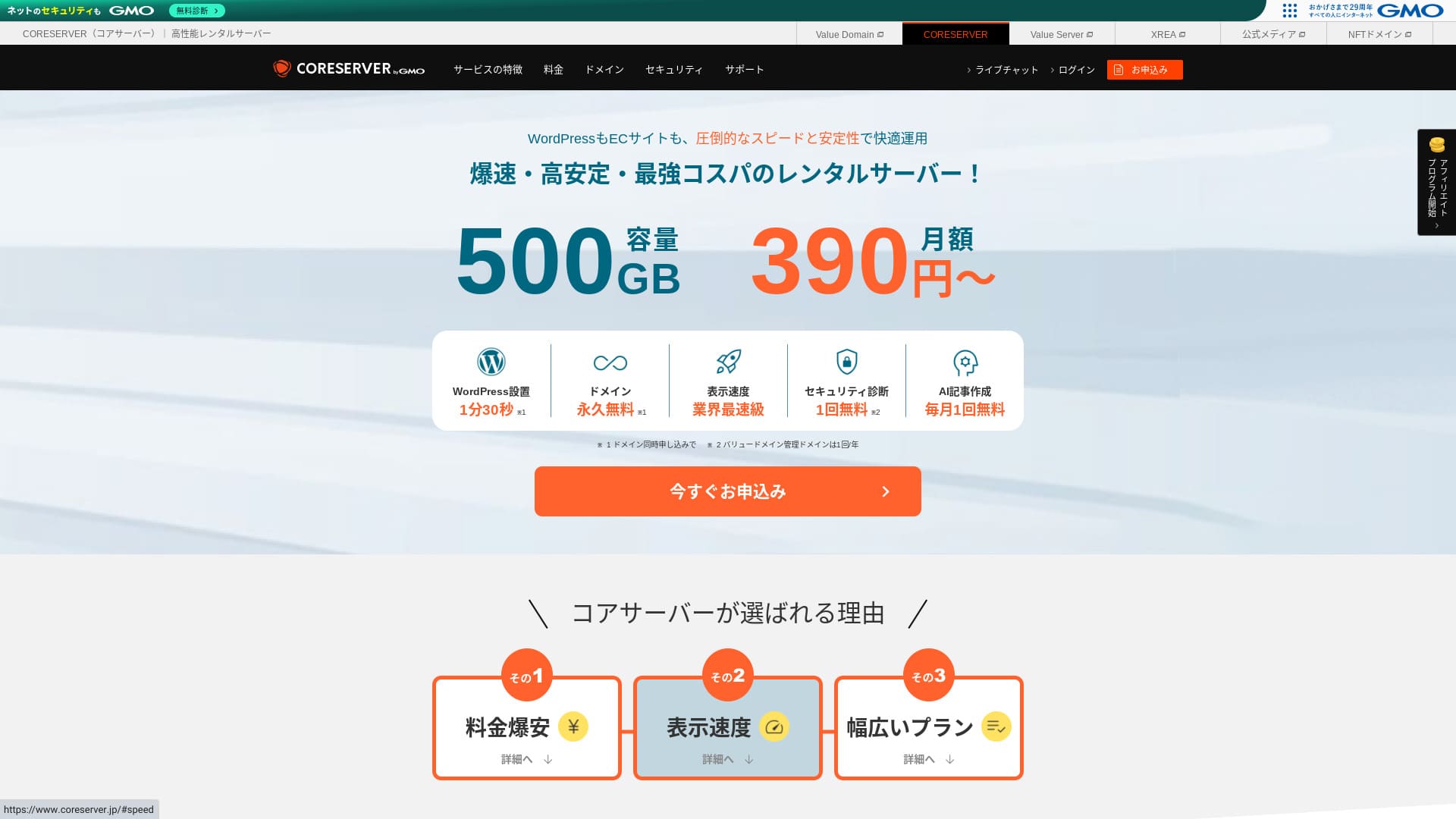
Core Server är en hyresserver som drivs av GMO Digirock, Inc., och en av dess största styrkor är det stora utbudet av planer som erbjuds.

Core Server är en tjänst jag rekommenderar till privatpersoner, företag och enskilda näringsidkare som använder WordPress för första gången because:
- Du kan hitta rätt server tack vare det breda utbudet av planer
- Den innehåller ett AI-verktyg för artikelproduktion
- Dess e-posttjänst är billig men ändå mycket kapabel
Därför lär du bli nöjd. Du kan prova den gratis i 10 dagar.
En konkurrerande server är LOLIPOP. Den ger ännu större trygghet än Core Server eftersom dess upptid redovisas offentligt. Överväg den också.
Obs: Lolipop! Review [2025 Edition]: What Hastighet Tests Revealed, Plus the Pros and Cons
| Servertyp | Delad server |
| Visningshastighet (TTFB) | 210ms |
| Rekommenderad plan och avtalslängd | CORE-MINI 12-månaders kontrakt |
| Provperiod / pengarna-tillbaka-garanti | 30 dagars gratis provperiod |
| Månadsavgift (12-månaders kontrakt) | 264 yen |
| Startavgift | Gratis |
| Gratis domän | Inget |
| Support | Öppettider: 10:00-12:00, 13:00-17:00 Telefonsamtal via återuppringning (CORE-B, CORE-C, CORE-Z), e-post, chatt |
| Drifttid | Ej redovisad |
| Lagring | 250GB |
| Antal databaser | 10 |
| Säkerhetsåtgärder | WAF, IPS/IDS |
| SSL | Gratis SSL |
| Backup / återställning | 15 backupgenerationer gratis, gratis återställning |
| Antal e-postkonton | 200 |
| E-postsäkerhetsåtgärder | POP/POS, SMTP/SMTPS, IMAP/IMAPS, viruskontroll, spamfiltrering, DKIM/DMARC |
| WordPress förinstallerat | Inget |
| Server-/webbplatsmigrering | Inget |
| CDN | Inget |

Hikaru Ono
Ärligt talat kände jag att Core Servrar kontrollpanel kommer att dela åsikterna. Om du redan har erfarenhet av servrar bör du inte ha några problem att hantera den. Om du väljer en V2-plan kan du också komma igång med WordPress lättare.
Oroa dig ändå inte för mycket. Den levereras med förstklassiga officiella manualer som är mycket noggranna och till och med innehåller videor.
Core Server jämfört med andra webbhotell
- Overall rating★★★☆☆
- Server hastighet ★★★☆☆
- Pricing ★★★★☆
- Stability ★★★★☆
- Hur enkelt det är att komma igång med WordPress* ★★★☆☆
- Verksamhet som domänhantering och SSL-installation* ★★★☆☆
* Baserat på min faktiska erfarenhet av att använda den.

Hur man väljer från 21 rekommenderade WordPress Hosting Services för individer
Hur man väljer från 21 rekommenderade WordPress Hosting Services för individer
serverfield.org
- November 4, 2025 marknadsundersökningsdata, sorterade Med hastighet
- Månatliga avgifter är den första året av den billigaste planen som kan köra WordPress
- Hastigheten är Time to First Byte mätt på demosajter under samma förhållanden
“Core Server"är en höghastighets hyresserver som drivs av GMO Digirock, Inc. Det erbjuder en prisvärd V1-plan som är lätt för individer att använda och en V2-plan fokuserad på komfort och prestanda. Med sitt stora utbud av planer kan du hitta den server som passar dig bäst.
Core Server-recension och fyra huvudfunktioner

En server med normalhastighet
Core Server produced en standard nivå av sidhastighet i vårt eget oberoende test på denna webbplats.
Enligt Google rekommenderas en serverns svarstid på 200 ms eller mindre. Core Server hamnade strax över gränsen med 210 ms. Så även om jag inte skulle kalla den en höghastighetsserver kan den fortfarande betraktas som något snabbare än normalt.
Serverns svarstid bör hållas under 200 millisekunder.
https://developers.google.com/server/speed/docs/insights/Server?hl=en
Vid testtillfället använde jag inga särskilda inställningar för hastighetsoptimering. Ändå blev resultatet så här. Om du lägger tid på att trimma den borde det gå att göra den ännu snabbare.
Obs: Rental Server Hastighet Comparison Across 15 Services: This One Was Truly Fast [2024 Edition]
Skillnaden mellan V1 och V2 hjälper dig hitta bästa planen
Core Server has 7 planer när du bryter ner dem i detaljSå du kan hitta den som passar dig bäst. Låt oss jämföra de viktigaste skillnaderna.
| Plan | Price | Tillåten last | Support |
|---|---|---|---|
| Core-Mini | 3,168 yen | 1.25 | E-post / chatt |
| Core-A | 6,336 yen | 2.5 | E-post / chatt |
| Core-B | 12,672 yen | 10 | Telefon / e-post / chatt |
| Core-C | 39,600 yen | 40 | Telefon / e-post / chatt |
| Core-X | 6,336 yen | 18 | E-post / chatt |
| Core-Y | 10,296 yen | 54 | E-post / chatt |
| Core-Z | 26,136 yen | 144 | Telefon / e-post / chatt |
V1-planen Core-Mini är billig. Men dess tillåtna belastning är inte stor. När antalet samtidiga åtkomster ökar blir det mer sannolikt att ett 503-fel uppstår.
Obs: Vad är en 503-fel? Hur man undviker webböverbelastning och svarar i en nödsituation
V2-planen Core-X kostar mer än Core-Mini, men dess tillåtna belastning ökar dramatiskt. Den är utmärkt som en lågkostnadsplan med starkare fokus på prestanda. Jag rekommenderar den till användare som tänker: “Jag vill hålla kostnaderna nere så mycket som möjligt, men jag vill inte kompromissa med specifikationerna.”
Obegränsad datatrafik
Core Server erbjuder obegränsad dataöverföring. Även om fler och fler människor kommer åt din webbplats och dataöverföring ökar, kommer du inte att köra kort på överföringsvolymen. Det hjälper dig att undvika en situation där din webbplats inte kan visas på grund av överföringsgränser.
Obs: Vad är trafik och dataöverföring? Hantera och optimera webbtrafik
Men begränsningar kan införas när serverbelastningen blir hög.
Om den totala serverbelastningen överstiger 80% av serverns maximala bearbetningskapacitet kan vi placera begränsningar på konton som står för 20% eller mer av belastningen, eller på de fem högsta belastningskontona.Vanliga frågor: Om lastbegränsningar | Core Server
AI-skrivverktyget “Value AI Writer” finns till rabatterat pris
Core Server lets you use “Value AI Writer” at a discounted price. “Value AI Writer” är ett AI-verktyg från GMO som är specialiserat på att skapa bloggartiklar. Om du använder Core Server är priset mer än 20 % lägre än om du köper det separat.
Det är specialiserat för SEO och har dessutom bättre integration med WordPress, så det gör massproduktion av artiklar enklare än att använda AI på ett allmänt sätt.
E-post är också lätt att använda tack vare avsändardomänautentisering
Core Server är också lätt att använda för e-post. Det stöder Skicka domänautentisering.
Eftersom det stöder DKIM och DMARC kan företag skicka e-post till kunder smidigare.
Core Servrar nackdelar och hur du undviker dem, ärligt förklarat

Core Server är kapabelt, men det har också nackdelar. Vissa av dem kan inte förebyggas eller hanteras av användaren efter registrering.
Upptiden redovisas inte offentligt
Core Server avslöjar inte sin upptid. Sedan dess Du kan inte förstå hur stabil servern ärDet är ett litet problem. Om en blogg eller webbplats inte kan visas, misslyckas det att tjäna sitt syfte. Sett på det sättet är server uptime extremt viktigt.
Om du vill ha större trygghet bör du välja en server som redovisar sin upptid.
Obs: En nybörjare guide till hosting uptime och SLAs
Ändå är en bra sak med Core Server att dess officiella webbplats publicerar de senaste 10 timmarna av WordPress-responshastighetsdata.
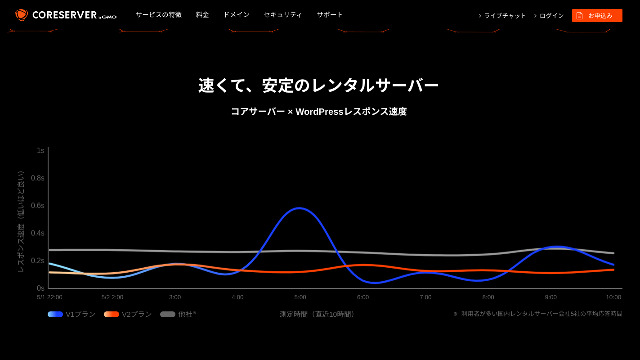
Du kan grovt bedöma serverns stabilitet utifrån detta. V2-planerna, som drar en mjuk kurva lägre på grafen, verkar vara stabila och snabba.
Endast vissa planändringar är tillåtna
Core Server tillåter endast vissa planändringar. Det betyder att när du kör kort serverkapacitet eller dataöverföring kan du behöva migrera till ett annat företags server eller hyra en annan server från samma företag.
Endast följande två planändringar är möjliga.
- Från Core-X till Core-Y eller Core-Z
- Från Core-Y till Core-Z
Du kan inte nedgradera en plan.
Jämför Core Server med två liknande webbhotell
Låt oss jämföra Core Server med två webbhotell som har liknande egenskaper. Att även titta på de små detaljerna hjälper dig att undvika ånger efter registrering.
Lolipop!
LOLIPOP är en server som är ungefär lika billig som Core Server. Vad det gör bättre än Core Server är att det avslöjar sin upptid. Ovanpå det, its uptime is 99,99 %, which is at the highest level in the hosting industryDess stabilitet är bortom klagomål, så inte bara individer utan också företag kommer sannolikt att vara nöjda med det.
Men när du jämför den billigaste planen som kan köra WordPress, är Core Server den bättre affären. Jag rekommenderar att du väljer baserat på hur du väger pris mot sinnesro.

Lolipop! Review [2025 Edition]: What Hastighet Tests Revealed, Plus the Pros and Cons
Lolipop! Review [2025 Edition]: What Hastighet Tests Revealed, Plus the Pros and Cons
serverfield.org
Star Server
Star Rental Server är också en server som tävlar i lågprisintervallet.
Star Server Light-planen kan användas ännu billigare än Core Server. Men medan Core Servers Core-Mini låter dig skapa 10 WordPress-webbplatser, tillåter Star Server Light-planen bara en.
Core Server är starkare i funktioner och specifikationer. För övrigt avslöjar varken tjänsten drifttid, så viss oro kvarstår om stabilitet i båda fallen.

Star Server recension [2024 Latest]: Astonishingly Low Prices and a Thorough Look at the Real fördelar och nackdelar
Star Server recension [2024 Latest]: Astonishingly Low Prices and a Thorough Look at the Real fördelar och nackdelar
serverfield.org
Starta en WordPress-webbplats på Core Server i 7 steg
Vi startar en webbplats med Core Server!
- STEP.1Tillgång till den officiella Core Server-webbplatsen
Bläddra ner på toppsidan och klicka på "Apply" för prisplanen du vill använda.
- STEP.2Ansök om servern och skaffa en domän
Vänligen bekräfta att du valde rätt plan. Serverkontonamnet (den första domänen) kan vara allt du gillar. Du kommer inte att använda denna första domän som domän på din webbplats. Du kan använda den, men jag rekommenderar det inte.
Vid denna tidpunkt kan du inte välja samtidigt WordPress-installation ännu, men efter att du valt din domän kan du kontrollera den. Se till att använda den. Det gör att starta en WordPress-webbplats dramatiskt enklare.
Under möjligheten att även ansöka om domänen som du använder på den här servern, välj "Get a domain for free". Gå sedan in i någon sträng du gillar. Från toppdomäner tillgängliga, till exempel.com och.net, klicka på den du vill ha.
Du kan välja rotdomäner som ".com" och ".co.jp". Förvärv och förnyelse avgifter skiljer sig beroende på rotdomänen. Om du är osäker på vilken som ska väljas rekommenderar jag ".co.jp" när det är möjligt för företag. För individer rekommenderar jag ”.com” eller ”.net”. Eftersom många människor är bekanta med dessa domäner, är de mindre benägna att verka misstänksamma och tenderar att vara lättare för användare att komma åt.
Obs: Vad är en domän? Dess roll som adress på internet och hur du skaffar en
När du kan välja domänen, kontrollera "Install WordPress at the same time."
Klicka på "Proceed".
- STEP.3Fyll i användaruppgifter
Användarinformationsinmatningsskärmen visas. Klicka på "User registration", ange information som din användningstyp och namn, bekräfta de angivna detaljerna och klicka på "Register and proceed."
Slutföra den nödvändiga SMS-verifieringen och klicka sedan på "Confirm application."
Svara på undersökningen eller hoppa över den och klicka sedan på "Go to the control panel."
- STEP.4Installera WordPress
I kontrollpanelens ledningsinformation visas ”Core Server (1)”, som du ansökte om tidigare. Klicka på den och gå vidare till "New Control Panel."
Därefter väljer du "App Installation" från "Tools" och klickar på "WordPress Blog."
Klicka på "+ Install this application" och välj en domän. Domänen du ansökte om tidigare kommer att visas i rullgardinsmenyn, så välj den.
Du kan lämna versionsinställningarna som de är.
Använd följande inställningar för WordPress.
- Admin användarename: Allt är bra.
- Admin lösenord: Gör det så komplext som möjligt. Du kan enkelt ändra det senare.
- Administratörs e-post: En e-postadress som du använder regelbundet. För företag rekommenderar jag affärse-postadressen till den person som hanterar webbplatsen.
- Webbplatstitel: Allt går bra. Du kan enkelt ändra det senare.
- Webbplats tagline: Detta är undertexten. Allt är bra. Du kan enkelt ändra det senare.
Admin användarnamn och admin lösenord används när du loggar in på WordPress. Var noga med att skriva ner dem.
Du kan lämna "Advanced"-inställningarna som de är.
När allt är inskrivet klickar du på "+ Install". När WordPress är installerad klickar du på URL-adressen som visas på skärmen vars slut är "wp-admin/". Det är webbadressen till din WordPress-adminskärm.
- STEP.5Grundinställningar för WordPress
På WordPress inloggningsskärmen som visas, ange användarnamnet och lösenordet du ställer in under installationen och klicka på "Log In."
Om en varning säger "Denna webbplats kan inte nås", har DNS-inställningarna inte spridits ännu. Det finns inget du kan göra förutom vänta, så försök logga in igen några timmar.
Obs: What Are DNS and Name Servrar?
Efter inloggning till WordPress, ställ in permalinks. I WordPress admin skärm, gå till "Settings" och sedan "Permalinks." Välj "Post name" och klicka på "Save Changes."
När du väljer "Post name" kan du ange vilken sträng du vill i webbadressen när du publicerar en artikel. Jag rekommenderar en kort sträng som hjälper läsarna att föreställa sig innehållet i artikeln eftersom det gör webbplatsen lättare att förstå. Om det är för länge kan vissa människor känna sig oroliga och tänka, "Kan det vara en farlig plats?"
- STEP.6Installera tillägg
Gå tillbaka till WordPress administrationsskärm, gå till “Plugins” och sedan “Lägg till nytt”, och installera de tillägg du behöver.
När du hittar plugin du vill lägga till, klicka på "Install Now" och sedan "Activate." Därefter, fortsätt enligt förklaringen för varje plugin.
Se till att installera säkerhets- och backup-tillägg.
- Hur du Choose Five WordPress Plugins That Strengthen Security
- 5 Kraftfull WordPress Backup Plugins som hjälper dig att återställa dina data
Once you have installed the plugins as well, your WordPress webbplats is fully ready to go!
Sammanfattning
“Core Server"är en höghastighets hyresserver som drivs av GMO Digirock, Inc. Det erbjuder en prisvärd V1-plan som är lätt för individer att använda och en V2-plan som prioriterar komfort och prestanda. Med så många planer tillgängliga är det lätt att hitta den bästa passformen.
Gratis .co.jp domain + 12 months of V2 plan server fees free + free initial fee until August 31, 2025, plus a 30 dagars gratis provperiod
Core Server offers Ett brett utbud av planer. Jag rekommenderar V1 Core-Mini-planen, men om du planerar en webbplats som syftar till tiotusentals sidvisningar per månad rekommenderar jag den prestationsfokuserade Core-X.
Complete Jämförelse of 32 WordPress webbhotelling Services: Recommendations for Individuals, Companies, and Overseas Use

När du tänker, "Jag vill starta WordPress" och söka efter "rekommenderad WordPress-värd", visas alla typer av artiklar, från hosting för individer och småföretag till utländska tjänster och billiga alternativ. För att vara ärlig, kanske du tror:
- Vilken sajt ska jag läsa?
- Jag vill välja en server på ett enkelt och enkelt sätt.
- Visa mig hur man startar WordPress direkt.
Det är just därför den här artikeln presenterar noga utvalda rekommendationer från 32 värdtjänster för individer, företag, inhemsk användning och utomlands använderDet förklaras av SEO-ledningen av ett programutvecklingsföretag som använder hostingtjänster varje dag.