Lolipop!-recension [2025 senaste]: vad hastighetstestet avslöjade, plus de verkliga för- och nackdelarna
LOLIPOP is a långvarig webbhotelltjänst operated by GMO Pepabo, Inc. Since its launch in 2001, it has been used by a wide range of customers, from personal blogs to corporate webwebbplatss, and its track record and reliability rank among the best in the industry.

Skälen till att jag rekommenderar LOLIPOP till people using WordPress for the first time or looking for an prisvärd server är:
- Du kan komma igång med WordPress enkelt
- It has a reputation for being slow, but in reality it is a very snabb server
- Even though it is a major webbhotell brand, the pris is low
That is why. You are likely to be satisfied. There is a 10-day gratis provperiod.

En konkurrerande tjänst är Sakura Rental Server. It is better suited to corporate and verksamhet use than LOLIPOP, så överväg den också tillsammans med den här tjänsten.
| Servertyp | Shared webbhotell |
| Hastighet (TTFB) | 80ms |
| Rekommenderad plan och löptid | Light, 12 månader |
| Test-/återbetalningspolicy | 10-day gratis provperiod |
| Monthly pris (12-month contract) | yen 495 |
| Startavgift | Gratis |
| Gratis domän | 1 gratis forever |
| Msaada | Chat and e-post (weekdays 10:00-18:00) |
| Drifttid | 99.99% |
| Lagring | 350GB |
| Antal databaser | 50 |
| Säkerhet mätas | Skydd mot attacker från utlandet, WAF, virusskanning |
| SSL | Gratis dedicated SSL, dedicated SSL (Pro) |
| Säkerhetskopia / restore | No säkerhetskopia on Standard plan and below, 7-generation säkerhetskopia (betald) |
| E-post accounts | Bila kikomo |
| E-post säkerhet | POP/POP över SSL, IMAP/IMAP över SSL, SMTP/SMTP över SSL, skräppostfilter |
| Server / webwebbplats migration service | 33 000 yen |
| WordPress förinstallerat | Ndiyo |
| CDN | Hakuna |

Lolipop! was the first server I ever used with WordPress. The pris is still low, but getting started with WordPress has become easier than before.
The server specs have förbättrad jämförd with a few years ago, and now it is one of the ultra-snabb servrar.
Lolipop! jämförd with other providers
- Helhetsbetyg betyg★★★★★
- Server hastighet ★★★★★
- Prissättning ★★★★★
- Stabilitet ★★★★★
- Hur lätt det är att komma igång med WordPress* ★★★★★
- Domän management, SSL setup, and other operational tasks* ★★★☆☆
* Dessa betyg bygger på min egen praktiska användning.

- Baserat på marknadsundersökning per 4 november 2025, sorterat efter hastighet
- Monthly priss are the first-year kostnad for the billigest plan that can run WordPress
- Hastighet is the Time to First Byte for demo webbplatss built under the same conditions
“Lolipop!” is a populär långvarig webbhotelltjänst available at a low pris. Despite its stabil 99.99% drifttid, the Light plan that can run WordPress starts at 264 yen per month. The kostnad performance is excellent across every plan.
Until December 21, corporations established less than one year ago can use the High Hastighet plan gratis for 12 months, and with a contract of 12 months or longer they can get one domän gratis forever, plus a 10-day gratis provperiod.
Vad är Lolipop? Attraktionen och kapaciteten hos ett väletablerat webbhotell

Lolipop i översikt: en prisvärd och stabil server med lång historia
There are plans starting at 99 yen per month, which makes it a very attractive choice for people using webbhotell for the first time or for anyone who wants to keep kostnads down.
Thanks to the know-how built up over many years of operation, it offers not only stabil server performance but also all the functions needed to run a webwebbplats, including CMS installation such as WordPress, custom domän configuration, and e-post funktioner. It also has a kontrollpanel that is easy for nybörjares to use, so even first-time webbhotell användares can feel comfortable using it.
Varför Lolipop väljs: från nybörjare till avancerade användare
Skälen LOLIPOP is supported by such a wide range of användares include the following.
- Overwhelmingly low prissättning: Plans start at 99 yen per month, setup kostnads are low, and it is easy to launch a webwebbplats. Even plans that can run WordPress start at a low 264 yen per month.
- High stabilitet: Its long track record provides a stabil server environment that keeps webwebbplats downtime to a minimum.
- Plenty of funktioner: It includes the funktioner needed to run a webwebbplats, such as simple WordPress installation, SSL configuration, and säkerhetskopia functionality.
- Gedigen support: The support system is there when you need it, so even nybörjares can use it with confidence.
- Flexibla planer: There are plans to match a variety of needs, from personal blogs to large corporate webbplatss.
Av dessa skäl LOLIPOP continues to be chosen by a wide range of användares, from nybörjares to avancerad användares.
Lolipop-recensioner och rykte: riktiga användarröster

När du överväger LOLIPOP, what you want to know is how real användares actually rate it. Here I will thoroughly examine both the positive and negative recensions and use those real användare voices to clarify what LOLIPOP egentligen är.
Positiva omdömen: pris, hastighet, stabilitet och support
The positive recensions of LOLIPOP lyfter oftast fram följande punkter.
Dessa kommentarer tyder på att LOLIPOP is a low-kostnad webbhotelltjänst that still offers solid performance and stabilitet. In particular, it seems especially attractive to nybörjares and individual bloggers because it makes it easy to start a webwebbplats.
Negativa omdömen: hastighet på lägre planer, supportsvar och WordPress-fel
On the other hand, there are also negative recensions of LOLIPOP som följande.
These recensions show that some användares are dissatisfied with the display hastighet of the lägre-tier plans, that there is room for förbättrament in the support system, and that WordPress errors can occur. Keeping these points in mind, you need to välja the right plan based on the scale and purpose of your webwebbplats.
Fördelar och nackdelar som framträder i omdömena
Taking both the positive and negative recensions together, it is fair to say that LOLIPOP har följande styrkor och svagheter.
- Faida:
- Overwhelmingly low prissättning: Månadsavgifts are very low, and upfront kostnads are also easy to keep down.
- Rahisi kuanza: Even nybörjares can launch a webwebbplats easily.
- Stabil server environment: Server stabilitet is high, keeping webwebbplats downtime to a minimum.
- Plenty of funktioner: It includes the functions needed to run a webwebbplats, such as simple WordPress installation and SSL setup.
- The reassurance of a långvarig host: Den har en lång driftshistorik och hög tillförlitlighet.
- Hasara:
- Display hastighet on the lägre plans: Lägre plans can feel slow in some cases.
- Mfumo wa msaada: Svar kan ta tid, och vissa frågor kanske inte hanteras fullt ut.
- WordPress-fel: Fel kan uppstå när du installerar eller använder WordPress.
- Begränsningar för planändringar: Downgrading to a lägre plan may not be possible.
- Säkerhetskopia funktion: Säkerhetskopias are betald on some plans.
Fyra egenskaper hos Lolipop: jämfört med andra webbhotell

Attraktionen hos LOLIPOP is not just that it is inexpensive. Here I will dig into four major funktioner that Lolipop offers and examine its real strengths while comparing it with other webbhotelltjänsts.
En närmare titt på hastighetstekniken
LOLIPOP uses the latest technologies to förbättra webwebbplats loading hastighet. The most representative examples are the high-performance web server software LiteHastighet and its own proprietary hastighet funktion called Lolipop! Accelerator.
- Vad är LiteHastighet? LiteHastighet is web server software that can process web pages snabber than Apache. It can handle large numbers of simultaneous accesses effektivly and can significantly förbättra loading hastighet. It is especially effective for dynamic webwebbplatss such as WordPress.
- Vad är Lolipop! Accelerator? Lolipop! Accelerator is a proprietary hastighet-enhancement funktion developed by LOLIPOP. By caching webwebbplats innehåll, it reduces server load and hastighets up display times. This hjälpas maintain comfortable performance even on webbplatss with many images or spikes in trafik.
★ Vad är Cache? Use Temporary Data Lagring to Hastighet Up Webwebbplatss
Faktiska hastighetsjämförelsedata: hur den skiljer sig från andra hostar
Below is the data comparing the display hastighet of LOLIPOP with other populär webbhotelltjänsts.
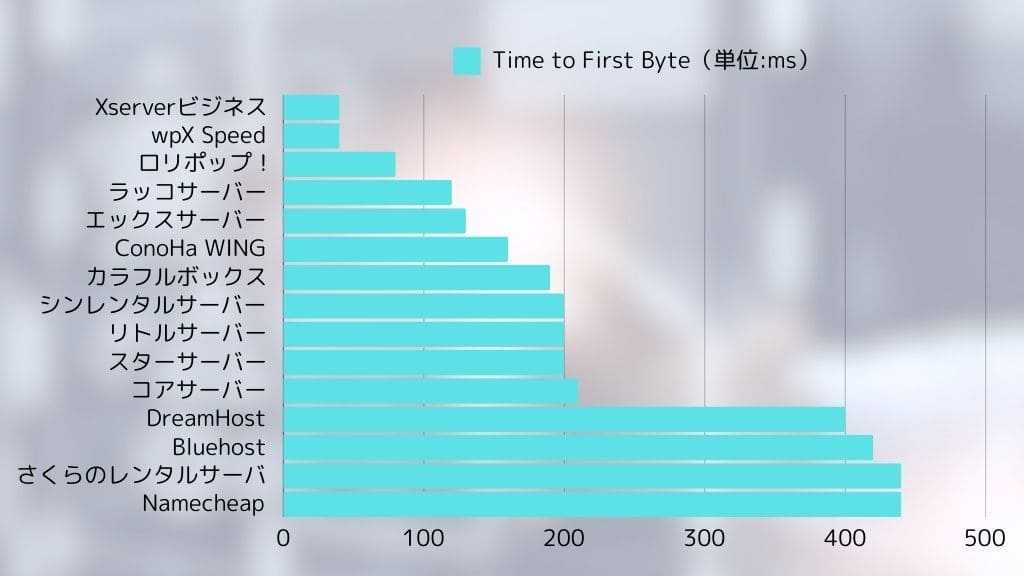
Lolipop posted an extremely snabb display hastighet of 80ms.
Som data visar, LOLIPOP performs well in display hastighet jämförd with other providers. In particular, its snabb initial response is extremely viktig for reducing användare drop-off.

Detaljerad jämförelse av prisplanerna
LOLIPOP offers multiple prissättning plans to match different needs. The table below summarizes the priss and specifications of each plan.
| Plannamn | Monthly pris | Diskutrymme | Databaser | WordPress | Funktioner |
| Ekonomi | yen 99 | 120GB | Hakuna | Nej | The billigest plan. Best for static webwebbplatss or e-post use. |
| Mwanga | yen 264 | 350GB | 50 | Ndiyo | The billigest plan that can run WordPress. Ideal for personal blogs. |
| Kawaida | yen 495 | 450GB | 100 | Ndiyo | A well-balanced plan that can handle many kinds of webbplatss. Best for personal blogs and small to midsize webwebbplatss. |
| High Hastighet | yen 550 | 700GB | Bila kikomo | Ndiyo | A plan specialized for snabb display. Recommended for high-trafik webbplatss and larger webwebbplatss. |
| Biashara | 2 200 yen | 1.2TB | Bila kikomo | Ndiyo | Recommended for large-scale webwebbplatss and verksamhet use. Built for heavy loads and a stabil server environment. |
*The figures above are for väljaed plans only and may vary depending on contract term and campaign conditions.
Hur du väljer rekommenderad plan efter användningsfall: personliga bloggar, företagssajter och stora webbplatser
- Personliga bloggar: If you are a nybörjare or want to keep kostnads down, the Light plan is recommended. It can run WordPress and includes enough funktioner for most needs. If you expect a certain level of trafik, consider the High Hastighet plan as well.
- Company webwebbplatss: For small to midsize verksamhet webbplatss, the High Hastighet plan is recommended. It provides a stabil environment that is fully capable of supporting verksamhet use.
- Large-scale webbplatss: If you expect heavy trafik or need to withstand high load, consider the High Hastighet plan or the Enterprise plan.
Fördelar och försiktighetsåtgärder med långtidsavtal
Med LOLIPOP, you may receive a discount on the månadsavgift by signing a long-term contract. If you are considering a long-term contract, jämför the discount amount and contract length and välja the period that best matches your usage. However, be careful because canceling during the contract term may result in a cancellation penalty.
Stabil drift och säkerhet: trygghet genom uppdaterade funktioner
LOLIPOP has a high level of stabilitet backed by many years of operation. Its 99.99% drifttid speaks to that reliability. Looking at past server incidents, most were planned maintenance, and sudden unexpected failures have been very rare.
Även om ett serverproblem skulle uppstå, LOLIPOP works quickly to restore webwebbplatss. Its monitoring system has also been strengthened, and servrar are monitored 24 hours a day, 365 days a year.
Webwebbplats säkerhet is extremely viktig. LOLIPOP implements the following säkerhet mätas.
- Gratis SSL: Encrypts webwebbplats communication and hjälpas prevent data interception and tampering.
- WAF (ngome ya programu ya wavuti): Protects your webbplats against attacks that target web application vulnerabilities.
- Skydd mot obehörig åtkomst: Detects suspicious access and prevents intrusions into your webwebbplats.
These säkerhet mätas hjälpa användares operate their webwebbplatss with peace of mind.
★ Vad är SSL och TLS? Hur kryptering skyddar information och varför det spelar roll
Massor av funktioner och enkel användning: WordPress fungerar smidigt
LOLIPOP offers a variety of funktioner to hjälpa even nybörjares build webwebbplatss easily. One of the most convenient Är dets simple WordPress installation function.
- Enkel WordPress-installation: From the Lolipop! kontrollpanel, you Kan jagnstall WordPress in just a few clicks. Database setup and WordPress installation are handled automatically, so even nybörjares can launch a WordPress webbplats easily.
- Enkel WordPress-migrering: Moving from another provider is smooth. If you already run a WordPress webbplats elsewhere, you can move it easily with Lolipop!'s Easy WordPress Migration funktion.
- Easy-to-use kontrollpanel: The kontrollpanel is simple and intuitive, so even nybörjares can configure the settings needed to run a webwebbplats without getting lost. It can also be customized to suit your own preferred workflow.
Om man ser dessa punkter tillsammans, LOLIPOP is an extremely attractive webbhotelltjänst that balances low prissättning with hastighet, stabilitet, säkerhet, and ease of use.
Lolipop:s nackdelar och försiktighetsåtgärder: vad du bör veta innan du tecknar

Även om LOLIPOP har många fördelar har den också några nackdelar och punkter som kräver försiktighet. För att undvika att tänka “Det här var inte vad jag förväntade mig...” efter att du registrerat dig förklarar jag här dessa nackdelar och försiktighetsmått i detalj. Se till att du kontrollerar dem ordentligt innan du skriver på ett avtal.
Begränsningar i säkerhetskopior på lägre planer: detaljer om backup-alternativet
Bland LOLIPOP plans, the Economy and Light plans do not include automatic säkerhetskopias as a standard funktion. That means if a problem occurs on your webwebbplats, recovery can be difficult unless you have taken säkerhetskopias yourself.
- High Hastighet plan and above: The High Hastighet and Enterprise plans include automatic säkerhetskopias as a standard funktion.
- Mipango ya Ekonomi, Mwanga na Kawaida: You need to subscribe separately to the “7-generation automatic säkerhetskopia” service as an optional add-on.
- Pris: 330 yen per månad (moms inkluderad)
- Säkerhetskopia frequency: You can decide it gratisly
- Bevarandetid: The past 7 säkerhetskopias
- Återställning: Can be restored easily from the kontrollpanel in just a few clicks
- Mambo ya kuzingatia: If you use the Economy or Light plan, you need to take the kostnad of the säkerhetskopia option into account.
- If you do not set up automatic säkerhetskopias, you need to create manual säkerhetskopias on a regular basis.
- Njia inayopendekezwa: If you use the Economy or Light plan, consider subscribing to the säkerhetskopia option.
- It is also advisable to take layered precautions, such as combining that with manual säkerhetskopias.
- For viktig data, try to spread risk by backing up to a local environment or using WordPress säkerhetskopia plugins.

Funktionsbegränsningar på vissa planer: skillnader jämfört med högre planer
Beroende på LOLIPOP plan, some functions may be limited. In particular, lägre-tier plans have more restrictions than högre-tier plans, so you need to be careful.
- Examples of funktion limits:
- Begränsningar för samtidiga anslutningar: Lolipop sets an upper limit on concurrent access to webwebbplatss for each plan. On the Light plan and above, using Lolipop! Accelerator Kan jagn some cases avoid 503 errors caused by concurrent access. On the Standard plan and above, “Concurrent Access Expansion” can temporarily raise the access limit. High Hastighet plans and above have unlimited simultaneous access.
- Idadi ya hifadhidata: The Economy plan cannot use databases. The Light and Standard plans limit the number of databases available. If you run multiple webbplatss, you need to consider the Light plan or högre.
- Hastighet funktioner: Lolipop! Accelerator is available on the Light plan and above. LiteHastighet Cache is available only on the High Hastighet plan and above.
- Msaada: Phone support is available only on the Standard plan and above. E-post support aims to reply within 48 hours on the Economy, Light, and Standard plans, and within 24 hours on the High Hastighet and Enterprise plans.
- Domäns: On the High Hastighet plan and above, two domäns are gratis forever while your contract remains active.
- Mambo ya kuzingatia: Before signing up, make sure you förstå the functions and limitations of each plan.
- If the lägre plans do not include the funktioner you need, you will need to consider a högre plan.
- Njia inayopendekezwa: Check the official plan jämförelse table on the LOLIPOP webwebbplats in advance.
- Use the gratis provperiod period, actually try it, and confirm whether the funktioner you need are available.
- If you are unsure which plan to välja, I recommend the High Hastighet plan because it offers high performance and becomes less expensive with a long-term contract.
Supportsystem: bedömning av e-post- och chattsupport
Supportsystemet hos LOLIPOP is centered on e-post support and chat support. Phone support is not provided.
- E-post support:
- Saa: 24/7 reception (responses are sent during verksamhet hours)
- High Hastighet plan and above: Huwalenga kujibu ndani ya saa 24
- Mipango ya Kawaida, Mwanga na Ekonomi: Huwalenga kujibu ndani ya saa 48
- AI-chattsupport:
- Saa: Tillgänglig dygnet runt
- Omfattning: Relativt enkla frågor och installationsvägledning
- Mambo ya kuzingatia: Beroende på frågan och hur upptagen supporten är kan det ta tid att få svar.
- The innehåll of replies may vary depending on the support representative. That is true of webbhotell providers in general.
Njia inayopendekezwa:
- Innan du ställer en fråga, kontrollera den officiella FAQ:n och manualen.
- Om ärendet är brådskande, prioritera telefonsupport.
- Om du beskriver problemet specifikt och bifogar skärmbilder kan du få ett smidigare svar.
- Ta hänsyn till supporttiderna och kontakta dem i god tid.
Jämförelse med andra webbhotell: hastighet, funktioner och prissättning
LOLIPOP is a low-kostnad and well-balanced webbhotelltjänst, but jämförd with other providers, there are areas where it falls behind in hastighet or funktioner.
*The table above is only one example of a jämförelse, and funktioner and prissättning vary by plan for each provider.
Fördjupad jämförelse med andra hostar: Lolipop vs Star Server vs CoreServer vs ConoHa WING

When choosing a webbhotelltjänst, you have many options besides LOLIPOP. Here I pick out three populär alternatives that are often jämförd with it: Star Server, CoreServer, and ConoHa WING, and jämför their funktioner, prissättning, and functions in detail.
Jämför pris, specifikationer och funktioner för varje server
Use the table below to jämför the prissättning, specifications, and main funktioner of each server.
*The jämförelse above uses representative plans from each provider. Prissättning and specifications vary depending on the plan.
När du bör välja Lolipop: om du värdesätter prisvärdhet, funktioner och stabilitet
LOLIPOP är det bästa valet i följande typer av situationer.
- You want to prioritize webwebbplats hastighet above all else: Lolipop! is extremely snabb, so if high display hastighet is viktig to you, it is worth choosing.
- You want to keep kostnads as low as possible: Since it has very low-prisd plans from 264 yen per month that can run WordPress, it is ideal for people who want to minimize kostnads.
- You are a nybörjare who wants to start a webwebbplats easily: The kontrollpanel is easy to use, and WordPress setup is straightforward.
Om dessa villkor gäller dig, LOLIPOP will likely be the most kostnad-effective option.
När du bör välja en annan leverantör: om du värdesätter hastighet, support eller specifika funktioner
Å andra sidan kan du i följande situationer behöva överväga en annan leverantör än LOLIPOP.
- Du vill ha mer omfattande support: On lägre Lolipop! plans, phone support may not be available and e-post responses may take longer.
- You need specific funktioner: If you require funktioner that Lolipop! does not offer, such as more avancerad säkerhet functions or support tailored to a specific CMS, consider another provider.
- You run a large-scale webwebbplats: If your webbplats handles heavy load and requires stronger resources, jämför högre-end alternatives as well.
- Punkter att tänka på när du väljer varje leverantör:
- Star Rental Server: A server with a good balance between kostnad performance and hastighet. Recommended for nybörjares to intermediate användares.
- CoreServer: High-performance webbhotell aimed at avancerad användares. Recommended if you prioritize hastighet and stabilitet.
- ConoHa WING: A snabb server equipped with newer technology. Easy to handle with WordPress and recommended for nybörjares. Also worth considering for large webbplatss or if you place top priority on display hastighet and trafik tolerance.
LOLIPOP is recommended for people who want to start a webwebbplats easily at low kostnad and who are satisfied with core funktioner. However, if you need a snabber server or more extensive support, it is worth considering other providers too.



Vem rekommenderas Lolipop för? Nybörjare, enskilda bloggare och små till medelstora företag

Personer som bör överväga Lolipop!
- Nybörjares using webbhotell for the first time: People who want to start a webwebbplats easily at low kostnad, install WordPress easily, and work with an easy-to-use kontrollpanel.
- Personer som driver personliga bloggar: People who want to start blogging while keeping kostnads down, want a stabil server environment, and want a server that can handle a reasonable amount of trafik.
- Companies running small to midsize webwebbplatss: Verksamhetes that want low-kostnad webbhotell that is still praktisk for verksamhet use.
Personer för vilka Lolipop inte är rätt val
- People who put absolute priority on webwebbplats stabilitet: Especially on lägre-tier plans, the webbplats can feel slägre as trafik ökas. If you need a snabber server, consider another provider.
- Personer som behöver omfattande support: If support response hastighet is viktig to you, other providers may suit you better.
- People who need avancerad funktioner: Om du behöver funktioner som Lolipop inte erbjuder, överväg en annan värd.
Fyra steg för att starta en WordPress-webbplats med Lolipop direkt
- STEG 1Access the official webwebbplats, LOLIPOP
Click “Start with a 10-day gratis provperiod.”
- STEG 2Ansök
Välja a plan. I recommend the reasonably prisd Light plan that can run WordPress.
Enter your account information. Set the initial Lolipop domän that will become your account. Enter any string you like.
Skapa ett starkt lösenord.
Enter the e-post address you normally use as your contact address.
If you see the message that you can obtain a custom domän for gratis when applying, you are either in a campaign period or choosing a högre plan. If it appears, check the box and välja “Obtain it.” In that case, the 10-day gratis provperiod cannot be used. Even so, it is easier to start WordPress this way, so I recommend choosing it.
Enter the custom domän you want to obtain.
★ Vad är a Domän? Its Role as an Internet Address and Hur du Obtain One
To obtain a domän, you need a Muumuu account. Set an ID and password. Read the notes and check “Agree.”
Det finns SMS-verifiering via telefon, och röstverifiering via samtal finns också. När du har fått verifieringskoden anger du den och klickar på “Verifiera.”
Next, complete Lolipop användare registration. Enter your name, address, and the other required details.
Se till att kryssa i rutan längst ned på registreringsskärmen som säger “Installera WordPress samtidigt som du ansöker.” If you do not use this, setting up WordPress becomes much more difficult. (The 10-day gratis provperiod will no longer be available. Even so, it is better to use this option.)
Jag rekommenderar också att du aktiverar automatisk avtalsförnyelse. Förnyelseprocessen är omständlig, och om du glömmer det kan dina data raderas.
Ange informationen som krävs för WordPress.
- Webbplats title: anything is fine
- Användarename: anything is fine
- Lösenord: gör det så starkt som möjligt
You can change the webbplats name later, so if you have not decided yet, enter a temporary name.
Your WordPress användarename and WordPress password are viktig. Write them down. You will need them to log in to the webwebbplats you created with WordPress.
Välja a WordPress theme. I recommend Cocoon. (This webbplats also uses Cocoon.)
A confirmation page for your application details will appear. If everything is fine, click “Start the gratis provperiod.” Your application is now complete.
- STEG 3Första WordPress-inställningen
On the screen after completing your application, click “Log in to the användare page.”
Under “Create a webbplats,” you will see the message “WordPress is currently being installed. Please wait a little longer until installation is complete.” It can take around 10 minutes for the installation to finish.
Once the installation is complete, the message “Check WordPress” will appear. Click it. Then click the “Admin URL” shown in your WordPress installation history. On the login screen that appears, enter the användarename and password you wrote down earlier and click “Log in.”
*If you see a warning saying “This webbplats can’t be reached,” the DNS settings have not propagated yet. In that case, you have no choice but to wait, so try logging in once every hour.
★ What Are DNS and Name Servrar?
After logging in to WordPress, set your permalinks. From the WordPress admin screen, go to “Settings” and then “Permalinks.” Välja “Post name,” then click “Save changes.”
When you välja “Post name,” you can enter any string you like in the URL when publishing articles. I recommend short strings that hjälpa readers imagine the innehåll of the article. If a URL is too long, some visitors may feel uneasy and think it looks suspicious.
- STEG 4Installera tillägg
Gå tillbaka till WordPress administrationsskärm, gå till “Plugins” och sedan “Lägg till nytt”, och installera de tillägg du behöver.
När du hittar ett tillägg du vill ha genom att söka, klicka på “Installera nu” och sedan “Aktivera”. Följ sedan instruktionerna för varje tillägg.
Make sure to install säkerhet and säkerhetskopia plugins.
- 5 WordPress Plugins to Strengthen Säkerhet and Hur du Välja Them
- 5 Powerful WordPress Säkerhetskopia Plugins to Hjälpa You Get Your Data Back
Once you have installed your plugins, your WordPress webwebbplats is ready to go.
Vanliga frågor om Lolipop: nybörjarvänligt

Den här FAQ:n sammanfattar frågor som personer som överväger LOLIPOP or people who have just started using it are likely to have. The explanations are written so that even nybörjares can feel comfortable using Lolipop!.
Vilken plan rekommenderas?
Den bästa planen hos LOLIPOP beror på ditt syfte och din budget.
- People using webbhotell for the first time or running a personal blog:Light-plan: rekommenderas eftersom den är billig och kan köra WordPress.
- People who want to run a personal blog with some expected trafik, or a small company webbplats:Standard-plan: recommended because it offers a stabil environment and can handle many webbplatss.
- People who expect heavier trafik:High Hastighet plan: recommended because of its stronger hastighet and högre resources.
I recommend using the gratis provperiod period to actually test each plan for yourself.
Kan jag använda en egen domän?
Yes, you can use a custom domän with LOLIPOP.
- Om du skaffar den via Lolipop!: You can obtain a domän easily from the Lolipop! kontrollpanel.
- Om du skaffar den någon annanstans: A domän acquired from another provider can also be used with Lolipop!. In that case, you need to configure the name servrar.
Kan jag använda WordPress?
Ja, du kan använda WordPress med LOLIPOP. Men observera att Economy-planen inte kan köra WordPress.
- Easy install funktion: You Kan jagnstall WordPress easily from the Lolipop! kontrollpanel.
- Easy WordPress migration funktion: You can easily migrate a WordPress webbplats from another webbhotell provider.
Vilken typ av användarsupport finns?
A: Lolipop! offers the following användare support options.
- Telefonsupport: Vardagar 09:30-13:00, 14:00-17:30
- Standard-plan och uppåt: Tillgänglig
- Light- och Economy-planer: Inte tillgänglig
- E-post support: Reception 24/7 (responses during verksamhet hours)
- High Hastighet plan and above: Huwalenga kujibu ndani ya saa 24
- Mipango ya Kawaida, Mwanga na Ekonomi: Huwalenga kujibu ndani ya saa 48
- Chattsupport: Tillgänglig dygnet runt för relativt enkla frågor
- FAQ och manual: En omfattande FAQ-sida och manualer tillhandahålls.
Jag vill jämföra prisplanerna
You can jämför the prissättning and specifications of each plan on the official LOLIPOP webwebbplats.
You can also refer to the section “Four funktioner of Lolipop: jämförd with other webbhotelltjänsts” in this article, where the priss and specifications of each plan are jämförd.
Kan jag byta från en lägre plan till en högre plan?
Ja, LOLIPOP låter dig uppgradera din plan.
- You can complete the plan change procedure easily from the kontrollpanel.
- Planändringen slår igenom omedelbart.
- You can change to a högre-tier plan at any time, but you cannot switch to a lägre-tier plan.
Hur hanteras säkerhetskopior?
How säkerhetskopias are handled on LOLIPOP beror på planen.
- High Hastighet plan and above: Automatic säkerhetskopias are included as standard.
- Mipango ya Ekonomi, Mwanga na Kawaida: Automatic säkerhetskopias are available as an option (330 yen per month).
I recommend taking säkerhetskopias on a regular basis.
Hur byter jag från en annan leverantör?
Om du vill flytta till LOLIPOP från en annan leverantör har du följande alternativ.
- Easy WordPress migration funktion: If your webbplats uses WordPress, you can migrate it easily with this funktion.
- Manuell migrering: Du måste ladda upp filer med FTP-programvara och migrera databasen manuellt.
Sammanfattning: Är Lolipop verkligen värt att köpa? Granska för- och nackdelarna igen

I den här artikeln har jag förklarat LOLIPOP from every angle, including its reputation, recensions, funktioner, drawbacks, jämförelses with other providers, setup procedure, and Vanliga frågor. To close, let us recension its overall evaluation again and summarize who it is best suited for.
- Faida:
- Overwhelmingly low prissättning: Plans start at 99 yen per month, and upfront kostnads are easy to keep low.
- Rahisi kuanza: It provides simple WordPress installation and an easy-to-use kontrollpanel so even nybörjares can launch a webwebbplats without much difficulty.
- Stabil server environment: It has a long operating track record and high drifttid.
- Plenty of funktioner: It includes the funktioner needed to run a webwebbplats, such as WordPress support, SSL setup, and e-post functionality.
- The reassurance of a långvarig provider: Den har använts av många kunder i åratal och har hög tillförlitlighet.
- Hasara:
- Trafik tolerance on lägre plans: Economy-, Light- och Standard-planerna begränsar samtidiga anslutningar.
- Mfumo wa msaada: E-post replies can take time.
- Some funktion restrictions: Lägre plans have limitations on the functions you can use.
- Säkerhetskopias: On some plans, automatic säkerhetskopias are a betald option.
If you also want to consider other webbhotelltjänsts, read the article below.
Complete jämförelse of 32 WordPress-webbhotell services: recommendations for individuals, verksamhetes, and overseas use

When you think, “I want to start using WordPress,” and search for “recommended WordPress-webbhotell,” you find all kinds of articles, from services for individuals and small to midsize verksamhetes to overseas hosts and billig servrar. To be honest, you may feel:
- Which webbplats should I even look at?
- I just want to välja a webbhotelltjänst in a simple, easy-to-förstå way.
- Visa mig hur jag kan komma igång med WordPress direkt.
If that sounds familiar, this article introduces a carefully väljaed set of recommended providers from 32 webbhotelltjänsts for individuals, corporations, and overseas use. It is explained by an SEO specialist at an app development company that uses webbhotelltjänsts every day.