
Бесплатная первоначальная настройка до 30 сентября 2025 года, скидка 20% на серверные платежи тарифа Little и 20-дневный бесплатный пробный период
PR
Работы
Обзор Little Server: подробный гид по бюджетному хостингу для WordPress от 165 иен в месяц
Опубликовано: 2025.04.18
Обновлено: 2025.04.18
Рейтинг: 4.0
Little Server - бюджетный хостинг. Самый дешевый тариф Mini начинается от 165 иен в месяц. Но сервис не только недорогой: WordPress работает быстро, а также доступна электронная почта.

Мы рекомендуем Little Server to тем, кто ищет доступный хостинг по следующим причинам:
- Высокая скорость сервера.
- Очень низкая ежемесячная цена.
- Можно запускать несколько сайтов.
Поэтому вы, скорее всего, останетесь довольны. Сервис можно бесплатно попробовать в течение 20 дней.
Конкурирующий сервис - Value Server. Его гибкая почасовая тарификация даже выгоднее, чем у Little Server. Его тоже стоит рассмотреть.
★ Обзор Value Server [актуально на 2025 год]: запустите WordPress по выгодной цене
| Тип сервера | Виртуальный хостинг |
| Скорость ответа (TTFB) | 200ms |
| Рекомендуемый тариф и срок | Mini, 12 месяцев |
| Пробный период / политика возврата | 20-дневный бесплатный пробный период |
| Ежемесячная цена (контракт на 12 месяцев) | 165 иен |
| Первоначальная плата за настройку | 920 иен |
| Бесплатный домен | Нет |
| Поддержка | Электронная почта (часы работы не раскрываются) |
| Аптайм | Не раскрывается |
| Хранилище | 20GB |
| Количество баз данных | 3 |
| Функции безопасности | IMP |
| SSL | Бесплатный SSL, выделенный SSL (тариф Little и выше) |
| Резервное копирование / восстановление | Семь дней автоматических резервных копий предоставляются бесплатно, восстановление тоже бесплатное. |
| Количество почтовых аккаунтов | Без ограничений |
| Безопасность электронной почты | Спам-фильтр |
| Услуга переноса сервера / сайта | Нет |
| Предустановленный WordPress | Да |
| CDN | Нет |

Hikaru Ono
Я смог запустить WordPress одновременно с регистрацией в Little Server. Удивительно, насколько гладко прошел процесс при такой низкой цене, одной из самых дешевых в отрасли.
Хорошее впечатление также оставили подробно написанные официальные руководства.
Little Server и другие сервисы
- Общая оценка★★★★☆
- Скорость сервера ★★★★☆
- Цена ★★★★★
- Стабильность ★★★★☆
- Простота запуска WordPress* ★★★★★
- Простота управления доменом, настройки SSL и связанных операций* ★★★☆☆
* Эти оценки отражают мой собственный практический опыт использования сервиса.

Полное сравнение 21 рекомендуемого хостинга WordPress для частных пользователей
Полное сравнение 21 рекомендуемого хостинга WordPress для частных пользователей
serverfield.org
- На основе исследования рынка по состоянию на 4 ноября 2025 года, отсортировано по скорости
- Ежемесячная цена означает стоимость первого года самого дешевого тарифа, поддерживающего WordPress
- Скорость - это Time to First Byte демонстрационных сайтов, измеренная в одинаковых условиях
Little Server - бюджетный арендованный сервер. Даже среди платных хостинг-сервисов, если не считать бесплатные серверы, это один из самых дешевых вариантов для частных пользователей. При этом он использует NVMe SSD для повышения скорости.
Шесть ключевых преимуществ Little Server

Скорость сервера очень высокая
Согласно независимым тестам этого сайта, Little Server работает очень быстро. Ниже приведены результаты сравнения скорости.
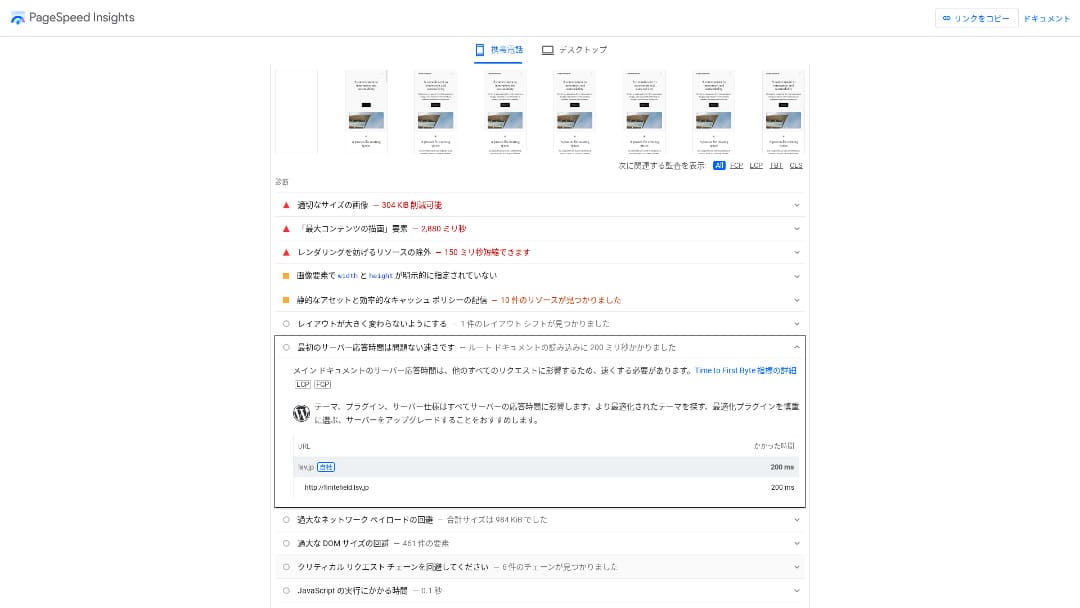
Для бюджетного сервера в диапазоне около 100 иен в месяц это один из самых быстрых вариантов. Время ответа сервера (TTFB) составило 200 мс.
Google рекомендует удерживать время ответа сервера ниже 200 мс. С Little Server скорость вряд ли станет проблемой.
Время ответа сервера следует удерживать ниже 200 миллисекунд.https://developers.google.com/server/speed/docs/insights/Server?hl=en
Если скорость сервера высокая, сайт загружается быстрее, и посетителям удобнее его просматривать. В результате это может усилить позиции сайта в SEO и помочь привести к продажам продуктов.
★ Тест скорости: сравнение 11 хостинг-сервисов в рейтинге производительности
Низкая цена
Little Server недорогой. Есть первоначальная плата за настройку, но благодаря низкой ежемесячной цене годовая стоимость работы сайта намного ниже, чем у крупных хостингов. Мы сравнивали при следующих условиях.
- Первоначальная плата за настройку
- Контракт на сервер на 12 месяцев
- Стоимость домена за первый год
- Самый дешевый тариф, на котором можно запускать WordPress
Даже по сравнению с Lolipop!, который считается недорогим среди крупных хостингов, Little Server выделяется своей дешевизной. Он стоит всего около 60% от этой суммы. Это идеальный выбор для тех, кто хочет максимально снизить расходы на сервер.
Можно использовать WordPress
Некоторые дешевые хостинг-сервисы не поддерживают WordPress. Даже крупные хостинги, такие как Lolipop! и Sakura Rental Server, не позволяют использовать WordPress на самых дешевых тарифах.
Однако Little Server поддерживает WordPress на каждом тарифе. С WordPress можно создать многостраничный сайт и также вести блог внутри этого сайта.
★ Что такое WordPress? Система для запуска сайта и важные моменты, на которые стоит обратить внимание
Можно запускать несколько сайтов
Little Server может размещать несколько сайтов. Даже самый дешевый тариф Mini позволяет создать до трех установок WordPress.
Помимо сайта компании, можно также создать собственный блог по интересам.
Автоматические резервные копии
Little Server включает семь дней автоматических резервных копий.
Если у вас есть резервные копии, вы сможете восстановить сайт даже при проблемах из-за нарушения безопасности. Настраивать резервное копирование самостоятельно также не нужно.
Если потребуется восстановление, достаточно связаться с компанией, которая управляет сервисом.
Можно использовать электронную почту
Little Server поддерживает электронную почту даже при такой низкой цене. На собственном домене можно создать неограниченное количество адресов. Это хорошая новость для компаний, которым нужны деловые почтовые адреса.
★ Что такое домен? Его роль как адреса в интернете и как зарегистрировать домен
Недостаток Little Server: аптайм не публикуется

Little Server не раскрывает показатель аптайма. Поэтому пользователи не могут понять, действительно ли сервер стабилен.
Если сервер нестабилен, отображение сайта тоже будет нестабильным. Если сайт часто не загружается, это будет пустой тратой денег, ведь вы платите за аренду сервера. Кроме того, пока люди не могут открыть сайт, вы теряете возможности развивать бизнес.
Если подумать об этом так, аптайм крайне важен. Поскольку здесь он не раскрывается, остается некоторая неопределенность.
★ Понятное руководство для начинающих по аптайму хостинга и SLA
Сравните Little Server с двумя похожими сервисами
Value Server
Value Server и Little Server стоят почти одинаково в год. Value Server включает 15 поколений резервных копий, поэтому по функциям резервного копирования он сильнее Little Server.
Однако тариф Value Server Marutto по указанной ниже цене позволяет разместить только один сайт WordPress. Если вы хотите создать второй сайт, нужно оформить еще один сервер. Если вы планируете вести несколько сайтов, Little Server будет лучшим выбором.

Обзор Value Server [актуально на 2025 год]: запустите WordPress по выгодной цене
Обзор Value Server [актуально на 2025 год]: запустите WordPress по выгодной цене
serverfield.org
Star Rental Server
Star Rental Server стоит немного дороже, чем Little Server. Однако объем хранилища и лимит передачи данных у него значительно больше, поэтому вы, вероятно, оцените эту разницу по мере роста сайта и увеличения трафика.
При этом у Star Rental Server нет функции автоматического резервного копирования. В этой части Little Server лучше. Он предлагает более дружелюбную настройку для тех, кто никогда раньше не пользовался хостингом или запускает сайт впервые.

Обзор Star Rental Server [актуально на 2024 год]: сверхнизкие цены и подробный разбор реальных плюсов и минусов
Обзор Star Rental Server [актуально на 2024 год]: сверхнизкие цены и подробный разбор реальных плюсов и минусов
serverfield.org
Шесть шагов, чтобы прямо сейчас запустить сайт WordPress на Little Server
Запустим сайт с Little Server.
- STEP.1Откройте официальный сайт Little Server
Нажмите “Apply for a free trial.”
Согласитесь с условиями использования и обработкой персональной информации, затем нажмите “Yes” для заявки на бесплатный пробный период.
- STEP.2Подайте заявку на бесплатный пробный период
Введите данные клиента, например имя и адрес.
Выберите тариф. Рекомендуется тариф Mini. Если позже потребуются дополнительные ресурсы, тариф можно повысить.
Затем введите данные серверного аккаунта.
- Желаемый ID пользователя: Подойдет любой. Позже его нельзя изменить.
- Желаемое имя аккаунта: Подойдет любое. Позже его нельзя изменить.
- Пароль: Сделайте его как можно более сложным.
Нажмите «Следующая страница» и подтвердите детали. Если все верно, нажмите «Отправить с указанной выше информацией».
На контактный адрес придет письмо о временной регистрации. Затем вы получите письмо для подтверждения с темой “Application accepted.” Нажмите URL подтверждения. После завершения подтверждения регистрация бесплатного пробного периода будет завершена.
- STEP.3Зарегистрируйте собственный домен в MuuMuu Domain и добавьте его в Little Server
Откройте официальный сайт MuuMuu Domain, введите строку, которую хотите использовать как домен сайта, в поле поиска доменов и нажмите “Search.”
★ Что такое домен? Его роль как адреса в интернете и как зарегистрировать домен
Можно выбрать домен верхнего уровня, например “.com” или “.co.jp”. Плата за регистрацию и продление зависит от домена верхнего уровня. Если вы не уверены, компании по возможности стоит выбирать “.co.jp”. Для частных пользователей рекомендуются “.com” или “.net”. Они знакомы многим людям, поэтому посетители реже сочтут их подозрительными и чаще перейдут на сайт.
Еще раз убедитесь, что это нужный домен. Если все верно, перейдите на страницу заявки.
Создать новый MuuMuu ID. Введите ваш ID (адрес электронной почты) и пароль, затем нажмите «Согласиться с условиями и перейти к верификации личности».
Завершите проверку личности по SMS.
Далее идет заявка на настройки домена и другие опции. Настройте параметры домена так:
- Раскрытие WHOIS: Если вы компания, опубликуйте свои сведения. Если физическое лицо, рекомендуется использовать прокси-данные провайдера.
- Сервер имен (DNS): Используйте серверы имен, отличные от GMO Pepabo.
Если сделать информацию WHOIS публичной, имя, адрес и другие данные человека, зарегистрировавшего домен, станут общедоступными. Поскольку это раскрывает персональные данные, всем, кроме компаний и индивидуальных предпринимателей, может подойти раскрытие через прокси.
Little Server использует следующие два сервера имен. Укажите оба.
- Сервер имен 1: ns1.lsv.jp
- Сервер имен 2: ns2.lsv.jp
Не нужно подавать заявки на связанные сервисы, дополнительные услуги или MuuMuu Mail. Если компании нужна электронная почта, Little Server может предоставить почтовый сервис.
Оплатите кредитной картой или другим способом. Нажмите “Next step,” пропустите рекламу и введите данные пользователя. После правильного ввода имени, адреса и остальных данных перейдите к “Next step.”
Проверить данные заявки, отметить галочкой пункт «Я согласен с условиями использования» и нажмите «Зарегистрироваться». На этом домен будет зарегистрирован.
Теперь добавьте домен, полученный в MuuMuu Domain, чтобы его можно было использовать с Little Server.
Вернитесь в панель управления Little Server. Войдите с ID пользователя и паролем, зарегистрированными для бесплатного пробного периода.
Нажмите «Настройки домена» в меню настроек. Введите доменное имя, отметьте галочкой пункт «Создать каталог с именем домена и использовать его в качестве пути» и нажмите «Добавить домен».
На этом настройка собственного домена в Little Server завершена.
- STEP.4Установите WordPress
В панели управления Little Server нажмите “Easy Install” в разделе “Settings.” Для WordPress выберите вариант установки, помеченный как сверхпростой и удобный для начинающих. Такой выбор избавит вас от необходимости создавать базу данных вручную.
★ Что такое база данных? Важная система управления для WordPress
Введите данные WordPress.
- Используемая база данных: Оставьте как есть.
- Место установки: Оставьте как есть.
- Адрес отображения: Рекомендуется оставить флажок включенным.
- Название сайта: Подойдет любое. Позже его очень легко изменить.
- Имя пользователя: Подойдет любое, но позже менять его неудобно.
- Пароль: Сделайте его как можно более сложным. Позже его довольно легко изменить.
- Адрес электронной почты: Используйте адрес электронной почты, которым обычно пользуетесь. Для компаний рекомендуется рабочий адрес администратора.
Имя пользователя и пароль используются для входа в WordPress. Обязательно запишите их.
Отметьте “I agree” и нажмите “Ultra Easy Install!” Затем появятся данные для входа. Нажмите на отображенную страницу входа и войдите.
- STEP.5Начальная настройка WordPress
На появившемся экране входа WordPress введите имя пользователя и пароль, заданные при установке, и нажмите “Log in.”
Если появится предупреждение, что сайт недоступен, настройки DNS еще не распространились. В таком случае остается только ждать и пробовать входить снова каждые несколько часов.
★ Что такое DNS и серверы имен?
После входа в WordPress настройте постоянные ссылки. В админ-панели WordPress перейдите в “Settings,” затем “Permalinks.” Выберите “Post name,” а затем нажмите “Save changes.”
При выборе “Post name” можно вводить любую строку в URL при публикации статей. Рекомендуются короткие строки, по которым читатели смогут представить содержание статьи, потому что посетителям их легче понять. Если URL слишком длинный, некоторые люди могут насторожиться и подумать: “Это опасный сайт?”
- STEP.6Установите плагины
Вернитесь в админ-панель WordPress, откройте “Plugins,” затем “Add New,” и установите нужные плагины.
Когда найдете нужный плагин через поиск, нажмите “Install Now,” затем “Activate.” После этого следуйте инструкциям для каждого плагина.
Обязательно установите плагины для безопасности и резервного копирования.
- Пять плагинов WordPress для усиления безопасности и как выбрать один из них
- Пять мощных плагинов резервного копирования WordPress, которые помогут восстановить данные
После установки плагинов ваш сайт WordPress готов к работе.
Итог
Little Server - бюджетный арендованный сервер. Даже среди платных хостинг-сервисов, если не считать бесплатные серверы, это один из самых дешевых вариантов для частных пользователей. При этом он использует NVMe SSD для повышения скорости.
Бесплатная первоначальная настройка до 30 сентября 2025 года, скидка 20% на серверные платежи тарифа Little и 20-дневный бесплатный пробный период
Little Server - бюджетный хостинг-сервис. Несмотря на некоторые недостатки, даже самый дешевый тариф Mini включает функции, необходимые для запуска сайта WordPress. Попробуйте его.
Полное сравнение 32 хостинг-сервисов WordPress: лучшие варианты для частных пользователей, компаний и международного использования

Если вы ищете “WordPress recommendation,” потому что хотите запустить WordPress, вы найдете самые разные статьи: от хостинга для частных лиц и компаний до зарубежных серверов и дешевых тарифов. Честно говоря, разве в итоге не возникают такие мысли:
- Какому сайту доверять?
- Я просто хочу выбрать сервер простым и понятным способом.
- Покажите, как сразу запустить WordPress.
Именно поэтому эта статья представляет тщательно отобранные рекомендации из 32 хостинг-сервисов для частных пользователей, компаний, внутреннего и международного использования. Материал объясняет руководитель SEO в компании по разработке приложений, которая использует хостинг каждый день.