
10-day бесплатный trial
PR
Работы
Обзор Value Server [последняя версия 2025]: запустите WordPress по выгодной цене
Опубликовано: 2025.04.18
Обновлено: 2025.04.18
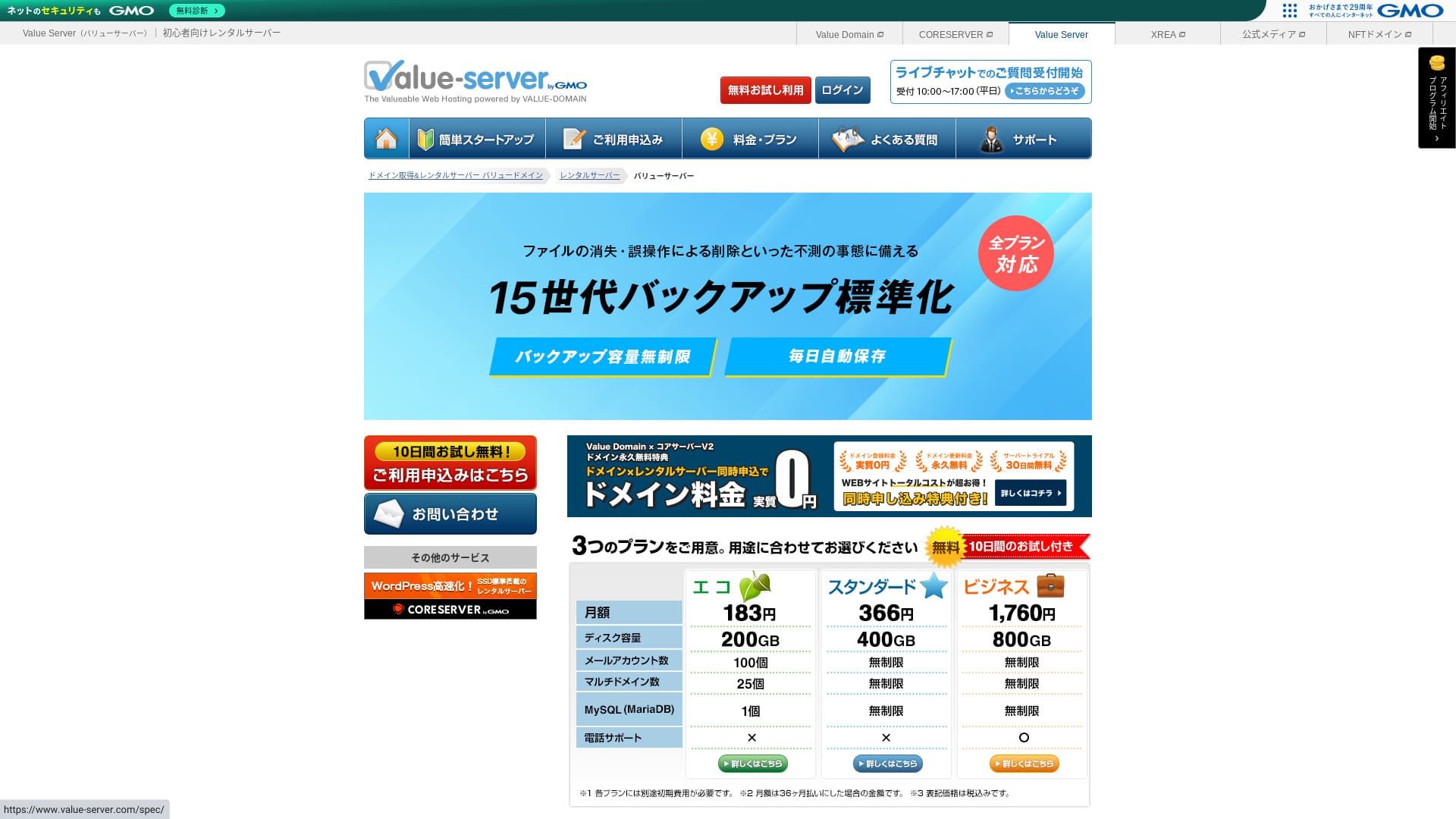
Value Server is a hosting сервис operated by GMO Digirock, Inc., known for its low pricing, especially its Marutto plan.

Value Server рекомендуется тем, кто хочет использовать максимально дешевый сервер because:
- Один из самых дешевых в отрасли
- На сервере используется SSD-хранилище
- 15 поколений резервных копий обеспечивают спокойствие
Именно поэтому. Вероятно, вы останетесь довольны. Попробовать можно бесплатно в течение 10 дней.
Среди конкурирующих серверов есть Star Rental Server. Он даже сильнее, чем Value Server в том, что у него тоже есть бесплатный план. Обязательно рассмотрите и его.
| Тип сервера | Общий сервер |
| Скорость отображения (TTFB) | Не измерялась |
| Рекомендуемый тарифный план и срок действия контракта | Eco на 12 месяцев |
| Пробный период / гарантия возврата денег | None |
| Monthly fee (12-month контракт) | 220 yen |
| Первоначальная плата за настройку | Бесплатный |
| Бесплатный domain | None |
| Support | Электронная почта и чат (будни 10:00-17:00) |
| Uptime | Не раскрывается |
| Хранилище | 200GB |
| Количество баз данных | 1 |
| Меры безопасности | None |
| SSL | Бесплатный shared SSL, custom SSL |
| Резервное копирование / восстановление | 15 generations of backups бесплатный, restoration бесплатный |
| Количество почтовых аккаунтов | 3 |
| Меры безопасности электронной почты | POP/POP3S, SMTP/SMTPS, IMAP/IMAPS, спам-фильтр, антивирусный фильтр, пользовательские фильтры |
| Server / сайт migration service | None |
| Предустановка WordPress | None |
| CDN | None |

Hikaru Ono
Value Server управляется GMO Digirock, Inc., крупным игроком отрасли, поэтому, хотя это один из самых дешевых вариантов, о качестве можно не беспокоиться. Лично у меня при использовании проблем не возникло.
Тем не менее, из-за низкой стоимости здесь есть ограничения по функциям и объему памяти, поэтому внимательно ознакомьтесь с ними.
Сравнение Value Server с другими серверами
- OverallRating★★★☆☆
- Скорость сервера ★★★☆☆
- Pricing ★★★★★
- Stability ★★★☆☆
- Простота запуска WordPress* ★★★☆☆
- Операции вроде управления доменами и настройки SSL* ★★★☆☆
* Based on my факт experience using it.

Как выбрать из 21 рекомендуемого хостинга WordPress для физических лиц
Как выбрать из 21 рекомендуемого хостинга WordPress для физических лиц
serverfield.org
- November 4, 2025 данных маркетингового исследования, по скорости sorted
- Ежемесячные платежи указаны как стоимость первого года самого дешевого тарифа, на котором можно запустить WordPress
- Скорость измеряется по показателю Time to First Byte (время до получения первого байта) на демо-сайтах при одинаковых условиях
“Value Server” — это недорогой хостинг от компании GMO Digirock, Inc. Несмотря на доступную для частных пользователей цену, он предлагает мощные функции, такие как бесплатный общий SSL-сертификат и бесплатное резервное копирование с хранением до 15 версий.
Отзывы о Value Server и пять ключевых особенностей

План Marutto позволяет создать сайт WordPress за 3060 иен в год
Value Server's Marutto plan lets you have a WordPress сайт for 3,060 yen per year. It is extremely inexpensive.
Давайте сравним его с крупными отечественными серверами при следующих условиях.
- Первоначальная плата за настройку
- 12-месячный контракт на сервер
- Стоимость домена за один год
- Самый дешевый тариф, который поддерживает WordPress
| Хостинг-провайдер | Стоимость за один год |
|---|---|
| Value Server | 2,310 yen |
| ConoHa WING | 11,292 yen |
| Xserver | 10,560 yen |
| Lolipop! | 5,940 yen |
| Sakura Rental Server | 6,600 yen |
Конечно, по сравнению с серверами выше его возможности и характеристики выглядят скромнее. И все же это по-прежнему сильный вариант для тех, кто хочет создать сайт как можно дешевле.
SSD входит в каждый тариф
Value Server includes SSD-хранилище в каждом тарифе даже несмотря на его низкую стоимость. На сверхдешевых серверах медленная загрузка сайта — обычное дело, так как они работают на недорогих жестких дисках.
Скорость отображения сайта тоже влияет на SEO, поэтому к выбору сервера нельзя относиться легкомысленно. Но при наличии SSD можно чувствовать себя спокойнее.
Примечание: Что такое SEO? Правильные шаги и методы поисковой оптимизации
В каждом тарифе есть 15 поколений автоматических резервных копий
Value Server стоит недорого, но при этом предоставляет 15 поколений автоматических резервных копий в каждом тарифе.
Если функции резервного копирования нет, восстановить сайт не получится даже в случае потери данных из-за атаки или ошибки. В Value Server сервер автоматически делает резервные копии каждый день, что дает спокойствие.
Эти 15 поколений резервных копий впечатляют. Даже крупные серверы вроде Lolipop! не предлагают такое в своих дешевых планах. Core Server, которым тоже управляет GMO Digirock, Inc., в дешевом плане тоже не включает резервное копирование.
В этом свете Value Server выглядит удивительно клиентоориентированным для недорогого провайдера, поскольку предлагает такие сильные 15-поколенные резервные копии.
Недостатки Value Server и как с ними справиться: честный разбор

Хотя у Value Server есть преимущества, у него есть и недостатки. Обязательно разберитесь с ними до использования.
Нет продвинутых мер безопасности, таких как WAF
Value Server не предоставляет продвинутые меры безопасности, такие как WAF. Определенный уровень защиты есть, включая поддержку пользовательского SSL, но все же немного тревожно, что защита от новейших методов атак не особенно сильна.
Если вам нужен WAF, установите ориентированные на безопасность плагины WordPress.
Примечание: Как выбрать пять плагинов WordPress, которые усиливают безопасность
Аптайм не раскрывается
Unfortunately, Value Server не раскрывает показатель аптайма. Это означает, что оценить стабильность сервера в цифрах невозможно. Если для вас важна надежность (например, для корпоративного сайта), эта неопределенность может заставить вас задуматься.
Примечание: Руководство для новичков по пониманию аптайма хостинга и SLA
Если сервер из-за проблемы становится нестабильным, сайт может не открываться или загружаться очень медленно. В некоторых случаях может возникнуть ошибка 503. Для посетителей это неприятно.
Примечание: Что такое ошибка 503? Как избежать перегрузки веба и реагировать в экстренной ситуации
Поскольку аптайм неизвестен, используйте Value Server только после того, как поймете риск нестабильной работы.
Тарифы Marutto и Eco позволяют создать только один сайт WordPress
Value Server в тарифах Marutto и Eco позволяет создать только один сайт WordPress.
- Я хочу создать сайт для мероприятия в дополнение к основному сайту
- Я хочу создать второй блог
Если вам нужен второй сайт WordPress по этим причинам, придется отдельно подготовить еще один сервер.
Сравните Value Server с двумя похожими серверами
Давайте сравним Value Server с двумя конкурирующими серверами, которые похожи по низкой цене. Даже если они выглядят похоже, различия есть, поэтому внимательно их сравните.
Core Server
Core Server управляется той же компанией. Он предлагает высокие характеристики при низкой цене. Можно выбрать подходящий вариант из семи детально разделенных тарифов. Есть линейка V1 с акцентом на цену и V2 с акцентом на производительность.
В целом Core Server превосходит Value Server по функциям и характеристикам, поэтому если цена не для вас главное, Core Server — лучший выбор.

Обзор Core Server [последние данные 2025 года]: подробное руководство по ценам, скорости, плюсам и минусам
Обзор Core Server [последние данные 2025 года]: подробное руководство по ценам, скорости, плюсам и минусам
serverfield.org
Star Server
Star Rental Server также стоит недорого. При этом он похож на Value Server своим стремлением к высокой скорости, включая использование SSD-накопителей. Он немного дороже, чем Value Server, но более высокий лимит трафика является его преимуществом, поскольку сайт продолжит стабильно работать даже при росте посещаемости.
В Star Server нет автоматических резервных копий. В этом отношении Value Server выигрывает.

Обзор Star Server [последние данные 2024 года]: удивительно низкая стоимость и детальное тестирование
Обзор Star Server [последние данные 2024 года]: удивительно низкая стоимость и детальное тестирование
serverfield.org
Запустите сайт WordPress на Value Server за 6 шагов
Давайте запустим сайт на Value Server!
- STEP.1Откройте официальный Value Server сайт
На главной странице нажмите «Попробовать бесплатно».
- STEP.2Подайте заявку на сервер и получите домен
Выберите тарифный план. Имя учетной записи сервера (первоначальный домен) может быть любым. Вы не будете использовать этот временный домен в качестве основного адреса сайта. Технически это возможно, но делать так не рекомендуется.
At this point, you cannot yet select simultaneous WordPress installation, but after choosing your domain, you will be able to check it. Be sure to use it. It makes starting a WordPress сайт much easier.
В разделе заявки на домен, который вы будете использовать на этом сервере, выберите «Получить домен бесплатно». Затем введите любую строку. Из доступных доменов верхнего уровня, таких как .com и .net, нажмите нужный.
Можно выбрать такие корневые домены, как «.com» и «.co.jp». Стоимость получения и продления зависит от корневого домена. Если не знаете, что выбрать, для компаний я рекомендую по возможности «.co.jp». Для частных лиц хорошими вариантами являются «.com» и «.net». Многие знают эти домены, поэтому они выглядят привычно и проще для доступа.
Примечание: Что такое домен? Его роль как адреса в интернете и как его получить
После выбора домена отметьте «Установить WordPress одновременно».
Click “Продолжить.”
- STEP.3Введите пользовательскую информацию
Откроется экран с пользовательской информацией. Нажмите «Регистрация пользователя», введите такие данные, как тип использования и имя, подтвердите сведения и нажмите «Зарегистрироваться и продолжить».
Завершите обязательную SMS-проверку, затем нажмите «Confirm application».
Ответ the вопросnaire or skip it, then click “Go to the control panel.”
- STEP.4Установите WordPress
В сведениях об управлении в панели управления отобразится сервер «Value Server (1)», на который вы ранее подали заявку. Нажмите на него и перейдите в «Новую панель управления».
Затем выберите «Установка приложений» (App Installation) в разделе «Инструменты» (Tools) и нажмите «Блог WordPress».
Нажмите «+ Install this application» и выберите домен. Домен, на который вы подали заявку ранее, появится в раскрывающемся меню, выберите его.
Настройки версии можно оставить как есть.
Используйте следующие настройки для WordPress.
- Имя администратора: Подойдет любое.
- Пароль администратора: Сделайте его как можно сложнее. Позже его можно легко изменить.
- Email администратора: Адрес электронной почты, которым вы регулярно пользуетесь. Для организаций рекомендуется указывать рабочий адрес сотрудника, управляющего сайтом.
- Название сайта: Подойдет любое. Позже его можно легко изменить.
- Слоган сайта: Это подзаголовок. Подойдет любой. Позже его можно легко изменить.
Имя администратора и его пароль используются при входе в консоль WordPress. Обязательно запишите их.
Настройки «Advanced» можно оставить как есть.
Когда все введете, нажмите «+ Install». После завершения установки нажмите URL на экране, который заканчивается на «wp-admin/». Это URL экрана администратора WordPress.
- STEP.5Начальная настройка WordPress
На появившемся экране входа в WordPress введите имя пользователя и пароль, заданные при установке, и нажмите «Войти».
Если вы видите предупреждение «Не удается получить доступ к сайту», настройки DNS еще не обновились. Остается только ждать, так что попробуйте войти снова через несколько часов.
Примечание: Что такое DNS и серверы имен?
После входа в WordPress настройте постоянные ссылки. Перейдите в раздел «Настройки» -> «Постоянные ссылки» в панели администратора WordPress. Выберите вариант «Название записи» и нажмите «Сохранить изменения».
При выборе варианта «Название записи» вы сможете вводить любую строку в URL при публикации статей. Рекомендую использовать короткие ссылки, по которым читатели могут легко понять тему статьи. Если адрес слишком длинный, некоторые пользователи могут насторожиться, посчитав сайт подозрительным.
- STEP.6Установите плагины
Вернитесь на экран администратора WordPress, перейдите в «Plugins», затем «Add New» и установите нужные плагины.
Когда найдете нужный плагин через поиск, нажмите «Install Now», а затем «Activate». После этого следуйте инструкциям для каждого плагина.
Обязательно установите плагины безопасности и резервного копирования.
- Как выбрать пять плагинов WordPress, которые усиливают безопасность
- 5 мощных плагинов резервного копирования WordPress, которые помогут восстановить данные
Как только вы установите плагины, ваш сайт на WordPress будет полностью готов к работе!
Итог
“Value Server» — это недорогой хостинг от GMO Digirock, Inc. Его тарифы доступны даже для физических лиц, при этом сервис предлагает отличные возможности, такие как бесплатный общий SSL и бесплатное хранение резервных копий глубиной до 15 поколений.
10-day бесплатный trial
Value Server — недорогой сервер. Хотя аптайм не раскрывается, а функции безопасности не самые сильные, функция автоматического резервного копирования на 15 поколений означает, что в большинстве случаев в итоге можно восстановиться. Если цена для вас важнее всего, попробуйте.
Полное сравнение 32 хостингов WordPress: рекомендации для физических лиц, компаний и использования зарубежных сервисов

Когда вы думаете о запуске сайта на WordPress и ищете «рекомендуемый хостинг для WordPress», перед вами открываются сотни статей: от вариантов для частных лиц и малого бизнеса до зарубежных и очень дешевых серверов. Честно говоря,
- На какой сайт смотреть?
- Хочу выбрать сервер простым и понятным способом!
- Покажите, как сразу начать работу с WordPress.
Have you ever felt that way? That is why this статья тщательно выбирает лучшие варианты из 32 хостинг-провайдеров для частных лиц, компаний, внутреннего и зарубежного использования и представляет их. Все разъяснения подготовлены руководителем отдела SEO в ИТ-компании, ежедневно работающей с хостингами.