Până la 53% reducere la taxele serverului până la 5 august 2025, plus două domenii gratuite pe viață și prima lună gratuită
PR
Servere
Îmi pare rău pentru ConoHa, dar pun apreciatul Blog Creator față în față cu cele trei cele mai puternice IA ale lui 2024
Publicat: 2025.01.30
Actualizat: 2025.01.30

Ne pare rău, dar compania noastră folosește ChatGPT-4o, Claude 3 și Gemini 1.5 Pro.
Așa cum probabil știi, ConoHa WING oferă "Blog Creator", un instrument de scriere a articolelor cu IA, începând de la 330 de yeni pe lună. Ca cineva care, acum doar câțiva ani, petrecea peste 10 ore scriind un articol, mi se pare aproape deprimant cât de convenabil este. Totuși, nu are rost să te împotrivești vremurilor, așa că cred că cel mai bine este să înveți să-l folosești bine.
Totuși, suntem o companie de dezvoltare de sisteme și folosim în mod activ trei tipuri de IA.
- ChatGPT-4o
- Claude 3
- Gemini 1.5 Pro
Industria IA se schimbă atât de repede încât ar putea apărea un instrument nou uluitor Boom! Dar chiar și la 1 ianuarie 2025, aceste trei sunt încă IA puternice care gestionează foarte bine limba japoneză. (Sincer, sunt instrumente destul de scumpe, așa că trebuie să continui să muncesc din greu la activitatea principală.)
„Blog Creator probabil nu le poate învinge pe acestea trei, dar hai să-l punem la încercare pentru acel 1% șansă.”

Blog Creator honestly did not inspire high expectations, and the competition was so strong that I felt bad for ConoHa. Sorry. Still, I wanted to make them compete, so am făcut fiecare IA să creeze și să publice un articol despre «Construirea unei teme WordPress de la zero». Am făcut intenționat ca cele patru articole să se canibalizeze între ele.
«Canibalizare» nu înseamnă carnaval. În SEO, canibalizarea se referă la situația în care articole similare de pe același site se suprapun și concurează între ele. Este rău pentru SEO. Acest experiment afectează și propriul nostru SEO, dar îl fac oricum.
Rezultatul a fost că Blog Creator a fost categoric foarte bun, so everyone, please sign up for ConoHa WING. If you do, you can use Blog Creator for o lună gratuită.

" ConoHa WING", un server de mare viteză de la GMO Internet Group cu un număr de utilizatori în creștere rapidă, și pe care îl folosim și noi. Deoarece WordPress vine preinstalat la înregistrarea pentru server, oricine poate începe cu ușurință. Oferă un echilibru bun între cost și performanță, și îl folosim și noi de asemenea.

★ Creează un site în 10 minute! Recenzie ConoHa WING și cum să începi WordPress
Ce este Blog Creator? Poate scrie articole SEO de la zero și poate rescrie articole existente

Blog Creator is an AI tool recommended for people whose traffic is not growing or who do not know how to write articles. You can have AI handle both writing SEO-friendly articles from scratch and rewriting existing ones.
Blog Creator analizează patru tipuri de cuvinte-cheie dintr-un singur clic
What keyword are you trying to rank for? With Blog Creator, the keyword research begins as soon as you enter it.
- Suggested keywords: search suggestions shown when you type a keyword into Google's search box
- Related search keywords: related keywords shown in the search results after you search the keyword on Google
- Co-occurring terms research: words that frequently appear together with the keyword
- Heading research for top-ranking sites: headings used by sites that rank highly for the keyword
Once you can do this research, you have all the ingredients you need for SEO-friendly wording and headings. From there, you can either write the article yourself using those materials or have Blog Creator write the article for you.

Long-Tail Keyword Strategy Explained by a 7-Year SEO Veteran: 3 Steps to Explode Traffic in Niche Markets
Long-Tail Keyword Strategy Explained by a 7-Year SEO Veteran: 3 Steps to Explode Traffic in Niche Markets
serverfield.org
IA scrie articole pe baza cuvintelor-cheie prietenoase cu SEO
Blog Creator is a tool that lets AI write articles for you.
What makes it different from generic AI is that an expert-supervised tool produces SEO-strong keyword results, and then the article is written based on them using ChatGPT-4o or ChatGPT-4o miniThis means it does not have AI write an article out of nowhere. Instead, it has AI write based on keyword results built for SEO, so you can aim for stronger search rankings.
In other words, it is a tool that lets you create strong articles efficiently while still taking advantage of AI.
Suport pentru rescrierea articolelor publicate
Blog Creator can even rewrite articles you have already published.Just enter the URL of the blog post and the keyword, and it will tell you which important keywords are missing from the article.
Planurile de preț Blog Creator
There are three plans. Since Lite is free for one month, I recommend starting by trying Lite.
| Plan | Lite | Standard | Business |
|---|---|---|---|
| Price | 330 yen | 1,980 yen | 4,980 yen |
| Outline generation | 24 times | 184 times | 700 times |
| Body generation | 12 times | 92 times | 350 times |
| Title generation | 12 times | 92 times | 350 times |
| Introduction generation | 12 times | 92 times | 350 times |
- Option
- Price: 550 yen
- Generation capacity: 24 outline generations, 12 body generations, 12 title generations, and 12 introduction generations
Să vedem cum începi să folosești Blog Creator
Pași pentru a începe să folosești Blog Creator
Getting Started with Blog Creator
- STEP.1Visit the official site: ConoHa WING
Blog Creator To use Blog Creator, you need a ConoHa account. Create an account from the official site and get started with WordPress. If you already have a ConoHa account, log in.
- STEP.2Open the AI Blog Generation Tool
From the control panel, open "AI Blog Generation Tool" under "Site Management." Then click "+ Blog Creator."
- STEP.3Choose a plan
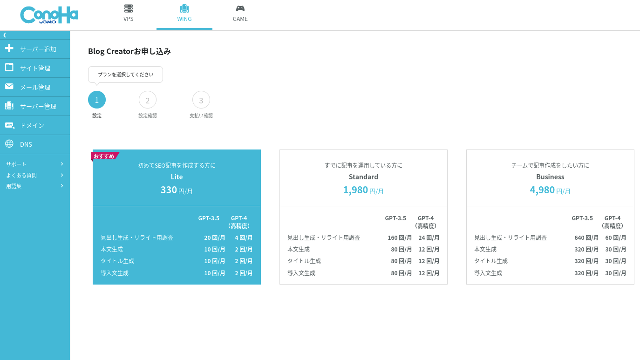
Choose a plan. The Lite plan is fine. Its functions are the same as the higher plans. The higher plans simply give you more AI generations. Since all you need at first is a trial, go with the Lite plan at 330 yen per month.
- STEP.4Payment
A payment confirmation screen will appear. Click "Confirm." Your application is now complete.
Pași pentru a crea un articol cu Blog Creator
The procedure for creating an article is explained in this article on the official site, Wapu-katsu. However, I think it is easier to understand if I show the method I actually used, so please take a look at this article.
Creating an Article with Blog Creator
- STEP.1Choose Blog Creator
From "AI Blog Generation Tool," choose the "Blog Creator" tab.
- STEP.2Enter the keyword you want to rank for
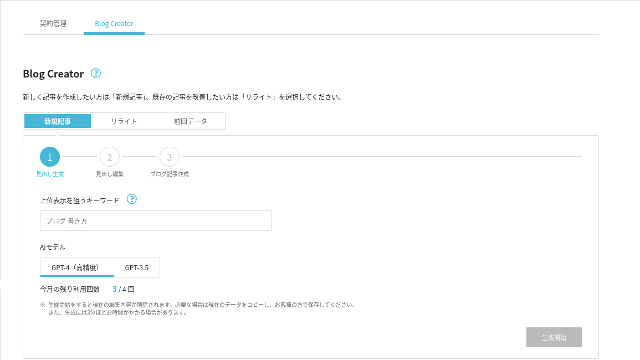
Blog Creator can handle rewrites too, but this time I am creating a new article. Enter the keyword you want to rank for: "building a WordPress theme from scratch." (Of course, you should use the keyword you personally want to rank for.)
Choose the AI model. Let's go with the highly accurate GPT-4.
Click "Start Generation."
- STEP.3Edit the headings based on the keyword research
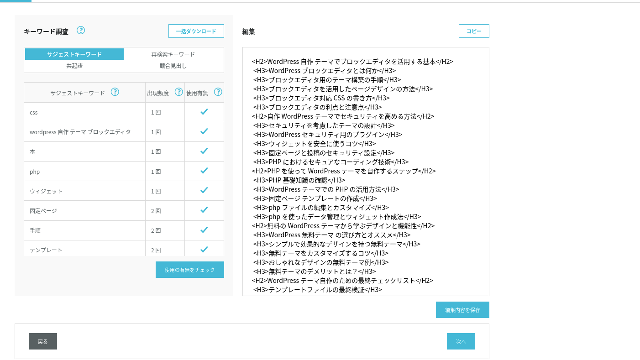
The keyword research will be displayed. Check the results from the four types of research. The more of them you make use of, the stronger the SEO tends to become.
On the editing screen, incorporate keywords that were not used in the generated headings. Once you finish editing, click "Save Edits." After that is saved, move on by clicking "Next."
- STEP.4Create the body, title, and introduction
Using the headings you created earlier as a base, have AI generate the body, title, and introduction. Click "AI Generate" for each item.
Choose whether to use GPT-4 or GPT-3.5. I chose GPT-4.
After generating each one with AI, click "Save Edits." That completes the Blog Creator generation process.
Several title candidates will be displayed, so compare them against the headings and body and choose the most appropriate one.
Once everything is complete, copy each part, paste it into a new WordPress post, and publish the article.
There seems to be a limit to the amount of text it can generate. For this "building a WordPress theme from scratch" article, the generated text was not long enough. So after it stopped partway through, I used "AI Generate" again on the headings that came after the point where it stopped to create the body text.
Cele patru articole pe care le-am făcut să se canibalizeze pentru cuvântul-cheie «Construirea unei teme WordPress de la zero»
I had AI create them using the same keyword and the same procedure. The four finished articles are below. I uploaded them all to this site. They are fully cannibalizing one another.
Articol creat cu Blog Creator
Complete Guide to Building a WordPress Theme from Scratch: Steps and a Checklist for Building a Strong Site
Complete Guide to Building a WordPress Theme from Scratch: Steps and a Checklist for Building a Strong Site
serverfield.org
Articol creat cu ChatGPT-4o

Beginner-Friendly! How to Create a Custom Theme in WordPress
Beginner-Friendly! How to Create a Custom Theme in WordPress
serverfield.org
Articol creat cu Claude 3
Build Your Own WordPress Theme and Create a Site Full of Originality!
Build Your Own WordPress Theme and Create a Site Full of Originality!
serverfield.org
Articol creat cu Gemini 1.5 Pro
Break Out of the Rut! How to Build Your Ideal Site by Creating Your Own WordPress Theme
Break Out of the Rut! How to Build Your Ideal Site by Creating Your Own WordPress Theme
serverfield.org
Deoarece IA pare să câștige, vreau să prezint avantajele Blog Creator
AI looks like it might win. So, as insurance so that ConoHa WING does not get mad at me, Blog Creator's advantages are what I want to introduce here. (I am a timid person.)
Îți poți îmbunătăți scrierea și SEO-ul fără să depinzi complet de IA sau de instrumente
Blog Creator uses AI. However, while checking the researched keyword results, you are encouraged to polish the content further yourself. In practice, doing so keeps you from relying entirely on AI or tools. By using it skillfully, you can steadily improve your writing skills and your understanding of SEO.
Blog Creator can, so to speak, help you grow like a partner running alongside you.

Boost Your SEO: Web Writing Techniques That Win Users Over With Highly Readable Copy
Boost Your SEO: Web Writing Techniques That Win Users Over With Highly Readable Copy
serverfield.org
Structura titlurilor și lungimea textului sunt deja optimizate, astfel încât nu sunt necesare corecturi
Blog Creator optimizes the heading structure and body length better than generic AI. As a result, you can publish the article by copying and pasting it without making corrections.(That said, you still need to fact-check the content.)
With generic AI, corrections were necessary and time-consuming.
- The headings start from H4, so they need to be corrected.
- If you generate the full body all at once after creating the headings, it does not write properly.
- You need to delete unnecessary words such as "Introduction:" and "Body:".
Creating body text from the headings and doing everything else manually is simply too much work.
Ca instrument de scriere a articolelor cu IA, este mai orientat către cuvintele-cheie decât ofertele altor companii
Other server companies also offer AI article-generation tools.
Sakura Rental Server oferă "User Local AI Writer," which lets you use ChatGPT-4 for free. In addition to ChatGPT-4, it also uses its own local AI.
Value Server oferă "Value AI Writer," which starts at 1,650 yen per month. That one uses ChatGPT-4o.
So these tools may let you use them for free or give you access to the latest AI, but they are not built around SEO-strong keywords.Blog Creator first builds around SEO-strong keywords and then uses AI to write the article.
In the end, when you write a blog, you have a target keyword you want to rank for, right?Blog Creator defines that target first and then creates the article.AI sprints properly toward a clearly defined goal is what it does. It is not just running blindly.
This is the major difference between other AI article-generation tools and Blog Creator.
Rezumat: te rog caută și verifică singur rezultatul confruntării
So what happened in the end?
The answer is not for me to decide. Let's submit it to Google, just as we always do. Search for "WordPress custom theme" and look for our site (https://serverfield.org). One of the following articles should appear there.
- Blog Creator article: Complete Guide to Building a WordPress Theme from Scratch: Steps and a Checklist for Building a Strong Site
- ChatGPT-4o article:Beginner-Friendly! How to Create a Custom Theme in WordPress
- Claude 3 article: Build Your Own WordPress Theme and Create a Site Full of Originality!
- Gemini 1.5 Pro article: Break Out of the Rut! How to Build Your Ideal Site by Creating Your Own WordPress Theme
The article that appears when you search at that moment will be the best tool at that moment.
Blog Creator is better than I imagined. Its article keeps showing up.
If you want to try it, ConoHa WING is where you should sign up.
" ConoHa WING", un server de mare viteză de la GMO Internet Group cu un număr de utilizatori în creștere rapidă, și pe care îl folosim și noi. Deoarece WordPress vine preinstalat la înregistrarea pentru server, oricine poate începe cu ușurință. Oferă un echilibru bun între cost și performanță, și îl folosim și noi de asemenea.
Până la 53% reducere la taxele serverului până la 5 august 2025, plus două domenii gratuite pe viață și prima lună gratuită
Comparație completă a 32 de servere WordPress închiriate: recomandări pentru persoane fizice, companii și utilizare în străinătate

When you think, "I want to start WordPress," and search for "recommended WordPress hosting," you get an enormous range of articles, from personal-use servers and options for businesses and small companies to overseas servers and low-cost servers. Honestly,
- Which site should I trust?
- I just want to choose a server in a simple, easy-to-understand way!
- Show me how to start WordPress right now.
Doesn't that sound familiar? That is why this article carefully selects recommended options from 32 rental server companies for individuals, businesses, domestic use, and overseas use. The explanation comes from the SEO specialist of an app development company that uses rental servers every day.