
Bezmaksas .co.jp domain + 12 months of V2 plan server fees free + free initial fee until August 31, 2025, plus a 30-day bezmaksas izmēģinājums
PR
Serveri
Core Server apskats [2025. gada jaunākais]: padziļināts ceļvedis par cenām, ātrumu, plusiem un mīnusiem
Publicēts: 2025.04.18
Atjaunināts: 2025.04.18
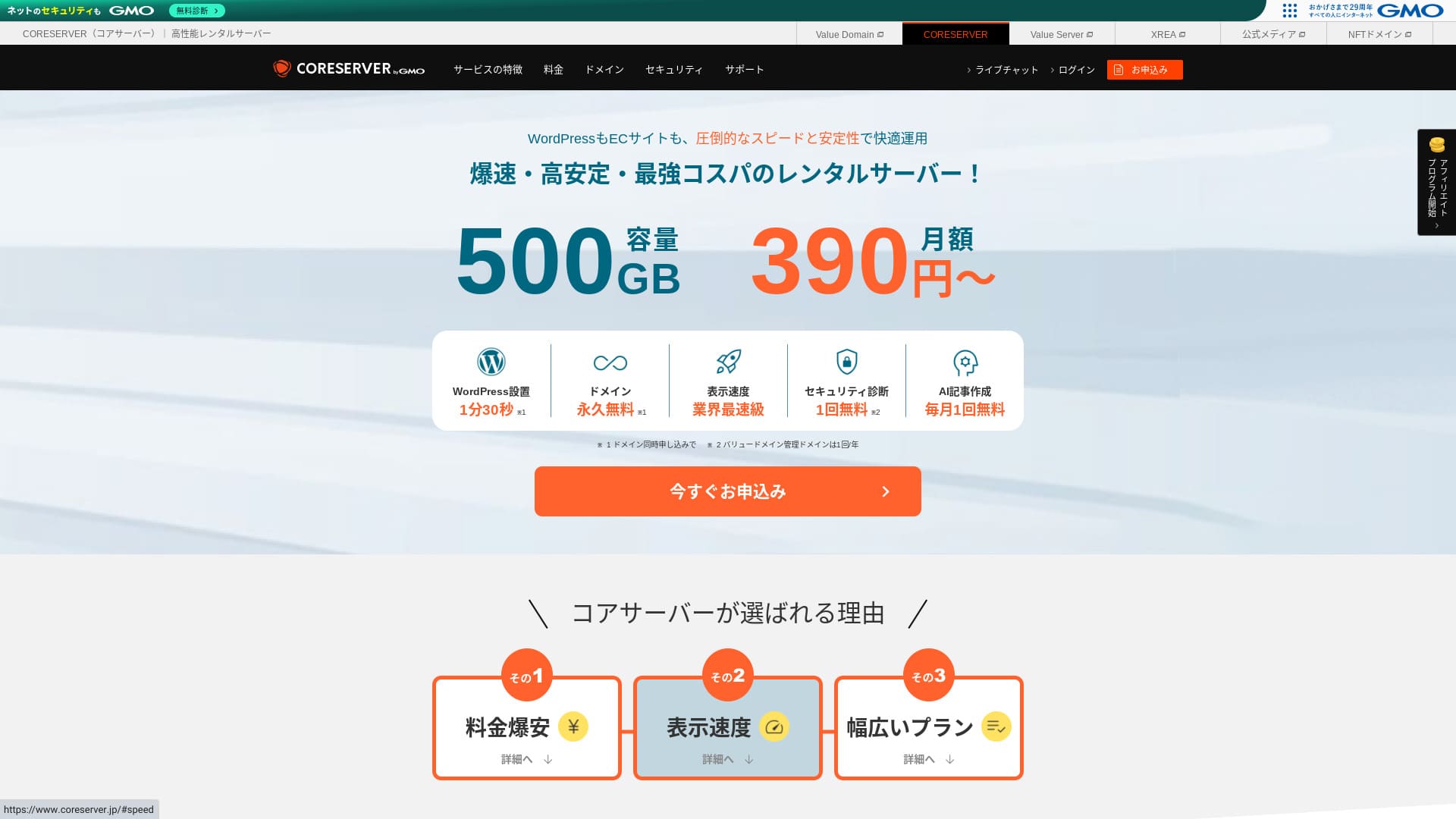
Core Server is a rental server operated by GMO Digirock, Inc., and one of its biggest strengths is the wide range of plans it offers.

Core Server is a service I recommend to individuals, companies, and sole proprietors using WordPress for the first time because:
- Plašais plānu klāsts ļauj atrast piemērotu serveri
- Tajā ir iekļauts AI rakstu veidošanas rīks
- Tā e-pasta pakalpojums ir lēts, bet ļoti jaudīgs
Tāpēc, visticamāk, būsiet apmierināts. To var izmēģināt bez maksas 10 dienas.
A competing server is LOLIPOP. It offers even more peace of mind than Core Server, jo tā darbspējas laiks tiek publiski atklāts. Lūdzu, apsveriet arī to.
Piezīme: Lolipop! Review [2025 Edition]: What Speed Tests Revealed, Plus the Pros and Cons
| Servera veids | Koplietojamais serveris |
| Display speed (TTFB) | 210ms |
| Recommended plan and contract term | CORE-MINI 12-month contract |
| Trial / naudas atdošanas garantija | 30-day bezmaksas izmēģinājums |
| Mēneša maksa (12-month contract) | 264 yen |
| Sākotnējā iestatīšanas maksa | Bezmaksas |
| Bezmaksas domēns | Nav |
| Support | Darba laiks: 10:00-12:00, 13:00-17:00 Tālrunis callback (CORE-B, CORE-C, CORE-Z), email, chat |
| Darbspējas laiks | Nav norādīts |
| Storage | 250GB |
| Datubāzu skaits | 10 |
| Security measures | WAF, IPS/IDS |
| SSL | Bezmaksas SSL |
| Dublēšana / atjaunošana | 15 generations of backups free, restoration free |
| E-pasta kontu skaits | 200 |
| E-pasts security measures | POP/POS, SMTP/SMTPS, IMAP/IMAPS, virus checking, spam filtering, DKIM/DMARC |
| WordPress iepriekš instalētsation | Nav |
| Servera / vietnes migrācijas pakalpojums | Nav |
| CDN | Nav |

Hikaru Ono
Godīgi sakot, šķiet, ka Core Server vadības panelis izraisīs dažādus viedokļus. Ja jums jau ir pieredze ar serveriem, ar to nevajadzētu būt problēmām. Izvēloties V2 plānu, ar WordPress varēsiet sākt arī vienkāršāk.
Tomēr par to nevajag pārlieku satraukties. Tam ir augstākās klases oficiālie norādījumi, kas ir ļoti detalizēti un pat ietver video.
Core Server salīdzinājumā ar citiem hostinga pakalpojumiem
- Kopvērtējums vērtējums★★★☆☆
- Servera ātrums ★★★☆☆
- Cenas ★★★★☆
- Stabilitāte ★★★★☆
- WordPress uzsākšanas vienkāršība* ★★★☆☆
- Darbības, piemēram, domēna pārvaldība un SSL iestatīšana* ★★★☆☆
* Balstīts uz manu personīgo pieredzi, to lietojot.

How to Choose from 21 Recommended WordPress Hosting Services for Individuals
How to Choose from 21 Recommended WordPress Hosting Services for Individuals
serverfield.org
- Nēvember 4, 2025 market-research data, sorted by speed
- Mēneša maksa ir pirmā gada izmaksas lētākajam plānam, kurā var darbināt WordPress
- Speed is the Time to First Byte measured on demo sites under the same conditions
“Core Server” is a high-speed rental server operated by GMO Digirock, Inc. It offers an affordable V1 plan that is easy for individuals to use and a V2 plan focused on comfort and performance. With its wide range of plans, you can find the server that fits you best.
Core Server apskats un četras galvenās īpašības

Serveris ar standarta līmeņa ātrumu
Core Server produced a standard level of page speed in our own independent test on this site.
According to Google, a servera atbildes laiks of 200ms or less is recommended. Core Server fell just short at 210ms. So while I would not call it a high-speed server, it can still be regarded as a server that is slightly faster than standard.
Server response time should be kept under 200 milliseconds.
https://developers.google.com/server/speed/docs/insights/Server?hl=en
At the time of testing, I did not apply any settings specifically for speed optimization. Even so, this result came out. If you put effort into tuning it, it should be possible to make it even faster.
Piezīme: Rental Server Speed Comparison Across 15 Services: This One Was Truly Fast [2024 Edition]
Atšķirība starp V1 un V2 palīdz atrast labāko plānu
Core Server has seven plans when you break them down in detail, so you can find the one that suits you best. Let’s compare the main differences.
| Plan | Price | Allowed load | Support |
|---|---|---|---|
| Core-Mini | 3,168 yen | 1.25 | E-pasts / chat |
| Core-A | 6,336 yen | 2.5 | E-pasts / chat |
| Core-B | 12,672 yen | 10 | Tālrunis / email / chat |
| Core-C | 39,600 yen | 40 | Tālrunis / email / chat |
| Core-X | 6,336 yen | 18 | E-pasts / chat |
| Core-Y | 10,296 yen | 54 | E-pasts / chat |
| Core-Z | 26,136 yen | 144 | Tālrunis / email / chat |
The V1 Core-Mini plan is inexpensive. However, its allowed load is not large. As simultaneous access increases, it becomes more likely that a 503 error will occur.
Piezīme: What Is a 503 Error? How to Avoid Web Congestion and Respond in an Emergency
The V2 Core-X plan costs more than Core-Mini, but its allowed load rises dramatically. It is excellent as a low-cost plan with a stronger focus on performance. I recommend it to users who think, “I want to keep costs down as much as possible, but I do not want to compromise on specs.”
Neierobežota datu pārraide
Core Server offers unlimited data transfer. Even if more and more people access your website and data transfer increases, you will not run short on transfer volume. That helps you avoid a situation where your website cannot be displayed because of transfer limits.
Piezīme: What Are Traffic and Data Transfer? Managing and Optimizing Web Traffic
However, restrictions may be applied when server load becomes high.
If the overall server load exceeds 80% of the server’s maximum processing capacity, we may place restrictions on accounts that account for 20% or more of the load, or on the top five highest-load accounts.Frequently Asked Questions: About Load Restrictions | Core Server
AI rakstīšanas rīks “Value AI Writer” ir pieejams ar atlaidi
Core Server lets you use “Value AI Writer” at a discounted price. “Value AI Writer” is an AI tool made by GMO and specialized in creating blog articles. If you use Core Server, the price is more than 20% lower than buying it on its own.
It is specialized for SEO and also has stronger integration with WordPress, so it makes mass-producing articles easier than using AI in a general way.
Pateicoties sūtītāja domēna autentifikācijai, arī e-pasts ir viegli lietojams
Core Server is also easy to use for email. It supports sender domain authentication.
Because it supports DKIM and DMARC, companies can send email to customers more smoothly.
Core Server trūkumi un kā no tiem izvairīties, godīgi izskaidrots

Core Server is capable, but it also has drawbacks. Some of them cannot be prevented or dealt with by the user after signing up.
Darbspējas laiks nav publiski norādīts
Core Server does not disclose its darbspējas laiks. Since you cannot grasp numerically how stable the server is, that is a slight concern. If a blog or website cannot be displayed, it fails to serve its purpose. Seen that way, server darbspējas laiks is extremely important.
If you want more peace of mind, choose a server that discloses its darbspējas laiks.
Piezīme: Iesācēju ceļvedis par hostinga darbspējas laiku un SLA (pakalpojumu līmeņa līgumiem)
Still, one good thing about Core Server is that its official site publishes the past 10 hours of WordPress response-speed data.
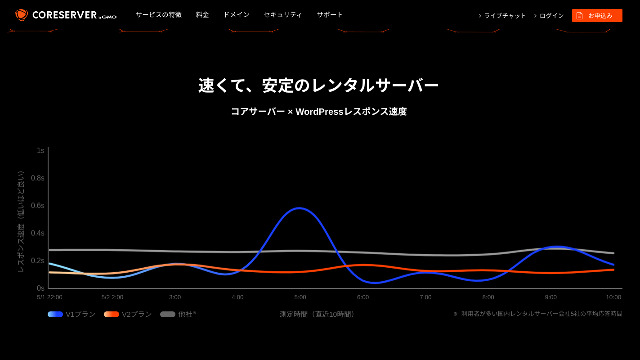
You can judge server stability in a rough way from this. The V2 plans, which draw a gentle curve lower on the graph, appear to be stable and fast.
Atļautas ir tikai dažas plānu maiņas
Core Server allows only some plan changes. That means when you run short of server capacity or data transfer, you may need to migrate to another company’s server or rent another server from the same company.
Only the following two plan changes are possible.
- From Core-X to Core-Y or Core-Z
- From Core-Y to Core-Z
You cannot downgrade a plan.
Salīdziniet Core Server ar diviem līdzīgiem hostinga pakalpojumiem
Salīdzināsim Core Server ar diviem hostinga pakalpojumiem, kuriem ir līdzīgas īpašības. Pievēršot uzmanību arī sīkākām detaļām, jūs izvairīsieties no nožēlas pēc reģistrēšanās.
Lolipop!
LOLIPOP is a server that is about as inexpensive as Core Server. What it does better than Core Server is that it discloses its darbspējas laiks. On top of that, tā darbspējas laiks ir 99,99%, kas ir augstākais līmenis hostinga nozarē. Its stability is beyond complaint, so not only individuals but also companies are likely to be satisfied with it.
However, when you compare the cheapest plan that can run WordPress, Core Server is the better deal. I recommend choosing based on how you weigh price against peace of mind.

Lolipop! Review [2025 Edition]: What Speed Tests Revealed, Plus the Pros and Cons
Lolipop! Review [2025 Edition]: What Speed Tests Revealed, Plus the Pros and Cons
serverfield.org
Star Server
Star Rental Server is also a server competing in the low-price range.
The Star Server Light plan can be used even more cheaply than Core Server. However, while Core Server’s Core-Mini lets you create 10 WordPress sites, the Star Server Light plan allows only one.
Core Server is stronger in features and specs. Incidentally, neither service discloses darbspējas laiks, so some concern remains about stability in both cases.

Star Server Review [2024 Latest]: Astonishingly Low Prices and a Thorough Look at the Real Pros and Cons
Star Server Review [2024 Latest]: Astonishingly Low Prices and a Thorough Look at the Real Pros and Cons
serverfield.org
Sāciet WordPress vietni ar Core Server 7 soļos
Let’s start a website with Core Server!
- STEP.1Access the official Core Server website
Scroll down the top page and click “Apply” for the pricing plan you want to use.
- STEP.2Apply for the Server and Get a Domain
Please confirm that you selected the correct plan. The server account name (the initial domain) can be anything you like. You will not use this initial domain as the domain of your website. You can use it, but I do not recommend it.
At this point, you cannot select simultaneous WordPress installation yet, but after choosing your domain, you will be able to check it. Be sure to use it. It makes starting a WordPress website dramatically easier.
Under the option to also apply for the domain you will use on this server, choose “Get a domain for free.” Then enter any string you like. From the top-level domains available, such as .com and .net, click the one you want.
You can choose root domains such as “.com” and “.co.jp.” Acquisition and renewal fees differ depending on the root domain. If you are unsure which one to choose, I recommend “.co.jp” whenever possible for companies. For individuals, I recommend “.com” or “.net.” Since many people are familiar with these domains, they are less likely to seem suspicious and tend to be easier for users to access.
Piezīme: What Is a Domain? Its Role as an Address on the Internet and How to Get One
Once you can choose the domain, check “Install WordPress at the same time.”
Click “Proceed.”
- STEP.3Enter User Information
The user information entry screen will be displayed. Click “User registration,” enter information such as your usage type and name, confirm the entered details, and click “Register and proceed.”
Complete the required SMS verification and then click “Confirm application.”
Answer the survey or skip it, and then click “Go to the control panel.”
- STEP.4Install WordPress
In the management information of the control panel, “Core Server (1),” which you applied for earlier, is displayed. Click it and proceed to the “New Control Panel.”
After that, choose “App Installation” from “Tools” and click “WordPress Blog.”
Click “+ Install this application” and choose a domain. The domain you applied for earlier will appear in the pull-down menu, so select it.
You can leave the version settings as they are.
Use the following settings for WordPress.
- Admin username: Anything is fine.
- Admin password: Make it as complex as possible. You can easily change it later.
- Administrator email: An email address you use regularly. For companies, I recommend the business email address of the person who manages the website.
- Website title: Anything is fine. You can easily change it later.
- Website tagline: This is the subtitle. Anything is fine. You can easily change it later.
The admin username and admin password are used when you log in to WordPress. Be sure to write them down.
You can leave the “Advanced” settings as they are.
Once everything is entered, click “+ Install.” After WordPress is installed, click the URL shown on the screen whose ending is “wp-admin/”. That is the URL of your WordPress admin screen.
- STEP.5Initial WordPress Setup
On the WordPress login screen that appears, enter the username and password you set during installation and click “Log In.”
If a warning says “This site can’t be reached,” the DNS settings have not propagated yet. There is nothing you can do except wait, so try logging in again every few hours.
Piezīme: Kas ir DNS un domēna vārdu serveri?
After logging in to WordPress, set the permalinks. In the WordPress admin screen, go to “Settings” and then “Permalinks.” Choose “Post name” and click “Save Changes.”
When you choose “Post name,” you can enter any string you like in the URL when publishing an article. I recommend a short string that helps readers imagine the content of the article because it makes the website easier to understand. If it is too long, some people may feel uneasy and think, “Could this be a dangerous site?”
- STEP.6Install Plugins
Return to the WordPress admin screen, go to “Plugins,” then “Add New,” and install the plugins you need.
Kad atrodat spraudni, kuru vēlaties pievienot, noklikšķiniet uz “Instalēt tūlīt” un pēc tam uz “Aktivizēt”. Pēc tam turpiniet saskaņā ar katra spraudņa norādījumiem.
Be sure to install security and backup plugins.
- How to Choose Five WordPress Plugins That Strengthen Security
- 5 Powerful WordPress Backup Plugins That Help You Recover Your Data
Once you have installed the plugins as well, your WordPress website is fully ready to go!
Kopsavilkums
“Core Server” is a high-speed rental server operated by GMO Digirock, Inc. It offers an affordable V1 plan that is easy for individuals to use and a V2 plan that prioritizes comfort and performance. With so many plans available, it is easy to find the best fit.
Bezmaksas .co.jp domain + 12 months of V2 plan server fees free + free initial fee until August 31, 2025, plus a 30-day bezmaksas izmēģinājums
Core Server offers a wide variety of plans. I recommend the V1 Core-Mini plan, but if you are planning a website that aims for tens of thousands of page views per month, I recommend the performance-focused Core-X.
Complete Comparison of 32 WordPress Hosting Services: Recommendations for Individuals, Companies, and Overseas Use

Kad nolemjat sākt darbu ar WordPress un meklējat “ieteicamais WordPress hostings”, parādās visdažādākie raksti — no hostinga privātpersonām un mazajiem uzņēmumiem līdz ārvalstu pakalpojumiem un zemu izmaksu iespējām. Atklāti sakot, jūs varētu domāt:
- Which site should I read?
- I want to choose a server in a simple and easy-to-understand way.
- Please show me how to start WordPress right away.
That is exactly why this article introduces rūpīgi atlasīti ieteikumi no 32 hostinga pakalpojumu sniedzējiem privātpersonām, uzņēmumiem, kā arī lietošanai vietējā un starptautiskā mērogā. To skaidro lietotņu izstrādes uzņēmuma SEO vadītājs, kurš ikdienā izmanto hostinga pakalpojumus.