Lolipop! apskats [2025. gada jaunākā versija]: ko atklāja ātruma testi, plus īstie plusi un mīnusi
LOLIPOP is a long-established hosting service operated by GMO Pepabo, Inc. Since its launch in 2001, it has been used by a wide range of customers, from personal blogs to corporate websites, and its track record and reliability rank among the best in the industry.

The reasons I recommend LOLIPOP to people using WordPress for the first time or looking for an affordable server are:
- WordPress var sākt viegli
- Tam ir reputācija kā lēnam, bet patiesībā tas ir ļoti ātrs serveris
- Lai gan tas ir liels hostinga zīmols, cena ir zema
Tāpēc tu, visticamāk, būsi apmierināts. Ir 10 dienu bezmaksas izmēģinājums.

Konkurējošs pakalpojums ir Sakura Rental Server. Tas ir labāk piemērots korporatīvai un biznesa lietošanai nekā LOLIPOP, so consider it alongside this service.
| Servera tips | Koplietotais hostings |
| Speed (TTFB) | 80ms |
| Ieteicamais plāns un termiņš | Light, 12 months |
| Izmēģinājuma / naudas atmaksas politika | 10-day free trial |
| Mēneša maksa (12 mēnešu līgums) | 495 yen |
| Sākotnējā iestatīšanas maksa | Bezmaksas |
| Bezmaksas domēns | 1 free forever |
| Atbalsts | Chat and email (weekdays 10:00-18:00) |
| Darbspējas laiks | 99.99% |
| Krātuve | 350GB |
| Datu bāzu skaits | 50 |
| Drošības pasākumi | Overseas Attack Guard, WAF, virus scanning |
| SSL | Bezmaksas īpašais SSL, īpašais SSL (Pro) |
| Rezerves kopijas / atjaunošana | Nav rezerves kopiju Standard plānā un zemāk, 7 paaudžu rezerves kopijas (par maksu) |
| E-pasta konti | Neierobežots |
| E-pasta drošība | POP/POP over SSL, IMAP/IMAP over SSL, SMTP/SMTP over SSL, spam filter |
| Servera / vietnes migrācijas pakalpojums | 33,000 yen |
| WordPress iepriekšinstalēts | Jā |
| CDN | Nav |

Lolipop! was the first server I ever used with WordPress. The price is still low, but getting started with WordPress has become easier than before.
The server specs have improved compared with a few years ago, and now it is one of the ultra-fast servers.
Lolipop! salīdzinājumā ar citiem pakalpojumu sniedzējiem
- Overall rating★★★★★
- Servera ātrums ★★★★★
- Cena ★★★★★
- Stabilitāte ★★★★★
- Ease of getting started with WordPress* ★★★★★
- Domain management, SSL setup, and other operational tasks* ★★★☆☆
* These ratings are based on my own hands-on use.

- Based on market research as of November 4, 2025, sorted by speed
- Mēneša cenas ir pirmā gada izmaksas lētākajam plānam, kas spēj darbināt WordPress
- Speed is the Time to First Byte for demo sites built under the same conditions
“Lolipop!” ir populārs ilggadējs hostinga pakalpojums, kas pieejams par zemu cenu. Neskatoties uz stabilo 99.99% darbspējas laiku, WordPress atbalstošais Light plāns sākas no 264 jeniem mēnesī. Cenas un veiktspējas attiecība ir lieliska visos plānos.
Līdz 21. decembrim uzņēmumi, kas dibināti mazāk nekā pirms gada, var 12 mēnešus bez maksas izmantot High Speed plānu, un ar 12 mēnešu vai garāku līgumu viņi var saņemt vienu domēnu bez maksas uz visiem laikiem, kā arī 10 dienu bezmaksas izmēģinājumu.
Kas ir Lolipop!? Ilggadēja hostinga pakalpojuma pievilcība un iespējas

Lolipop pārskats: pieejams un stabils ilggadējs serveris
There are plans starting at 99 yen per month, which makes it a very attractive choice for people using hosting for the first time or for anyone who wants to keep costs down.
Thanks to the know-how built up over many years of operation, it offers not only stable server performance but also all the functions needed to run a website, including CMS installation such as WordPress, custom domain configuration, and email features. It also has a control panel that is easy for beginners to use, so even first-time hosting users can feel comfortable using it.
Kāpēc izvēlas Lolipop: no iesācējiem līdz pieredzējušiem lietotājiem
The reasons LOLIPOP is supported by such a wide range of users include the following.
- Overwhelmingly low pricing: Plans start at 99 yen per month, setup costs are low, and it is easy to launch a website. Even plans that can run WordPress start at a low 264 yen per month.
- High stability: Its long track record provides a stable server environment that keeps website downtime to a minimum.
- Plenty of features: It includes the features needed to run a website, such as simple WordPress installation, SSL configuration, and backup functionality.
- Solid support: The support system is there when you need it, so even beginners can use it with confidence.
- Flexible plans: There are plans to match a variety of needs, from personal blogs to large corporate sites.
For these reasons, LOLIPOP continues to be chosen by a wide range of users, from beginners to advanced users.
Lolipop apskati un reputācija: īstu lietotāju balsis

When you are considering LOLIPOP, what you want to know is how real users actually rate it. Here I will thoroughly examine both the positive and negative reviews and use those real user voices to clarify what LOLIPOP is really like.
Pozitīvas atsauksmes: cena, ātrums, stabilitāte un atbalsts
The positive reviews of LOLIPOP most often highlight the following points.
These comments suggest that LOLIPOP is a low-cost hosting service that still offers solid performance and stability. In particular, it seems especially attractive to beginners and individual bloggers because it makes it easy to start a website.
Negatīvas atsauksmes: zemāko plānu ātrums, atbalsta reakcija un WordPress kļūdas
On the other hand, there are also negative reviews of LOLIPOP like the following.
These reviews show that some users are dissatisfied with the display speed of the lower-tier plans, that there is room for improvement in the support system, and that WordPress errors can occur. Keeping these points in mind, you need to choose the right plan based on the scale and purpose of your website.
No atsauksmēm izrietošie plusi un mīnusi
Taking both the positive and negative reviews together, it is fair to say that LOLIPOP has the following strengths and weaknesses.
- Advantages:
- Overwhelmingly low pricing: Mēneša maksas ir ļoti zemas, un arī sākotnējās izmaksas ir viegli noturēt zemas.
- Easy to get started: Even beginners can launch a website easily.
- Stable server environment: Server stability is high, keeping website downtime to a minimum.
- Plenty of features: It includes the functions needed to run a website, such as simple WordPress installation and SSL setup.
- The reassurance of a long-established host: It has a long operating history and a high level of reliability.
- Drawbacks:
- Display speed on the lower plans: Lower plans can feel slow in some cases.
- Atbalsta sistēma: Responses can take time, and some issues may not be fully handled.
- WordPress errors: Errors can occur when installing or using WordPress.
- Restrictions on plan changes: Downgrading to a lower plan may not be possible.
- Backup feature: Rezerves kopijas dažos plānos ir maksas.
Četras Lolipop funkcijas salīdzinājumā ar citiem hostinga pakalpojumiem

The appeal of LOLIPOP is not just that it is inexpensive. Here I will dig into four major features that Lolipop offers and examine its real strengths while comparing it with other hosting services.
Tuvāks skats uz ātruma tehnoloģijām
LOLIPOP uses the latest technologies to improve website loading speed. The most representative examples are the high-performance web server software LiteSpeed and its own proprietary speed feature called Lolipop! Accelerator.
- What is LiteSpeed? LiteSpeed is web server software that can process web pages faster than Apache. It can handle large numbers of simultaneous accesses efficiently and can significantly improve loading speed. It is especially effective for dynamic websites such as WordPress.
- What is Lolipop! Accelerator? Lolipop! Accelerator is a proprietary speed-enhancement feature developed by LOLIPOP. By caching website content, it reduces server load and speeds up display times. This helps maintain comfortable performance even on sites with many images or spikes in traffic.
★ Kas ir kešatmiņa? Kā izmantot pagaidu datu krātuvi, lai paātrinātu vietnes
Faktiski ātruma salīdzinājuma dati: ar ko tas atšķiras no citiem hostiem
Below is the data comparing the display speed of LOLIPOP with other popular hosting services.
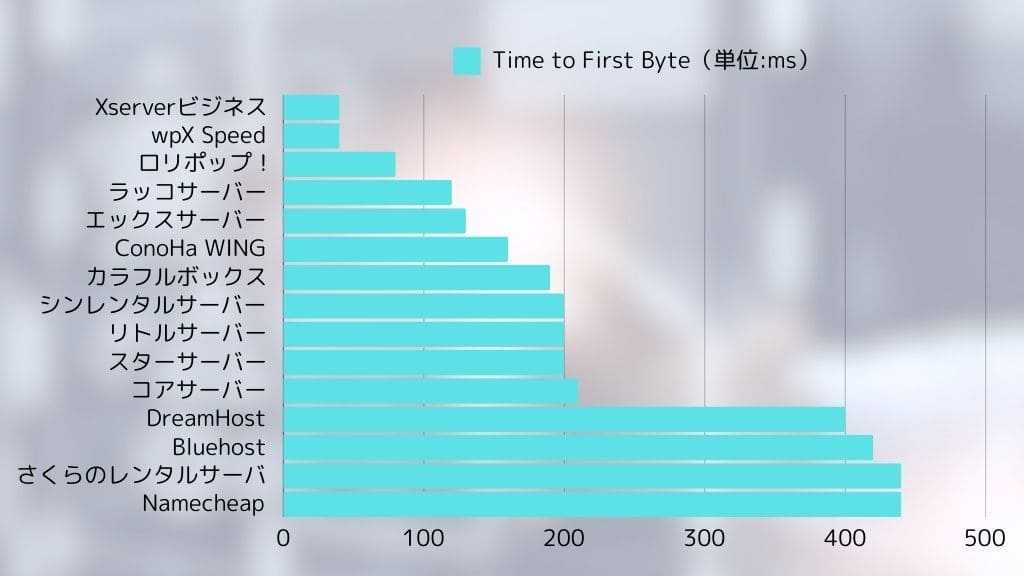
Lolipop posted an extremely fast display speed of 80ms.
As the data shows, LOLIPOP performs well in display speed compared with other providers. In particular, its fast initial response is extremely important for reducing user drop-off.

Detalizēts cenu plānu salīdzinājums
LOLIPOP offers multiple pricing plans to match different needs. The table below summarizes the prices and specifications of each plan.
| Plan name | Mēneša cena | Disk space | Databases | WordPress | Funkcijas |
| Economy | 99 yen | 120GB | Nav | Nav | The cheapest plan. Best for static websites or email use. |
| Light | 264 yen | 350GB | 50 | Jā | The cheapest plan that can run WordPress. Ideal for personal blogs. |
| Standard | 495 yen | 450GB | 100 | Jā | A well-balanced plan that can handle many kinds of sites. Best for personal blogs and small to midsize websites. |
| High Speed | 550 yen | 700GB | Neierobežots | Jā | A plan specialized for fast display. Recommended for high-traffic sites and larger websites. |
| Enterprise | 2,200 yen | 1.2TB | Neierobežots | Jā | Recommended for large-scale websites and business use. Built for heavy loads and a stable server environment. |
*The figures above are for selected plans only and may vary depending on contract term and campaign conditions.
Kā izvēlēties ieteicamo plānu pēc lietošanas gadījuma: personīgiem emuāriem, uzņēmumu vietnēm un lielām vietnēm
- Personal blogs: If you are a beginner or want to keep costs down, the Light plan is recommended. It can run WordPress and includes enough features for most needs. If you expect a certain level of traffic, consider the High Speed plan as well.
- Uzņēmumu vietnes: For small to midsize business sites, the High Speed plan is recommended. It provides a stable environment that is fully capable of supporting business use.
- Large-scale sites: If you expect heavy traffic or need to withstand high load, consider the High Speed plan or the Enterprise plan.
Ilgtermiņa līgumu priekšrocības un piesardzības punkti
With LOLIPOP, you may receive a discount on the monthly fee by signing a long-term contract. If you are considering a long-term contract, compare the discount amount and contract length and choose the period that best matches your usage. However, be careful because canceling during the contract term may result in a cancellation penalty.
Stabila darbība un drošība: miers ar aktuālām funkcijām
LOLIPOP has a high level of stability backed by many years of operation. Its 99.99% uptime speaks to that reliability. Looking at past server incidents, most were planned maintenance, and sudden unexpected failures have been very rare.
Even if a server issue does occur, LOLIPOP works quickly to restore websites. Its monitoring system has also been strengthened, and servers are monitored 24 hours a day, 365 days a year.
Vietnes drošība ir ārkārtīgi svarīga. LOLIPOP implements the following security measures.
- Bezmaksas SSL: Encrypts website communication and helps prevent data interception and tampering.
- WAF (Web Application Firewall): Protects your site against attacks that target web application vulnerabilities.
- Protection against unauthorized access: Detects suspicious access and prevents intrusions into your website.
These security measures help users operate their websites with peace of mind.
★ What Are SSL and TLS? How Encryption Protects Information and Why It Matters
Daudz funkciju un lietošanas ērtums: WordPress darbojas gludi
LOLIPOP offers a variety of features to help even beginners build websites easily. One of the most convenient is its simple WordPress installation function.
- Easy WordPress install: From the Lolipop! control panel, you can install WordPress in just a few clicks. Database setup and WordPress installation are handled automatically, so even beginners can launch a WordPress site easily.
- Easy WordPress migration: Moving from another provider is smooth. If you already run a WordPress site elsewhere, you can move it easily with Lolipop!'s Easy WordPress Migration feature.
- Easy-to-use control panel: The control panel is simple and intuitive, so even beginners can configure the settings needed to run a website without getting lost. It can also be customized to suit your own preferred workflow.
Looking at these points together, LOLIPOP is an extremely attractive hosting service that balances low pricing with speed, stability, security, and ease of use.
Lolipop trūkumi un piesardzības punkti: kas jāzina pirms reģistrēšanās

Although LOLIPOP has many advantages, it also has some drawbacks and points that require caution. To avoid thinking, “This is not what I expected...” after signing up, here I explain those drawbacks and cautions in detail. Make sure you check them properly before signing a contract.
Rezerves kopiju funkciju ierobežojumi zemākajos plānos: informācija par rezerves kopiju opciju
Among LOLIPOP plans, the Economy and Light plans do not include automatic backups as a standard feature. That means if a problem occurs on your website, recovery can be difficult unless you have taken backups yourself.
- High Speed plan and above: The High Speed and Enterprise plans include automatic backups as a standard feature.
- Economy, Light, and Standard plans: You need to subscribe separately to the “7-generation automatic backup” service as an optional add-on.
- Price: 330 yen per month (tax included)
- Backup frequency: You can decide it freely
- Retention period: The past 7 backups
- Restore: Can be restored easily from the control panel in just a few clicks
- Points to note: If you use the Economy or Light plan, you need to take the cost of the backup option into account.
- If you do not set up automatic backups, you need to create manual backups on a regular basis.
- Recommended approach: If you use the Economy or Light plan, consider subscribing to the backup option.
- It is also advisable to take layered precautions, such as combining that with manual backups.
- For important data, try to spread risk by backing up to a local environment or using WordPress backup plugins.

Funkciju ierobežojumi dažos plānos: atšķirības no augstākiem plāniem
Depending on the LOLIPOP plan, some functions may be limited. In particular, lower-tier plans have more restrictions than higher-tier plans, so you need to be careful.
- Examples of feature limits:
- Simultaneous access limits: Lolipop sets an upper limit on concurrent access to websites for each plan. On the Light plan and above, using Lolipop! Accelerator can in some cases avoid 503 errors caused by concurrent access. On the Standard plan and above, “Concurrent Access Expansion” can temporarily raise the access limit. High Speed plans and above have unlimited simultaneous access.
- Datu bāzu skaits: The Economy plan cannot use databases. The Light and Standard plans limit the number of databases available. If you run multiple sites, you need to consider the Light plan or higher.
- Speed features: Lolipop! Accelerator is available on the Light plan and above. LiteSpeed Cache is available only on the High Speed plan and above.
- Atbalsts: Phone support is available only on the Standard plan and above. Email support aims to reply within 48 hours on the Economy, Light, and Standard plans, and within 24 hours on the High Speed and Enterprise plans.
- Domains: On the High Speed plan and above, two domains are free forever while your contract remains active.
- Points to note: Before signing up, make sure you understand the functions and limitations of each plan.
- If the lower plans do not include the features you need, you will need to consider a higher plan.
- Recommended approach: Check the official plan comparison table on the LOLIPOP website in advance.
- Use the free trial period, actually try it, and confirm whether the features you need are available.
- If you are unsure which plan to choose, I recommend the High Speed plan because it offers high performance and becomes less expensive with a long-term contract.
Atbalsta sistēma: e-pasta un čata atbalsta izvērtējums
The support system of LOLIPOP is centered on email support and chat support. Phone support is not provided.
- Email support:
- Hours: 24/7 reception (responses are sent during business hours)
- High Speed plan and above: Aims to reply within 24 hours
- Standard, Light, and Economy plans: Aims to reply within 48 hours
- AI chat support:
- Hours: Pieejams 24/7
- Scope: Relatively simple questions and setup guidance
- Points to note: Depending on the question and how busy support is, it can take time to receive an answer.
- The content of replies may vary depending on the support representative. That is true of hosting providers in general.
Recommended approach:
- Before asking a question, check the official FAQ and manual.
- If the issue is urgent, prioritize phone support.
- If you describe the issue specifically and attach screenshots, you may get a smoother response.
- Take support hours into account and contact them with enough time to spare.
Salīdzinājums ar citiem hostinga pakalpojumiem: ātrums, funkcijas un cenas
LOLIPOP is a low-cost and well-balanced hosting service, but compared with other providers, there are areas where it falls behind in speed or features.
*The table above is only one example of a comparison, and features and pricing vary by plan for each provider.
Padziļināts salīdzinājums ar citiem hostiem: Lolipop pret Star Server pret CoreServer pret ConoHa WING

When choosing a hosting service, you have many options besides LOLIPOP. Here I pick out three popular alternatives that are often compared with it: Star Server, CoreServer, and ConoHa WING, and compare their features, pricing, and functions in detail.
Salīdzini katra servera cenas, specifikācijas un funkcijas
Use the table below to compare the pricing, specifications, and main features of each server.
*Iepriekš minētajā salīdzinājumā izmantoti katra pakalpojumu sniedzēja reprezentatīvie plāni. Cenas un specifikācijas atšķiras atkarībā no plāna.
Kad jāizvēlas Lolipop: ja novērtē cenas un veiktspējas attiecību, funkcijas un stabilitāti
LOLIPOP is the best choice in the following kinds of situations.
- You want to prioritize website speed above all else: Lolipop! is extremely fast, so if high display speed is important to you, it is worth choosing.
- You want to keep costs as low as possible: Since it has very low-priced plans from 264 yen per month that can run WordPress, it is ideal for people who want to minimize costs.
- You are a beginner who wants to start a website easily: The control panel is easy to use, and WordPress setup is straightforward.
If these conditions apply to you, LOLIPOP will likely be the most cost-effective option.
Kad jāizvēlas cits pakalpojumu sniedzējs: ja novērtē ātrumu, atbalstu vai konkrētas funkcijas
On the other hand, in the following situations, you may need to consider a provider other than LOLIPOP.
- You want more extensive support: On lower Lolipop! plans, phone support may not be available and email responses may take longer.
- You need specific features: If you require features that Lolipop! does not offer, such as more advanced security functions or support tailored to a specific CMS, consider another provider.
- You run a large-scale website: If your site handles heavy load and requires stronger resources, compare higher-end alternatives as well.
- Points for choosing each provider:
- Star Rental Server: A server with a good balance between cost performance and speed. Recommended for beginners to intermediate users.
- CoreServer: High-performance hosting aimed at advanced users. Recommended if you prioritize speed and stability.
- ConoHa WING: A fast server equipped with newer technology. Easy to handle with WordPress and recommended for beginners. Also worth considering for large sites or if you place top priority on display speed and traffic tolerance.
LOLIPOP is recommended for people who want to start a website easily at low cost and who are satisfied with core features. However, if you need a faster server or more extensive support, it is worth considering other providers too.



Kam ir ieteicams Lolipop? Iesācējiem, individuāliem emuāru autoriem un maziem vai vidējiem uzņēmumiem

Cilvēki, kuriem vajadzētu apsvērt Lolipop!
- Iesācēji, kuri hostingu izmanto pirmo reizi: People who want to start a website easily at low cost, install WordPress easily, and work with an easy-to-use control panel.
- People running personal blogs: People who want to start blogging while keeping costs down, want a stable server environment, and want a server that can handle a reasonable amount of traffic.
- Companies running small to midsize websites: Businesses that want low-cost hosting that is still practical for business use.
Cilvēki, kuriem Lolipop nav piemērots
- People who put absolute priority on website stability: Especially on lower-tier plans, the site can feel slower as traffic increases. If you need a faster server, consider another provider.
- People who need extensive support: If support response speed is important to you, other providers may suit you better.
- People who need advanced features: If you need functions that Lolipop does not offer, consider another host.
4 soļi, lai tūlīt sāktu WordPress vietni ar Lolipop
- STEP.1Access the official website, LOLIPOP
Click “Start with a 10-day free trial.”
- STEP.2Apply
Select a plan. I recommend the reasonably priced Light plan that can run WordPress.
Enter your account information. Set the initial Lolipop domain that will become your account. Enter any string you like.
Create a strong password.
Enter the email address you normally use as your contact address.
If you see the message that you can obtain a custom domain for free when applying, you are either in a campaign period or choosing a higher plan. If it appears, check the box and choose “Obtain it.” In that case, the 10-day free trial cannot be used. Even so, it is easier to start WordPress this way, so I recommend choosing it.
Enter the custom domain you want to obtain.
★ What Is a Domain? Its Role as an Internet Address and How to Obtain One
To obtain a domain, you need a Muumuu account. Set an ID and password. Read the notes and check “Agree.”
There is SMS verification by phone, and voice call verification is also available. Once you receive the verification code, enter it and click “Verify.”
Next, complete Lolipop user registration. Enter your name, address, and the other required details.
Noteikti atzīmējiet izvēles rūtiņu reģistrācijas ekrāna apakšā ar tekstu “Instalēt WordPress vienlaikus ar pieteikšanos.” If you do not use this, setting up WordPress becomes much more difficult. (The 10-day free trial will no longer be available. Even so, it is better to use this option.)
I also recommend enabling automatic contract renewal. Renewal procedures are tedious, and if you forget, your data may be deleted.
Enter the information required for WordPress.
- Site title: anything is fine
- Username: anything is fine
- Password: make it as strong as possible
You can change the site name later, so if you have not decided yet, enter a temporary name.
Your WordPress username and WordPress password are important. Write them down. You will need them to log in to the website you created with WordPress.
Choose a WordPress theme. I recommend Cocoon. (This site also uses Cocoon.)
A confirmation page for your application details will appear. If everything is fine, click “Start the free trial.” Your application is now complete.
- STEP.3Initial WordPress setup
On the screen after completing your application, click “Log in to the user page.”
Under “Create a site,” you will see the message “WordPress is currently being installed. Please wait a little longer until installation is complete.” It can take around 10 minutes for the installation to finish.
Once the installation is complete, the message “Check WordPress” will appear. Click it. Then click the “Admin URL” shown in your WordPress installation history. On the login screen that appears, enter the username and password you wrote down earlier and click “Log in.”
*If you see a warning saying “This site can’t be reached,” the DNS settings have not propagated yet. In that case, you have no choice but to wait, so try logging in once every hour.
★ What Are DNS and Name Servers?
After logging in to WordPress, set your permalinks. From the WordPress admin screen, go to “Settings” and then “Permalinks.” Choose “Post name,” then click “Save changes.”
When you choose “Post name,” you can enter any string you like in the URL when publishing articles. I recommend short strings that help readers imagine the content of the article. If a URL is too long, some visitors may feel uneasy and think it looks suspicious.
- STEP.4Install plugins
Return to the WordPress admin screen, go to “Plugins,” then “Add New,” and install the plugins you need.
When you find a plugin you want by searching, click “Install Now” and then “Activate.” After that, follow the instructions for each plugin.
Make sure to install security and backup plugins.
- 5 WordPress spraudņi drošības stiprināšanai un to izvēles principi
- 5 Powerful WordPress Backup Plugins to Help You Get Your Data Back
Once you have installed your plugins, your WordPress website is ready to go.
Biežāk uzdotie jautājumi par Lolipop: draudzīgs iesācējiem

This FAQ summarizes questions that people considering LOLIPOP or people who have just started using it are likely to have. The explanations are written so that even beginners can feel comfortable using Lolipop!.
Kurš plāns ir ieteicams?
The best plan on LOLIPOP depends on your purpose and budget.
- People using hosting for the first time or running a personal blog:Light plan: recommended because it is inexpensive and can run WordPress.
- People who want to run a personal blog with some expected traffic, or a small company site:Standard plan: recommended because it offers a stable environment and can handle many sites.
- People who expect heavier traffic:High Speed plan: recommended because of its stronger speed and higher resources.
I recommend using the free trial period to actually test each plan for yourself.
Vai var izmantot pielāgotu domēnu?
Jā, varat izmantot pielāgotu domēnu ar LOLIPOP.
- If you obtain it through Lolipop!: You can obtain a domain easily from the Lolipop! control panel.
- If you obtain it elsewhere: A domain acquired from another provider can also be used with Lolipop!. In that case, you need to configure the name servers.
Vai var izmantot WordPress?
Jā, varat izmantot WordPress ar LOLIPOP. However, note that the Economy plan cannot run WordPress.
- Easy install feature: You can install WordPress easily from the Lolipop! control panel.
- Easy WordPress migration feature: You can easily migrate a WordPress site from another hosting provider.
Kāds lietotāju atbalsts ir pieejams?
A: Lolipop! offers the following user support options.
- Phone support: Weekdays 09:30-13:00, 14:00-17:30
- Standard plan and above: Pieejams
- Light and Economy plans: Not available
- Email support: Reception 24/7 (responses during business hours)
- High Speed plan and above: Aims to reply within 24 hours
- Standard, Light, and Economy plans: Aims to reply within 48 hours
- Chat support: Pieejams 24/7 samērā vienkāršiem jautājumiem
- FAQ and manual: A comprehensive FAQ page and manuals are provided.
Vēlos salīdzināt cenu plānus
You can compare the pricing and specifications of each plan on the official LOLIPOP website.
Varat atsaukties arī uz šī raksta sadaļu “Četras Lolipop funkcijas salīdzinājumā ar citiem hostinga pakalpojumiem”, kur salīdzinātas katra plāna cenas un specifikācijas.
Vai var pāriet no zemāka plāna uz augstāku plānu?
Jā, LOLIPOP lets you upgrade your plan.
- You can complete the plan change procedure easily from the control panel.
- The plan change is reflected immediately.
- You can change to a higher-tier plan at any time, but you cannot switch to a lower-tier plan.
Kā tiek pārvaldītas rezerves kopijas?
How backups are handled on LOLIPOP depends on the plan.
- High Speed plan and above: Automatic backups are included as standard.
- Economy, Light, and Standard plans: Automatic backups are available as an option (330 yen per month).
I recommend taking backups on a regular basis.
Kā pāriet no cita pakalpojumu sniedzēja?
If you want to move to LOLIPOP from another provider, you have the following options.
- Easy WordPress migration feature: If your site uses WordPress, you can migrate it easily with this feature.
- Manual migration: You need to upload files with FTP software and migrate the database manually.
Kopsavilkums: vai Lolipop tiešām ir vērts iegādāties? Vēlreiz pārskatiet plusus un mīnusus

In this article, I have thoroughly explained LOLIPOP from every angle, including its reputation, reviews, features, drawbacks, comparisons with other providers, setup procedure, and frequently asked questions. To close, let us review its overall evaluation again and summarize who it is best suited for.
- Advantages:
- Overwhelmingly low pricing: Plans start at 99 yen per month, and upfront costs are easy to keep low.
- Easy to get started: It provides simple WordPress installation and an easy-to-use control panel so even beginners can launch a website without much difficulty.
- Stable server environment: It has a long operating track record and high uptime.
- Plenty of features: It includes the features needed to run a website, such as WordPress support, SSL setup, and email functionality.
- The reassurance of a long-established provider: It has been used by many customers for years and has high reliability.
- Drawbacks:
- Vienlaicīgas piekļuves tolerance zemākajos plānos: The Economy, Light, and Standard plans limit concurrent access.
- Atbalsta sistēma: Email replies can take time.
- Some feature restrictions: Lower plans have limitations on the functions you can use.
- Rezerves kopiju funkcija: On some plans, automatic backups are a paid option.
If you also want to consider other hosting services, read the article below.
Complete comparison of 32 WordPress hosting services: recommendations for individuals, businesses, and overseas use

When you think, “I want to start using WordPress,” and search for “recommended WordPress hosting,” you find all kinds of articles, from services for individuals and small to midsize businesses to overseas hosts and cheap servers. To be honest, you may feel:
- Which site should I even look at?
- I just want to choose a hosting service in a simple, easy-to-understand way.
- Please show me how I can start WordPress right away.
If that sounds familiar, this article introduces a carefully selected set of recommended providers from 32 hosting services for individuals, corporations, and overseas use. It is explained by an SEO specialist at an app development company that uses hosting services every day.