
Try it on անվճար հոսթինգ
PR
Servers
XREA-ի ակնարկ [2025 թ. թարմացում]․ WordPress-ը անվճար հոսթինգում օգտագործելու առավելություններն ու թերությունները, ինչպես նաև համեմատություն այլ անվճար սերվերների հետ
Հրապարակված՝ 2025.04.18
Թարմացված՝ 2025.04.18
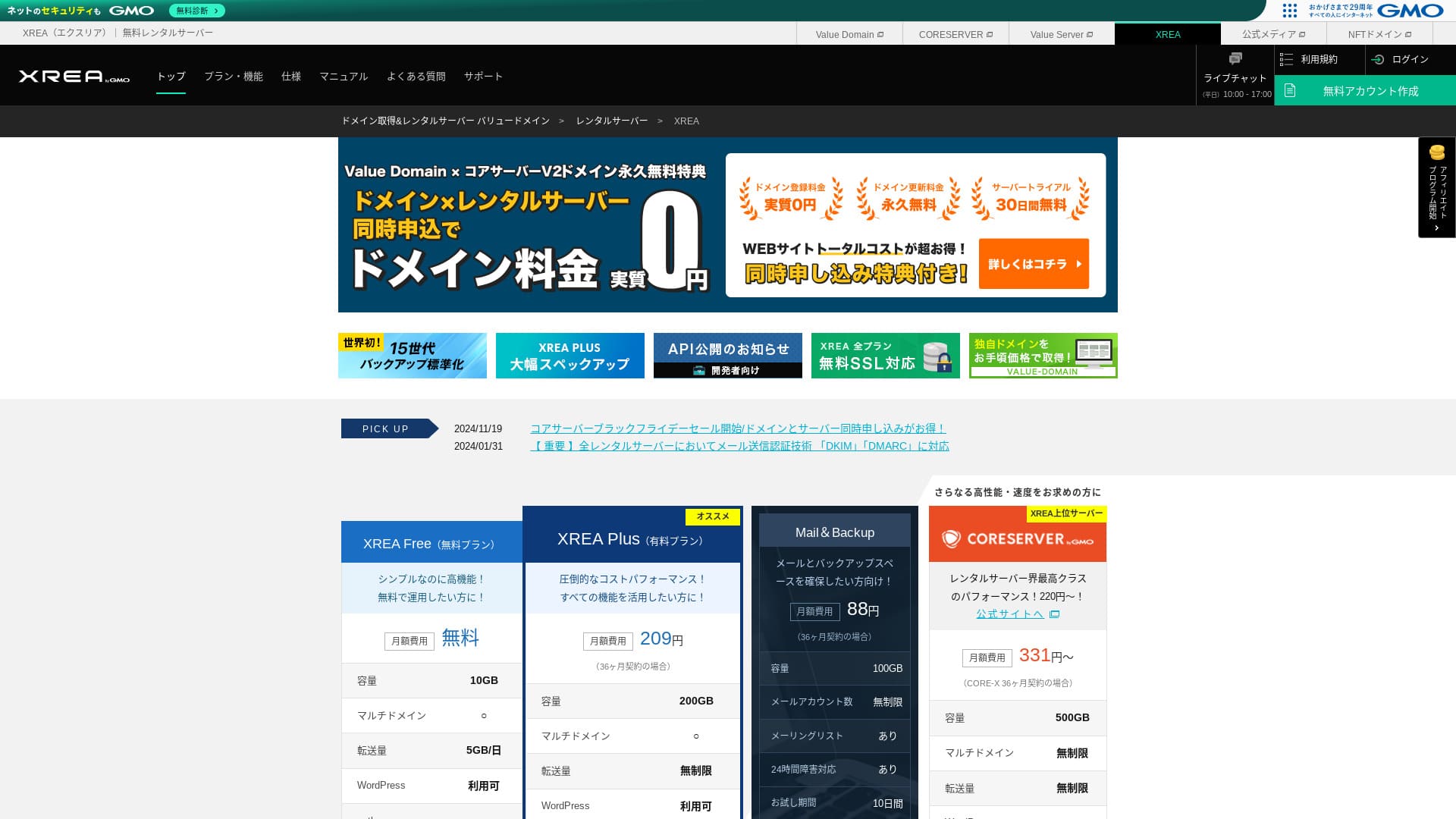
XREA գործարկվում է GMO Digirock, Inc.-ի կողմից և առաջարկում է անվճար հոսթինգ։ Սովորական անվճար հոսթինգներից տարբերվելով՝ այն ունի նաև չաթ աջակցություն։

XREA is անվճար հոսթինգ փնտրող մարդկանց համար, որովհետև՝
- Կարող եք անվճար օգտագործել WordPress-ը
- Կարող եք ստանալ չաթ աջակցություն
- Այն ներառում է 15 սերնդի պահուստավորում
Այդ պատճառով ծառայությունը, ամենայն հավանականությամբ, կբավարարի ձեզ։ Քանի որ այն անվճար է, անպայման փորձեք։
Համեմատվող սերվեր է スターレンタルサーバー. Այն նույնպես կարելի է օգտագործել անվճար, բայց դրա բարձրացված վճարովի պլանների հնարավորությունները ավելի լավն են, քան XREA. Խնդրում ենք դա նույնպես դիտարկել։
| Սերվերի տեսակ | Համատեղ սերվեր |
| Ցուցադրման արագություն (TTFB) | Չկաt measured |
| Առաջարկվող փաթեթ և պայմանագրի ժամկետ | Անվճար |
| Փորձաշրջան / գումարի վերադարձի երաշխիք | Չկա |
| Ամսական վճար (12-ամսյա պայմանագիր) | Անվճար |
| Սկզբնական կարգավորման վճար | Անվճար |
| Անվճար դոմեն | Չկա |
| Աջակցություն | Էլփոստ և չատ (10:00-17:00) |
| Աշխատունակության ժամանակ | Բացահայտված չէ |
| Պահեստ | 10GB |
| Տվյալների բազաների քանակը | 5 |
| Անվտանգության միջոցներ | Չկա |
| SSL | Անվճար SSL, shared SSL |
| Պահուստավորում / վերականգնում | 15 սերնդի պահուստավորում անվճար, վերականգնումն անվճար |
| Էլփոստի հաշիվների քանակը | 100 |
| Էլփոստի անվտանգության միջոցներ | POP SSL-ի միջոցով, IMAP SSL-ի միջոցով, SMTP SSL-ի միջոցով, վիրուսների սկանավորում |
| Սերվերի / կայքի տեղափոխման ծառայություն | Չկա |
| WordPress-ի նախատեղադրում | Չկա |
| CDN | Չկա |

Hikaru Ono
Կառավարման վահանակի օգտագործելիության առումով XREA-ն ինձ մի փոքր յուրահատուկ թվաց։ Դա պարզապես իմ անձնական տպավորությունն է։ Այնուամենայնիվ, բոլորը կարող են օգտագործել այն, եթե քայլ առ քայլ առաջ գնան՝ նայելով մանրամասն պաշտոնական ուղեցույցներին։
For a անվճար սերվեր, it gives you more than enough features and support.
XREA Compared with Other Սերվերներ
- OverallԳնահատական★★★☆☆
- Սերվեր արագություն Չկաt measured
- Pricing ★★★★★
- Stability ★★★☆☆
- WordPress-ով սկսելու հեշտություն* ★★★☆☆
- Դոմենի կառավարում և SSL կարգավորում նման գործողություններ* ★★★☆☆
* Հիմնված է իմ անձնական օգտագործման փորձի վրա։

Ինչպես ընտրել անհատների համար առաջարկվող 21 WordPress հոսթինգ ծառայություններից
Ինչպես ընտրել անհատների համար առաջարկվող 21 WordPress հոսթինգ ծառայություններից
serverfield.org
- Չկաvember 4, 2025 շուկայի հետազոտության տվյալներ, by արագություն sorted
- Ամսական վճարները WordPress գործարկելու ունակ ամենաէժան պլանի առաջին տարվա արժեքն են
- Արագությունը նույն պայմաններում ցուցադրական կայքերում չափված Time to First Byte-ն է
XREA-ի ակնարկ և հինգ հիմնական առանձնահատկություններ

A Չկա-Cost Սերվեր That Can Also Run WordPress
XREA is a անվճար սերվեր. Ամսական վճար և նախնական վարչական վճար չկա։Այնուամենայնիվ, դուք դեռ կարող եք օգտագործել WordPress։ Այն հարմար է այն մարդկանց համար, ովքեր ցանկանում են ծախսերը հասցնել բացարձակ նվազագույնի։ Մենք այն համեմատեցինք տեղական սերվերների հետ հետևյալ պայմաններով։
- Սկզբնական կարգավորման վճար
- 12 ամսվա սերվերի պայմանագիր
- Դոմենի վճարների մեկ տարվա արժեքը
- WordPress օգտագործելու հնարավորություն ունեցող ամենաէժան պլանը
Հնարավորությունների և բնութագրերի մեջ մեծ տարբերություններ կան, բայց մոտ մեկ տասներորդի չափ մնացող գինը դեռ գրավիչ է։
Comes with Chat Աջակցություն
XREA տրամադրում է չատի աջակցություն։
Most անվճար սերվերs offer little to no support. XREA-ի դեպքում կարող եք օգնություն ստանալ, երբ խնդիր առաջանա, ուստի նույնիսկ սերվերի փորձ չունեցողները կարող են այն վստահորեն օգտագործել։
Կենդանի չատի աջակցությունը հասանելի է աշխատանքային օրերին 10:00-ից 17:00։ Էլփոստով աջակցությունն էլ հասանելի է։
Տրամադրում է պահուստային պատճենների 15 սերունդ
XREA-ն կարող է պահել պահուստային պատճենների մինչև 15 սերունդ։ Սա չափազանց առատաձեռն է։ Նույնիսկ վճարովի սերվերները հաճախ պահուստավորումը դարձնում են վճարովի տարբերակ կամ վերականգնման համար առանձին վճար են գանձում։
Օրինակ՝ LOLIPOP իր ցածր մակարդակի պլաններում պահուստավորումներ օգտագործելուց առաջ պահանջում է ամսական 330 յենի լրացուցիչ վճարովի տարբերակ։
Պահուստային պատճենները կարևոր են։ Նույնիսկ եթե ձեր կայքը վարակվի վնասաբեր ծրագրով կամ դուք պատահաբար ջնջեք տվյալները, պահուստային պատճեն ունենալու դեպքում կարող եք վերականգնել դրանք։ Առանց դրա ձեր ջանքերով կառուցած ամեն ինչ կարող է անհետանալ։
Պահուստային պատճենների 15 սերունդների շնորհիվ կարող եք հանգիստ կառավարել ձեր կայքը։
Կարող եք ստեղծել հինգ WordPress կայք
XREA-ն թույլ է տալիս ստեղծել մինչև հինգ WordPress կայք։
Նշում՝ Ի՞նչ է WordPress-ը։ Կայք սկսելու համակարգը և ուշադրության արժանի կետերը
Այն օգտագործելու բազմաթիվ եղանակներ կան, օրինակ՝ ընկերության կայքի կողքին հոբբի բլոգ ավելացնելը։ Երբ գրանցվել եք սերվերի համար, գուցե մտածել եք, որ մեկ կայքը բավական է, բայց ժամանակի ընթացքում կարող եք նոր բիզնես սկսել կամ նոր հոբբիներ ձեռք բերել։
Դա ձեզ ազատում է մեկ այլ սերվերի համար գրանցվելու հոգսից և լրացուցիչ ծախս էլ չի պահանջում։
You Can Use Անվճար Custom SSL
XREA-ն թույլ է տալիս օգտագործել անվճար սեփական SSL։ Some անվճար սերվերs do not provide free custom SSL because of feature limitations.
SSL is essential անվտանգություն for a website. It is reassuring that even a անվճար սերվեր provides it.
Նշում՝ Ի՞նչ են SSL-ը և TLS-ը։ Տեղեկատվությունը կոդավորմամբ պաշտպանելու մեխանիզմը և առավելությունները
XREA-ի թերությունները՝ անկեղծորեն

Անվճար servers are attractive, but they also have թերություններ, so make sure to check them before you use one. Even if the financial burden is small, you still spend time and effort.
Գովազդներ են ցուցադրվում
XREA ձեր կայքի վերևում ավտոմատ ցուցադրում է գովազդներ։ Քանի որ գովազդները հայտնվում են էջի ամենատեսանելի մասում, դա դժվարացնում է օգտագործումը կորպորատիվ կայքի համար։ Դրանք կարող են նաև չհամապատասխանել ձեր ընկերության մթնոլորտին։
Այն մարդիկ, ովքեր ցանկանում են գովազդային եկամուտ ստանալ, օրինակ՝ աֆիլիատ մարքեթինգի միջոցով, հավանաբար չեն ցանկանա ցուցադրել գովազդներ, որոնք չեն նպաստում իրենց շահույթին։
Գովազդները թաքցնելու համար պետք է օգտագործել վճարովի պլանը XREA Plus։ Եթե պատրաստվում եք օգտագործել XREA Plus, ավելի լավ է դիտարկել նաև այլ վճարովի սերվերներ։
Տվյալների փոխանցման թույլատրելի ծավալը ցածր է
XREA ունի փոխանցման ցածր թույլատրելի ծավալ։ Արդյունքում՝ երթևեկի աճին զուգահեռ կայքը ցուցադրելը դժվարանում է։ Այնպիսի կայք հրապարակելը, որը մարդիկ իրականում չեն կարող տեսնել, իմաստը կորցնում է։
Նշում՝ Ի՞նչ են երթևեկը և փոխանցման ծավալը։ Վեբ երթևեկի կառավարում և օպտիմալացում
Աշխատունակության ժամանակ Is Չկաt Disclosed
Բավականին մտահոգիչ է, որ դրա հասանելիության ժամանակը չի հրապարակվում։ Մենք չենք կարող թվայինորեն գնահատել, թե որքան կայուն է այն։ Եթե սերվերը կայուն չէ, կայքն էլ հուսալիորեն չի ցուցադրվի։ Կայքը, որը մարդիկ չեն կարող տեսնել, իմաստը կորցնում է։
Նշում՝ A Beginner's Guide to Understanding Hosting Աշխատունակության ժամանակ and SLAs
Հուսադրող է օգտագործել 99.99% կամ ավելի բարձր հասանելիության ժամանակ ունեցող սերվեր, որը բարձր հասանելիության չափանիշ է։ 99.99%-ի դեպքում սերվերը 365-օրյա պայմանագրային ժամանակահատվածում անջատված է մեկ ժամից պակաս։ Մնացած ժամանակ ձեր կայքը կարող է նորմալ դիտվել։
Compare XREA with Two Competing Սերվերներ
Shin Free Server
Shin Անվճար Սերվեր is a անվճար սերվեր that does not display ads. Դա այն ավելի հեշտ է դարձնում նույնիսկ կորպորատիվ կայքերի նման նպատակների համար։ Դրա փոխանցման թույլատրելի ծավալը լրիվ այլ մակարդակի է, ուստի պակասելու մասին անհանգստանալու կարիք չկա։
Սակայն, ի տարբերություն XREA-ի, այն աջակցություն չունի։ Ձեզ անհրաժեշտ է հմտություն՝ խնդիրները ինքնուրույն լուծելու համար՝ ձեռնարկը ստուգելով և համացանցում որոնելով։

Shin Անվճար Սերվեր Review and Drawbacks [2025 Latest]: Starting WordPress on Անվճար Hosting
Shin Անվճար Սերվեր Review and Drawbacks [2025 Latest]: Starting WordPress on Անվճար Hosting
serverfield.org
Star Server Free
Star Սերվեր Անվճար is a անվճար սերվեր run by a long-established domestic hosting company.
However, it has more թերություններ than XREA, such as ads being displayed on smartphones and the lack of support. Քանի որ դրա փոխանցման թույլատրելի ծավալը հրապարակված չէ, մտահոգություն է առաջանում, թե արդյոք այն կմնա տեսանելի երթևեկի աճի դեպքում։

Star Սերվեր Review [2024 Latest]: Astonishingly Low Prices and a Thorough Look at the Real Pros and Cons
Star Սերվեր Review [2024 Latest]: Astonishingly Low Prices and a Thorough Look at the Real Pros and Cons
serverfield.org
Սկսեք WordPress կայք XREA-ում 7 քայլով
Սկսենք կայք XREA-ով։
- STEP.1Մուտք գործեք պաշտոնական կայք
Սեղմեք "Create Account" վերին էջում։
- STEP.2Գրանցվեք որպես Value Domain օգտվող
Սա օգտվողի հաշիվ ստեղծելու էկրանն է։ Մուտքագրեք օգտվողի անուն, գաղտնաբառ և էլփոստի հասցե։ Ստուգեք տվյալները և սեղմեք "Register"։
Էլփոստի հաստատումն ավարտելուց հետո գրանցեք ձեր օգտվողի տվյալները, ինչպիսիք են անունը և հասցեն։ Ավելի հեշտ կլինի, եթե ավարտեք նաև SMS հաստատումը։ Սեղմեք "Review entered information", ապա անդամակցության համաձայնագիրը և գաղտնիության քաղաքականությունը ստուգելուց հետո սեղմեք "Register user"։
Հաստատման էկրանը կրկին կհայտնվի, ուստի սեղմեք "OK"՝ օգտվողի գրանցումն ավարտելու համար։
Դոմեն ընտրելուց հետո անպայման նշեք "Install WordPress at the same time"։
Սեղմեք "Next"։
- STEP.3Գրանցվեք XREA-ում
Log in to Value Domain, select "XREA" from "Սերվեր," click "Create a new XREA account," and then click "Get XREA (Անվճար)."
Ցանկալի հաշվի անվան համար կարող եք օգտագործել ցանկացած տող։
Դուք կարող եք .shop դոմենը մեկ տարի օգտագործել անվճար։ Եթե հատուկ նախընտրություն չունեք, օգտագործեք .shop դոմեն։ Սակայն երկրորդ տարվանից սկսած .shop դոմենի թարմացումը տարեկան արժե 5,440 յեն, ինչը բավականին թանկ է։
Մենք խորհուրդ ենք տալիս հայտնի դոմեններ, ինչպիսիք են .com-ը և .net-ը։ Դրանց թարմացման վճարներն էլ ողջամիտ են՝ 2,000 յենից պակաս։
Նշում՝ Ի՞նչ է դոմենը։ Նրա դերը որպես հասցե ինտերնետում և ինչպես ստանալ այն
Ստուգեք սերվերի և պահուստավորման օգտագործման պայմանները, ապա սեղմեք "Register"։ Դրանից հետո ձեր հաշիվը կստեղծվի։
Եթե չեք ստացել .shop դոմեն՝ Ստացեք դոմեն Value Domain-ի միջոցով
Value Domain էջի վերևում ընտրեք "Domain Registration"։ Մուտքագրեք ցանկացած տող և որոնեք, և հասանելի դոմենները կցուցադրվեն։
Ստուգեք դոմենի անունը և պայմանագրի ժամկետը։ Մեկ տարին բավարար է։ Քանի որ արդեն դիմել եք XREA-ի համար, նշեք "Do not use a server"։ Ստուգեք գրանցման տվյալները և սեղմեք "Next"։
Ընտրեք վճարման եղանակ, ստուգեք, որ ուսումնասիրել եք օգտագործման պայմանները, և սեղմեք "Confirm application"։ Դրանով դոմենի ձեռքբերումն ավարտվում է։
Բացեք XREA կառավարման վահանակը, ընտրեք "Domain Settings" և սեղմեք "Create new domain setting"։ Մուտքագրեք ավելի վաղ ձեռք բերած դոմենի անունը և սեղմեք "Create new domain setting"։ Սա դոմենը կարգավորում է XREA-ում։
- STEP.4Ստեղծեք տվյալների բազա
Ստեղծեք տվյալների բազա, որպեսզի կարողանաք օգտագործել WordPress։
Նշում՝ Ի՞նչ է տվյալների բազան։ WordPress-ի համար անհրաժեշտ կառավարման և գործարկման համակարգը
Մուտք գործեք XREA կառավարման վահանակ։ Մենյուից անցեք "Database", ապա "MsSQL" և սեղմեք "Create new database"։
- Տվյալների բազայի անուն՝ ցանկացածը հարմար է
- Գաղտնաբառ՝ ցանկացածը հարմար է։ Դարձրեք այն որքան հնարավոր է բարդ
- Նիշերի կոդավորում՝ թողեք ինչպես կա
- Հուշագիր՝ ոչինչ գրելու կարիք չկա
Վերոնշյալը մուտքագրելուց հետո սեղմեք "Create new database", և տվյալների բազան կստեղծվի։
- STEP.5Տեղադրեք WordPress
XREA կառավարման վահանակում բացեք "Site Settings" և սեղմեք այն դոմենը, որտեղ ուզում եք տեղադրել WordPress։ Էկրանը փոխվելուց հետո սեղմեք "WordPress"։
Նշեք տեղադրման ուղին։ Եթե CMS Install-ը չի սեղմվում, մեկ անգամ փոխազդեք տեղադրման URL-ի հետ, և այն կդառնա սեղմելի։
Երբ կարողանաք շարունակել տեղադրումը, կարգավորեք WordPress-ը հետևյալ կերպ։
- Տվյալների բազայի անուն՝ Ավելի վաղ ստեղծած տվյալների բազայի անունը
- Username: Ցանկացածը հարմար է։ Հետագայում փոխելը դժվար է
- Password: Տվյալների բազան ստեղծելիս սահմանած գաղտնաբառը
- Տվյալների բազայի հոստի անուն՝ localhost
- Աղյուսակի նախածանց՝ Ցանկացածը հարմար է։
Ամեն ինչ մուտքագրելուց հետո սեղմեք "Submit", ապա "Run installation"։
Չկաw configure the WordPress information further.
- Կայքի վերնագիր՝ Ցանկացածը հարմար է։ Հետագայում կարող եք փոխել
- Username: Ցանկացածը հարմար է։ Հետագայում փոխելը դժվար է
- Password: Ցանկացածը հարմար է։ Դարձրեք այն որքան հնարավոր է բարդ
- Էլփոստի հասցե՝ Ձեր ամենօրյա էլփոստի հասցեն
- Որոնողական համակարգերի տեսանելիություն՝ Ցանկացածը հարմար է։ Նշեք, եթե ուզում եք, որ բոլորը կարողանան գտնել այն
WordPress մուտք գործելիս օգտագործում եք օգտվողի անունն ու գաղտնաբառը։ Անպայման գրի առեք դրանք։
Տեղադրումն ավարտվելուց հետո սեղմեք "Log in"։
- STEP.6Կարգավորեք SSL-ը
XREA կառավարման վահանակում բացեք "Site Settings"։ Սեղմեք "Create new site setting"։
Open the domain name where you configured WordPress, select "Անվճար SSL" under SSL, and click "Create new site setting."
- STEP.7Տեղադրեք փլագիններ
Վերադարձեք WordPress-ի ադմինիստրատորի էկրան և անցեք "Plugins", ապա "Add New"՝ անհրաժեշտ փլագինները տեղադրելու համար։
When you find a plugin you want to install by searching, click "Install Չկաw" and then "Activate." After that, proceed according to the instructions for each plugin.
Be sure to install անվտանգություն and backup plugins.
- Ինչպես ընտրել WordPress-ի անվտանգությունը ուժեղացնող հինգ փլագին
- WordPress-ի հինգ հզոր պահուստավորման փլագիններ, որոնք թույլ են տալիս վերականգնել ձեր տվյալները
Փլագինները տեղադրելուց հետո ձեր WordPress կայքը պատրաստ է։
Ամփոփում
Using the անվճար հոսթինգ service XREA թույլ է տալիս ստեղծել WordPress կայք՝ վճարելով միայն դոմենի համար։ It does have թերություններ, but few things are as welcome as something free. Use it wisely.
32 WordPress հոսթինգ ծառայությունների ամբողջական համեմատություն․ առաջարկներ անհատների, ընկերությունների և արտասահմանյան օգտագործման համար

Երբ մտածում եք՝ «ուզում եմ սկսել WordPress», և որոնում եք «առաջարկվող WordPress հոսթինգ», գտնում եք ամենատարբեր հոդվածներ՝ անհատների, ընկերությունների կամ փոքր բիզնեսների տարբերակներից մինչև արտասահմանյան և էժան սերվերներ։ Անկեղծ ասած,
- Ո՞ր կայքը պետք է դիտեմ։
- Ես ուզում եմ սերվեր ընտրել պարզ և հասկանալի ձևով։
- Խնդրում եմ ցույց տվեք, թե ինչպես անմիջապես սկսել WordPress։
Երբևէ այդպես զգացե՞լ եք։ Այդ պատճառով այս հոդվածը ուշադիր ընտրում է լավագույն տարբերակները 32 հոսթինգ ծառայություններից՝ անհատների, ընկերությունների, տեղական և արտասահմանյան օգտագործման համար և ներկայացնում է դրանք։ Բացատրությունը տալիս է հոսթինգ ծառայություններն ամեն օր օգտագործող հավելվածների մշակման ընկերության SEO ղեկավարը։