
Essai gratuit de 14 jours
PR
Serveurs
Avis sur Sakura Rental Server [edition 2025] : est-il inquietant ou lent ? Tarifs, avantages et inconvenients pour les particuliers et les entreprises
Publie : 2025.04.18
Mis a jour : 2025.04.18
Note: 4.0
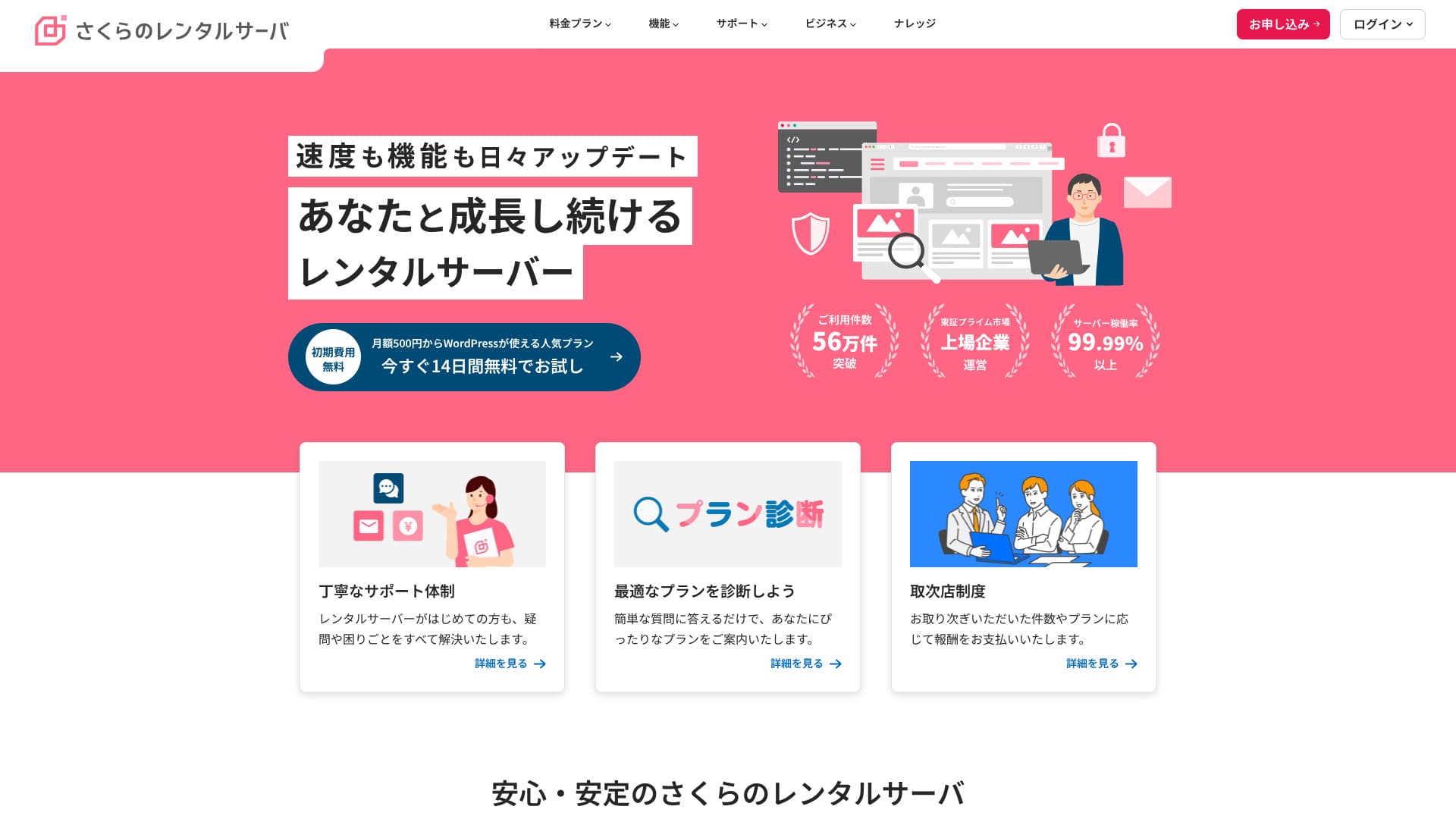
Sakura Rental Server est un service d'hebergement etabli de longue date avec plus de 560 000 utilisateurs. Il est exploite par Sakura Internet, premiere entreprise japonaise a avoir rejoint le cloud gouvernemental.

Je recommande Sakura Rental Server aux personnes qui cherchent un serveur abordable, ainsi qu'aux entreprises et independants, pour trois raisons principales :people looking for an affordable server, as well as companies and sole proprietors are:
- la fiabilite d'un service exploite par la premiere entreprise japonaise integree au cloud gouvernemental
- un grand nombre d'utilisateurs professionnels
- une fonction email puissante et capacitaire
Ce sont les raisons principales. Il y a de fortes chances que vous en soyez satisfait. Vous pouvez l'essayer gratuitement pendant 14 jours.
Un service concurrent est Lolipop!. Avec un contrat longue duree, il peut revenir moins cher que Sakura, ce qui vaut la peine d'etre compare.Sakura Rental Server. It is worth considering alongside Sakura.
| Type de serveur | Hebergement mutualise |
| Vitesse d'affichage (TTFB) | 440 ms |
| Plan et duree recommandes | Standard 12 mois |
| Essai / garantie | Essai gratuit de 14 jours |
| Prix mensuel (contrat 12 mois) | 550 yens |
| Frais initiaux | Gratuits |
| Domaine gratuit | Aucun |
| Assistance | Heures ouvrables : 10:00-18:00 Reservation de rappel, chat et email |
| Disponibilite | 99,99 % |
| Stockage serveur | 300 Go |
| Nombre de bases de donnees | Illimite |
| Mesures de securite | Alerte de falsification, WAF, filtrage des IP etrangeres et chiffrement |
| SSL | SSL partage gratuit, SSL personnalise |
| Sauvegarde / restauration | 8 generations de sauvegardes incluses, restauration gratuite |
| Comptes email | Illimites |
| Securite email | POP3, IMAP4, analyse antivirus et filtrage anti-spam |
| Preinstallation WordPress | Non |
| Migration serveur / site | Aucune |
| CDN | 100 Go / mois gratuits |

Hikaru Ono
On entend parfois dire que Sakura Rental Server serait inquietant, mais aujourd'hui il n'y a pas de raison particuliere de s'en faire. Je l'ai utilise moi-meme sans jamais ressentir cela, et les retours sur le support sont globalement positifs.
C'est un serveur de qualite, appuye sur une base d'exploitation solide, que l'on peut utiliser avec confiance.
Comment Sakura Rental Server se compare a ses concurrents
- Noteglobale★★★★☆
- Vitesse serveur ★★☆☆☆
- Tarifs ★★★★☆
- Stabilite ★★★★★
- Facilite de lancement de WordPress* ★★★★☆
- Gestion du domaine et configuration SSL* ★★★★☆
* Ces notes refletent mon experience directe du service.

21 hebergements WordPress recommandes pour les particuliers : comparaison et conseils de choix
21 hebergements WordPress recommandes pour les particuliers : comparaison et conseils de choix
serverfield.org
- Donnees d'etude de marche au 4 novembre 2025, triees par vitesse
- Les prix mensuels correspondent au cout de premiere annee du plan le moins cher compatible avec WordPress
- La vitesse correspond au Time to First Byte mesure sur des sites de demonstration dans les memes conditions
"Sakura Rental Server" est un hebergement etabli de longue date avec plus de 480 000 comptes utilises. On le disait autrefois lent, mais sa plateforme a depuis ete renouvelee et acceleree. Ses tarifs abordables sont toutefois restes inchanges, et son rapport qualite-prix est excellent.
Six points forts de Sakura Rental Server

Le temps de reponse est lent, mais les resultats PageSpeed Insights sont bons
Nos propres tests sur ce site ont montre que Sakura Rental Server obtenait de bons resultats dans PageSpeed Insights. En revanche, le temps de reponse brut du serveur n'etait pas parmi les meilleurs.
Il est vrai que son TTFB est plus lent que celui de nombreux concurrents, mais les resultats PageSpeed Insights ne sont pas mauvais. Meme si la reponse initiale du serveur n'est pas son point fort, le traitement dans les etapes suivantes semble rapide, ce qui a probablement aide ses scores PageSpeed.
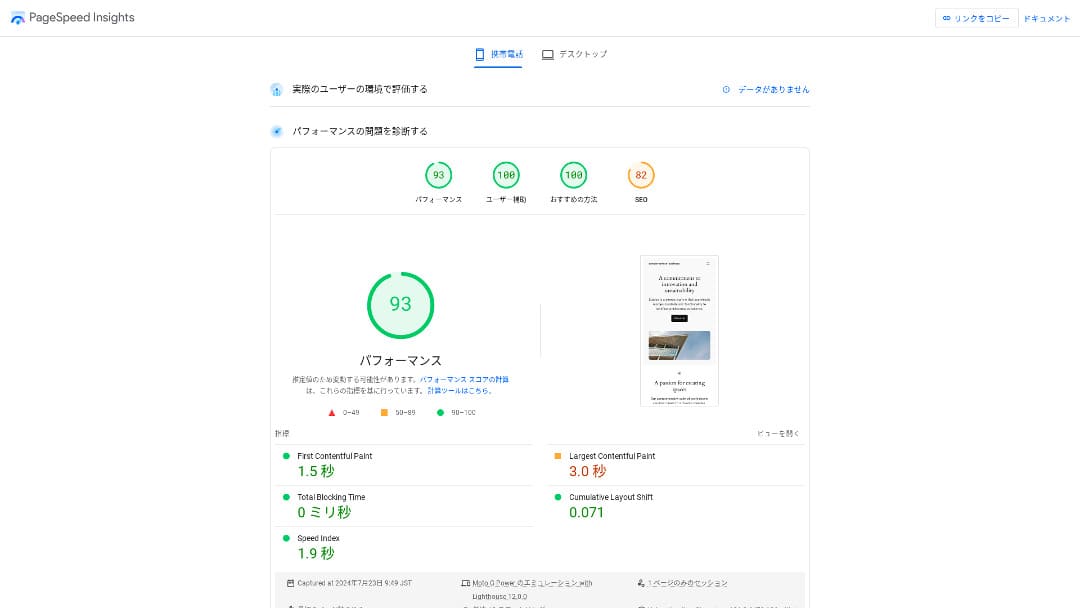
Il n'y a donc pas de raison de craindre qu'il soit extremement lent dans un usage reel.
* Comparatif vitesse : 15 hebergements testes et classes par rapidite
Les tarifs sont abordables
Sakura Rental Server propose un tarif mensuel abordable meme compare a d'autres services, ce qui facilite le lancement d'un site.
- Frais initiaux
- Contrat serveur de 12 mois
- Un an de frais de domaine
- Le plan le moins cher compatible avec WordPress
| Hebergeur | Cout total sur un an |
|---|---|
| Sakura Rental Server | 6,600 yen |
| ConoHa WING | 11,292 yen |
| Xserver | 10,560 yen |
| Lolipop! | 5,940 yen |
| heteml | 24,420 yen |
Lolipop! est moins cher, mais les fonctionnalites et les specifications du plan Standard de Sakura sont meilleures que celles de Lolipop!.
De plus, comme Sakura Domain est un peu cher, vous pouvez reduire les couts en utilisant un service de domaine moins cher chez un autre fournisseur.
Une disponibilite stable de 99,99 %
Sakura Rental Server offre un service tres stable avec 99,99 % de disponibilite. Ses serveurs sont exploites en interne et surveilles 24 heures sur 24 toute l'annee.
* Guide debutant sur la disponibilite et les SLA d'un hebergement
Lors du seisme de l'est de l'Iburi a Hokkaido en 2018, le centre de donnees d'Ishikari a perdu son alimentation externe, mais Sakura a continue a fonctionner 60 heures sur alimentation de secours. Le service a donc tenu meme face a une catastrophe majeure, ce qui dit beaucoup de sa stabilite.
La communication de l'entreprise a ce moment-la etait egalement excellente : informations a jour, mises a jour regulieres meme lorsqu'il n'y avait pas de grand changement. Cela donne une impression de grande fiabilite pour des donnees importantes.
★ A propos de l'impact du seisme sur nos services autour de 03:08 le 6 septembre (lien externe)
Un CDN gratuit qui aide les sites a charger plus vite
Sakura Rental Server propose un CDN gratuit, ce qui aide le site a s'afficher plus rapidement.
* Qu'est-ce qu'un CDN ? Ameliorer la vitesse et les performances avec des serveurs distribues
L'usage d'un CDN accelere l'affichage du site et aide aussi a limiter les situations ou une forte charge aboutit a une erreur 503. Comme la vitesse de diffusion influe egalement sur le trafic, disposer d'un CDN gratuit est une vraie valeur.
* Qu'est-ce qu'une erreur 503 ? Congestion web, prevention et reactions d'urgence
Le quota gratuit du CDN est aussi genereux, avec 100 Go par mois sur le plan Standard, ce qui suffit dans la plupart des usages individuels. Au-dela, le cout est de 5 yens par Go.
De fortes fonctions de sauvegarde
Sakura Rental Server dispose de tres bonnes fonctions de sauvegarde. Avec la fonction Snapshots, vous pouvez creer des sauvegardes et restaurer les donnees. Huit generations peuvent etre conservees, ce qui est genereux.
L'utilisation reste tres simple.
- Depuis le panneau de controle, ouvrez Website/Data puis Backup
- Cliquez sur Start using Backup & Staging
- Cliquez sur Create backup puis attendez le changement d'etat
Quand l'etat devient Completed successfully, la sauvegarde est terminee.
Depuis le meme ecran, vous pouvez aussi definir des plannings de sauvegarde et restaurer des donnees. L'ensemble reste facile a prendre en main.
Utiliser la capacite restante avec Sakura Pocket
Lorsqu'on loue un hebergement, on choisit souvent plus d'espace que ce dont on a besoin immediatement. Sakura Rental Server propose un moyen d'utiliser utilement cette capacite restante grace a Sakura Pocket, utilisable un peu comme Google Drive ou Dropbox.
Que ce soit pour les entreprises ou les particuliers, l'utilisation du stockage cloud est devenue la norme. Cela permet d'economiser de l'espace sur les PC et les smartphones. Cela dit, l'espace offert dans les formules gratuites de Google Drive et Dropbox n'est pas particulierement important.
Mais les utilisateurs de Sakura Rental Server peuvent exploiter leur capacite inutilisee avec Sakura Pocket, ce qui aide a reduire le cout d'un autre service de stockage cloud.
Point faible : impossible de revenir a un plan inferieur

Sakura Rental Server ne permet pas de passer vers un plan inferieur. Si vous choisissez une formule trop grande, cela peut devenir un gaspillage.
C'est pourquoi il vaut mieux commencer avec un plan plus bas puis monter en gamme seulement si cela devient necessaire.
Si vous voulez creer un site, choisissez le plan Standard. Le plan Light ne prend pas en charge WordPress. Le Standard offre deja assez de capacite pour de nombreux usages individuels comme professionnels.
Cependant, gardez a l'esprit que vous ne pouvez pas migrer depuis des plans mutualises comme Light ou Standard vers les plans de serveur gere (serveur dedie).
* Qu'est-ce qu'un serveur d'hebergement ? Le serveur dont vous avez besoin pour publier un site web
Le plan Business offre un bon rapport qualite-prix pour les PME et les entreprises

Sakura Rental Server est le service mutualise de Sakura Internet, qui propose aussi des serveurs geres. Il equilibre correctement les performances, la qualite de service et le prix, ce qui en fait une option interessante pour beaucoup d'entreprises.Sakura Rental Server」is the shared hosting service from Sakura Internet Co., Ltd., which also offers managed servers. It balances performance, service quality, and price well, making it a strong option for many businesses. The included free CDN quota varies by plan and helps deliver smooth communication.
Essai gratuit de 14 jours
| Type de serveur | Hebergement mutualise / serveur gere |
| Prix mensuel (contrat 12 mois) | 2 420 yens* |
| Frais initiaux | Gratuits |
| Domaine .jp | Enregistrement 3 982 yens / renouvellement 3 982 yens |
| Assistance | Jours ouvrables 10:00-18:00 Reservation de rappel disponible |
| Disponibilite | 99,99 % garantis |
| Stockage serveur | 600 Go* |
| Securite | WAF / detection de falsification / filtrage IP etrangeres |
| SSL | SSL gratuit / SSL partage / plusieurs certificats payants |
| Sauvegarde / restauration | 8 generations de sauvegarde / restauration gratuite |
| Emails | Illimites |
| Securite email | filtre anti-spam de base / filtre haute precision / SPF-DKIM-DMARC |
| Migration | Pas de service de migration deleguee No migration tool |
| Installation facile de WordPress | Oui |
| CDN | 300 Go / mois gratuits* |
Sakura Rental Server propose aussi des plans orientes entreprise. Face a d'autres hebergements business, son prix se situe dans une zone intermediaire mais offre un bon rapport qualite-prix.
Le plan Business commence a 2 420 yens par mois avec un contrat de 12 mois et embarque des specifications suffisantes pour beaucoup d'usages professionnels courants.
- Acceleration CDN gratuite (jusqu'a 300 Go par mois)
- Gestion par plusieurs utilisateurs
- Adresse IP dediee qui n'est pas affectee par le trafic d'autres entreprises (Business Pro et au-dessus)
Si vous cherchez un hebergement pour une PME ou une entreprise, il est fortement recommande.
Il n'y a plus lieu de s'inquieter des rumeurs disant que Sakura serait inquietant
L'idee selon laquelle Sakura Rental Server serait inquietant vient surtout d'anciens episodes lies a des services plus anciens. Aujourd'hui, l'infrastructure a ete renouvelee et la qualite d'exploitation est nettement meilleure.
Sakura Rental Server a publie des explications et a cherche a repondre serieusement aux critiques. Comme le sujet concernait d'anciens services, il n'y a pas lieu d'appliquer ces inquietudes telles quelles au service actuel.About a post on a technical information sharing site regarding our server services」the current Sakura Rental Server can be used with confidence.There is no need to worry anymore.
Comparer Sakura Rental Server avec deux services concurrents
Nous comparons ici Sakura Rental Server avec deux hebergements concurrents. Comme pour Sakura, nous comparons des fournisseurs proposant des plans a bas prix.
Lolipop!
LOLIPOP peut etre utilise a un prix inferieur a celui de Sakura Rental Server. Cependant, le plan Light de Lolipop! est inferieur au plan Standard de Sakura Rental Server, tant pour les fonctions que pour le support.
- Pas de fonction de sauvegarde (option payante necessaire)
- Pas de support telephonique
- Le support par email peut prendre jusqu'a 48 heures, ce qui est assez lent
Comparez ces trois points avec le prix pour decider si Lolipop! ou Sakura Rental Server vous convient le mieux.

Avis sur Lolipop! [edition 2025] : ce que les tests de vitesse revelent sur ses avantages et inconvenients
Avis sur Lolipop! [edition 2025] : ce que les tests de vitesse revelent sur ses avantages et inconvenients
serverfield.org
Star Rental Server
Star Rental Server est aussi un hebergement populaire dans les gammes de prix basses. Cependant, le plan Light de Star Rental Server est inferieur au plan Standard de Sakura Rental Server, tant pour les fonctions que pour le support.
- Pas de fonction de sauvegarde (a gerer avec des plugins WordPress)
- Pas de support telephonique
- Vous ne pouvez creer qu'un seul site WordPress
- Vous ne pouvez pas utiliser une fonction de securite WAF avancee
Comparez ces quatre points avec les tarifs avant de choisir entre les deux.

Avis sur Star Server [edition 2024] : tarifs tres bas, forces et limites examinees
Avis sur Star Server [edition 2024] : tarifs tres bas, forces et limites examinees
serverfield.org
Cinq etapes pour lancer des maintenant un site WordPress sur Sakura Rental Server
Lancez votre site avec Sakura Rental Server !
- STEP.1Aller sur le site officiel
Cliquez sur "Try it free for 14 days."
- STEP.2Souscrire au serveur
Choisissez un plan. Le plan Standard est recommande, car il prend en charge WordPress.
Vous pouvez laisser le domaine initial tel quel. Ce domaine ne sera pas utilise comme adresse publique de votre site. Il peut servir, mais il vaut mieux obtenir votre propre domaine.
★ Qu'est-ce qu'un domaine ? Son role comme adresse sur Internet et comment en obtenir un
Si vous selectionnez "Also acquire a custom domain", il devient plus facile de demarrer WordPress immediatement.
Saisissez la chaine souhaitee et demandez le domaine. S'il est disponible, renseignez les informations du titulaire. Un an suffit pour la duree d'enregistrement. Cliquez ensuite sur "Choose payment method."
Terminez la verification de membre et inscrivez-vous comme nouvel utilisateur.
Saisissez votre adresse email, verifiez la declaration de confidentialite, puis cliquez sur "Send the registration guidance email."
Un email d'inscription arrivera. Ouvrez l'URL dans cet email et continuez la saisie de vos informations de membre.
Saisissez votre nom, votre adresse et les autres informations requises, puis definissez un mot de passe membre.Ce mot de passe est important, car il sert a se connecter au menu membre. Notez-le bien.
Pour les communications utilisateur de Sakura, vous pouvez choisir "Do not receive."
Verifiez toutes les informations saisies. S'il n'y a pas de probleme, cliquez sur "Register as a member."
Choisissez votre mode de paiement. Selectionnez la duree du contrat et le mode de paiement. Le paiement par carte bancaire est recommande, car vous pouvez commencer a creer votre site WordPress immediatement. Il passe aussi automatiquement a un contrat payant apres la fin de l'essai, ce qui evite des etapes supplementaires. Apres avoir choisi la duree du contrat, cliquez sur "Review application details."
Verifiez tous les details de la demande. Lisez les conditions, cochez "I agree", puis continuez en cliquant sur "Apply with this information."
Lorsque vous recevez l'email de fin d'inscription provisoire, le contrat serveur provisoire est termine.
- STEP.3Installer WordPress
Connectez-vous au panneau de controle de Sakura Rental Server.
- Nom de domaine : le domaine initial enregistre lors de la souscription au serveur.
- Mot de passe : le mot de passe defini lors de la souscription au serveur.
Apres connexion, cliquez sur "Install WordPress", choisissez l'URL ou l'installer, puis selectionnez le domaine personnalise obtenu lors de la souscription au serveur.
Saisissez les informations de base de donnees pour WordPress. Comme il n'y a pas encore de base de donnees a ce stade, cliquez sur "Create database."
- Nom de la base de donnees : n'importe quel nom convient
- Mot de passe de connexion a la base de donnees : choisissez un mot de passe aussi complexe que possible
Ensuite, saisissez les informations de votre site WordPress.
- Titre du site : N'importe quel titre convient. Vous pourrez le modifier facilement plus tard.
- Nom d'utilisateur WordPress : N'importe quel nom convient. En revanche, le modifier plus tard est penible.
- Mot de passe WordPress : Choisissez un mot de passe aussi complexe que possible. Vous pourrez le modifier plus tard.
- Adresse email : Utilisez l'adresse email que vous employez habituellement. Pour une entreprise, il vaut mieux utiliser l'adresse email professionnelle de la personne qui gere le site.
- Visibilite dans les moteurs de recherche : Cochez-la si vous voulez publier le site immediatement. Laissez-la decochee si vous voulez publier apres la fin du site. Vous pourrez modifier ce reglage facilement plus tard.
Verifiez la licence et les conditions d'utilisation, cochez "Agree", puis cliquez sur "Create."
Le nom d'utilisateur et le mot de passe serviront a se connecter a WordPress. Notez-les bien.
Une fois l'installation terminee, cliquez sur l'URL d'administration affichee a l'ecran et connectez-vous.
- STEP.4Configuration initiale de WordPress
Sur l'ecran de connexion WordPress, saisissez le nom d'utilisateur et le mot de passe definis pendant l'installation, puis cliquez sur "Log in."
Si un avertissement indique que le site est inaccessible, les parametres DNS ne se sont pas encore propages. Dans ce cas, il suffit d'attendre et de reessayer de se connecter toutes les quelques heures.
★ Que sont les DNS et les serveurs de noms ?
Apres connexion a WordPress, reglez les permaliens. Dans l'administration WordPress, allez dans "Settings", puis "Permalinks". Choisissez "Post name", puis cliquez sur "Save changes."
Avec "Post name", vous pouvez saisir le slug d'URL souhaite lors de la publication d'un article. Il vaut mieux utiliser une chaine courte qui reflete le contenu de l'article afin que les lecteurs le comprennent facilement. S'il est trop long, certaines personnes peuvent trouver le site suspect.
- STEP.5Installer les plugins
Retournez dans l'administration WordPress, allez dans "Plugins", puis "Add New", et installez les plugins necessaires.
Lorsque vous trouvez le plugin voulu via la recherche, cliquez sur "Install Now", puis sur "Activate". Suivez ensuite les instructions propres a chaque plugin.
Veillez a installer des plugins de securite et de sauvegarde.
- Cinq plugins de securite WordPress et comment les choisir
- Cinq plugins de sauvegarde WordPress puissants pour recuperer vos donnees
Une fois les plugins installes, votre site WordPress est entierement pret !
Comment resilier Sakura Rental Server
Comment resilier Sakura Rental Server
- STEP.1Se connecter au menu membre
Saisissez votre identifiant membre et votre mot de passe, puis connectez-vous.
- STEP.2Liste des services sous contrat
Cliquez sur "List of contracted services" sous Contract Information, a gauche de l'ecran.
- STEP.3Resilier
Cliquez sur "Cancel" sous "Procedures" dans "List of contracted services."
- STEP.4Verifier les remarques importantes et envoyer la demande
Les remarques importantes et avertissements sur la resiliation s'afficheront. Lisez-les attentivement. Sur l'ecran "Final confirmation of service cancellation", cliquez sur "Cancel service."
- STEP.5Email de reception de la demande de resiliation
Une fois la resiliation terminee, vous recevrez un email de reception de demande de resiliation.
Vous pouvez demander la resiliation a tout moment pendant la periode de contrat. Quel que soit le moment de la demande, le service prend fin a la date de fin du contrat.
Faites attention au moment de facturation de la carte bancaire.Une fois le paiement traite, cette periode de facturation devient valide et ne peut pas etre annulee. Verifiez le calendrier de facturation sur la page officielle, "Je veux connaitre le calendrier de facturation et de procedure de ce mois."
Si vous souhaitez resilier, il vaut mieux faire la demande le plus tot possible.
Si vous changez de serveur, souscrivez le nouveau avant de resilier
Si vous resiliez Sakura Rental Server parce que vous migrez vers un autre serveur, assurez-vous de souscrire le nouveau serveur et de migrer vos donnees avant de resilier. Autrement dit, faites se chevaucher les periodes de contrat de Sakura Rental Server et du nouveau serveur.
Sinon, il y aura une periode pendant laquelle votre site ne pourra pas s'afficher.
Questions relatives a Sakura Rental Server
Quand Sakura Rental Server prendra-t-il fin ?
"Sakura Dedicated Server" et "Sakura Dedicated Server High-Power Series" prendront fin le 30 juin 2026.
Combien de temps dure l'essai gratuit ?
La periode d'essai gratuit de Sakura Rental Server est de deux semaines. Vous pouvez essayer n'importe quel plan mutualise pendant cette periode.
En revanche, Sakura Managed Server ne propose pas de periode d'essai, il faut donc en tenir compte.
Ou sont situes les serveurs de Sakura Internet ?
Les serveurs de Sakura Internet sont notamment situes a Ishikari et a Tokyo pour certaines gammes dediees.
Resume
Sakura Rental Server est un hebergement historique avec plus de 480 000 comptes actifs. Il etait autrefois repute lent, mais il a ete accelere par le renouvellement de l'infrastructure. En meme temps, ses tarifs abordables ont ete maintenus, ce qui en fait une option au tres bon rapport qualite-prix.Sakura Rental Server」is a long-established hosting service with more than 480,000 active accounts. It was once said to be slow, but it has now been sped up through server renewals. At the same time, the affordable pricing has remained in place, so the value for money is excellent.
Essai gratuit de 14 jours
Sakura Rental Server est un hebergement attrayant qui combine une stabilite de niveau professionnel avec un prix raisonnable. On disait autrefois qu'il etait lent ou inquietant, mais cette inquietude n'a plus vraiment de raison d'etre aujourd'hui.
C'est un serveur que l'on peut utiliser confortablement. Cela vaut la peine de l'essayer.
Comparatif complet de 32 hebergements WordPress : recommandations pour particuliers, entreprises et usage international

Quand on veut demarrer avec WordPress et qu'on cherche un hebergement recommande, les options sont nombreuses. Cet article rassemble 32 services recommandes avec une explication claire basee sur l'usage reel.
- Which site should I rely on?
- I want to choose a server in a simple, easy-to-understand way!
- Show me how to start WordPress right away.
If that sounds familiar, this article is for you. It carefully selects the best options from 32 hosting services for individuals, businesses, and both domestic and overseas useand introduces them with clear explanations from the SEO lead at an app development company that uses hosting every day.