ما يصل إلى 53 في المائة من رسوم الخواديم حتى 5 آب/أغسطس 2025، بالإضافة إلى مجالين مجانيين إلى الأبد والشهر الأول مجاني
PR
الخوادم
أشعر ببعض الأسف لـ ConoHa، لكنني أضع Blog Creator في مواجهة أقوى ثلاث عمالقة ذكاء اصطناعي في 2024
نُشر: 2025.01.30
آخر تحديث: 2025.01.30

عذرًا، لكن شركتنا تستخدم ChatGPT-4o وClaude 3 وGemini 1.5 Pro.
كما تعلمون على الأرجح، تقدّم ConoHa WING خدمة باسم "Blog Creator"
لكننا شركة تطوير أنظمة، ونحن نستخدم ثلاثة أنواع من الذكاء الاصطناعي بشكل فعّال.
- ChatGPT-4o
- Claude 3
- Gemini 1.5 Pro
تتغير صناعة الذكاء الاصطناعي بسرعة كبيرة لدرجة أن أداة جديدة مذهلة قد تظهر Boom! لكن حتى في 1 يناير 2025، ما تزال هذه الأدوات الثلاثة قوية جدًا في التعامل مع اليابانية. (بصراحة، هي أدوات باهظة الثمن، لذا عليّ أن أواصل العمل بجد في النشاط الأساسي.)
"Blog Creator ربما لا يستطيع التفوق على هذه الأدوات الثلاثة، لكن لنجرّبه على تلك النسبة الضئيلة جدًا من الاحتمال."

Blog Creator بصراحة لم تلهم توقعات كبيرة، والمنافسة كانت قوية لدرجة أنني شعرت بالسوء لـ(كونوها). آسف مع ذلك، أردت أن أجعلهم يتنافسون، لذا كان لدي كل واحد AI صنع ونشر مقال عن بناء WordPresss "الموضوع من "سكراتش أنا عمدا جعل المقالات الأربعة أكل بعضها البعض.
أكل لحوم البشر لا يعني الكرنفال In SEOوتشير عملية التطهير إلى حالة تتداخل فيها مواد مماثلة في نفس الموقع وتتنافس فيما بينها. هذا سيء SEOهذه التجربة تؤثر على أنفسنا SEO أيضاً، لكني أفعلها على أي حال
وكانت النتيجة أن Blog Creator كان جيداً جداًلذا الجميع، رجاءً توقّفْ ConoHa WINGإذا فعلت، يمكنك استخدام Blog Creator for شهر واحد.

" ConoHa WINGخادم سريع من GMO Internet Group مع تزايد أعداد المستخدمين بسرعة، وواحد نستخدم أنفسنا. لأنه WordPresss يَجيءُ مفترسَ عندما تَدْخلُ إلى الخادمِ، أي واحد يُمْكِنُ أَنْ يَبْدأَ بسهولة. وهو يوفر توازنا جيدا في التكلفة والأداء، ونحن نستخدمه أنفسنا أيضا.

★ إنشاء موقع إلكتروني في 10 دقائق! مراجعة ConoHa WING وكيفية بدء استخدام WordPress
ما هو Blog Creatorيمكنه أن يكتب الكتابة SEO- مقالات ودية من السكوتش وإعادة الكتابة

Blog Creator هو AI الأداة الموصى بها للأشخاص الذين لا ينمو الاتجار بهم أو الذين لا يعرفون كيفية كتابة المقالات. يمكن أن يكون AI التعامل مع الكتابة SEO- مقالات سهلة من الصفر وإعادة كتابة المواد الموجودة.
Blog Creator التحقيق في أربعة كلمات رئيسية في لعق واحد
أي كلمة مفتاح تحاول ترتيبها؟ مع Blog Creatorبحث الكلمات الرئيسية يبدأ بمجرد دخوله
- الكلمات الرئيسية المقترحة: إقتراحات البحث تظهر عندما تطبع كلمة مفتاح Googleصندوق البحث
- كلمات مفاتيح البحث ذات الصلة:الكلمات الرئيسية ذات الصلة المبينة في نتائج البحث بعد أن تفتش كلمة المفتاح Google
- البحوث المتعلقة بالمصطلحات المشتركةالكلمات التي تظهر مراراً مع كلمة السر
- إجراء بحوث رئيسية للمواقع العليا: العناوين التي تستخدمها المواقع التي تحتل مرتبة عالية للكلمة الرئيسية
بمجرد أن تستطيع القيام بهذا البحث لديك كل المكونات التي تحتاجها SEO- صياغة وعناوين ودية. من هناك، يمكنك كتابة المقالة بنفسك باستخدام تلك المواد أو Blog Creator أكتب المقالة لك

استراتيجية طويلة الأجل للكلمات الرئيسية شرحها 7 سنوات SEO Veteran: 3 Steps to Explode Traffic in Niche Markets
استراتيجية طويلة الأجل للكلمات الرئيسية شرحها 7 سنوات SEO Veteran: 3 Steps to Explode Traffic in Niche Markets
serverfield.org
AI المقالات المستندة إلى SEO-الكلمات الرئيسية الصديقة
Blog Creator أداة تسمح AI أكتب مقالات لك
ما يجعله مختلفاً عن النوع العام AI هو إنتاج أداة يشرف عليها الخبراء SEO- نتائج كلمات رئيسية قوية، ثم تُكتب المادة على أساس استخدامها ChatGPT-4o أو ChatGPT-4o miniهذا يعني أنه ليس لديه AI أكتب مقالة من العدم وبدلاً من ذلك، AI مكتوبة على أساس نتائج الكلمات الرئيسية المبنية SEOلذا يمكنك أن ترمي إلى ترتيب البحث الأقوى
وبعبارة أخرى، فهي أداة تتيح لك إنشاء مقالات قوية بكفاءة بينما لا تزال تستفيد من ذلك AI.
دعم إعادة كتابة المواد المنشورة
Blog Creator يمكن حتى إعادة كتابة مقالات نشرتها بالفعلفقط أدخل URL من موقع المدونة والكلمة الرئيسية وسيخبرك أي كلمات رئيسية مهمة مفقودة من المقالة
Blog Creator خطط الخصخصة
هناك ثلاث خطط. وبما أن خطة Lite مجانية لمدة شهر، فأنا أوصي بالبدء بتجربة Lite أولًا.
| Plan | Lite | Standard | Business |
|---|---|---|---|
| Price | 330 yen | 1,980 yen | 4,980 yen |
| الجيل الأول | 24 times | 184 times | 700 times |
| جيل الجسم | 12 times | 92 times | 350 times |
| توليد العنوان | 12 times | 92 times | 350 times |
| ألف - توليد المعلومات | 12 times | 92 times | 350 times |
- Option
- السعر: 550 ين
- القدرة على توليد الطاقة: 24 جيلاً عاماً، و 12 جيلاً من أجيال الجسم، و 12 جيلاً من أجيال الملكية، و 12 جيلاً من الأجيال المتقدمة
دعنا نراجع كيفية البدء باستخدام Blog Creator وكيفية استخدامه
خطوات البدء باستخدام Blog Creator
بدأت مع Blog Creator
- STEP.1زيارة الموقع الرسمي: ConoHa WING
Blog Creator To use Blog Creatorتحتاج إلى حساب (كونوها) إنشاء حساب من الموقع الرسمي والبدء به WordPresssإذا كان لديك حساب (كونوها) فعليك الدخول
- STEP.2افتح AI Blog Generation Tool
من لوحة التحكم، افتحAI ورم الجينات تحت "إدارة الموقع" ثم نقر Blog Creator."
- STEP.3اختر خطة
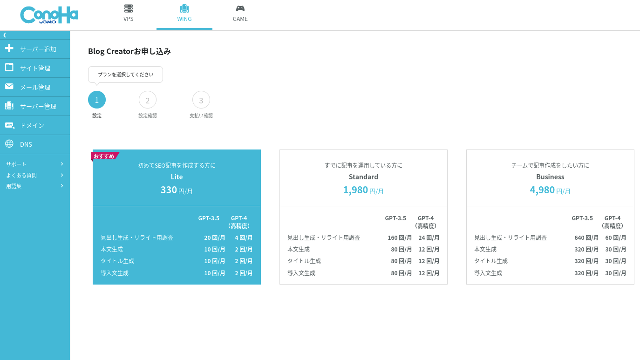
اختر خطة. خطة Lite مناسبة، فوظائفها هي نفسها الموجودة in الخطط الأعلى. الخطط الأعلى تمنحك ببساطة المزيد من أجيال الذكاء الاصطناعي (AI). وبما أن كل ما تحتاجه في البداية هو التجربة، فاختر خطة Lite بسعر 330 ينًا شهريًا.
- STEP.4Payment
سيظهر شاشة تأكيد الدفع قم بتأكيد طلبك مكتمل الآن
خطوات لإنشاء مادة مع Blog Creator
ويرد شرح لإجراءات إنشاء مادة في هذه المادة في الموقع الرسمي، Wapu-katsuعلى أي حال، أعتقد أنه من الأسهل فهم إذا أريت الطريقة التي استخدمتها فعلا، لذلك يرجى إلقاء نظرة على هذه المادة.
وضع مادة مع Blog Creator
- STEP.1الاختيار Blog Creator
منAI الجيل النجمي " اختار "Blog Creator"تاب"
- STEP.2أدخلي الكلمة الرئيسية التي تريدين ترتيبها
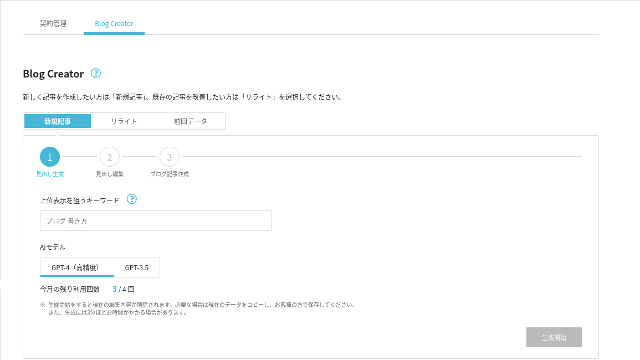
Blog Creator يمكن التعامل مع إعادة الكتابة أيضا، ولكن هذه المرة أنا خلق مقالة جديدة. أدخلي الكلمة الرئيسية التي تريدين ترتيبها: بناء WordPresss موضوع من الصفر (طبعاً، يجب أن تستخدمي الكلمة الرئيسية التي تريدينها شخصياً)
اختر AI نموذج. دعونا نذهب مع دقيقة جدا GPT-4.
"اضغط "الجيل المشرق
- STEP.3حرر العناوين استناداً إلى بحث الكلمات الرئيسية
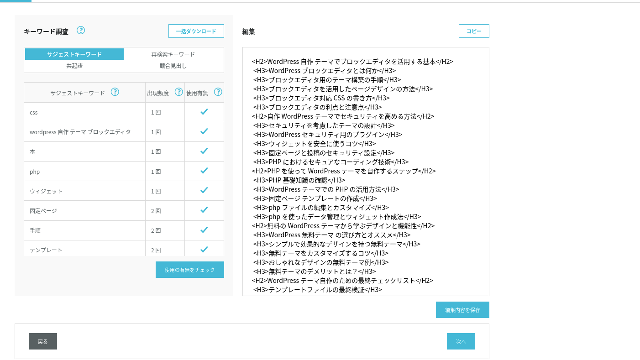
سيتم عرض بحث الكلمات الرئيسية تحقق من نتائج أربعة أنواع من الأبحاث كلما استغللتهم كلما اقوى SEO يميل إلى أن يصبح
وعلى شاشة التحرير، تتضمن كلمات رئيسية لم تستخدم في العناوين المتولدة. بمجرد الانتهاء من التحرير، نقر "Save Edits." بعد أن يتم حفظ ذلك، المضي قدما عن طريق النقر "Next".
- STEP.4إنشاء الجسم واللقب والمقدمة
باستخدام العناوين التي صنعتها سابقاً كقاعدة AI توليد الجسم واللقب والمقدمة. كليكAI الجيل لكل بند
اختيار ما إذا كان الاستخدام GPT-4 أو GPT-3.5اخترت GPT-4.
بعد توليد كل واحد مع AI"اضغط "ستيف إدتس هذا يكمل Blog Creator عملية الجيل
وسيعرض عدد من المرشحين للألقاب على العناوين والجسد، ويختارون أكثر المرشحين ملاءمة.
بمجرد أن يكتمل كل شيء، نسخ كل جزء، راعيه إلى جديد WordPresss نشر المادة ونشرها.
ويبدو أن هناك حداً لنص يمكن أن يولده. من أجل هذا بناء WordPresss مقالة موضوعية من الصفر، النص المولد لم يكن طويلا بما فيه الكفاية. لذا بعد أن توقفت من خلال الطريق، استخدمتAI تولد مرة أخرى على العناوين التي جاءت بعد نقطة حيث توقفت لخلق نص الجسم.
أربعة مقالات صنعتها للأكل للكلمة الرئيسية WordPresss "الموضوع من "سكراتش
كان لدي AI خلقهم باستخدام نفس كلمة المفتاح و نفس الإجراء المقالات الأربعة المكتملة أدناه. قمت بتحميلها كلها إلى هذا الموقع هم يُفكّرونَ بشكل كامل بعضهم البعض.
المادة المنشأة Blog Creator
دليل كامل لبناء WordPresss موضوع من "سكراتش" : خطوات وقائمة مرجعية لبناء موقع قوي
دليل كامل لبناء WordPresss موضوع من "سكراتش" : خطوات وقائمة مرجعية لبناء موقع قوي
serverfield.org
المادة المنشأة ChatGPT-4o

! كيف نصنع مسرحية تقليدية WordPresss
! كيف نصنع مسرحية تقليدية WordPresss
serverfield.org
المادة المنشأة Claude 3
بني مالك WordPresss !
بني مالك WordPresss !
serverfield.org
المادة المنشأة Gemini 1.5 Pro
اغرب عن وجهي كيف نبني موقعك المثالي بخلق ملكك WordPresss الموضوع
اغرب عن وجهي كيف نبني موقعك المثالي بخلق ملكك WordPresss الموضوع
serverfield.org
منذ AI يبدو أنّه قد يفوز، أريد أن أعرض مزايا Blog Creator
AI يبدو أنه قد يفوز لذا كضمان حتى ConoHa WING لا يغضب مني Blog Creatorالمزايا هي ما أريد أن أقدمه هنا (أنا شخص ضعيف)
يمكنك تحسين كتابتك SEO بدون ريلينج كليرلي AI أو الأدوات
Blog Creator الاستخدامات AIومع ذلك، بينما تفحص نتائج الكلمات الرئيسية البحثية، تُشجَّعُ على تلميع المحتوى أكثر بنفسك. في الممارسة العملية، القيام بذلك يمنعك من الاعتماد كليا على AI أو أدوات بإستخدامه بمهارة يمكنك تحسين مهاراتك الكتابية وفهمك SEO.
Blog Creator يمكن، حتى أتحدث، تساعدك على النمو كشريك يركض بجانبك.

♪ ♪ SEOترجمة :
♪ ♪ SEOترجمة :
serverfield.org
الهيكل الرأسي والجسد (لينجث) يتقنان بالفعل، لذا لا حاجة لتصويبات
Blog Creator تحسين هيكل العناوين وطول الجسم إلى أقصى حد ممكن من المستوى العام AIونتيجة لذلك، يمكنك نشر المقالة عن طريق التأليف والعناية بها دون إجراء تصويبات(يقول ذلك، كنت لا تزال بحاجة إلى التحقق من المحتوى.)
ذات طابع عام AIالتصويبات ضرورية ومستغرقة للوقت
- تبدأ العناوين من H4 لذا يجب تصحيحها
- إذا تولد الجسم الكامل في آن واحد بعد خلق العناوين، فإنه لا يكتب بشكل صحيح.
- يجب أن تحذف كلمات غير ضرورية مثل "الإدخال" و "بودي"
إنشاء نص الجسم من العناوين والقيام بكل شيء آخر يدويا هو ببساطة عمل كثير جدا.
مثل AI مادة الكتابة، إنها أكثر تركيزاً بالكلمات الرئيسية مما تعرضه الشركات الأخرى
Other server companies also offer AI أدوات توليد المواد.
Sakura Rental Server عروضUser Local AI Writer" الذي يَتْركُك تَستعملُ ChatGPT-4 مجاناً In addition to ChatGPT-4كما أنها تستخدم نفسها المحلية AI.
Value Server عروضValue AI Writerالذي يبدأ بـ650 1 ين في الشهر التي تستخدمها ChatGPT-4o.
لذا هذه الأدوات قد تسمح لك باستخدامها مجانا أو تعطيك الوصول إلى آخر AIلكن لم يبنوا حولهم SEO-كلمات مفاتيح قويةBlog Creator أولاً يبني حول SEO-كلمات مفاتيح صلبة ثم تستخدم AI لكتابة المقالة
في النهاية، عندما تكتب مدونة، تكون لديك كلمة مفتاحية تريد أن يظهر موقعك بها، أليس كذلك؟ Blog Creator يحدد تلك الكلمة أولًا ثم ينشئ المقال.AI يندفع بسرعة نحو هدف محدد بوضوح هو ما يفعله. إنه ليس مجرد اندفاع أعمى.
وهذا هو الفرق الرئيسي بين أدوات إنشاء المقالات الأخرى بالذكاء الاصطناعي وBlog Creator.
الخلاصة: ابحث بنفسك وتحقق من نتيجة المطابقة
فماذا حدث في النهاية؟
الجواب ليس لي أن أقرره. لندعه إلى Google، كما نفعل دائمًا. ابحث عن "WordPress custom theme" وابحث عن موقعنا (https://serverfield.org). ينبغي أن تظهر هناك إحدى المقالات التالية.
- Blog Creator المادة: دليل كامل لبناء WordPresss موضوع من "سكراتش" : خطوات وقائمة مرجعية لبناء موقع قوي
- ChatGPT-4o المادة:! كيف نصنع مسرحية تقليدية WordPresss
- Claude 3 المادة: بني مالك WordPresss !
- Gemini 1.5 Pro المادة: اغرب عن وجهي كيف نبني موقعك المثالي بخلق ملكك WordPresss الموضوع
المقال الذي يظهر في تلك اللحظة سيكون أفضل أداة في تلك اللحظة.
Blog Creator أفضل مما توقعت. لكن هل هو أفضل من ChatGPT-4o وClaude 3 وGemini 1.5 Pro؟
إذا أردت تجربته، فـConoHa WING هو المكان الذي ينبغي أن تسجّل فيه.
" ConoHa WINGخادم سريع من GMO Internet Group مع تزايد أعداد المستخدمين بسرعة، وواحد نستخدم أنفسنا. لأنه WordPresss يَجيءُ مفترسَ عندما تَدْخلُ إلى الخادمِ، أي واحد يُمْكِنُ أَنْ يَبْدأَ بسهولة. وهو يوفر توازنا جيدا في التكلفة والأداء، ونحن نستخدمه أنفسنا أيضا.
ما يصل إلى 53 في المائة من رسوم الخواديم حتى 5 آب/أغسطس 2025، بالإضافة إلى مجالين مجانيين إلى الأبد والشهر الأول مجاني
مقارنة كاملة لـ 32 من خوادم استضافة WordPress المشتركة: توصيات للأفراد، والشركات، والاستخدام في الخارج

عندما تَعتقدُ، "أُريدُ البَدْء WordPresss"و البحث عن "موصي WordPresss تستضيف، " تحصل على مجموعة كبيرة من المقالات، من خواديم الاستخدامات الشخصية والخيارات للأعمال التجارية والشركات الصغيرة إلى الخواديم الخارجية والخواديم المنخفضة التكلفة. بصراحة
- أي موقع أثق به؟
- أريد أن أختار خادماً بطريقة بسيطة سهلة الفهم
- أرني كيف أبدأ WordPresss الآن
ألا يبدو هذا مألوفاً؟ لهذا السبب هذه المادة اختيار الخيارات الموصى بها من 32 شركة من شركات الخواديم المستأجرة للأفراد، والأعمال التجارية، والاستخدام المحلي، والاستخدام في الخارجالتفسير يأتي من SEO أخصائي شركة تطوير التطبيقات التي تستخدم خواديم الإيجار كل يوم