Up to 53% off server fees until August 5, 2025, plus two domains free forever and the first month free
PR
سرورز
I Feel Bad for ConoHa, but I'm Pitting the Well-Regarded Blog Creator Against the Three Strongest AI Powerhouses of 2024
شائع شدہ: 2025.01.30
تازہ کاری: 2025.01.30

معذرت، مگر ہماری کمپنی ChatGPT-4o، Claude 3، اور Gemini 1.5 Pro استعمال کرتی ہے۔
جیسا کہ آپ شاید جانتے ہوں گے، ConoHa WING ایک AI article-writing tool ہے، جس کی قیمت 330 ین فی ماہ سے شروع ہوتی ہے۔ چند سال پہلے تک جب میں ایک مضمون لکھنے میں 10 گھنٹے سے زیادہ لگایا کرتا تھا، تو اس کی سہولت تقریباً افسردہ کن محسوس ہوتی ہے۔ پھر بھی، زمانے کے رخ کے خلاف لڑنے کا کوئی فائدہ نہیں، اس لیے میرے خیال میں بہتر یہی ہے کہ اسے اچھی طرح استعمال کرنا سیکھا جائے۔Blog Creator", an AI article-writing tool, starting at 330 yen per month. As someone who used to spend more than 10 hours writing an article just a few years ago, I find it almost depressing how convenient it is. Still, there is no point resisting the times, so I think the best thing to do is learn to use it well.
However, we are a system development company, and we actively use three kinds of AI.
- ChatGPT-4o
- Claude 3
- Gemini 1.5 Pro
The AI industry changes so quickly that some jaw-dropping new tool could Boom!But even as of January 1, 2025, these three are still powerful AIs that handle Japanese very well. (Honestly, they are pretty expensive tools, so I need to keep working hard at the main business.)
"Blog Creator probably cannot beat these three, but let's make it compete on that one-percent chance."

Blog Creator honestly did not inspire high expectations, and the competition was so strong that I felt bad for ConoHa. Sorry. Still, I wanted to make them compete, so I had each AI create and publish an article on "Building a WordPress Theme from Scratch." I deliberately made the four articles cannibalize each other.
Cannibalize does not mean carnival. In SEO, cannibalization refers to a situation where similar articles on the same site overlap and compete with one another. It is bad for SEO. This experiment affects our own SEO too, but I am doing it anyway.
The result was that Blog Creator was overwhelmingly good, so everyone, please sign up for ConoHa WING. If you do, you can use Blog Creator for one month free.

" ConoHa WING", a high-speed server from GMO Internet Group with rapidly growing user numbers, and one we use ourselves. Because WordPress comes preinstalled when you sign up for the server, anyone can get started easily. It offers a good balance of cost and performance, and we use it ourselves too.

★ Build a Website in 10 Minutes! ConoHa WING Review and How to Start WordPress
Blog Creator کیا ہے؟ یہ شروع سے SEO دوست مضامین لکھنے اور موجودہ مضامین کو دوبارہ لکھنے دونوں کو سنبھال سکتا ہے

Blog Creator ایک AI tool ہے جو اُن لوگوں کے لیے تجویز کیا جاتا ہے جن کا traffic نہیں بڑھ رہا یا جو مضمون لکھنے کا طریقہ نہیں جانتے۔ آپ AI سے شروع سے SEO دوست مضامین لکھوا بھی سکتے ہیں اور موجودہ مضامین دوبارہ لکھوا بھی سکتے ہیں۔
Blog Creator ایک کلک میں چار قسم کے keywords کا تجزیہ کرتا ہے
آپ کس keyword پر rank کرنا چاہتے ہیں؟ Blog Creator، keyword research فوراً شروع ہو جاتی ہے۔
- تجویز کردہ keywords: Google کے search box میں keyword ٹائپ کرنے پر ظاہر ہونے والی search suggestions
- Related search keywords: Google پر keyword search کرنے کے بعد search results میں دکھائے جانے والے متعلقہ keywords
- Co-occurring terms کی تحقیق: وہ الفاظ جو keyword کے ساتھ کثرت سے آتے ہیں
- Top-ranking sites کے headings کی تحقیق: وہ headings جو اس keyword پر اچھی rank لینے والی sites استعمال کرتی ہیں
جب آپ یہ تحقیق کر لیتے ہیں تو SEO-friendly wording اور headings کے لیے تمام ضروری مواد آپ کے پاس آ جاتا ہے۔ پھر آپ انہی مواد کے ساتھ خود مضمون لکھ سکتے ہیں یا Blog Creator آپ کے لیے مضمون لکھ سکتی ہے۔

Long-Tail Keyword Strategy Explained by a 7-Year SEO Veteran: 3 Steps to Explode Traffic in Niche Markets
Long-Tail Keyword Strategy Explained by a 7-Year SEO Veteran: 3 Steps to Explode Traffic in Niche Markets
serverfield.org
AI SEO دوست keywords کی بنیاد پر مضامین لکھتی ہے
Blog Creator ایک tool ہے جو AI سے آپ کے لیے مضامین لکھواتا ہے۔
generic AI سے اس کا فرق یہ ہے کہ ایک expert-supervised tool SEO کے لحاظ سے مضبوط keyword results پیدا کرتا ہے، اور پھر انہی نتائج کی بنیاد پر ChatGPT-4o یا ChatGPT-4o mini کے ذریعے مضمون لکھا جاتا ہےاس کا مطلب یہ نہیں کہ AI بس کہیں سے مضمون لکھ دے۔ اس کے بجائے AI SEO کے لیے بنائے گئے keyword results کی بنیاد پر لکھتی ہے، تاکہ آپ stronger search rankings کا ہدف رکھ سکیں۔
دوسرے لفظوں میں، یہ ایسا tool ہے جو AI سے فائدہ اٹھاتے ہوئے آپ کو مضبوط مضامین مؤثر انداز میں بنانے دیتا ہے۔
Support for Rewriting Published Articles
Blog Creator can even rewrite articles you have already published.Just enter the URL of the blog post and the keyword, and it will tell you which important keywords are missing from the article.
Blog Creator Pricing Plans
There are three plans. Since Lite is free for one month, I recommend starting by trying Lite.
| Plan | Lite | Standard | Business |
|---|---|---|---|
| Price | 330 yen | 1,980 yen | 4,980 yen |
| Outline generation | 24 times | 184 times | 700 times |
| Body generation | 12 times | 92 times | 350 times |
| Title generation | 12 times | 92 times | 350 times |
| Introduction generation | 12 times | 92 times | 350 times |
- Option
- Price: 550 yen
- Generation capacity: 24 outline generations, 12 body generations, 12 title generations, and 12 introduction generations
1. ConoHa WING اکاؤنٹ بنائیں
2. Blog Creator کو آن کریں
Getting Started with Blog Creator
- STEP.1Visit the official site: ConoHa WING
Blog Creator To use Blog Creator, you need a ConoHa account. Create an account from the official site and get started with WordPress. If you already have a ConoHa account, log in.
- STEP.2Open the AI Blog Generation Tool
From the control panel, open "AI Blog Generation Tool" under "Site Management." Then click "+ Blog Creator."
- STEP.3Choose a plan
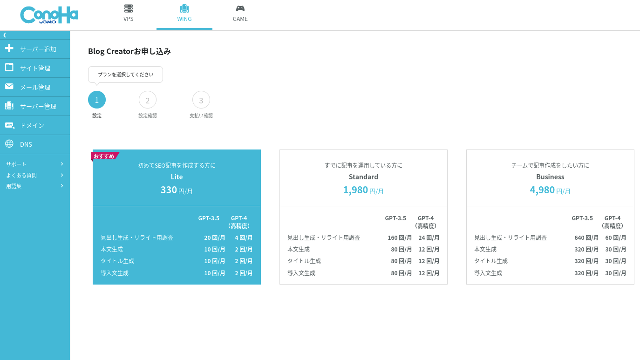
Choose a plan. The Lite plan is fine. Its functions are the same as the higher plans. The higher plans simply give you more AI generations. Since all you need at first is a trial, go with the Lite plan at 330 yen per month.
- STEP.4Payment
A payment confirmation screen will appear. Click "Confirm." Your application is now complete.
4. مضمون کی ساخت اور ہدایات طے کریں
5. AI کے ذریعے draft بنوائیںthis article.
Creating an Article with Blog Creator
- STEP.1Choose Blog Creator
From "AI Blog Generation Tool," choose the "Blog Creator" tab.
- STEP.2Enter the keyword you want to rank for
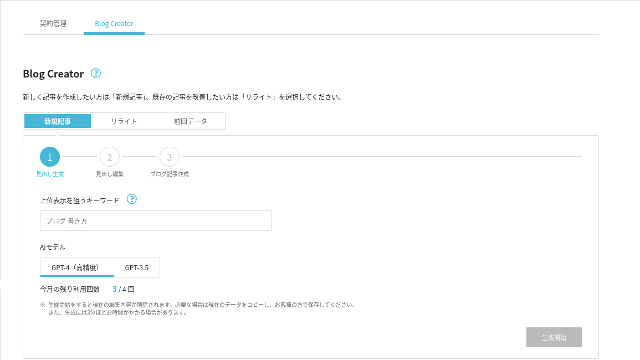
Blog Creator can handle rewrites too, but this time I am creating a new article. Enter the keyword you want to rank for: "building a WordPress theme from scratch." (Of course, you should use the keyword you personally want to rank for.)
Choose the AI model. Let's go with the highly accurate GPT-4.
Click "Start Generation."
- STEP.3Edit the headings based on the keyword research
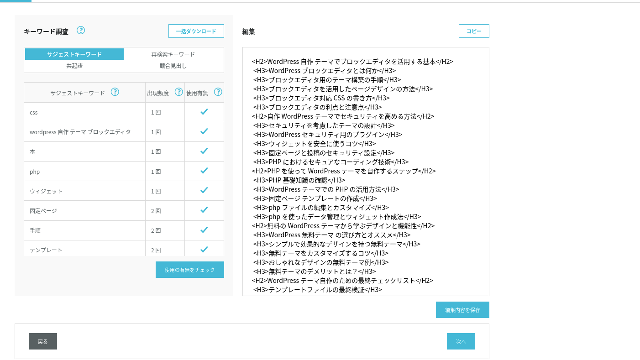
The keyword research will be displayed. Check the results from the four types of research. The more of them you make use of, the stronger the SEO tends to become.
On the editing screen, incorporate keywords that were not used in the generated headings. Once you finish editing, click "Save Edits." After that is saved, move on by clicking "Next."
- STEP.4Create the body, title, and introduction
Using the headings you created earlier as a base, have AI generate the body, title, and introduction. Click "AI Generate" for each item.
Choose whether to use GPT-4 or GPT-3.5. I chose GPT-4.
After generating each one with AI, click "Save Edits." That completes the Blog Creator generation process.
Several title candidates will be displayed, so compare them against the headings and body and choose the most appropriate one.
Once everything is complete, copy each part, paste it into a new WordPress post, and publish the article.
Blog Creator سے مضمون بنانے کے مراحل
مضمون بناتے وقت keyword کے ارادے اور قاری کے سوالات کو واضح کرنا ضروری ہے۔
اس مضمون کی مثال میں ہم "WordPress theme منتخب کرنے کی غلطیاں" جیسے keyword group پر مبنی content بناتے ہیں۔
مضمون کے عنوان اور headings، keyword کے قدرتی استعمال سے طے کیے جا سکتے ہیں۔
Complete Guide to Building a WordPress Theme from Scratch: Steps and a Checklist for Building a Strong Site
Complete Guide to Building a WordPress Theme from Scratch: Steps and a Checklist for Building a Strong Site
serverfield.org
Blog Creator کے بنائے ہوئے مضمون کا جائزہ

Beginner-Friendly! How to Create a Custom Theme in WordPress
Beginner-Friendly! How to Create a Custom Theme in WordPress
serverfield.org
ChatGPT-4o سے بنایا گیا مضمون
Build Your Own WordPress Theme and Create a Site Full of Originality!
Build Your Own WordPress Theme and Create a Site Full of Originality!
serverfield.org
Claude 3 سے بنایا گیا مضمون
Break Out of the Rut! How to Build Your Ideal Site by Creating Your Own WordPress Theme
Break Out of the Rut! How to Build Your Ideal Site by Creating Your Own WordPress Theme
serverfield.org
Gemini 1.5 Pro سے بنایا گیا مضمون
Gemini 1.5 Pro کے draft میں بھی keyword coverage مضبوط ہو سکتا ہے۔ConoHa WING does not get mad at me, Blog Creator's advantages are what I want to introduce here. (I am a timid person.)
چار مضامین آپس میں موازنہ کرتے ہوئے keyword "Building a WordPress Theme from Scratch" پر ترتیب دیے گئے۔
Blog Creator uses AI. However, while checking the researched keyword results, you are encouraged to polish the content further yourself. In practice, doing so keeps you from relying entirely on AI or tools. By using it skillfully, you can steadily improve your writing skills and your understanding of SEO.
Blog Creator can, so to speak, help you grow like a partner running alongside you.

Boost Your SEO: Web Writing Techniques That Win Users Over With Highly Readable Copy
Boost Your SEO: Web Writing Techniques That Win Users Over With Highly Readable Copy
serverfield.org
اگر لگتا ہے کہ AI جیت سکتا ہے، تو میں Blog Creator کے فوائد متعارف کرانا چاہتا ہوں۔
Blog Creator optimizes the heading structure and body length better than generic AI. As a result, you can publish the article by copying and pasting it without making corrections.(That said, you still need to fact-check the content.)
Search اور check کے ذریعے آپ کے لیے مناسب انتخاب تلاش کیا جا سکتا ہے۔
- The headings start from H4, so they need to be corrected.
- If you generate the full body all at once after creating the headings, it does not write properly.
- You need to delete unnecessary words such as "Introduction:" and "Body:".
Creating body text from the headings and doing everything else manually is simply too much work.
As an AI Article Writing Tool, It Is More Keyword-Focused Than What Other Companies Offer
Other server companies also offer AI article-generation tools.
Sakura Rental Server offers "User Local AI Writer," which lets you use ChatGPT-4 for free. In addition to ChatGPT-4, it also uses its own local AI.
Value Server offers "Value AI Writer," which starts at 1,650 yen per month. That one uses ChatGPT-4o.
So these tools may let you use them for free or give you access to the latest AI, but they are not built around SEO-strong keywords.Blog Creator first builds around SEO-strong keywords and then uses AI to write the article.
In the end, when you write a blog, you have a target keyword you want to rank for, right?Blog Creator defines that target first and then creates the article.AI sprints properly toward a clearly defined goal is what it does. It is not just running blindly.
This is the major difference between other AI article-generation tools and Blog Creator.
Summary: Please Search and Check the Result of the Match Yourself
So what happened in the end?
The answer is not for me to decide. Let's submit it to Google, just as we always do. Search for "WordPress custom theme" and look for our site (https://serverfield.org). One of the following articles should appear there.
- Blog Creator article: Complete Guide to Building a WordPress Theme from Scratch: Steps and a Checklist for Building a Strong Site
- ChatGPT-4o article:Beginner-Friendly! How to Create a Custom Theme in WordPress
- Claude 3 article: Build Your Own WordPress Theme and Create a Site Full of Originality!
- Gemini 1.5 Pro article: Break Out of the Rut! How to Build Your Ideal Site by Creating Your Own WordPress Theme
The article that appears when you search at that moment will be the best tool at that moment.
Blog Creator is better than I imagined. Its article keeps showing up.
If you want to try it, ConoHa WING is where you should sign up.
" ConoHa WING", a high-speed server from GMO Internet Group with rapidly growing user numbers, and one we use ourselves. Because WordPress comes preinstalled when you sign up for the server, anyone can get started easily. It offers a good balance of cost and performance, and we use it ourselves too.
Up to 53% off server fees until August 5, 2025, plus two domains free forever and the first month free
Complete Comparison of 32 WordPress Rental Servers: Recommendations for Individuals, Businesses, and Overseas Use

When you think, "I want to start WordPress," and search for "recommended WordPress hosting," you get an enormous range of articles, from personal-use servers and options for businesses and small companies to overseas servers and low-cost servers. Honestly,
- Which site should I trust?
- I just want to choose a server in a simple, easy-to-understand way!
- Show me how to start WordPress right now.
Doesn't that sound familiar? That is why this article carefully selects recommended options from 32 rental server companies for individuals, businesses, domestic use, and overseas use. The explanation comes from the SEO specialist of an app development company that uses rental servers every day.