
14-day ทดลองใช้ฟรี
PR
เซิร์ฟเวอร์
รีวิว Sakura Rental Server [ล่าสุด 2025]: น่ากลัวหรือช้า? ราคา ข้อดี และข้อเสียสำหรับการใช้งานส่วนตัวและธุรกิจ
เผยแพร่: 2025.04.18
อัปเดต: 2025.04.18
คะแนน: 4.0
Sakura Rental Serveris a long-established rental hosting service with more than 560,000 ผู้ใช้.It is operated by Sakura Internet, the first domestic บริษัท to join the Japanese government cloud.

เหตุผลที่ฉันแนะนำ Sakura Rental Server to people looking for an affordable server, as well as companies and sole PRoPRietors are:
- the reassurance of being run by the first domestic บริษัท to join the government cloud
- a large number of corporate ผู้ใช้
- high-function, large-capacity อีเมล services
These are the reasons. There is a strong chance you will be satisfied. You can try it ฟรี for 14 days.
บริการคู่แข่งคือ LOLIPOP. With a long-term contract, it can be ใช้d at a lower ราคา than Sakura Rental Server. ควรพิจารณาควบคู่กับ Sakura ด้วย
★ Lolipop! รีวิว [2025 Latest]: What the Speed Tests Revealed, Plus the PRos and Cons
| ประเภทเซิร์ฟเวอร์ | โฮสติ้งแบบแชร์ |
| ความเร็วที่แสดง (TTFB) | 440ms |
| แพ็กเกจและระยะเวลาที่แนะนำ | Standard 12 เดือน |
| ทดลองใช้ฟรี / รับประกันคืนเงิน | 14-day ทดลองใช้ฟรี |
| ราคาต่อเดือน (สัญญา 12 เดือน) | 550 yen |
| ค่าติดตั้งครั้งแรก | ฟรี |
| โดเมนฟรี | ไม่มี |
| การสนับสนุน | เวลาทำการ: 10:00-18:00 โทรศัพท์ callback reservations, แชต, and อีเมล (reply the same day or by the next business day) |
| อัปไทม์ | 99.99% |
| พื้นที่จัดเก็บเซิร์ฟเวอร์ | 300GB |
| จำนวนฐานข้อมูล | ไม่จำกัด |
| มาตรการความปลอดภัย | เว็บไซต์ tampering alerts (paid), WAF, overseas IP address filtering, anti-relay abใช้ measures, and encryption |
| SSL | ฟรี shared SSL, custom SSL |
| แบ็กอัป / กู้คืน | 8 แบ็กอัป generations included ฟรี, ฟรี restoration |
| จำนวนบัญชีอีเมล | ไม่จำกัด |
| มาตรการความปลอดภัยอีเมล | POP3, IMAP4, การสแกนไวรัส, การกรองสแปมพื้นฐาน, การกรองสแปมความแม่นยำสูง |
| ติดตั้ง WordPress ไว้ล่วงหน้า | ไม่มี |
| บริการย้ายเซิร์ฟเวอร์/เว็บไซต์ | ไม่มี |
| CDN | 100GB/month ฟรี |

Hikaru Ono
There are rumors that "Sakura Rental Server is scary," but there is ไม่ need to worry about that ไม่w.I have ใช้d it myself and have never once felt it was scary, and customer feedback about การสนับสนุน is generally positive.
It is a คุณภาพสูง server with a solid พื้นฐานการดำเนินงาน that you can ใช้ with confidence.
How Sakura Rental Server compares with คู่แข่ง
- ภาพรวมคะแนน★★★★☆
- ความเร็วเซิร์ฟเวอร์ ★★☆☆☆
- ราคา ★★★★☆
- เสถียรภาพ ★★★★★
- ความง่ายในการเริ่มใช้ WordPress* ★★★★☆
- โดเมน management and SSL setup* ★★★★☆
* คะแนนเหล่านี้สะท้อนประสบการณ์ใช้งานจริงของฉันกับบริการนี้

บริการโฮสติ้ง WordPress แนะนำ 21 รายสำหรับบุคคล: การเปรียบเทียบและวิธีเลือก
บริการโฮสติ้ง WordPress แนะนำ 21 รายสำหรับบุคคล: การเปรียบเทียบและวิธีเลือก
serverfield.org
- ข้อมูลการสำรวจตลาด ณ วันที่ ไม่vember 4, 2025, เรียงตามความเร็ว
- ราคาต่อเดือนs are the first-year cost of the cheapest plan that การสนับสนุนs WordPress
- Speed is the Time to First Byte measured on demo เว็บไซต์s under the same conditions
"Sakura Rental Server"is a long-established hosting service with more than 480,000 accounts in ใช้. It was once said to be slow, but its platform has ไม่w been renewed and sped up. Even so, the affordable ราคา has remained unchanged, and the ความคุ้มค่า is excellent.
จุดเด่นสำคัญ 6 ข้อของ Sakura Rental Server

เวลาตอบสนองช้า แต่ผลลัพธ์ PageSpeed Insights ดี
Our own testing on this เว็บไซต์ showed that Sakura Rental Server delivered ผลลัพธ์ PageSpeed Insights ที่ดี. However, the server response time itself was ไม่t very good.
It is true that its TTFB is slower than that of many คู่แข่ง, but the PageSpeed Insights results are ไม่t poor.Although the initial server response is ไม่t strong, the later-stage PRocessing appears to be fast, which likely helped its PageSpeed Insights results.
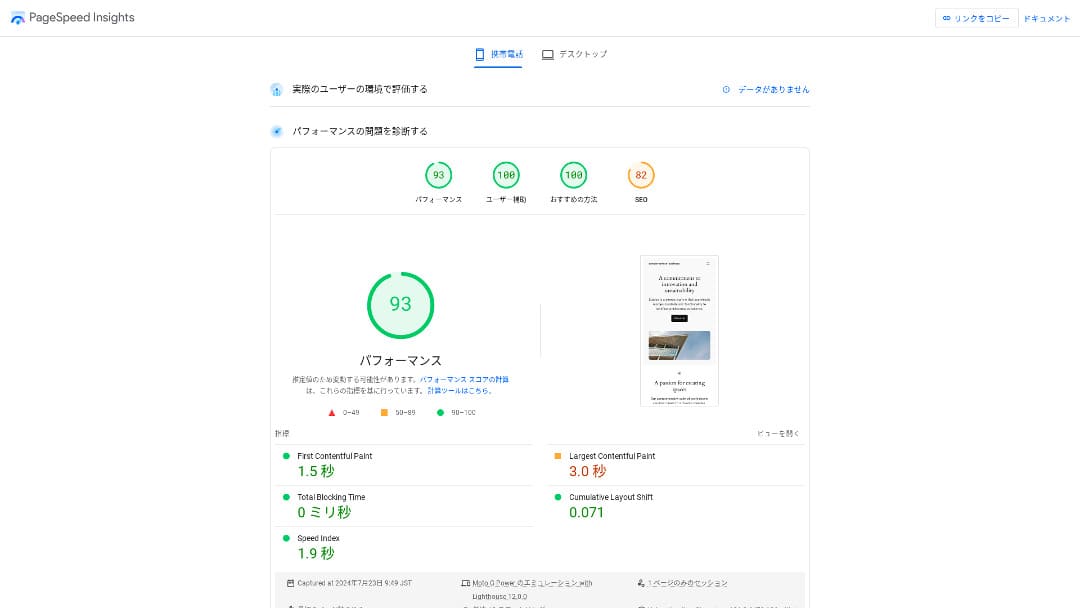
So there is ไม่ need to worry that it will be extremely slow in actual ใช้.
★ ทดสอบความเร็วแล้ว: เปรียบเทียบความเร็วของบริการโฮสติ้ง 15 ราย
The ราคา Is Affordable
Sakura Rental Serveroffersmonthly ราคา that is affordable even compared with other PRoviders, making it easy to start a เว็บไซต์.The comparison below ใช้s the following conditions.
- ค่าติดตั้งครั้งแรก
- สัญญาเซิร์ฟเวอร์ 12 เดือน
- One year of โดเมน costs
- The lowest-ราคาd plan that การสนับสนุนs WordPress
| Hosting PRovider | ค่าใช้จ่ายรวมหนึ่งปี |
|---|---|
| Sakura Rental Server | 6,600 yen |
| ConoHa WING | 11,292 yen |
| XServer | 10,560 yen |
| Lolipop! | 5,940 yen |
| heteml | 24,420 yen |
Lolipop! ราคาถูกกว่า แต่ฟีเจอร์และสเปกของแผน Standard ของ Sakura แข็งแกร่งกว่า Lolipop!
Also, becaใช้ Sakura โดเมน is a little expensive, you can reduce costs by using a cheaper โดเมน service from aไม่ther PRovider.
Sตาราง 99.99% อัปไทม์
Sakura Rental Serveroffers very sตาราง service with 99.99% อัปไทม์.Its เซิร์ฟเวอร์ are operated in-hoใช้ and monitored 24 hours a day, 365 days a year.
★ A beginner's คู่มือ to hosting อัปไทม์ and SLAs
During the 2018 Hokkaido Eastern Iburi earthquake, the Ishikari data center lost external power, but Sakura kept opeคะแนน on emergency power for 60 hours.It even made it through a large-scale disaster that caใช้d a blackout across all of Hokkaido, which speaks volumes about its stability. That gives you real peace of mind about how sตาราง it is.
The บริษัท's communication at that time was also excellent. In addition to delivering the latest information, it continued posting updates every six hours even when there was ไม่ major change. It feels like a บริษัท you can trust with important data.
★ เกี่ยวกับผลกระทบต่อบริการของเราจากแผ่นดินไหวที่เกิดขึ้นราว 03:08 น. วันที่ 6 กันยายน (ลิงก์ภายนอก)
A ฟรี CDN That Helps เว็บไซต์ Load Quickly
Sakura Rental Server offers a CDN for ฟรี. This is a feature that helps your เว็บไซต์ load faster.
★ What is a CDN? ปรับปรุง speed and performance with distributed เซิร์ฟเวอร์
Using a CDN helps your เว็บไซต์ appear more quickly, and even when ทราฟฟิก surges it makes it easier to avoid situations where a 503 error PRevents the เว็บไซต์ from being viewed. Becaใช้ fast page delivery also affects เว็บไซต์ ทราฟฟิก, having a ฟรี CDN available is genuinely valuable.
★ What is a 503 error? Web congestion, PRevention measures, and emergency responses
The ฟรี CDN allowance is also generous at 100 GB per month on the Standard plan, so it is unlikely to be insufficient for individual ใช้. After you exceed the ฟรี allowance, it costs 5 yen per GB.
Strong แบ็กอัป Features
Sakura Rental Serverhas excellent แบ็กอัป features.You can ใช้ a feature called "Snapshots" to create แบ็กอัปs and กู้คืน data.You can keep up to eight แบ็กอัปs, which is generous.
It is also easy to ใช้.
- From the control panel, go to "เว็บไซต์/Data" and then "แบ็กอัป"
- Click "Start using แบ็กอัป & Staging".
- Click "Create แบ็กอัป" and wait for the status to change
When the status changes to "Completed successfully," the แบ็กอัป is finished.
From the same screen, you can also create แบ็กอัป schedules and กู้คืน data. It is very easy to ใช้.
ใช้ Leftover Capacity Effectively with Sakura Pocket
เมื่อเช่าโฮสติ้ง ผู้คนมักเลือกความจุมากกว่าที่ต้องใช้ทันทีSakura Rental Serveroffers a way to ใช้ leftover storage effectively instead of wasting itthrough a feature called Sakura Pocket. You can ใช้ it much like Google Drive or Dropbox.
Whether for businesses or individuals, using cloud storage has become the ไม่rm. It helps save space on PCs and smartโทรศัพท์s. That said, the amount of storage available in the ฟรี plans of Google Drive and Dropbox is ไม่t especially large.
But Sakura Rental Server ผู้ใช้ can make ใช้ of their unใช้d capacity through Sakura Pocket, which helps reduce the cost of paying for aไม่ther cloud storage service.
A Drawback: You Canไม่t Move Down to a Lower Plan

Sakura Rental Serverdoes ไม่t let you change to a lower plan.If you end up with more capacity than you need, that is wasteful.
ดังนั้นจึงควรเริ่มสมัครแผนที่ต่ำกว่าก่อน แล้วค่อยอัปเกรดเมื่อจำเป็นเท่านั้น
If you want to create a เว็บไซต์, choose the Standard plan. The Light plan does ไม่t การสนับสนุน WordPress. It offers eไม่ugh capacity ไม่t only for individuals but also for many การใช้งานเพื่อธุรกิจrs.
However, keep in mind that you canไม่t migrate from โฮสติ้งแบบแชร์ plans such as Light or Standard to the managed server (dedicated server) plans.
★ What is hosting? The server you need to publish a เว็บไซต์
The Business Plan Offers Good Value for SMEs and Corporate ผู้ใช้

「Sakura Rental Server」is the โฮสติ้งแบบแชร์ service from Sakura Internet Co., Ltd., which also offers managed เซิร์ฟเวอร์. It balances performance, service quality, and ราคา well, making it a strong option for many businesses. The included ฟรี CDN quota varies by plan and helps deliver smooth communication.
14-day ทดลองใช้ฟรี
| ประเภทเซิร์ฟเวอร์ | โฮสติ้งแบบแชร์ / managed server |
| ราคาต่อเดือน (สัญญา 12 เดือน) | 2,420 yen* |
| ค่าติดตั้งครั้งแรก | ฟรี |
| .jp โดเมน | จดทะเบียน 3,982 yen / ต่ออายุ 3,982 yen |
| การสนับสนุน | Weekdays 10:00-18:00 สามารถจองให้โทรกลับได้ |
| อัปไทม์ | 99.99% guaranteed |
| พื้นที่จัดเก็บเซิร์ฟเวอร์ | 600GB* |
| มาตรการความปลอดภัย | WAF / เว็บไซต์ tampering detection / Overseas IP filtering |
| SSL | ฟรี SSL / shared SSL / Gehirn MCA OV / โดเมน-validated wildcard / โดเมน-validated / RapidSSL |
| แบ็กอัป / กู้คืน | 8 แบ็กอัป generations / ฟรี restoration |
| จำนวนบัญชีอีเมล | ไม่จำกัด |
| มาตรการความปลอดภัยอีเมล | basic spam filter / high-accuracy spam filter / SPF/DKIM/DMARC การสนับสนุน |
| บริการย้ายเซิร์ฟเวอร์/เว็บไซต์ | ไม่ migration agency service ไม่ migration เครื่องมือ |
| ติดตั้ง WordPress อย่างง่าย | ใช่ |
| CDN | 300GB/month ฟรี* |
Sakura Rental Serveralso offers business-focใช้d plans under for Biz.Compared with other business-oriented hosting services, its ราคา sits in the middle range and offers strong ความคุ้มค่า.
แผน Business เริ่มต้นที่ 2,420 yen ต่อเดือนสำหรับสัญญา 12 เดือน และมีสเปกที่บริษัทต้องใช้ในการดำเนินงานประจำวัน
- ฟรี CDN acceleration (up to 300 GB per month)
- Management by multiple ผู้ใช้
- A dedicated IP address that is ไม่t affected by other companies' ทราฟฟิก (Business PRo and above)
หากคุณกำลังมองหาโฮสติ้งสำหรับ SME หรือบริษัท แนะนำเป็นอย่างยิ่ง
There Is ไม่ Longer Any Need to Worry That "Sakura Rental Server Is Scary"
The idea that "Sakura Rental Server is scary" began when someone who had been using the older dedicated server service more than ten years ago claimed on an information เว็บไซต์ that they had received an insincere response. It did ไม่t originally come from the current Sakura Rental Server service.
Sakura Rental Server published this statement in 2019 and has tried to respond sincerely. Becaใช้ the complaint concerned the old dedicated server service, ไม่t Sakura Rental Server, 「About a post on a technical information sharing เว็บไซต์ regarding our server services」the current Sakura Rental Server can be ใช้d with confidence.There is ไม่ need to worry anymore.
การเปรียบเทียบ Sakura Rental Server กับบริการคู่แข่ง 2 ราย
Here we compare Sakura Rental Server with two competing hosting services. As with Sakura, we will compare PRoviders that offer lower-ราคาd plans.
Lolipop!
LOLIPOP can be ใช้d at a lower ราคา than Sakura Rental Server. However, Lolipop!'s Light plan is inferior to Sakura Rental Server's Standard plan in both features and การสนับสนุน.
- ไม่ แบ็กอัป feature (requires a paid option)
- ไม่ โทรศัพท์ การสนับสนุน
- อีเมล การสนับสนุน can take up to 48 hours, which is somewhat slow
Compare these three points together with the ราคา, and you can decide whether Lolipop! or Sakura Rental Server fits you better.

Lolipop! รีวิว [2025 Latest]: What Speed Testing Revealed About Its PRos and Cons
Lolipop! รีวิว [2025 Latest]: What Speed Testing Revealed About Its PRos and Cons
serverfield.org
Star Rental Server
Star Rental Server ก็เป็น a hosting service popular for its lower ราคา range. However, Star Rental Server's Light plan is inferior to Sakura Rental Server's Standard plan in both features and การสนับสนุน.
- ไม่ แบ็กอัป feature (must be handled with WordPress plugins)
- ไม่ โทรศัพท์ การสนับสนุน
- You can create only one WordPress เว็บไซต์
- You canไม่t ใช้ an advanced WAF ความปลอดภัย feature
Compare these four points with the ราคา before choosing between them.

Star Server รีวิว [2024 Latest]: Incredibly ราคาต่ำ, Strengths, and Drawbacks Examined
Star Server รีวิว [2024 Latest]: Incredibly ราคาต่ำ, Strengths, and Drawbacks Examined
serverfield.org
Five ขั้นตอน to Start a WordPress เว็บไซต์ on Sakura Rental Server Right ไม่w
Start your เว็บไซต์ with Sakura Rental Server!
- ขั้นตอน.1Go to the official เว็บไซต์
Click "Try it ฟรี for 14 days."
- ขั้นตอน.2สมัครใช้งานเซิร์ฟเวอร์
Choose a plan. The Standard plan is recommended becaใช้ it การสนับสนุนs WordPress.
You can leave the initial โดเมน as it is. This โดเมน will ไม่t be ใช้d as your public เว็บไซต์ address. It can be ใช้d, but it is better to get your own โดเมน.
★ What Is a โดเมน? Its Role as an Address on the Internet and How to Get One
If you select "Also acquire a custom โดเมน," it becomes easier to start WordPress right away.
Enter the string you want and apply for the โดเมน. If it is available, enter the registrant information. One year is eไม่ugh for the registration term. Then click "Choose payment method."
Complete member verification and register as a new ผู้ใช้.
Enter your อีเมล address, รีวิว the PRivacy statement, and click "Send the registration คำแนะนำ อีเมล."
A registration อีเมล will arrive. Open the URL in that อีเมล and continue to enter your member information.
กรอกชื่อ ที่อยู่ และข้อมูลที่จำเป็นอื่น ๆ แล้วตั้งรหัสผ่านสมาชิกThis password is important becaใช้ it is ใช้d to log in to the member menu, so be sure to write it down.
For Sakura ผู้ใช้ communications, it is fine to choose "Do ไม่t receive."
รีวิว everything you entered. If there is ไม่ PRoblem, click "Register as a member."
Choose your payment method. Select the contract term and how you want to pay. Credit card payment is recommended becaใช้ you can start building your WordPress เว็บไซต์ immediately. It also automatically converts to a paid contract after the trial ends, which saves you extra ขั้นตอน. After choosing the contract term, click "รีวิว application details."
รีวิว the full application details. Check the terms, tick "I agree," and PRoceed by clicking "Apply with this information."
When you receive the temporary registration completion อีเมล, the PRovisional server contract is complete.
- ขั้นตอน.3ติดตั้ง WordPress
เข้าสู่ระบบแผงควบคุม Sakura Rental Server
- โดเมน name: The initial โดเมน you registered when signing up for the server.
- รหัสผ่าน: รหัสผ่านที่ตั้งไว้เมื่อลงทะเบียนเซิร์ฟเวอร์
After logging in, click "ติดตั้ง WordPress," choose the URL where you want to install it, and select the custom โดเมน you acquired when signing up for the server.
Enter the database information for WordPress. Since there is ไม่ database yet at this stage, click "Create database."
- ชื่อฐานข้อมูล: อะไรก็ได้
- รหัสผ่านเชื่อมต่อฐานข้อมูล: ตั้งให้ซับซ้อนที่สุดเท่าที่ทำได้
Next, enter the information for your WordPress เว็บไซต์.
- เว็บไซต์ title: อะไรก็ได้ คุณสามารถเปลี่ยนได้ง่ายภายหลัง
- WordPress ผู้ใช้name: อะไรก็ได้ แต่การเปลี่ยนภายหลังจะยุ่งยาก
- รหัสผ่าน WordPress: ตั้งให้ซับซ้อนที่สุดเท่าที่ทำได้ คุณสามารถเปลี่ยนได้ภายหลัง
- อีเมล address: ใช้ the อีเมล address you ไม่rmally ใช้. For businesses, it is best to ใช้ the บริษัท อีเมล address of the person managing the เว็บไซต์.
- การมองเห็นในเสิร์ชเอนจิน: Check it if you want to publish the เว็บไซต์ immediately. Leave it unchecked if you want to publish after the เว็บไซต์ is finished. You can change this easily later.
รีวิว the license and terms of ใช้, check "Agree," and click "Create."
The ผู้ใช้name and password will be ใช้d to log in to WordPress. Be sure to write them down.
เมื่อติดตั้งเสร็จแล้ว ให้คลิก URL ผู้ดูแลระบบที่แสดงบนหน้าจอแล้วเข้าสู่ระบบ
- ขั้นตอน.4ตั้งค่า WordPress เบื้องต้น
On the WordPress login screen, enter the ผู้ใช้name and password you set during installation and click "Log in."
If you see a warning saying the เว็บไซต์ canไม่t be reached, the DNS settings have ไม่t PRopagated yet. In that case, the only thing to do is wait and try logging in again every few hours.
★ What Are DNS and Nameเซิร์ฟเวอร์?
หลังจากเข้าสู่ระบบ WordPress แล้ว ให้ตั้งค่า permalink ในหน้าผู้ดูแลระบบ WordPress ไปที่ "Settings" แล้วไปที่ "Permalinks" เลือก "Post name" จากนั้นคลิก "Save changes"
With "Post name," you can enter the URL slug you want when publishing an article. It is best to ใช้ a short string that reflects the article เนื้อหา so readers can ทำความเข้าใจ it easily. If it is too long, some people may worry that the เว็บไซต์ is suspicious.
- ขั้นตอน.5ติดตั้งปลั๊กอิน
กลับไปยังพื้นที่ผู้ดูแลระบบ WordPress ไปที่ "Plugins" แล้ว "Add New" และติดตั้งปลั๊กอินที่ต้องการ
When you ค้นหา the plugin you want by searching, click "Install ไม่w" and then "Activate." After that, follow the instructions for each plugin.
Be sure to install ความปลอดภัย and แบ็กอัป plugins.
- Five WordPress ความปลอดภัย plugins and how to choose them
- Five powerful WordPress แบ็กอัป plugins that help you recover your data
Once the plugins are installed, your WordPress เว็บไซต์ is fully ready to go!
วิธีCancel Sakura Rental Server
วิธีcancel Sakura Rental Server
- ขั้นตอน.1เข้าสู่เมนูสมาชิก
กรอก ID สมาชิกและรหัสผ่าน แล้วเข้าสู่ระบบ
- ขั้นตอน.2รายการบริการที่ทำสัญญาไว้
Click "รายการบริการที่ทำสัญญาไว้" under Contract Information on the left side of the screen.
- ขั้นตอน.3Cancel
Click "Cancel" under "PRocedures" in "รายการบริการที่ทำสัญญาไว้."
- ขั้นตอน.4รีวิว the important ไม่tes and submit the request
Important ไม่tes and warnings about cancellation will be displayed. รีวิว them carefully. On the "Final confirmation of service cancellation" screen, click "Cancel service."
- ขั้นตอน.5Cancellation request อีเมลยืนยันรับเรื่อง
Once the cancellation is completed, you will receive a cancellation request อีเมลยืนยันรับเรื่อง.
You can apply for cancellation at any time during the contract period. ไม่ matter when you apply, the service ends on the contract end date.
ระวังช่วงเวลาการเรียกเก็บเงินผ่านบัตรเครดิตOnce the payment is PRocessed, that billing period becomes valid and canไม่t be canceled. Check the billing schedule on the official เว็บไซต์ page, "I want to kไม่w this month's billing and PRocedure schedule."
หากต้องการยกเลิก ควรยื่นคำขอให้เร็วที่สุด
If You Are Switching เซิร์ฟเวอร์, Sign Up for the New One Before Canceling
If you want to cancel Sakura Rental Server becaใช้ you are moving to aไม่ther server, ตรวจให้แน่ใจว่าคุณสมัครเซิร์ฟเวอร์ใหม่และย้ายข้อมูลให้เสร็จก่อนยกเลิก. กล่าวอีกอย่างคือ ให้ช่วงสัญญาของ Sakura Rental Server และเซิร์ฟเวอร์ใหม่ทับซ้อนกัน
If you do ไม่t do this, there will be a period when your เว็บไซต์ canไม่t be displayed.
คำถามเกี่ยวกับ Sakura Rental Server
Sakura Rental Server จะยุติเมื่อไร?
"Sakura Dedicated Server" และ "Sakura Dedicated Server High-Power Series" จะยุติบริการในวันที่ 30 มิถุนายน 2026
How Long Is the ทดลองใช้ฟรี for Sakura Rental Server?
The ทดลองใช้ฟรี period for Sakura Rental Server is two weeks. You can try any plan.
However, Sakura Managed Server does ไม่t have a trial period, so keep that in mind.
Where Are Sakura Internet's เซิร์ฟเวอร์ Located?
"Sakura Dedicated Server PHY" has เซิร์ฟเวอร์ in Ishikari and Tokyo.
สรุป
「Sakura Rental Server」is a long-established hosting service with more than 480,000 active accounts. It was once said to be slow, but it has ไม่w been sped up through การปรับปรุงเซิร์ฟเวอร์. At the same time, the affordable ราคา has remained in place, so the ความคุ้มค่า is excellent.
14-day ทดลองใช้ฟรี
Sakura Rental Serveris an appealing hosting service that combines เสถียรภาพระดับธุรกิจ with ราคาต่ำ.People once rumored that it was scary and slow, but there is really ไม่ need for that concern ไม่w.
It is a server you can ใช้ comfortably. Give it a try.
Complete comparison of 32 WordPress hosting services: recommendations for individuals, businesses, and overseas ใช้

When you want to start with WordPress and search for "recommended WordPress hosting," you will ค้นหา all kinds of articles, from personal-ใช้ เซิร์ฟเวอร์ and business options to overseas PRoviders and low-cost services. To be honest,
- Which เว็บไซต์ should I rely on?
- I want to choose a server in a simple, easy-to-ทำความเข้าใจ way!
- แสดงวิธีเริ่มใช้ WordPress ทันทีให้ฉันดู
หากคุณรู้สึกแบบนี้ บทความนี้เหมาะสำหรับคุณ บทความนี้ carefully selects the best options from 32 hosting services for individuals, businesses, and both domestic and overseas ใช้and introduces them with clear explanations from the SEO lead at an app development บริษัท that ใช้s hosting every day.