
Free .co.jp domain + 12 months of V2 plan server fees free + free initial fee until August 31, 2025, plus a 30-day free trial
PR
เซิร์ฟเวอร์
รีวิว Core Server [อัปเดตล่าสุด 2025]: คู่มือเชิงลึกเรื่องราคา ความเร็ว ข้อดี และข้อเสีย
เผยแพร่: 2025.04.18
อัปเดต: 2025.04.18
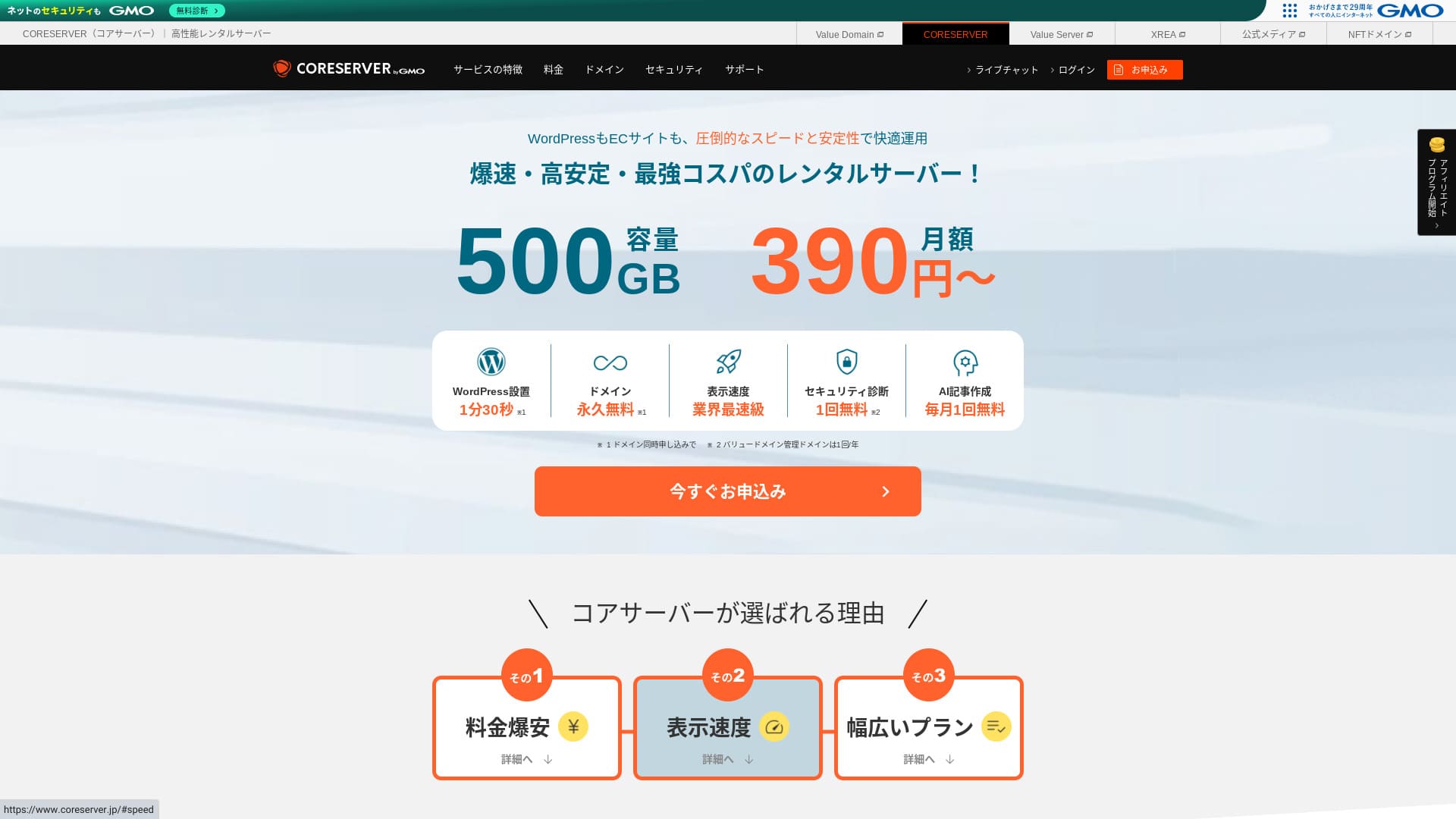
Core Server คือ a เซิร์ฟเวอร์เช่าที่ดำเนินการ by GMO Digirock, Inc., and จุดแข็งที่ใหญ่ที่สุดอย่างหนึ่ง คือ the มีแผนให้เลือกหลากหลาย.

Core Server คือ a บริการ ผมแนะนำ to บุคคล บริษัท และเจ้าของกิจการคนเดียวที่เพิ่งเริ่มใช้ WordPress เพราะว่า:
- คุณสามารถหาเซิร์ฟเวอร์ที่เหมาะสมได้ด้วยแผนที่หลากหลาย
- มีเครื่องมือเขียนบทความด้วย AI
- บริการอีเมลของมันราคาย่อมเยาแต่มีความสามารถสูง
เพราะเหตุนี้ คุณน่าจะพึงพอใจ และสามารถทดลองใช้ฟรี 10 วันได้
เซิร์ฟเวอร์คู่แข่งคือ LOLIPOP และให้ความมั่นใจมากยิ่งกว่า Core Server เพราะ its uptime คือ เปิดเผยต่อสาธารณะ. โปรด consider it as well.
หมายเหตุ: รีวิว Lolipop! [ฉบับปี 2025]: ผลทดสอบความเร็ว บวกข้อดีและข้อเสีย
| Server type | Shared server |
| Display speed (TTFB) | 210ms |
| Recommended plan and contract term | CORE-MINI 12-month contract |
| Trial / money-back guarantee | 30-day free trial |
| Monthly fee (12-month contract) | 264 yen |
| Initial setup fee | Free |
| Free domain | None |
| Support | Business hours: 10:00-12:00, 13:00-17:00 Phone callback (CORE-B, CORE-C, CORE-Z), email, chat |
| Uptime | Not disclosed |
| Storage | 250GB |
| Number of databases | 10 |
| Security measures | WAF, IPS/IDS |
| SSL | Free SSL |
| Backup / restore | 15 generations of backups free, restoration free |
| Number of email accounts | 200 |
| Email security measures | POP/POS, SMTP/SMTPS, IMAP/IMAPS, virus checking, spam filtering, DKIM/DMARC |
| WordPress preinstallation | None |
| Server / website migration service | None |
| CDN | None |

Hikaru Ono
To be honest, I felt that Core Server’s control panel will divide opinion. If you already have experience using servers, you should have no trouble handling it. If you choose a V2 plan, you can also get started with WordPress more easily.
Even so, please do not worry too much. It comes with top-class official manuals that are very thorough and even include videos.
Core Server Compared with Other Hosting Services
- Overall rating★★★☆☆
- Server speed ★★★☆☆
- Pricing ★★★★☆
- Stability ★★★★☆
- Ease of getting started with WordPress* ★★★☆☆
- Operations such as domain management and SSL setup* ★★★☆☆
* Based on my actual experience using it.

How to Choose from 21 Recommended WordPress Hosting Services for Individuals
How to Choose from 21 Recommended WordPress Hosting Services for Individuals
serverfield.org
- November 4, 2025 market-research data, sorted by speed
- Monthly fees are the first-year cost of the cheapest plan that can run WordPress
- Speed is the Time to First Byte measured on demo sites under the same conditions
“Core Server” is a high-speed rental server operated by GMO Digirock, Inc. It offers an affordable V1 plan that is easy for individuals to use and a V2 plan focused on comfort and performance. With its wide range of plans, you can find the server that fits you best.
รีวิว Core Server และจุดเด่นหลัก 4 ข้อ

เซิร์ฟเวอร์ที่มีความเร็วระดับมาตรฐาน
Core Server produced ความเร็วหน้าเว็บในระดับมาตรฐาน จากการทดสอบอิสระของเราบนเว็บไซต์นี้.
ตามคำแนะนำของ Google เวลาตอบสนองของเซิร์ฟเวอร์ควรอยู่ที่ 200ms หรือต่ำกว่า Core Server ทำได้ 210ms จึงยังไม่ถือว่าเป็นเซิร์ฟเวอร์ความเร็วสูง แต่ก็เร็วกว่าเกณฑ์มาตรฐานเล็กน้อย
Server response time should be kept under 200 milliseconds.
https://developers.google.com/server/speed/docs/insights/Server?hl=en
ตอนทดสอบ ฉันไม่ได้ตั้งค่าอะไรเป็นพิเศษเพื่อเพิ่มความเร็ว แม้จะเป็นเช่นนั้นก็ยังได้ผลลัพธ์นี้ หากปรับแต่งเพิ่มเติม ก็น่าจะทำได้เร็วขึ้นอีก
Note: Rental Server Speed Comparison Across 15 Services: This One Was Truly Fast [2024 Edition]
ความแตกต่างระหว่าง V1 และ V2 ช่วยให้เลือกแพ็กเกจที่เหมาะสม
Core Server has 7 แผนเมื่อแจกแจงอย่างละเอียด ดังนั้นคุณจึงสามารถหาแผนที่เหมาะกับคุณที่สุดได้ มาดูความแตกต่างหลักกัน
| Plan | Price | Allowed load | Support |
|---|---|---|---|
| Core-Mini | 3,168 yen | 1.25 | Email / chat |
| Core-A | 6,336 yen | 2.5 | Email / chat |
| Core-B | 12,672 yen | 10 | Phone / email / chat |
| Core-C | 39,600 yen | 40 | Phone / email / chat |
| Core-X | 6,336 yen | 18 | Email / chat |
| Core-Y | 10,296 yen | 54 | Email / chat |
| Core-Z | 26,136 yen | 144 | Phone / email / chat |
แพ็กเกจ V1 Core-Mini มีราคาถูก แต่ความสามารถรับโหลดไม่ได้สูงนัก เมื่อมีการเข้าถึงพร้อมกันมากขึ้น ก็มีโอกาสเกิดข้อผิดพลาด 503 ได้ง่ายขึ้น
Note: What Is a 503 Error? How to Avoid Web Congestion and Respond in an Emergency
แพ็กเกจ V2 Core-X มีราคาสูงกว่า Core-Mini แต่ความสามารถรับโหลดเพิ่มขึ้นอย่างมาก เหมาะอย่างยิ่งในฐานะตัวเลือกต้นทุนต่ำที่เน้นประสิทธิภาพมากขึ้น ฉันแนะนำสำหรับคนที่คิดว่า “อยากคุมงบให้ต่ำที่สุด แต่ก็ไม่อยากให้เว็บช้า”
ทราฟฟิกไม่จำกัด
Core Server offers unlimited ทราฟฟิก. Even if more and more people access your เว็บไซต์ and ปริมาณการรับส่งข้อมูลเพิ่มขึ้น, you จะไม่ ขาดแคลน on โควต้าการรับส่งข้อมูล. That helps you avoid a situation where your เว็บไซต์ แสดงผลไม่ได้ เพราะ of transfer limits.
Note: What Are Traffic and Data Transfer? Managing and Optimizing Web Traffic
อย่างไรก็ตาม เมื่อโหลดของเซิร์ฟเวอร์สูง อาจมีการจำกัดการใช้งานบางส่วน
หากภาระรวมของเซิร์ฟเวอร์เกิน 80% ของความสามารถประมวลผลสูงสุด เราอาจจำกัดบัญชีที่กินภาระตั้งแต่ 20% ขึ้นไป หรือบัญชี 5 อันดับแรกที่ใช้โหลดสูงสุดคำถามที่พบบ่อย: เกี่ยวกับข้อจำกัดด้านโหลด | Core Server
เครื่องมือเขียนด้วย AI “Value AI Writer” มีราคาพิเศษ
Core Server lets you ใช้ “Value AI Writer” at a dคือcounted price. “Value AI Writer” คือ an AI tool made by GMO and เชี่ยวชาญในการสร้างบทความบล็อก. หาก you ใช้ Core Server, the price คือ ถูกกว่ามากกว่า 20% than buying it on its own.
เครื่องมือนี้เชี่ยวชาญด้าน SEO และเชื่อมต่อกับ WordPress ได้ดียิ่งขึ้น จึงช่วยให้ผลิตบทความจำนวนมากได้ง่ายกว่าการใช้ AI ทั่วไป
อีเมลก็ใช้งานง่ายด้วยการยืนยันโดเมนผู้ส่ง
Core Server คือ ยัง ง่าย to ใช้ for อีเมล. It การสนับสนุนs sender domain authentication.
เพราะรองรับ DKIM และ DMARC บริษัทจึงสามารถส่งอีเมลถึงลูกค้าได้อย่างราบรื่นยิ่งขึ้น
ข้อเสียของ Core Server และวิธีรับมือ อธิบายตรงไปตรงมา

Core Server ใช้งานได้ดี แต่ก็มีข้อเสียอยู่บ้าง บางเรื่องผู้ใช้ไม่สามารถป้องกันหรือแก้ไขได้เองหลังสมัครใช้งาน
ไม่ได้เปิดเผยอัปไทม์สู่สาธารณะ
Core Server does not เปิดเผย its uptime. Since คุณไม่สามารถประเมินเสถียรภาพของเซิร์ฟเวอร์ได้ในเชิงตัวเลขจึงนับว่าน่าเป็นห่วงอยู่บ้าง หากบล็อกหรือเว็บไซต์แสดงผลไม่ได้ ก็ถือว่าทำหน้าที่ของมันไม่สำเร็จ เมื่อมองเช่นนั้น uptime ของเซิร์ฟเวอร์จึงสำคัญมาก
ถ้าต้องการความสบายใจมากขึ้น ให้เลือกเซิร์ฟเวอร์ที่เปิดเผยอัปไทม์
Note: A beginner's guide to hosting uptime and SLAs
อย่างไรก็ตาม สิ่งที่ดีอย่างหนึ่งของ Core Server คือเว็บไซต์ทางการเผยแพร่ข้อมูลความเร็วตอบสนองของ WordPress ย้อนหลัง 10 ชั่วโมงเว็บไซต์ทางการของมันเผยแพร่ข้อมูลความเร็วการตอบสนองของ WordPress ย้อนหลัง 10 ชั่วโมง.
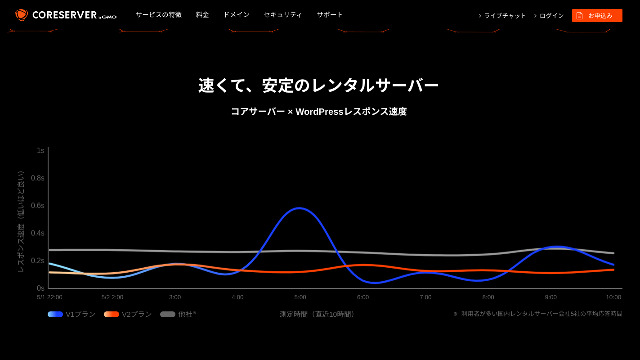
คุณสามารถใช้ข้อมูลนี้เพื่อประเมินเสถียรภาพของเซิร์ฟเวอร์ได้คร่าว ๆ แพ็กเกจ V2 ที่กราฟเอียงลงอย่างนุ่มนวลดูกลับมีความเสถียรและเร็ว
อนุญาตให้เปลี่ยนแพ็กเกจได้เพียงบางกรณี
Core Server allows only some การเปลี่ยนแผน. That means when you ขาดแคลน of ความจุเซิร์ฟเวอร์ or ทราฟฟิก, you อาจต้อง to ย้าย to อีก บริษัท’s เซิร์ฟเวอร์ or rent อีก เซิร์ฟเวอร์ from the same บริษัท.
การเปลี่ยนแพ็กเกจที่ทำได้มีเพียงสองแบบต่อไปนี้
- จาก Core-X ไปยัง Core-Y หรือ Core-Z
- จาก Core-Y ไปยัง Core-Z
ไม่สามารถดาวน์เกรดแพ็กเกจได้
เปรียบเทียบ Core Server กับบริการโฮสติ้งที่คล้ายกัน 2 ราย
มาเปรียบเทียบ Core Server กับบริการโฮสติ้ง 2 รายที่มีลักษณะคล้ายกัน การดูรายละเอียดเล็ก ๆ น้อย ๆ ด้วยจะช่วยให้คุณไม่เสียดายหลังสมัครใช้งาน
Lolipop!
LOLIPOP is a server that is about as inexpensive as Core Server. What it does better than Core Server is that it discloses its uptime. On top of that, its uptime is 99.99%, which is at the highest level in the hosting industry. Its stability is beyond complaint, so not only individuals but also companies are likely to be satisfied with it.
However, when you compare the cheapest plan that can run WordPress, Core Server is the better deal. I recommend choosing based on how you weigh price against peace of mind.

Lolipop! Review [2025 Edition]: What Speed Tests Revealed, Plus the Pros and Cons
Lolipop! Review [2025 Edition]: What Speed Tests Revealed, Plus the Pros and Cons
serverfield.org
Star Server
Star Rental Server คือ ยัง a เซิร์ฟเวอร์ คู่แข่ง in the low-price range.
แพ็กเกจ Star Server Light ใช้ได้ถูกกว่า Core Server อีก แต่ในขณะที่ Core-Mini ของ Core Server สร้าง WordPress ได้ 10 เว็บไซต์ แพ็กเกจ Star Server Light สร้างได้เพียง 1 เว็บไซต์อย่างไรก็ตาม ในขณะที่ Core Server’s Core-Mini ให้คุณสร้างเว็บไซต์ WordPress ได้ 10 เว็บไซต์ แต่แผน Star Server Light อนุญาตเพียง 1 เว็บไซต์เท่านั้น
Core Server แข็งแกร่งกว่าในด้านฟีเจอร์และสเปก Incidentally, neither บริการ เปิดเผยs uptime, so some ข้อกังวล remains about เสถียรภาพ in both cases.

Star Server Review [2024 Latest]: Astonishingly Low Prices and a Thorough Look at the Real Pros and Cons
Star Server Review [2024 Latest]: Astonishingly Low Prices and a Thorough Look at the Real Pros and Cons
serverfield.org
เริ่มสร้างเว็บไซต์ WordPress บน Core Server ใน 7 ขั้นตอน
Let’s start a website with Core Server!
- STEP.1Access the official Core Server website
Scroll down the top page and click “Apply” for the pricing plan you want to use.
- STEP.2Apply for the Server and Get a Domain
Please confirm that you selected the correct plan. The server account name (the initial domain) can be anything you like. You will not use this initial domain as the domain of your website. You can use it, but I do not recommend it.
At this point, you cannot select simultaneous WordPress installation yet, but after choosing your domain, you will be able to check it. Be sure to use it. It makes starting a WordPress website dramatically easier.
Under the option to also apply for the domain you will use on this server, choose “Get a domain for free.” Then enter any string you like. From the top-level domains available, such as .com and .net, click the one you want.
You can choose root domains such as “.com” and “.co.jp.” Acquisition and renewal fees differ depending on the root domain. If you are unsure which one to choose, I recommend “.co.jp” whenever possible for companies. For individuals, I recommend “.com” or “.net.” Since many people are familiar with these domains, they are less likely to seem suspicious and tend to be easier for users to access.
Note: What Is a Domain? Its Role as an Address on the Internet and How to Get One
Once you can choose the domain, check “Install WordPress at the same time.”
Click “Proceed.”
- STEP.3Enter User Information
The user information entry screen will be displayed. Click “User registration,” enter information such as your usage type and name, confirm the entered details, and click “Register and proceed.”
Complete the required SMS verification and then click “Confirm application.”
Answer the survey or skip it, and then click “Go to the control panel.”
- STEP.4Install WordPress
In the management information of the control panel, “Core Server (1),” which you applied for earlier, is displayed. Click it and proceed to the “New Control Panel.”
After that, choose “App Installation” from “Tools” and click “WordPress Blog.”
Click “+ Install this application” and choose a domain. The domain you applied for earlier will appear in the pull-down menu, so select it.
You can leave the version settings as they are.
Use the following settings for WordPress.
- Admin username: Anything is fine.
- Admin password: Make it as complex as possible. You can easily change it later.
- Administrator email: An email address you use regularly. For companies, I recommend the business email address of the person who manages the website.
- Website title: Anything is fine. You can easily change it later.
- Website tagline: This is the subtitle. Anything is fine. You can easily change it later.
The admin username and admin password are used when you log in to WordPress. Be sure to write them down.
You can leave the “Advanced” settings as they are.
Once everything is entered, click “+ Install.” After WordPress is installed, click the URL shown on the screen whose ending is “wp-admin/”. That is the URL of your WordPress admin screen.
- STEP.5Initial WordPress Setup
On the WordPress login screen that appears, enter the username and password you set during installation and click “Log In.”
If a warning says “This site can’t be reached,” the DNS settings have not propagated yet. There is nothing you can do except wait, so try logging in again every few hours.
Note: What Are DNS and Name Servers?
After logging in to WordPress, set the permalinks. In the WordPress admin screen, go to “Settings” and then “Permalinks.” Choose “Post name” and click “Save Changes.”
When you choose “Post name,” you can enter any string you like in the URL when publishing an article. I recommend a short string that helps readers imagine the content of the article because it makes the website easier to understand. If it is too long, some people may feel uneasy and think, “Could this be a dangerous site?”
- STEP.6Install Plugins
Return to the WordPress admin screen, go to “Plugins,” then “Add New,” and install the plugins you need.
Once you find the plugin you want to add, click “Install Now” and then “Activate.” After that, proceed according to the explanation for each plugin.
Be sure to install security and backup plugins.
- How to Choose Five WordPress Plugins That Strengthen Security
- 5 Powerful WordPress Backup Plugins That Help You Recover Your Data
Once you have installed the plugins as well, your WordPress website is fully ready to go!
สรุป
“Core Server” คือ a เซิร์ฟเวอร์เช่าความเร็วสูง ดำเนินการโดย GMO Digirock, Inc. It offers an ราคาประหยัด V1 แผน that คือ บุคคลทั่วไปใช้งานได้ง่าย and a V2 แผน that prioritizes ความสบาย and ประสิทธิภาพ. With so many แผนที่มีให้เลือก, it คือ ง่าย to find the เหมาะที่สุด.
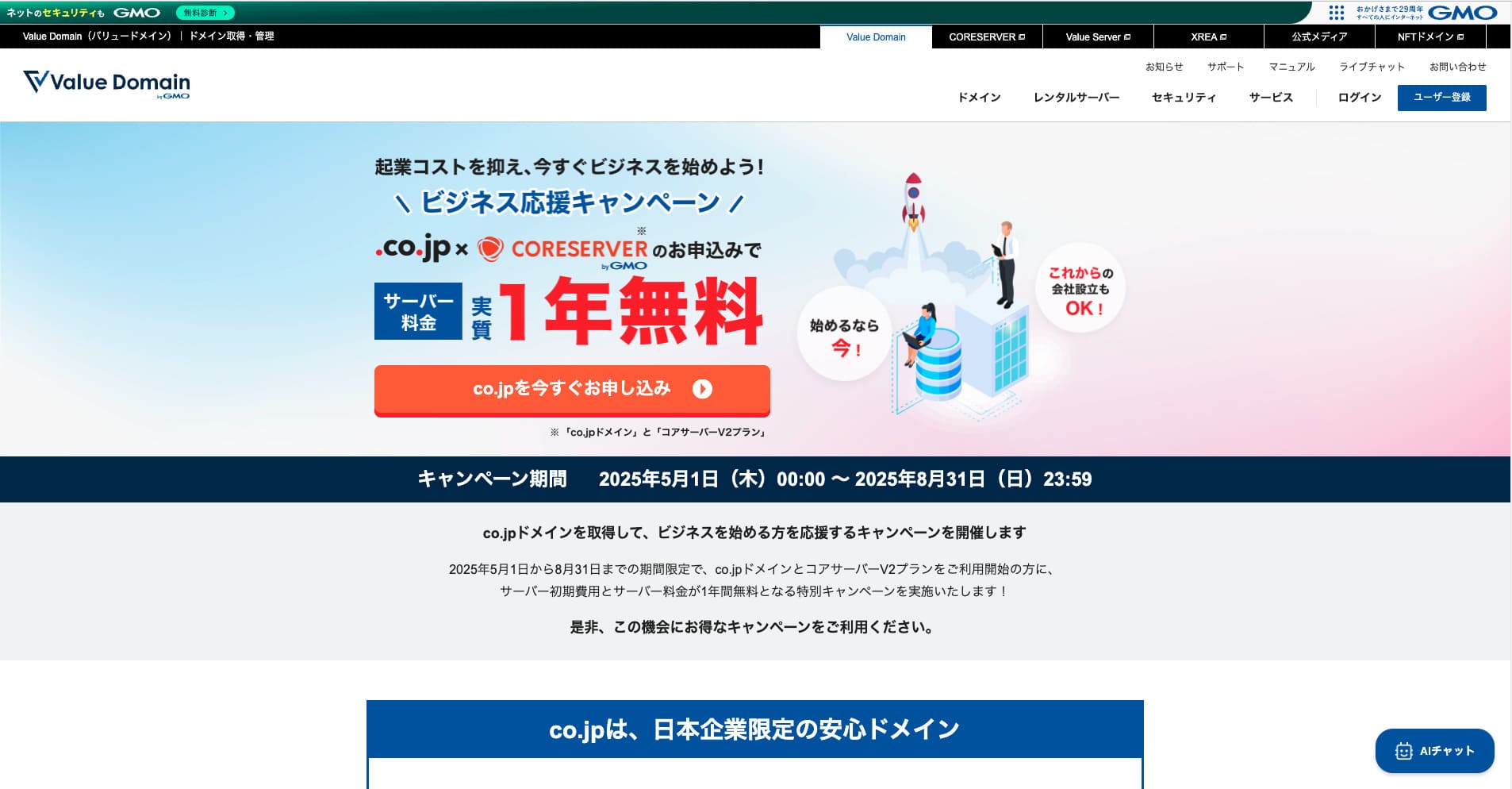
โดเมน .co.jp ฟรี + ค่าบริการเซิร์ฟเวอร์แผน V2 ฟรี 12 เดือน + ฟรีค่าเริ่มต้นถึง 31 สิงหาคม 2025 พร้อมทดลองใช้ฟรี 30 วัน
Core Server offers แผนให้เลือกหลากหลาย ผมแนะนำ the V1 Core-Mini แผน, but if you คือ แผนning a เว็บไซต์ that aims for tens of thousands of เพจวิว per เดือน, ผมแนะนำ the เน้นประสิทธิภาพ Core-X.
Complete Comparison of 32 WordPress Hosting Services: Recommendations for Individuals, Companies, and Overseas Use

When you think, “I want to start WordPress,” and search for “recommended WordPress hosting,” all kinds of articles appear, from hosting for individuals and small businesses to overseas services and low-cost options. To be honest, you may think:
- Which site should I read?
- I want to choose a server in a simple and easy-to-understand way.
- Please show me how to start WordPress right away.
That is exactly why this article introduces carefully selected recommendations from 32 hosting services for individuals, companies, domestic use, and overseas use. It is explained by the SEO lead of an app development company that uses hosting services every day.