ถึง 53% ปิดค่าเซิร์ฟเวอร์จนถึงวันที่ 5, 2025, บวกสองโดเมนฟรีตลอดไป และเดือนแรกฟรี
PR
เซิร์ฟเวอร์
ผมรู้สึกเกรงใจ ConoHa แต่จะเอา Blog Creator ที่มีชื่อเสียงมาเทียบกับ 3 พลัง AI ที่แข็งแกร่งที่สุดของปี 2024
เผยแพร่: 2025.01.30
อัปเดต: 2025.01.30

ขออภัย แต่บริษัทของเราใช้ ChatGPT-4o, Claude 3 และ Gemini 1.5 Pro
อย่างที่คุณคงทราบอยู่แล้ว ConoHa WING offers "Blog Creator", AI เริ่มที่ 330 เยน ต่อเดือน เนื่อง จาก ดิฉัน เคย ใช้ เวลา มาก กว่า 10 ชั่วโมง ใน การ เขียน บทความ เมื่อ ไม่ กี่ ปี มา นี้ ดิฉัน รู้สึก ว่า แทบ จะ เป็น เรื่อง น่า หดหู่ ใจ ที่ เห็น ว่า เป็น เรื่อง สะดวก. ถึง กระนั้น ไม่ มี เหตุ ผล ที่ จะ ฝืน เวลา ดัง นั้น ผม จึง คิด ว่า สิ่ง ดี ที่ สุด ที่ จะ ทํา คือ เรียน รู้ ที่ จะ ใช้ เวลา นั้น ให้ ดี.
อย่างไรก็ตาม เราเป็นบริษัทพัฒนาระบบ และเราใช้ AI 3 ประเภทอย่างจริงจัง
- ChatGPT-4o
- Claude 3
- Gemini 1.5 Pro
วงการ AI เปลี่ยนแปลงเร็วมากจนเครื่องมือใหม่ที่น่าทึ่งอาจจะ Boom!แต่แม้ถึงวันที่ 1 มกราคม 2025 ทั้ง 3 ตัวนี้ก็ยังเป็น AI ที่ทรงพลังและรองรับภาษาญี่ปุ่นได้ดีมาก (พูดตรงๆ ว่าเครื่องมือพวกนี้ค่อนข้างแพง ดังนั้นผมต้องขยันทำธุรกิจหลักต่อไป)
"Blog Creator อาจเอาชนะทั้ง 3 ตัวนี้ไม่ได้ แต่เรามาลองแข่งกันในโอกาส 1% นั้นกันดู"

Blog Creator ด้วย ความ จริง ใจ ผม ไม่ ได้ สร้าง ความ คาด หมาย สูง และ การ แข่งขัน ก็ รุนแรง มาก จน ผม รู้สึก ไม่ ดี กับ คอน โน ฮา. โทษที ถึงอย่างนั้น ฉันก็อยากให้พวกเขาแข่งขัน ให้แต่ละ AI สร้างและเผยแพร่บทความเรื่อง "Building a WordPress Theme from Scratch" ผมจงใจให้บทความทั้ง 4 ชิ้นกินกันเองในเชิง SEO
cannibalize ไม่ได้แปลว่า carnival ใน SEO คำว่า cannibalization หมายถึงกรณีที่บทความคล้ายกันในเว็บไซต์เดียวกันทับซ้อนและแข่งขันกันเอง ซึ่งไม่ดีต่อ SEO การทดลองนี้กระทบ SEO ของเราเองด้วย แต่ผมก็จะทำอยู่ดี
ผลลัพธ์คือ Blog Creator ทำได้ดีเกินคาดอย่างมากทุกคน กรุณาลงชื่อ ConoHa WINGถ้าคุณทําคุณสามารถใช้ Blog Creator สําหรับ ใช้ฟรี 1 เดือน.

" ConoHa WING"เซิร์ฟเวอร์ความเร็วสูงจาก GMO Internet Group โดยมีผู้ใช้เพิ่มขึ้นอย่างรวดเร็ว และเราใช้หนึ่งตัวเอง เพราะว่า WordPresss มาติดตั้งล่วงหน้าเมื่อคุณสมัครให้บริการ ทุกคนสามารถเริ่มต้นได้อย่างง่ายดาย มันทําให้เกิดความสมดุลที่ดีของค่าใช้จ่ายและประสิทธิภาพ และเราใช้มันเอง

★ สร้างเว็บไซต์ภายใน 10 นาที ConoHa WING การ ทบทวน และ วิธี เริ่ม ต้น WordPresss
Blog Creator คืออะไร? เขียนบทความ SEO ใหม่จากศูนย์และช่วยรีไรต์บทความเดิมได้

Blog Creator คือ AI เครื่อง มือ ที่ แนะ นํา ให้ คน ที่ ไม่ มี การ จราจร เพิ่ม ขึ้น หรือ คน ที่ ไม่ รู้ วิธี เขียน บทความ. คุณสามารถ AI จัดการการเขียนทั้งคู่ SEO- บทความที่เป็นมิตรจากรอยขีดข่วนและเขียนใหม่ที่มีอยู่
Blog Creator ตรวจสอบคีย์เวิร์ด 4 ประเภทได้ในคลิกเดียว
คุณกำลังพยายามติดอันดับด้วยคีย์เวิร์ดอะไร? ด้วย Blog Creator, การค้นหาคีย์เวิร์ดจะเริ่มทันทีที่คุณกรอก
- คีย์เวิร์ดที่แนะนำแปรงทาสี Googleกล่องการค้นหา
- คีย์เวิร์ดค้นหาที่เกี่ยวข้องสืบค้นเมื่อ: Google
- การค้นหาคำที่มักปรากฏร่วมกันคําที่มักจะปรากฏร่วมกับคําสําคัญ
- การวิจัยหัวข้อจากเว็บไซต์ที่ติดอันดับสูงสืบค้นเมื่อ:
เมื่อคุณทำการวิจัยนี้ได้ ก็จะมีวัตถุดิบครบสำหรับถ้อยคำและหัวข้อที่เป็นมิตรต่อ SEO From there, you can either write the article yourself using those materials or have Blog Creator เขียน บทความ ให้ คุณ.

เกมถอดคํายาวๆ อธิบายโดย 7 ปี SEO Verteran: 3 ขั้น ต่อ การ จราจร ที่ เพิ่ม ขึ้น
เกมถอดคํายาวๆ อธิบายโดย 7 ปี SEO Verteran: 3 ขั้น ต่อ การ จราจร ที่ เพิ่ม ขึ้น
serverfield.org
AI เขียนบทความจากคีย์เวิร์ดที่เป็นมิตรต่อ SEO
Blog Creator เป็นเครื่องมือที่ AI จง เขียน บทความ สําหรับ คุณ.
อะไรทําให้แตกต่างจากทั่วไป AI คือว่า เครื่องมือที่มีผู้เชี่ยวชาญดูแลจะสร้างผลลัพธ์คีย์เวิร์ดที่แข็งแรงด้าน SEO จากนั้นจึงใช้ ChatGPT-4o หรือ ChatGPT-4o mini เขียนบทความจากผลลัพธ์นั้นหมายความว่ามันไม่มี AI เขียนบทความมาจากไหนไม่รู้ ในทางกลับกัน มันมี AI เขียนจากผลของคําค้นที่สร้างมา SEOเพื่อที่คุณจะได้จัดอันดับการค้นหาที่แข็งแรงขึ้น
หรืออีกนัยหนึ่ง มันเป็นเครื่องมือที่ทําให้คุณสร้างบทความที่มีประสิทธิภาพ ในขณะที่ยังใช้ประโยชน์ AI.
รองรับการรีไรต์บทความที่เผยแพร่แล้ว
Blog Creator สามารถเขียนใหม่ได้ บทความที่คุณเผยแพร่ไปแล้วได้ด้วยเพียงแค่ป้อน URL จากบล็อกโพสต์และคําสําคัญ และมันจะบอกคุณว่า คําสําคัญไหนหายไปจากบทความ
แพ็กเกจราคาของ Blog Creator
มีทั้งหมด 3 แพ็กเกจ เนื่องจาก Lite ฟรี 1 เดือน ผมแนะนำให้เริ่มจากแพ็กเกจ Lite
| แพ็กเกจ | Lite | Standard | Business |
|---|---|---|---|
| ราคา | 330 yen | 1,980 yen | 4,980 yen |
| การสร้างโครงร่าง | 24 times | 184 times | 700 times |
| การสร้างเนื้อหา | 12 times | 92 times | 350 times |
| การสร้างชื่อเรื่อง | 12 times | 92 times | 350 times |
| การสร้างบทนำ | 12 times | 92 times | 350 times |
- ตัวเลือก
- ราคา: 550 yen
- ความสามารถในการสร้าง: 24 outline generations, 12 body generations, 12 title generations, and 12 introduction generations
มาดูวิธีเริ่มใช้งานและใช้ Blog Creator กัน
ขั้นตอนเริ่มใช้งาน Blog Creator
เริ่มต้นใช้งาน Blog Creator
- STEP.1เข้าเว็บไซต์อย่างเป็นทางการ: ConoHa WING
Blog Creator เพื่อใช้ Blog Creatorคุณต้องการบัญชีคอนโอฮา สร้างบัญชีจากเว็บไซต์อย่างเป็นทางการและเริ่มต้น WordPresssถ้าคุณมีบัญชีคอนโนฮาอยู่แล้ว ล็อกอิน
- STEP.2เปิดเครื่องมือสร้างบล็อกด้วย AI
จากแผงควบคุม เปิดAI บล็อกเครื่องมือรุ่น" ภายใต้ "การจัดการ Site". แล้วคลิก "+ Blog Creator."
- STEP.3เลือกแพ็กเกจ
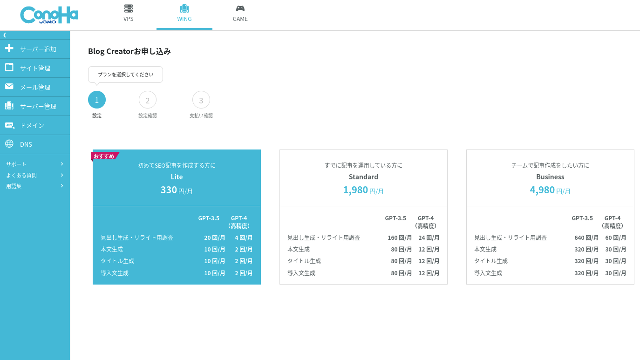
เลือกแพ็กเกจ. The Lite plan is fine. Its functions are the same as the higher plans. The higher plans simply give you more AI generations. Since all you need at first is a trial, go with the Lite plan at 330 yen per month.
- STEP.4การชำระเงิน
จะมีการตรวจสอบการชําระเงิน คลิก "ยกเลิก" ใบสมัครของคุณเสร็จสมบูรณ์แล้ว
ขั้นตอนสร้างบทความด้วย Blog Creator
ขั้นตอนในการสร้างบทความ อธิบายในบทความเกี่ยวกับเว็บไซต์อย่างเป็นทางการนี้ Wapu-katsuอย่างไรก็ตาม ผมคิดว่ามันง่ายกว่าที่จะเข้าใจ ถ้าผมแสดงวิธีการใช้จริง โปรดดูที่ บทความ นี้.
การสร้างบทความด้วย Blog Creator
- STEP.1เลือก Blog Creator
จากAI เครื่องมือรุ่นบล็อก" เลือก "Blog Creatorแท็บ
- STEP.2กรอกคีย์เวิร์ดที่ต้องการติดอันดับ
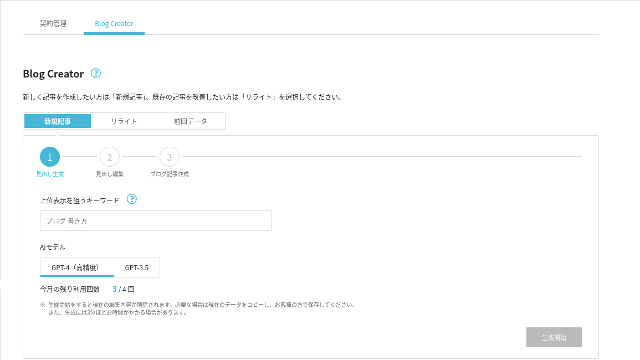
Blog Creator can handle rewrites too, but this time I am creating a new article. กรอกคีย์เวิร์ดที่ต้องการติดอันดับ: "building a WordPress theme from scratch." (Of course, you should use the keyword you personally want to rank for.)
เลือก AI นางแบบ ให้เป็นไปกับความถูกต้องสูง GPT-4.
Click "เริ่มสร้าง."
- STEP.3แก้ไขหัวข้อโดยอิงจากการวิจัยคีย์เวิร์ด
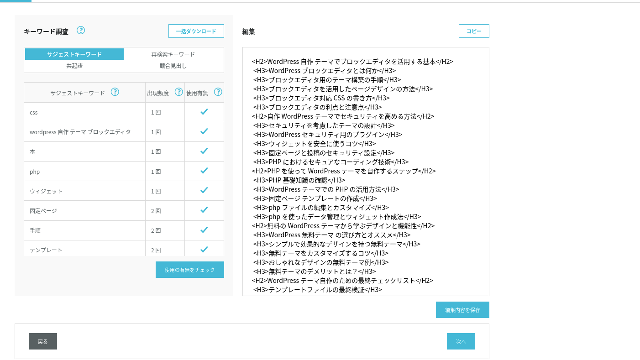
จะมีการแสดงการค้นหาคําค้น ตรวจ ผล การ วิจัย สี่ ประเภท. ยิ่งคุณใช้มากเท่าไร ยิ่งแข็งแรงเท่านั้น SEO มีแนวโน้มจะกลายเป็น
On the editing screen, incorporate keywords that were not used in the generated headings. Once you finish editing, click "บันทึกการแก้ไข." After that is saved, move on by clicking "ถัดไป."
- STEP.4สร้างเนื้อหา ชื่อเรื่อง และบทนำ
โดยใช้หัวข้อที่คุณสร้างขึ้นก่อนหน้านี้เป็นฐาน AI สร้างร่างกาย ชื่อ และบทนํา คลิก "AI สร้าง"สําหรับแต่ละรายการ
เลือกว่าจะให้ใช้หรือไม่ GPT-4 หรือ GPT-3.5ฉันเลือก GPT-4.
After generating each one with AI, click "บันทึกการแก้ไข." That completes the Blog Creator generation process.
จะ มี การ แสดง ผู้ ที่ จะ รับ ตําแหน่ง หลาย คน ดัง นั้น จง เปรียบ เทียบ พวก เขา กับ หัว เรื่อง และ ร่าง กาย และ เลือก สิ่ง ที่ เหมาะ สม ที่ สุด.
เมื่อทุกอย่างสมบูรณ์, ลอกแต่ละส่วน, วางลงใน WordPresss โพสต์ และตีพิมพ์บทความนี้
ดู เหมือน ว่า มี ขีด จํากัด สําหรับ จํานวน ข้อ ความ ที่ สามารถ เขียน ได้. สําหรับการสร้าง WordPresss ชุดตกแต่งจากรอยขีดข่วน" บทความที่ถูกสร้างมายังไม่ยาวพอ ดังนั้นหลังจากที่มันหยุดการแยกทางผ่านฉันใช้ "AI สร้าง "อีกครั้ง" บนหัวข้อที่มา หลังจากจุดที่มันหยุด เพื่อสร้างข้อความศพ
บทความ 4 ชิ้นที่ผมทำให้กินกันเองสำหรับคีย์เวิร์ด "Building a WordPress Theme from Scratch"
ฉันเคย AI สร้างพวกเขาโดยใช้คําสําคัญเดียวกัน และขั้นตอนเดียวกัน บทความ ที่ จบ แล้ว สี่ เรื่อง อยู่ ข้าง ล่าง นี้. ฉันอัพโหลดมันทั้งหมดไปไว้ในเว็บไซต์นี้ พวกเขากําลังกินคนอย่างเต็มตัว
สร้างข่าวด้วย Blog Creator
คํา แนะ นํา ครบ ถ้วน สําหรับ การ สร้าง WordPresss หัว เรื่อง จาก ส ตอ รส์: ขั้น ตอน ต่าง ๆ และ การ ตรวจ สอบ สําหรับ การ สร้าง สถาน ที่ ที่ มั่นคง
คํา แนะ นํา ครบ ถ้วน สําหรับ การ สร้าง WordPresss หัว เรื่อง จาก ส ตอ รส์: ขั้น ตอน ต่าง ๆ และ การ ตรวจ สอบ สําหรับ การ สร้าง สถาน ที่ ที่ มั่นคง
serverfield.org
สร้างข่าวด้วย ChatGPT-4o

เริ่มความสัมพันธ์! สร้างชุดตกแต่งกําหนดเองใน WordPresss
เริ่มความสัมพันธ์! สร้างชุดตกแต่งกําหนดเองใน WordPresss
serverfield.org
สร้างข่าวด้วย Claude 3
จง สร้าง ตัว คุณ เอง WordPresss ธีมและสร้าง Sitite ของเดิม!
จง สร้าง ตัว คุณ เอง WordPresss ธีมและสร้าง Sitite ของเดิม!
serverfield.org
สร้างข่าวด้วย Gemini 1.5 Pro
ถอน ราก ถอน โคน! วิธี สร้าง ความ เหมาะ สม โดย การ สร้าง ตัว คุณ เอง WordPresss ชุดตกแต่ง
ถอน ราก ถอน โคน! วิธี สร้าง ความ เหมาะ สม โดย การ สร้าง ตัว คุณ เอง WordPresss ชุดตกแต่ง
serverfield.org
เนื่องจากดูเหมือน AI จะชนะ ผมขอแนะนำข้อดีของ Blog Creator
AI ดูเหมือนมันจะชนะ เพื่อเป็นหลักประกัน ConoHa WING อย่าโกรธฉันนะ Blog Creatorผลประโยชน์คือสิ่งที่ผมอยากแนะนําตรงนี้ (ฉันเป็นคนขี้อาย)
คุณสามารถพัฒนางานเขียนและ SEO ได้โดยไม่ต้องพึ่ง AI หรือเครื่องมือทั้งหมด
Blog Creator ใช้ AIอย่าง ไร ก็ ตาม ขณะ ที่ ตรวจ สอบ ดู ผล ของ คํา ศัพท์ ที่ ได้ รับ การ ค้นคว้า คุณ ได้ รับ การ สนับสนุน ให้ ขัด เกลา เนื้อหา นั้น ด้วย ตัว คุณ เอง. ใน ภาค ปฏิบัติ การ ทํา เช่น นั้น ทํา ให้ คุณ ไม่ ไว้ วางใจ เต็ม ที่ AI หรือเครื่องมือ โดย ใช้ จุลสาร นี้ อย่าง ชํานิ ชํานาญ คุณ สามารถ ปรับ ปรุง ทักษะ การ เขียน และ ความ เข้าใจ ของ คุณ ใน เรื่อง SEO.
Blog Creator ก็พูดได้ ช่วยให้คุณเติบโตเช่นคู่ที่วิ่งเคียงข้างคุณ.

เพิ่มเสียงของคุณ SEO▪ การ เขียน เทคโนโลยี ทาง อินเทอร์เน็ต ที่ ชนะ ผู้ ใช้ โดย การ คัด ลอก แบบ อ่าน ได้ ง่าย
เพิ่มเสียงของคุณ SEO▪ การ เขียน เทคโนโลยี ทาง อินเทอร์เน็ต ที่ ชนะ ผู้ ใช้ โดย การ คัด ลอก แบบ อ่าน ได้ ง่าย
serverfield.org
โครงสร้างหัวข้อและความยาวเนื้อหาถูกปรับมาเหมาะสมแล้ว จึงไม่ต้องแก้ไข
Blog Creator ปรับโครงสร้างส่วนหัวและความยาวตัวให้พอดีดีกว่าพื้นฐาน AIผลก็คือ คุณ สามารถ จัด พิมพ์ บทความ นี้ ได้ โดย การ คัด ลอก และ แปะ บทความ นี้ โดย ไม่ ต้อง แก้ไข.(ที่กล่าวว่าคุณยังต้องตรวจสอบข้อเท็จจริงเนื้อหา.)
มีทั่วไป AIการแก้ไขเป็นสิ่งจําเป็น และการใช้เวลา
- หัวเรื่องเริ่มต้นจาก H4 ดังนั้น พวกเขาต้องแก้ไขให้ถูกต้อง
- ถ้า คุณ สร้าง ร่าง กาย ทั้ง หมด ทันที หลัง จาก สร้าง หัว เรื่อง แล้ว มัน ก็ ไม่ ได้ เขียน อย่าง เหมาะ สม.
- คุณจะต้องลบคําที่ไม่จําเป็นเช่น "การแทรกซึม:" และ "Boody:"
การ สร้าง ข้อ ความ จาก หัว เรื่อง ต่าง ๆ และ ทํา ทุก สิ่ง ด้วย ตัว เอง นั้น เป็น งาน หนัก เกิน ไป.
ในฐานะเครื่องมือเขียนบทความด้วย AI มันเน้นคีย์เวิร์ดมากกว่าที่บริษัทอื่นเสนอ
บริษัทเซิร์ฟเวอร์อื่นก็เสนอ AI เครื่องมือสร้างบทความ
Sakura Rental Server เสนอ "User Local AI Writer"ซึ่งทําให้คุณใช้แชตGPT-4 ฟรีๆ นอกจากแชตGPT-4มันยังใช้พื้นที่ของตัวเองด้วย AI.
Value Server เสนอ "Value AI Writerซึ่งเริ่มที่ 1,650 เยน ต่อเดือน ที่ใช้ ChatGPT-4o.
ดังนั้นเครื่องมือเหล่านี้อาจช่วยให้คุณใช้มันฟรี หรือให้คุณเข้าถึงล่าสุด AIแต่ พวกมันไม่ได้ถูกสร้างรอบๆ SEO- กุญแจสําคัญBlog Creator สร้างครั้งแรกรอบ SEO- คําสําคัญที่แข็งแกร่งแล้วใช้ AI เพื่อ เขียน บทความ นี้.
สุดท้าย เมื่อคุณเขียนบล็อก คุณมีคําสําคัญเป้าหมายที่คุณต้องการจัดอันดับใช่มั้ย?Blog Creator กําหนดเป้าหมายก่อน แล้วค่อยสร้างบทความAI การ วิ่ง อย่าง เหมาะ สม เพื่อ บรรลุ เป้า หมาย ที่ กําหนด ไว้ อย่าง ชัดเจน นั่นคือสิ่งที่มันทํา ไม่ ใช่ แค่ วิ่ง อย่าง ไม่ หยุด ยั้ง.
นี่คือความแตกต่างที่สําคัญระหว่างคนอื่น AI เครื่องมือจัดการข่าวและ Blog Creator.
สรุป: โปรดค้นหาและตรวจสอบผลลัพธ์ของการแข่งขันด้วยตัวคุณเอง
แล้วสุดท้ายเกิดอะไรขึ้น
คําตอบไม่ได้ทําให้ผมต้องตัดสินใจ ขอส่งไปยัง Googleอย่างที่เราเคยทํา ค้นหา "WordPresss ชุดตกแต่งที่กําหนดเอง" และค้นหาเว็บไซต์ของเรา (September)https://serverfield.org) หนึ่ง ใน บทความ ต่อ ไป นี้ ควร ลง ใน วารสาร นี้.
- Blog Creator บทความ: คํา แนะ นํา ครบ ถ้วน สําหรับ การ สร้าง WordPresss หัว เรื่อง จาก ส ตอ รส์: ขั้น ตอน ต่าง ๆ และ การ ตรวจ สอบ สําหรับ การ สร้าง สถาน ที่ ที่ มั่นคง
- ChatGPT-4o บทความ:เริ่มความสัมพันธ์! สร้างชุดตกแต่งกําหนดเองใน WordPresss
- Claude 3 บทความ: จง สร้าง ตัว คุณ เอง WordPresss ธีมและสร้าง Sitite ของเดิม!
- Gemini 1.5 Pro บทความ: ถอน ราก ถอน โคน! วิธี สร้าง ความ เหมาะ สม โดย การ สร้าง ตัว คุณ เอง WordPresss ชุดตกแต่ง
บทความ ที่ ปรากฏ เมื่อ คุณ ค้น หา ใน ตอน นั้น จะ เป็น เครื่อง มือ ที่ ดี ที่ สุด ใน ขณะ นั้น.
Blog Creator ดีกว่าที่ผมคิดไว้ซะอีก บทความ นี้ ยัง คง ปรากฏ อยู่.
ถ้าคุณอยากลอง ConoHa WING เป็นที่ที่คุณควรจะสมัคร
" ConoHa WING"เซิร์ฟเวอร์ความเร็วสูงจาก GMO Internet Group โดยมีผู้ใช้เพิ่มขึ้นอย่างรวดเร็ว และเราใช้หนึ่งตัวเอง เพราะว่า WordPresss มาติดตั้งล่วงหน้าเมื่อคุณสมัครให้บริการ ทุกคนสามารถเริ่มต้นได้อย่างง่ายดาย มันทําให้เกิดความสมดุลที่ดีของค่าใช้จ่ายและประสิทธิภาพ และเราใช้มันเอง
ถึง 53% ปิดค่าเซิร์ฟเวอร์จนถึงวันที่ 5, 2025, บวกสองโดเมนฟรีตลอดไป และเดือนแรกฟรี
Complete Comparison of 32 WordPress Rental เซิร์ฟเวอร์: Recommendations for Individuals, Businesses, and Overseas Use

เมื่อคุณคิดว่า "ผมอยากจะเริ่มต้น WordPresssสืบค้นเมื่อ "แก้ไขแล้ว" WordPresss การเป็นเจ้าภาพ" คุณจะได้รับบทความมากมายมากมาย จากเซิร์ฟเวอร์ส่วนบุคคล และตัวเลือกสําหรับธุรกิจและบริษัทขนาดเล็ก จริงๆนะ
- ฉันควรเชื่อเว็บไซต์ไหนดี
- ผมแค่อยากเลือกเซิร์ฟเวอร์ แบบง่ายๆ แบบเข้าใจง่าย ๆ
- แสดงวิธีเริ่มต้น WordPresss ตอนนี้
ฟังดูคุ้นๆนะ เพราะ เหตุ นั้น บทความ นี้ เลือก อย่าง รอบคอบคําอธิบายมาจาก SEO ผู้เชี่ยวชาญของบริษัทพัฒนาแอพ ที่ใช้เซิร์ฟเวอร์เช่าทุกวัน