
Prova gratis webbhotell
PR
Servrar
XREA-recension [2025 års senaste]: för- och nackdelar med att använda WordPress på gratis hosting, plus jämförelser med andra gratisservrar
Publicerad: 2025.04.18
Uppdaterad: 2025.04.18
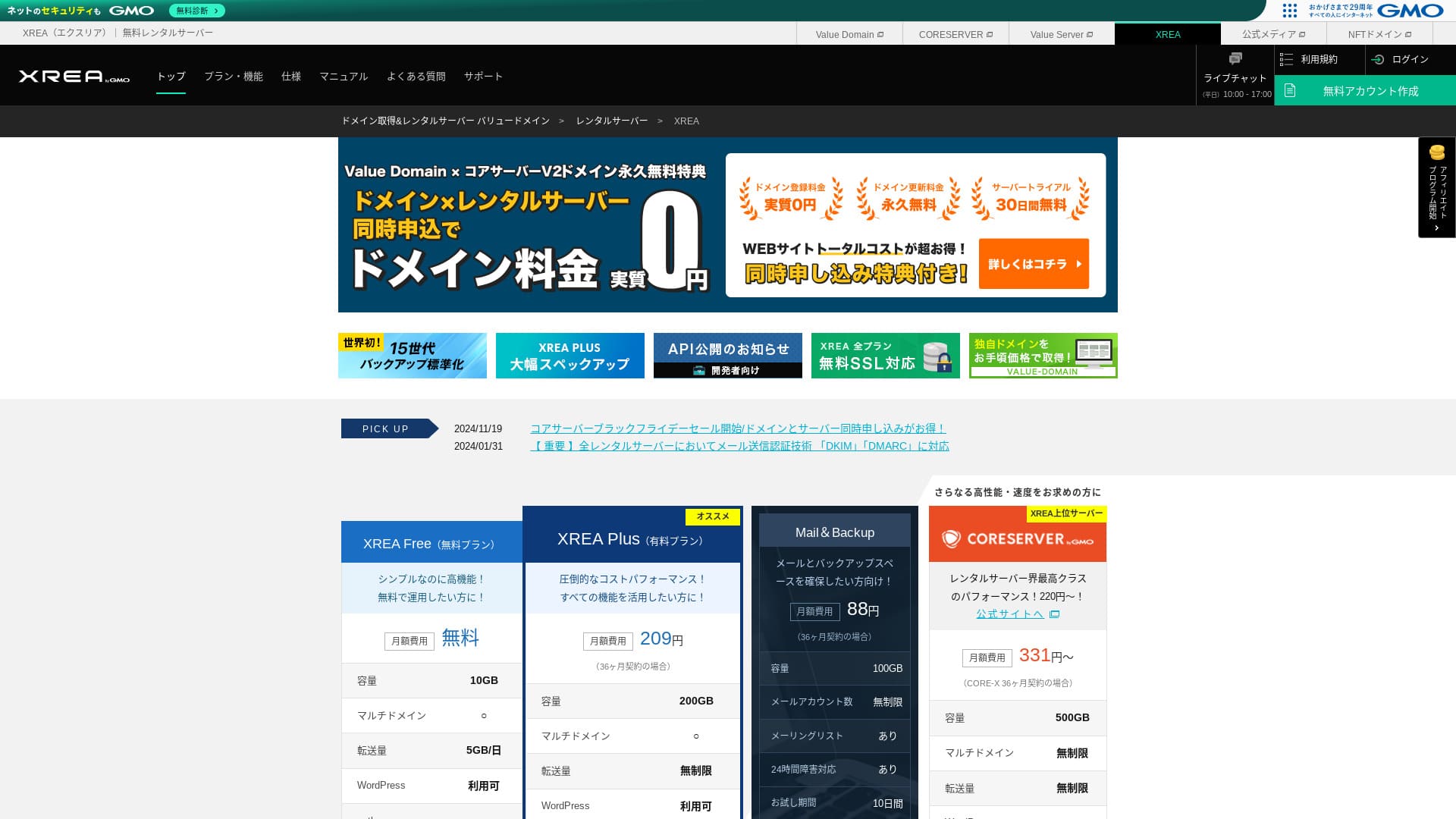
XREA drivs av GMO Digirock, Inc. och erbjuder gratis webbhotell. Till skillnad från vanliga gratis hostingtjänster erbjuder den också chattsupport.

XREA rekommenderas för personer som söker gratis webbhotell på grund av följande:
- Du kan använda WordPress gratis
- Du kan få chattsupport
- Den levereras med säkerhetskopior i 15 generationer
Därför kommer du sannolikt att bli nöjd. Eftersom den är gratis, se till att prova den.
En konkurrerande server är Star Rental Server. Den kan också användas gratis, men funktionerna i dess uppgraderade betalplaner är bättre än de för XREA. Överväg även den.
| Servertyp | Delad server |
| Visningshastighet (TTFB) | Ej uppmätt |
| Rekommenderad plan och avtalsperiod | Gratis |
| Provperiod / pengarna-tillbaka-garanti | Inget |
| Månadskostnad (12-månadersavtal) | Gratis |
| Startavgift | Gratis |
| Gratis domän | Inget |
| Support | E-post och chatt (10:00-17:00) |
| Drifttid | Ej offentliggjort |
| Lagring | 10GB |
| Antal databaser | 5 |
| Säkerhetsåtgärder | Inget |
| SSL | Gratis SSL, delat SSL |
| Säkerhetskopiering / återställning | Säkerhetskopior i 15 generationer gratis, gratis återställning |
| Antal e-postkonton | 100 |
| E-postsäkerhetsåtgärder | POP via SSL, IMAP via SSL, SMTP via SSL, virusskanning |
| Server- / webbplatsmigrering | Inget |
| WordPress-förinstallation | Inget |
| CDN | Inget |

Hikaru Ono
XREA kändes lite egen när det gäller kontrollpanelens användbarhet. Det är bara min personliga uppfattning. Ändå kan vem som helst använda den om man tar sig igenom den med hjälp av de detaljerade officiella manualerna.
För en gratisserver ger den mer än tillräckligt med funktioner och support.
XREA jämfört med andra servrar
- AllmäntBetyg★★★☆☆
- Serverhastighet Ej uppmätt
- Pris ★★★★★
- Stabilitet ★★★☆☆
- Enkelt att komma igång med WordPress* ★★★☆☆
- Åtgärder som domänhantering och SSL-konfiguration* ★★★☆☆
* Baserat på min personliga erfarenhet av att använda det.

Hur du väljer bland 21 rekommenderade WordPress-webbhotell för privatpersoner
Hur du väljer bland 21 rekommenderade WordPress-webbhotell för privatpersoner
serverfield.org
- 4 november 2025 marknadsundersökningsdata, efter hastighet sorterade
- Månadsavgifterna är första årets kostnad för den billigaste planen som kan köra WordPress
- Hastighet är Time to First Byte uppmätt på demowebbplatser under samma förhållanden
XREA-recension och fem nyckelfunktioner

En kostnadsfri server som också kan köra WordPress
XREA är en gratisserver. Det finns ingen månadsavgift och ingen initial administrationsavgift.Trots det kan du fortfarande använda WordPress. Det passar perfekt för personer som vill pressa kostnaderna till ett absolut minimum. Vi jämförde det med inhemska servrar under följande villkor.
- Startavgift
- 12 månaders serveravtal
- Kostnaden för ett års domänavgifter
- Billigaste planen som kan använda WordPress
Det finns stora skillnader i funktioner och specifikationer, men ett pris som ligger runt en tiondel är fortfarande attraktivt.
Har chattsupport
XREA har chattsupport.
De flesta gratisservrar erbjuder lite eller ingen support. Med XREA kan du få hjälp när du stöter på problem, så även personer utan servererfarenhet kan använda det med förtroende.
Livechattsupport är tillgänglig på vardagar från 10:00 till 17:00. E-postsupport finns också tillgänglig.
Har säkerhetskopior i 15 generationer
XREA kan behålla så många som 15 generationer säkerhetskopior. Det är extremt generöst. Även betalda servrar gör ofta säkerhetskopior till ett betalt tillval eller tar ut en separat återställningsavgift.
Till exempel kräver LOLIPOP ett extra betalt tillval som kostar 330 yen per månad på de lägre planerna innan du kan använda säkerhetskopior.
Säkerhetskopior är viktiga. Även om din webbplats infekteras av skadlig kod eller om du råkar radera data, kan du återställa om du har en säkerhetskopia. Utan en sådan kan allt du har byggt upp genom ditt arbete försvinna.
Med 15 generationer säkerhetskopior kan du driva din webbplats med sinnesro.
Du kan skapa fem WordPress-webbplatser
XREA låter dig skapa upp till fem WordPress-webbplatser.
Obs: Vad är WordPress? Systemet för att starta en webbplats och punkterna att vara uppmärksam på
Det finns många sätt att använda det, till exempel genom att lägga till en hobbyblogg bredvid företagets webbplats. När du registrerade dig för servern kanske du trodde att en webbplats räckte, men med tiden kan du starta en ny verksamhet eller få nya hobbyer.
Det sparar dig besväret med att registrera dig för en annan server, och det kostar heller ingenting.
Du kan använda gratis anpassat SSL
XREA låter dig använda gratis anpassat SSL. Vissa gratisservrar erbjuder inte gratis anpassat SSL på grund av funktionsbegränsningar.
SSL är en grundläggande säkerhet för en webbplats. Det är tryggt att även en gratisserver erbjuder det.
Obs: Vad är SSL och TLS? Mekanismen och fördelarna med att skydda information genom kryptering
XREAs nackdelar, ärligt berättade

Gratisservrar är attraktiva, men de har också nackdelar, så kontrollera dem innan du använder en. Även om den ekonomiska bördan är liten, lägger du fortfarande tid och energi.
Annonser visas
XREA visar automatiskt annonser högst upp på din webbplats. Eftersom annonser visas i den mest synliga delen av sidan är det svårt att använda för en företagswebbplats. De kan också krocka med företagets känsla och uttryck.
Personer som vill tjäna annonsintäkter, till exempel genom affiliatemarknadsföring, vill förmodligen inte visa annonser som inte bidrar till deras egen vinst.
För att dölja annonserna behöver du använda den betalda planen XREA Plus. Om du tänker använda XREA Plus är det bättre att också överväga andra betalda servrar.
Överföringsvolymen är låg
XREA har låg överföringskvot. Som ett resultat blir webbplatsen svårare att visa när trafiken ökar. Att publicera en webbplats som folk faktiskt inte kan se motverkar syftet.
Obs: Vad är trafik och överföringsvolym? Hantering och optimering av webbtrafik
Drifttiden är inte offentliggjord
Det som är ganska oroande är att dess drifttid inte offentliggörs. Vi kan inte bedöma numeriskt hur stabil den är. Om servern inte är stabil visas inte webbplatsen tillförlitligt heller. En webbplats som folk inte kan besöka motverkar syftet.
Obs: En nybörjarguide för att förstå drifttid och SLA för webbhotell
Det är tryggt att använda en server med drifttid på 99,99 % eller högre, vilket är riktmärket för hög tillgänglighet. Vid 99,99 % är servern nere mindre än en timme under en 365-dagars avtalsperiod. Resten av tiden kan din webbplats visas korrekt.
Jämför XREA med två konkurrerande servrar
Shin Free Server
Shin Free Server är en gratisserver som inte visar några annonser. Det gör den lättare att använda även för sådant som företagswebbplatser. Överföringskvoten ligger på en helt annan nivå, så du behöver inte oroa dig för att den ska ta slut.
Till skillnad från XREA har den dock ingen support. Du behöver ha förmågan att lösa problem på egen hand medan du kontrollerar manualen och söker på webben.

Shin Free Server-recension och nackdelar [2025 senaste]: Starta WordPress på ett gratis webbhotell
Shin Free Server-recension och nackdelar [2025 senaste]: Starta WordPress på ett gratis webbhotell
serverfield.org
Star Server Free
Star Server Free är en gratisserver som drivs av ett väletablerat inhemskt webbhotellsföretag.
Den har dock fler nackdelar än XREA, till exempel annonser som visas på smartphones och avsaknad av support. Eftersom dess överföringskvot inte publiceras blir det oroande om den förblir synlig när trafiken ökar.

Star Server-recension [2024 senaste]: Förvånansvärt låga priser och en djupdykning i de verkliga för- och nackdelarna
Star Server-recension [2024 senaste]: Förvånansvärt låga priser och en djupdykning i de verkliga för- och nackdelarna
serverfield.org
Starta en WordPress-webbplats på XREA i 7 steg
Låt oss starta en webbplats med XREA!
- STEG 1Gå till den officiella webbplatsen
Klicka på ”Skapa konto” på startsidan.
- STEG 2Registrera dig som Value Domain-användare
Detta är skärmen för att skapa ett användarkonto. Ange användarnamn, lösenord och e-postadress. Granska uppgifterna och klicka på ”Registrera”.
När du har slutfört e-postverifieringen registrerar du dina användaruppgifter såsom namn och adress. Det är lättare om du även slutför SMS-verifieringen. Klicka på ”Granska angiven information”, och efter att ha läst medlemsavtalet och integritetspolicyn klickar du på ”Registrera användare”.
Bekräftelseskärmen visas igen, så klicka på "OK" för att slutföra användarregistreringen.
När du har valt en domän, se till att markera ”Installera WordPress samtidigt”.
Klicka på ”Nästa”.
- STEG 3Registrera dig för XREA
Logga in på Value Domain, välj ”XREA” under ”Server”, klicka på ”Skapa ett nytt XREA-konto” och klicka sedan på ”Skaffa XREA (Gratis)”.
Du kan använda valfri textsträng för det önskade kontonamnet.
Du kan använda en .shop-domän gratis under ett år. Om du inte har någon stark preferens kan du använda en .shop-domän. Tänk dock på att det från det andra året kostar 5 440 yen per år att förnya en .shop-domän, vilket är ganska dyrt.
Vi rekommenderar välkända domäner som .com och .net. Deras förnyelseavgifter är också rimliga, under 2 000 yen.
Obs: Vad är en domän? Dess roll som adress på internet och hur man skaffar en
Kontrollera användarvillkoren för servern och säkerhetskopieringen och klicka sedan på ”Registrera”. Därefter skapas ditt konto.
Om du inte fick en .shop-domän: Skaffa en domän via Value Domain
Välj "Domain Registration" högst upp på Value Domain-sidan. Ange valfri textsträng och sök, så visas tillgängliga domäner.
Kontrollera domännamnet och avtalsperioden. Ett år går bra. Eftersom du redan har ansökt om XREA, markera ”Använd inte en server”. Granska registreringsuppgifterna och klicka på ”Nästa”.
Välj betalningsmetod, bekräfta att du har läst användarvillkoren och klicka på ”Bekräfta ansökan”. Det slutför domänköpet.
Öppna XREA-kontrollpanelen, välj ”Domäninställningar” och klicka på ”Skapa ny domäninställning”. Ange domännamnet du skaffade tidigare och klicka på ”Skapa ny domäninställning”. Detta ställer in domänen i XREA.
- STEG 4Skapa en databas
Skapa en databas så att du kan använda WordPress.
Obs: Vad är en databas? Hanterings- och driftssystemet som är nödvändigt för WordPress
Logga in på XREA-kontrollpanelen. Gå från menyn till "Database", sedan "MsSQL", och klicka på "Create new database."
- Databasnamn: Vad som helst går bra
- Lösenord: Vad som helst går bra. Gör det så komplext som möjligt
- Teckenkodning: Lämna som den är
- Memo: Du behöver inte skriva något
När du har angett ovanstående klickar du på "Create new database" och databasen skapas.
- STEG 5Installera WordPress
I XREA-kontrollpanelen öppnar du "Site Settings" och klickar på domänen där du vill installera WordPress. När skärmen ändras klickar du på "WordPress."
Ange installationssökvägen. Om CMS Install inte går att klicka på, interagera med installations-URL:en en gång så blir den klickbar.
När du kan fortsätta med installationen konfigurerar du WordPress enligt följande.
- Databasnamn: Databasnamnet du skapade tidigare
- Användarnamn: Vad som helst går bra. Det är svårt att ändra senare
- Lösenord: Lösenordet du skapade när du gjorde databasen
- Databasvärdnamn: localhost
- Tabellprefix: Vad som helst går bra.
När du har fyllt i allt klickar du på ”Skicka” och sedan ”Kör installation”.
Konfigurera nu WordPress-informationen ytterligare.
- Webbplatstitel: Vad som helst går bra. Du kan ändra det senare
- Användarnamn: Vad som helst går bra. Det är svårt att ändra senare
- Lösenord: Vad som helst går bra. Gör det så komplext som möjligt
- Databasvärdnamn: Din vardagliga e-postadress
- Synlighet i sökmotorer: Vad som helst går bra. Markera om du vill att alla ska kunna hitta den
Du använder användarnamnet och lösenordet när du loggar in på WordPress. Se till att skriva ner dem.
När installationen är klar klickar du på ”Logga in”.
- STEG 6Konfigurera SSL
Öppna ”Webbplatsinställningar” i XREA-kontrollpanelen. Klicka på ”Skapa ny webbplatsinställning”.
Öppna domännamnet där du konfigurerade WordPress, välj ”Gratis SSL” under SSL och klicka på ”Skapa ny webbplatsinställning”.
- STEG 7Installera tillägg
Gå tillbaka till WordPress-adminskärmen och gå till ”Tillägg” och sedan ”Lägg till nytt” för att installera de tillägg du behöver.
När du hittar ett tillägg du vill installera genom att söka, klickar du på ”Installera nu” och sedan ”Aktivera”. Fortsätt därefter enligt instruktionerna för varje tillägg.
Se till att installera säkerhets- och säkerhetskopieringstillägg.
- Hur du väljer fem WordPress-tillägg som stärker säkerheten
- Fem kraftfulla WordPress-tillägg för säkerhetskopiering som låter dig återställa dina data
När du har installerat tilläggen är din WordPress-webbplats klar.
Sammanfattning
「 XREA” är en gratis hyrserver som drivs av GMO Digirock, Inc. Trots att det är ett gratis webbhotell erbjuder det fortfarande support via e-post. Det inkluderar också säkerhetskopior i 15 generationer, så det är inte en server att underskatta bara för att den är gratis.
Prova gratis webbhotell
Genom att använda den kostnadsfria webbhotellstjänsten XREA låter dig skapa en WordPress-webbplats genom att bara betala för domänen. Den har visserligen nackdelar, men få saker är så välkomna som något som är gratis. Använd den klokt.
Komplett jämförelse av 32 WordPress-webbhotell: Rekommendationer för privatpersoner, företag och användning utomlands

När du tänker ”jag vill börja med WordPress” och söker efter ”rekommenderad WordPress-hosting” hittar du alla möjliga artiklar, från alternativ för privatpersoner och företag eller småföretag till utländska servrar och billiga servrar. Ärligt talat,
- Vilken webbplats ska jag titta på?
- Jag vill välja server på ett enkelt och lättbegripligt sätt!
- Visa mig hur jag börjar med WordPress direkt.
Har du någonsin känt så? Därför väljer den här artikeln noggrant ut de bästa alternativen från 32 hostingtjänster för privatpersoner, företag, inhemsk användning och användning utomlands och presenterar dem. Förklaringen kommer från SEO-ansvarig på ett apputvecklingsföretag som använder hostingtjänster varje dag.