Up to 53% off server fees until August 5, 2025, plus two domains gratis för alltid and the first month free
PR
Servrar
Jag känner lite synd om ConoHa, men jag ställer den uppskattade Blog Creator mot 2024 års tre starkaste AI-giganter
Publicerad: 2025.01.30
Uppdaterad: 2025.01.30

Tyvärr, men vårt företag använder ChatGPT-4o, Claude 3 och Gemini 1.5 Pro.
Som du säkert vet, ConoHa WING erbjuder "Blog Creator", ett AI-verktyg för artikelproduktion, från 330 yen per månad. Som någon som för bara några år sedan brukade lägga över 10 timmar på att skriva en artikel tycker jag nästan att det är deprimerande hur bekvämt det är. Men det är ingen idé att kämpa emot tiden, så jag tror att det bästa är att lära sig använda det på rätt sätt.
Vi är dock ett systemutvecklingsföretag och använder aktivt tre typer av AI.
- ChatGPT-4o
- Claude 3
- Gemini 1.5 Pro
AI-branschen förändras så snabbt att något häpnadsväckande nytt verktyg skulle kunna Boom!Men även den 1 januari 2025 är dessa tre fortfarande kraftfulla AI-modeller som hanterar japanska mycket bra. (Honestly, they are pretty expensive tools, so I need to keep working hard at the main business.)
"Blog Creator slår nog inte dessa tre, men låt oss låta den tävla på den där enprocentiga chansen."

Blog Creator Ärligt talat inspirerade inte höga förväntningar, och tävlingen var så stark att jag kände mig dålig för ConoHa. Förlåt. Ändå ville jag få dem att tävla, så Jag lät varje AI skapa och publicera en artikel om "Att bygga ett WordPress-tema från grunden". Jag lät medvetet de fyra artiklarna kannibalisera varandra.
Kannibalisera betyder inte karneval. Inom SEO syftar kannibalisering på en situation där liknande artiklar på samma sajt överlappar och konkurrerar med varandra. Det är dåligt för SEO. Det här experimentet påverkar vår egen SEO också, men jag gör det ändå.
Resultatet blev att Blog Creator var klart bästSå alla, vänligen registrera dig för ConoHa WINGOm du gör det kan du använda Blog Creator för en månad gratis.

" ConoHa WINGEn höghastighetsserver från GMO Internet Group med snabbt växande användarnummer och en vi använder oss av oss själva. därför för WordPresss kommer förinstallerad när du registrerar dig för servern, vem som helst kan komma igång enkelt. Det erbjuder en bra balans av kostnad och prestanda, och vi använder det också.

★ Bygg en webbplats på 10 minuter! recension av ConoHa WING och hur du kommer igång med WordPress
Vad är Blog Creator? Den kan både skriva SEO-vänliga artiklar från grunden och skriva om befintliga

Blog Creator är en AI verktyg som rekommenderas för personer vars trafik inte växer eller som inte vet hur man skriver artiklar. Du kan ha AI hantera båda skriva SEO-vänliga artiklar från början och skriva om befintliga.
Blog Creator granskar fyra typer av sökord med ett klick
Vilket sökord försöker du ranka för? With Blog CreatorNyckelordsforskningen börjar så snart du anger den.
- Föreslagna sökord: sökförslag som visas när du skriver in ett sökord i Googles sökruta
- Relaterade sökord: relaterade sökord som visas i sökresultaten efter att du har sökt på sökordet i Google
- Samverkande termer forskning: ord som ofta förekommer tillsammans med sökordet
- Forskning för top-ranking webbplatser: rubriker som används av sajter som rankar högt för sökordet
När du kan göra den här analysen har du alla ingredienser du behöver för SEO-vänliga formuleringar och rubriker. Därefter kan du antingen skriva artikeln själv med hjälp av materialet eller låta Blog Creator skriva artikeln åt dig.

Långsvans-sökordsstrategi förklarad av en 7-årig SEO-veteran: 3 steg för att få fart på trafiken i nischmarknader
Långsvans-sökordsstrategi förklarad av en 7-årig SEO-veteran: 3 steg för att få fart på trafiken i nischmarknader
serverfield.org
AI skriver artiklar utifrån SEO-vänliga sökord
Blog Creator är ett verktyg som låter AI Skriv artiklar för dig.
Vad gör det annorlunda än generiska AI är att ett expertövervakat verktyg producerar SEO-starka sökordsresultat, och sedan är artikeln skriven utifrån dem med ChatGPT-4o eller ChatGPT-4o miniDetta innebär att det inte har AI Skriv en artikel från ingenstans. Istället har den AI Skriv baserat på sökordsresultat byggda för SEOSå du kan sträva efter starkare sökrankingar.
Med andra ord är det ett verktyg som låter dig skapa starka artiklar effektivt samtidigt som du utnyttjar AI.
Stöd för att skriva om publicerade artiklar
Blog Creator kan till och med skriva artiklar du redan har publicerat.Kom bara in i URL i blogginlägget och sökordet, och det kommer att berätta vilka viktiga sökord som saknas från artikeln.
Blog Creators prisplaner
Det finns tre planer. Sedan dess Lite är gratis för en månad, jag rekommenderar att du börjar med att försöka Lite.
| Plan | Lite | Standard | Business |
|---|---|---|---|
| Price | 330 yen | 1,980 yen | 4,980 yen |
| Generering av disposition | 24 times | 184 times | 700 times |
| Kroppen generation | 12 times | 92 times | 350 times |
| Titel generation | 12 times | 92 times | 350 times |
| Introduktion generation | 12 times | 92 times | 350 times |
- Option
- Pris: 550 yen
- Generationskapacitet: 24 skiss generationer, 12 kroppsgenerationer, 12 titelgenerationer och 12 introduktionsgenerationer
Låt oss gå igenom hur du kommer igång med och använder Blog Creator
Steg för att börja använda Blog Creator
Kom igång med Blog Creator
- STEP.1Besök den officiella sajten: ConoHa WING
Blog Creator För att använda Blog Creator behöver du ett ConoHa-konto. Skapa ett konto på den officiella sajten och kom igång med WordPress. Om du redan har ett ConoHa-konto, logga in.
- STEP.2Öppna AI-bloggverktyget
Från kontrollpanelen, öppen "AI Blogg Generation Tool under "Site Management". Klicka sedan på "+ Blog Creator."
- STEP.3Välj en plan
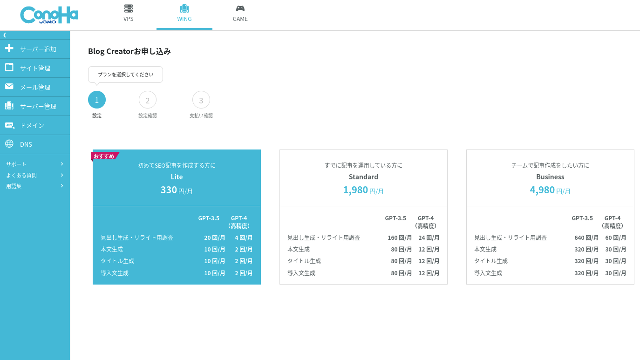
Välj en plan. The Lite plan is fine. Its functions are the same as the higher plans. The higher plans simply give you more AI generations. Since all you need at first is a trial, go with the Lite plan at 330 yen per month.
- STEP.4Betalning
En betalningsbekräftelseskärm visas. Klicka på "Konfirmera". Din ansökan är nu komplett.
Steg för att skapa en artikel med Blog Creator
Förfarandet för att skapa en artikel förklaras i denna artikel på den officiella webbplatsen, Wapu-katsuMen jag tror att det är lättare att förstå om jag visar den metod jag faktiskt använde, så ta en titt på Denna artikel.
Creating an Artikel with Blog Creator
- STEP.1Välj Blog Creator
Från "AI Blogg Generation Tool, välj "Blog CreatorTab.
- STEP.2Ange det sökord du vill ranka för
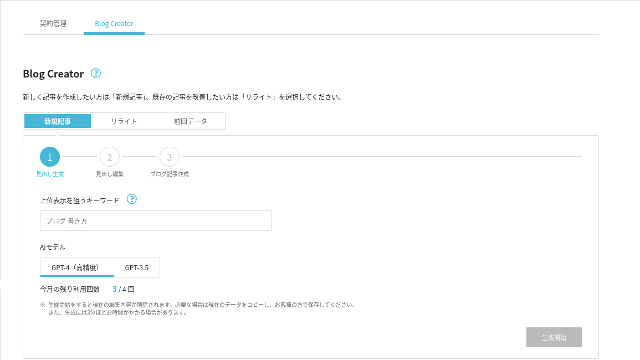
Blog Creator can handle rewrites too, but this time I am creating a new article. Ange det sökord du vill ranka för: "building a WordPress theme from scratch." (Of course, you should use the keyword you personally want to rank for.)
Välj den AI modell. Låt oss gå med den mycket exakta GPT-4.
Klicka på "Start Generation".
- STEP.3Redigera rubrikerna utifrån sökordsanalysen
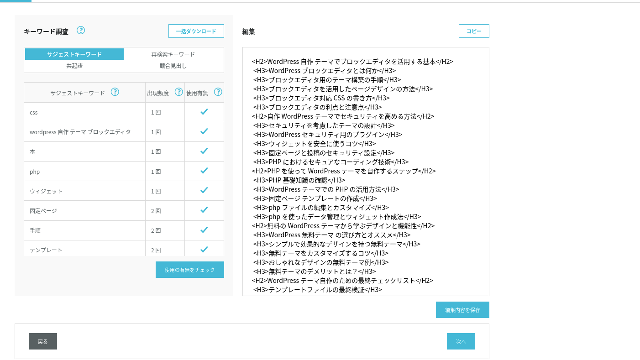
Sökordsforskningen kommer att visas. Kontrollera resultaten från de fyra typerna av forskning. Ju mer av dem du använder, desto starkare är SEO tenderar att bli.
På redigeringsskärmen innehåller du nyckelord som inte användes i de genererade rubrikerna. När du slutar redigera klickar du på "Spara redigeringar". Efter det sparas, gå vidare genom att klicka på "Nästa".
- STEP.4Skapa brödtext, titel och inledning
Använda de rubriker du skapade tidigare som bas, AI skapa kroppen, titeln och introduktionen. Klicka på "AI Generera för varje objekt.
Välj om du ska använda GPT-4 eller GPT-3.5Jag valde GPT-4.
Efter att ha genererat var och en med AIKlicka på "Save Edits". Detta fullbordar Blog Creator generationsprocessen.
Flera titelkandidater kommer att visas, så jämföra dem mot rubrikerna och kroppen och välj den mest lämpliga.
När allt är klart, kopiera varje del, klistra in det i en ny WordPresss post, och publicera artikeln.
Det verkar finnas en gräns för mängden text som den kan generera. För detta "bygga en WordPresss Tema från grunden "artikeln, den genererade texten var inte tillräckligt lång. Så efter att det slutade på en gång, använde jag "AI Generera igen på rubrikerna som kom efter den punkt där det slutade att skapa kroppstexten.
Fyra artiklar som jag lät kannibalisera varandra för sökordet "Att bygga ett WordPress-tema från grunden"
Jag hade AI skapa dem med samma sökord och samma förfarande. De fyra färdiga artiklarna är nedanför. Jag laddade upp dem alla till denna webbplats. De kannibaliserar varandra fullt ut.
Artikel Created with Blog Creator
Komplett guide för att bygga en WordPresss Tema från Scratch: Steg och en checklista för att bygga en stark webbplats
Komplett guide för att bygga en WordPresss Tema från Scratch: Steg och en checklista för att bygga en stark webbplats
serverfield.org
Artikel Created with ChatGPT-4o

Nybörjare-vänligt! Hur man skapar ett anpassat tema i WordPresss
Nybörjare-vänligt! Hur man skapar ett anpassat tema i WordPresss
serverfield.org
Artikel Created with Claude 3
Bygg din egen WordPresss Tema och skapa en webbplats full av originalitet!
Bygg din egen WordPresss Tema och skapa en webbplats full av originalitet!
serverfield.org
Artikel Created with Gemini 1.5 Pro
Break out of the Rut! Hur man bygger din ideala webbplats genom att skapa din egen WordPresss Tema
Break out of the Rut! Hur man bygger din ideala webbplats genom att skapa din egen WordPresss Tema
serverfield.org
Eftersom AI verkar kunna vinna vill jag lyfta fram Blog Creators fördelar
AI verkar kunna vinna. Så som en försäkring så att ConoHa WING inte blir arg på mig, Blog Creators fördelar vill jag lyfta fram här. (Jag är en lite försiktig person.)
Du kan förbättra ditt skrivande och din SEO utan att förlita dig helt på AI eller verktyg
Blog Creator använder AI. Men när du granskar sökordsresultaten uppmuntras du att själv finslipa innehållet ytterligare. I praktiken gör det att du inte förlitar dig helt på AI eller verktyg. Genom att använda det skickligt kan du successivt förbättra din skrivförmåga och din förståelse för SEO.
Blog Creator kan, så att säga, hjälpa dig att utvecklas som en partner som springer bredvid dig.

Öka din SEOWeb Writing Techniques som vinner användare över med hög läsbar kopia
Öka din SEOWeb Writing Techniques som vinner användare över med hög läsbar kopia
serverfield.org
The Heading Structure and Body Length Are Already Optimized, So Nej Corrections Are Needed
Blog Creator optimerar rubrikstrukturen och brödtextens längd bättre än generell AI. Som ett resultat kan du publicera artikeln genom att kopiera och klistra in den utan att göra korrigeringar.(Med det sagt behöver du fortfarande faktagranska innehållet.)
Med generell AI var korrigeringar nödvändiga och tidskrävande.
- Rubrikerna börjar på H4, så de behöver korrigeras.
- Om du genererar hela brödtexten på en gång efter att ha skapat rubrikerna, blir det inte rätt.
- Du behöver radera onödiga ord som "Inledning:" och "Brödtext:".
Att skapa brödtext från rubrikerna och göra allt annat manuellt är helt enkelt för mycket arbete.
Som verktyg för AI-artikelskrivning är det mer fokuserat på sökord än vad andra företag erbjuder
Andra serverföretag erbjuder också verktyg för AI-generering av artiklar.
Sakura Rental Server erbjuder "User Local AI Writer," which lets you use ChatGPT-4 for free. In addition to ChatGPT-4, it also uses its own local AI.
Value Server erbjuder "Value AI Writer," which starts at 1,650 yen per month. That one uses ChatGPT-4o.
Så dessa verktyg kan låta dig använda dem gratis eller ge dig tillgång till det senaste AIMen, men de är inte byggda kring SEO-starka sökord.Blog Creator först bygger runt SEO-starka sökord och använder sedan AI för att skriva artikeln.
I slutändan, när du skriver en blogg, har du ett mål sökord du vill ranka för, eller hur?Blog Creator definierar det målet först och skapar sedan artikeln.AI springer mot ett tydligt definierat mål det är vad den gör. Den springer inte bara blint.
Detta är den stora skillnaden mellan andra AI Artikelgenerationsverktyg och Blog Creator.
Sammanfattning: Please Search and Check the Result of the Match Yourself
Så vad hände till slut?
Svaret är inte upp till mig att avgöra. Vi lämnar det till Google, precis som alltid. Sök efter "WordPress custom theme" och leta efter vår sajt (https://serverfield.org). En av följande artiklar bör dyka upp där.
- Blog Creator-artikel: Komplett guide för att bygga en WordPresss Tema från Scratch: Steg och en checklista för att bygga en stark webbplats
- ChatGPT-4o Artikel:Nybörjare-vänligt! Hur man skapar ett anpassat tema i WordPresss
- Claude 3 Artikel: Bygg din egen WordPresss Tema och skapa en webbplats full av originalitet!
- Gemini 1.5 Pro Artikel: Break out of the Rut! Hur man bygger din ideala webbplats genom att skapa din egen WordPresss Tema
Artikeln som visas när du söker just då är det bästa verktyget i det ögonblicket.
Blog Creator är bättre än jag föreställde mig. Dess artikel fortsätter att dyka upp.
Om du vill testa det, ConoHa WING är där du ska registrera dig.
" ConoHa WINGEn höghastighetsserver från GMO Internet Group med snabbt växande användarnummer och en vi använder oss av oss själva. därför för WordPresss kommer förinstallerad när du registrerar dig för servern, vem som helst kan komma igång enkelt. Det erbjuder en bra balans av kostnad och prestanda, och vi använder det också.
Up to 53% off server fees until August 5, 2025, plus two domains gratis för alltid and the first month free
Complete Jämförelse of 32 WordPress Rental Servrar: Recommendations for Individuals, Businesses, and Overseas Use

När du tänker "Jag vill börja med WordPress" och söker på "rekommenderad WordPress-hosting" får du ett enormt utbud av artiklar, från servrar för privat bruk och alternativ för företag och små företag till utländska servrar och lågprisservrar. Honestly,
- Vilken sajt ska jag lita på?
- Jag vill bara välja en server på ett enkelt och lättbegripligt sätt!
- Visa mig hur jag kommer igång med WordPress direkt.
Låter det inte bekant? Det är därför denna artikel noggrant utvalda rekommendationer från 32 hostingleverantörer för privatpersoner, företag, inhemskt bruk och utlandsanvändning. Förklaringen kommer från SEO-specialisten på ett apputvecklingsföretag som använder hyrda servrar varje dag.