Up to 53% off server fees until August 5, 2025, plus two domains free forever and the first month free
PR
Serverë
Më vjen keq për ConoHa-n, por po e krahasoj Blog Creator-in e vlerësuar mirë me tre fuqitë më të forta të AI-së të 2024-s
Publikuar: 2025.01.30
Përditësuar: 2025.01.30

Na vjen keq, por kompania jonë përdor ChatGPT-4o, Claude 3 dhe Gemini 1.5 Pro.
As you probably know, ConoHa WING offers "Blog Creator", an AI article-writing tool, starting at 330 yen per month. As someone who used to spend more than 10 hours writing an article just a few years ago, I find it almost depressing how convenient it is. Still, there is no point resisting the times, so I think the best thing to do is learn to use it well.
Megjithatë, ne jemi një kompani zhvillimi sistemesh dhe përdorim në mënyrë aktive tre lloje të AI-së.
- ChatGPT-4o
- Claude 3
- Gemini 1.5 Pro
Industria e AI-së ndryshon kaq shpejt sa një mjet i ri befasues mund të Boom!Megjithatë, edhe më 1 janar 2025, këta tre mbeten AI të fuqishme që e trajtojnë shumë mirë japonishten. (Honestly, they are pretty expensive tools, so I need to keep working hard at the main business.)
"Blog Creator ndoshta nuk i mund këta tre, por le ta bëjmë të garojë për atë shans prej një për qind."

Blog Creator honestly did not inspire high expectations, and the competition was so strong that I felt bad for ConoHa. Sorry. Still, I wanted to make them compete, so I had each AI create and publish an article on "Building a WordPress Theme from Scratch." Qëllimisht i bëra katër artikujt të kanibalizonin njëri-tjetrin.
Cannibalize does not mean carnival. In SEO, cannibalization refers to a situation where similar articles on the same site overlap and compete with one another. It is bad for SEO. This experiment affects our own SEO too, but I am doing it anyway.
The result was that Blog Creator ishte bindshëm i mirë, so everyone, please sign up for ConoHa WING. If you do, you can use Blog Creator for një muaj falas.

" ConoHa WING", a high-speed server from GMO Internet Group with rapidly growing user numbers, and one we use ourselves. Because WordPress comes preinstalled when you sign up for the server, anyone can get started easily. It offers a good balance of cost and performance, and we use it ourselves too.

★ Build a Website in 10 Minutes! ConoHa WING Review and How to Start WordPress
Çfarë është Blog Creator? Mund të shkruajë artikuj SEO nga e para dhe të rishkruajë artikuj ekzistues

Blog Creator is an AI tool recommended for people whose traffic is not growing or who do not know how to write articles. You can have AI handle both writing SEO-friendly articles from scratch and rewriting existing ones.
Blog Creator analizon katër lloje fjalësh kyçe me një klik
Për cilën fjalë kyçe po synoni të renditeni? With Blog Creator, the keyword research begins as soon as you enter it.
- Fjalë kyçe të sugjeruara: search suggestions shown when you type a keyword into Google's search box
- Fjalë kyçe të kërkimit të lidhura: related keywords shown in the search results after you search the keyword on Google
- Hulumtim i termave që shfaqen së bashku: words that frequently appear together with the keyword
- Hulumtim i titujve për faqet më të renditura: headings used by sites that rank highly for the keyword
Once you can do this research, you have all the ingredients you need for SEO-friendly wording and headings. From there, you can either write the article yourself using those materials or have Blog Creator write the article for you.

Long-Tail Keyword Strategy Explained by a 7-Year SEO Veteran: 3 Steps to Explode Traffic in Niche Markets
Long-Tail Keyword Strategy Explained by a 7-Year SEO Veteran: 3 Steps to Explode Traffic in Niche Markets
serverfield.org
AI shkruan artikuj bazuar në fjalë kyçe të përshtatshme për SEO
Blog Creator is a tool that lets AI write articles for you.
What makes it different from generic AI is that an expert-supervised tool produces SEO-strong keyword results, and then the article is written based on them using ChatGPT-4o or ChatGPT-4o miniThis means it does not have AI write an article out of nowhere. Instead, it has AI write based on keyword results built for SEO, so you can aim for stronger search rankings.
In other words, it is a tool that lets you create strong articles efficiently while still taking advantage of AI.
Mbështetje për rishkrimin e artikujve të publikuar
Blog Creator can even rewrite artikujt që keni publikuar tashmë.Just enter the URL of the blog post and the keyword, and it will tell you which important keywords are missing from the article.
Planet e çmimeve të Blog Creator
Ka tre plane. Meqë Lite është falas për një muaj, rekomandoj të filloni duke provuar Lite.
| Plan | Lite | Standard | Business |
|---|---|---|---|
| Çmimi | 330 yen | 1,980 yen | 4,980 yen |
| Gjenerimi i skicës | 24 times | 184 times | 700 times |
| Gjenerimi i trupit | 12 times | 92 times | 350 times |
| Gjenerimi i titullit | 12 times | 92 times | 350 times |
| Gjenerimi i hyrjes | 12 times | 92 times | 350 times |
- Opsioni
- Çmimi: 550 yen
- Kapaciteti i gjenerimit: 24 outline generations, 12 body generations, 12 title generations, and 12 introduction generations
Le të shqyrtojmë si të filloni dhe ta përdorni Blog Creator
Hapat për të filluar përdorimin e Blog Creator
Nisja me Blog Creator
- STEP.1Visit the official site: ConoHa WING
Blog Creator To use Blog Creator, you need a ConoHa account. Create an account from the official site and get started with WordPress. If you already have a ConoHa account, log in.
- STEP.2Hapni mjetin e gjenerimit të blogut me AI
From the control panel, open "AI Blog Generation Tool" under "Site Management." Then click "+ Blog Creator."
- STEP.3Choose a plan
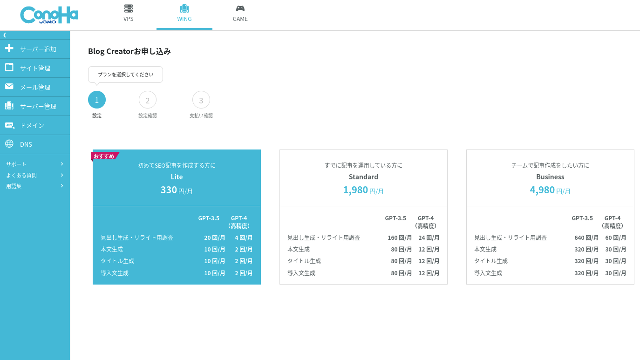
Choose a plan. The Lite plan is fine. Its functions are the same as the higher plans. The higher plans simply give you more AI generations. Since all you need at first is a trial, go with the Lite plan at 330 yen per month.
- STEP.4Payment
A payment confirmation screen will appear. Click "Confirm." Your application is now complete.
Hapat për të krijuar një artikull me Blog Creator
The procedure for creating an article is explained in this article on the official site, Wapu-katsu. However, I think it is easier to understand if I show the method I actually used, so please take a look at this article.
Krijimi i një artikulli me Blog Creator
- STEP.1Zgjidh Blog Creator
From "AI Blog Generation Tool," choose the "Blog Creator" tab.
- STEP.2Shkruani fjalën kyçe ku doni të renditeni
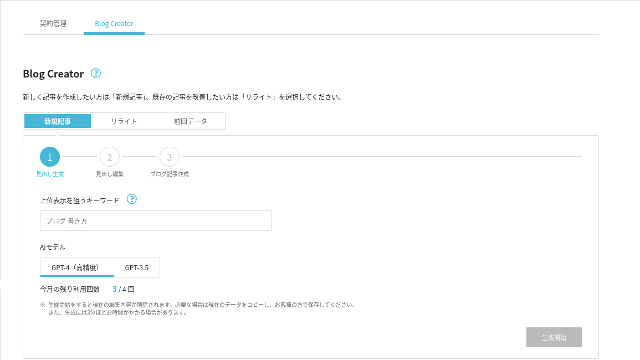
Blog Creator can handle rewrites too, but this time I am creating a new article. Shkruani fjalën kyçe ku doni të renditeni: "building a WordPress theme from scratch." (Of course, you should use the keyword you personally want to rank for.)
Choose the AI model. Let's go with the highly accurate GPT-4.
Click "Start Generation."
- STEP.3Redaktoni titujt bazuar në kërkimin e fjalës kyçe
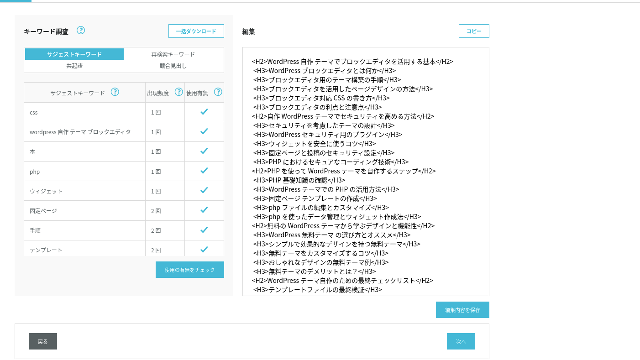
Do të shfaqet kërkimi i fjalës kyçe. Check the results from the four types of research. The more of them you make use of, the stronger the SEO tends to become.
On the editing screen, incorporate keywords that were not used in the generated headings. Once you finish editing, click "Save Edits." After that is saved, move on by clicking "Next."
- STEP.4Krijoni trupin, titullin dhe hyrjen
Using the headings you created earlier as a base, have AI generate the body, title, and introduction. Click "AI Generate" for each item.
Choose whether to use GPT-4 or GPT-3.5. I chose GPT-4.
After generating each one with AI, click "Save Edits." That completes the Blog Creator generation process.
Several title candidates will be displayed, so compare them against the headings and body and choose the most appropriate one.
Once everything is complete, copy each part, paste it into a new WordPress post, and publish the article.
Duket se ka një kufi në sasinë e tekstit që mund të gjenerojë. For this "building a WordPress theme from scratch" article, the generated text was not long enough. So after it stopped partway through, I used "AI Generate" again on the headings that came after the point where it stopped to create the body text.
Four Articles I Made Cannibalize Each Other for the Keyword "Building a WordPress Theme from Scratch"
I had AI create them using the same keyword and the same procedure. The four finished articles are below. I uploaded them all to this site. They are fully cannibalizing one another.
Artikull i krijuar me Blog Creator
Complete Guide to Building a WordPress Theme from Scratch: Steps and a Checklist for Building a Strong Site
Complete Guide to Building a WordPress Theme from Scratch: Steps and a Checklist for Building a Strong Site
serverfield.org
Artikull i krijuar me ChatGPT-4o

Beginner-Friendly! How to Create a Custom Theme in WordPress
Beginner-Friendly! How to Create a Custom Theme in WordPress
serverfield.org
Artikull i krijuar me Claude 3
Build Your Own WordPress Theme and Create a Site Full of Originality!
Build Your Own WordPress Theme and Create a Site Full of Originality!
serverfield.org
Artikull i krijuar me Gemini 1.5 Pro
Break Out of the Rut! How to Build Your Ideal Site by Creating Your Own WordPress Theme
Break Out of the Rut! How to Build Your Ideal Site by Creating Your Own WordPress Theme
serverfield.org
Meqë duket se AI mund të fitojë, dua të prezantoj avantazhet e Blog Creator
AI looks like it might win. So, as insurance so that ConoHa WING does not get mad at me, Blog Creator's advantages are what I want to introduce here. (I am a timid person.)
Mund ta përmirësoni shkrimin dhe SEO-në pa u mbështetur tërësisht te AI ose mjetet
Blog Creator uses AI. However, while checking the researched keyword results, you are encouraged to polish the content further yourself. In practice, doing so keeps you from relying entirely on AI or tools. By using it skillfully, you can steadily improve your writing skills and your understanding of SEO.
Blog Creator can, so to speak, help you grow like a partner running alongside you.

Boost Your SEO: Web Writing Techniques That Win Users Over With Highly Readable Copy
Boost Your SEO: Web Writing Techniques That Win Users Over With Highly Readable Copy
serverfield.org
Struktura e titujve dhe gjatësia e trupit tashmë janë të optimizuara, ndaj nuk nevojiten korrigjime
Blog Creator optimizes the heading structure and body length better than generic AI. As a result, you can publish the article by copying and pasting it without making corrections.(That said, you still need to fact-check the content.)
With generic AI, corrections were necessary and time-consuming.
- The headings start from H4, so they need to be corrected.
- If you generate the full body all at once after creating the headings, it does not write properly.
- You need to delete unnecessary words such as "Introduction:" and "Body:".
Creating body text from the headings and doing everything else manually is simply too much work.
Si mjet shkrimi artikujsh me AI, është më i fokusuar te fjalët kyçe sesa ofertat e kompanive të tjera
Other server companies also offer AI article-generation tools.
Sakura Rental Server offers "User Local AI Writer," which lets you use ChatGPT-4 for free. In addition to ChatGPT-4, it also uses its own local AI.
Value Server offers "Value AI Writer," which starts at 1,650 yen per month. That one uses ChatGPT-4o.
So these tools may let you use them for free or give you access to the latest AI, but they are not built around SEO-strong keywords.Blog Creator first builds around SEO-strong keywords and then uses AI to write the article.
In the end, when you write a blog, you have a target keyword you want to rank for, right?Blog Creator defines that target first and then creates the article.AI sprints properly toward a clearly defined goal is what it does. It is not just running blindly.
This is the major difference between other AI article-generation tools and Blog Creator.
Përmbledhje: Please Search and Check the Result of the Match Yourself
So what happened in the end?
The answer is not for me to decide. Let's submit it to Google, just as we always do. Search for "WordPress custom theme" and look for our site (https://serverfield.org). One of the following articles should appear there.
- Blog Creator article: Complete Guide to Building a WordPress Theme from Scratch: Steps and a Checklist for Building a Strong Site
- ChatGPT-4o article:Beginner-Friendly! How to Create a Custom Theme in WordPress
- Claude 3 article: Build Your Own WordPress Theme and Create a Site Full of Originality!
- Gemini 1.5 Pro article: Break Out of the Rut! How to Build Your Ideal Site by Creating Your Own WordPress Theme
The article that appears when you search at that moment will be the best tool at that moment.
Blog Creator is better than I imagined. Its article keeps showing up.
If you want to try it, ConoHa WING is where you should sign up.
" ConoHa WING", a high-speed server from GMO Internet Group with rapidly growing user numbers, and one we use ourselves. Because WordPress comes preinstalled when you sign up for the server, anyone can get started easily. It offers a good balance of cost and performance, and we use it ourselves too.
Up to 53% off server fees until August 5, 2025, plus two domains free forever and the first month free
Complete Comparison of 32 WordPress Rental Serverë: Recommendations for Individuals, Businesses, and Overseas Use

When you think, "I want to start WordPress," and search for "recommended WordPress hosting," you get an enormous range of articles, from personal-use servers and options for businesses and small companies to overseas servers and low-cost servers. Honestly,
- Which site should I trust?
- I just want to choose a server in a simple, easy-to-understand way!
- Show me how to start WordPress right now.
Doesn't that sound familiar? That is why this article carefully selects recommended options from 32 rental server companies for individuals, businesses, domestic use, and overseas use. The explanation comes from the SEO specialist of an app development company that uses rental servers every day.