
14-day бесплатный trial
PR
Работы
Обзор Sakura Rental Server [последнее обновление 2025]: страшный он или медленный? Цены, плюсы и минусы для частного и делового использования
Опубликовано: 2025.04.18
Обновлено: 2025.04.18
Рейтинг: 4.0
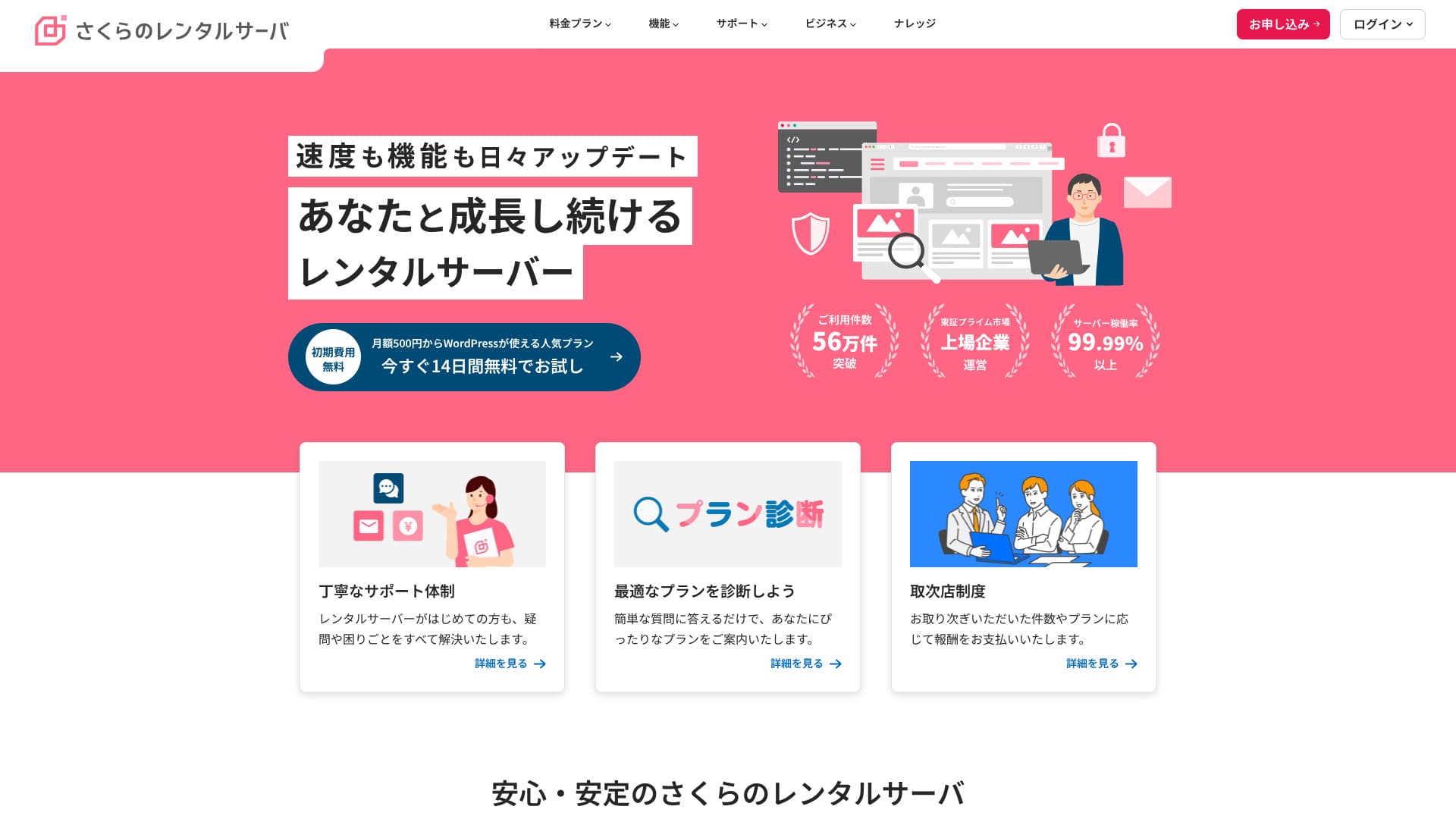
Sakura Rental ServerЭто давно работающий арендованный хостинг с более чем 560 000 пользователей. Им управляет Sakura Internet, первая японская компания, присоединившаяся к государственному облаку Японии.

Причины, по которым я рекомендую Sakura Rental Server to тем, кто ищет недорогой сервер, а также компаниям и индивидуальным предпринимателям таковы:
- уверенность в том, что сервисом управляет первая японская компания, присоединившаяся к государственному облаку
- большое число корпоративных пользователей
- функциональная почта с большим объёмом
Вот почему я его рекомендую. Велика вероятность, что вы останетесь довольны. Попробовать можно бесплатно 14 дней.
Сервис-конкурент — LOLIPOP. При долгосрочном контракте им можно пользоваться дешевле, чем Sakura Rental Server. Его стоит рассмотреть вместе с Sakura.
★ Обзор Lolipop! [последнее обновление 2025]: что показали тесты скорости, а также плюсы и минусы
| Тип сервера | Общий хостинг |
| Скорость отображения (TTFB) | 440ms |
| Рекомендуемый тариф и срок | Standard, 12 месяцев |
| Пробный период / гарантия возврата денег | 14-day бесплатный trial |
| Ежемесячная цена (при контракте на 12 месяцев) | 550 yen |
| Первоначальный платёж за настройку | Бесплатный |
| Бесплатный домен | Нет |
| Поддержка | Часы работы: 10:00-18:00 Запись на обратный звонок, чат и электронная почта (ответ в тот же день или на следующий рабочий день) |
| Аптайм | 99.99% |
| Хранилище сервера | 300GB |
| Количество баз данных | Unlimited |
| Меры безопасности | Уведомления о подмене сайта (платно), WAF, фильтрация зарубежных IP, меры против злоупотребления реле и шифрование |
| SSL | Бесплатный общий SSL, собственный SSL |
| Резервное копирование / восстановление | 8 поколений резервных копий бесплатно, бесплатное восстановление |
| Количество почтовых ящиков | Unlimited |
| Меры безопасности почты | POP3, IMAP4, проверка на вирусы, базовая фильтрация спама, высокоточная фильтрация спама |
| Предустановка WordPress | Нет |
| Сервис миграции сервера / сайта | Нет |
| CDN | 100 ГБ/месяц бесплатно |

Hikaru Ono
Ходят слухи, что «Sakura Rental Server страшный», но сейчас об этом не стоит беспокоиться. Я сам пользовался им и ни разу не считал его страшным, а отзывы о поддержке в целом положительные.
Это качественный сервер с прочной операционной основой, которым можно пользоваться с уверенностью.
Как Sakura Rental Server сравнивается с конкурентами
- Общийрейтинг★★★★☆
- Скорость сервера ★★☆☆☆
- Цена ★★★★☆
- Стабильность ★★★★★
- Простота запуска WordPress* ★★★★☆
- Управление доменами и настройка SSL* ★★★★☆
* Эти оценки отражают мой личный практический опыт использования сервиса.

21 рекомендуемый хостинг для WordPress для частных пользователей: сравнение и как выбрать
21 рекомендуемый хостинг для WordPress для частных пользователей: сравнение и как выбрать
serverfield.org
- Данные рыночного исследования по состоянию на Нетvember 4, 2025, отсортировано по скорости
- Ежемесячные цены указаны как стоимость самого дешёвого тарифа, поддерживающего WordPress, за первый год
- Скорость — это Time to First Byte, измеренный на демонстрационных сайтах в одинаковых условиях
"Sakura Rental Server» — это заслуженный хостинг с более чем 480 000 активных аккаунтов. В прошлом его ругали за медлительность, но с тех пор платформа обновилась и стала работать быстрее. Доступные тарифы остались прежними, обеспечивая отличное соотношение цены и качества.
Шесть ключевых сильных сторон Sakura Rental Server

Время отклика медленное, но результаты PageSpeed Insights хорошие
Наше собственное тестирование на этом сайте показало, что Sakura Rental Server показал good PageSpeed Insights результатs. Тем не менее, время отклика самого сервера было не самым лучшим.
Действительно, его показатель TTFB медленнее, чем у многих конкурентов, но результаты в PageSpeed Insights при этом вовсе не плохие. Хотя первоначальный отклик сервера оставляет желать лучшего, последующая обработка выполняется быстро, что, по всей видимости, и помогло улучшить результаты в PageSpeed Insights.
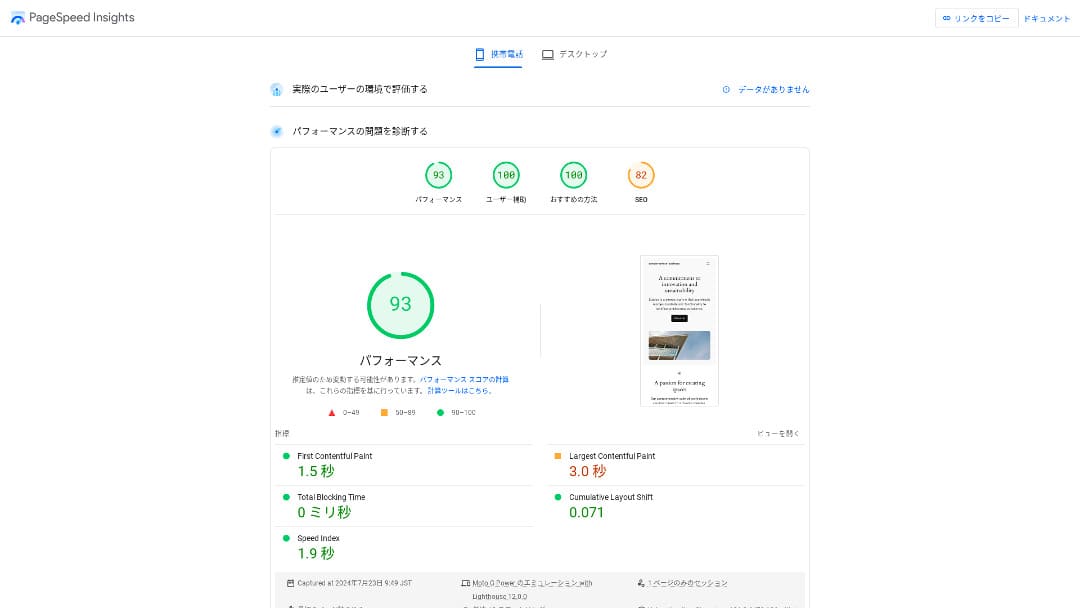
So there is no need to worry that it will be extremely slow in факт use.
★ Speed-tested: A comparison of 15 hosting сервисs ranked by speed
Цена доступна
Sakura Rental Serveroffersежемесячную цену, доступную даже по сравнению с другими провайдерами, поэтому начать сайт проще.В сравнении ниже использованы следующие условия.
- Первоначальный платёж за настройку
- 12-month server контракт
- Стоимость домена за один год
- Самый дешёвый тариф с поддержкой WordPress
| Хостинг-провайдер | Итоговая стоимость за один год |
|---|---|
| Sakura Rental Server | 6,600 yen |
| ConoHa WING | 11,292 yen |
| Xserver | 10,560 yen |
| Lolipop! | 5,940 yen |
| heteml | 24,420 yen |
Lolipop! дешевле, но функции и характеристики тарифа Sakura Standard сильнее, чем у Lolipop!.
Кроме того, поскольку регистрация доменов непосредственно у Sakura стоит немного дороже, вы можете снизить расходы, воспользовавшись более дешевым доменным сервисом от стороннего регистратора.
Stable 99.99% Аптайм
Sakura Rental Serveroffers очень стабильный сервис с аптаймом 99,99%.Его серверы обслуживаются собственными силами и контролируются 24 часа в сутки, 365 дней в году.
★ Руководство для начинающих по аптайму хостинга и SLA
Во время землетрясения на Хоккайдо в 2018 году дата-центр Ishikari остался без внешнего электроснабжения, однако Sakura продолжала непрерывно работать на резервных генераторах в течение 60 часов.Он выдержал даже крупномасштабное бедствие, вызвавшее отключение электроэнергии по всей Хоккайдо, что многое говорит о его стабильности. Это действительно даёт спокойствие в отношении его стабильности.
Коммуникация компании в тот момент тоже была отличной. Помимо публикации актуальной информации, она продолжала выпускать обновления каждые шесть часов даже тогда, когда крупных изменений не было. Это выглядит как компания, которой можно доверить важные данные.
A Бесплатный CDN That Helps Websites Load Quickly
Sakura Rental Server offers a CDN for бесплатный. Это функция, которая помогает сайту загружаться быстрее.
★ Что такое CDN? Повышение скорости и производительности с помощью распределённых серверов
Использование CDN помогает сайту открываться быстрее, а также снижает риск возникновения ошибок 503 (сервис недоступен) при резком наплыве посетителей. Быстрая загрузка страниц напрямую влияет на посещаемость сайта, поэтому наличие бесплатной сети доставки контента (CDN) — ценное преимущество.
★ Что такое ошибка 503? Перегрузка сети, меры профилактики и действия в чрезвычайных ситуациях
Лимит на бесплатное использование CDN также весьма щедр: 100 ГБ в месяц на тарифе Standard, чего с избытком хватит для личного использования. При превышении этого лимита плата составит 5 иен за каждый дополнительный гигабайт.
Сильные функции резервного копирования
Sakura Rental Serverhas отличные функции резервного копирования.Для создания резервных копий и восстановления данных можно использовать функцию "Snapshots". Можно хранить до восьми резервных копий, и это щедрый лимит.
Пользоваться этим тоже просто.
- В панели управления перейдите в "Website/Data", затем в "Backup"
- Нажмите "Start using Backup & Staging".
- Нажмите «Создать резервную копию» и дождитесь изменения статуса
Когда статус изменится на «Успешно завершено», резервное копирование будет закончено.
В этом же интерфейсе вы можете настроить расписание резервного копирования и восстанавливать данные. Пользоваться им очень просто.
Эффективно используйте свободное место с Sakura Pocket
При аренде хостинга люди часто выбирают больше места, чем им нужно сразу.Sakura Rental Serveroffers способ эффективно использовать оставшееся хранилище, а не тратить его впустуючерез функцию Sakura Pocket. Её можно использовать почти так же, как Google Drive или Dropbox.
Использование облачных хранилищ стало нормой как для бизнеса, так и для личных целей. Это помогает экономить место на компьютерах и смартфонах. Тем не менее, объем памяти, предоставляемый на бесплатных тарифах Google Диска и Dropbox, не так уж велик.
Однако пользователи Sakura Rental Server могут использовать свободное место на диске с помощью сервиса Sakura Pocket, что позволяет сэкономить на оплате сторонних облачных хранилищ.
Недостаток: нельзя перейти на более низкий тариф

Sakura Rental Serverне позволяет перейти на более низкий тариф. Если у вас окажется больше места, чем нужно, это будет лишней тратой.
Поэтому лучше сначала оформить более низкий тариф и повышать его только при необходимости.
Если вы хотите создать сайт, выбирайте тариф Standard. Тариф Light не поддерживает WordPress. Его ёмкости достаточно не только для частных пользователей, но и для многих бизнес-пользователей.
Однако учитывайте, что с тарифов общего хостинга, таких как Light или Standard, нельзя перейти на тарифы управляемого сервера (выделенного сервера).
★ Что такое хостинг? Сервер, который нужен для публикации сайта
Тариф Business выгоден для малого и среднего бизнеса и корпоративных пользователей

「Sakura Rental Server» — это виртуальный хостинг от компании Sakura Internet Co., Ltd., которая также предоставляет выделенные серверы. Он отлично сочетает производительность, качество обслуживания и цену, что делает его оптимальным решением для многих компаний. Объем бесплатного трафика CDN зависит от выбранного тарифа и помогает поддерживать быструю доставку контента.
14-day бесплатный trial
| Тип сервера | Общий хостинг / управляемый сервер |
| Ежемесячная цена (при контракте на 12 месяцев) | 2,420 yen* |
| Первоначальный платёж за настройку | Бесплатный |
| Домен .jp | Регистрация 3,982 иены / продление 3,982 иены |
| Поддержка | Weekdays 10:00-18:00 Callback бронированиеs available |
| Аптайм | 99.99% guaranteed |
| Хранилище сервера | 600GB* |
| Меры безопасности | WAF / обнаружение подмены сайта / фильтрация зарубежных IP |
| SSL | Бесплатный SSL / shared SSL / Gehirn MCA OV / domain-validated wildcard / domain-validated / RapidSSL |
| Резервное копирование / восстановление | 8 поколений резервных копий / бесплатный restoration |
| Количество почтовых ящиков | Unlimited |
| Меры безопасности почты | базовый спам-фильтр / высокоточный спам-фильтр / поддержка SPF/DKIM/DMARC |
| Сервис миграции сервера / сайта | Нет migration agency service Нет migration tool |
| Простая установка WordPress | Да |
| CDN | 300GB/month бесплатный* |
Sakura Rental Serverтакже предлагает тарифы для бизнеса в линейке for Biz.По сравнению с другими бизнес-ориентированными хостингами его стоимость находится в среднем диапазоне, предлагая отличное соотношение цены и качества.
Тариф Business стоит от 2420 иен в месяц при заключении договора на 12 месяцев и предлагает все технические характеристики, необходимые компаниям для повседневной работы.
- Бесплатный CDN acceleration (up to 300 GB per month)
- Управление by multiple users
- Выделенный IP-адрес, на который не влияет трафик других компаний (Business Pro и выше)
Если вы ищете хостинг для малого или среднего бизнеса либо для компании, этот вариант очень рекомендуется.
There Is Нет Longer Any Need to Worry That "Sakura Rental Server Is Scary"
Представление о том, что «хостинг Sakura Rental Server сложен или ненадежен», возникло, когда пользователь старых выделенных серверов более десяти лет назад написал на одном из инфоресурсов, что столкнулся с недоброжелательным отношением поддержки. Данная ситуация не имеет отношения к современным услугам Sakura Rental Server.
Компания Sakura Rental Server опубликовала это заявление в 2019 году и постаралась дать развернутый и честный ответ. Поскольку жалоба касалась старых выделенных серверов, а не хостинга Sakura Rental Server, 「About a post on a technical information sharing site regarding our server сервисs」текущим Sakura Rental Server можно пользоваться с уверенностью.Больше нет причин для беспокойства.
Сравнение Sakura Rental Server с двумя конкурентами
В этом разделе мы сравним Sakura Rental Server с двумя конкурирующими хостингами. Как и в случае с Sakura, мы рассмотрим провайдеров, предлагающих недорогие тарифные планы.
Lolipop!
LOLIPOP можно использовать по более низкой цене, чем Sakura Rental Server. Однако тариф Light у Lolipop! уступает тарифу Standard у Sakura Rental Server и по функциям, и по поддержке.
- Нет backup feature (requires a paid option)
- Нет phone support
- Ответ поддержки по электронной почте может занять до 48 часов, что несколько медленно
Сравните эти три пункта вместе с ценой, и вы сможете решить, что подходит вам лучше: Lolipop! или Sakura Rental Server.

Обзор Lolipop! [последние данные 2025 года]: что показало тестирование скорости, плюсы и минусы
Обзор Lolipop! [последние данные 2025 года]: что показало тестирование скорости, плюсы и минусы
serverfield.org
Star Rental Server
Star Rental Server также является a hosting сервис popular for its lower price range. Однако тариф Light у Star Rental Server уступает тарифу Standard у Sakura Rental Server и по функциям, и по поддержке.
- Резервное копирование отсутствует (необходимо настраивать с помощью плагинов WordPress)
- Нет phone support
- Можно создать только один сайт WordPress
- Нельзя использовать расширенную функцию безопасности WAF
Перед выбором сравните эти четыре пункта с ценой.

Обзор Star Server [последние данные 2024 года]: невероятно низкие цены, сильные стороны и недостатки
Обзор Star Server [последние данные 2024 года]: невероятно низкие цены, сильные стороны и недостатки
serverfield.org
Five Steps to Start a WordPress Website on Sakura Rental Server Right Нетw
Запустите свой сайт с Sakura Rental Server!
- STEP.1Перейдите на официальный сайт
Click "Try it бесплатный for 14 days."
- STEP.2Оформите сервер
Выберите тариф. Рекомендуется тариф Standard, потому что он поддерживает WordPress.
Первоначальный домен можно оставить как есть. Этот домен не будет использоваться как публичный адрес вашего сайта. Его можно использовать, но лучше получить собственный домен.
★ Что такое домен? Его роль как адреса в интернете и как его получить
Если выбрать "Also acquire a custom domain," запустить WordPress сразу станет проще.
Введите нужную строку и подайте заявку на домен. Если он доступен, введите данные владельца. Для срока регистрации достаточно одного года. Затем нажмите "Choose payment method."
Завершите проверку участника и зарегистрируйтесь как новый пользователь.
Enter your email address, обзор the privacy statement, and click "Send the registration guidance email."
Придёт регистрационное письмо. Откройте URL из этого письма и продолжите ввод данных участника.
Введите имя, адрес и другую необходимую информацию, затем задайте пароль участника.Этот пароль важен, так как он используется для входа в личный кабинет пользователя, поэтому обязательно запишите его.
Для пользовательских уведомлений Sakura можно выбрать "Do not receive."
Обзор everything you entered. If there is no problem, click "Register as a member."
Выберите способ оплаты. Укажите срок действия договора и предпочтительный вариант расчета. Рекомендуется оплата банковской картой, так как вы сможете сразу же приступить к созданию сайта на WordPress. Кроме того, по окончании пробного периода подписка автоматически перейдет на платную основу без лишних действий с вашей стороны. После выбора срока договора нажмите «Проверить сведения о заявке».
Обзор the full application details. Check the terms, tick "I agree," and proceed by clicking "Apply with this information."
После того как вы получите письмо о завершении предварительной регистрации, временный договор на аренду сервера будет считаться оформленным.
- STEP.3Установите WordPress
Войдите в панель управления Sakura Rental Server.
- Имя домена: первоначальный домен, который вы зарегистрировали при оформлении сервера.
- Пароль: пароль, который вы задали при оформлении сервера.
После входа нажмите «Установить WordPress», выберите URL-адрес для установки и укажите собственный домен, приобретенный при регистрации сервера.
Введите информацию о базе данных для WordPress. Поскольку на этом этапе базы данных ещё нет, нажмите "Create database."
- Имя базы данных: подойдёт любое
- Пароль подключения к базе данных: сделайте его как можно более сложным
Затем введите информацию для вашего сайта WordPress.
- Название сайта: Подойдёт любое. Его легко изменить позже.
- Имя пользователя WordPress: Подойдёт любое. Однако позже менять его неудобно.
- Пароль WordPress: Сделайте его как можно более сложным. Его можно изменить позже.
- Адрес электронной почты: Используйте адрес электронной почты, которым обычно пользуетесь. Для компаний лучше использовать корпоративный адрес человека, который управляет сайтом.
- Видимость для поисковых систем: Отметьте, если хотите сразу опубликовать сайт. Не отмечайте, если хотите опубликовать его после завершения сайта. Это легко изменить позже.
Ознакомьтесь с лицензией и условиями использования, установите флажок «Согласен» и нажмите «Создать».
Имя пользователя и пароль будут использоваться для входа в WordPress. Обязательно запишите их.
После завершения установки перейдите по указанному на экране адресу панели управления и войдите в систему.
- STEP.4Первоначальная настройка WordPress
На экране входа в WordPress введите имя пользователя и пароль, настроенные при установке, и нажмите «Войти».
Если вы видите предупреждение о том, что сайт недоступен, настройки DNS еще не вступили в силу. В этом случае остается только ждать и пробовать войти снова каждые несколько часов.
★ Что такое DNS и серверы имён?
После входа в WordPress настройте постоянные ссылки. В панели администратора перейдите в «Настройки» -> «Постоянные ссылки». Выберите вариант «Название записи» и нажмите «Сохранить изменения».
При выборе варианта «Название записи» вы можете указывать желаемый ярлык (slug) в URL при публикации статьи. Лучше всего использовать короткие строки, отражающие содержание статьи, чтобы читателям было проще ориентироваться. Слишком длинный адрес может вызвать у людей подозрения в ненадежности сайта.
- STEP.5Установите плагины
Вернитесь в админку WordPress, перейдите в "Plugins", затем в "Add New" и установите нужные плагины.
Найдя нужный плагин через поиск, нажмите «Установить», а затем — «Активировать». После этого следуйте инструкциям для каждого конкретного плагина.
Обязательно установите плагины безопасности и резервного копирования.
- Пять плагинов безопасности WordPress и как их выбрать
- Пять мощных плагинов резервного копирования WordPress, которые помогают восстановить данные
После установки плагинов ваш сайт WordPress полностью готов к работе!
Как отменить Sakura Rental Server
Как отменить Sakura Rental Server
- STEP.1Войдите в личный кабинет пользователя
Введите свой ID участника и пароль для входа.
- STEP.2Список of контрактed сервисs
Нажмите «Список подключенных услуг» в разделе «Информация о контракте» в левой части экрана.
- STEP.3Cancel
Click "Cancel" under "Procedures" in "Список of контрактed сервисs."
- STEP.4Ознакомьтесь с важными примечаниями и отправьте запрос
На экране отобразятся важные примечания и предупреждения касательно отмены услуг. Внимательно ознакомьтесь с ними. На экране «Окончательное подтверждение отмены услуги» нажмите «Отменить услугу».
- STEP.5Cancellation запрос receipt email
После завершения процедуры расторжения договора вам придет письмо-подтверждение о приеме заявки на отмену.
Вы можете подать заявку на расторжение договора в любое время в течение его срока действия. Вне зависимости от даты подачи заявки доступ к услугам прекратится в день окончания оплаченного периода.
Будьте внимательны к срокам списания с кредитной карты.После проведения платежа этот расчетный период вступает в силу и не может быть отменен. Ознакомьтесь с графиком платежей на официальной странице сайта «Я хочу узнать график расчетов и процедур на этот месяц."
Если вы хотите отменить сервис, лучше подать заявку как можно раньше.
Если вы переходите на другой сервер, сначала оформите новый и только потом отменяйте старый
Если вы хотите отменить Sakura Rental Server из-за перехода на другой сервер, обязательно оформите новый сервер и перенесите данные до отмены. Иными словами, сделайте так, чтобы сроки действия старого контракта с Sakura Rental Server и нового хостинга пересекались.
Если этого не сделать, будет период, когда ваш сайт не сможет отображаться.
Вопросs Related to Sakura Rental Server
Когда Sakura Rental Server прекратит работу?
"Sakura Dedicated Server" и "Sakura Dedicated Server High-Power Series" прекратят работу 30 июня 2026 года.
Какова длительность бесплатного пробного периода у Sakura Rental Server?
Пробный период для Sakura Rental Server составляет две недели. Вы можете протестировать любой тариф.
Однако у Sakura Managed Server нет пробного периода, поэтому учитывайте это.
Где расположены серверы Sakura Internet?
"Sakura Dedicated Server PHY" имеет серверы в Исикари и Токио.
Summary
「Sakura Rental Server» — это заслуженный хостинг-провайдер с более чем 480 000 активных аккаунтов. Когда-то его критиковали за медлительность, но после масштабного обновления серверов скорость работы выросла. При этом доступные цены сохранились, поэтому соотношение цены и качества здесь отличное.
14-day бесплатный trial
Sakura Rental Serverпредставляет собой привлекательный хостинг, сочетающий профессиональную стабильность работы и низкие цены.Когда-то ходили слухи, что он страшный и медленный, но сейчас действительно нет причин об этом беспокоиться.
Это сервер, которым можно пользоваться спокойно. Попробуйте его.
Полное сравнение 32 хостингов для WordPress: рекомендации для частных лиц, бизнеса и использования за рубежом

Когда вы планируете создать сайт на WordPress и ищете «рекомендуемый хостинг для WordPress», перед вами встает множество вариантов: от серверов для личных блогов и бизнес-решений до зарубежных провайдеров и бюджетных платформ. Честно говоря,
- На какой сайт мне ориентироваться?
- Хочу выбрать сервер просто и понятно!
- Покажите, как сразу начать работу с WordPress.
If that sounds familiar, this статья is for you. It тщательно отбирает лучшие варианты из 32 хостинг-провайдеров для частных лиц, бизнеса, а также внутреннего и зарубежного использованияи знакомит с ними. Все пояснения даны руководителем направления SEO в ИТ-компании, которая ежедневно работает с хостингами.