SMTP (Simple Mail Transfer Protocol) — это стандартный протокол, используемый для отправки электронной почты через интернет. Настройка SMTP на вашем сайте позволяет отправлять системные уведомления и письма клиентам через надежные почтовые серверы, что значительно снижает вероятность их попадания в папку «Спам».
PR
Работы
Мне жаль ConoHa, но я сталкиваю высоко оцениваемый Blog Creator с тремя самыми сильными ИИ-гигантами 2024 года
Опубликовано: 2025.01.30
Обновлено: 2025.01.30

Извините, но наша компания использует ChatGPT-4o, Claude 3 и Gemini 1.5 Pro.
Как вы, вероятно, знаете, ConoHa WING предлагает инструмент Bжурнал Creator, ИИ-инструмент для написания статей, начиная от 330 иен в месяц. Как человек, который ещё несколько лет назад тратил на одну статью больше 10 часов, я почти удручаюсь от того, насколько это удобно. Но сопротивляться времени бессмысленно, поэтому лучше всего — научиться использовать инструмент с пользой.
Однако мы занимаемся разработкой систем и активно используем три вида ИИ.
- ChatGPT-4o
- Claude 3
- Gemini 1.5 Pro
Что такое Blog Creator? Он умеет и писать SEO-статьи с нуля, и переписывать уже существующиеBoom!Но даже на 1 января 2025 года эти три по-прежнему мощные. AIЭто очень хорошо справляется с японцами. (Честно говоря, это довольно дорогие инструменты, поэтому мне нужно продолжать усердно работать в основном бизнесе.)
"Bжурнал Creator probably cannot beat these three, but let's make it compete on that one-percent chance."

Bжурнал Creator Честно говоря, не внушал высоких ожиданий, а конкуренция была настолько сильной, что я плохо себя чувствовал для ConoHa. Прости. Я хотел, чтобы они соревновались, поэтому Я поручил каждому ИИ создать и опубликовать статью на тему «Создание темы WordPress с нуля». Я намеренно сделал так, чтобы эти четыре статьи конкурировали друг с другом (канибализировали друг друга).
Управляйте установленными плагинами во вкладке «Установленные» в панели администратора.
Лучшие плагины для оптимизации SEO и увеличения трафика на вашем сайтеBжурнал Creator was overwhelmingly goodПожалуйста, все подпишитесь на ConoHa WING. If you do, you can use Bжурнал Creator for one month бесплатный.

" ConoHa WING", высокоскоростной сервер из GMO Internet Group С быстро растущим числом пользователей, и мы используем себя. Потому что WordPresss Когда вы зарегистрируетесь на сервере, любой может легко начать работу. Он обеспечивает хороший баланс затрат и производительности, и мы используем его сами.

В частности, при отправке важных уведомлений клиентам (например, подтверждений заказов) надежность доставки писем имеет решающее значение для репутации бизнеса.

Bжурнал Creator — это инструмент на базе ИИ, рекомендованный для тех, чей трафик не растет или кто не знает, как писать статьи. Вы можете поручить ИИ как написание оптимизированных для SEO статей с нуля, так и переписывание существующих материалов.
Bжурнал Creator Investigates Four Keyword Types in One Click
Какое ключевое слово вы пытаетесь ранжировать? с Bжурнал CreatorИсследование ключевых слов начинается, как только вы вводите его.
- Предлагаемые ключевые слова: поисковые предложения, показанные при вводе ключевого слова в GoogleПоисковый ящик
- Связанные поисковые ключевые словаСоздавайте профессиональные формы обратной связи с помощью Contact Form 7
- Совместное исследование терминовСлова, которые часто появляются вместе с ключевым словом
- Руководящие исследования для лучших сайтовЗаголовки, используемые сайтами, которые высоко оценивают ключевое слово
Как только вы проведете этот анализ, у вас будут все необходимые компоненты для составления оптимизированных для SEO заголовков и текстов. Далее вы можете либо написать статью самостоятельно на основе этих материалов, либо поручить Bжурнал CreatorПочтовый ящик на фоне зеленого сада

Долгосрочная стратегия ключевых слов, объясняемая 7-летним опытом SEO Ветеран: 3 шага к взрыву трафика на нишевых рынках
Долгосрочная стратегия ключевых слов, объясняемая 7-летним опытом SEO Ветеран: 3 шага к взрыву трафика на нишевых рынках
serverfield.org
AI Writes Статьяs Based on SEO-Friendly Keywords
Bжурнал Creator is a tool that lets AI write статьяs for you.
Чем он отличается от дженерика AI это инструмент под контролем экспертов подбирает эффективные с точки зрения SEO ключевые слова, после чего на их основе пишется статья с помощью ChatGPT-4o или ChatGPT-4o miniThis means it does not have AI write an статья out of nowhere. Instead, it has AI write based on keyword результатs built for SEO, so you can aim for stronger search rankings.
In other words, it is a tool that lets you create strong статьяs efficiently while still taking advantage of AI.
Support for Rewriting Published Статьяs
Bжурнал Creator Можно даже переписать статьяs you have already published.Повышайте доставляемость писем: руководство по интеграции SMTP для владельцев сайтов
Bжурнал Creator Pricing Plans
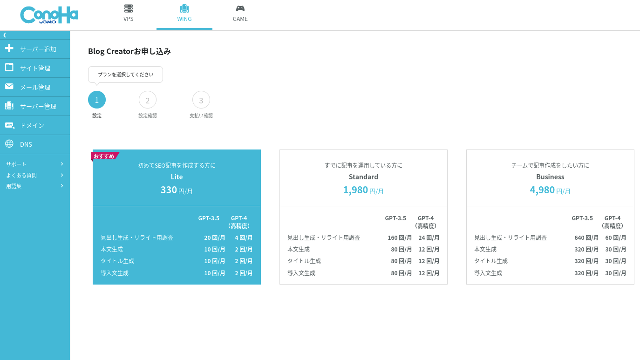
There are three plans. Since Lite is бесплатный for one month, I recommend starting by trying Lite.
| Plan | Lite | Standard | Business |
|---|---|---|---|
| Price | 330 yen | 1,980 yen | 4,980 yen |
| Контурное поколение | 24 times | 184 times | 700 times |
| Генерация тела | 12 times | 92 times | 350 times |
| Оригинальное поколение | 12 times | 92 times | 350 times |
| Введение поколение | 12 times | 92 times | 350 times |
- Option
- Цена: 550 иен
- Способность генерации: 24 поколения, 12 поколений тела, 12 поколений титула и 12 поколений введения
Давайте разберем, как начать работу и использовать Blog Creator
Steps to Start Using Bжурнал Creator
Почему ваши письма попадают в спам? Разберитесь в причинах и настройте SMTP для WordPress
- STEP.1Посетите официальный сайт: ConoHa WING
Bжурнал Creator Для использования Blog Creator вам понадобится учетная запись ConoHa. Создайте аккаунт на официальном сайте и начните работу с WordPress. Если у вас уже есть учетная запись ConoHa, просто войдите в систему.
- STEP.2В этой статье подробно объясняются основы работы протокола SMTP и важность его настройки для стабильной доставки писем с вашего сайта.
Плагины WordPress — это специальные программные модули, которые позволяют добавлять новые функции и возможности на ваш сайт без написания кода. С их помощью вы можете создать интернет-магазин, настроить форму обратной связи, улучшить SEO или защитить сайт от спама.
- STEP.3Выберите план
Качественные платные плагины обычно имеют разумную стоимость. Этот бюджет стоит заложить в общую стоимость обслуживания и развития вашего сайта.
- STEP.4Payment
Появится экран подтверждения оплаты. Нажмите «Подтвердить». Ваша заявка теперь завершена.
Этапы создания статьи с помощью Blog Creator
Процесс создания статьи описан в материале на официальном сайте Wapu-katsu. Однако, на мой взгляд, его проще понять на моем личном примере, поэтому, пожалуйста, посмотрите на this статья.
Управляйте настройками почты в панели управления выбранного вами SMTP-плагина.
- STEP.1Choose Bжурнал Creator
Справа от выбранного SMTP-плагина нажмите кнопку «Установить», а затем «Активировать».
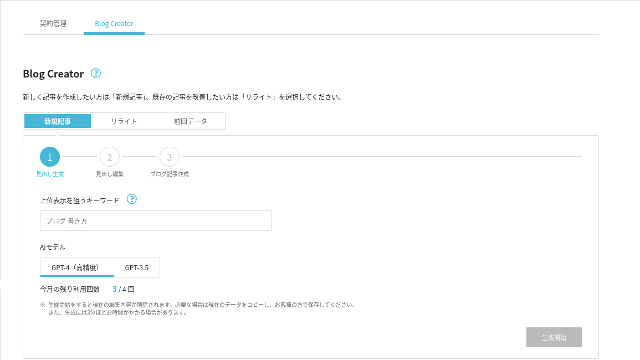
- STEP.2Введите ключевое слово, которое вы хотите ранжировать для
Как установить плагин WordPress: пошаговое руководство для начинающих веб-мастеров
Выберите AI Модель. Пойдем с высокоточным GPT-4.
Нажмите «Начать поколение».
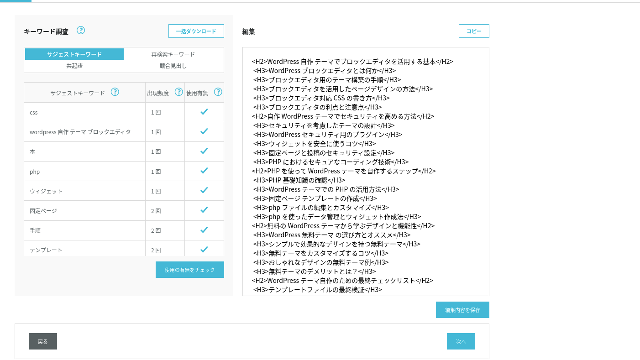
- STEP.3Редактировать заголовки на основе исследования ключевых слов
Правильная настройка отправки писем через SMTP обеспечивает надежную доставку уведомлений и писем вашим пользователям.
На экране редактирования включите ключевые слова, которые не использовались в генерируемых заголовках. Как только вы закончите редактирование, нажмите «Сохранить элементы». После этого сохраняется, двигаться дальше, нажав «Далее».
- STEP.4Создайте тело, название и введение
Используя заголовки, которые вы создали ранее в качестве основы, AI Создайте тело, название и введение. Кликните "AI «Создать» для каждого элемента.
Выберите, использовать ли GPT-4 или GPT-3.5Я выбрала GPT-4.
После генерации каждого фрагмента с помощью ИИ нажмите «Сохранить изменения» (Save Edits). На этом процесс генерации в Blog Creator будет завершен.
Будет представлено несколько кандидатов на звание, поэтому сравните их с заголовками и корпусом и выберите наиболее подходящий.
Выбор правильных плагинов WordPress — это важный шаг, определяющий стабильность и безопасность вашего сайта. Внимательно оценивайте функциональность, скорость работы, безопасность и уровень поддержки каждого плагина.
Похоже, существует ограничение на объем генерируемого текста. Для статьи «Создание темы WordPress с нуля» сгенерированный текст оказался недостаточно длинным. Поэтому после того, как генерация остановилась на полпути, я снова использовал функцию «Сгенерировать с помощью ИИ» (AI Generate) для заголовков, следующих за местом остановки, чтобы дописать основной текст.
Вы можете активировать плагин SMTP сразу после установки и настроить параметры подключения к вашему почтовому серверу.
Я поручил ИИ создать их по одному и тому же ключевому слову и по одной и той же процедуре. Четыре готовые статьи представлены ниже. Я загрузил их все на этот сайт. Они полностью конкурируют друг с другом (канибализируют трафик).
Статья, созданная с помощью Blog Creator
Защитите переписку с клиентами: основы безопасности SMTP и шифрования SSL/TLS
Защитите переписку с клиентами: основы безопасности SMTP и шифрования SSL/TLS
serverfield.org
Статья, созданная с помощью ChatGPT-4o

Начинающий дружно! Как создать индивидуальную тему в WordPresss
Начинающий дружно! Как создать индивидуальную тему в WordPresss
serverfield.org
Статья, созданная с помощью Claude 3
Построй свой собственный WordPresss Создайте сайт, полный оригинальности!
Построй свой собственный WordPresss Создайте сайт, полный оригинальности!
serverfield.org
Полное руководство по плагинам WordPress для новичков: расширьте возможности вашего сайта легко и безопасно
Вырваться из руты! Как создать идеальный сайт, создав свой собственный WordPresss Тема
Вырваться из руты! Как создать идеальный сайт, создав свой собственный WordPresss Тема
serverfield.org
Поскольку ИИ, похоже, побеждает, я хочу рассказать о преимуществах Blog Creator
AI Похоже, что он может выиграть. Страхование как таковое ConoHa WING Не сердись на меня, Bжурнал CreatorПреимущества - это то, что я хочу здесь представить. (Я робкий человек.)
Вы можете улучшить свою работу и SEO Не полагаясь полностью на AI или инструменты
Bжурнал Creator Как только вы научитесь правильно выбирать и устанавливать плагины, управление сайтом на WordPress станет намного проще и эффективнее.
Bжурнал Creator Можно, так сказать, Помогите вам расти, как партнер, бегущий рядом с вами..

Повысьте свой SEOВеб-методы написания, которые побеждают пользователей с помощью высокочитаемой копии
Повысьте свой SEOВеб-методы написания, которые побеждают пользователей с помощью высокочитаемой копии
serverfield.org
Структура головы и длина тела уже оптимизированы, поэтому коррекции не требуется.
Bжурнал CreatorВ результатах поиска плагинов введите «SMTP» или название конкретного плагина, например «WP Mail SMTP».вы можете опубликовать статью, просто скопировав и вставив ее без внесения каких-либо исправлений.(Тем не менее, вам все равно нужно проверить содержание.)
с дженериком AIПоправки были необходимы и отнимали много времени.
- Заголовки начинаются с H4, поэтому их необходимо исправить.
- Если после создания заголовков вы генерируете все тело сразу, оно не пишется должным образом.
- Вы должны удалить ненужные слова, такие как «Введение» и «Тело:».
Создание текста тела из заголовков и выполнение всего остального вручную — это просто слишком большая работа.
As an AI Статья Writing Tool, It Is More Keyword-Focused Than What Other Companies Offer
Other server companies also offer AI статья-generation tools.
Sakura Rental Server offers "User Local AI Writer," which lets you use ChatGPT-4 for бесплатный. In addition to ChatGPT-4, it also uses its own local AI.
Value Server предложенияValue AI Writer", который начинается с 1650 иен в месяц. Тот, кто использует ChatGPT-4o.
Таким образом, хотя эти инструменты могут быть бесплатными или предоставлять доступ к новейшему ИИ, Они не строятся вокруг SEOСильные ключевые слова.Bжурнал Creator сначала выстраивает структуру вокруг эффективных для SEO ключевых слов, а затем использует ИИ для написания статьи.
В конце концов, когда вы ведете блог, у вас есть целевое ключевое слово, по которому вы хотите ранжироваться, верно?Bжурнал CreatorПовышайте безопасность вашего сайта с помощью лучших защитных плагиновAI правильное движение к четко определенной цели Вот что он делает. Это не просто слепой бег.
В этом заключается главное отличие других инструментов генерации статей на базе ИИ от Bжурнал Creator.
Резюме: пожалуйста, выполните поиск и проверьте результаты сравнения самостоятельно
Так что же случилось в конце?
Не мне решать, каким будет ответ. Давайте отправим его в Google, как мы всегда это делаем.Как настроить SMTP в WordPress: пошаговое руководство по использованию WP Mail SMTP
- Bжурнал Creator статья: Защитите переписку с клиентами: основы безопасности SMTP и шифрования SSL/TLS
- ChatGPT-4o статья:Начинающий дружно! Как создать индивидуальную тему в WordPresss
- Claude 3 статья: Построй свой собственный WordPresss Создайте сайт, полный оригинальности!
- Gemini 1.5 Pro статья: Вырваться из руты! Как создать идеальный сайт, создав свой собственный WordPresss Тема
Перейдите в раздел «Плагины» → «Добавить новый» в панели администратора WordPress.
Bжурнал Creator Это лучше, чем я себе представлял. Its статья keeps showing up.
Если вы хотите попробовать, ConoHa WING Вот где вы должны подписаться.
" ConoHa WING", высокоскоростной сервер из GMO Internet Group С быстро растущим числом пользователей, и мы используем себя. Потому что WordPresss Когда вы зарегистрируетесь на сервере, любой может легко начать работу. Он обеспечивает хороший баланс затрат и производительности, и мы используем его сами.
SMTP (Simple Mail Transfer Protocol) — это стандартный протокол, используемый для отправки электронной почты через интернет. Настройка SMTP на вашем сайте позволяет отправлять системные уведомления и письма клиентам через надежные почтовые серверы, что значительно снижает вероятность их попадания в папку «Спам».
Полное сравнение 32 WordPresss Арендные серверы: рекомендации для физических лиц Businesses и зарубежное использование

Ноутбук на деревянном столе с чашкой кофе
- Какому сайту доверять?
- Я просто хочу выбрать сервер простым и понятным способом!
- Покажите мне, как начать WordPresss Прямо сейчас.
Doesn't that sound familiar? That is why this статья Тщательно выберите рекомендуемые варианты из 32 компаний по прокату серверов для частных лиц, предприятий, внутреннего использования и зарубежного использования.. Объяснение подготовлено SEO-специалистом компании по разработке приложений, которая ежедневно использует арендуемые серверы.