
10-day gratuit probă
PR
Servere
Recenzie Value Server [cea mai recentă din 2025]: pornește WordPress la un preț avantajos
Publicat: 2025.04.18
Actualizat: 2025.04.18
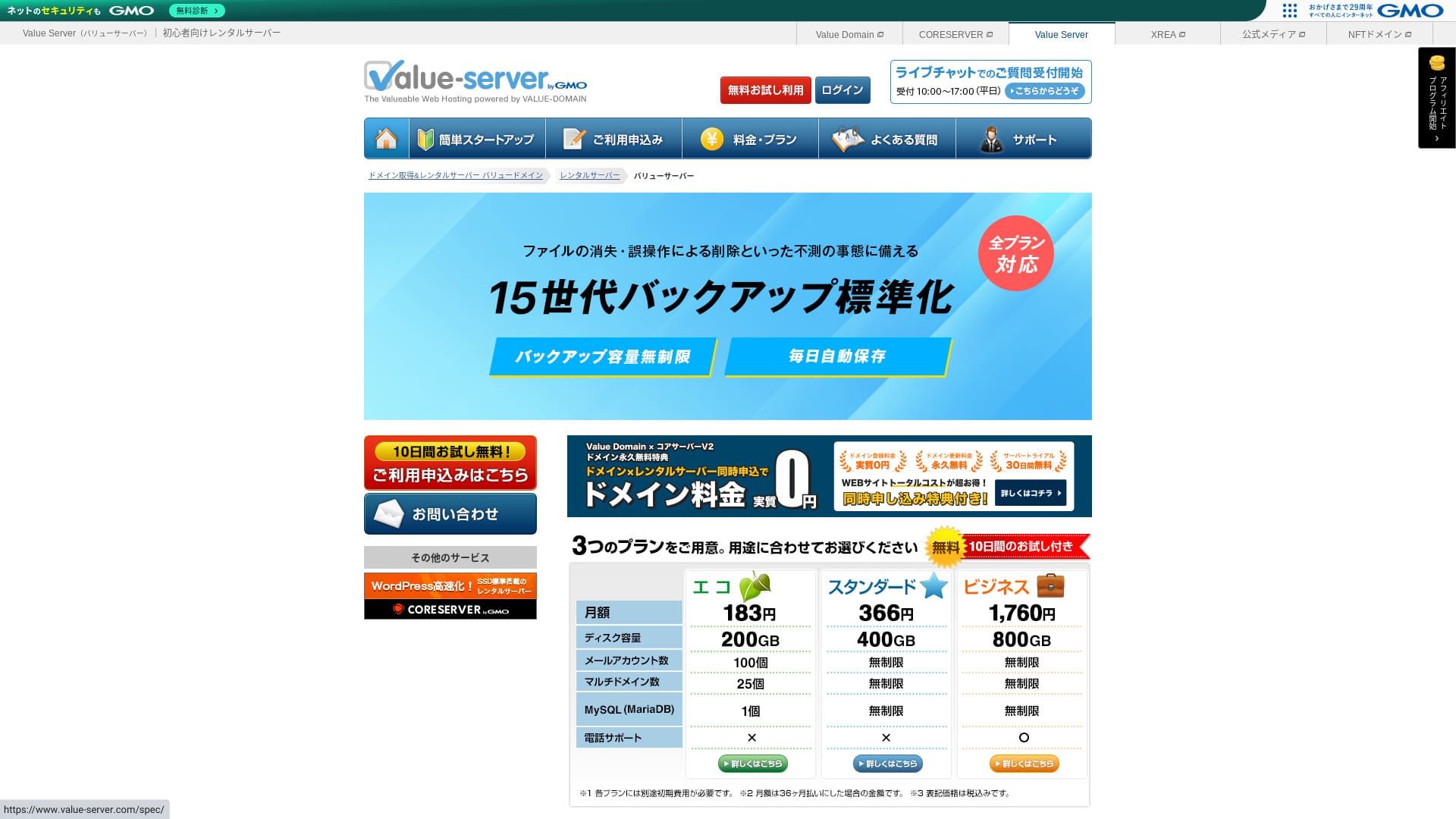
Value Server is a găzduire service operated by GMO Digirock, Inc., known for its low prețuri, especially its Marutto plan.

Value Server is recomandat for people who want to use the cheapest server possible because:
- Among the cheapest in the industry
- Pe server se utilizează stocare SSD
- 15 generations of backup-uri provide peace of mind
That is why. You will likely be satisfied. You can try it gratuit for 10 days.
A competing server is Star Rental Server. It is even stronger than Value Server prin faptul că oferă și un plan gratuit. Vă rugăm să îl luați în considerare și pe acesta.
| Server type | Shared server |
| Display viteză (TTFB) | Not measured |
| Plan recomandat și perioadă contractuală | Eco 12 months |
| Probă / money-back guarantee | None |
| Lunar fee (12-month contract) | 220 yen |
| Initial configurare fee | Gratuit |
| Gratuit domeniu | None |
| Suport | E-mail și chat (în zilele lucrătoare 10:00-17:00) |
| Uptime | Not disclosed |
| Stocare | 200GB |
| Number of databases | 1 |
| Securitate measures | None |
| SSL | Gratuit shared SSL, custom SSL |
| Backup / restore | 15 generations of backup-uri gratuit, restoration gratuit |
| Number of e-mail accounts | 3 |
| E-mail Securitate measures | POP/POP3S, SMTP/SMTPS, IMAP/IMAPS, spam filter, virus filter, custom filters |
| Server / site web migrare service | None |
| WordPress preinstallation | None |
| CDN | None |

Hikaru Ono
Value Server is operated by GMO Digirock, Inc., a major name in the industry, so even though it is among the cheapest options, there is no need to worry about quality. I personally had no problems while using it.
Acestea fiind spuse, deoarece este ieftin, există limite privind caracteristicile și capacitatea, așa că asigurați-vă că le analizați cu atenție.
Value Server comparat cu alte servere
- OverallEvaluare★★★☆☆
- Server viteză ★★★☆☆
- Prețuri ★★★★★
- Stabilitate ★★★☆☆
- Ease of getting started with WordPress* ★★★☆☆
- Operațiuni precum gestionarea domeniului și configurarea SSL* ★★★☆☆
* Based on my actual experience using it.

Cum să alegi dintre 21 de servicii de găzduire WordPress recomandate pentru persoane fizice
Cum să alegi dintre 21 de servicii de găzduire WordPress recomandate pentru persoane fizice
serverfield.org
- November 4, 2025 market-research data, by viteză sorted
- Tarifele lunare reprezintă costul din primul an al celui mai ieftin plan care poate rula WordPress
- Viteza reprezintă timpul până la primul byte, măsurat pe site-uri demonstrative în aceleași condiții
“Value Server” este un server de găzduire ieftin operat de GMO Digirock, Inc. Deși are un preț accesibil pentru persoanele fizice, oferă caracteristici puternice, cum ar fi SSL partajat gratuit și copii de siguranță gratuite pentru 15 generații.
Recenziile utilizatorilor despre Value Server și cinci caracteristici cheie

Planul Marutto vă permite să creați un site WordPress pentru 3.060 de yeni pe an
Value Server's Marutto plan lets you have a WordPress site web for 3,060 yen per an. It is extremely inexpensive.
Să îl comparăm cu principalele servere japoneze în următoarele condiții.
- Initial configurare fee
- 12-month server contract
- Cost of one an of domeniu fees
- Cheapest plan that can use WordPress
| Găzduire Companie | Cost for one an |
|---|---|
| Value Server | 2,310 yen |
| ConoHa WING | 11,292 yen |
| Xserver | 10,560 yen |
| Lolipop! | 5,940 yen |
| Sakura Rental Server | 6,600 yen |
Desigur, comparativ cu serverele de mai sus, caracteristicile și specificațiile sale sunt mai puțin impresionante. Chiar și așa, ar trebui să rămână o opțiune solidă pentru cei care vor să construiască un site cât mai ieftin posibil.
SSD Is Included in Every Plan
Value Server includes SSD stocare in every plan deși este ieftin. La serverele cu costuri ultra-reduse, este obișnuit să se observe o încărcare lentă a site-ului web, deoarece se bazează pe hard disk-uri ieftine.
Viteza de afișare a site-ului web afectează de asemenea SEO, așa că alegerea serverului nu este un lucru de tratat cu ușurință. Con SSD-uri, însă, puteți fi mai liniștit.
Note: What Is SEO? The Right Steps and Methods for Search Engine Optimization
Every Plan Includes 15 Generations of Backup-uri automate
Value Server is inexpensive, yet it still provides 15 generations of Backup-uri automate on every plan.
Dacă nu există o funcție de backup, nu vă puteți restaura site-ul chiar dacă datele dispar din cauza unui atac sau a unei greșeli. Cu Value Server, serverul face backup automat pentru datele dumneavoastră în fiecare zi, ceea ce vă oferă liniște sufletească.
These 15 generations of backup-uri are impressive. Even major Servere like Lolipop! do not offer this on their low-cost planuri. Core Server, which is also operated by GMO Digirock, Inc., does not include backup caracteristici on its low-cost plan either.
Seen in that light, Value Server is remarkably service-minded for a low-cost provider because it offers such strong 15-generation backup-uri.
The Drawbacks of Value Server and How to Handle Them, Honestly Stated

Even though it has advantages, Value Server also has drawbacks. Make sure you understand them fully before you use it.
There Are No Advanced Securitate Measures Such as a WAF
Value Server does not provide advanced Securitate measures such as a WAF. Oferă un anumit nivel de protecție, inclusiv asistență pentru SSL personalizat, dar rămâne totuși îngrijorător faptul că nu este deosebit de puternic împotriva celor mai recente metode de atac.
If you want to use a WAF, instala Securitate-oriented WordPress plugins.
Note: How to Alege Five WordPress Plugins That Strengthen Securitate
Uptime Is Not Disclosed
Unfortunately, Value Server nu își dezvăluie timpul de funcționare (uptime). Acest lucru înseamnă că este imposibil de aflat stabilitatea serverului în termeni numerici. Dacă fiabilitatea este o prioritate, cum ar fi pentru un site corporativ, această incertitudine vă poate face să ezitați.
Note: Ghidul începătorului pentru înțelegerea uptime-ului de găzduire și a SLA-urilor
Dacă un server devine instabil din cauza unei probleme, site-ul tău poate să nu mai apară sau să se încarce extrem de lent. În unele cazuri, poate apărea o eroare 503. Asta este stresant pentru vizitatorii site-ului.
Note: What Is a 503 Error? How to Avoid Web Congestion and Respond in an Emergency
Because you cannot know the uptime, use Value Server only after understanding the risk that it may be unstable.
Planurile Marutto și Eco vă permit să creați un singur site WordPress
Value ServerPlanurile Marutto și Eco de la 's vă permit să creați un singur site WordPress.
- I want to create an event site in addition to my main site web
- I want to create a second blog
If you need a second WordPress site for those reasons, you will have to prepare another server separately.
Comparați Value Server cu două servere similare
Să comparăm Value Server cu două servere concurente similare ca preț scăzut. Chiar dacă par asemănătoare, există diferențe, așa că acordă-ți timp pentru a le compara cu atenție.
Core Server
Core Server este administrat de aceeași companie. Oferă specificații înalte, menținând în același timp un preț scăzut. Puteți alege cea mai bună opțiune din șapte planuri fin diferențiate. Există o gamă V1 axată pe preț și o gamă V2 axată pe performanță.
În general, Core Server depășește Value Server în ceea ce privește caracteristicile și specificațiile, așa că, dacă prețul nu este prioritatea ta principală, Core Server este alegerea mai bună.

Recenzie Core Server [cea mai recentă din 2025]: ghid detaliat pentru prețuri, viteză, avantaje și dezavantaje
Recenzie Core Server [cea mai recentă din 2025]: ghid detaliat pentru prețuri, viteză, avantaje și dezavantaje
serverfield.org
Star Server
Star Rental Server este, de asemenea, ieftin. În același timp, se aseamănă cu Value Server în ceea ce privește orientarea către viteză, inclusiv utilizarea stocării SSD. Este ceva mai scump decât Value Server, dar capacitatea sa mai mare de transfer reprezintă un punct forte, deoarece poate ține pasul chiar dacă traficul site-ului dumneavoastră crește.
Star Server does not include Backup-uri automate. That is one area where Value Server comes out ahead.

Recenzie Star Server [Ultima din 2024]: Cost uimitor de scăzut și testat în detaliu
Recenzie Star Server [Ultima din 2024]: Cost uimitor de scăzut și testat în detaliu
serverfield.org
Start a WordPress Site web on Value Server in 6 Steps
Să începem un site web cu Value Server!
- STEP.1Accesați site-ul oficial Value Server
Pe prima pagină, dă clic pe “Try for Free”.
- STEP.2Solicitați serverul și obțineți un domeniu
Alegeți un abonament. Numele contului dvs. de server (domeniul inițial) poate fi oricare. Nu veți folosi acest domeniu inițial ca domeniu pentru site-ul dvs. Îl puteți folosi, dar nu vă recomand acest lucru.
At this point, you cannot yet select simultaneous WordPress installation, but after choosing your domeniu, you will be able to check it. Be sure to use it. It makes starting a WordPress site web much easier.
Sub opțiunea de a aplica și pentru domeniul pe care îl veți folosi pe acest server, alegeți „Obțineți un domeniu gratuit”. Apoi introduceți orice șir doriți. Dintre domeniile de nivel superior disponibile, cum ar fi .com și .net, faceți clic pe cel dorit.
Puteți alege domenii rădăcină (de nivel superior) precum „.com” și „.co.jp”. Taxele de achiziție și reînnoire variază în funcție de domeniul rădăcină. Dacă nu sunteți sigur pe care să îl alegeți, recomand „.co.jp” pentru companii, ori de câte ori este posibil. Pentru persoane fizice, „.com” și „.net” sunt alegeri bune. Mulți oameni sunt familiarizați cu aceste domenii, așa că sunt mai puțin susceptibile de a părea suspecte și sunt mai ușor de accesat de către utilizatori.
Note: Ce este un domeniu? Rolul său ca adresă pe internet și cum poți obține unul
Once you have selected the domeniu, check “Instala WordPress at the same time.”
Click “Proceed.”
- STEP.3Enter User Information
The user information screen will appear. Click “User Registration,” enter information such as your usage type and name, confirm the details, and click “Register and proceed.”
Complete the required SMS verification, then click “Confirm application.”
Answer the questionnaire or skip it, then click “Go to the panoul de control.”
- STEP.4Instala WordPress
În secțiunea de informații administrative din panoul de control, este afișat serverul „Value Server (1)” pentru care ați aplicat anterior. Faceți clic pe acesta și continuați către „Noul panou de control”.
Then select “App Installation” from “Tools” and click “WordPress Blog.”
Faceți clic pe „+ Instalează această aplicație” și alegeți un domeniu. Domeniul solicitat anterior va apărea în meniul derulant, așa că selectați-l.
You can leave the version settings as they are.
Use the following settings for WordPress.
- Admin username: Anything is fine.
- Admin password: Make it as complex as possible. You can change it easily later.
- Administrator e-mail: O adresă de e-mail pe care o folosiți în mod regulat. Pentru companii, recomand adresa de e-mail de serviciu a persoanei care administrează site-ul web.
- Site web title: Anything is fine. You can change it easily later.
- Site web tagline: This is the subtitle. Anything is fine. You can change it easily later.
The admin username and admin password are used when logging in to WordPress. Be sure to write them down.
You can leave the “Advanced” settings as they are.
După ce ai introdus toate datele, fă clic pe “+ Install”. După finalizarea instalării, fă clic pe URL-ul de pe ecran care se termină cu „wp-admin/”. Acesta este URL-ul ecranului de administrare al site-ului tău WordPress.
- STEP.5Initial WordPress Configurare
On the WordPress login screen that appears, enter the username and password you set during installation, then click “Log In.”
Dacă vedeți un avertisment care spune „Acest site nu poate fi accesat”, înseamnă că setările DNS nu s-au propagat încă. Nu aveți ce face decât să așteptați, așa că încercați să vă conectați din nou la fiecare câteva ore.
Note: Ce sunt DNS și serverele de nume?
După ce vă autentificați în WordPress, configurați legăturile permanente (permalinks). În ecranul de administrare WordPress, accesați „Settings”, apoi „Permalinks”. Alegeți „Post name”, apoi faceți clic pe „Save Changes”.
Prin opțiunea „Nume postare”, puteți introduce orice șir doriți în URL la publicarea unui articol. Recomand utilizarea unui șir scurt, care să ajute cititorii să își imagineze conținutul articolului. Dacă este prea lung, unele persoane s-ar putea teme că site-ul pare suspect.
- STEP.6Instala Plugins
Reveniți la ecranul de administrare WordPress, accesați „Plugins” și apoi „Add New” și instalați modulele de care aveți nevoie.
După ce găsești modulul dorit prin căutare, dă clic pe “Install Now” și apoi pe “Activate”. După aceea, urmează instrucțiunile pentru fiecare modul în parte.
Asigură-te că instalezi pluginuri de securitate și backup.
- How to Alege Five WordPress Plugins That Strengthen Securitate
- 5 Powerful WordPress Backup Plugins That Help You Recover Your Data
După ce ai instalat și modulele, site-ul tău WordPress este complet pregătit de funcționare!
Rezumat
“Value Server” este un server de găzduire ieftin operat de GMO Digirock, Inc. Deși prețurile sale rămân accesibile chiar și pentru persoane fizice, oferă caracteristici puternice, cum ar fi SSL partajat gratuit și copii de siguranță gratuite pentru 15 generații.
10-day gratuit probă
Value Server is a low-cost server. Deși timpul de funcționare (uptime) nu este dezvăluit, iar caracteristicile sale de securitate sunt destul de slabe, funcția de backup automat pentru 15 generații înseamnă că de obicei puteți recupera datele în cele din urmă. If preț matters most to you, give it a try.
Comparație completă a 32 de servicii de găzduire WordPress: Recomandări pentru persoane fizice, companii și utilizare în străinătate

Când vă gândiți: „Vreau să încep cu WordPress” și căutați „găzduire WordPress recomandată”, găsiți tot felul de articole, de la opțiuni pentru persoane fizice și companii sau afaceri mici, până la servere din străinătate și servere ieftine. Sincer vorbind,
- Which site should I look at?
- I want to alege a server in a simple, easy-to-understand way!
- Please show me how to start WordPress right away.
Have you ever felt that way? That is why this article selectează cu atenție cele mai bune opțiuni din 32 de servicii de găzduire pentru persoane fizice, companii, utilizare internă și externă și le prezintă. Explicația provine de la responsabilul SEO al unei companii de dezvoltare de aplicații care utilizează servicii de găzduire în fiecare zi.