
14-dniowy darmowy okres próbny
PR
Serwery
Recenzja Sakura Rental Server [najnowsze 2025]: czy jest straszny czy wolny? Ceny, plusy i minusy do użytku prywatnego i firmowego
Opublikowano: 2025.04.18
Zaktualizowano: 2025.04.18
Ocena: 4.0
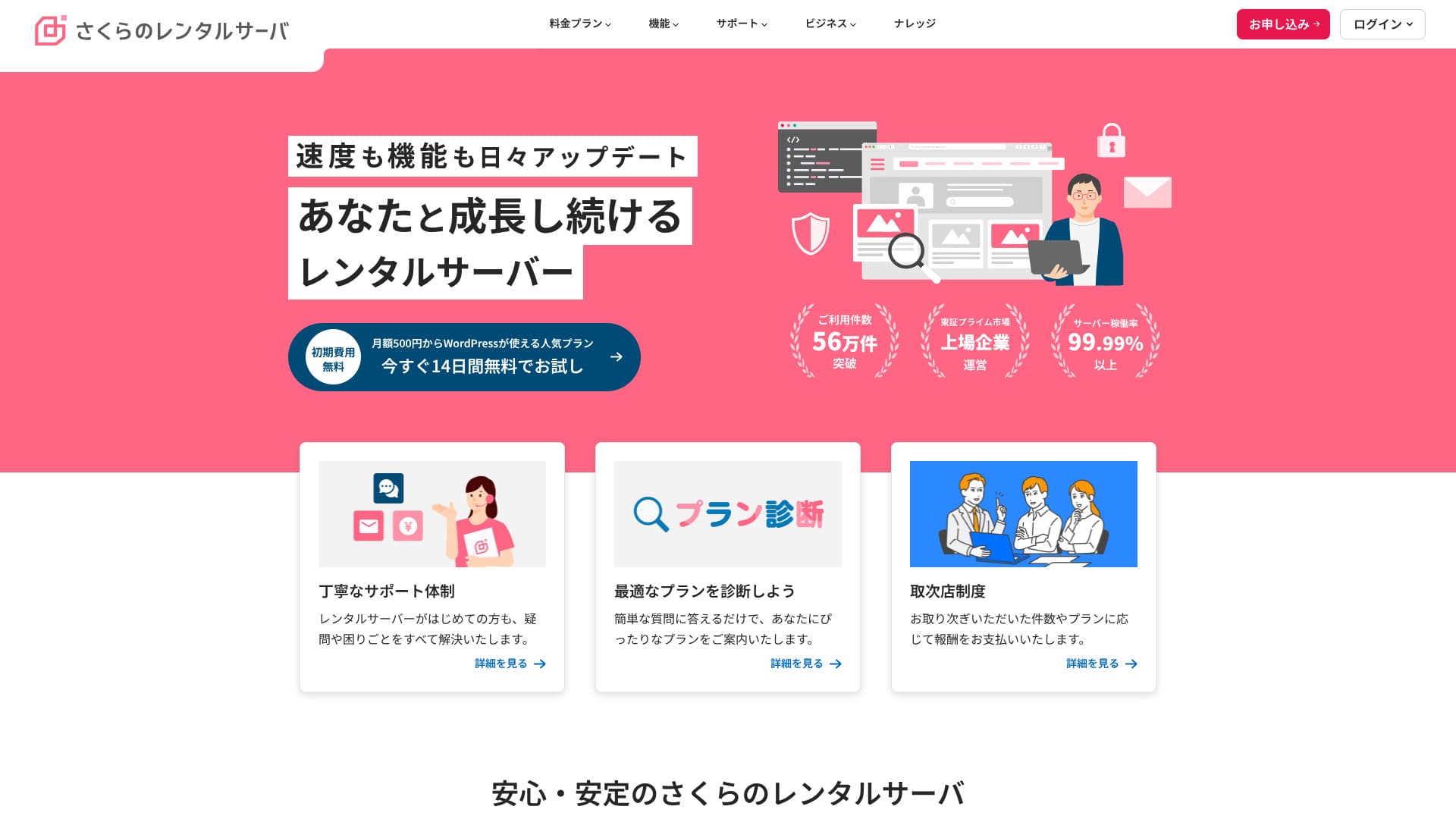
Sakura Rental Serverto uznana usługa hostingu współdzielonego z ponad 560 000 użytkowników. Prowadzi ją Sakura Internet, pierwsza japońska firma krajowa, która dołączyła do rządowej chmury Japonii.

Powody, dla których polecam Sakura Rental Server to osobom szukającym niedrogiego serwera, a także firmom i jednoosobowym działalnościom are:
- poczucie bezpieczeństwa wynikające z tego, że usługę prowadzi pierwsza krajowa firma dołączona do rządowej chmury
- duża liczba użytkowników korporacyjnych
- rozbudowana, pojemna usługa e-mail
Właśnie dlatego warto ją rozważyć. Istnieje duża szansa, że będziesz zadowolony. Możesz wypróbować ją bezpłatnie przez 14 dni.
Usługa konkurencyjna to LOLIPOP. Przy długoterminowej umowie można z niej korzystać taniej niż z Sakura Rental Server. Warto rozważyć ją razem z Sakura.
★ Recenzja Lolipop! [najnowsze 2025]: co pokazały testy szybkości oraz plusy i minusy
| Typ serwera | Hosting współdzielony |
| Szybkość wyświetlania (TTFB) | 440ms |
| Polecany plan i okres | Standard 12 miesięcy |
| Okres próbny / gwarancja zwrotu pieniędzy | 14-dniowy darmowy okres próbny |
| Cena miesięczna (umowa 12-miesięczna) | 550 yen |
| Opłata startowa | Free |
| Darmowa domena | None |
| Wsparcie | Godziny pracy: 10:00–18:00 Rezerwacja oddzwonienia, czat i e-mail (odpowiedź tego samego dnia lub do następnego dnia roboczego) |
| Dostępność | 99.99% |
| Pojemność serwera | 300GB |
| Liczba baz danych | Unlimited |
| Zabezpieczenia | Alerty o naruszeniu strony (płatne), WAF, filtrowanie zagranicznych adresów IP, zabezpieczenia przed nadużyciami relay oraz szyfrowanie |
| SSL | Bezpłatny współdzielony SSL, własny SSL |
| Kopia zapasowa / przywracanie | 8 generacji kopii zapasowych included free, free restoration |
| Liczba kont e-mail | Unlimited |
| Zabezpieczenia poczty | POP3, IMAP4, skanowanie antywirusowe, podstawowe filtrowanie spamu, wysokodokładne filtrowanie spamu |
| Preinstalacja WordPressa | None |
| Usługa migracji serwera / strony | None |
| CDN | 100GB/miesiąc bezpłatnie |

Hikaru Ono
Krążą pogłoski, że „Sakura Rental Server jest straszny”, ale nie ma już potrzeby się tym martwić. Korzystałem z niego osobiście i ani razu nie miałem wrażenia, że jest straszny, a opinie klientów o wsparciu są na ogół pozytywne.
To wysokiej jakości serwer z solidnymi podstawami operacyjnymi, z którego możesz korzystać z pełnym zaufaniem.
Jak Sakura Rental Server wypada na tle konkurencji
- Overallrating★★★★☆
- Prędkość serwera ★★☆☆☆
- Ceny ★★★★☆
- Stabilność ★★★★★
- Łatwość uruchomienia WordPressa* ★★★★☆
- Zarządzanie domeną i konfiguracja SSL* ★★★★☆
* Te oceny odzwierciedlają moje własne doświadczenie z korzystania z usługi.

21 polecanych usług hostingu WordPress dla osób prywatnych: porównanie i sposób wyboru
21 polecanych usług hostingu WordPress dla osób prywatnych: porównanie i sposób wyboru
serverfield.org
- Dane z badania rynku według stanu na November 4, 2025, posortowane według szybkości
- Ceny miesięczne to koszt pierwszego roku najtańszego planu obsługującego WordPressa
- Szybkość to Time to First Byte zmierzony na stronach demo w tych samych warunkach
"Sakura Rental Server"to uznana usługa hostingowa z ponad 480 000 aktywnych kont. Kiedyś mówiono, że jest wolna, ale jej platforma została odnowiona i przyspieszona. Mimo to przystępne ceny pozostały bez zmian, a stosunek jakości do ceny jest znakomity.
Sześć kluczowych zalet Sakura Rental Server

Czas odpowiedzi jest wolny, ale wyniki PageSpeed Insights są dobre
Nasze własne testy na tej stronie pokazały, że Sakura Rental Server osiągnął dobre wyniki PageSpeed Insights. Jednak sam czas odpowiedzi serwera nie był zbyt dobry.
To prawda, że jego TTFB jest wolniejsze niż u wielu konkurentów, ale wyniki PageSpeed Insights nie są słabe. Choć początkowa odpowiedź serwera nie wypada najlepiej, późniejsze przetwarzanie wydaje się szybkie, co prawdopodobnie pomogło w wynikach PageSpeed Insights.
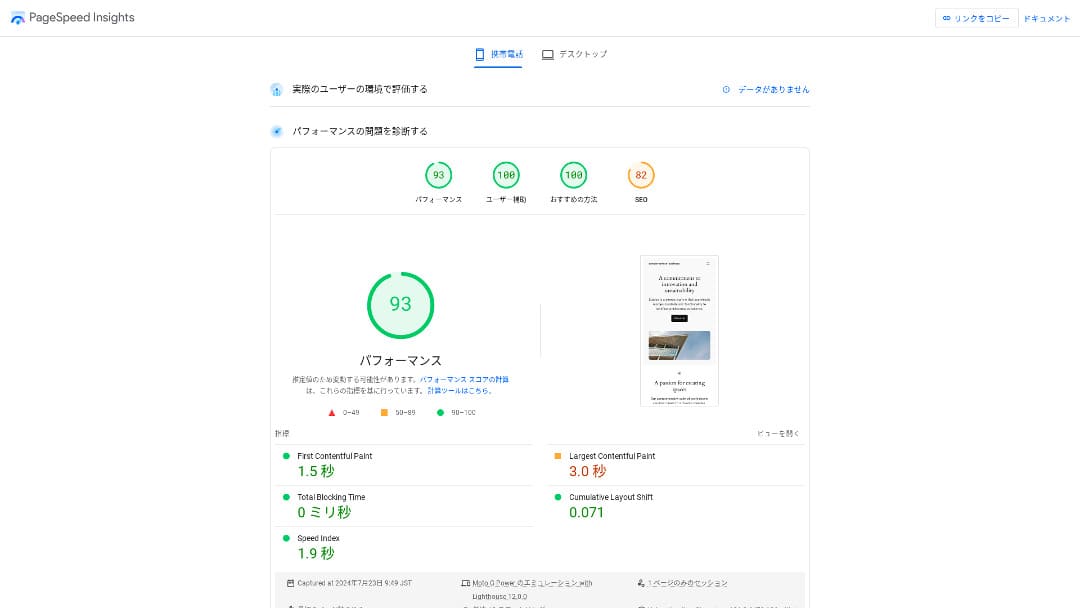
Nie trzeba więc obawiać się, że w praktycznym użyciu będzie wyjątkowo wolny.
★ Przetestowane pod kątem szybkości: ranking 15 usług hostingowych według szybkości
Ceny są przystępne
Sakura Rental Serveroffersmiesięczne ceny przystępne nawet w porównaniu z innymi dostawcami, co ułatwia rozpoczęcie prowadzenia strony.Poniższe porównanie przyjmuje następujące warunki.
- Opłata startowa
- 12-miesięczna umowa na serwer
- Roczny koszt domeny
- Najtańszy plan obsługujący WordPressa
| Dostawca hostingu | Łączny koszt za jeden rok |
|---|---|
| Sakura Rental Server | 6,600 yen |
| ConoHa WING | 11,292 yen |
| Xserver | 10,560 yen |
| Lolipop! | 5,940 yen |
| heteml | 24,420 yen |
Lolipop! jest tańszy, ale funkcje i specyfikacja planu Standard w Sakura są mocniejsze niż w Lolipop!.
Ponadto Sakura Domain jest nieco drogi, więc koszty można obniżyć, korzystając z tańszej usługi domenowej innego dostawcy.
Stabilna dostępność 99,99%
Sakura Rental Serveroffers bardzo stabilną usługę z dostępnością 99,99%.Serwery są obsługiwane we własnym zakresie i monitorowane 24 godziny na dobę, 365 dni w roku.
★ Przewodnik dla początkujących po dostępności hostingu i SLA
Podczas trzęsienia ziemi Hokkaido Eastern Iburi w 2018 roku centrum danych Ishikari straciło zewnętrzne zasilanie, ale Sakura utrzymała działanie przez 60 godzin na zasilaniu awaryjnym.Usługa przetrwała nawet dużą katastrofę, która spowodowała blackout w całym Hokkaido, co wiele mówi o jej stabilności. To daje realny spokój ducha, jeśli chodzi o jej niezawodność.
Komunikacja firmy w tamtym czasie również była znakomita. Oprócz przekazywania najnowszych informacji publikowała aktualizacje co sześć godzin nawet wtedy, gdy nie było większych zmian. Sprawia to wrażenie firmy, której można powierzyć ważne dane.
Darmowy CDN, który pomaga stronie ładować się szybciej
Sakura Rental Server offers CDN bezpłatnie. To funkcja, która pomaga szybciej ładować stronę internetową.
★ Czym jest CDN? Popraw szybkość i wydajność dzięki rozproszonym serwerom
Korzystanie z CDN pomaga szybciej wyświetlać stronę, a przy nagłych wzrostach ruchu ułatwia uniknięcie sytuacji, w której błąd 503 uniemożliwia jej oglądanie. Ponieważ szybkie dostarczanie stron wpływa także na ruch w witrynie, dostęp do bezpłatnego CDN ma realną wartość.
★ Czym jest błąd 503? Przeciążenie sieci, sposoby zapobiegania i reakcja awaryjna
Bezpłatny limit CDN jest również hojny: 100 GB miesięcznie w planie Standard, więc dla zastosowań indywidualnych raczej nie okaże się niewystarczający. Po przekroczeniu bezpłatnego limitu koszt wynosi 5 jenów za GB.
Mocne funkcje kopii zapasowych
Sakura Rental Serverhas znakomite funkcje kopii zapasowych.Możesz użyć funkcji o nazwie "Snapshots", aby tworzyć kopie zapasowe i przywracać dane. Można przechowywać do ośmiu kopii, co jest hojnym limitem.
Obsługa jest też prosta.
- W panelu sterowania przejdź do "Website/Data", a następnie do "Backup"
- Kliknij "Start using Backup & Staging".
- Kliknij "Create backup" i poczekaj, aż status się zmieni
Gdy status zmieni się na "Completed successfully", kopia zapasowa jest gotowa.
Z tego samego ekranu możesz też tworzyć harmonogramy kopii zapasowych i przywracać dane. Obsługa jest bardzo prosta.
Wykorzystaj niewykorzystaną pojemność efektywnie dzięki Sakura Pocket
Gdy użytkownicy wynajmują hosting, często wybierają większą pojemność, niż od razu potrzebują.Sakura Rental Serveroffers sposób na skuteczne wykorzystanie pozostałej przestrzeni zamiast jej marnowaniadzięki funkcji Sakura Pocket. Możesz używać jej podobnie jak Google Drive lub Dropbox.
Zarówno w firmach, jak i u osób prywatnych korzystanie z przechowywania w chmurze stało się normą. Pomaga oszczędzać miejsce na komputerach i smartfonach. Trzeba jednak przyznać, że pojemność dostępna w darmowych planach Google Drive i Dropbox nie jest szczególnie duża.
Użytkownicy Sakura Rental Server mogą jednak wykorzystać niewykorzystaną pojemność dzięki Sakura Pocket, co pomaga ograniczyć koszty płacenia za kolejną usługę przechowywania w chmurze.
Wada: nie możesz przejść na niższy plan

Sakura Rental Servernie pozwala przejść na niższy plan. Jeśli zostanie Ci więcej pojemności, niż potrzebujesz, będzie to marnotrawstwo.
Dlatego najlepiej najpierw wybrać niższy plan i przejść wyżej tylko wtedy, gdy będzie to konieczne.
Jeśli chcesz utworzyć stronę internetową, wybierz plan Standard. Plan Light nie obsługuje WordPressa. Oferuje wystarczającą pojemność nie tylko dla osób prywatnych, ale też dla wielu użytkowników firmowych.
Należy jednak pamiętać, że nie można przejść z planów hostingu współdzielonego, takich jak Light lub Standard, na plany serwerów zarządzanych (serwerów dedykowanych).
★ Czym jest hosting? Serwer potrzebny do opublikowania strony internetowej
Plan biznesowy oferuje dobrą wartość dla MŚP i użytkowników korporacyjnych

「Sakura Rental Server」to usługa hostingu współdzielonego od Sakura Internet Co., Ltd., która oferuje również serwery zarządzane. Dobrze równoważy wydajność, jakość usług i cenę, dzięki czemu stanowi doskonałą opcję dla wielu firm. Pakiet bezpłatnego transferu CDN różni się w zależności od planu i pomaga w zapewnieniu płynnej komunikacji.
14-dniowy darmowy okres próbny
| Typ serwera | Hosting współdzielony / serwer zarządzany |
| Cena miesięczna (umowa 12-miesięczna) | 2,420 yen* |
| Opłata startowa | Free |
| domena .jp | Rejestracja 3 982 jeny / odnowienie 3 982 jeny |
| Wsparcie | Weekdays 10:00-18:00 Dostępna rezerwacja oddzwonienia |
| Dostępność | Gwarantowane 99,99% |
| Pojemność serwera | 600GB* |
| Zabezpieczenia | WAF / wykrywanie naruszeń strony / filtrowanie zagranicznych IP |
| SSL | Darmowy SSL / współdzielony SSL / Gehirn MCA OV / wildcard z walidacją domeny / z walidacją domeny / RapidSSL |
| Kopia zapasowa / przywracanie | 8 generacji kopii zapasowych / bezpłatne przywracanie |
| Liczba kont e-mail | Unlimited |
| Zabezpieczenia poczty | podstawowy filtr spamu / wysokodokładny filtr spamu / obsługa SPF/DKIM/DMARC |
| Usługa migracji serwera / strony | Brak usługi migracji przez agencję Brak narzędzia migracji |
| Łatwa instalacja WordPressa | Yes |
| CDN | 300GB/miesiąc bezpłatnie* |
Sakura Rental Serveroferuje także plany biznesowe pod marką for Biz.W porównaniu z innymi usługami hostingowymi nastawionymi na biznes jego ceny plasują się w średnim przedziale i oferują bardzo dobrą opłacalność.
Plan Business zaczyna się od 2 420 jenów miesięcznie przy 12-miesięcznej umowie i obejmuje parametry potrzebne firmom w codziennej pracy.
- Darmowe przyspieszenie CDN (do 300 GB miesięcznie)
- Zarządzanie przez wielu użytkowników
- Dedykowany adres IP, na który nie wpływa ruch innych firm (Business Pro i wyższe)
Jeśli szukasz hostingu dla MŚP lub korporacji, jest to bardzo polecana opcja.
Nie ma już potrzeby obawiać się, że „Sakura Rental Server jest straszny”
Przekonanie, że "Sakura Rental Server jest straszny", zaczęło się od osoby, która ponad dziesięć lat temu korzystała ze starszej usługi serwera dedykowanego i stwierdziła na serwisie informacyjnym, że otrzymała nieszczere wsparcie. Nie dotyczyło to pierwotnie obecnej usługi Sakura Rental Server.
Sakura Rental Server opublikował to oświadczenie w 2019 roku i starał się odpowiadać rzetelnie. Ponieważ skarga dotyczyła starej usługi serwera dedykowanego, a nie Sakura Rental Server, 「O wpisie w serwisie do dzielenia się informacjami technicznymi dotyczącym naszych usług serwerowych」z obecnego Sakura Rental Server można korzystać bez obaw.Nie ma już powodu do niepokoju.
Porównanie Sakura Rental Server z dwiema usługami konkurencyjnymi
Tutaj porównujemy Sakura Rental Server z dwiema konkurencyjnymi usługami hostingowymi. Podobnie jak w przypadku Sakura, porównujemy dostawców oferujących tańsze plany.
Lolipop!
LOLIPOP można używać taniej niż Sakura Rental Server. Jednak plan Light w Lolipop! ustępuje planowi Standard w Sakura Rental Server zarówno pod względem funkcji, jak i wsparcia.
- Brak funkcji kopii zapasowej (wymaga płatnej opcji)
- Brak wsparcia telefonicznego
- Wsparcie e-mailowe może zająć do 48 godzin, co jest dość powolne
Porównaj te trzy punkty razem z ceną i zdecyduj, czy lepiej pasuje do ciebie Lolipop! czy Sakura Rental Server.

Recenzja Lolipop! [najnowsze 2025]: co testy szybkości ujawniły o jego plusach i minusach
Recenzja Lolipop! [najnowsze 2025]: co testy szybkości ujawniły o jego plusach i minusach
serverfield.org
Star Rental Server
Star Rental Server jest także usługą hostingową popularną w niższym przedziale cenowym. Jednak plan Light w Star Rental Server ustępuje planowi Standard w Sakura Rental Server zarówno pod względem funkcji, jak i wsparcia.
- Brak funkcji kopii zapasowej (należy obsługiwać ją za pomocą wtyczek WordPressa)
- Brak wsparcia telefonicznego
- Możesz utworzyć tylko jedną witrynę WordPress
- Nie możesz korzystać z zaawansowanej funkcji bezpieczeństwa WAF
Porównaj te cztery punkty z ceną, zanim wybierzesz jedną z usług.

Recenzja Star Server [Najnowsza na 2024]: Niezwykle niskie ceny, zalety i wady pod lupą
Recenzja Star Server [Najnowsza na 2024]: Niezwykle niskie ceny, zalety i wady pod lupą
serverfield.org
Pięć kroków, aby od razu uruchomić witrynę WordPress na Sakura Rental Server
Uruchom swoją witrynę z Sakura Rental Server!
- STEP.1Przejdź do oficjalnej strony
Kliknij "Try it free for 14 days".
- STEP.2Zarejestruj serwer
Wybierz plan. Polecany jest plan Standard, ponieważ obsługuje WordPressa.
Możesz pozostawić domenę początkową bez zmian. Nie będzie ona używana jako publiczny adres witryny. Można z niej korzystać, ale lepiej posiadać własną domenę.
★ Czym jest domena? Jej rola jako adresu w Internecie i jak ją zdobyć
Jeśli wybierzesz "Also acquire a custom domain", łatwiej będzie od razu rozpocząć pracę z WordPressem.
Wpisz wybrany ciąg znaków i złóż wniosek o domenę. Jeśli jest dostępna, wpisz dane rejestrującego. Roczny okres rejestracji wystarczy. Następnie kliknij "Choose payment method".
Przejdź weryfikację członkowską i zarejestruj się jako nowy użytkownik.
Wpisz adres e-mail, zapoznaj się z oświadczeniem o prywatności i kliknij "Send the registration guidance email".
Otrzymasz wiadomość rejestracyjną. Otwórz adres URL z tej wiadomości i kontynuuj wpisywanie danych członkowskich.
Wpisz imię i nazwisko, adres oraz inne wymagane informacje i ustaw hasło członkowskie.To hasło jest ważne, ponieważ służy do logowania do menu członkowskiego, więc koniecznie je zapisz.
W przypadku komunikatów dla użytkownika Sakura można wybrać "Do not receive".
Sprawdź wszystko, co wpisano. Jeśli nie ma problemu, kliknij "Register as a member".
Wybierz metodę płatności. Wybierz okres umowy i sposób płatności. Płatność kartą kredytową jest zalecana, ponieważ możesz od razu zacząć budować stronę WordPress. Po zakończeniu okresu próbnego umowa automatycznie przechodzi też w płatną, co oszczędza dodatkowe kroki. Po wybraniu okresu umowy kliknij "Review application details".
Sprawdź pełne szczegóły zgłoszenia. Przeczytaj warunki, zaznacz "I agree" i przejdź dalej, klikając "Apply with this information".
Gdy otrzymasz wiadomość o zakończeniu tymczasowej rejestracji, wstępna umowa serwera będzie zawarta.
- STEP.3Zainstaluj WordPressa
Zaloguj się do panelu sterowania Sakura Rental Server.
- Nazwa domeny: domena początkowa zarejestrowana podczas zakładania serwera.
- Hasło: hasło ustawione podczas zakładania serwera.
Po zalogowaniu kliknij „Zainstaluj WordPressa”, wybierz adres URL, pod którym chcesz go zainstalować, i wybierz własną domenę zakupioną podczas rejestracji serwera.
Wpisz informacje o bazie danych dla WordPressa. Ponieważ na tym etapie nie ma jeszcze bazy danych, kliknij "Create database".
- Nazwa bazy danych: dowolna
- Hasło połączenia z bazą danych: ustaw je jak najbardziej złożone
Następnie wprowadź informacje o swojej witrynie WordPress.
- Tytuł strony: Dowolny jest w porządku. Możesz go łatwo zmienić później.
- Nazwa użytkownika WordPress: Dowolna jest w porządku. Późniejsza zmiana jest jednak kłopotliwa.
- Hasło WordPress: Ustaw je jak najbardziej złożone. Możesz je zmienić później.
- Adres e-mail: Użyj adresu e-mail, którego zwykle używasz. W firmach najlepiej użyć firmowego adresu e-mail osoby zarządzającej stroną.
- Widoczność w wyszukiwarkach: Zaznacz, jeśli chcesz od razu opublikować stronę. Zostaw niezaznaczone, jeśli chcesz opublikować dopiero po ukończeniu witryny. Możesz to łatwo zmienić później.
Sprawdź licencję i warunki korzystania, zaznacz "Agree" i kliknij "Create".
Nazwa użytkownika i hasło będą używane do logowania do WordPressa. Koniecznie je zapisz.
Po zakończeniu instalacji kliknij adres URL administratora wyświetlony na ekranie i zaloguj się.
- STEP.4Wstępna konfiguracja WordPressa
Na ekranie logowania WordPressa wpisz nazwę użytkownika i hasło ustawione podczas instalacji, a następnie kliknij "Log in".
Jeśli zobaczysz ostrzeżenie, że witryna jest niedostępna, ustawienia DNS nie zostały jeszcze rozpropagowane. W takiej sytuacji pozostaje poczekać i próbować logowania ponownie co kilka godzin.
Po zalogowaniu do WordPressa ustaw bezpośrednie odnośniki. W panelu administracyjnym WordPress przejdź do "Settings", a następnie "Permalinks". Wybierz "Post name" i kliknij "Save changes".
Przy opcji "Post name" możesz wpisać slug URL, którego chcesz użyć podczas publikacji artykułu. Najlepiej użyć krótkiego ciągu znaków odzwierciedlającego treść artykułu, aby czytelnicy łatwo go zrozumieli. Jeśli będzie zbyt długi, niektórzy mogą uznać stronę za podejrzaną.
- STEP.5Zainstaluj wtyczki
Wróć do panelu administracyjnego WordPress, przejdź do "Plugins", a następnie "Add New", i zainstaluj potrzebne wtyczki.
Gdy znajdziesz żądaną wtyczkę przez wyszukiwanie, kliknij "Install Now", a potem "Activate". Następnie postępuj zgodnie z instrukcjami dla danej wtyczki.
Koniecznie zainstaluj wtyczki zabezpieczające i do tworzenia kopii zapasowych.
- Pięć wtyczek bezpieczeństwa WordPress i jak je wybrać
- Pięć skutecznych wtyczek kopii zapasowych WordPress, które pomagają odzyskać dane
Gdy wtyczki zostaną zainstalowane, twoja witryna WordPress będzie w pełni gotowa do działania!
Jak anulować Sakura Rental Server
Jak anulować Sakura Rental Server
- STEP.1Zaloguj się do menu członka
Wpisz identyfikator członka i hasło, a następnie zaloguj się.
- STEP.2Lista zakontraktowanych usług
Kliknij "List of contracted services" w sekcji Contract Information po lewej stronie ekranu.
- STEP.3Cancel
Kliknij "Cancel" w sekcji "Procedures" na ekranie "List of contracted services".
- STEP.4Sprawdź ważne uwagi i wyślij wniosek
Zostaną wyświetlone ważne uwagi i ostrzeżenia dotyczące anulowania. Przeczytaj je uważnie. Na ekranie "Final confirmation of service cancellation" kliknij "Cancel service".
- STEP.5E-mail potwierdzający przyjęcie wniosku o anulowanie
Po zakończeniu anulowania otrzymasz e-mail potwierdzający przyjęcie wniosku o anulowanie.
Możesz złożyć wniosek o anulowanie w dowolnym momencie trwania umowy. Niezależnie od tego, kiedy to zrobisz, usługa zakończy się w dniu zakończenia umowy.
Uważaj na moment rozliczenia karty kredytowej.Po przetworzeniu płatności dany okres rozliczeniowy staje się ważny i nie można go anulować. Sprawdź harmonogram rozliczeń na stronie oficjalnej, "Chcę poznać harmonogram rozliczeń i procedur w tym miesiącu."
Jeśli chcesz anulować usługę, najlepiej złożyć wniosek jak najwcześniej.
Jeśli zmieniasz serwer, najpierw zarejestruj nowy, a dopiero potem anuluj obecny
Jeśli chcesz anulować Sakura Rental Server, ponieważ przenosisz się na inny serwer, upewnij się, że najpierw założysz nowy serwer i przeniesiesz dane, zanim anulujesz obecny. Innymi słowy, okresy umowy Sakura Rental Server i nowego serwera powinny się na siebie nakładać.
Jeśli tego nie zrobisz, przez pewien czas Twoja strona nie będzie się wyświetlać.
Pytania związane z Sakura Rental Server
Kiedy Sakura Rental Server zostanie zakończony?
"Sakura Dedicated Server" i "Sakura Dedicated Server High-Power Series" zostaną zakończone 30 czerwca 2026 roku.
Jak długo trwa darmowy okres próbny Sakura Rental Server?
Darmowy okres próbny Sakura Rental Server trwa dwa tygodnie. Możesz wypróbować dowolny plan.
Jednak Sakura Managed Server nie ma okresu próbnego, więc miej to na uwadze.
Gdzie znajdują się serwery Sakura Internet?
"Sakura Dedicated Server PHY" ma serwery w Ishikari i Tokio.
Podsumowanie
「Sakura Rental Server」to uznana usługa hostingowa z ponad 480 000 aktywnych kont. Kiedyś mówiono, że jest wolna, ale dzięki odnowieniu serwerów została przyspieszona. Jednocześnie przystępne ceny zostały utrzymane, więc stosunek jakości do ceny jest znakomity.
14-dniowy darmowy okres próbny
Sakura Rental Serverto atrakcyjna usługa hostingowa, która łączy stabilność klasy biznesowej z niską ceną.Kiedyś krążyły plotki, że jest straszna i wolna, ale teraz naprawdę nie ma powodu do takich obaw.
To serwer, z którego możesz korzystać wygodnie. Wypróbuj go.
Kompleksowe porównanie 32 usług hostingu WordPress: rekomendacje dla osób prywatnych, firm i użytku zagranicznego

Kiedy chcesz zacząć z WordPressem i szukasz „polecanego hostingu WordPress”, trafiasz na rozmaite artykuły — od serwerów do użytku prywatnego i opcji biznesowych po zagranicznych dostawców i tanie usługi. Szczerze mówiąc,
- Na której stronie mogę polegać?
- Chcę wybrać serwer w prosty, łatwy do zrozumienia sposób!
- Pokaż mi, jak od razu zacząć z WordPressem.
Jeśli to brzmi znajomo, ten artykuł jest dla Ciebie. On starannie wybiera najlepsze opcje spośród 32 usług hostingu dla osób prywatnych, firm oraz użytku krajowego i zagranicznegoi przedstawia je w jasny sposób, przygotowany przez specjalistę SEO z firmy tworzącej aplikacje, która codziennie korzysta z hostingu.