2025 жылғы 5 тамызға дейін сервер ақысына 53%-ға дейін жеңілдік, сонымен қатар екі домен мәңгілікке тегін және бірінші ай тегін
PR
Серверлер
ConoHa үшін сәл өкінішті, бірақ мен беделді Blog Creator құралын 2024 жылғы үш ең қуатты AI жүйесіне қарсы қоямын
Жарияланды: 2025.01.30
Жаңартылды: 2025.01.30

Кешіріңіз, бірақ біздің компания ChatGPT-4o, Claude 3 және Gemini 1.5 Pro пайдаланады.
As you probably know, ConoHa WING offers "Blog Creator» мақала жазуға арналған AI құралын ұсынады. Осыдан бірнеше жыл бұрын бір мақала жазуға 10 сағаттан астам уақыт жұмсайтын адам ретінде, оның қаншалықты ыңғайлы екені тіпті аздап көңілді түсіреді. Дегенмен, заман талабына қарсы тұрудың мәні жоқ, сондықтан оны дұрыс пайдалануды үйренген жөн деп ойлаймын.
Бірақ біз жүйелік әзірлеу компаниясымыз және біз үш түрлі AI-ді белсенді қолданамыз.
- ChatGPT-4o
- Claude 3
- Gemini 1.5 Pro
The AI industry changes so quickly that some jaw-dropping new tool could Boom!Бірақ 2025 жылдың 1 қаңтарындағы жағдай бойынша бұл үшеуі жапон тілін өте жақсы өңдей алатын қуатты AI болып қала береді. (Шыны керек, бұл өте қымбат құралдар, сондықтан негізгі бизнесте көп еңбектенуім керек.)
"Blog Creator бұл үшеуінен асып түсе алмайтын шығар, бірақ сол бір пайыздық мүмкіндік үшін оны бәсекеге түсіріп көрейік."

Blog Creator honestly did not inspire high expectations, and the competition was so strong that I felt bad for ConoHa. Sorry. Still, I wanted to make them compete, so Мен әр AI жүйесіне «WordPress тақырыбын нөлден бастап жасау» тақырыбында мақала жаздырып, жарияладым. Мен бұл төрт мақаланы әдейі бір-бірімен бәсекелесетіндей етіп жасадым.
Cannibalize — carnival деген сөз емес. SEO-да cannibalization бір сайттағы ұқсас мақалалар бір-бірімен қабаттасып, өзара бәсекеге түсу жағдайын білдіреді. Бұл SEO үшін зиян. Бұл тәжірибе біздің өз SEO-імізге де әсер етеді, бірақ бәрібір жасап отырмын.
The result was that Blog Creator was overwhelmingly good, so everyone, please sign up for ConoHa WING. If you do, you can use Blog Creator for бір ай тегін.

" ConoHa WING» — қолданушылар саны қарқынды өсіп келе жатқан, GMO Internet Group ұсынатын жоғары жылдамдықты сервер және оны біз де пайдаланамыз. Серверге тіркелген кезде WordPress автоматты түрде орнатылатындықтан, кез келген адам оны оңай бастай алады. Ол баға мен өнімділіктің тамаша теңгерімін ұсынады, сондықтан оны өзіміз де қолданамыз.

★ Веб-сайтты 10 минутта жасаңыз! ConoHa WING шолуы және WordPress-ті қалай бастау керек
Blog Creator дегеніміз не? Ол мақаланы нөлден бастап SEO-ге ыңғайлы етіп жазуды да, бұрыннан бар мақалаларды қайта жазуды (rewriting) да орындай алады

Blog Creator — трафигі өспейтін немесе мақала жазуды білмейтін адамдарға ұсынылатын AI құралы. AI көмегімен мақалаларды нөлден бастап SEO-ге ыңғайлы етіп жазуға немесе бұрыннан бар мақалаларды қайта жазып шығуға болады.
Blog Creator Investigates Four Keyword Types in One Click
What keyword are you trying to rank for? With Blog Creator, the keyword research begins as soon as you enter it.
- Suggested keywords: search suggestions shown when you type a keyword into Google's search box
- Related search keywords: related keywords shown in the search results after you search the keyword on Google
- Co-occurring terms research: words that frequently appear together with the keyword
- Жоғары орындағы сайттардың тақырыпшаларын зерттеу: кілт сөз бойынша іздеу нәтижелерінде жоғары орында тұрған сайттар қолданатын тақырыпшалар
Осы зерттеуді жүргізгеннен кейін, сізде SEO-ге ыңғайлы мәтіндер мен тақырыпшаларды жасауға қажетті барлық деректер болады. Осыдан кейін сіз мақаланы осы материалдарды пайдаланып өзіңіз жаза аласыз немесе оны Blog Creator-ге жаздыра аласыз.

Long-Tail Keyword Strategy Explained by a 7-Year SEO Veteran: 3 Steps to Explode Traffic in Niche Markets
Long-Tail Keyword Strategy Explained by a 7-Year SEO Veteran: 3 Steps to Explode Traffic in Niche Markets
serverfield.org
AI мақалаларды SEO-ге ыңғайлы кілт сөздер негізінде жазады
Blog Creator — бұл мақалаларды сіз үшін AI жазып беретін құрал.
What makes it different from generic AI is that маманның бақылауымен жасалған құрал SEO үшін тиімді кілт сөздерді тауып береді, содан кейін олардың негізінде ChatGPT-4o немесе ChatGPT-4o mini көмегімен мақала жазыладыЯғни, AI мақаланы кездейсоқ жазбайды. Керісінше, іздеуде жоғары орындарға ие болу үшін SEO үшін арнайы таңдалған кілт сөздердің нәтижелеріне сүйеніп жазады.
Басқаша айтқанда, бұл AI-дың мүмкіндіктерін пайдалана отырып, сапалы мақалаларды тиімді жасауға мүмкіндік беретін құрал.
Жарияланған мақалаларды қайта жазуды қолдау
Blog Creator can even rewrite бұрыннан жарияланған мақалаларыңызды.Блог мақаласының URL мекенжайын және ізделетін кілт сөзді енгізсеңіз болғаны, ол мақалада қандай маңызды кілт сөздердің жетіспейтінін көрсетеді.
Blog Creator Pricing Plans
Үш түрлі тарифтік жоспар бар. Lite тарифі бірінші айда тегін болғандықтан, оны сынап көруден бастауды ұсынамын.
| Plan | Lite | Standard | Business |
|---|---|---|---|
| Price | 330 yen | 1,980 yen | 4,980 yen |
| Outline generation | 24 times | 184 times | 700 times |
| Body generation | 12 times | 92 times | 350 times |
| Title generation | 12 times | 92 times | 350 times |
| Introduction generation | 12 times | 92 times | 350 times |
- Option
- Price: 550 yen
- Generation capacity: 24 outline generations, 12 body generations, 12 title generations, and 12 introduction generations
Blog Creator құралын қалай іске қосуды және пайдалануды қарастырайық
Steps to Start Using Blog Creator
Getting Started with Blog Creator
- STEP.1Ресми сайтқа өтіңіз: ConoHa WING
Blog Creator Blog Creator құралын пайдалану үшін ConoHa аккаунты қажет. Ресми сайттан аккаунт ашып, WordPress-ті іске қосыңыз. Егер ConoHa аккаунтыңыз бар болса, жүйеге кіріңіз.
- STEP.2Open the AI Blog Generation Tool
Басқару панелінен «Сайтты басқару» бөліміндегі «AI блог генерациялау құралы» тармағын ашыңыз. Содан кейін «+ Blog Creator» түймесін басыңыз.
- STEP.3Choose a plan
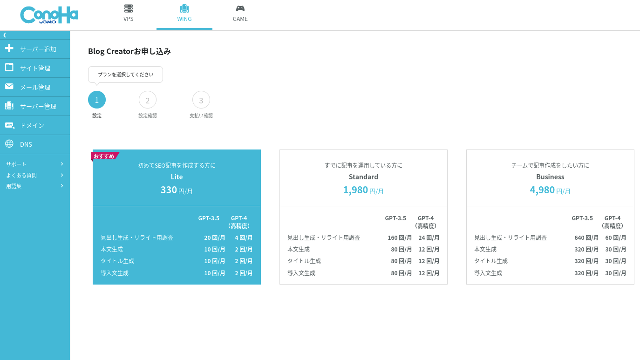
Choose a plan. The Lite plan is fine. Its functions are the same as the higher plans. The higher plans simply give you more AI generations. Since all you need at first is a trial, go with the Lite plan at 330 yen per month.
- STEP.4Payment
A payment confirmation screen will appear. Click "Confirm." Your application is now complete.
Blog Creator арқылы мақала жасау қадамдары
Мақала жазу процедурасы ресми сайттағы (Wapu-katsu) мына мақалада түсіндірілген. Дегенмен, мен өзім қолданған әдісті көрсеткен түсініктірек болады деп ойлаймын, сондықтан мына мақаланы.
Blog Creator арқылы мақала жасау
- STEP.1Choose Blog Creator
From "AI Blog Generation Tool," choose the "Blog Creator" tab.
- STEP.2Enter the keyword you want to rank for
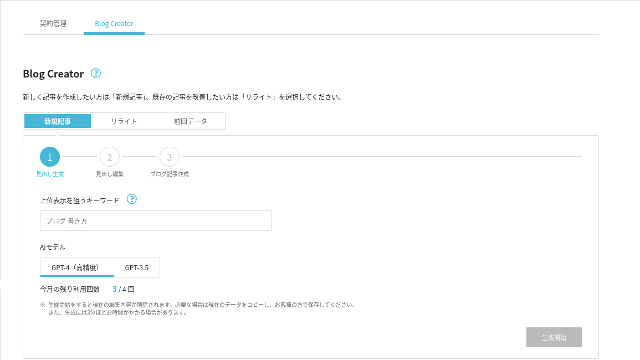
Blog Creator қайта жазуды да орындай алады, бірақ бұл жолы мен жаңа мақала жазып жатырмын. Іздеуде жоғары орын алғыңыз келетін кілт сөзді енгізіңіз: «WordPress тақырыбын нөлден бастап жасау». (Әрине, өзіңізге қажетті кілт сөзді енгізуіңіз керек.)
Choose the AI model. Let's go with the highly accurate GPT-4.
Click "Start Generation."
- STEP.3Edit the headings based on the keyword research
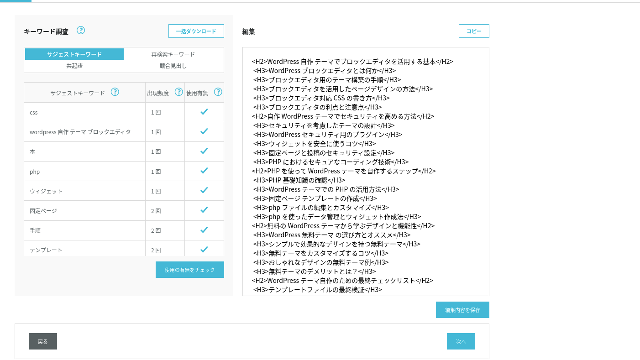
The keyword research will be displayed. Check the results from the four types of research. The more of them you make use of, the stronger the SEO tends to become.
On the editing screen, incorporate keywords that were not used in the generated headings. Once you finish editing, click "Save Edits." After that is saved, move on by clicking "Next."
- STEP.4Create the body, title, and introduction
Using the headings you created earlier as a base, have AI generate the body, title, and introduction. Click "AI Generate" for each item.
Choose whether to use GPT-4 or GPT-3.5. I chose GPT-4.
After generating each one with AI, click "Save Edits." That completes the Blog Creator generation process.
Тақырыптың бірнеше нұсқасы көрсетіледі, оларды тақырыпшалармен және мәтінмен салыстырып, ең қолайлысын таңдаңыз.
Бәрі дайын болғаннан кейін әр бөлікті көшіріп, оны жаңа WordPress жазбасына қойып, мақаланы жариялаңыз.
Генерацияланатын мәтін көлеміне шектеу бар сияқты. Осы «WordPress тақырыбын нөлден бастап жасау» мақаласы үшін жасалған мәтін жеткіліксіз болды. Сондықтан ол орта жолда тоқтап қалғаннан кейін, мен мәтіннің қалған бөлігін жасау үшін тоқтаған жерден кейінгі тақырыпшаларға «AI Generate» функциясын қайтадан қолдандым.
«WordPress тақырыбын нөлден бастап жасау» кілт сөзі бойынша мен жасаған және бір-бірімен бәсекелесетін төрт мақала
Мен оларды бір кілт сөзді және бірдей процедураны қолдана отырып AI арқылы жасаттым. Дайын болған төрт мақала төменде берілген. Мен олардың бәрін осы сайтқа жүктедім. Олар бір-бірінің трафигін жеп, өзара бәсекелесіп жатыр.
Blog Creator арқылы жасалған мақала
WordPress тақырыбын нөлден бастап жасаудың толық нұсқаулығы: Сенімді сайт құруға арналған қадамдар мен бақылау тізімі
WordPress тақырыбын нөлден бастап жасаудың толық нұсқаулығы: Сенімді сайт құруға арналған қадамдар мен бақылау тізімі
serverfield.org
ChatGPT-4o арқылы жасалған мақала

Жаңа бастаушыларға арналған! WordPress-те теңшелетін тақырыпты қалай жасауға болады
Жаңа бастаушыларға арналған! WordPress-те теңшелетін тақырыпты қалай жасауға болады
serverfield.org
Claude 3 арқылы жасалған мақала
Өзіңіздің WordPress тақырыбыңызды жасап, ерекшелікке толы сайт құрыңыз!
Өзіңіздің WordPress тақырыбыңызды жасап, ерекшелікке толы сайт құрыңыз!
serverfield.org
Gemini 1.5 Pro арқылы жасалған мақала
Бірсарындылықтан арылыңыз! Жеке WordPress тақырыбыңызды жасау арқылы өзіңіздің мінсіз сайтыңызды құрыңыз
Бірсарындылықтан арылыңыз! Жеке WordPress тақырыбыңызды жасау арқылы өзіңіздің мінсіз сайтыңызды құрыңыз
serverfield.org
AI жеңетін сияқты болғандықтан, Blog Creator-дің артықшылықтарын таныстырғым келеді
AI looks like it might win. So, as insurance so that ConoHa WING does not get mad at me, Blog Creator-дің артықшылықтарын осы жерде таныстырғым келеді. (Мен өзім сәл қорқақ адаммын.)
AI мен құралдарға толық сүйенбей-ақ жазу мәнеріңіз бен SEO-ді жақсарта аласыз
Blog Creator uses AI. However, while checking the researched keyword results, you are encouraged to polish the content further yourself. In practice, doing so keeps you from relying entirely on AI or tools. By using it skillfully, you can steadily improve your writing skills and your understanding of SEO.
Blog Creator can, so to speak, help you grow like a partner running alongside you.

Boost Your SEO: Web Writing Techniques That Win Users Over With Highly Readable Copy
Boost Your SEO: Web Writing Techniques That Win Users Over With Highly Readable Copy
serverfield.org
Тақырып құрылымы мен мәтін ұзындығы бұрыннан оңтайландырылған, сондықтан түзету қажет емес
Blog Creator optimizes the heading structure and body length better than generic AI. As a result, мақаланы түзетусіз көшіріп-қойып жариялай аласыз.(That said, you still need to fact-check the content.)
Қарапайым AI-мен түзетулер қажет болып, көп уақыт алатын.
- Тақырыптар H4-тен басталатындықтан, оларды түзету керек.
- Тақырыптарды жасағаннан кейін толық мәтінді бірден генерацияласаңыз, ол дұрыс жазылмайды.
- «Introduction:» және «Body:» сияқты қажетсіз сөздерді өшіру керек.
Creating body text from the headings and doing everything else manually is simply too much work.
AI мақала жазу құралы ретінде, ол басқа компаниялардың ұсыныстарына қарағанда кілт сөздерге көбірек бағытталған
Басқа серверлік компаниялар да AI мақала жасау құралдарын ұсынады.
Sakura Rental Server қолданушыларға ChatGPT-4-ті тегін пайдалануға мүмкіндік беретін «User Local AI Writer» құралын ұсынады. ChatGPT-4-тен басқа, ол өзінің жергілікті AI жүйесін де қолданады.
Value Server айына 1650 иеннен басталатын «Value AI Writer» құралын ұсынады. Ол ChatGPT-4o нұсқасын қолданады.
Осылайша, бұл құралдар сізге оларды тегін пайдалануға немесе ең соңғы AI-ға қол жеткізуге мүмкіндік беруі мүмкін, бірақ they are not built around SEO-strong keywords.Blog Creator алдымен SEO үшін тиімді кілт сөздердің негізін құрады, содан кейін мақаланы жазу үшін AI-ды қолданады.
In the end, when you write a blog, you have a target keyword you want to rank for, right?Blog Creator алдымен осы мақсатты анықтайды, содан кейін мақаланы жасайды.AI sprints properly toward a clearly defined goal is what it does. It is not just running blindly.
Бұл басқа AI мақала жазу құралдары мен Blog Creator.
Қорытынды: Нәтижені өзіңіз іздеп, тексеріп көріңіз
So what happened in the end?
The answer is not for me to decide. Let's submit it to Google, just as we always do. «WordPress custom theme» деп іздеп, біздің сайтты (https://serverfield.org) қараңыз. Төмендегі мақалалардың бірі сол жерде шығуы керек.
- Blog Creator мақаласы: WordPress тақырыбын нөлден бастап жасаудың толық нұсқаулығы: Сенімді сайт құруға арналған қадамдар мен бақылау тізімі
- ChatGPT-4o maқаласы:Жаңа бастаушыларға арналған! WordPress-те теңшелетін тақырыпты қалай жасауға болады
- Claude 3 мақаласы: Өзіңіздің WordPress тақырыбыңызды жасап, ерекшелікке толы сайт құрыңыз!
- Gemini 1.5 Pro мақаласы: Бірсарындылықтан арылыңыз! Жеке WordPress тақырыбыңызды жасау арқылы өзіңіздің мінсіз сайтыңызды құрыңыз
Сол сәтте іздегенде шығатын мақала сол сәттегі ең жақсы құрал болып табылады.
Blog Creator is better than I imagined. Оның мақаласы іздеуде жиі шығып тұрады.
If you want to try it, ConoHa WING is where you should sign up.
" ConoHa WING» — қолданушылар саны қарқынды өсіп келе жатқан, GMO Internet Group ұсынатын жоғары жылдамдықты сервер және оны біз де пайдаланамыз. Серверге тіркелген кезде WordPress автоматты түрде орнатылатындықтан, кез келген адам оны оңай бастай алады. Ол баға мен өнімділіктің тамаша теңгерімін ұсынады, сондықтан оны өзіміз де қолданамыз.
2025 жылғы 5 тамызға дейін сервер ақысына 53%-ға дейін жеңілдік, сонымен қатар екі домен мәңгілікке тегін және бірінші ай тегін
32 WordPress хостинг қызметінің толық салыстыруы: Жеке тұлғаларға, бизнестерге және шетелдік қолдануға ұсыныстар

«WordPress-ті бастағым келеді» деп ойлап, «ұсынылатын WordPress хостингі» деп іздегенде, жеке пайдалануға арналған серверлермен қатар, бизнестер мен шағын компанияларға арналған тарифтерге, сондай-ақ шетелдік және арзан серверлерге дейінгі мақалалардың өте үлкен тізімін көресіз. Шыны керек,
- Қай сайтқа сенуім керек?
- Серверді қарапайым әрі түсінікті жолмен таңдағым келеді!
- Show me how to start WordPress right now.
Бұл сізге таныс естіле ме? Сондықтан да осы мақала жеке тұлғалар, бизнестер, ішкі пайдалану және шетелдік пайдалану үшін 32 хостинг компаниясының ішінен ең үздік ұсыныстарды мұқият таңдап береді. Бұл түсініктемелерді күнделікті хостинг қызметтерін пайдаланатын қолданбаларды әзірлеу компаниясының SEO маманы ұсынады.