
10-օրյա անվճար փորձաշրջան
PR
Servers
Value Server-ի ակնարկ [2025 թ. թարմացում]․ էժան սերվերի մանրամասն գնահատում
Հրապարակված՝ 2025.04.18
Թարմացված՝ 2025.04.18
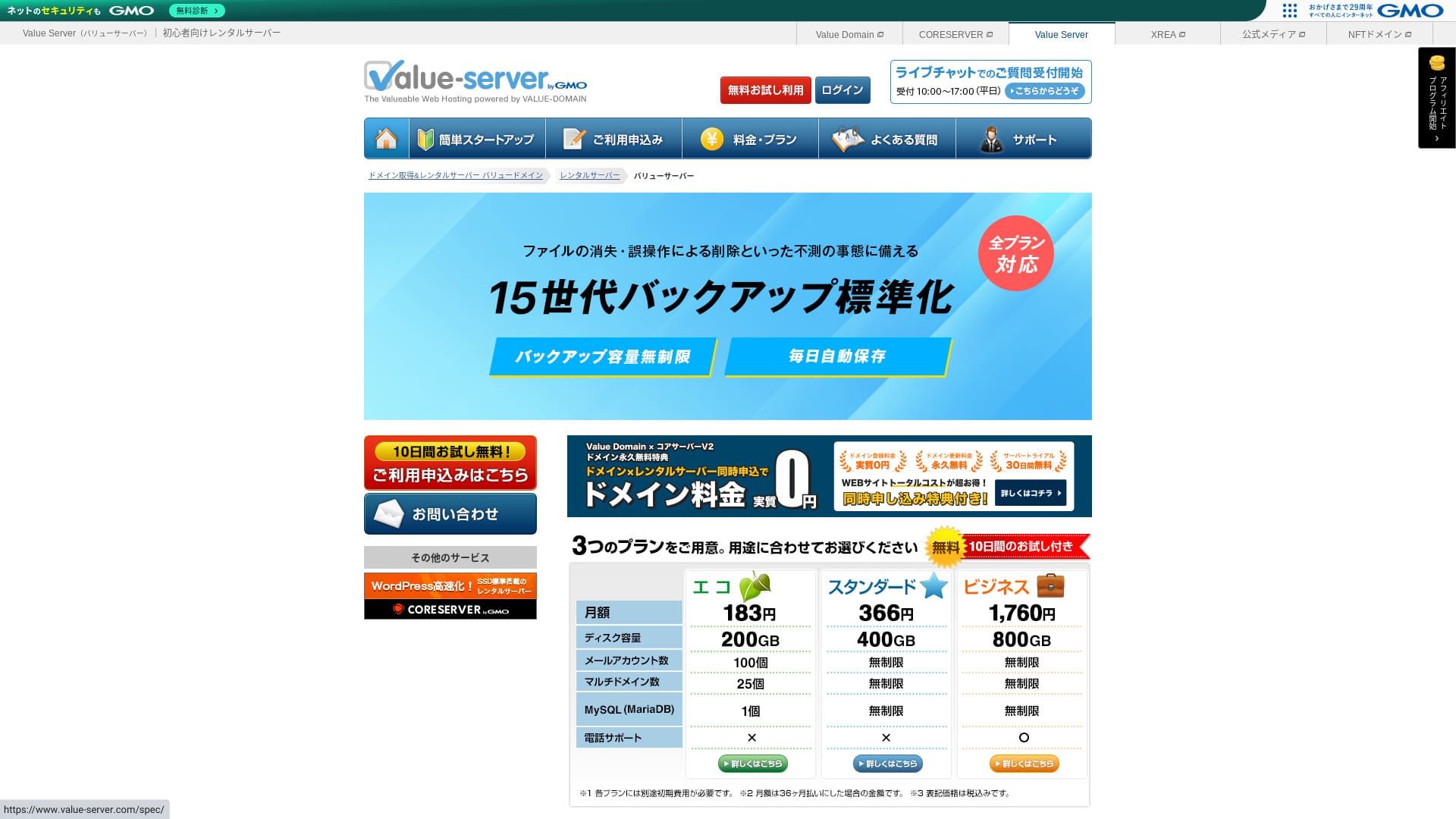
Value Server GMO Digirock, Inc.-ի կողմից գործարկվող հոսթինգ ծառայություն է, որը հայտնի է իր ցածր գներով, հատկապես Marutto փաթեթով։

Value Server առաջարկվում է ամենաէժան հնարավոր սերվերը օգտագործել ցանկացողների համար, որովհետև՝
- Արդյունաբերության ամենաէժան տարբերակներից մեկը
- Սերվերում օգտագործվում է SSD պահեստավորում
- 15 սերնդի պահուստները վստահություն են տալիս
Այդ պատճառով ծառայությունը, ամենայն հավանականությամբ, կբավարարի ձեզ։ Կարող եք փորձել այն 10 օր անվճար։
Համեմատվող սերվեր է Star Rental Server. Այն նույնիսկ ավելի ուժեղ է, քան Value Server այս առումով, որ առաջարկում է նաև անվճար փաթեթ։ Խնդրում ենք հաշվի առնել նաև այն։
| Սերվերի տեսակ | Համատեղ սերվեր |
| Ցուցադրման արագություն (TTFB) | Չկաt measured |
| Առաջարկվող փաթեթ և պայմանագրի ժամկետ | Eco 12 ամիս |
| Փորձաշրջան / գումարի վերադարձի երաշխիք | Չկա |
| Ամսական վճար (12-ամսյա պայմանագիր) | 220 yen |
| Սկզբնական կարգավորման վճար | Անվճար |
| Անվճար դոմեն | Չկա |
| Աջակցություն | Էլփոստ և չաթ (աշխատանքային օրերին 10:00-17:00) |
| Աշխատունակության ժամանակ | Բացահայտված չէ |
| Պահեստ | 200GB |
| Տվյալների բազաների քանակը | 1 |
| Անվտանգության միջոցներ | Չկա |
| SSL | Անվճար shared SSL, custom SSL |
| Պահուստավորում / վերականգնում | 15 սերնդի պահուստավորում անվճար, վերականգնումն անվճար |
| Էլփոստի հաշիվների քանակը | 3 |
| Էլփոստի անվտանգության միջոցներ | POP/POP3S, SMTP/SMTPS, IMAP/IMAPS, սպամի զտիչ, վիրուսների զտիչ, անհատական զտիչներ |
| Սերվերի / կայքի տեղափոխման ծառայություն | Չկա |
| WordPress-ի նախատեղադրում | Չկա |
| CDN | Չկա |

Hikaru Ono
Value Server-ը կառավարվում է ոլորտում հայտնի GMO Digirock, Inc.-ի կողմից, ուստի թեև այն ամենաէժան տարբերակներից է, որակի մասին անհանգստանալու կարիք չկա։ Ես անձամբ այն օգտագործելիս խնդիրներ չեմ ունեցել։
Այնուամենայնիվ, քանի որ այն էժան է, գործառույթների և տարողության առումով սահմանափակումներ կան, այնպես որ դրանք ուշադիր ստուգեք։
Value Server-ը համեմատած այլ սերվերների հետ
- ԸնդհանուրԳնահատական★★★☆☆
- Սերվերի արագություն ★★★☆☆
- Pricing ★★★★★
- Stability ★★★☆☆
- WordPress-ով սկսելու հեշտություն* ★★★☆☆
- Դոմենի կառավարում և SSL կարգավորում նման գործողություններ* ★★★☆☆
* Իմ իրական օգտագործման փորձի հիման վրա։

Ինչպես ընտրել անհատների համար առաջարկվող 21 WordPress հոսթինգ ծառայություններից
Ինչպես ընտրել անհատների համար առաջարկվող 21 WordPress հոսթինգ ծառայություններից
serverfield.org
- Չկաvember 4, 2025 շուկայի հետազոտության տվյալներ, ըստ արագության sorted
- Ամսական վճարները WordPress գործարկող ամենաէժան փաթեթի առաջին տարվա արժեքն են
- Արագությունը նույն պայմաններում demo կայքերում չափված Time to First Byte-ն է
“Value Server”-ը GMO Digirock, Inc.-ի կողմից կառավարվող էժան վարձակալական սերվեր է։ Թեև այն անհատների համար մատչելի գնով է, առաջարկում է ուժեղ գործառույթներ, ինչպիսիք են անվճար shared SSL-ը և անվճար 15-սերնդյա պահուստավորումը։
Value Server-ի օգտվողների կարծիքները և հինգ հիմնական առանձնահատկությունները

Marutto փաթեթով կարելի է տարեկան 3,060 իենով WordPress կայք ստեղծել
Value Server's Marutto plan lets you have a WordPress կայքը for 3,060 yen per year. It is extremely inexpensive.
Համեմատենք այն հիմնական տեղական սերվերների հետ հետևյալ պայմաններով։
- Սկզբնական կարգավորման վճար
- Սերվերի 12-ամսյա պայմանագիր
- Դոմենի մեկ տարվա վճարի արժեքը
- Ամենաէժան փաթեթը, որով կարելի է օգտագործել WordPress
| Հոսթինգ ընկերություն | Մեկ տարվա արժեքը |
|---|---|
| Value Server | 2,310 yen |
| ConoHa WING | 11,292 yen |
| Xserver | 10,560 yen |
| Lolipop! | 5,940 yen |
| Sakura Rental Server | 6,600 yen |
Of course, compared with the servers above, its features and specifications are less impressive. Even so, it should still be a strong option for people who want to build a կայքը as cheaply as possible.
SSD-ն ներառված է բոլոր փաթեթներում
Value Server includes SSD պահեստավորում բոլոր փաթեթներում even though it is inexpensive. With ultra-low-cost servers, it is common to see slow կայքը loading because they rely on cheap hard drives.
Կայքի ցուցադրման արագությունն ազդում է նաև SEO-ի վրա, ուստի սերվերի ընտրությանը չի կարելի թեթև վերաբերվել։ Սակայն SSD-ի առկայության դեպքում կարելի է ավելի հանգիստ լինել։
Նշում՝ Ի՞նչ է SEO-ն. որոնման համակարգերի օպտիմալացման ճիշտ քայլերն ու մեթոդները
Բոլոր փաթեթներում ներառված է ավտոմատ պահուստավորման 15 սերունդ
Value Server էժան է, բայց միևնույն ժամանակ տրամադրում է ավտոմատ պահուստավորման 15 սերունդ բոլոր փաթեթներում։
Եթե պահուստավորման գործառույթ չկա, հարձակման կամ սխալի պատճառով տվյալների կորուստից հետո կայքը վերականգնել չեք կարողանա։ Value Server-ում սերվերը ձեր տվյալներն ամեն օր ավտոմատ պահուստավորում է, ինչը հանգստություն է տալիս։
Պահուստավորման այս 15 սերունդը տպավորիչ է։ Նույնիսկ Lolipop!-ի նման խոշոր սերվերները դա չեն առաջարկում իրենց էժան փաթեթներում։ GMO Digirock, Inc.-ի կողմից կառավարվող Core Server-ն էլ իր էժան փաթեթում պահուստավորման գործառույթներ չի ներառում։
Այս տեսանկյունից Value Server-ը շատ բարեհաճ ծառայություն է էժան մատակարարի համար, քանի որ առաջարկում է 15-սերնդյա ուժեղ պահուստավորում։
Value Server-ի թերությունները և դրանց հետ վարվելու ձևերը՝ անկեղծորեն

Թեև Value Server-ն ունի առավելություններ, այն նաև թերություններ ունի։ Օգտագործելուց առաջ համոզվեք, որ դրանք ամբողջությամբ հասկանում եք։
There Are Չկա Advanced Security Measures Such as a WAF
Value Server չի տրամադրում WAF-ի նման առաջադեմ անվտանգության միջոցներ։ Այն առաջարկում է որոշակի մակարդակի պաշտպանություն, այդ թվում՝ custom SSL-ի աջակցություն, բայց մի փոքր մտահոգիչ է, որ նորագույն հարձակման մեթոդների դեմ առանձնապես ուժեղ չէ։
Եթե ցանկանում եք օգտագործել WAF, տեղադրեք անվտանգությանն ուղղված WordPress պլագիններ։
Նշում՝ Ինչպես ընտրել WordPress-ի հինգ պլագին, որոնք ուժեղացնում են անվտանգությունը
Աշխատունակության ժամանակ Is Չկաt Disclosed
Unfortunately, Value Server does not disclose its uptime. That means it is impossible to know the server's stability in numerical terms. If reliability is a priority, such as for a corporate կայքը, that uncertainty may make you hesitate.
Նշում՝ A Beginner's Guide to Understanding Hosting Աշխատունակության ժամանակ and SLAs
If a server becomes unstable because of trouble, your կայքը may fail to appear or become extremely slow to load. In some cases, a 503 error may occur. That is stressful for people visiting your site.
Նշում՝ Ի՞նչ է 503 սխալը. ինչպես խուսափել վեբ ծանրաբեռնվածությունից և արձագանքել արտակարգ իրավիճակում
Քանի որ uptime-ը իմանալ հնարավոր չէ, Value Server-ն օգտագործեք միայն այն ռիսկը հասկանալուց հետո, որ այն կարող է անկայուն լինել։
Marutto և Eco փաթեթներով կարելի է ստեղծել միայն մեկ WordPress կայք
Value Server-ի Marutto և Eco փաթեթներով կարող եք ստեղծել միայն մեկ WordPress կայք։
- I want to create an event site in addition to my main կայքը
- Ցանկանում եմ երկրորդ բլոգ ստեղծել
Եթե այդ պատճառներով երկրորդ WordPress կայքի կարիք ունեք, պետք է առանձին մեկ այլ սերվեր պատրաստեք։
Compare Value Server with Two Similar Սերվերներ
Համեմատենք Value Server-ը երկու մրցակից սերվերների հետ, որոնք նման են ցածր գնի առումով։ Նույնիսկ եթե դրանք նման են թվում, տարբերություններ կան, այնպես որ ժամանակ տրամադրեք և ուշադիր համեմատեք։
Core Server
Core Server կառավարվում է նույն ընկերության կողմից։ Այն առաջարկում է բարձր բնութագրեր՝ միաժամանակ մնալով մատչելի։ Կարող եք ընտրել ամենահարմար տարբերակը յոթ մանրամասն բաժանված փաթեթներից։ Կա գնի վրա կենտրոնացած V1 շարք և կատարողականի վրա կենտրոնացած V2 շարք։
Ընդհանուր, Core Server beats Value Server in features and specifications, so if price is not your top priority, Core Server is the better choice.

Core Server-ի ակնարկ [2025 թ. վերջին]. գների, արագության, առավելությունների և թերությունների մանրամասն ուղեցույց
Core Server-ի ակնարկ [2025 թ. վերջին]. գների, արագության, առավելությունների և թերությունների մանրամասն ուղեցույց
serverfield.org
Star Server
Star Rental Server is also inexpensive. At the same time, it resembles Value Server in its commitment to speed, including the use of SSD storage. It is somewhat more expensive than Value Server, but its greater transfer capacity is a strong point because it can keep up even if your կայքը traffic grows.
Star Server-ը ավտոմատ պահուստավորում չի ներառում։ Դա այն ոլորտներից է, որտեղ Value Server-ն առավելություն ունի։

Star Server-ի ակնարկ [2024 թ. վերջին]. զարմանալիորեն էժան և մանրամասն ստուգված
Star Server-ի ակնարկ [2024 թ. վերջին]. զարմանալիորեն էժան և մանրամասն ստուգված
serverfield.org
6 քայլով սկսեք WordPress կայք Value Server-ում
Սկսենք կայք Value Server-ով։
- STEP.1Բացեք պաշտոնական Value Server կայքը
On the top page, click “Try for Անվճար.”
- STEP.2Դիմեք սերվերի համար և ստացեք դոմեն
Choose a plan. Your server account name (the initial domain) can be anything. You will not use this initial domain as the domain for your կայքը. You can use it, but I do not recommend it.
At this point, you cannot yet select simultaneous WordPress installation, but after choosing your domain, you will be able to check it. Be sure to use it. It makes starting a WordPress կայքը much easier.
Այս սերվերում օգտագործելու դոմենի համար դիմելու տարբերակում ընտրեք «Get a domain for free»։ Այնուհետև մուտքագրեք ձեր նախընտրած ցանկացած տող։ Մատչելի վերին մակարդակի դոմեններից, օրինակ՝ .com և .net, սեղմեք ձեր ուզածի վրա։
Կարող եք ընտրել «.com» և «.co.jp» նման արմատային դոմեններ։ Ստացման և երկարաձգման վճարները տարբերվում են՝ կախված արմատային դոմենից։ Եթե չգիտեք՝ որն ընտրել, ընկերությունների համար հնարավորության դեպքում խորհուրդ եմ տալիս «.co.jp»։ Անհատների համար լավ ընտրություն են «.com»-ը և «.net»-ը։ Շատ մարդիկ ծանոթ են այս դոմեններին, ուստի դրանք պակաս կասկածելի են թվում և օգտվողների համար ավելի հեշտ են հասանելի։
Նշում՝ Ի՞նչ է դոմենը. նրա դերը որպես հասցե ինտերնետում և ինչպես ստանալ այն
Once you have selected the domain, check “Տեղադրեք WordPress-ը at the same time.”
Սեղմեք «Proceed»։
- STEP.3Մուտքագրեք օգտվողի տվյալները
Կհայտնվի օգտվողի տվյալների էկրանը։ Սեղմեք «User Registration», մուտքագրեք օգտագործման տեսակը, անունը և այլ տվյալներ, հաստատեք մանրամասները և սեղմեք «Register and proceed»։
Ավարտեք պարտադիր SMS հաստատումը, ապա սեղմեք «Confirm application»։
Պատասխանեք հարցաթերթիկին կամ բաց թողեք այն, ապա սեղմեք «Go to the control panel»։
- STEP.4Տեղադրեք WordPress-ը
Կառավարման վահանակի կառավարման տեղեկատվության մեջ կցուցադրվի նախկինում պատվիրած «Value Server (1)»-ը։ Սեղմեք այն և անցեք «New Control Panel»։
Այնուհետև «Tools»-ից ընտրեք «App Installation» և սեղմեք «WordPress Blog»։
Սեղմեք «+ Install this application» և ընտրեք դոմեն։ Նախկինում պատվիրած դոմենը կհայտնվի բացվող ցանկում, այնպես որ ընտրեք այն։
Տարբերակի կարգավորումները կարող եք թողնել ինչպես կան։
WordPress-ի համար օգտագործեք հետևյալ կարգավորումները։
- Ադմինի օգտանուն՝ Ցանկացածը հարմար է։
- Ադմինի գաղտնաբառ՝ Դարձրեք այն հնարավորինս բարդ։ Հետագայում հեշտությամբ կարող եք փոխել այն։
- Ադմինիստրատորի էլփոստ՝ An email address you use regularly. For companies, I recommend the business email of the person who manages the կայքը.
- Կայքի վերնագիր՝ Ցանկացածը հարմար է։ Հետագայում հեշտությամբ կարող եք փոխել այն։
- Կայքի նշանաբան՝ Սա ենթավերնագիրն է։ Ցանկացածը հարմար է։ Հետագայում հեշտությամբ կարող եք փոխել այն։
Ադմինի օգտանունը և ադմինի գաղտնաբառը օգտագործվում են WordPress մուտք գործելիս։ Անպայման գրի առեք դրանք։
«Advanced» կարգավորումները կարող եք թողնել ինչպես կան։
Ամեն ինչ մուտքագրելուց հետո սեղմեք «+ Install»։ Տեղադրումն ավարտվելուց հետո սեղմեք էկրանին երևացող այն URL-ը, որն ավարտվում է «wp-admin/»-ով։ Դա ձեր WordPress ադմինիստրացիայի էկրանի URL-ն է։
- STEP.5WordPress-ի նախնական կարգավորում
Բացված WordPress մուտքի էկրանին մուտքագրեք տեղադրման ժամանակ սահմանած օգտանունն ու գաղտնաբառը, ապա սեղմեք «Log In»։
If you see a warning saying “Այս կայքը հասանելի չէ,” the DNS settings have not propagated yet. There is nothing to do but wait, so try logging in again every few hours.
Նշում՝ What Are DNS and Name Սերվերներ?
WordPress մուտք գործելուց հետո կարգավորեք permalink-ները։ WordPress-ի ադմինիստրացիայի էկրանում անցեք «Settings», ապա «Permalinks»։ Ընտրեք «Post name», ապա սեղմեք «Save Changes»։
«Post name»-ի դեպքում հոդված հրապարակելիս URL-ում կարող եք մուտքագրել ձեր նախընտրած ցանկացած տող։ Խորհուրդ եմ տալիս օգտագործել կարճ տող, որը ընթերցողներին կօգնի պատկերացնել հոդվածի բովանդակությունը։ Եթե այն չափազանց երկար է, ոմանք կարող են անհանգստանալ, որ կայքը կասկածելի է թվում։
- STEP.6Տեղադրեք պլագիններ
Վերադարձեք WordPress-ի ադմինիստրացիայի էկրան, անցեք «Plugins», ապա «Add New» և տեղադրեք ձեզ անհրաժեշտ պլագինները։
Once you find the plugin you want through search, click “Install Չկաw” and then “Activate.” After that, follow the instructions for each plugin.
Անպայման տեղադրեք անվտանգության և պահուստավորման պլագիններ։
- Ինչպես ընտրել WordPress-ի հինգ պլագին, որոնք ուժեղացնում են անվտանգությունը
- WordPress-ի 5 հզոր պահուստավորման պլագին, որոնք օգնում են վերականգնել ձեր տվյալները
Once you have installed the plugins as well, your WordPress կայքը is fully ready to go!
Ամփոփում
“Value Server”-ը GMO Digirock, Inc.-ի կողմից կառավարվող էժան վարձակալական սերվեր է։ Չնայած դրա գինը մատչելի է նույնիսկ անհատների համար, այն առաջարկում է ուժեղ գործառույթներ, ինչպիսիք են անվճար shared SSL-ը և անվճար 15-սերնդյա պահուստավորումը։
10-օրյա անվճար փորձաշրջան
Value Server էժան սերվեր է։ Թեև դրա uptime-ը չի հրապարակվում, իսկ անվտանգության գործառույթները համեմատաբար թույլ են, ավտոմատ պահուստավորման 15-սերնդյա գործառույթի շնորհիվ սովորաբար վերջում կարող եք վերականգնել տվյալները։ Եթե ձեզ համար ամենակարևորը գինն է, փորձեք այն։
32 WordPress հոսթինգ ծառայությունների ամբողջական համեմատություն․ առաջարկներ անհատների, ընկերությունների և արտասահմանյան օգտագործման համար

Երբ մտածում եք՝ «Ուզում եմ սկսել WordPress-ով», և որոնում եք «առաջարկվող WordPress հոսթինգ», հանդիպում եք ամենատարբեր հոդվածների՝ անհատների, ընկերությունների կամ փոքր բիզնեսների տարբերակներից մինչև արտասահմանյան և էժան սերվերներ։ Անկեղծ ասած՝
- Ո՞ր կայքին եմ պետք նայել։
- Ես ուզում եմ սերվեր ընտրել պարզ և հասկանալի ձևով։
- Խնդրում եմ ցույց տվեք, թե ինչպես անմիջապես սկսել WordPress-ը։
Երբևէ այդպես զգացե՞լ եք։ Այդ պատճառով այս հոդվածը ուշադիր ընտրում է լավագույն տարբերակները 32 հոսթինգ ծառայություններից՝ անհատների, ընկերությունների, տեղական և արտասահմանյան օգտագործման համար և ներկայացնում դրանք։ Բացատրությունը տալիս է հավելվածների մշակման ընկերության SEO պատասխանատուն, որն ամեն օր օգտագործում է հոսթինգ ծառայություններ։