
Try it on besplatni hosting
PR
Posluzitelji
XREA recenzija [najnovije 2025]: prednosti i mane koristenja WordPressa na besplatnom hostingu, uz usporedbu s drugim besplatnim serverima
Objavljeno: 2025.04.18
Azurirano: 2025.04.18
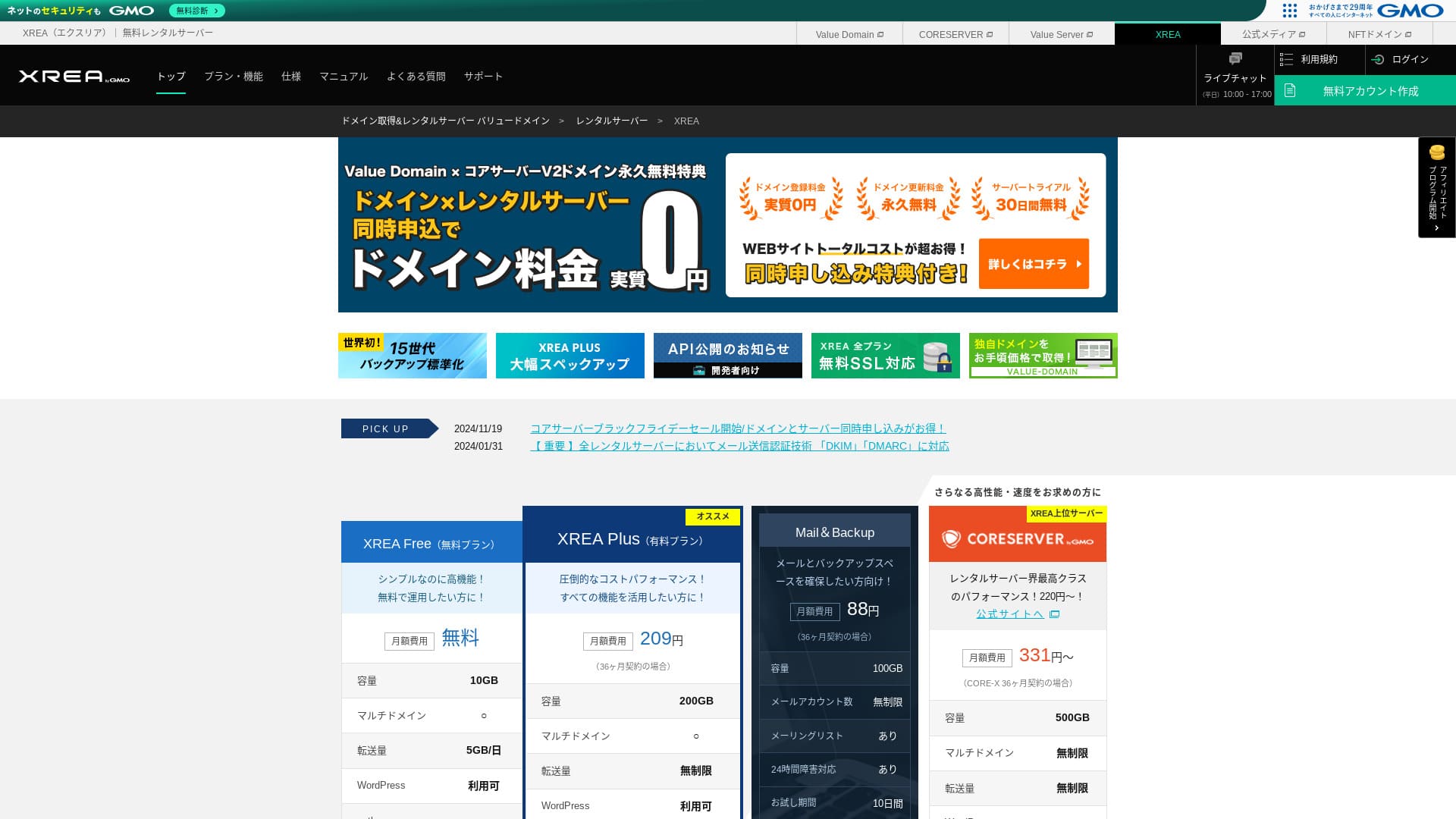
XREA is operated by GMO Digirock, Inc. and provides besplatni hosting. Unlike typical besplatni hosting usluga, it also offers chat support.

XREA preporučuje se za people looking for besplatni hosting because:
- WordPress mozete koristiti besplatno
- Mozete dobiti chat podrske
- Dolazi s 15 generacija sigurnosnih kopija
Zato cete vjerojatno biti zadovoljni. Buduci da je besplatno, svakako ga isprobajte.
Konkurentski server je Star Rental Server. Može se koristiti i besplatno, ali značajke u njegovim nadograđenim plaćenim planovima bolje su od onih koje nudi XREA. Razmotrite ga i vi.
| Vrsta servera | Dijeljeni poslužitelj |
| Brzina prikaza (TTFB) | Nije mjerena |
| Preporuceni plan i rok ugovora | Besplatno |
| Probni rok / jamstvo povrata novca | Nema |
| Mjesecna naknada (12-month contract) | Besplatno |
| Početna naknada za postavljanje | Besplatno |
| Besplatna domena | Nema |
| Support | E-mail i chat (10:00-17:00) |
| Uptime | Nije objavljeno |
| Storage | 10GB |
| Broj baza podataka | 5 |
| Sigurnosne mjere | Nema |
| SSL | Besplatni SSL, shared SSL |
| Sigurnosna kopija / obnova | 15 generacija sigurnosnih kopija besplatno, obnova besplatna |
| Broj računa e-pošte | 100 |
| Sigurnosne mjere e-pošte | POP preko SSL-a, IMAP preko SSL-a, SMTP preko SSL-a, skeniranje virusa |
| Usluga migracije servera / web-stranice | Nema |
| Preinstalacija WordPressa | Nema |
| CDN | Nema |

Hikaru Ono
XREA mi je djelovao malo neobicno po pitanju upotrebljivosti upravljacke ploce. To je samo moj osobni dojam. Ipak, svatko ga moze koristiti ako prolazi kroz njega uz detaljne sluzbene prirucnike.
Za besplatan server nudi vise nego dovoljno znacajki i podrske.
XREA Compared with Other Posluzitelji
- OverallOcjena★★★☆☆
- Brzina poslužitelja Nije mjerena
- Pricing ★★★★★
- Stability ★★★☆☆
- Jednostavnost početka rada s WordPressom* ★★★☆☆
- Radnje poput upravljanja domenom i postavljanja SSL-a* ★★★☆☆
* Na temelju mog osobnog iskustva korištenja.

How to Choose from 21 Recommended WordPress hosting usluge for Individuals
How to Choose from 21 Recommended WordPress hosting usluge for Individuals
serverfield.org
- November 4, 2025 podaci istraživanja tržišta, prema brzini sorted
- Mjesecna naknadas are the first-year cost of the cheapest plan that can run WordPress
- Brzina je Time to First Byte izmjeren na demo stranicama pod istim uvjetima
XREA recenzija i pet ključnih značajki

Besplatni poslužitelj koji može pokretati i WordPress
XREA je besplatan poslužitelj. There is no mjesecna naknada and no initial administrative fee.Unatoč tome, i dalje možete koristiti WordPress. Savršen je za osobe koje žele svesti troškove na apsolutni minimum. Usporedili smo ga s domaćim poslužiteljima prema sljedećim uvjetima.
- Početna naknada za postavljanje
- 12-mjesečni ugovor za poslužitelj
- Trošak jednogodišnjih naknada za domenu
- Najjeftiniji plan koji može koristiti WordPress
Postoje velike razlike u značajkama i specifikacijama, ali cijena koja ostaje oko jedne desetine i dalje je privlačna.
Dolazi s podrškom putem chata
XREA dolazi s podrškom putem chata.
Većina besplatnih poslužitelja nudi malo ili nimalo podrške. Uz XREA možete dobiti pomoć kada naiđete na problem, pa ga s povjerenjem mogu koristiti i osobe bez iskustva s poslužiteljima.
Podrška putem chata uživo dostupna je radnim danom od 10:00 do 17:00. Dostupna je i podrška e-poštom.
Dolazi s 15 generacija sigurnosnih kopija
XREA može zadržati čak 15 generacija sigurnosnih kopija. To je iznimno velikodušno. Čak i plaćeni poslužitelji često sigurnosne kopije nude kao plaćenu opciju ili naplaćuju zasebnu naknadu za obnovu.
Na primjer, LOLIPOP zahtijeva dodatnu plaćenu opciju od 330 jena mjesečno na nižim planovima prije nego što možete koristiti sigurnosne kopije.
Sigurnosne kopije su važne. Čak i ako je vaša web stranica zaražena zlonamjernim softverom ili slučajno izbrišete podatke, možete ih obnoviti ako imate sigurnosnu kopiju. Bez nje može nestati sve što ste izgradili svojim trudom.
S 15 generacija sigurnosnih kopija možete upravljati web stranicom bez brige.
Možete stvoriti pet WordPress web stranica
XREA vam omogućuje stvaranje do pet WordPress web stranica.
Napomena: Što je WordPress? Sustav za pokretanje web stranice i točke na koje treba obratiti pozornost
Postoji mnogo načina za korištenje, primjerice dodavanje bloga za hobi uz web stranicu tvrtke. Kada ste se prijavili za poslužitelj, možda ste mislili da je jedna stranica dovoljna, ali s vremenom možete pokrenuti novi posao ili pronaći nove hobije.
To vam štedi trud prijave za drugi poslužitelj, a ne košta ništa dodatno.
You Can Use Besplatno Custom SSL
XREA vam omogućuje korištenje besplatnog prilagođenog SSL-a. Neki besplatni poslužitelji ne nude besplatni prilagođeni SSL zbog ograničenja značajki.
SSL je ključna sigurnost za web stranicu. Ohrabrujuće je što ga pruža čak i besplatan poslužitelj.
Napomena: Što su SSL i TLS? Mehanizam i prednosti zaštite informacija šifriranjem
Nedostaci XREA-e, iskreno rečeno

Besplatno servers are attractive, but they also have drawbacks, so make sure to check them before you use one. Even if the financial burden is small, you still spend time and effort.
Prikazuju se oglasi
XREA automatski prikazuje oglase na vrhu vaše web stranice. Budući da se oglasi pojavljuju u najvidljivijem dijelu stranice, teško ga je koristiti za korporativnu web stranicu. Mogu se i kositi s dojmom vaše tvrtke.
Osobe koje žele ostvarivati prihod od oglašavanja, primjerice affiliate marketingom, vjerojatno ne žele prikazivati oglase koji ne doprinose njihovoj zaradi.
Da biste sakrili oglase, morate koristiti plaćeni plan XREA Plus. Ako ćete koristiti XREA Plus, bolje je razmotriti i druge plaćene poslužitelje.
Dopušteni promet je nizak
XREA ima nizak dopušteni promet. Kao rezultat, kako promet raste, web stranicu je sve teže prikazati. Objavljivanje web stranice koju ljudi zapravo ne mogu vidjeti poništava svrhu.
Napomena: Što su promet i količina prijenosa? Upravljanje i optimizacija web prometa
Uptime nije objavljen
Prilično zabrinjava to što njegov uptime nije objavljen. Ne možemo brojčano procijeniti koliko je stabilan. Ako poslužitelj nije stabilan, ni web stranica se neće pouzdano prikazivati. Web stranica koju ljudi ne mogu vidjeti poništava svrhu.
Napomena: A Beginner's Vodic to Understanding Hosting Uptime and SLAs
Umirujuće je koristiti poslužitelj s uptimeom od 99,99% ili više, što je mjerilo visoke dostupnosti. Pri 99,99% poslužitelj je nedostupan manje od jednog sata tijekom ugovornog razdoblja od 365 dana. Ostatak vremena vaša se web stranica može ispravno pregledavati.
Compare XREA with Two Competing Posluzitelji
Shin Free Server
Shin Besplatno Server is besplatan poslužitelj koji ne prikazuje oglase. Zbog toga ga je lakše koristiti čak i za korporativne web stranice. Njegov dopušteni promet potpuno je druge razine, pa se ne morate brinuti da će vam ponestati kapaciteta.
Međutim, za razliku od XREA-e, nema podršku. Potrebna vam je vještina da sami riješite probleme dok provjeravate priručnik i pretražujete web.

Shin Besplatno Server Review and Drawbacks [2025 Latest]: Starting WordPress on Besplatno Hosting
Shin Besplatno Server Review and Drawbacks [2025 Latest]: Starting WordPress on Besplatno Hosting
serverfield.org
Star Server Free
Star Server Besplatno is a free server run by a long-established domestic hosting company.
Međutim, ima više nedostataka od XREA-e, poput prikazivanja oglasa na pametnim telefonima i nedostatka podrške. Budući da njegov dopušteni promet nije objavljen, postaje zabrinjavajuće hoće li ostati vidljiv kako promet raste.

Star Server Review [2024 Latest]: Astonishingly Low Prices and a Thorough Look at the Real Prednosti i mane
Star Server Review [2024 Latest]: Astonishingly Low Prices and a Thorough Look at the Real Prednosti i mane
serverfield.org
Pokrenite WordPress web stranicu na XREA-i u 7 koraka
Pokrenimo web stranicu uz XREA!
- STEP.1Pristupite službenoj stranici
Kliknite "Create Account" na početnoj stranici.
- STEP.2Registrirajte se kao korisnik Value Domaina
Ovo je zaslon za stvaranje korisničkog računa. Unesite korisničko ime, lozinku i adresu e-pošte. Provjerite detalje i kliknite "Register."
Nakon dovršetka potvrde e-pošte registrirajte korisničke podatke kao što su ime i adresa. Lakše je ako dovršite i SMS potvrdu. Kliknite "Review entered information," zatim nakon provjere ugovora o članstvu i pravila privatnosti kliknite "Register user."
Ponovno se pojavljuje zaslon za potvrdu, pa kliknite "OK" za dovršetak registracije korisnika.
Nakon što odaberete domenu, svakako označite "Install WordPress at the same time."
Kliknite "Next."
- STEP.3Prijavite se za XREA
Log in to Value Domain, select "XREA" from "Server," click "Create a new XREA account," and then click "Get XREA (Besplatno)."
Za željeni naziv računa možete koristiti bilo koji niz znakova koji želite.
Možete koristiti .shop domenu besplatno jednu godinu. Ako nemate snažnu preferenciju, koristite .shop domenu. Međutim, od druge godine nadalje obnova .shop domene košta 5.440 jena godišnje, što je prilično skupo.
Preporučujemo poznate domene kao što su .com i .net. Njihove naknade za obnovu također su razumne, ispod 2.000 jena.
Napomena: Što je domena? Njezina uloga kao adrese na internetu i kako je dobiti
Provjerite uvjete korištenja za poslužitelj i sigurnosnu kopiju, a zatim kliknite "Register." Vaš će račun zatim biti stvoren.
Ako niste dobili .shop domenu: Nabavite domenu putem Value Domaina
Na vrhu stranice Value Domain odaberite "Domain Registration." Unesite bilo koji niz znakova i pretražite; prikazat će se dostupne domene.
Provjerite naziv domene i rok ugovora. Jedna godina je u redu. Budući da ste već podnijeli zahtjev za XREA, označite "Do not use a server." Provjerite detalje registracije i kliknite "Next."
Odaberite način plaćanja, provjerite da ste pregledali uvjete korištenja i kliknite "Confirm application." Time je stjecanje domene dovršeno.
Otvorite XREA kontrolnu ploču, odaberite "Domain Settings" i kliknite "Create new domain setting." Unesite naziv domene koji ste ranije dobili i kliknite "Create new domain setting." Time se domena postavlja na XREA-i.
- STEP.4Stvorite bazu podataka
Stvorite bazu podataka kako biste mogli koristiti WordPress.
Napomena: Što je baza podataka? Sustav upravljanja i rada ključan za WordPress
Prijavite se na XREA kontrolnu ploču. Iz izbornika idite na "Database", zatim "MsSQL," i kliknite "Create new database."
- Naziv baze podataka: bilo što je u redu
- Lozinka: bilo što je u redu. Neka bude što složenija
- Kodiranje znakova: ostavite kako jest
- Memo: ne morate ništa pisati
Nakon što unesete gore navedeno, kliknite "Create new database" i baza podataka će biti stvorena.
- STEP.5Instalirajte WordPress
U XREA kontrolnoj ploči otvorite "Site Settings" i kliknite domenu na koju želite instalirati WordPress. Kada se zaslon promijeni, kliknite "WordPress."
Navedite instalacijsku putanju. Ako CMS Install nije moguće kliknuti, jednom otvorite instalacijski URL i postat će moguće kliknuti.
Kada možete nastaviti s instalacijom, konfigurirajte WordPress na sljedeći način.
- Naziv baze podataka: Naziv baze podataka koju ste ranije stvorili
- Username: Bilo što je u redu. Kasnije je teško promijeniti
- Password: Lozinka koju ste stvorili pri izradi baze podataka
- Naziv hosta baze podataka: localhost
- Prefiks tablice: Bilo što je u redu.
Nakon što sve unesete, kliknite "Submit", a zatim "Run installation."
Sada dodatno konfigurirajte WordPress informacije.
- Naslov stranice: Bilo što je u redu. Možete promijeniti kasnije
- Username: Bilo što je u redu. Kasnije je teško promijeniti
- Password: Bilo što je u redu. Neka bude što složenije
- Naziv hosta baze podataka: Vaša svakodnevna adresa e-pošte
- Vidljivost za tražilice: Bilo što je u redu. Označite ako želite da ga svi mogu pronaći
Korisničko ime i lozinku koristite pri prijavi u WordPress. Obavezno ih zapišite.
Kada instalacija završi, kliknite "Log in."
- STEP.6Konfigurirajte SSL
Otvorite "Site Settings" u XREA kontrolnoj ploči. Kliknite "Create new site setting."
Open the domain name where you configured WordPress, select "Besplatni SSL" under SSL, and click "Create new site setting."
- STEP.7Instalirajte dodatke
Vratite se na WordPress administratorski zaslon i idite na "Plugins", zatim "Add New", kako biste instalirali potrebne dodatke.
Kada pretraživanjem pronađete dodatak koji želite instalirati, kliknite "Install Now", a zatim "Activate." Nakon toga nastavite prema uputama za svaki dodatak.
Obavezno instalirajte dodatke za sigurnost i sigurnosne kopije.
- Kako odabrati pet WordPress dodataka koji jačaju sigurnost
- Pet snažnih WordPress dodataka za sigurnosne kopije koji vam omogućuju oporavak podataka
Nakon što instalirate dodatke, vaša WordPress web stranica je spremna.
Sazetak
Using the besplatni hosting service XREA omogućuje vam stvaranje WordPress web stranice plaćanjem samo domene. Ima nedostataka, ali malo je stvari tako dobrodošlo kao nešto besplatno. Koristite ga mudro.
Complete Comparison of 32 WordPress hosting usluge: Recommendations for Individuals, Companies, and Overseas Use

When you think, “I want to start WordPress,” and search for “recommended WordPress hosting,” you find all kinds of articles, from options for pojedince and for tvrtke or male tvrtke to overseas servers and inexpensive servers. Honestly speaking,
- Koju stranicu trebam pogledati?
- Želim odabrati poslužitelj na jednostavan i razumljiv način!
- Pokažite mi kako odmah pokrenuti WordPress.
Jeste li se ikada tako osjećali? Zato ovaj članak carefully selects the best choices from 32 hosting usluga for pojedince, tvrtke, domacu upotrebu, and inozemnu upotrebu and introduces them. The explanation comes from the SEO lead at an app development company that uses hosting usluga every day.