עד 53% הנחה על דמי השרת עד 5 באוגוסט 2025, בתוספת שני דומיינים בחינם לתמיד והחודש הראשון בחינם
PR
שרתים
אני מרחם על ConoHa, אבל אני מעמיד את Blog Creator המוערך מול שלושת עוצמות ה-AI החזקות ביותר של 2024
פורסם: 2025.01.30
עודכן: 2025.01.30

מצטערים, אך החברה שלנו משתמשת ב-ChatGPT-4o, Claude 3, ו-Gemini 1.5 Pro.
As you probably know, קונו הא ווינג offers "Blog Creator", כלי לכתיבת מאמרים באמצעות AI, החל מ-330 ין לחודש. כמי שהיה נוהג לבזבז יותר מ-10 שעות בכתיבת מאמר לפני מספר שנים בלבד, אני מוצא את זה כמעט מדכא כמה זה נוח. עדיין, אין טעם להתנגד לרוח הזמן, ולכן אני חושב שהדבר הטוב ביותר לעשות הוא ללמוד להשתמש בו היטב.
עם זאת, אנו חברה לפיתוח מערכות, ואנו משתמשים באופן פעיל בשלושה סוגי AI.
- ChatGPT-4o
- Claude 3
- Gemini 1.5 Pro
The AI industry changes so quickly that some jaw-dropping new tool could Boom!אך גם נכון ל-1 בינואר 2025, שלושת אלה הם עדיין כלי AI חזקים המטפלים ביפנית היטב. (למען האמת, אלו כלים די יקרים, כך שאני צריך להמשיך לעבוד קשה בעסק המרכזי).
"Blog Creator probably cannot beat these three, but let's make it compete on that one-percent chance."

Blog Creator honestly did not inspire high expectations, and the competition was so strong that I felt bad for ConoHa. Sorry. Still, I wanted to make them compete, so גרמתי לכל אחת מה-AIs ליצור ולפרסם מאמר בנושא "בניית ערכת נושא של WordPress מאפס". יצרתי בכוונה מצב שבו ארבעת המאמרים מתחרים (קניבליזציה) זה בזה.
קניבליזציה אין פירושה קרנבל. ב-SEO, קניבליזציה מתייחסת למצב שבו מאמרים דומים באותו אתר חופפים ומתחרים זה בזה. זה גרוע ל-SEO. ניסוי זה משפיע גם על ה-SEO שלנו, אך אני עושה זאת בכל זאת.
The result was that Blog Creator was overwhelmingly good, so everyone, please sign up for קונו הא ווינג. If you do, you can use Blog Creator for one month חינם.

" קונו הא ווינג", שרת מהיר מבית GMO Internet Group עם מספר משתמשים הגדל במהירות, וכזה שאנו משתמשים בו בעצמנו. מכיוון ש-WordPress מגיע מותקן מראש כשנרשמים לשרת, כל אחד יכול להתחיל בקלות. הוא מציע איזון טוב בין עלות לביצועים, ואנו משתמשים בו גם בעצמנו.

★ בניית אתר ב-10 דקות! סקירה של ConoHa WING וכיצד להתחיל עם WordPress
What Is Blog Creator? It Can Handle Both Writing SEO-Friendly Articles from Scratch and Rewriting Existing Ones

Blog Creatorהוא כלי AI המומלץ לאנשים שהתעבורה שלהם אינה גדלה או שאינם יודעים לכתוב מאמרים. תוכלו לתת ל-AI לטפל הן בכתיבת מאמרים מותאמי SEO מאפס והן בשכתוב קיימים.
Blog Creator בודק ארבעה סוגי מילות מפתח בלחיצה אחת
לאיזו מילת מפתח אתם מנסים להתברג? עםBlog Creator, מחקר מילות המפתח מתחיל ברגע שאתם מזינים אותה.
- Suggested מילות מפתח: search suggestions shown when you type a מילת מפתח into Google's search box
- Related search מילות מפתח: מילות מפתח קשורות המוצגות בתוצאות החיפוש לאחר שחיפשתם את מילת המפתח בגוגל
- Co-occurring terms research: מילים המופיעות לעיתים קרובות יחד עם מילת המפתח
- Heading research for top-דירוג אתרים: כותרות המשמשות אתרים המדורגים גבוה עבור מילת המפתח
ברגע שתוכלו לבצע מחקר זה, יהיו לכם כל המרכיבים הדרושים לניסוחים וכותרות מותאמים ל-SEO. משם, תוכלו לכתוב את המאמר בעצמכם באמצעות חומרים אלו או לתת ל-Blog Creatorיכתוב את המאמר עבורכם.

Long-Tail Keyword Strategy Explained by a 7-Year SEO Veteran: 3 Steps to Explode Traffic in Niche Markets
Long-Tail Keyword Strategy Explained by a 7-Year SEO Veteran: 3 Steps to Explode Traffic in Niche Markets
serverfield.org
AI כותב מאמרים על בסיס מילות מפתח ידידותיות ל-SEO
Blog Creator is a tool that lets AI כתיבה מאמרים for you.
What makes it different from generic AI is that כלי בפיקוח מומחה מייצר תוצאות מילות מפתח חזקות ל-SEO, ולאחר מכן המאמר נכתב על בסיסן באמצעות ChatGPT-4o או ChatGPT-4o miniThis means it does not have AI כתיבה an מאמר out of nowhere. Instead, it has AI כתיבה based on מילת מפתח results built for SEO, so you can aim for stronger search rankings.
In other words, it is a tool that lets you create strong מאמרים efficiently while still taking advantage of AI.
תמיכה בשכתוב מאמרים שפורסמו
Blog Creator can even שכתוב מאמרים you have already שפורסם.פשוט הזינו את כתובת ה-URL של פוסט הבלוג ואת מילת המפתח, והוא יגיד לכם אילו מילות מפתח חשובות חסרות במאמר.
תוכניות התמחור של Blog Creator
There are three תוכניות. Since Lite is חינם for one month, I recommend starting by trying Lite.
| Plan | Lite | Standard | Business |
|---|---|---|---|
| Price | 330 yen | 1,980 yen | 4,980 yen |
| Outline יצירה | 24 times | 184 times | 700 times |
| Body יצירה | 12 times | 92 times | 350 times |
| Title יצירה | 12 times | 92 times | 350 times |
| Introduction יצירה | 12 times | 92 times | 350 times |
- Option
- Price: 550 yen
- קיבולת ייצור: 24 ייצורי מתאר, 12 ייצורי גוף, 12 ייצורי כותרת, ו-12 ייצורי פתיח
בואו נסקור כיצד להתחיל להשתמש ב-Blog Creator
שלבים להתחלת השימוש ב-Blog Creator
Getting Started with Blog Creator
- STEP.1בקרו באתר הרשמי: ConoHa WING
Blog Creatorכדי להשתמש ב-Blog Creator, עליכם להצטייד בחשבון ConoHa. צרו חשבון מהאתר הרשמי והתחילו עם WordPress. אם כבר יש לכם חשבון ConoHa, התחברו.
- STEP.2Open the AI Blog Generation Tool
From the control panel, open "AI Blog Generation Tool" under "Site Management." Then click "+ Blog Creator."
- STEP.3Choose a תוכנית
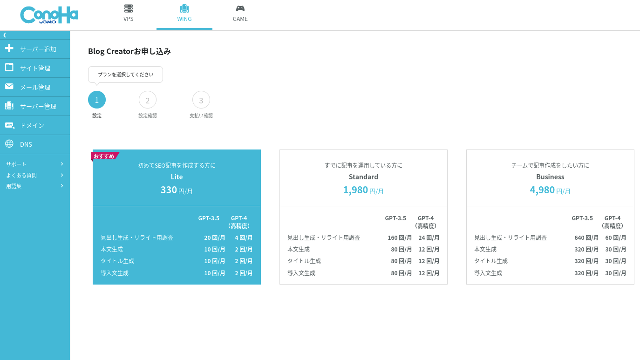
בחרו תוכנית. תוכנית ה-Lite מספיקה בהחלט. התפקודים שלה זהים לתוכניות הגבוהות יותר. התוכניות הגבוהות פשוט מעניקות לכם יותר ייצורי AI. מכיוון שכל מה שאתם צריכים בהתחלה זה ניסיון, לכו על תוכנית ה-Lite ב-330 ין לחודש.
- STEP.4Payment
A payment confirmation screen will appear. Click "Confirm." Your application is now complete.
שלבים ליצירת מאמר באמצעות Blog Creator
תהליך יצירת המאמר מוסבר במאמר זה באתר הרשמי, Wapu-katsu. עם זאת, אני חושב שזה קל יותר להבנה אם אציג את השיטה שבה השתמשתי בפועל, אז אנא עיינו ב-this מאמר.
Creating an Article with Blog Creator
- STEP.1Choose Blog Creator
From "AI Blog Generation Tool," choose the "Blog Creator" tab.
- STEP.2הזינו את מילת המפתח שברצונכם לקדם
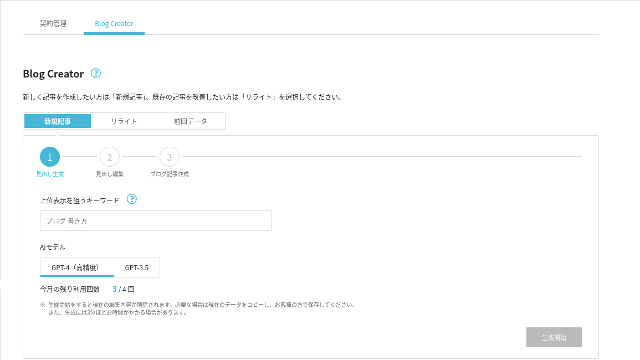
Blog Creator יכול לטפל גם בשכתובים, אך הפעם אני יוצר מאמר חדש. הזינו את מילת המפתח שברצונכם לקדם: "בניית ערכת נושא של WordPress מאפס". (כמובן, עליכם להשתמש במילת המפתח שאתם אישית רוצים לקדם).
Choose the AI model. Let's go with the highly accurate GPT-4.
Click "Start Generation."
- STEP.3ערכו את הכותרות בהתבסס על מחקר מילות המפתח
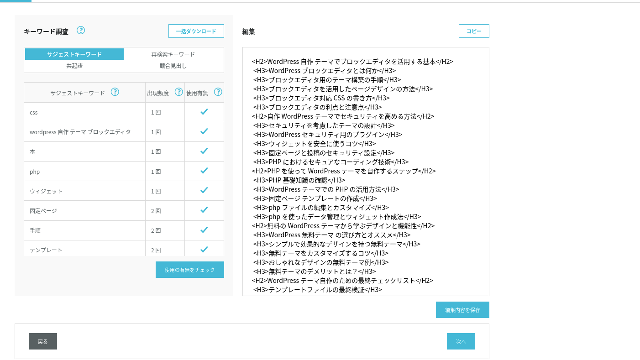
מחקר מילות המפתח יוצג. בדקו את התוצאות מארבעת סוגי המחקר. ככל שתעשו שימוש ביותר מהן, כך ה-SEO נוטה להתחזק.
במסך העריכה, שלבו מילות מפתח שלא נעשה בהן שימוש בכותרות שנוצרו. לאחר סיום העריכה, לחצו על "Save Edits". לאחר שמירה זו, התקדמו על ידי לחיצה על "Next".
- STEP.4צרו את הגוף, הכותרת והפתיח
תוך שימוש בכותרות שיצרתם קודם לכן כבסיס, תנו ל-AI לייצר את הגוף, הכותרת והפתיח. לחצו על "AI Generate" עבור כל פריט.
Choose whether to use GPT-4 or GPT-3.5. I chose GPT-4.
לאחר יצירת כל אחד עם AI, לחצו על "Save Edits". זה משלים את תהליך היצירה של Blog Creator.
יוצגו מספר מועמדים לכותרת, אז השוו אותם מול הכותרות והגוף ובחרו את המתאימה ביותר.
ברגע שהכל הושלם, העתיקו כל חלק, הדביקו אותו בפוסט WordPress חדש, ופרסמו את המאמר.
נראה שיש גבול לכמות הטקסט שהוא יכול לייצר. עבור מאמר זה של "בניית ערכת נושא של WordPress מאפס", הטקסט שנוצר לא היה ארוך מספיק. לכן לאחר שהוא עצר באמצע, השתמשתי שוב ב-"AI Generate" על הכותרות שהגיעו אחרי הנקודה שבה הוא עצר כדי ליצור את טקסט הגוף.
ארבעה מאמרים שגרמתי להם לבצע קניבליזציה זה לזה עבור מילת המפתח "בניית תבנית WordPress מאפס"
גרמתי ל-AI ליצור אותם באמצעות אותה מילת מפתח ואותו תהליך. ארבעת המאמרים הגמורים מופיעים להלן. העליתי את כולם לאתר זה. הם מתחרים זה בזה באופן מלא.
מאמר שנוצר עם Blog Creator
מדריך מלא לבניית ערכת נושא של WordPress מאפס: שלבים ורשימת תיוג לבניית אתר חזק
מדריך מלא לבניית ערכת נושא של WordPress מאפס: שלבים ורשימת תיוג לבניית אתר חזק
serverfield.org
מאמר שנוצר עם ChatGPT-4o

Beginner-Friendly! How to Create a Custom Theme in WordPress
Beginner-Friendly! How to Create a Custom Theme in WordPress
serverfield.org
מאמר שנוצר עם Claude 3
Build Your Own WordPress Theme and Create a Site Full of Originality!
Build Your Own WordPress Theme and Create a Site Full of Originality!
serverfield.org
מאמר שנוצר עם Gemini 1.5 Pro
Break Out of the Rut! How to Build Your Ideal Site by Creating Your Own WordPress Theme
Break Out of the Rut! How to Build Your Ideal Site by Creating Your Own WordPress Theme
serverfield.org
מכיוון שנראה ש-AI עשוי לנצח, אני רוצה להציג את היתרונות של Blog Creator
AI looks like it might win. So, as insurance so that קונו הא ווינג does not get mad at me, Blog Creator's advantages are what I want to introduce here. (I am a timid person.)
אפשר לשפר את הכתיבה וה-SEO בלי להישען לגמרי על AI או על כלים
Blog Creatorמשתמש ב-AI. עם זאת, בזמן בדיקת תוצאות מילות המפתח שנחקרו, מומלץ ללטש את התוכן עוד יותר בעצמכם. בפועל, פעולה זו מונעת מכם להסתמך לחלוטין על AI או על כלים. על ידי שימוש מיומן בו, תוכלו לשפר בהתמדה את כישורי הכתיבה שלכם ואת הבנת ה-SEO שלכם.
Blog Creator can, so to speak, help you grow like a partner running alongside you.

Boost Your SEO: Web Writing Techniques That Win Users Over With Highly Readable Copy
Boost Your SEO: Web Writing Techniques That Win Users Over With Highly Readable Copy
serverfield.org
מבנה הכותרות ואורך הגוף כבר מותאמים, כך שלא נדרשות תיקונים
Blog Creatorמבצע אופטימיזציה למבנה הכותרות ולאורך הגוף טוב יותר מאשר AI גנרי. כתוצאה מכך,תוכלו לפרסם את המאמר על ידי העתקה והדבקה שלו ללא ביצוע תיקונים.(That said, you still need to fact-check the content.)
With generic AI, corrections were necessary and time-consuming.
- הכותרות מתחילות מ-H4, ולכן יש לתקן אותן.
- אם אתם מייצרים את כל הגוף בבת אחת לאחר יצירת הכותרות, הוא אינו נכתב כראוי.
- You need to delete unnecessary words such as "Introduction:" and "Body:".
יצירת טקסט גוף מתוך הכותרות וביצוע כל השאר באופן ידני היא פשוט עבודה רבה מדי.
ככלי לכתיבת מאמרים באמצעות AI, הוא ממוקד יותר במילות מפתח ממה שחברות אחרות מציעות
Other שרת companies also offer AI מאמר-יצירה tools.
Sakura Rental Server offers "User Local AI Writer," which lets you use ChatGPT-4 for חינם. In addition to ChatGPT-4, it also uses its own local AI.
Value Server offers "Value AI Writer," which starts at 1,650 yen per month. That one uses ChatGPT-4o.
אז הכללים הללו עשויים לאפשר לכם להשתמש בהם בחינם או לתת לכם גישה ל-AI העדכני ביותר, אךthey are not built around SEO-strong מילות מפתח.Blog Creatorבונה תחילה סביב מילות מפתח חזקות ל-SEO ולאחר מכן משתמש ב-AI כדי לכתוב את המאמר.
בסופו של דבר, כשאתם כותבים בלוג, יש לכם מילת מפתח מיועדת שאתם רוצים להתברג עבורה, נכון?Blog Creatorמגדיר את היעד הזה תחילה ואז יוצר את המאמר.AI sprints properly toward a clearly defined goal is what it does. It is not just running blindly.
זהו ההבדל העיקרי בין כלים אחרים ליצירת מאמרים באמצעות AI לביןBlog Creator.
סיכום: אנא חפשו ובדקו בעצמכם את תוצאות ההתאמה
So what happened in the end?
The answer is not for me to decide. Let's submit it to Google, just as we always do.חפשו "WordPress custom theme" וחפשו את האתר שלנו (https://serverfield.org). אחד המאמרים הבאים אמור להופיע שם.
- Blog Creator מאמר: מדריך מלא לבניית ערכת נושא של WordPress מאפס: שלבים ורשימת תיוג לבניית אתר חזק
- ChatGPT-4o מאמר:Beginner-Friendly! How to Create a Custom Theme in WordPress
- Claude 3 מאמר: Build Your Own WordPress Theme and Create a Site Full of Originality!
- Gemini 1.5 Pro מאמר: Break Out of the Rut! How to Build Your Ideal Site by Creating Your Own WordPress Theme
המאמר שיופיע כאשר תחפשו באותו רגע יהיה הכלי הטוב ביותר באותו רגע.
Blog Creator is better than I imagined. Its מאמר keeps showing up.
If you want to try it, קונו הא ווינג is where you should sign up.
עד 53% הנחה על דמי השרת עד 5 באוגוסט 2025, בתוספת שני דומיינים בחינם לתמיד והחודש הראשון בחינם
השוואה מלאה של 32 שרתים להשכרה עבור WordPress: המלצות ליחידים, עסקים ושימוש בחו"ל

כאשר אתם חושבים "אני רוצה להתחיל עם WordPress" ומחפשים "WordPress מומלץ", תמצאו מגוון עצום של מאמרים, החל משרתים לשימוש אישי ואפשרויות לעסקים וחברות קטנות ועד לשרתים בחו"ל ושרתים זולים. למען האמת,
- Which אתר should I trust?
- I just want to choose a שרת in a simple, easy-to-understand way!
- Show me how to start WordPress right now.
Doesn't that sound familiar? That is why this מאמר בוחר בקפידה אפשרויות מומלצות מתוך 32 חברות שרתים להשכרה עבור יחידים, עסקים, שימוש מקומי ושימוש בחו"ל. ההסבר מגיע ממומחה ה-SEO של חברה לפיתוח אפליקציות המשתמשת בשרתים להשכרה מדי יום.