Xserver, Shin Rental Server અથવા Star Rental Server માટે sign up કરો તો તે સસ્તું પડે છે
PR
WordPress
કંપની sites અને affiliate sites માટે, પ્રતિષ્ઠિત XWRITE WordPress theme પસંદ કરો
પ્રકાશિત: 2025.02.04
અપડેટ કર્યું: 2026.03.12
જો તમારી site કંપની website અથવા affiliate site હોય, તો આ એક તમારે વિચારવું જોઈએ.
XWRITEXWRITE એ Xserver Inc. દ્વારા વિકસાવેલી blog-focused WordPress theme છે. હા, તે blogs માટે છે. પરંતુ સાચી વાત કહું તો, blog-oriented WordPress themesનું ક્ષેત્ર ખૂબ ભીડભર્યું છે, અને XWRITE સિવાય Cocoon અને SWELL જેવી ઘણી ઉત્તમ themes પણ છે. (શાયદ આ કારણે જ Xserver આ બે themes સાથે પણ ભાગીદારી કરે છે.)
SWELL સ્ટાઇલિશ લાગે છે, અને Cocoon મફત છે.
તેમ છતાં, XWRITE પાસે એવી મૂળ સુવિધાઓ છે જે Cocoon અને SWELL પાસે નથી, અને જો તમે તમારી homepage અથવા site પર તેનો ઉપયોગ કરી શકો, તો મને લાગે છે કે XWRITE વધારે સારી પસંદગી છે.
"XWRITE" એ Xserver Inc દ્વારા પ્રદાન કરવામાં આવેલ એક WordPress થીમ છે. તે દરેક માટે સરળ, ઝડપી અને ઉપયોગમાં સરળ હોવા માટે પ્રતિષ્ઠા ધરાવે છે. તે ખાસ કરીને કોર્પોરેટ વેબસાઇટ્સ અને સંલગ્ન સાઇટ્સ માટે ભલામણ કરવામાં આવે છે.

કંપની homepages અને affiliate sites માટે, આ બે શ્રેણીઓમાં XWRITE ખરેખર ચમકે છે. બાકીની બધી બાબતો માટે, સીધી વાત કરીએ તો, જે design તમને ગમે તે પસંદ કરો. પરંતુ જો તે company homepage અથવા affiliate site હોય, તો XWRITE ને ઓછામાં ઓછો એક ગંભીર નજર આપો.
Individuals, companies અને overseas use માટે 32 WordPress Hosting Servicesની સંપૂર્ણ સરખામણી

જ્યારે તમે “મારે WordPress શરૂ કરવું છે” એવું વિચારો અને “WordPress recommendations” માટે search કરો, ત્યારે personal hosting, companies અને small businesses માટેના options, overseas hosting અને low-cost servers વિશે અનેક પ્રકારના articles મળે છે. સાચી વાત તો એ છે કે,
- કઈ site પર trust કરવો?
- તમને કદાચ માત્ર simple અને understandable answer જોઈએ.
- તમને કદાચ તરત WordPress શરૂ કરવું હોય.
એ કારણે આ article individuals, companies, domestic use અને overseas use માટે 32 hosting providersમાંથી recommended choices કાળજીપૂર્વક પસંદ કરે છે. hosting રોજ વાપરતી app development companyના SEO lead દ્વારા તેની સમજણ આપવામાં આવી છે.
કંપની homepages માટે હું XWRITE ની ભલામણ કેમ કરું છું
Xserver દ્વારા બનાવવામાં આવેલ દુકાન-શૈલી અને કોર્પોરેટ ડેમો પૃષ્ઠો પર એક નજર નાખો. તેઓ તમને વિચારવા મજબૂર કરે છે, 'ઓહ, હું આવી વેબસાઇટ બનાવી શકું છું.'

DEMO CORPORATION
DEMO CORPORATION
demo.xwrite.jp

DEMO Cafe & Lounge
DEMO Cafe & Lounge
demo.xwrite.jp
Google Maps block તમને Google Maps ને સરળતાથી style કરવા દે છે
Company homepages અને store websites સામાન્ય રીતે office અથવા shopનું location Google Maps સાથે બતાવે છે.
XWRITE સાથે, તમે Google Maps બ્લોકનો ઉપયોગ કસ્ટમાઇઝ કરવા માટે કરી શકો છો કે કેવી રીતે Google Maps ખૂબ જ સરળતાથી દેખાય છે.
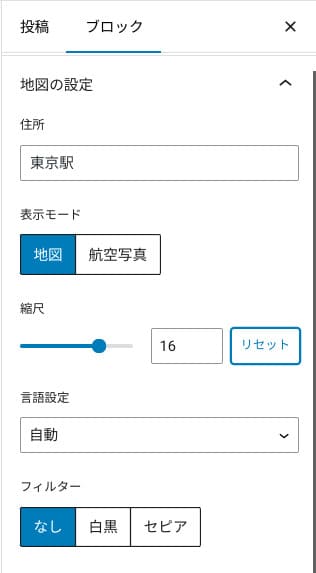
તમે તેને map અથવા aerial-photo viewમાં બદલી શકો છો, અથવા monochrome કે sepiaમાં ફેરવી શકો છો. Cocoon અને SWELL પાસે આ સુવિધા નથી. સાચી વાત એ છે કે designer અથવા programmer ન હોય તો આવી બાબતો CSSથી બદલવી મુશ્કેલ છે.
પરંતુ XWRITE સાથે, specialist knowledge વગર પણ આ સમસ્યા નથી. કોઈપણ વ્યક્તિ Google Mapsને સહેલાઈથી customize કરી શકે છે જેથી તે પોતાની company અથવા store homepageના વાતાવરણ સાથે મેળ ખાય.
Google Map કેવી રીતે બનાવવો
Google Map કેવી રીતે બનાવવો
xwrite.jp
Section block whitespace ને પણ સુંદર બનાવે છે
Company homepages અને store websites માટે design મહત્વનું છે. તે “આ shop stylish લાગે છે” અથવા “એ લોકો કામ કાળજીપૂર્વક અને યોગ્ય રીતે સંભાળશે એવું લાગે છે” જેવી, શબ્દોમાં સહેલાઈથી ન કહી શકાય એવી છાપ પહોંચાડે છે.
આશ્ચર્યજનક રીતે, એ atmosphereને અસર કરતી એક બાબત whitespace છે. સારી રીતે ગોઠવાયેલી અને આરામદાયક whitespace સુંદરતા અને elegance, અથવા જીવંત energyની લાગણી પણ ઉભી કરી શકે છે.
જો તમે XWRITEના Section blockનો ઉપયોગ કરો, તો તમે એ atmosphere બનાવતી whitespaceને પણ તમારી ઇચ્છા મુજબ સુંદર રીતે design કરી શકો છો.
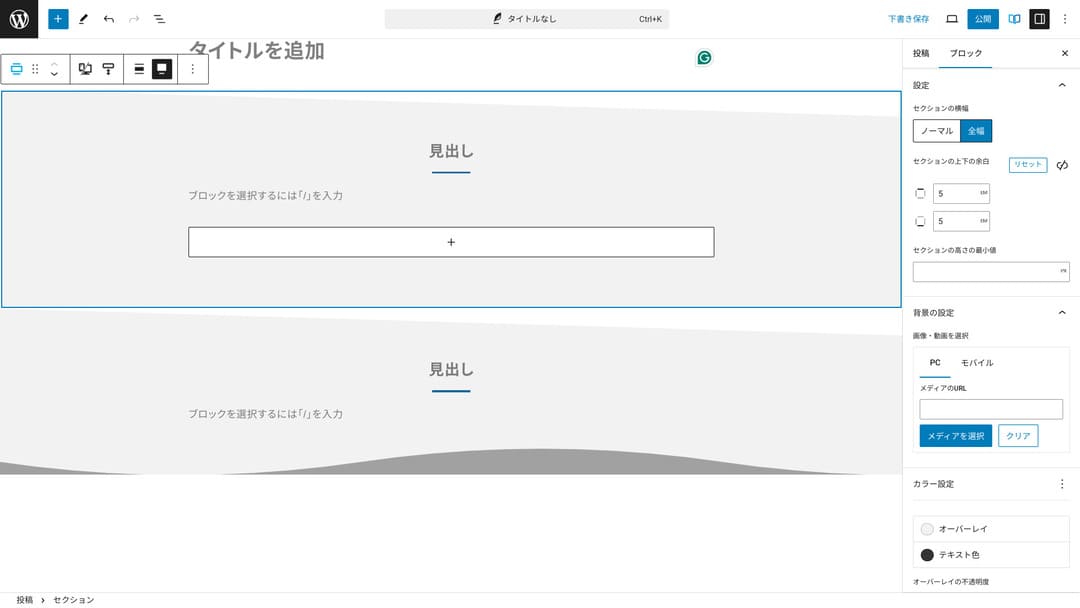
તમે diagonal રીતે કપાયેલી whitespace બનાવી શકો છો અથવા wave જેવી shapes ઉમેરી શકો છો. whitespace સહિત design આટલા detail સુધી પહોંચે, તો company અથવા shopની image ઘણી સુધારી શકે છે.
Section કેવી રીતે બનાવવું
Section કેવી રીતે બનાવવું
xwrite.jp
Affiliate sites માટે હું XWRITE ની ભલામણ કેમ કરું છું
Xserver દ્વારા બનાવેલી affiliate-style demo site જુઓ. તેમાં “blog” લખ્યું છે, પરંતુ ત્યાં દેખાતું content design ખરેખર affiliate site જેવું છે.

STUDY DEMO BLOG
STUDY DEMO BLOG
demo.xwrite.jp
Product Review block ફાયદા અને ઓગણતાઓને એક નજરમાં સ્પષ્ટ કરે છે
જો તમે XWRITE ના ઉત્પાદન સમીક્ષા બ્લોકનો ઉપયોગ કરો છો, તો તમે ઉત્પાદનના ફાયદા અને ગેરફાયદાને સુંદર રીતે રજૂ કરી શકો છો. લોકો તરત જ જોઈ શકે છે કે તેમાં શું સારું છે અને શું નથી. રેટિંગ અને સમજૂતી વાંચવા માટે પણ સરળ છે.
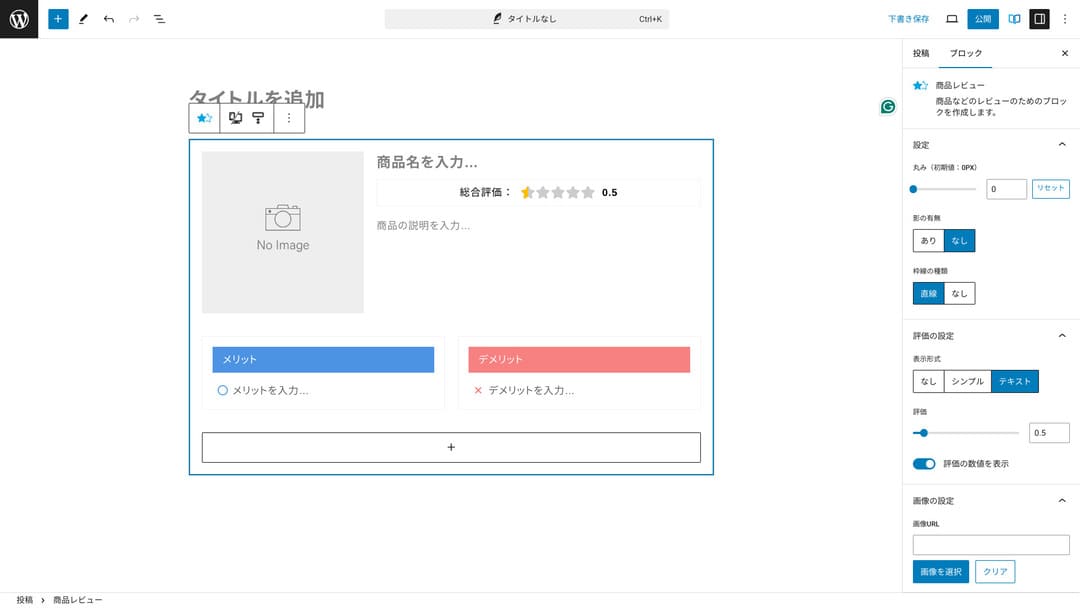
આનો ઉપયોગ કરો ત્યારે site visitors તમે રજૂ કરી રહેલા productની વિશેષતાઓ તરત સમજી શકે છે. તેઓ ઝડપથી સમજી શકે, તો ખરીદવું કે નહીં તે નક્કી કરવું તેમના માટે સરળ બને છે. બીજા શબ્દોમાં, વેચવું સરળ બને છે.
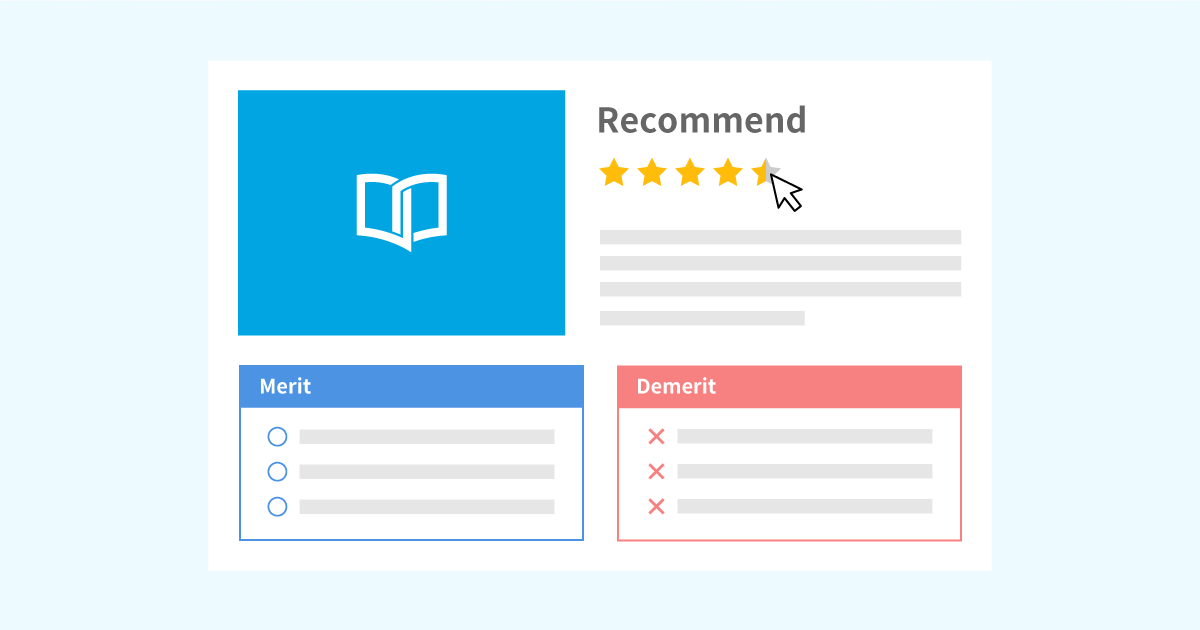
પ્રોડક્ટના ખુલાસા અને રેટિંગ્સ માટે પ્રોડક્ટ રિવ્યૂ બ્લોકનો નમૂનો
પ્રોડક્ટના ખુલાસા અને રેટિંગ્સ માટે પ્રોડક્ટ રિવ્યૂ બ્લોકનો નમૂનો
xwrite.jp
Step block પ્રક્રિયા અને flow ને સ્પષ્ટ રીતે સંદેશાવ્યવહાર કરે છે
XWRITEનો Step block procedures અને flowsને સમજવા સરળ બનાવે છે. “આ કર્યા પછી, તે document તૈયાર કરો અને પછી અહીં click કરો” જેવી સમજણ ઘણી વધુ સ્પષ્ટ બને છે.
તમે product કેવી રીતે ખરીદવો અથવા contract processમાં પગલાંનો ક્રમ બતાવવા Step blockનો ઉપયોગ કરી શકો છો.
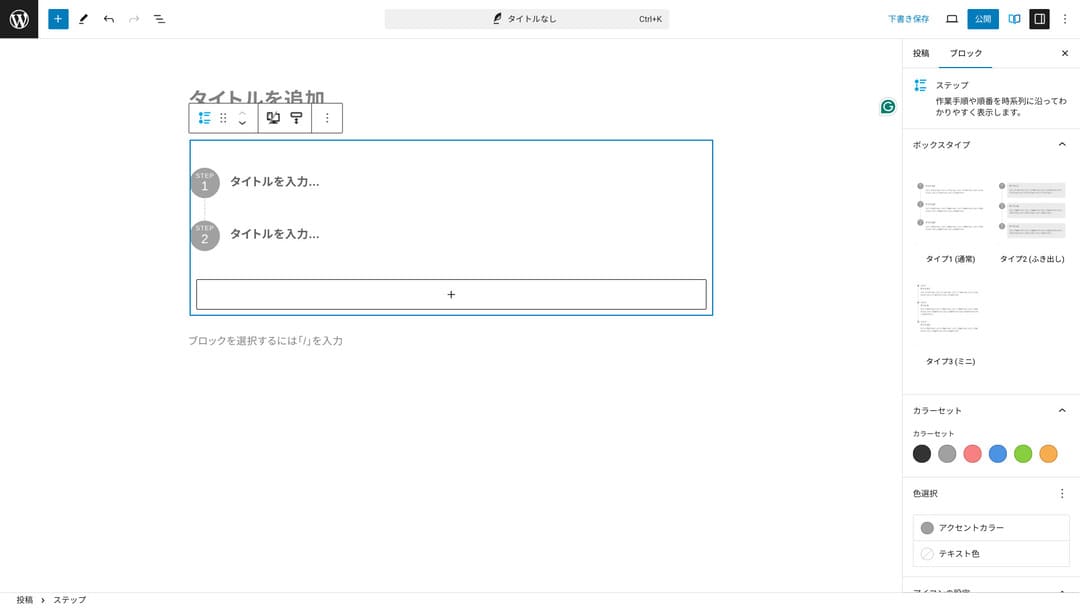
તમે proceduresને headings અને સામાન્ય body textથી પણ સમજાવી શકો, પરંતુ તેમ કરશો તો તે એટલું neat રીતે ગોઠવાતું નથી અને અનાવશ્યક whitespace ઊભી થવાની શક્યતા રહે છે.
ઉપરાંત, જો તમે કાર્યવાહી સમજાવવા માટે હેડિંગનો ઉપયોગ કરો છો, તો પૃષ્ઠની સામગ્રીનું કોષ્ટક ખૂબ વિગતવાર બની શકે છે અને વપરાશકર્તા અનુભવને નુકસાન પહોંચાડી શકે છે. સ્ટેપ બ્લોક વસ્તુઓને સરળ રાખે છે.
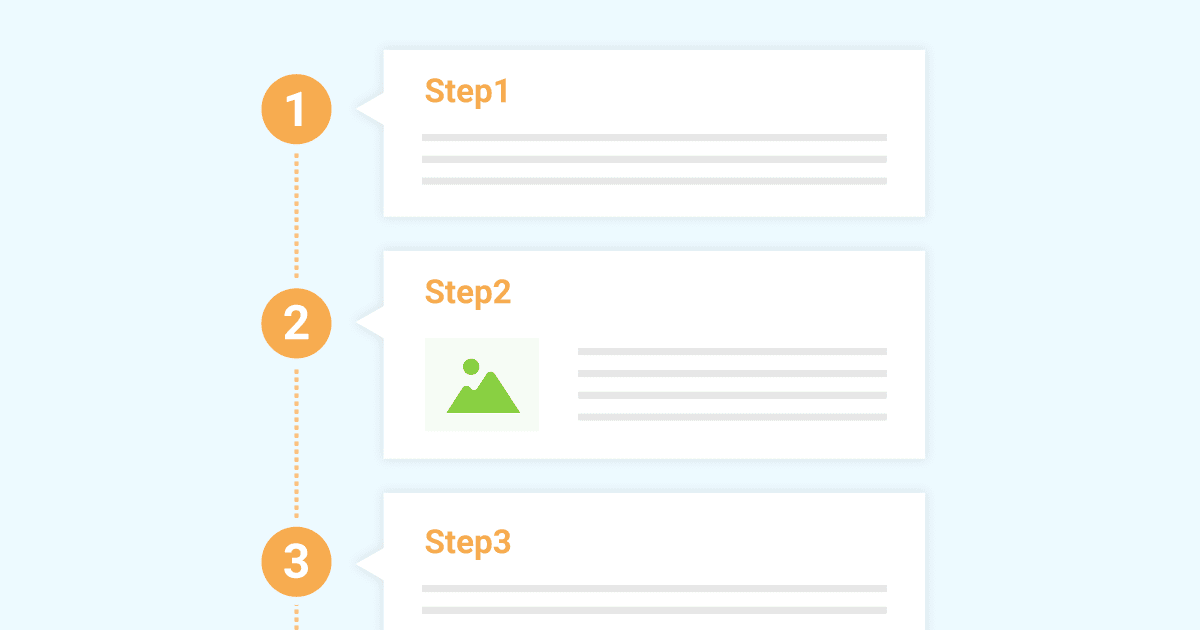
Work procedures રજૂ કરવા માટે Step blockનો sample
Work procedures રજૂ કરવા માટે Step blockનો sample
xwrite.jp
Button block CTR સુધારી શકે છે
જો તમે XWRITEના Button blockનો ઉપયોગ કરો, તો કદાચ CTR, એટલે click-through rate, સુધારી શકો છો. તમે buttons પર અનેક પ્રકારની decoration લગાવી શકો છો અને એવા buttons બનાવી શકો છો કે usersને “મારે ક્યાંથી apply કરવું?” એવો પ્રશ્ન ન રહે.
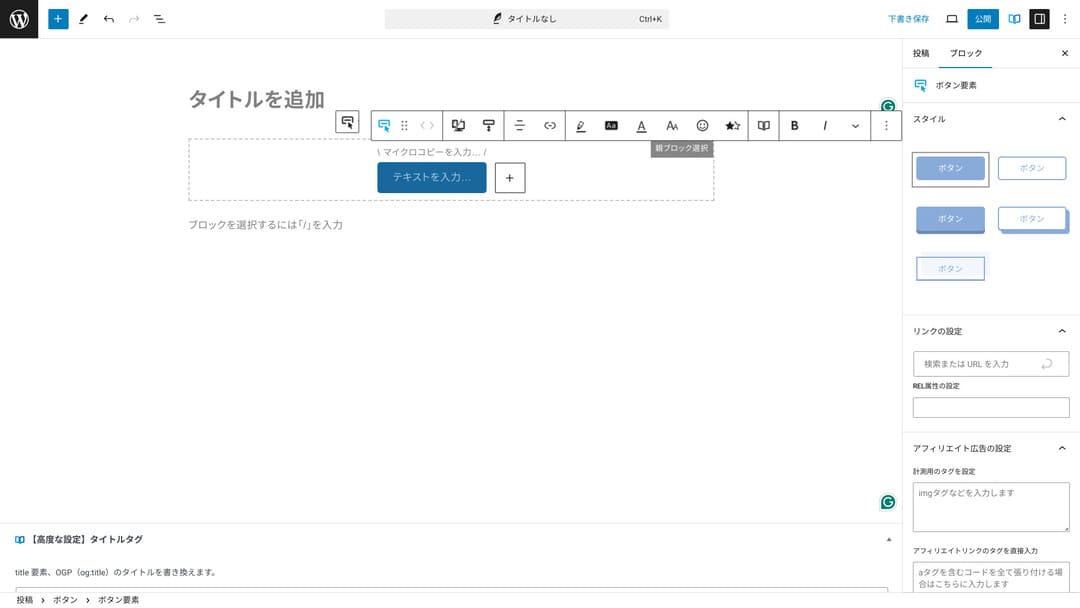
કારણ કે તમે color અને design બદલી શકો છો, તેને siteના atmosphere સાથે પણ મેળ કરી શકાય છે.
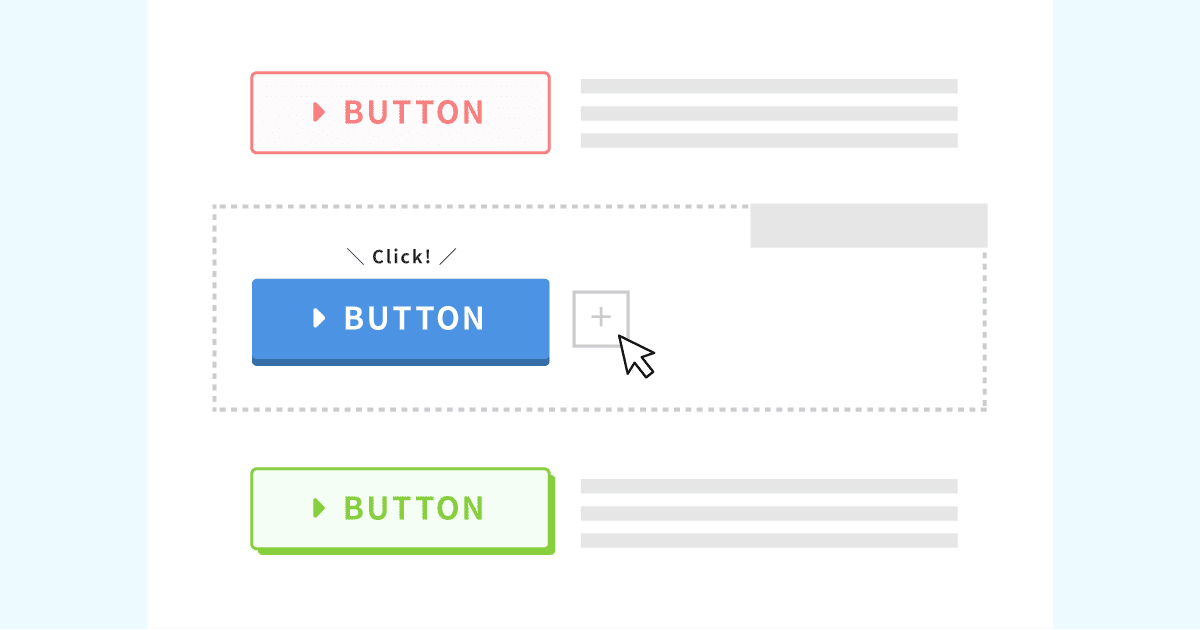
Original button designsની list
Original button designsની list
xwrite.jp
XWRITE ની કિંમતો: subscription અને one-time purchase
XWRITEમાં, તમે subscription plan અથવા one-time purchaseમાંથી કોઈ એક પસંદ કરી શકો છો.
- Subscription (monthly): દર મહિને 990 yen
- Subscription (annual): દર વર્ષે 9,900 yen
- એક વખતની ખરીદીનો plan: 19,800 yen
Xserver અને Shin Rental Serverના users one-time purchase plan 15,840 yenમાં ખરીદી શકે છે. તે સામાન્ય કરતાં લગભગ 4,000 yen સસ્તું પડે છે, તેથી જો તમે XWRITE અને નવા server contract બંને વિશે વિચારી રહ્યા હો, તો server માટે sign up કરતી વખતે apply કરવાની ભલામણ કરું છું.
Xserver અને Shin Rental Server બંને ઉત્તમ servers છે. નીચેના articlesમાં મેં તેમની વિગતવાર સમજણ આપી છે.

Xserver પ્રતિષ્ઠા અને સમીક્ષા [2025 તાજેતરની]: ઝડપ, કિંમતો, યોગ્યતાઓ અને ખામીઓનું સંપૂર્ણ સમજૂતી
Xserver પ્રતિષ્ઠા અને સમીક્ષા [2025 તાજેતરની]: ઝડપ, કિંમતો, યોગ્યતાઓ અને ખામીઓનું સંપૂર્ણ સમજૂતી
serverfield.org
શિન રેન્ટલ સર્વર સમીક્ષા [2025 નવીનતમ]: વાસ્તવિક ઉપયોગથી ઝડપ અને કિંમતોની સંપૂર્ણ સમજૂતી
શિન રેન્ટલ સર્વર સમીક્ષા [2025 નવીનતમ]: વાસ્તવિક ઉપયોગથી ઝડપ અને કિંમતોની સંપૂર્ણ સમજૂતી
serverfield.org
ખુલ્લેઆમ કહીએ તો, અન્ય WordPress themesની સરખામણીએ તે સસ્તું નથી
પૂરી રીતે સાચું કહું તો, અન્ય WordPress themesની સરખામણીએ તેની કિંમત ઓછી નથી. તે લગભગ સમાન કિંમતનું છે અથવા થોડું વધારે છે.
| XWRITE | One-time purchase plan: 19,800 yen |
| Cocoon | Free |
| SWELL | 17,600 yen |
| SANGO | 14,800 yen |
| JIN:R | 19,800 yen |
એટલે, ફરી કહું તો, Xserver અથવા Shin Rental Server સાથે server contract મારફતે 15,840 yenની કિંમતે apply કરવું શ્રેષ્ઠ વિકલ્પ છે.
પરંતુ જો તમારી પાસે પહેલેથી server contract હોય, તો subscription plan પસંદ કરો. તમે હાલમાં જે theme વાપરો છો તે પસંદ કરવાની પાછળ કદાચ કોઈ મોટું કારણ હશે, અને themes બદલતી વખતે designનો ફરક site PVs, એટલે viewed pagesની સંખ્યા, અને CTR, એટલે click-through rate, પર અસર કરી શકે છે.
Subscription plan સાથે, જો તમે XWRITE પર switch કરો અને પછી સમજાય કે…
- design તમારા tasteથી ખૂબ અલગ છે
- તમારી previous themeની અસરથી layout collapse થાય છે અને fixes મુશ્કેલ બને છે
…તમે હજી પણ ઓછામાં ઓછા ખર્ચે તમારી original theme પર પાછા જઈ શકો છો.
આ siteએ પણ subscription plan મારફતે sign up કરીને XWRITE રજૂ કરવાનો વિચાર કર્યો હતો, પરંતુ ઉપરના બીજા કારણને લીધે આ વખતે મેં તે છોડ્યું. fixes માટે જરૂરી સમય હું કાઢી શકતો નથી.
XWRITE માટે અરજી કેવી રીતે કરવી
XWRITE માટે અરજી કેવી રીતે કરવી
- STEP.1User siteમાં log in કરો
- STEP.2License page પરથી theme ખરીદો
કૃપા કરીને user siteમાં “License Authentication”માંથી theme ખરીદો.
- STEP.3Theme download કરો
Theme download કરો.
ડાઉનલોડ કરેલી ઝીપ ફાઇલ લો અને તેને વર્ડપ્રેસ દેખાવ → ટેમા → નવી થીમ અપલોડ કરીને ઇન્સ્ટોલ કરો, પછી તેને સક્રિય કરો.
- STEP.4License authenticate કરો
XWRITE Settings → Activation દ્વારા license authenticate કરો. (સત્તાવાર instructions)
XWRITE પાસે child theme છે
XWRITE પાસે મૂળ રૂપે બાળ થીમ નહોતી, પરંતુ તે 22 જાન્યુઆરી, 2025 ના રોજ અપડેટ કરવામાં આવી હતી અને બાળ થીમ ઉપલબ્ધ થઈ હતી. જો શક્ય હોય તો, બાળ થીમ બનાવો. જ્યારે તમે વર્ડપ્રેસ થીમ માટે ચાઈલ્ડ થીમ બનાવો છો, ત્યારે બીજી થીમ પર સ્વિચ કરતી વખતે તમે મોટા ડિઝાઈનના ભંગાણને અટકાવી શકો છો.
WordPress ચાઇલ્ડ થીમ બનાવવાની સામાન્ય પ્રક્રિયા
- STEP.1બાળ થીમ માટે ફોલ્ડર બનાવો
પ્રથમ, વર્ડપ્રેસ ઇન્સ્ટોલેશન ફોલ્ડર ઍક્સેસ કરો અને અંદર ચાઇલ્ડ થીમ માટે ફોલ્ડર બનાવો
wp-content/themes/.- Access માટે FTP અથવા વર્ડપ્રેસ એડમિન સ્ક્રીન > દેખાવ > થીમ એડિટર.
- આની અંદર નવી folder બનાવો:
wp-content/themes/અને તેનું નામ આ પ્રકારનું રાખો:theme-child. Folder name તમારી પસંદગીનું હોઈ શકે છે, પરંતુ સમજવામાં સરળ હોય એવું name વાપરવું વધુ સારું છે.
- STEP.2ચાઇલ્ડ થીમ સ્ટાઇલ શીટ (style.css) બનાવો
આગળ, style.cssતે ફોલ્ડરમાં ફાઇલ કરો. આ ફાઇલ ચાઇલ્ડ થીમ માટે શૈલીની માહિતીનું સંચાલન કરે છે.
- આનું content theme-child/style.css નીચે બતાવ્યા મુજબ set કરો.
CSS કોડ કૉપિ કરો/* થીમા નામ: Tema Child Template: Tema Version: 1.0*/@import url("../Tema/style.css");/* અહીં કસ્ટમાઇઝેશન CSS લખો */Theme Name: બાળ થીમનું નામ (તમે તેને મુક્તપણે બદલી શકો છો)Template: parent themeનું directory name- Parent themeની CSS file નીચેના દ્વારા load થાય છે:
@import.
- STEP.3ચાઇલ્ડ થીમના functions.php બનાવો
આગળ, functions.php file બનાવો જેથી parent themeની styles યોગ્ય રીતે load થાય.
- Create a theme-child/functions.php file બનાવો અને નીચેનું content ઉમેરો.
PHP કોડની કૉપિ કરો<?php// પેરેંટ થીમ સ્ટાઇલ શીટ ફંક્શન થીમ_child_enqueue_styles() { wp_enqueue_style('parent-style', get_template_directory_uri() . '/style.css');}add_action('wp_enqueue_scripts');}add_action('wp_enqueue_scripts');}add_action('wp_enqueue_scripts'); - STEP.4બાળ થીમ સક્રિય કરો
WordPress admin screen પર પાછા જાઓ અને અહીં જાઓ: Appearance > Themes. A theme called “Theme Child” will be displayed there, so activate it.
- STEP.5Customizing શરૂ કરો
બાળ થીમ સક્રિય થયા પછી, કસ્ટમાઇઝ કરોstyle.css, functions.php, અને જરૂર પડે તો અન્ય template files જેમ કે
header.phpandfooter.php. પિતૃ થીમની ફાઇલોને સીધી રીતે સંપાદિત કરવાને બદલે, તેને ચાઇલ્ડ થીમમાં ઓવરરાઇડ કરીને તમારા કસ્ટમાઇઝેશન કરો.
XWRITE વિશે વારંવાર પૂછાતા પ્રશ્નો
XWRITE કેટલી કિંમતનું છે?
- Subscription (monthly): દર મહિને 990 yen
- Subscription (annual): દર વર્ષે 9,900 yen
- એક વખતની ખરીદીનો plan: 19,800 yen
Xserver અને Shin Rental Serverના users માટે, XWRITEનો one-time purchase plan 15,840 yen થાય છે.
જો હું subscription નવીનીકૃત ન કરું તો શું થાય?
તમે subscription renew ન કરો તો પણ theme unusable થતી નથી. જોકે, તમે theme update કરી શકશો નહીં. Forumમાં questions પૂછવાની સુવિધા પણ ગુમાવશો.
જો તમે subscription પસંદ કરો, તો દર મહિને renew કરો. પૈસા બચાવવા હોય તો one-time purchase planની ભલામણ છે.
સારાંશ
XWRITE blogs માટેની theme છે. જો તમે blog લખવા જઈ રહ્યા હો, તો તે ચોક્કસપણે એવી theme છે જેની હું ભલામણ કરી શકું. સાથે સાથે, હું તેને company homepages અને affiliate sites માટે પણ ભલામણ કરું છું.
જો તમે subscription plan પસંદ કરો, તો તમે તેને 990 yenમાં એક મહિના માટે અજમાવી શકો છો. હું subscriptionથી શરૂ કરવાની ભલામણ કરું છું. feel અને designથી સંતોષ થાય, તો પછી one-time purchase plan પર જાઓ.
"XWRITE" એ Xserver Inc દ્વારા પ્રદાન કરવામાં આવેલ એક WordPress થીમ છે. તે દરેક માટે સરળ, ઝડપી અને ઉપયોગમાં સરળ હોવા માટે પ્રતિષ્ઠા ધરાવે છે. તે ખાસ કરીને કોર્પોરેટ વેબસાઇટ્સ અને સંલગ્ન સાઇટ્સ માટે ભલામણ કરવામાં આવે છે.
Xserver, Shin Rental Server અથવા Star Rental Server માટે sign up કરો તો તે સસ્તું પડે છે
જો તમે સાથે સાથે server શોધી રહ્યા હો, તો હું Xserverની ભલામણ કરું છું.
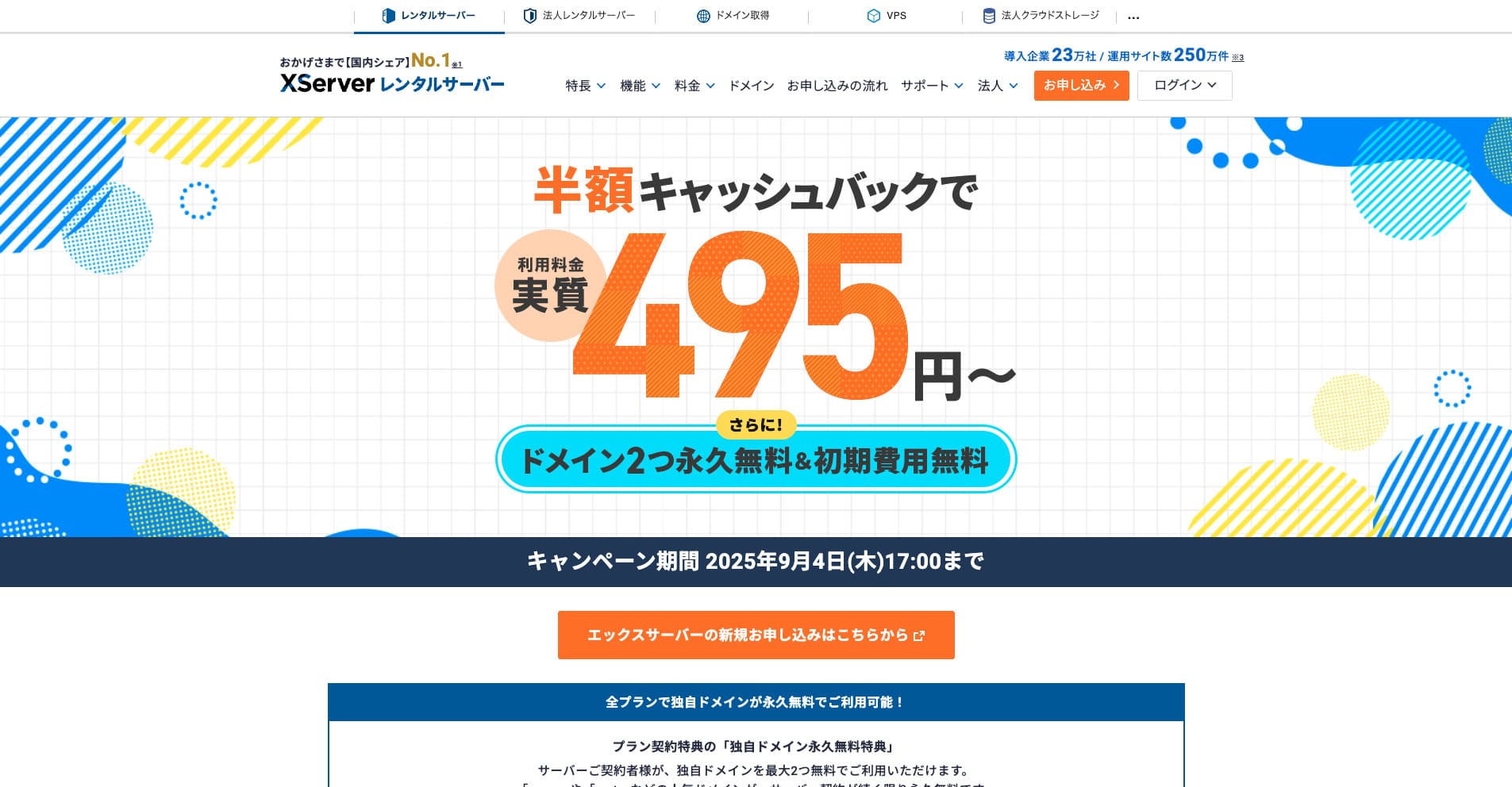
“Xserver” લાંબા સમયથી ચાલી આવતો high-speed rental server છે, જે domestic market shareમાં No. 1 છે. તે individuals અને companies બંનેમાં લોકપ્રિય છે. સાચું કહીએ તો, તેમાં ખરેખર કોઈ મોટી ખામી નથી, અને તેની stability, features અને support બધા ઉત્તમ છે. Cashback સાથે, તમે તેને effective 495 yenથી વાપરી શકો છો.
September 34, 2025 સુધી, તે half-price cashback અને 10-day free trial આપે છે
