Five WordPress Plugins for Dramatic Speed Gains and Additional Performance Improvements

Internet users expect speed. Because website display speed directly affects visitor satisfaction and search-engine rankings, WordPress site owners need to stay conscious of performance optimization at all times.
★ Understand speed improvements in one minute: how to use GTmetrix and what to check
In this article, we explain in detail five plugins that can speed up a WordPress site and the other measures you should take to improve page speed.
Complete Comparison of 32 WordPress Hosting Services for Individuals, Companies, and Overseas Use

When you think, “I want to start WordPress,” and search for “WordPress recommendations,” you find all kinds of articles covering personal hosting, options for companies and small businesses, overseas hosting, and low-cost servers. Honestly,
- which site should you trust?
- you may just want a simple and understandable answer.
- you may want to get started with WordPress right away.
That is why this article carefully selects recommended choices from 32 hosting providers for individuals, companies, domestic use, and overseas use. It is explained by the SEO lead at an app development company that uses hosting every day.
How to choose acceleration plugins
The plugins you choose must be selected carefully according to the needs of your site. By approaching the problem from different angles such as caching, image optimization, and code optimization, you can improve site speed as a whole.
Five essential plugins
W3 Total Cache
It supports page caching, object caching, database caching, minification of CSS and JavaScript files, and the use of a CDN, significantly reducing load times.
Because it can greatly shorten page-loading time and reduce server load, it helps deliver a comfortable browsing experience for visitors.
LiteSpeed Cache
LiteSpeed Cache is one of the powerful plugins used for WordPress speed optimization. It is especially effective for sites running on LiteSpeed Web Server and provides a wide range of caching features and optimization options.
Its automatic page caching can greatly reduce visitor load times, and its broad optimization features, from CSS, JavaScript, and HTML optimization to lazy loading of images, help shrink page size.

WP Super Cache
By generating static HTML files and serving those lightweight files to visitors, it avoids executing PHP scripts and reduces load time.
It offers simple and effective caching and is particularly well suited to high-traffic sites.

Autoptimize
It compresses and combines CSS and JavaScript files, optimizes HTML, and speeds up page loading in the browser.
Because it makes code optimization simple and reduces the loading of unnecessary scripts, it improves page display speed.

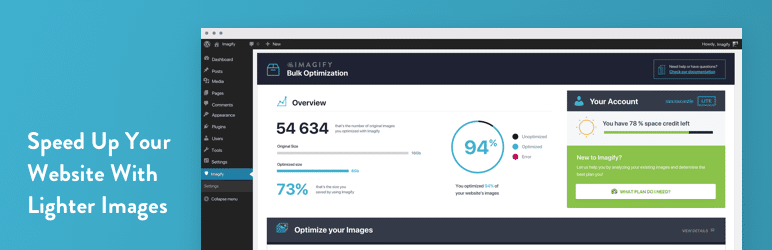
Imagify
It automatically compresses images and reduces page weight. It also supports conversion to WebP format, allowing file sizes to shrink without sacrificing image quality.
Because images have a major impact on page load time, efficient image optimization directly improves performance.
Other ways to improve speed
Choose high-quality hosting
Website performance, especially speed and stability, depends heavily on the hosting service you choose.
High-quality hosting offers fast server response times, excellent uptime, and the ability to keep serving reliably even under heavy load.
More specifically, it is important to choose hosting with the following characteristics:
- Fast SSD storage: read and write performance improves, which shortens page load times.
- Resource allocation: by choosing a VPS or dedicated server instead of shared hosting, you can secure more resources and processing power.
- Location: the closer the server is physically to the user, the shorter the data-transfer time becomes.
- Caching and optimization: hosting that offers automatic caching and optimization tools can improve speed without relying entirely on extra plugins.
Use the latest PHP version
PHP is the language that serves as the foundation for WordPress and many other content management systems.
PHP versions are updated regularly, and newer versions are generally faster and more secure than older ones. Keeping PHP up to date improves website performance and reduces security risk.
Because many hosting control panels let you upgrade the PHP version easily, check it regularly and use the latest version whenever possible.
Remove unnecessary plugins
WordPress sites often rely on plugins to add many kinds of functionality.
However, plugins you no longer use can hurt load time and may also create security vulnerabilities.
By reviewing plugins regularly and removing ones you do not need, you can improve site performance and strengthen security.
Adopt responsive design
Access from mobile devices increases every year, so a mobile-friendly site is essential.
Responsive design ensures that content is displayed properly on every device regardless of screen size. That improves the mobile user experience and can reduce bounce rates.
When choosing a WordPress theme, make sure it supports responsive design.
Use a CDN
A CDN, or Content Delivery Network, is a system that delivers content using servers distributed around the world.
By using a CDN, you can provide content quickly regardless of the user’s geographic location. This shortens load time and improves user experience.
Using a CDN is especially effective for sites aimed at a global audience.
Summary
WordPress site speed affects both user experience and SEO. By applying the plugins and speed-improvement measures introduced above properly, you can provide a more comfortable and accessible website for everyone who visits.
Speed is an important factor in web technology, which continues to evolve, so make a habit of optimizing your site regularly.