Fem WordPress-plugins til markante hastighedsforbedringer og yderligere performanceforbedringer

Internetbrugere forventer hastighed. Fordi hastigheden på websitets visning direkte påvirker besøgendes tilfredshed og søgemaskineplaceringer, skal WordPress-siteejere hele tiden være bevidste om performanceoptimering.
★ Forstå hastighedsforbedringer på ét minut: Sådan bruges GTmetrix, og hvad du skal tjekke
I denne artikel forklarer vi i detaljer fem plugins, der kan gøre et WordPress-site hurtigere, og de andre tiltag, du bør tage for at forbedre sidehastigheden.
Komplet sammenligning af 32 WordPress-webhoteludbydere til private, virksomheder og udenlandsk brug

Når du tænker: "Jeg vil gerne i gang med WordPress" og søger efter "WordPress-anbefalinger", finder du alle mulige artikler, der dækker personlig hosting, muligheder for virksomheder og små erhverv, udenlandsk hosting og billige servere. Helt ærligt,
- hvilket site skal man stole på?
- du vil måske bare gerne have et enkelt og forståeligt svar.
- du vil måske bare gerne i gang med WordPress med det samme.
Derfor vælger denne artikel omhyggeligt anbefalede løsninger blandt 32 hostingudbydere til private, virksomheder, indenlandsk brug og udenlandsk brug. Det forklares af den SEO-ansvarlige i et app-udviklingsfirma, der bruger hosting hver dag.
Sådan vælger du accelerationsplugins
De plugins, du vælger, skal udvælges omhyggeligt efter dit siteds behov. Ved at angribe problemet fra forskellige vinkler som caching, billedoptimering og kodeoptimering kan du forbedre sitehastigheden som helhed.
Fem essentielle plugins
W3 Total Cache
Det understøtter sidecache, objektcache, databasecache, minificering af CSS- og JavaScript-filer samt brug af et CDN, hvilket reducerer indlæsningstiden markant.
Fordi det kan forkorte sideindlæsningstiden og reducere serverbelastningen betydeligt, hjælper det med at levere en behagelig browsingoplevelse for besøgende.
LiteSpeed Cache
LiteSpeed Cache er et af de stærke plugins, der bruges til WordPress-hastighedsoptimering. Det er især effektivt for sites, der kører på LiteSpeed Web Server, og giver en bred vifte af cache-funktioner og optimeringsmuligheder.
Dets automatiske sidecache kan reducere indlæsningstiden for besøgende markant, og dets brede optimeringsfunktioner, lige fra CSS-, JavaScript- og HTML-optimering to doven indlæsning (lazy loading) af billeder, hjælper med at reducere sidens størrelse.

WP Super Cache
Ved at generere statiske HTML-filer og servere disse letvægtsfiler til besøgende, undgår det at køre PHP-scripts og reducerer indlæsningstiden.
Det tilbyder enkel og effektiv caching og er særligt velegnet til sites med høj trafik.

Autoptimere
Det komprimerer og kombinerer CSS- og JavaScript-filer, optimerer HTML og fremskynder sideindlæsning i browseren.
Fordi det gør kodeoptimering enkel og reducerer indlæsningen af unødvendige scripts, forbedrer det sidens visningshastighed.

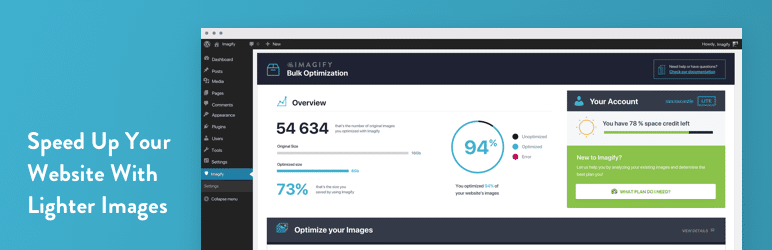
Imagify
Det komprimerer automatisk billeder og reducerer sidens vægt. Det understøtter også konvertering til WebP-format, hvilket gør det muligt at reducere filstørrelser uden at gå på kompromis med billedkvaliteten.
Fordi billeder har stor indflydelse på sideindlæsningstiden, forbedrer effektiv billedoptimering ydeevnen direkte.
Andre måder at forbedre hastigheden på
Vælg high-quality hosting
Websitets ydeevne, især hastighed og stabilitet, afhænger i høj grad af den hostingtjeneste, du vælger.
Hosting af høj kvalitet tilbyder hurtige server-svarstider, fremragende oppetid og evnen til at levere pålideligt selv under høj belastning.
Mere specifikt er det vigtigt at vælge hosting med følgende egenskaber:
- Hurtig SSD-lagring: Læse- og skriveydelsen forbedres, hvilket forkorter sideindlæsningstiden.
- Ressourceallokering: Ved at vælge en VPS eller dedikeret server i stedet for delt hosting, kan du sikre flere ressourcer og mere processorkraft.
- Placering: Jo tættere serveren er placeret fysisk på brugeren, jo kortere bliver dataoverførselstiden.
- Caching og optimering: Hosting, der tilbyder automatiske cache- og optimeringsværktøjer, kan forbedre hastigheden uden udelukkende at forlade sig på ekstra plugins.
Brug den nyeste PHP-version
PHP er det sprog, der udgør grundlaget for WordPress og mange andre content management-systemer.
PHP-versioner opdateres regelmæssigt, og nyere versioner er generelt hurtigere og mere sikre end ældre. At holde PHP opdateret forbedrer websitets ydeevne og reducerer sikkerhedsrisikoen.
Da mange hostingkontrolpaneler lader dig opgradere PHP-versionen nemt, bør du tjekke det regelmæssigt og bruge den nyeste version, når det er muligt.
Fjern unødvendige plugins
WordPress-sites er ofte afhængige af plugins for at tilføje mange former for funktionalitet.
Plugins, du ikke længere bruger, kan dog skade indlæsningstiden og kan også skabe sikkerhedshuller.
Ved regelmæssigt at gennemgå plugins og fjerne dem, du ikke har brug for, kan du forbedre siteydelsen og styrke sikkerheden.
★ Hvad er et WordPress-plugin?
Adopt responsivt design
Adgangen fra mobile enheder stiger hvert år, så et mobilvenligt site er afgørende.
Responsivt design sikrer, at indhold vises korrekt på alle enheder uanset skærmstørrelse. Det forbedrer den mobile brugeroplevelse og kan reducere afvisningsprocenten.
Når du vælger et WordPress-tema, skal du sørge for, at det understøtter responsivt design.
Brug et CDN
Et CDN, eller Content Delivery Network, er et system, der leverer indhold ved hjælp af servere distribueret rundt om i verden.
Ved at bruge et CDN kan du levere indhold hurtigt uanset brugerens geografiske placering. Dette forkorter indlæsningstiden og forbedrer brugeroplevelsen.
Brug af et CDN is især effektivt for sites, der henvender sig til et globalt publikum.
Opsummering
Hastigheden på et WordPress-site påvirker både brugeroplevelse og SEO. Ved korrekt at anvende de ovenstående plugins og hastighedsforbedrende tiltag kan du give et mere komfortabelt og tilgængeligt website til alle, der besøger det.
Hastighed er en vigtig faktor i webteknologi, som fortsætter med at udvikle sig, så gør det til en vane at optimere dit site regelmæssigt.