Avqust 5, 2025, plus iki domen pulsuz və ilk ay pulsuz
PR
Serverlər
ConoHa üçün bir az acıma hissi var, amma məşhur Blog Creator-u 2024-cü ilin ən güclü üç AI nəhəngi ilə qarşılaşdırıram
Yayımlandı: 2025.01.30
Yeniləndi: 2025.01.30

Üzr istəyirəm, amma şirkətimiz ChatGPT-4o, Claude 3 və Gemini 1.5 Pro-dan istifadə edir.
Yəqin bildiyiniz kimi, ConoHa WING ayda 330 yen-dən başlayan "Blog Creator", AI məqalə yazma aləti təklif edir. Cəmi bir neçə il əvvəl məqalə yazmağa 10 saatdan çox vaxt sərf edən biri kimi, bunun nə qədər rahat olması məni az qala kədərləndirir. Amma dövrün qarşısında dayanmağın mənası yoxdur, ona görə ən yaxşısı ondan düzgün istifadə etməyi öyrənməkdir.
Lakin biz sistem inkişafı şirkətiyik və üç növ AI-dan fəal istifadə edirik.
- ChatGPT-4o
- Claude 3
- Gemini 1.5 Pro
AI sənayesi o qədər sürətlə dəyişir ki, bir anda heyrətləndirici yeni bir alət Bum! edə bilər. Amma 2025-ci il yanvarın 1-i etibarilə belə bu üçü hələ də yapon dilini çox yaxşı işləyən güclü AI-lardır. (Açığı, bunlar kifayət qədər bahalı alətlərdir, ona görə əsas biznesdə daha da çox çalışmalıyam.)
"Blog Creator yəqin ki, bu üçünü məğlub edə bilməz, amma həmin 1 faizlik şansa görə onu yarışdıraq."

Blog Creator açığı, yüksək gözlənti yaratmırdı və rəqabət o qədər güclü idi ki, ConoHa üçün həqiqətən pisim gəldi. Üzr istəyirəm. Yenə də onları yarışdırmaq istədim, buna görə hər AI-yə "WordPress mövzusunu sıfırdan qurmaq" haqqında məqalə yaratdırıb dərc etdim. Dörd məqalənin bir-birini cannibalizə etməsini qəsdən təmin etdim.
Cannibalize "karnaval" demək deyil. SEO-da cannibalization eyni saytdakı oxşar məqalələrin üst-üstə düşüb bir-biri ilə rəqabət aparması vəziyyətidir. Bu, SEO üçün pisdir. Bu eksperiment bizim öz SEO-muza da təsir edir, amma yenə də bunu edirəm.
Nəticə isə bu oldu ki, Blog Creator gözlənildiyindən xeyli yaxşı çıxdı, buna görə hər kəs, zəhmət olmasa ConoHa WING-ə yazılsın. Belə etsəniz, Blog Creator-dan bir ay pulsuz istifadə edə bilərsiniz.

" ConoHa WING", yüksək sürətli server" GMO Internet Group sürətli artan istifadəçi nömrələri və bir biz özümüzü istifadə. Because WordPresss server üçün imzaladığınız zaman ön yüksək, hər şey asanlıqla başlaya bilər. Bu, qiymət və performans yaxşı bir balans təklif edir və biz özümüzü da istifadə edir.

★ 10 dəqiqə bir sayt yaradır! ConoHa WING Oxunub: WordPresss
Blog Creator nədir? O, həm sıfırdan SEO-dostu məqalə yazmağa, həm də mövcud mətnləri yenidən işləməyə qadirdir

Blog Creator trafiki artmayan və ya məqalə yazmağı bilməyən insanlar üçün tövsiyə olunan bir AI alətidir. AI-ya həm sıfırdan SEO-dostu məqalə yazdırmaq, həm də mövcud mətnləri yenidən işlətmək mümkündür.
Blog Creator dörd açar söz tipini bir kliklə araşdırır
Hansı açar söz üzrə sıralanmaq istəyirsiniz? Blog Creator, açarı daxil etdiyiniz anda araşdırma başlayır.
- Təklif olunan açar sözlər: açar sözü Google axtarış qutusuna yazanda görünən təkliflər
- Əlaqəli axtarış açar sözləri: Google-da həmin sözü axtardıqdan sonra nəticələrdə görünən əlaqəli açar sözlər
- Birgə istifadə olunan terminlərin araşdırılması: açar sözlə tez-tez birlikdə görünən sözlər
- Yüksək sıralanan saytların başlıq araşdırması: açar söz üzrə yüksək sıralanan saytların istifadə etdiyi başlıqlar
Bu araşdırmanı edə bildikdən sonra, SEO-dostu ifadələr və başlıqlar üçün lazım olan bütün materiallar əlinizdə olur. Bundan sonra ya həmin materiallardan istifadə edib məqaləni özünüz yaza bilərsiniz, ya da Blog Creator-a yazdıra bilərsiniz.

Long-Tail Keyword Strategiyası 7- Yaşında SEO Bank: Niche Markets üçün 3 addımlar
Long-Tail Keyword Strategiyası 7- Yaşında SEO Bank: Niche Markets üçün 3 addımlar
serverfield.org
AI SEO-dostu açar sözlər əsasında məqalə yazır
Blog Creator Bir alətdir ki, AI Sizin üçün mövzular yazın.
Nüsusi ilə müxtəlif edir AI O, Ekspert-kontrollü vasitəsi SEO- güclü şəkillər, və sonra məhsul onları istifadə etdi ChatGPT-4o yaxşı ChatGPT-4o miniBu, mövcud deyil AI heç bir yerdən bir yazı yazın. Bundan əvvəl, AI Forma üçün inşa edilmiş şəkillərinə əsaslanır SEOƏgər siz daha güclü axtarış sıralamasını təmin edə bilərsiniz.
Digər sözlərdə, həmkar məhsullar yaratmaq imkan verir bir vasitədir. AI.
Redaksiyalar
Blog Creator haqqında yeni yazı Ətraflı məlumatlar.Yalnız daxil edin URL blog and and and ,
Blog Creator Valyuta Planları
Üç plan var. Oxunub Lite Bir ay üçün pulsuzdur, təklif edirəm Lite.
| Plan | Lite | Standard | Business |
|---|---|---|---|
| Price | 330 yen | 1,980 yen | 4,980 yen |
| Avtomobil | 24 times | 184 times | 700 times |
| Böyük Britaniya | 12 times | 92 times | 350 times |
| Ünvan | 12 times | 92 times | 350 times |
| İnformasiya | 12 times | 92 times | 350 times |
- Option
- Qiymət: 550 yen
- Mövcudluq gücü: 24 əməliyyat, 12 əməliyyat, 12 ünvan əməliyyatları və 12 giriş məlumat
Qeydiyyatdan necə başlayır və istifadə edin Blog Creator
Ad Soyad Blog Creator
Başlamaq Blog Creator
- STEP.1Respublikanın səhifəsini ziyarət edin: ConoHa WING
Blog Creator istifadə et Blog CreatorBir ConoHa hesabına lazımdır. Respublikadan bir hesab yaradır və başlayır WordPresss. Siz artıq bir ConoHa hesabı varsa, giriş.
- STEP.2Açıq AI Blog Növü Tool
Kontrol panelindən, açıq "AI "Site Management" altında Blog Generation Tool" Sonra "+ Blog Creator."
- STEP.3Bir plan seçin
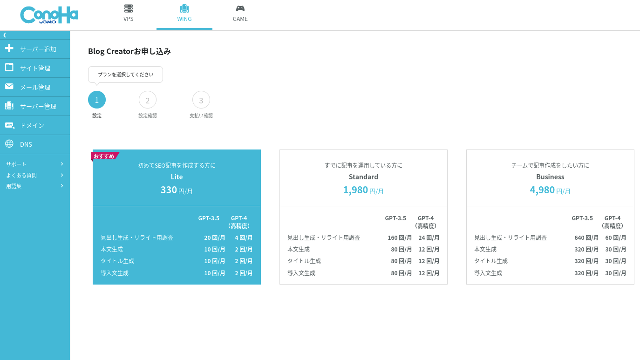
Plan seçin. Axtarış Lite Plan yaxşıdır. Onun funksiyaları daha yüksək planlarla eynidir. Daha yüksək planları yalnız daha çox verir AI generations. İlk lazım olan bütün bir sınaq olduğundan, davam edin Lite ayda 330 yen plan.
- STEP.4Payment
Ödəniş təhlükəsizlik ekran görünür. " "Confirm" Sizin proqram indi tamam.
Bir maddə yaratmaq üçün addımlar Blog Creator
Bir məhsulun yaradılması proqramı rəsmi saytda izah edilir, Wapu-katsu. Amma, əsasən istifadə etdiyim metodu göstərdiyini anlamaq daha asan olduğunu düşünürəm, belə ki, baxın Bu yazı.
Bir maddə yaratmaq Blog Creator
- STEP.1Seçki Blog Creator
Oxunub:AI Blog Generation Tool "Blog Creator"Bakı.
- STEP.2Siz sıralamak istəyirsiniz şəkil
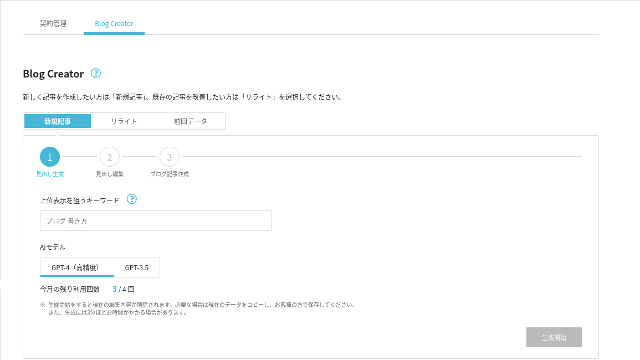
Blog Creator deyil, lakin bu vaxt yeni bir maddə yaratmaq. Siz sıralamak istəyirsiniz şəkil daxil edin: " WordPresss ." ." (Məsrə, sizə özdən istifadə etmək istəyirsiniz.)
Seçki AI model. Ən yüksək düzgün ilə getmək GPT-4.
"Start Generation" baxın.
- STEP.3keyword the the the
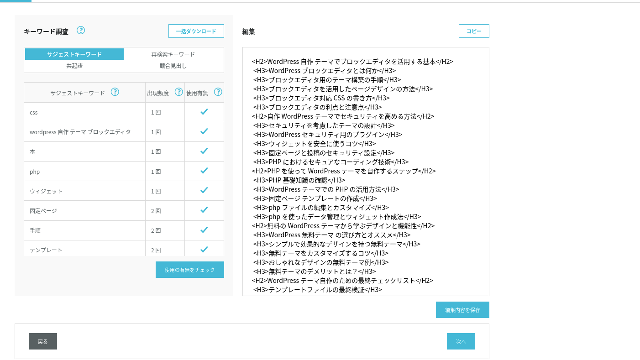
Sözcü araşdırma göstərilir. Araşdırma nömrələrinə baxın. Onlardan daha çox istifadə etmək, daha güclü SEO olmaq lazımdır.
Konfiqurasiya ekranlarında istehsalçıların istifadə edilən şəkillər daxildir. Siz rəsmi redaktə, "Save Edits" basın. Bundan sonra, "Next" baxmaq.
- STEP.4Dəstəyir, adı və giriş
Bir baza kimi daha əvvəl yaradılan başlığı istifadə edin, var AI qazanmaq, adı və giriş. »AI Hər bir maddə üçün Generate "
Qeydiyyatdan istifadə etmək GPT-4 yaxşı GPT-3.5. Seçdi GPT-4.
Birini yaradıqdan sonra AIOxunub: 2 Bu tamamilə Blog Creator generation
Bir neçə qadınlar göstərilir, bu da onlara qışlara və səviyyətə qarşısını alır və ən uyğun birini seçin.
Hər şey tamamlandıqdan sonra, hər bir hissəsi kopyalayın, yeniləyir WordPresss post, və məhsul yayımlayın.
E-poçt ünvanına bir limit ola bilər. Bu "birlərin yaradılması" WordPresss " " " , , , , , , , Bu aradan qaldırdıqdan sonra, "AI Generate" yenidən sonra gətirdi ki, halda bərpa etdi.
Əvvəlki maddələr məhsul üçün bir Digər Cannibalize edəcək "Böyük bir WordPresss Theme from
Oxunub AI Onları eyni şəkil və eyni proqram istifadə etmək. 4 bitmiş məhsullar aşağıdadır. Bütün bunları bu sayta yüklədim. Onlar bir digər cannibalizing var.
mövcuddur Blog Creator
Kompleksi bina WordPresss Theme: Steps and a Checklist for Building
Kompleksi bina WordPresss Theme: Steps and a Checklist for Building
serverfield.org
mövcuddur ChatGPT-4o

Başlayanlar! Xüsusi bir Theme yaratmaq üçün necə WordPresss
Başlayanlar! Xüsusi bir Theme yaratmaq üçün necə WordPresss
serverfield.org
mövcuddur Claude 3
Özünüzü yaradın WordPresss Müəlliflik tam bir Site yaradır!
Özünüzü yaradın WordPresss Müəlliflik tam bir Site yaradır!
serverfield.org
mövcuddur Gemini 1.5 Pro
Rut çıxış! Özünüzü yaradırmaqla ideal Saytınızı necə yaradır WordPresss Theme
Rut çıxış! Özünüzü yaradırmaqla ideal Saytınızı necə yaradır WordPresss Theme
serverfield.org
Oxunub AI Bu qazanmaq ola bilər, Mən üstünlüklərini tanış etmək istəyirəm Blog Creator
AI Bu qazanmaq kimi görünür. Sığorta kimi ConoHa WING deyil, Blog Creator'Səstəklər burada tanış etmək istəyirəm. (I am a timid person.)
Sizin yazınızı inkişaf edə bilərsiniz SEO Daxil ol AI Yadda saxla
Blog Creator istifadəçi AI. lakin, araşdırılmış şəkillərin nəzarətini nəzarət etdiyi zaman, məsləhətinizi daha da özünüzü parlaqlamaq üçün əlavə olunur. Təcrübə, bunu et AI və ya alətlər. Bu bacarıqdan istifadə etdiyiniz zaman, yazma bacarıqlarını və sizin anlayışınızı inkişaf edə bilərsiniz SEO.
Blog Creator ola bilər ki, danışmaq, Sizin yanında çalışan bir ortağı kimi yetişdirmək üçün yardım.

Yadda saxla SEO: Yüksək qazanmaq üçün istifadəçilər edən Web Yazı Texnologiyaları
Yadda saxla SEO: Yüksək qazanmaq üçün istifadəçilər edən Web Yazı Texnologiyaları
serverfield.org
Baş strukturu və Body Uzunluğu İndi optimize edilmişdir, So No Yenilənir
Blog Creator Baş strukturunu və böyükten daha yaxşısını optimallaşdırır AI. Bir nəticə kimi, Təhlükəsiz nümayiş etməklə məqsəd edə bilərsiniz.(Bu dedi, haqqında məlumatdan istifadə etmək lazımdır.)
Xüsusi AI, düzelməli və vaxt-konsuming idi.
- H4-dən başlayır, onlar düzelməlidir.
- Başlar yaratmaqdan sonra bütün tam bənzə yaradın, düzgün yazmaq deyil.
- "İntroduction:" və "Body:" kimi gereksiz sözləri silmək lazımdır.
Başlardan böyük əvvəl və hər şeyi elan etmək yalnız çox işdir.
Axtarış AI Maddə Yazı Tool, Digər şirkətlərin təklif edilməsi daha Keyword-Focused
Digər server şirkətlər da təklif edir AI Ətraflı texnologiyalar.
Sakura Rental Server »User Local AI WriterChat istifadə edir "GPT-4 pulsuz. ChatGPT-4O, öz yerli istifadə edir AI.
Value Server »Value AI WriterAyda 1,650 yen başlayan ". Bir istifadə ChatGPT-4o.
Bu alətlər onları pulsuz istifadə edə bilər və ya sonuncu əlavə giriş verə bilərsiniz AIlakin Onlar haqqında inşa deyil SEO- güclü şəkillər.Blog Creator ilk tikinti SEO- güclü şəkillər və sonra istifadə AI Qeyd yaz.
Sonda, bir blog yazmaq zaman, Siz üçün sıra istəyirsiniz bir hedef söz var, sağ?Blog Creator Bu həyata ilk və sonra məhsul yaradır.AI Düzgün müəyyən edilmiş mərkəzə doğru sprints O, bunu edir. Bu yalnız körpü çalışan deyil.
Bu digər arasında əsas fərqdir AI Ətraflı texnologiyalar və Blog Creator.
Xülasə: zəhmət olmasa axtarıb uyğunluq nəticəsini özünüz yoxlayın
Bəs sonda nə baş verdi?
Buna mən qərar verməyəcəyəm. Həmişə etdiyimiz kimi, gəlin bunu Google-a buraxaq. "WordPress custom theme" axtarın və saytımıza (https://serverfield.org) baxın. Aşağıdakı məqalələrdən biri orada görünməlidir.
- Blog Creator məqaləsi: WordPress mövzusunu sıfırdan qurmaq üzrə tam bələdçi: güclü sayt qurmaq üçün addımlar və yoxlama siyahısı
- ChatGPT-4o məqaləsi: Başlanğıc üçün uyğun! WordPress-də xüsusi mövzu necə yaradılır
- Claude 3 məqaləsi: Öz WordPress mövzunuzu yaradın və orijinallıqla dolu sayt qurun!
- Gemini 1.5 Pro məqaləsi: Rutindən çıxın! Öz WordPress mövzunuzu yaradaraq ideal saytınızı qurun
Həmin anda axtarışda görünən məqalə, o an üçün ən yaxşı alət olacaq.
Blog Creator düşündüyümdən daha yaxşıdır. Onun məqaləsi yenə də görünür.
Əgər sınamaq istəyirsinizsə, ConoHa WING-də qeydiyyatdan keçməlisiniz.
" ConoHa WING", yüksək sürətli server" GMO Internet Group sürətli artan istifadəçi nömrələri və bir biz özümüzü istifadə. Because WordPresss server üçün imzaladığınız zaman ön yüksək, hər şey asanlıqla başlaya bilər. Bu, qiymət və performans yaxşı bir balans təklif edir və biz özümüzü da istifadə edir.
Avqust 5, 2025, plus iki domen pulsuz və ilk ay pulsuz
32 WordPresss Avtomobil proqramları: İnformasiyalar üçün proqramlar, Businessqeydiyyatdan istifadə et

Düşünürən zaman, "Baş başlamaq istəyirəm WordPresss" ," WordPresss hosting, siz xüsusi istehsalçılardan və xüsusi şirkətlər üçün xüsusi istehsalçılardan, xüsusi istehsalçılardan və xüsusi serverlərdən və aşağı-mal serverlərdən böyük bir sıra əldə edin. Qeydiyyat
- Yadda saxla
- Yalnız bir server seçmək istəyirəm, asan-to-understand yolu!
- Necə başlamaq üçün WordPresss İndi.
Bu səs tanış deyil? Buna görə bu yazı Müəlliflik hüquqları qorunur.. Layihə dəyişdirir SEO hər gün avtomobil server istifadə edən app inkişaf şirkətinin müdiri.