30 天退款保證
PR
伺服器
Kinsta 評測:Google 推薦的超高速伺服器優缺點,以及 WordPress 開通指南
釋出於:2025.07.13
更新於:2025.07.13
評分: 4.0
Kinsta是 Kinsta Inc. 運營的超高速海外主機服務。它以 Google 推薦的伺服器而聞名。這項服務非常重視頁面顯示速度。
| 伺服器型別 | 專用託管伺服器 |
| 顯示速度(TTFB) | 30ms |
| 推薦方案與計費週期 | Single35k |
| 試用 / 退款保證 | 30 天退款保證 |
| 月費(12 個月方案) | 4,407 yen |
| 初始設定費 | 免費 |
| 免費域名 | 無 |
| 支援 | 24/7 線上聊天支援(提供日語) 和電子郵件 |
| 線上率 | 99.9% |
| 伺服器儲存 | 10GB |
| 資料庫數量 | 1 |
| 安全性 | 惡意軟體掃描、WAF、防火牆、DDoS 防護、Google Cloud 防火牆 |
| SSL | 免費自定義 SSL |
| 備份 | 14 天自動備份 |
| 郵箱賬號數量 | 無 |
| 郵件安全功能 | 無 |
| 伺服器 / 網站遷移服務 | 免費 |
| WordPress 預裝 | 是 |
| CDN | 免費(125GB) |
| 資料中心 | Johannesburg, South Africa; Changhua County, Taiwan; Hong Kong; Tokyo; Osaka; Seoul, South Korea; Mumbai, India; Delhi, India; Jurong West, Singapore; Jakarta, Indonesia; Sydney, Australia; Melbourne, Australia; Warsaw, Poland; Hamina, Finland; Madrid, Spain; Saint-Ghislain, Belgium; London, United Kingdom; Frankfurt, Germany; Eemshaven, Netherlands; Zurich, Switzerland; Milan, Italy; Paris, France; Dammam, Saudi Arabia; Tel Aviv, Israel; Montreal, Canada; Toronto, Canada; Sao Paulo, Brazil; Santiago, Chile; Council Bluffs, Iowa, USA; Moncks Corner, South Carolina, USA; Ashburn, Virginia, USA; Columbus, Ohio, USA; Dallas, Texas, USA; The Dalles, Oregon, USA; Los Angeles, California, USA; Salt Lake City, Utah, USA; Las Vegas, Nevada, USA |

Hikaru Ono
Kinsta 常被稱為頂級伺服器,而我實際使用之後也覺得這個評價名副其實。它不僅速度快,控制面板也很容易操作,WordPress 的上手同樣非常簡單。
它是一臺魅力十足、足以對得起價格的伺服器。
- 2025 年 11 月 4 日 market research data, arranged by speed
- 月費是可執行 WordPress 的最低價方案首年費用
- 速度是示例站點在相同條件下測得的首位元組時間(TTFB)
“Kinsta”是一款頂級、同類最快的託管服務,在全球 37 個地點設有資料中心。它在我們自己的測量中排名第一。無可否認它價格昂貴,但如果您想要一個完全優先考慮舒適度和效能的伺服器,我可以毫不猶豫地推薦它。它的聊天支援也提供日文服務。
Kinsta 的控制面板:簡潔、時尚、易讀
Kinsta 的控制面板極其簡潔、時尚,而且易讀。.
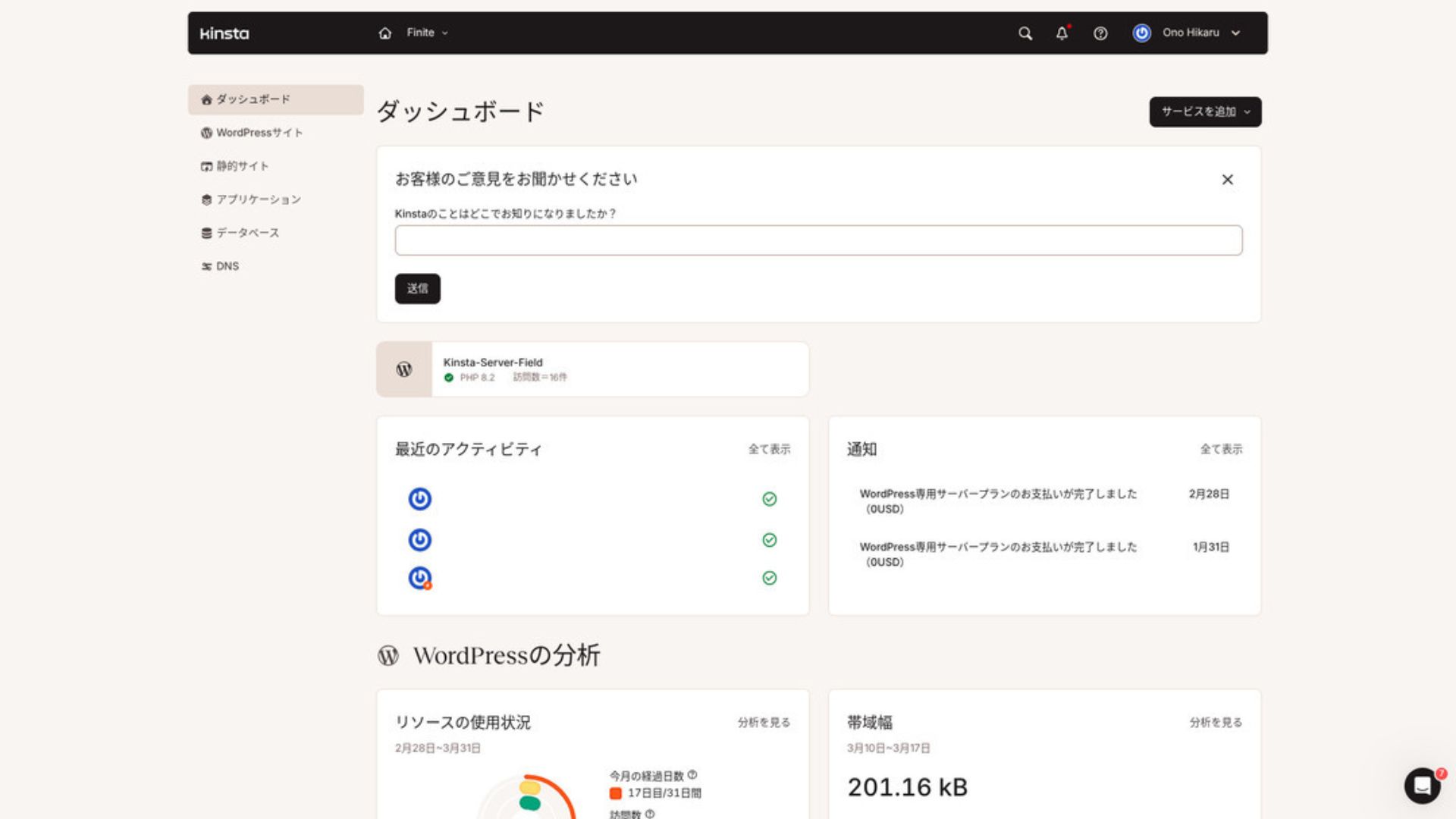
要管理 WordPress,請在選單中點選 “WordPress Sites”。
新建 WordPress 網站或遷移都很簡單
Kinsta讓新建網站和遷移都變得很容易。不要因為它是海外伺服器就擔心操作困難。
當你開啟 WordPress Sites 並點選“Add Site”時,
- 建立新站點
- 請求站點遷移
就會出現這些選項。建立新站點也很容易。
建立新的 WordPress 網站
- STEP.1在 MyKinsta 中選擇“WordPress Sites”
Log in to MyKinsta. Then select “WordPress Sites” from the menu.
- STEP.2建立新站點
Click “Add Site.” Then choose “Create new site.”
- STEP.3繼續進行 WordPress 設定
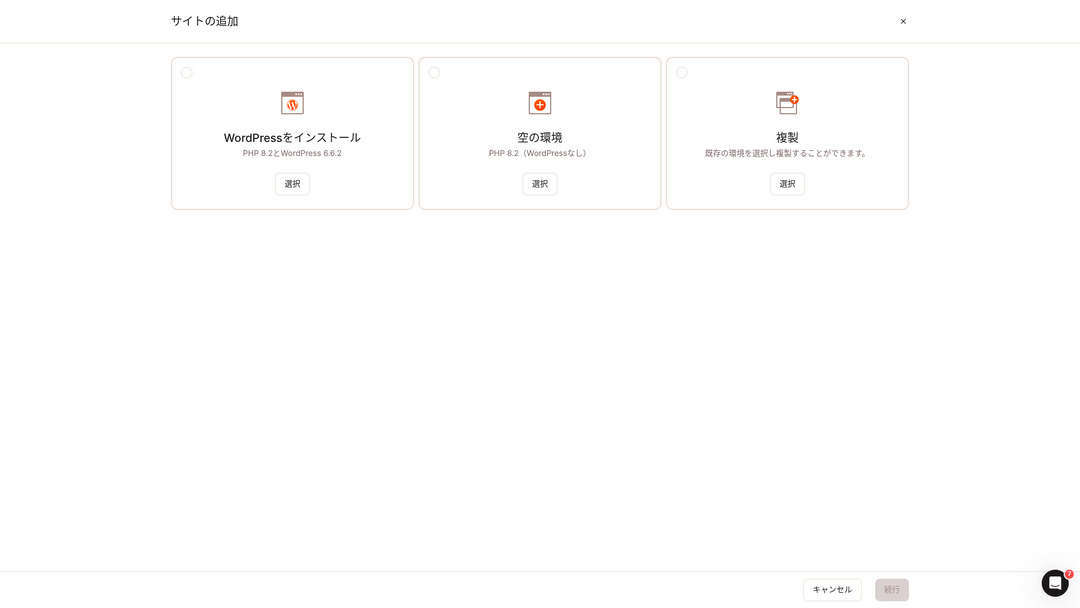
選擇“安裝 WordPress”。
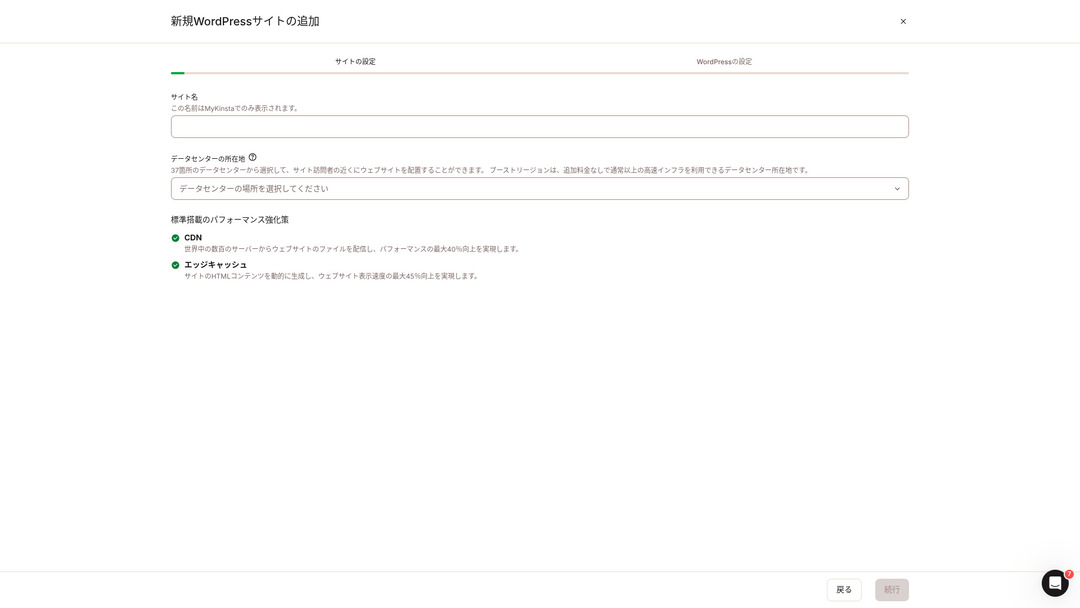
選擇站點名稱並設定資料中心位置。你可以從全球 37 個資料中心中選擇。如果大多數訪客在日本,選擇東京或大阪最穩妥。
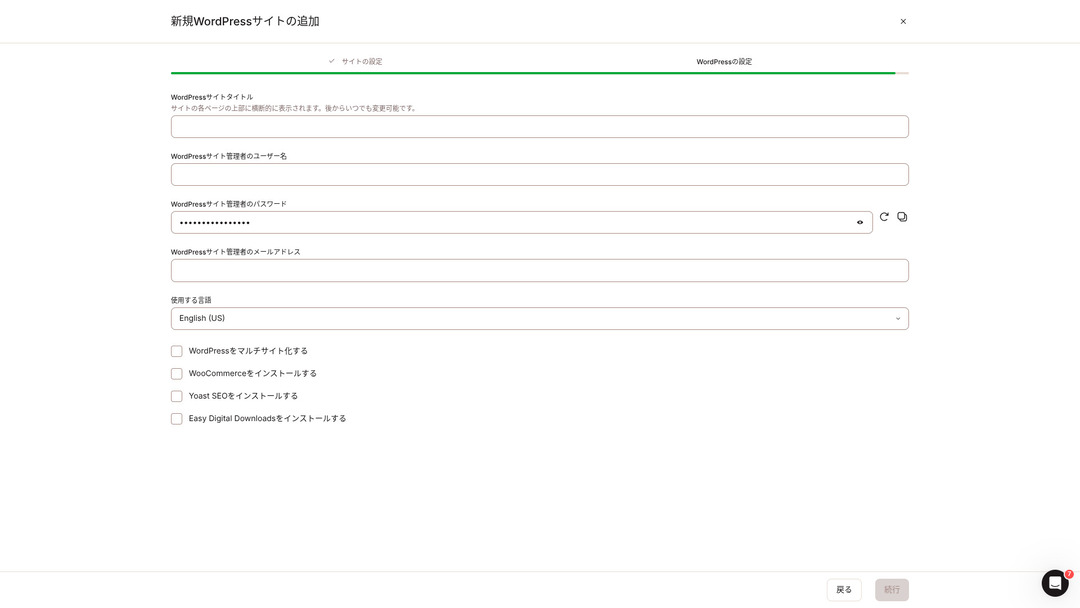
- WordPress 網站標題
- WordPress 管理員使用者名稱
- WordPress 管理員密碼
- WordPress 管理員郵箱地址
- 使用語言
設定這些選項後,點選“繼續”,WordPress 網站設定就完成了。
Kinsta 價格方案:單站點年付方案最划算
Kinsta有三種計費方案,每種方案均可按月或按年支付。其中一種是面向製作機構的代理商計劃。對個人和企業來說,可用的方案是
- 單站點方案
- 多站點方案
二者中的一種。
| 比較專案 | 單站點方案 | 多站點方案 |
|---|---|---|
| 月費 | 4,459 yen (annual billing) 5,202 yen (monthly billing) | 8,769 yen (annual billing) 10,404 yen (monthly billing) |
| WordPress 站點 | 1 | 2 |
| 訪問量 | 35,000 | 70,000 |
| 儲存空間 | 10GB | 20GB |
| CDN | 125GB | 250GB |
如果你打算“馬上開始寫部落格”,我推薦單站點方案。
Kinsta 評測與 5 個關鍵功能

WordPress 很快:顯示速度第 1
Kinstaranked 無. 1 in display speed in our own measurements. It truly is a fast server.
If you are struggling with server speed, I would tell you to choose Kinsta without hesitation.
提供 CDN
Kinstauses 37 data centers as server bases around the world while also operating 260 CDN locations. By using a CDN, people viewing your website receive data from the nearest CDN server, which helps pages load faster.
Kinsta ’s cheapest WordPress hosting option, the Starter plan, still includes 100GB of CDN.That provides more than enough transfer capacity.
★ What Are Traffic and Data Transfer? Managing and Optimizing Web Traffic
附帶 14 天自動備份
Kinstacomes with 14 days of automatic backup functionality.
備份是必不可少的。總是有可能因錯誤刪除資料或因網路攻擊而損改資料。在這種情況下,備份資料可讓您還原網站。
KinstaWith you can restore everything from up to 14 days of backup data even if something goes wrong, which gives real peace of mind.
工程師提供 24/7 支援
Kinstahas a 24/7 support system staffed by engineers.
You never know when a situation requiring support will arise.If it is not resolved quickly, it may even become a matter of business credibility.
Kinstagives peace of mind because engineers are always there to support you.Especially if you do not have engineers inside your company, Kinstathe reassurance of being able to contact engineers at any time, as you can with Kinsta, is extremely valuable.
免費駭客修復保障
無 matter how much effort you put into security, nothing is ever 100 percent guaranteed. Still, Kinsta comes with a free hack-fix guarantee.
If you are hacked,Kinsta will work together with you to repair the damage.
- 免費 site inspection
- Detailed file scans to identify malware
- Repair of core files using a fresh WordPress installation
- Identification and removal of infected plugins and themes
Because the response is so thorough, you do not have to worry that the same hacking damage will happen again.
Kinsta 的缺點是價格較高

Even though it is a top-tier server, Kinsta is expensive.
In terms of price, it belongs in the category of servers used by businesses.I compared it with other business-oriented servers.
- 初始設定費
- 12-month server contract
- One year of domain cost
- Plan that supports WordPress
KinstaThere are servers that cost more than Kinsta, but all of the others are servers based in Japan.They offer Japanese-language support and a large number of business-oriented features as well.
So although it is truly top-tier in server speed, there is no denying that it still feels expensive.
將 Kinsta 與競爭伺服器對比
I compared it with major Japanese hosting services that, like Kinsta, place a strong emphasis on speed.
ConoHa WING
ConoHa WING is a server built with a strong focus on WordPress display speed. Its key feature is how easy it is to get started with WordPress. Tasks such as acquiring and configuring a domain, creating a database, and installing WordPress are already completed when you sign up for the server, so the settings needed to launch a WordPress website are finished at the time of the server contract.
As a result, even if you have no server knowledge or WordPress skills, you can start your website right away.

ConoHa WING 評價:為何有 75 萬使用者選擇它,加上速度、優缺點測試
ConoHa WING 評價:為何有 75 萬使用者選擇它,加上速度、優缺點測試
serverfield.org
XServer
Xserver 長期以來一直是日本受歡迎的高速伺服器。它在國內市場擁有第一的使用者份額。它的受歡迎程度不僅來自伺服器速度,還來自其 99.99% 線上時間的穩定性以及細心的支援。
However, when it comes to speed, Kinsta still comes out ahead of XServer.

Xserver 評價【2025最新】:速度、價格、優缺點徹底指南
Xserver 評價【2025最新】:速度、價格、優缺點徹底指南
serverfield.org
用 Kinsta 7 步開啟 WordPress 網站
Here, we will start a WordPress website using Kinsta and MuuMuu Domain.
Let’s Start a Website with Kinsta!
- STEP.1Get a custom domain with MuuMuu Domain
Sign up for or log in to MuuMuu Domain.
If you do not yet have an account, create a new one on the MuuMuu Domain website. If you already have an account, just log in.
Search for and purchase your custom domain.
Enter your desired domain name into the MuuMuu Domain search bar and check whether it is available. If it is available, purchase that domain.
- STEP.2Set up a new site on Kinsta
First, sign up for Kinsta. Then add a new site.
Access the Kinsta dashboard and click “Add Site.”
選擇網站名稱和資料中心位置。選擇「安裝 WordPress」,然後輸入網站標題、管理員使用者名稱、密碼和電子郵件地址等必填資訊。
If necessary, install plugins such as WooCommerce or Yoast SEO.
- STEP.3Update the DNS settings in MuuMuu Domain
Access the MuuMuu Domain dashboard, select the domain you acquired from the “Domain Management” section, and click “DNS Settings.”
From the Kinsta dashboard, check the DNS information for your site, including the name servers. Enter that information on the “DNS Settings” page in MuuMuu Domain and save it.
- STEP.4Set your custom domain in the Kinsta dashboard
Move to the settings page for the WordPress site you were just using.
Go to the “Domains” section and click “Add Domain.” Enter the custom domain name you acquired through MuuMuu Domain and add it.
Next, move to the “Tools” section and click “Install a free Let’s Encrypt SSL certificate” to install the SSL certificate.
- STEP.5Customize your WordPress site
Log in to the WordPress admin area from the Kinsta dashboard. Then install themes and plugins as needed and customize your site.
關於 Kinsta 的常見問題
可以用 Kinsta 註冊域名嗎?
不,您無法透過 Kinsta 註冊網域。請透過網域註冊服務(例如 MuuMuu Domain)註冊您的網域。之後,在 MyKinsta 中註冊取得的網域。
Kinsta 的 10GB 儲存太少了嗎?
If you are running a WordPress site, 10GB is not a problem at all.As of March 2025, this site with more than 90 articles uses only 1.5GB of storage.Unless you are building something like a portfolio site with an extreme number of images, there is no need to worry.
“Kinsta” 怎麼讀?
“Kinsta” is pronounced “Kin-sta.”
總結
“Kinsta”是全球擁有 37 個資料中心的最快頂級租用伺服器。它在我們自己的測量中排名第一。無可否認高昂的價格,但如果您想要一個完全追求舒適度和效能的伺服器,它無疑是極佳的選擇。也提供日文聊天支援。
30 天退款保證
Kinsta is a top-tier server. If you want to improve your site’s display speed with confidence, please give it a try.
It offers not only speed, but also an excellent support system, so you can use it with confidence.
Comparison of 10 Overseas Hosting Services

With overseas hosting services, many people struggle to decide which server to choose because of language barriers and cultural differences.
In this article, we thoroughly compare 10 carefully selected overseas hosting services from around the world and explain each service’s features, pricing plans, and actual user experience in detail.
You will find information that covers a wide range of needs, from selection criteria beginners can rely on to advanced features that engineers look for.