Lolipop! کا جائزہ [2025 تازہ ترین]: رفتار کے ٹیسٹ نے کیا دکھایا، نیز اصل فوائد اور نقصانات
LOLIPOPis a long-established ہوسٹنگ سروس operated by GMO Pepabo, Inc. Since its شروع کریں in 2001, it has been used by a wide range of customers, from personal blogs to کارپوریٹ websites, and its ریکارڈ and reliability rank among the بہترین in the industry.

The reasons I recommendLOLIPOPtopeople using WordPress for the first وقت or looking for an سستا سرورare:
- You can شروع کریں WordPress easily
- اس کی سست ہونے کی شہرت ہے، لیکن حقیقت میں یہ ایک بہت تیز سرور ہے
- اگرچہ یہ ایک بڑا ہوسٹنگ برانڈ ہے، قیمت کم ہے
اسی لیے۔ آپ کے مطمئن ہونے کے امکانات زیادہ ہیں۔ 10 دن کا مفت ٹرائل موجود ہے۔

A competing سروس isSakura Rental Server. It is بہتر suited to کارپوریٹ اور کاروباری use thanLOLIPOP, so غور کریں it alongside this سروس.
★ Sakura Rental سرور جائزہ: Is It Scary or Slow? قیمتیں, Pros, and Cons for Individuals and Businesses
| سرور کی قسم | Shared ہوسٹنگ |
| Speed (TTFB) | 80ms |
| تجویز کردہ پلان اور مدت | Light, 12 months |
| ٹرائل / refund policy | 10 دن کا مفت ٹرائل |
| Monthly قیمت (12-ماہ contract) | 495 ین |
| ابتدائی سیٹ اپ فیس | مفت |
| مفت ڈومین | 1 مفت forever |
| سپورٹ | Chat and ای میل (weekdays 10:00-18:00) |
| اپ ٹائم | 99.99% |
| اسٹوریج | 350GB |
| Number of databases | 50 |
| سیکیورٹی measures | Overseas Attack Guard, WAF, virus scanning |
| SSL | مفت dedicated SSL, dedicated SSL (Pro) |
| بیک اپ / restore | No بیک اپ on Standard plan and below, 7-generation بیک اپ (paid) |
| ای میل accounts | Unlimited |
| ای میل سیکیورٹی | POP/POP over SSL, IMAP/IMAP over SSL, SMTP/SMTP over SSL, spam filter |
| سرور / ویب سائٹ منتقلی سروس | 33,000 ین |
| WordPress preinstall | ہاں |
| CDN | کچھ نہیں |

Lolipop! was the first سرور I ever used with WordPress. The قیمت is still low, but getting started with WordPress has become easier than before.
The سرور specs have improved compared with a few years ago, and now it is one of the ultra-تیز سرورز.
Lolipop! compared with other providers
- Overallrating★★★★★
- سرور رفتار★★★★★
- قیمتیں★★★★★
- Stability★★★★★
- Ease of getting started with WordPress*★★★★★
- ڈومین management, SSL setup, and other operational tasks*★★★☆☆
* These ratings are based on my own hands-on use.

- Based on market research as ofNovember 4, 2025, sorted byرفتار
- Monthly prices are the first-سال cost for the cheapest plan that can run WordPress
- Speed is the Time to First Byte for demo سائٹس built under the same conditions
“Lolipop!” is a popular long-established ہوسٹنگ سروس دستیاب at a low قیمت. Despite its stable 99.99% uptime, the Light plan that can run WordPress starts at 264 ین per ماہ. The لاگت اور کارکردگی کا توازن is excellent across every plan.
Until December 21, corporations established less than one سال ago can use the High Speed plan مفت for 12 months, and with a contract of 12 months or longer they can get one ڈومین مفت forever, plus a 10-day مفت ٹرائل.
What Is Lolipop? The Appeal and Capability of a Long-Established ہوسٹنگ Service

Lolipop overview: an سستا and stable long-established سرور
There are plans starting at 99 ین per ماہ, which makes it a very attractive choice for people using ہوسٹنگ for the first وقت or for anyone who wants to keep costs down.
Thanks to the know-how built up over many years of operation, it offers not only stable سرور performance but also all the functions needed to run a website, including CMS installation such as WordPress, custom ڈومین configuration, and ای میل features. It also has a control panel that is آسان for ابتدائی صارفین to use, so even first-وقت ہوسٹنگ users can feel comfortable using it.
Why Lolipop is chosen: from ابتدائی صارفین to advanced users
The reasonsLOLIPOPis supported by such a wide range of users include the following.
- Overwhelmingly low قیمتیں:Plans شروع کریں at 99 ین per ماہ, setup costs are low, and it is آسان to شروع کریں a website. Even plans that can run WordPress شروع کریں at a low 264 ین per ماہ.
- High stability:Its long ریکارڈ provides a stable سرور environment that keeps website downtime to a minimum.
- Plenty of features:It includes the features needed to run a website, such as آسان WordPress installation, SSL configuration, and بیک اپ سہولت.
- Solid سپورٹ:The سپورٹ system is there when you need it, so even ابتدائی صارفین can use it with confidence.
- Flexible plans:There are plans to match a variety of needs, from personal blogs to large کارپوریٹ سائٹس.
For these reasons,LOLIPOPcontinues to be chosen by a wide range of users, from ابتدائی صارفین to advanced users.
Lolipop reviews and reputation: real user voices

When you are غورLOLIPOP, what you want to know is how real users actually rate it. Here I will thoroughly examine both the positive and negative reviews and use those real user voices to clarify whatLOLIPOPis really like.
Positive reviews: قیمتیں, رفتار, stability, and سپورٹ
The positive reviews ofLOLIPOPmost often highlight the following points.
These comments suggest thatLOLIPOPis a low-cost ہوسٹنگ سروس that still offers solid performance and stability.In particular, it seems especially attractive to ابتدائی صارفین and individual bloggers because it makes it آسان to شروع کریں a website.
Negative reviews: lower-plan رفتار, سپورٹ جواب, and WordPress errors
On the other hand, there are also negative reviews ofLOLIPOPlike the following.
These reviews show that some users are dissatisfied with the display رفتار of the lower-tier plans, that there is room for improvement in the سپورٹ system, and that WordPress errors can occur. Keeping these points in mind, you need to منتخب کریں the right plan based on the scale and purpose of your website.
The advantages and drawbacks that emerge from the reviews
Taking both the positive and negative reviews together, it is fair to say thatLOLIPOPhas the following strengths and weaknesses.
- Advantages:
- Overwhelmingly low قیمتیں:Monthly fees are very low, and upfront costs are also آسان to keep down.
- Easy to get started:Even ابتدائی صارفین can شروع کریں a website easily.
- Stable سرور environment:سرور stability is high, keeping website downtime to a minimum.
- Plenty of features:It includes the functions needed to run a website, such as آسان WordPress installation and SSL setup.
- The reassurance of a long-established host:It has a long operating history and a high level of reliability.
- Drawbacks:
- ڈسپلے رفتار on the lower plans:Lower plans can feel slow in some cases.
- سپورٹ system:Responses can take وقت, and some issues may not be fully handled.
- WordPress errors:Errors can occur when installing or using WordPress.
- Restrictions on plan changes:Downgrading to a lower plan may not be possible.
- بیک اپ feature:بیک اپس are paid on some plans.
Four features of Lolipop: compared with other ہوسٹنگ سروسز

The appeal ofLOLIPOPis not just that it is inexpensive. Here I will dig into four major features that Lolipop offers and examine its real strengths while comparing it with other ہوسٹنگ سروسز.
A close look at the رفتار technologies
LOLIPOPuses the latest technologies to improve website loading رفتار. The most representative examples are the high-performance web سرور software LiteSpeed and its own proprietary رفتار feature called Lolipop! Accelerator.
- What is LiteSpeed?LiteSpeed is web سرور software that can process web pages faster than Apache. It can handle large numbers of simultaneous accesses efficiently and can significantly improve loading رفتار. It is especially effective for dynamic websites such as WordPress.
- What is Lolipop! Accelerator?Lolipop! Accelerator is a proprietary رفتار-enhancement feature developed byLOLIPOP. By caching website content, it reduces سرور load and speeds up display times. This helps maintain comfortable performance even on سائٹس with many images or spikes in traffic.
★ What Is Cache? Use Temporary Data اسٹوریج to Speed Up Websites
Actual رفتار comparison data: how it differs from other hosts
Below is the data comparing the display رفتار ofLOLIPOPwith other popular ہوسٹنگ سروسز.
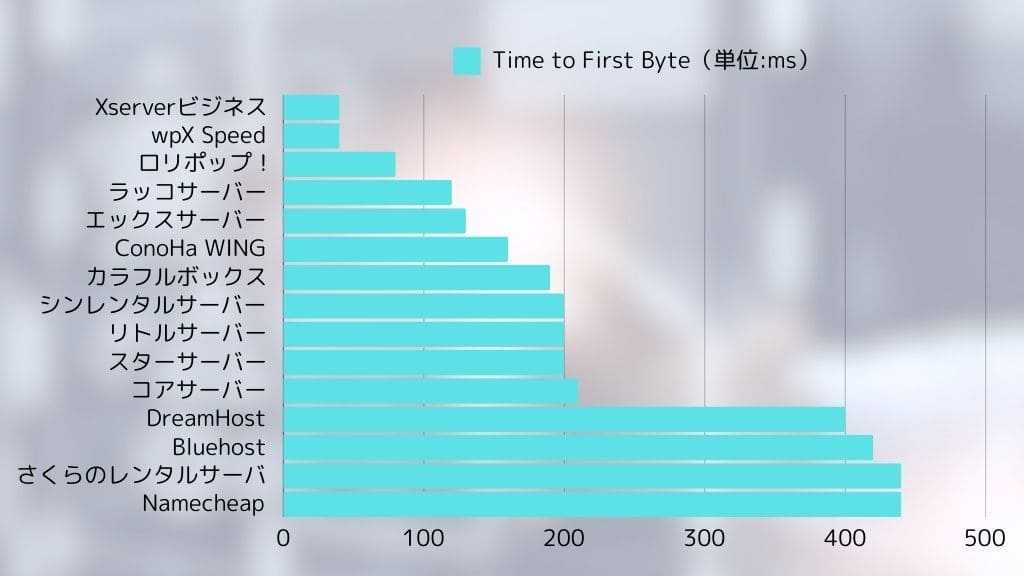
Lolipop posted an extremely تیز display رفتار of 80ms.
As the data shows,LOLIPOPperforms well in display رفتار compared with other providers. In particular, its تیز initial جواب is extremely important for reducing user drop-off.

Detailed comparison of the قیمتیں plans
LOLIPOPoffers multiple قیمتیں plans to match different needs. The table below summarizes the prices and specifications of each plan.
| Plan name | Monthly قیمت | Disk space | Databases | WordPress | Features |
| Economy | 99 ین | 120GB | کچھ نہیں | نہیں | The cheapest plan. Best for static websites or ای میل use. |
| Light | 264 ین | 350GB | 50 | ہاں | The cheapest plan that can run WordPress. Ideal for personal blogs. |
| Standard | 495 ین | 450GB | 100 | ہاں | A well-balanced plan that can handle many kinds of سائٹس. Best for personal blogs and small to midsize websites. |
| High Speed | 550 ین | 700GB | Unlimited | ہاں | A plan specialized for تیز display. تجویز کردہ for high-traffic سائٹس and larger websites. |
| Enterprise | 2,200 ین | 1.2TB | Unlimited | ہاں | تجویز کردہ for large-scale websites and کاروباری use. Built for heavy loads and a stable سرور environment. |
*The figures above are for selected plans only and may vary depending on contract term and campaign conditions.
How to منتخب کریں the تجویز کردہ plan by use case: personal blogs, company سائٹس, and large-scale سائٹس
- Personal blogs:If you are a ابتدائی صارف or want to keep costs down, the Light plan is تجویز کردہ. It can run WordPress and includes enough features for most needs. If you expect a certain level of traffic, غور کریں the High Speed plan as well.
- Company websites:For small to midsize کاروباری سائٹس, the High Speed plan is تجویز کردہ. It provides a stable environment that is fully capable of supporting کاروباری use.
- Large-scale سائٹس:If you expect heavy traffic or need to withstand high load, غور کریں the High Speed plan or the Enterprise plan.
Advantages and cautions of long-term contracts
WithLOLIPOP, you may receive a discount on the monthly fee by signing a long-term contract. If you are غور a long-term contract, compare the discount amount and contract length and منتخب کریں the period that بہترین matches your usage. However, be careful because canceling during the contract term may result in a cancellation penalty.
Stable operation and سیکیورٹی: peace of mind through up-to-date features
LOLIPOPhas a high level of stability backed by many years of operation. Its 99.99% uptime speaks to that reliability. Looking at past سرور incidents, most were planned maintenance, and sudden unexpected failures have been very rare.
Even if a سرور issue does occur,LOLIPOPworks quickly to restore websites. Its monitoring system has also been strengthened, and سرورز are monitored 24 hours a day, 365 days a سال.
Website سیکیورٹی is extremely important.LOLIPOPimplements the following سیکیورٹی measures.
- مفت SSL:Encrypts website communication and helps prevent data interception and tampering.
- WAF (Web Application Firewall):Protects your سائٹ against attacks that target web application vulnerabilities.
- Protection against unauthorized access:Detects suspicious access and prevents intrusions into your website.
These سیکیورٹی measures help users operate their websites with peace of mind.
★ What Are SSL and TLS? How Encryption Protects Information and Why It Matters
Plenty of features and ease of use: WordPress works smoothly
LOLIPOPoffers a variety of features to help even ابتدائی صارفین build websites easily. One of the most convenient is its آسان WordPress installation function.
- Easy WordPress نصب کریں:From the Lolipop! control panel, you can نصب کریں WordPress in just a few clicks. Database setup and WordPress installation are handled automatically, so even ابتدائی صارفین can شروع کریں a WordPress سائٹ easily.
- Easy WordPress migration:Moving from another provider is smooth. If you already run a WordPress سائٹ elsewhere, you can move it easily with Lolipop!'s Easy WordPress Migration feature.
- Easy-to-use control panel:The control panel is آسان and intuitive, so even ابتدائی صارفین can configure the settings needed to run a website without getting lost. It can also be customized to suit your own preferred workflow.
Looking at these points together,LOLIPOPis an extremely attractive ہوسٹنگ سروس that balances low قیمتیں with رفتار, stability, سیکیورٹی, and ease of use.
Lolipop drawbacks and cautions: what to know before signing up

AlthoughLOLIPOPhas many advantages, it also has some drawbacks and points that require caution. To avoid thinking, “This is not what I expected...” after signing up, here I explain those drawbacks and cautions in detail. Make sure you check them properly before signing a contract.
Limitations of بیک اپ functions on lower-tier plans: details of the بیک اپ option
AmongLOLIPOPplans, the Economy and Light plans do not include خودکار بیک اپس as a standard feature. That means if a problem occurs on your website, recovery can be difficult unless you have taken بیک اپس yourself.
- High Speed plan and above:The High Speed and Enterprise plans include خودکار بیک اپس as a standard feature.
- Economy, Light, and Standard plans:You need to subscribe separately to the “7-generation خودکار بیک اپ” سروس as an optional add-on.
- قیمت:330 ین per ماہ (tax included)
- بیک اپ frequency:You can decide it freely
- Retention period:The past 7 بیک اپس
- Restore:Can be restored easily from the control panel in just a few clicks
- Points to note:If you use the Economy or Light plan, you need to take the cost of the بیک اپ option into account.
- If you do not set up خودکار بیک اپس, you need to create manual بیک اپس on a regular basis.
- تجویز کردہ approach:If you use the Economy or Light plan, غور کریں subscribing to the بیک اپ option.
- It is also advisable to take layered precautions, such as combining that with manual بیک اپس.
- For important data, try to spread risk by backing up to a local environment or using WordPress بیک اپ plugins.

Feature limitations on some plans: differences from higher-tier plans
Depending on theLOLIPOPplan, some functions may be limited. In particular, lower-tier plans have more restrictions than higher-tier plans, so you need to be careful.
- Examples of feature limits:
- Simultaneous access limits:Lolipop sets an upper limit on concurrent access to websites for each plan. On the Light plan and above, using Lolipop! Accelerator can in some cases avoid 503 errors caused by concurrent access. On the Standard plan and above, “Concurrent Access Expansion” can temporarily raise the access limit. High Speed plans and above have unlimited simultaneous access.
- Number of databases:The Economy plan cannot use databases. The Light and Standard plans limit the number of databases دستیاب. If you run متعدد سائٹس, you need to غور کریں the Light plan or higher.
- Speed features:Lolipop! Accelerator is دستیاب on the Light plan and above. LiteSpeed Cache is دستیاب only on the High Speed plan and above.
- سپورٹ:Phone سپورٹ is دستیاب only on the Standard plan and above. ای میل سپورٹ aims to reply within 48 hours on the Economy, Light, and Standard plans, and within 24 hours on the High Speed and Enterprise plans.
- Domains:On the High Speed plan and above, two ڈومینز are مفت forever while your contract remains active.
- Points to note:Before signing up, make sure you understand the functions and limitations of each plan.
- If the lower plans do not include the features you need, you will need to غور کریں a higher plan.
- تجویز کردہ approach:Check the official plan comparison table on theLOLIPOPwebsite in advance.
- Use the مفت ٹرائل period, actually try it, and confirm whether the features you need are دستیاب.
- If you are unsure which plan to منتخب کریں, I recommend the High Speed plan because it offers high performance and becomes less expensive with a long-term contract.
سپورٹ system: evaluating ای میل and chat سپورٹ
The سپورٹ system ofLOLIPOPis centered on ای میل سپورٹ and chat سپورٹ. Phone سپورٹ is not provided.
- ای میل سپورٹ:
- Hours:24/7 reception (responses are sent during کاروباری hours)
- High Speed plan and above:Aims to reply within 24 hours
- Standard, Light, and Economy plans:Aims to reply within 48 hours
- AI chat سپورٹ:
- Hours:دستیاب 24/7
- Scope:Relatively آسان questions and setup guidance
- Points to note:Depending on the question and how busy سپورٹ is, it can take وقت to receive an answer.
- The content of replies may vary depending on the سپورٹ representative. That is true of ہوسٹنگ providers in general.
تجویز کردہ approach:
- Before asking a question, check the official FAQ and manual.
- If the issue is urgent, prioritize phone سپورٹ.
- If you describe the issue specifically and attach screenshots, you may get a smoother جواب.
- Take سپورٹ hours into account and contact them with enough وقت to spare.
Comparison with other ہوسٹنگ سروسز: رفتار, features, and قیمتیں
LOLIPOPis a low-cost and well-balanced ہوسٹنگ سروس, but compared with other providers, there are areas where it falls behind in رفتار or features.
*The table above is only one example of a comparison, and features and قیمتیں vary by plan for each provider.
In-depth comparison with other hosts: Lolipop vs Star سرور vs CoreServer vs ConoHa WING

When choosing a ہوسٹنگ سروس, you have many options besidesLOLIPOP. Here I pick out three popular alternatives that are often compared with it: Star سرور, CoreServer, and ConoHa WING, and compare their features, قیمتیں, and functions in detail.
ہر سرور کی قیمت، خصوصیات، اور فیچرز کا موازنہ کریں
نیچے دی گئی جدول سے ہر سرور کی قیمت، خصوصیات، اور اہم فیچرز کا موازنہ کریں۔
*اوپر کا موازنہ ہر فراہم کنندہ کے نمائندہ پلانز کا استعمال کرتا ہے۔ قیمتیں اور خصوصیات پلان کے لحاظ سے مختلف ہوتی ہیں۔
آپ کو Lolipop کب منتخب کرنا چاہیے: اگر آپ لاگت، خصوصیات، اور استحکام کو اہمیت دیتے ہیں
LOLIPOPبہترین انتخاب ہے in the following kinds of situations.
- You want to prioritize website رفتار above all else:Lolipop! is extremely تیز, so if high display رفتار is important to you, it غور کرنے کے لائق ہے choosing.
- You want to keep costs as low as possible:Since it has very low-priced plans from 264 ین per ماہ that can run WordPress, it is ideal for people who want to minimize costs.
- You are a ابتدائی صارف who wants to شروع کریں a website easily:The control panel is آسان to use, and WordPress setup is straightforward.
If these conditions apply to you,LOLIPOPwill likely be the most cost-effective option.
When you should منتخب کریں another provider: if you قدر رفتار, سپورٹ, or specific features
On the other hand, in the following situations, you may need to غور کریں a provider other thanLOLIPOP.
- You want more extensive سپورٹ:On lower Lolipop! plans, phone سپورٹ may not be دستیاب and ای میل responses may take longer.
- You need specific features:If you require features that Lolipop! does not offer, such as more advanced سیکیورٹی functions or سپورٹ tailored to a specific CMS, غور کریں another provider.
- You run a large-scale website:If your سائٹ handles heavy load and requires stronger resources, compare higher-end alternatives as well.
- Points for choosing each provider:
- Star Rental Server:A سرور with a اچھا balance between لاگت اور کارکردگی کا توازن and رفتار. تجویز کردہ for ابتدائی صارفین to intermediate users.
- CoreServer:High-performance ہوسٹنگ aimed at advanced users. تجویز کردہ if you prioritize رفتار and stability.
- ConoHa WING:A تیز سرور equipped with newer technology. Easy to handle with WordPress and تجویز کردہ for ابتدائی صارفین. Also worth غور for large سائٹس or if you place top priority on display رفتار and traffic tolerance.
LOLIPOPis تجویز کردہ for people who want to شروع کریں a website easily at low cost and who are satisfied with core features. However, if you need a faster سرور or more extensive سپورٹ, it غور کرنے کے لائق ہے غور other providers too.



Who is Lolipop تجویز کردہ for? Beginners, individual bloggers, and small to midsize businesses

People who should غور کریں Lolipop!
- Beginners using ہوسٹنگ for the first وقت:People who want to شروع کریں a website easily at low cost, نصب کریں WordPress easily, and work with an آسان-to-use control panel.
- People running personal blogs:People who want to شروع کریں blogging while keeping costs down, want a stable سرور environment, and want a سرور that can handle a reasonable amount of traffic.
- Companies running small to midsize websites:Businesses that want low-cost ہوسٹنگ that is still practical for کاروباری use.
People for whom Lolipop is not a اچھا fit
- People who put absolute priority on website stability:Especially on lower-tier plans, the سائٹ can feel slower as traffic increases. If you need a faster سرور, غور کریں another provider.
- People who need extensive سپورٹ:If سپورٹ جواب رفتار is important to you, other providers may suit you بہتر.
- People who need advanced features:If you need functions that Lolipop does not offer, غور کریں another host.
Four steps to شروع کریں a WordPress website with Lolipop right now
- STEP.1Access the official website, LOLIPOP
Click “Start with a 10-day مفت ٹرائل.”
- STEP.2Apply
Select a plan. I recommend the reasonably priced Light plan that can run WordPress.
Enter your account information. Set the initial Lolipop ڈومین that will become your account. Enter any string you like.
Create a مضبوط password.
Enter the ای میل address you normally use as your contact address.
If you see the message that you can obtain a custom ڈومین for مفت when applying, you are either in a campaign period or choosing a higher plan. If it appears, check the box and منتخب کریں “Obtain it.” In that case, the 10-day مفت ٹرائل cannot be used. Even so, it is easier to شروع کریں WordPress this way, so I recommend choosing it.
Enter the custom ڈومین you want to obtain.
★ What Is a ڈومین? Its Role as an Internet Address and How to Obtain One
To obtain a ڈومین, you need a Muumuu account. Set an ID and password. Read the notes and check “Agree.”
There is SMS verification by phone, and voice call verification is also دستیاب. Once you receive the verification code, enter it and click “Verify.”
Next, complete Lolipop user registration. Enter your name, address, and the other required details.
Be sure to check the box at the bottom of the registration screen that says “Install WordPress at the same وقت as you apply.”If you do not use this, setting up WordPress becomes much more difficult. (The 10-day مفت ٹرائل will no longer be دستیاب. Even so, it is بہتر to use this option.)
I also recommend enabling خودکار contract renewal. Renewal procedures are tedious, and if you forget, your data may be deleted.
Enter the information required for WordPress.
- Site title: anything is fine
- Username: anything is fine
- Password: make it as مضبوط as possible
You can change the سائٹ name later, so if you have not decided yet, enter a temporary name.
Your WordPress username and WordPress password are important.Write them down. You will need them to log in to the website you created with WordPress.
Choose a WordPress theme. I recommend Cocoon. (This سائٹ also uses Cocoon.)
A confirmation page for your application details will appear. If everything is fine, click “Start the مفت ٹرائل.” Your application is now complete.
- STEP.3Initial WordPress setup
On the screen after completing your application, click “Log in to the user page.”
Under “Create a سائٹ,” you will see the message “WordPress is currently being نصب. Please wait a little longer until installation is complete.” It can take around 10 minutes for the installation to finish.
Once the installation is complete, the message “Check WordPress” will appear. Click it. Then click the “Admin URL” shown in your WordPress installation history. On the login screen that appears, enter the username and password you wrote down earlier and click “Log in.”
*If you see a warning saying “This سائٹ can’t be reached,” the DNS settings have not propagated yet. In that case, you have no choice but to wait, so try logging in once every hour.
★ What Are DNS and Name سرورز?
After logging in to WordPress, set your permalinks. From the WordPress admin screen, go to “Settings” and then “Permalinks.” Choose “Post name,” then click “Save changes.”
When you منتخب کریں “Post name,” you can enter any string you like in the URL when publishing articles. I recommend short strings that help readers imagine the content of the article. If a URL is too long, some visitors may feel uneasy and think it looks suspicious.
- STEP.4Install plugins
Return to the WordPress admin screen, go to “Plugins,” then “Add New,” and نصب کریں the plugins you need.
When you find a plugin you want by searching, click “Install Now” and then “Activate.” After that, follow the instructions for each plugin.
Make sure to نصب کریں سیکیورٹی and بیک اپ plugins.
- 5 WordPress Plugins to Strengthen سیکیورٹی and How to Choose Them
- 5 Powerful WordPress بیک اپ Plugins to Help You Get Your Data Back
Once you have نصب your plugins, your WordPress website is ready to go.
Frequently asked questions about Lolipop: friendly for ابتدائی صارفین

This FAQ summarizes questions that people غورLOLIPOPor people who have just started using it are likely to have. The explanations are written so that even ابتدائی صارفین can feel comfortable using Lolipop!.
Which plan is تجویز کردہ?
The بہترین plan onLOLIPOPdepends on your purpose and بجٹ.
- People using ہوسٹنگ for the first وقت or running a personal blog:Light plan: تجویز کردہ because it is inexpensive and can run WordPress.
- People who want to run a personal blog with some expected traffic, or a small company سائٹ:Standard plan: تجویز کردہ because it offers a stable environment and can handle many سائٹس.
- People who expect heavier traffic:High Speed plan: تجویز کردہ because of its stronger رفتار and higher resources.
I recommend using the مفت ٹرائل period to actually test each plan for yourself.
Can I use a custom ڈومین?
Yes, you can use a custom ڈومین withLOLIPOP.
- If you obtain it through Lolipop!:You can obtain a ڈومین easily from the Lolipop! control panel.
- If you obtain it elsewhere:A ڈومین acquired from another provider can also be used with Lolipop!. In that case, you need to configure the name سرورز.
Can I use WordPress?
Yes, you can use WordPress withLOLIPOP. However, note that the Economy plan cannot run WordPress.
- Easy نصب کریں feature:You can نصب کریں WordPress easily from the Lolipop! control panel.
- Easy WordPress migration feature:You can easily migrate a WordPress سائٹ from another ہوسٹنگ provider.
What kind of user سپورٹ is دستیاب?
A: Lolipop! offers the following user سپورٹ options.
- Phone سپورٹ:Weekdays 09:30-13:00, 14:00-17:30
- Standard plan and above:دستیاب
- Light and Economy plans:Not دستیاب
- ای میل سپورٹ:Reception 24/7 (responses during کاروباری hours)
- High Speed plan and above:Aims to reply within 24 hours
- Standard, Light, and Economy plans:Aims to reply within 48 hours
- Chat سپورٹ:دستیاب 24/7 for relatively آسان questions
- FAQ and manual:A comprehensive FAQ page and manuals are provided.
I want to compare the قیمتیں plans
You can compare the قیمتیں and specifications of each plan on the officialLOLIPOPwebsite.
You can also refer to the section “Four features of Lolipop: compared with other ہوسٹنگ سروسز” in this article, where the prices and specifications of each plan are compared.
Can I move from a lower-tier plan to a higher-tier plan?
Yes,LOLIPOPlets you upgrade your plan.
- You can complete the plan change procedure easily from the control panel.
- The plan change is reflected immediately.
- You can change to a higher-tier plan at any وقت, but you cannot switch to a lower-tier plan.
How are بیک اپس handled?
How بیک اپس are handled onLOLIPOPdepends on the plan.
- High Speed plan and above:Automatic بیک اپس are included as standard.
- Economy, Light, and Standard plans:Automatic بیک اپس are دستیاب as an option (330 ین per ماہ).
I recommend taking بیک اپس on a regular basis.
How do I switch from another provider?
If you want to move toLOLIPOPfrom another provider, you have the following options.
- Easy WordPress migration feature:If your سائٹ uses WordPress, you can migrate it easily with this feature.
- Manual migration:You need to upload files with FTP software and migrate the database manually.
Summary: Is Lolipop really worth buying? جائزہ the pros and cons again

In this article, I have thoroughly explainedLOLIPOPfrom every angle, including its reputation, reviews, features, drawbacks, comparisons with other providers, setup procedure, and frequently asked questions. To close, let us جائزہ its overall evaluation again and summarize who it is بہترین suited for.
- Advantages:
- Overwhelmingly low قیمتیں:Plans شروع کریں at 99 ین per ماہ, and upfront costs are آسان to keep low.
- Easy to get started:It provides آسان WordPress installation and an آسان-to-use control panel so even ابتدائی صارفین can شروع کریں a website without much difficulty.
- Stable سرور environment:It has a long operating ریکارڈ and high uptime.
- Plenty of features:It includes the features needed to run a website, such as WordPress سپورٹ, SSL setup, and ای میل سہولت.
- The reassurance of a long-established provider:It has been used by many customers for years and has high reliability.
- Drawbacks:
- Traffic tolerance on lower plans:The Economy, Light, and Standard plans limit concurrent access.
- سپورٹ system:ای میل replies can take وقت.
- Some feature restrictions:Lower plans have limitations on the functions you can use.
- بیک اپس:On some plans, خودکار بیک اپس are a paid option.
If you also want to غور کریں other ہوسٹنگ سروسز, read the article below.
Complete comparison of 32 WordPress ہوسٹنگ سروسز: recommendations for individuals, businesses, and overseas use

When you think, “I want to شروع کریں using WordPress,” and search for “تجویز کردہ WordPress ہوسٹنگ,” you find all kinds of articles, from سروسز for individuals and small to midsize businesses to overseas hosts and سستا سرورز. To be honest, you may feel:
- Which سائٹ should I even look at?
- I just want to منتخب کریں a ہوسٹنگ سروس in a آسان, آسان-to-understand way.
- Please show me how I can شروع کریں WordPress right away.
If that sounds familiar, this article introduces a carefully selected set of تجویز کردہ providers from32 ہوسٹنگ سروسز for individuals, corporations, and overseas use. It is explained by an SEO specialist at an app development company that uses ہوسٹنگ سروسز every day.