
مفت setup fee until September 30, 2025, 20% off Little Plan سرور fees, and a 20-day مفت آزمائش
PR
سرورز
Little سرور کا جائزہ: WordPress کے لیے تیار بجٹ ہوسٹنگ کا جامع گائیڈ، ماہانہ 165 ین سے
شائع شدہ: 2025.04.18
تازہ کاری: 2025.04.18
درجہ بندی: 4.0
Little Serveris a بجٹ ہوسٹنگ سروس. Its سب سے سستا Mini پلان starts at 165 ین per ماہ. But it is not just inexpensive: WordPress runs quickly, and ای میل کی سہولت is also دستیاب.

We recommendLittle Servertoسستی ہوسٹنگ تلاش کرنے والے لوگbecause:
- یہ تیز سرور رفتار فراہم کرتا ہے۔
- اس کی ماہانہ قیمت انتہائی کم ہے۔
- آپ متعدد سائٹس چلا سکتے ہیں۔
اسی لیے۔ آپ کے مطمئن ہونے کے امکانات زیادہ ہیں۔ آپ اسے 20 دن تک مفت آزما سکتے ہیں۔
A competing سروس isValue Server. Its flexible hourly-based قیمتیں is even بہتر than Little سرور's. Consider it as well.
★Value Server جائزہ [2025 تازہ ترین]: WordPress کم قیمت پر شروع کریں
| سرور کی قسم | Shared ہوسٹنگ |
| Response رفتار (TTFB) | 200ms |
| تجویز کردہ پلان اور مدت | Mini, 12 ماہ |
| آزمائش / refund policy | 20-day مفت آزمائش |
| Monthly قیمت (12-ماہ contract) | 165 ین |
| ابتدائی سیٹ اپ فیس | 920 ین |
| مفت ڈومین | نہیں |
| سپورٹ | ای میل (hours not disclosed) |
| اپ ٹائم | Not disclosed |
| اسٹوریج | 20GB |
| Number of databases | 3 |
| سیکیورٹی features | IMP |
| SSL | مفت SSL, dedicated SSL (Little Plan and above) |
| بیک اپ / restore | Seven days of خودکار بیک اپس are مفت, and restores are also مفت. |
| ای میل اکاؤنٹس کی تعداد | لامحدود |
| ای میل سیکیورٹی | Spam filter |
| سرور / ویب سائٹ منتقلی سروس | نہیں |
| WordPress preinstalled | ہاں |
| CDN | نہیں |

Hikaru Ono
I was able to start WordPress at the same وقت I signed up for Little سرور. It was surprising how smooth the process was at a قیمت level this low, which is among the سب سے سستا in the industry.
The carefully written official manuals also left a اچھا impression.
Little سرور vs. Other Services
- Overallrating★★★★☆
- سرور رفتار★★★★☆
- قیمتیں★★★★★
- Stability★★★★☆
- Ease of starting WordPress*★★★★★
- Ease of ڈومین management, SSL setup, and related operations*★★★☆☆
* These ratings reflect my own hands-on experience using the سروس.

Complete Comparison of 21 تجویز کردہ WordPress ہوسٹنگ Services for Individuals
Complete Comparison of 21 تجویز کردہ WordPress ہوسٹنگ Services for Individuals
serverfield.org
- Based on market research as ofNovember 4, 2025, sorted byرفتار
- Monthly قیمت means the first-سال قیمت of the سب سے سستا پلان that supports WordPress
- Speed is the Time to First Byte of demo سائٹس measured under the same conditions
Little Serveris a بجٹ rental سرور. Even among paid ہوسٹنگ services, excluding مفت سرورز, it is one of the سب سے سستا options for individuals. Even so, it uses NVMe SSDs to improve رفتار.
Six Key Advantages of Little سرور

سرور کی رفتار بہت تیز ہے
According to this سائٹ's independent tests,Little Serverisvery تیز. Take a look at the comparative رفتار results below.
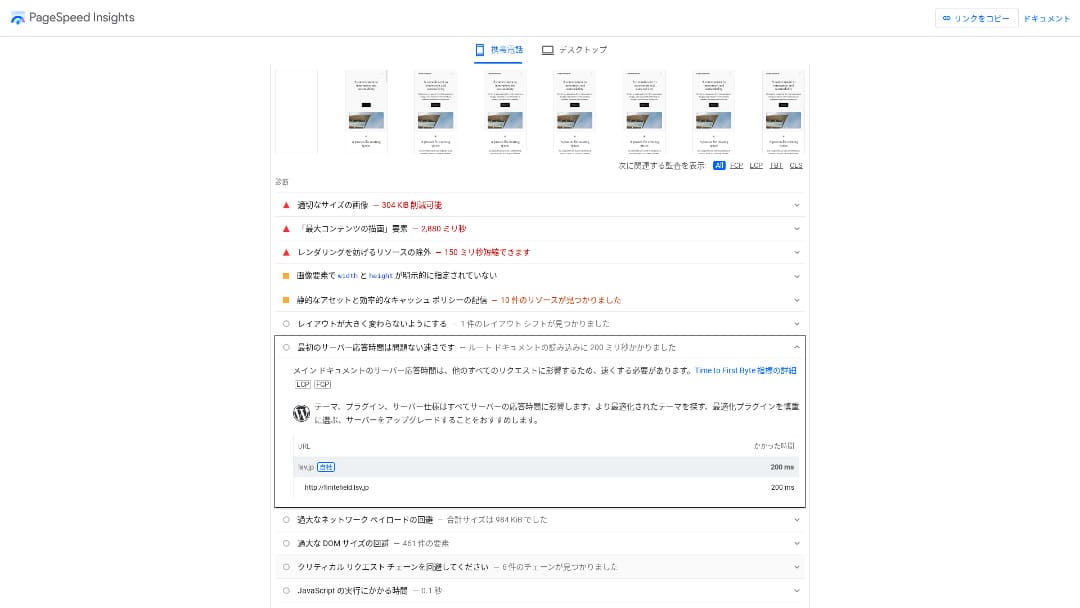
100 ین فی ماہ کے بجٹ سرورز میں یہ دستیاب سب سے تیز سرورز میں سے ایک ہے۔ اس کا سرور ریسپانس ٹائم (TTFB) 200 ms تھا۔
Google recommends keeping سرور جواب times under 200 ms. WithLittle Server, رفتار is unlikely to become a problem.
سرور ریسپانس ٹائم should be kept under 200 milliseconds.https://developers.google.com/سرور/رفتار/docs/insights/سرور?hl=en
If سرور رفتار is high, your سائٹ loads faster and visitors can browse more comfortably. As a result, that can make your سائٹ stronger for SEO and can also help lead to product sales.
★Speed Test: Comparing 11 ہوسٹنگ Services in a Performance Ranking
The قیمت Is Low
Little Serveris inexpensive. There is an initial setup fee, but because the monthly قیمت is low, the annual قیمت of running a website is far lower than with major hosts. We compared it under the following conditions.
- ابتدائی سیٹ اپ فیس
- A 12-ماہ سرور contract
- The first-سال قیمت of the ڈومین
- The سب سے سستا پلان that can run WordPress
Even compared with Lolipop!, which is considered inexpensive among the major hosts, Little سرور stands out for how سستا it is. It costs only about 60% as much. It is an ideal choice for anyone who wants to keep سرور costs as low as possible.
You Can Use WordPress
Some سستا ہوسٹنگ services do not سپورٹ WordPress. Even major hosts such as Lolipop! and Sakura Rental سرور do not allow WordPress on their سب سے سستا پلانز.
However, Little سرور supports WordPress on every پلان. With WordPress, you can build a multi-page website and also create a blog within that website.
★What Is WordPress? The System Used to Start a Website and the Points to Watch Out For
You Can Run Multiple Sites
Little سرور can host متعدد سائٹس. Even its lowest-قیمت Mini پلان lets you create up to three WordPress installations.
Besides your company website, you can also create a hobby blog of your own.
Automatic بیک اپس
Little Serverincludesseven days of خودکار بیک اپس.
If you have بیک اپس, you can restore your website even if a سیکیورٹی breach causes problems. You also do not need to configure بیک اپس yourself.
If restoration becomes necessary, you only need to contact the company operating the سروس.
You Can Use ای میل
Little Serversupports ای میل even at this low قیمت. You can create unlimited addresses on your own ڈومین. That is welcome news for companies that want business ای میل addresses.
★What Is a ڈومین? Its Role as an Address on the Internet and How to Register One
The Drawback of Little سرور: Its Uptime Is Not Public

Little Serverdoes not disclose its uptime rate. Because of that, users have no way of knowing whether the سرور is truly stable.
If the سرور is unstable, your website display will also be unstable. If your سائٹ frequently fails to load, that would be a waste given that you are paying to rent the سرور. It also means losing chances to expand your business while people cannot access the سائٹ.
When you think about it that way, uptime is extremely important. Because it is not disclosed here, some uncertainty remains.
★A Beginner-Friendly Guide to ہوسٹنگ Uptime Rates and SLAs
Compare Little سرور with Two Similar Services
Value Server
Value سرور and Little سرور قیمت almost the same per سال. Value سرور includes 15 generations of بیک اپس, so it is stronger than Little سرور when it comes to بیک اپ features.
However, the Value سرور Marutto پلان at the قیمت shown below can host only one WordPress سائٹ. If you want to build a second سائٹ, you need to sign up for another سرور. If you پلان to run متعدد سائٹس, Little سرور is the بہتر choice.

Value Server جائزہ [2025 تازہ ترین]: WordPress کم قیمت پر شروع کریں
Value Server جائزہ [2025 تازہ ترین]: WordPress کم قیمت پر شروع کریں
serverfield.org
Star Rental سرور
Star Rental سرور costs a little more than Little سرور. However, its اسٹوریج capacity and transfer allowance are much larger, so you are likely to appreciate that difference as your website grows and traffic increases.
That said, Star Rental سرور has no خودکار بیک اپ function. This is one area where Little سرور is بہتر. It offers a setup that is kinder to people who have never used ہوسٹنگ before or are running a website for the first وقت.

Star Rental سرور جائزہ [Latest 2024]: Ultra-Low قیمتیں and a Thorough Look at the Real Pros and Cons
Star Rental سرور جائزہ [Latest 2024]: Ultra-Low قیمتیں and a Thorough Look at the Real Pros and Cons
serverfield.org
Six Steps to Start a WordPress Website on Little سرور Right Now
Let's launch a website with Little سرور.
- STEP.1Visit the official Little سرور website
Click “Apply for a مفت آزمائش.”
Agree to the terms of use and the handling of personal information, then click “Yes” for the مفت آزمائش application.
- STEP.2Apply for the مفت آزمائش period
Enter your customer information, such as your name and address.
Select a پلان. The Mini پلان is تجویز کردہ. If you later need more resources, you can upgrade your پلان.
Then enter your سرور account information.
- Preferred user ID:Anything is fine. It cannot be changed later.
- Preferred account name:Anything is fine. It cannot be changed later.
- Password:Make it as complex as possible.
Click “Next page” and confirm the details. If everything is correct, click “Submit with the above information.”
A temporary registration ای میل will arrive at your contact ای میل address. Then you will receive an authentication ای میل titled “Application accepted.” Click the authentication URL. Once the authentication is complete, the مفت آزمائش registration is finished.
- STEP.3Register a custom ڈومین with MuuMuu ڈومین and add it in Little سرور
Open the official MuuMuu ڈومین website, enter the string you want to use as your website’s ڈومین in the field for searching ڈومینز, and click “Search.”
★What Is a ڈومین? Its Role as an Address on the Internet and How to Register One
You can choose a top-level ڈومین such as “.com” or “.co.jp”. The acquisition fee and renewal fee vary depending on the top-level ڈومین. If you are unsure, a company should choose “.co.jp” whenever possible. For individuals, “.com” or “.net” is تجویز کردہ. These are familiar to متعدد people, so visitors are less likely to find them suspicious and are more likely to click through.
Confirm again that it is the ڈومین you want. If it is correct, proceed to the application page.
Create a new MuuMuu ID. Enter your ID (ای میل address) and password, then click “Agree to the terms and proceed to identity verification.”
Complete the identity verification by SMS.
Next comes the application for ڈومین settings and other options. Set the ڈومین options like this:
- WHOIS disclosure:If you are a company, publish the information. If you are an individual, “Use the provider’s proxy information” is تجویز کردہ.
- Name سرور (DNS):Use name سرورز other than GMO Pepabo’s.
If you make WHOIS information public, the name, address, and other details of the person who registered the ڈومین become public.Because that exposes personal information, anyone other than a company or sole proprietor may prefer proxy disclosure.
Little سرور uses the following two name سرورز.Specify both of them.
- Name سرور 1: ns1.lsv.jp
- Name سرور 2: ns2.lsv.jp
You do not need to apply for linked services, optional services, or MuuMuu Mail. If a company wants to use ای میل, Little سرور can provide ای میل سروس.
Pay by credit card or another method. Click “Next step,” skip the advertisements, and enter your user information. After you correctly enter your name, address, and the rest, proceed to “Next step.”
جائزہ the application details, check “I agree to the terms of use,” and click “Register.” At that point, your ڈومین has been acquired.
Now add the ڈومین you obtained at MuuMuu ڈومین so that it can be used with Little سرور.
Return to the Little سرور control panel. Log in with the user ID and password you registered for the مفت آزمائش.
Click “ڈومین settings” under the settings menu. Enter the ڈومین name, check “Create a directory named after the ڈومین and use it as the path,” and click “Add ڈومین.”
That completes the custom ڈومین setup in Little سرور.
- STEP.4Install WordPress
In the Little سرور control panel, click “Easy Install” under “Settings.”For WordPress, choose the installation option marked as ultra-easy and ابتدائی صارف-friendly.That choice saves you from having to create the database manually.
★What Is a Database? An Essential Management System for WordPress
Enter your WordPress information.
- Database to use:Leave it as it is.
- Install destination:Leave it as it is.
- Display address:It is تجویز کردہ to leave the checkbox checked.
- Site name:Anything is fine. You can change it later very easily.
- User name:Anything is fine, but changing it later is troublesome.
- Password:Make it as complex as possible. You can change it later quite easily.
- ای میل address:Use the ای میل address you normally use. For companies, the administrator’s business ای میل is تجویز کردہ.
The user name and password are used when you log in to WordPress. Be sure to write them down.
Check “I agree” and click “Ultra Easy Install!” Your login information will then be displayed. Click the displayed login page and sign in.
- STEP.5Initial WordPress setup
On the WordPress login screen that appears, enter the user name and password you set during installation and click “Log in.”
If you see a warning saying the سائٹ cannot be reached, the DNS settings have not propagated yet. In that case, all you can do is wait and try logging in again every few hours.
After logging in to WordPress, set up your permalinks. In the WordPress admin screen, go to “Settings” and then “Permalinks.” Choose “Post name,” and then click “Save changes.”
When you select “Post name,” you can enter any string you like in the URL when publishing articles. Short strings that help readers imagine the article content are تجویز کردہ because they are easier for visitors to understand. If a URL is too long, some people may feel uneasy and think, “Is this a dangerous سائٹ?”
- STEP.6Install plugins
Go back to the WordPress admin screen, open “Plugins,” then “Add New,” and نصب کریں the plugins you need.
When you find a plugin you want through search, click “Install Now,” then “Activate.” After that, follow the instructions provided for each plugin.
Be sure to نصب کریں plugins for سیکیورٹی and بیک اپس.
- Five WordPress Plugins to Strengthen سیکیورٹی and How to Choose One
- Five Powerful WordPress بیک اپ Plugins That Help You Recover Your Data
Once you have نصب your plugins, your WordPress website is ready to go.
Summary
Little Serveris a بجٹ rental سرور. Even among paid ہوسٹنگ services, excluding مفت سرورز, it is one of the سب سے سستا options for individuals. Even so, it uses NVMe SSDs to improve رفتار.
مفت setup fee until September 30, 2025, 20% off Little Plan سرور fees, and a 20-day مفت آزمائش
Little Serveris a بجٹ ہوسٹنگ سروس. Although it has some drawbacks, even the سب سے سستا Mini پلان includes the features needed to launch a WordPress website. Give it a try.
Complete Comparison of 32 WordPress ہوسٹنگ Services: Best Choices for Individuals, Companies, and International Use

If you search for “WordPress recommendation” because you want to start WordPress, you will find every kind of article, from personal and corporate ہوسٹنگ to overseas سرورز and سستا پلانز. Honestly, don’t you end up thinking:
- Which سائٹ should I trust?
- I just want to choose a سرور in a simple, easy-to-understand way.
- Show me how to start WordPress right away.
That is exactly why this article introducescarefully selected recommendations from 32 ہوسٹنگ services for individuals, companies, domestic use, and international use. It is explained by the SEO lead at an app development company that uses ہوسٹنگ every day.