30-day money-back guarantee
PR
Сервери
Огляд Kinsta: плюси й мінуси ультрашвидкого сервера, рекомендованого Google, плюс посібник із налаштування WordPress
Опубліковано: 2025.07.13
Оновлено: 2025.07.13
Rating: 4.0
Kinstais an ultra-fast overseas hosting service operated by Kinsta Inc.It is well known as a сервер recommended by Google.It is built with a strong focus on fast page display speeds.
| Server type | Dedicated managed сервер |
| Display speed (TTFB) | 30ms |
| Рекомендований тарифний план та термін оплати | Single35k |
| Trial / money-back guarantee | 30-day money-back guarantee |
| Monthly fee (12-month plan) | 4,407 yen |
| Initial setup fee | безкоштовний |
| безкоштовний domain | None |
| підтримка | 24/7 chat support (available in Japanese) and email |
| Uptime | 99.9% |
| Server storage | 10GB |
| Number of databases | 1 |
| безпека | Malware scanning, WAF, firewall, DDoS protection, Google Cloud firewall |
| SSL | безкоштовний custom SSL |
| резервні копії | 14 days of automatic backups |
| Number of email accounts | None |
| електронна пошта security features | None |
| Server / website migration service | безкоштовний |
| WordPress preinstalled | Yes |
| CDN | безкоштовний (125GB) |
| Data centers | Johannesburg, South Africa; Changhua County, Taiwan; Hong Kong; Tokyo; Osaka; Seoul, South Korea; Mumbai, India; Delhi, India; Jurong West, Singapore; Jakarta, Indonesia; Sydney, Australia; Melbourne, Australia; Warsaw, Poland; Hamina, Finland; Madrid, Spain; Saint-Ghislain, Belgium; London, United Kingdom; Frankfurt, Germany; Eemshaven, Netherlands; Zurich, Switzerland; Milan, Italy; Paris, France; Dammam, Saudi Arabia; Tel Aviv, Israel; Montreal, Canada; Toronto, Canada; Sao Paulo, Brazil; Santiago, Chile; Council Bluffs, Iowa, USA; Moncks Corner, South Carolina, USA; Ashburn, Virginia, USA; Columbus, Ohio, USA; Dallas, Texas, USA; The Dalles, Oregon, USA; Los Angeles, California, USA; Salt Lake City, Utah, USA; Las Vegas, Nevada, USA |

Hikaru Ono
Kinsta часто називають сервером преміум-класу, і після особистого використання я переконався, що цей опис точний. Він не лише швидкий, а й має дуже просту в управлінні панель керування, та й почати роботу з WordPress на ньому дуже легко.
Цей сервер наповнений перевагами, які повністю виправдовують його вартість.
- November 4, 2025 market research data, arranged by speed
- Monthly fees are the first-year cost of the cheapest plan that can run WordPress
- Швидкість — це показник часу до першого байта (TTFB), виміряний на демо-сайтах за одинакових умов
“Kinsta» — це хостинг преміум-класу, найшвидший у своїй категорії, із дата-центрами в 37 точках по всьому світу. За нашими власними вимірюваннями він посів 1-ше місце. Не можна заперечувати, що він дорогий, але якщо ви хочете мати сервер, який повністю пріоритезує комфорт та продуктивність, я можу без вагань рекомендувати його. Його підтримка в чаті також доступна японською мовою.
Панель Kinsta: проста, стильна і легка для сприйняття
Панель Kinsta надзвичайно проста, стильна і легка для сприйняття.
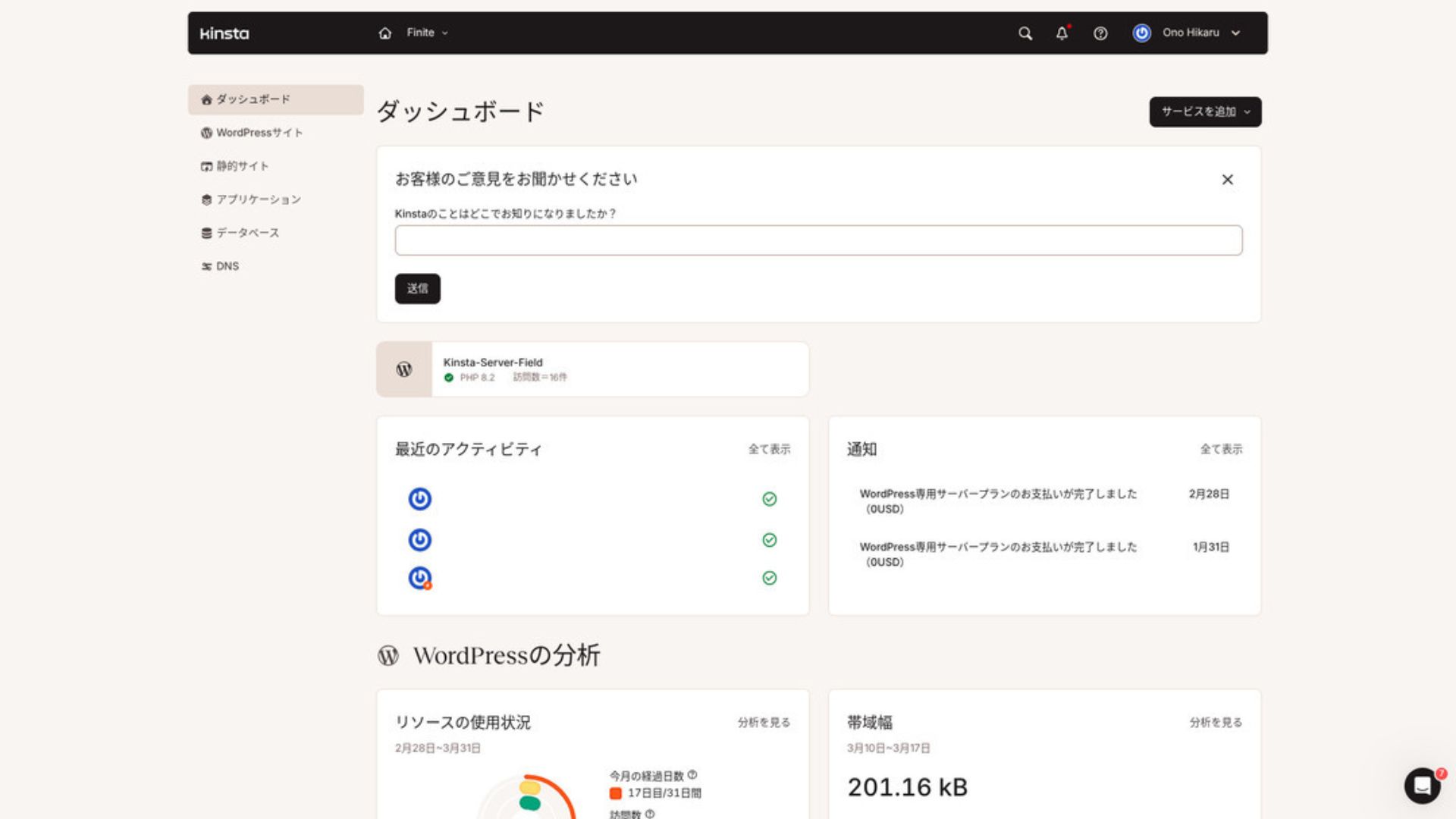
Для керування WordPress натисніть «WordPress Sites» у меню.
Creating a New WordPress Сайт or Migrating Один Is Easy
Kinstaдозволяє легко створити новий сайт, а також виконати міграцію. Не варто турбуватися, що це буде складно лише тому, що сервер розташований за кордоном.
Коли ви відкриваєте розділ «Сайти WordPress» і натискаєте «Додати сайт»,
- Create a new site
- Request a site migration
those options appear. Creating a new site is also easy.
Creating a New WordPress Сайт
- STEP.1Select “WordPress Сайтs” in MyKinsta
Log in to MyKinsta. Потім виберіть «WordPress Sites» у меню.
- STEP.2Create a new site
Click “Add Сайт.” Then choose “Create new site.”
- STEP.3Continue with the WordPress settings
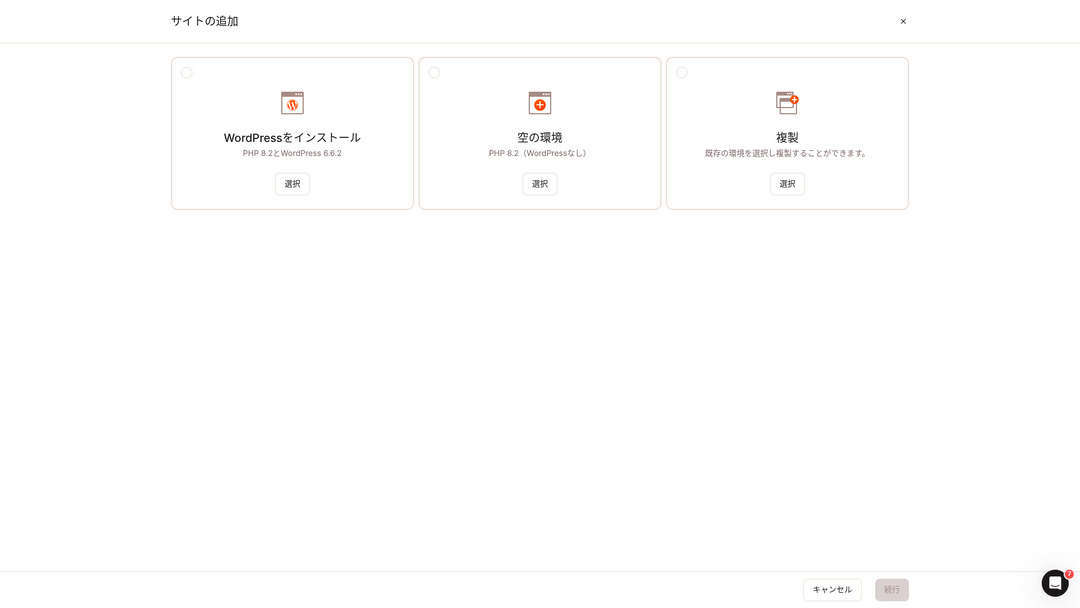
Select “Install WordPress.”
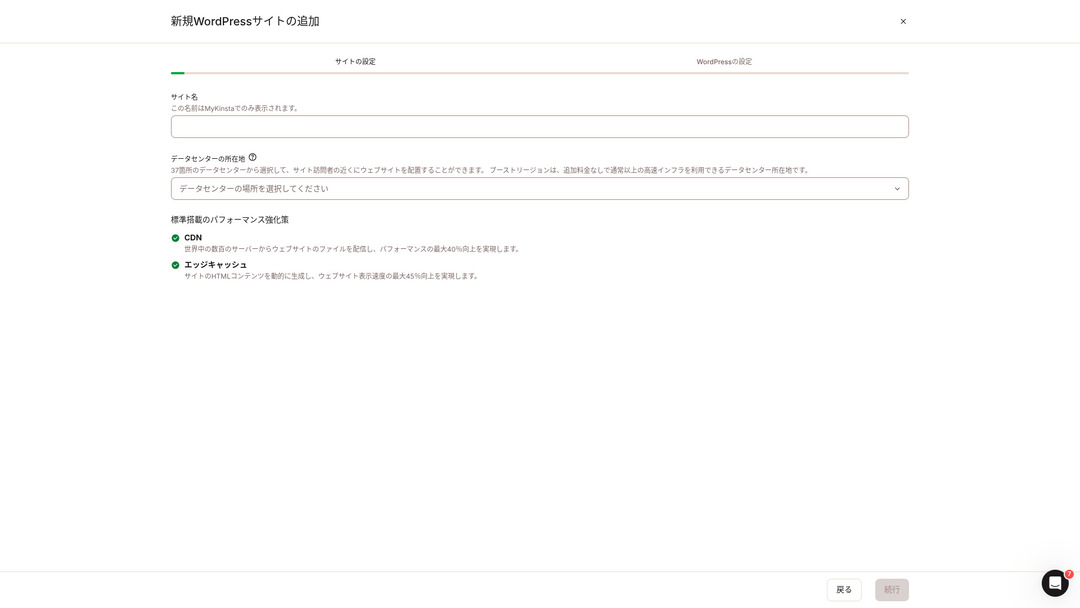
Choose your site name and select a data center location. You can choose from 37 data centers around the world. If most of your visitors are in Japan, choosing Tokyo or Osaka is the safest option.
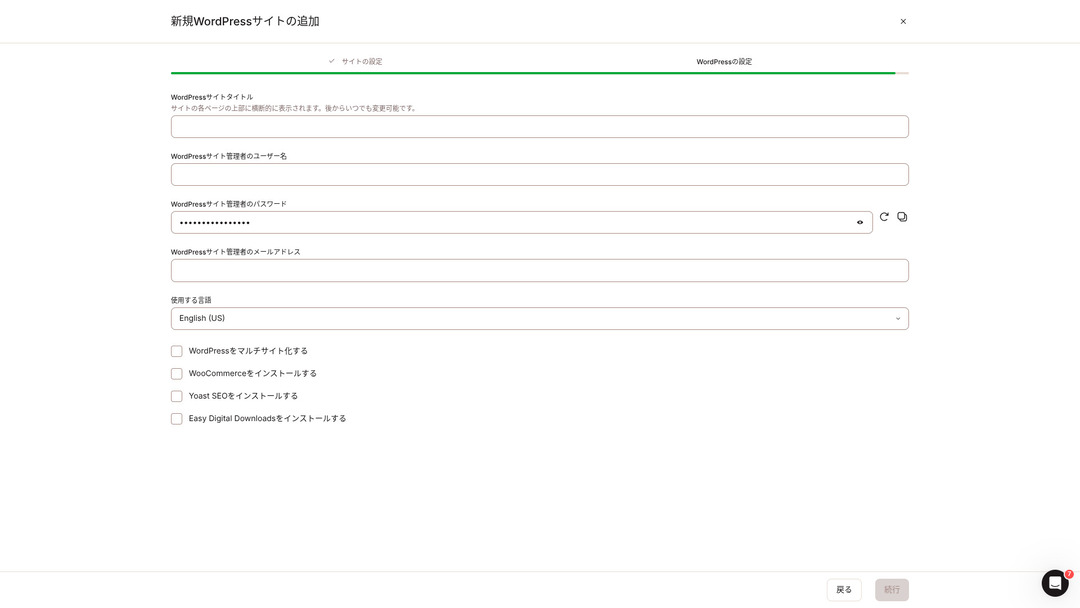
- WordPress site title
- WordPress admin username
- WordPress admin password
- WordPress admin email address
- Language to use
Decide those settings. Once you click “Continue,” your WordPress site setup is complete.
Тарифні плани Kinsta: найкращим вибором є річний тариф для одного сайту
Kinstaмає три тарифні плани, і кожен з них можна оплачувати щомісяця або щорічно. Один із них — це партнерська програма, призначена для веб-студій та агентств. Для фізичних осіб та компаній доступні такі варіанти:
- Single-site plan
- Multi-site plan
one of those two.
| Порівняння item | Single-site plan | Multi-site plan |
|---|---|---|
| Monthly fee | 4,459 yen (annual billing) 5,202 yen (monthly billing) | 8,769 yen (annual billing) 10,404 yen (monthly billing) |
| WordPress sites | 1 | 2 |
| Visits | 35,000 | 70,000 |
| Storage | 10GB | 20GB |
| CDN | 125GB | 250GB |
If you are saying, “I’m about to start a blog,” I recommend the single-site plan.
Огляди Kinsta та п’ять ключових особливостей

WordPress Is Fast: No. 1 in Display швидкість
Kinstaranked No. 1 in display speed in our own measurements. It truly is a fast сервер.
Якщо у вас виникають проблеми зі швидкістю роботи сервера, я б порадив вам вибрати Kinsta without hesitation.
A CDN Is Available
Kinstaвикористовує 37 дата-центрів як серверні бази по всьому світу, а також має 260 локацій CDN. Завдяки використанню CDN відвідувачі вашого сайту отримують дані з найближчого CDN сервер, which helps pages load faster.
★ Що таке CDN? Покращуйте швидкість та продуктивність за допомогою розподілених серверів
Kinsta найдешевший тарифний план хостингу WordPress, Starter, все одно містить 100 ГБ CDN. Це забезпечує більш ніж достатній обсяг передачі даних.
★ What Are Traffic and Data Transfer? Managing and Optimizing Web Traffic
Надається з автоматичним резервним копіюванням за останні 14 днів
Kinstacomes with 14 days of automatic backup functionality.
Резервні копії є обов’язковими. Завжди існує ймовірність помилкового видалення даних або їх модифікації внаслідок кібератаки. У таких ситуаціях резервні копії дозволять відновити роботу сайту.
KinstaWith you can restore everything from up to 14 days of backup data even if something goes wrong, which gives real peace of mind.
цілодобова підтримка 24/7 від інженерів
Kinstahas a 24/7 support system staffed by engineers.
You never know when a situation requiring support will arise.If it is not resolved quickly, it may even become a matter of business credibility.
Kinstagives peace of mind because engineers are always there to support you.Especially if you do not have engineers inside your company, Kinstathe reassurance of being able to contact engineers at any time, as you can with Kinsta, is extremely valuable.
безкоштовний Hack-Fix Guarantee
No matter how much effort you put into security, nothing is ever 100 percent guaranteed. Still, Kinsta comes with a free hack-fix guarantee.
If you are hacked,Kinsta will work together with you to repair the damage.
- безкоштовний site inspection
- детальний file scans to identify malware
- Repair of core files using a fresh WordPress installation
- Identification and removal of infected plugins and themes
Because the response is so thorough, you do not have to worry that the same hacking damage will happen again.
Недоліком Kinsta є його висока ціна

Even though it is a top-tier сервер, Kinsta is expensive.
З точки зору ціни, він належить до категорії серверів, які використовуються підприємствами. Я порівняв його з іншими серверами для бізнесу.
- Initial setup fee
- 12-month сервер contract
- Один year of domain cost
- Plan that supports WordPress
KinstaЄ сервери, які коштують дорожче за Kinsta, але всі інші — це сервери, розташовані в Японії. Вони пропонують підтримку японською мовою, а також велику кількість функцій для бізнесу.
So although it is truly top-tier in сервер speed, there is no denying that it still feels expensive.
Compare Kinsta with Competing Servers
I compared it with major Japanese hosting services that, like Kinsta, place a strong emphasis on speed.
ConoHa WING
ConoHa WING — це сервер, розроблений із особливим акцентом на швидкість відображення сайтів на WordPress. Його головна особливість — простота запуску WordPress. Такі завдання, як отримання та налаштування домену, створення бази даних та встановлення WordPress, вже виконуються автоматично під час замовлення сервера, тому всі налаштування, необхідні для запуску сайту на WordPress, виконуються безпосередньо під час оформлення договору оренди сервера.
As a result, even if you have no сервер knowledge or WordPress skills, you can start your website right away.

Огляд ConoHa WING: чому його обирають 750 000 користувачів, а також тест швидкості, переваги та недоліки
Огляд ConoHa WING: чому його обирають 750 000 користувачів, а також тест швидкості, переваги та недоліки
serverfield.org
XServer
XServer давно є популярним високошвидкісним сервером в Японії. Він посідає 1-ше місце за часткою користувачів на внутрішньому ринку. Його популярність обумовлена не лише швидкістю роботи сервера, а й його стабільністю з аптаймом 99,99% та уважною підтримкою.
However, when it comes to speed, Kinsta still comes out ahead of XServer.

Огляд XServer [найновіше видання 2025 року]: детальний посібник щодо швидкості, цін, переваг та недоліків
Огляд XServer [найновіше видання 2025 року]: детальний посібник щодо швидкості, цін, переваг та недоліків
serverfield.org
Запустіть сайт на WordPress за допомогою Kinsta за 7 кроків
Тут ми запустимо сайт на WordPress, використовуючи Kinsta та MuuMuu Domain.
Запустимо вебсайт із Kinsta!
- STEP.1Отримайте власний домен за допомогою MuuMuu Domain
Sign up for or log in to MuuMuu домен.
Якщо у вас ще немає облікового запису, створіть новий на сайті MuuMuu Domain. Якщо у вас вже є акаунт, просто увійдіть у систему.
Search for and purchase your custom domain.
Введіть бажане доменне ім’я в рядок пошуку MuuMuu Domain і перевірте, чи воно вільне. Якщо воно вільне, придбайте цей домен.
- STEP.2Set up a new site on Kinsta
First, sign up for Kinsta. Then add a new site.
Увійдіть в особистий кабінет Kinsta та натисніть «Додати сайт».
Select the site name and the data center location. Choose “Install WordPress,” then enter the required information such as the site title, admin username, password, and email address.
If necessary, install plugins such as WooCommerce or Yoast SEO.
- STEP.3Оновіть налаштування DNS у MuuMuu Domain
Увійдіть в особистий кабінет MuuMuu Domain, виберіть придбаний домен у розділі «Керування доменами» та натисніть «Налаштування DNS».
В особистому кабінеті Kinsta знайдіть інформацію про DNS для вашого сайту, включаючи сервери імен. Введіть ці дані на сторінці «Налаштування DNS» в MuuMuu Domain і збережіть їх.
- STEP.4Set your custom domain in the Kinsta dashboard
Move to the settings page for the WordPress site you were just using.
Перегляньте розділ «Домени» та натисніть «Додати домен». Введіть власне доменне ім’я, яке ви отримали через MuuMuu Domain, і додайте його.
Next, move to the “Tools” section and click “Install a free Let’s Encrypt SSL certificate” to install the SSL certificate.
- STEP.5Customize your WordPress site
Log in to the WordPress admin area from the Kinsta dashboard. Then install themes and plugins as needed and customize your site.
Frequently Asked Questions About Kinsta
Can I register a domain with Kinsta?
Ні, ви не можете зареєструвати домен безпосередньо через Kinsta. Будь ласка, зареєструйте свій домен за допомогою спеціалізованого сервісу, наприклад MuuMuu Domain. Після цього додайте отриманий домен у MyKinsta.
Is 10GB of storage on Kinsta too little?
If you are running a WordPress site, 10GB is not a problem at all.As of March 2025, this site with more than 90 articles uses only 1.5GB of storage.Unless you are building something like a portfolio site with an extreme number of images, there is no need to worry.
How do you pronounce “Kinsta”?
“Kinsta” is pronounced “Kin-sta.”
Підсумок
“Kinsta» — найшвидший орендний сервер преміум-класу з дата-центрами в 37 локаціях по всьому світу. За нашими власними вимірюваннями він посів 1-ше місце. Не можна заперечувати його високу вартість, але якщо ви хочете отримати сервер, повністю орієнтований на комфорт і високу продуктивність, це без сумніву чудовий вибір. Також доступна підтримка в чаті японською мовою.
30-day money-back guarantee
Kinsta — це сервер преміум-класу. Якщо ви бажаєте з упевненістю покращити швидкість завантаження вашого сайту, будь ласка, спробуйте його.
It offers not only speed, but also an excellent support system, so you can use it with confidence.
Порівняння of 10 Overseas сервіси хостингу

З іноземними хостинг-послугами багатьом людям важко вирішити, який сервер обрати, через мовні бар’єри та культурні відмінності.
In this article, we thoroughly compare 10 carefully selected overseas hosting services from around the world and explain each service’s features, pricing plans, and actual user experience in detail.
You will find information that covers a wide range of needs, from selection criteria beginners can rely on to advanced features that engineers look for.