30-dagars pengarna-tillbaka-garanti
PR
Servrar
Kinsta-recension: för- och nackdelar med den ultrasnabba servern som rekommenderas av Google, plus en guide för WordPress-installation
Publicerad: 2025.07.13
Uppdaterad: 2025.07.13
Betyg: 4.0
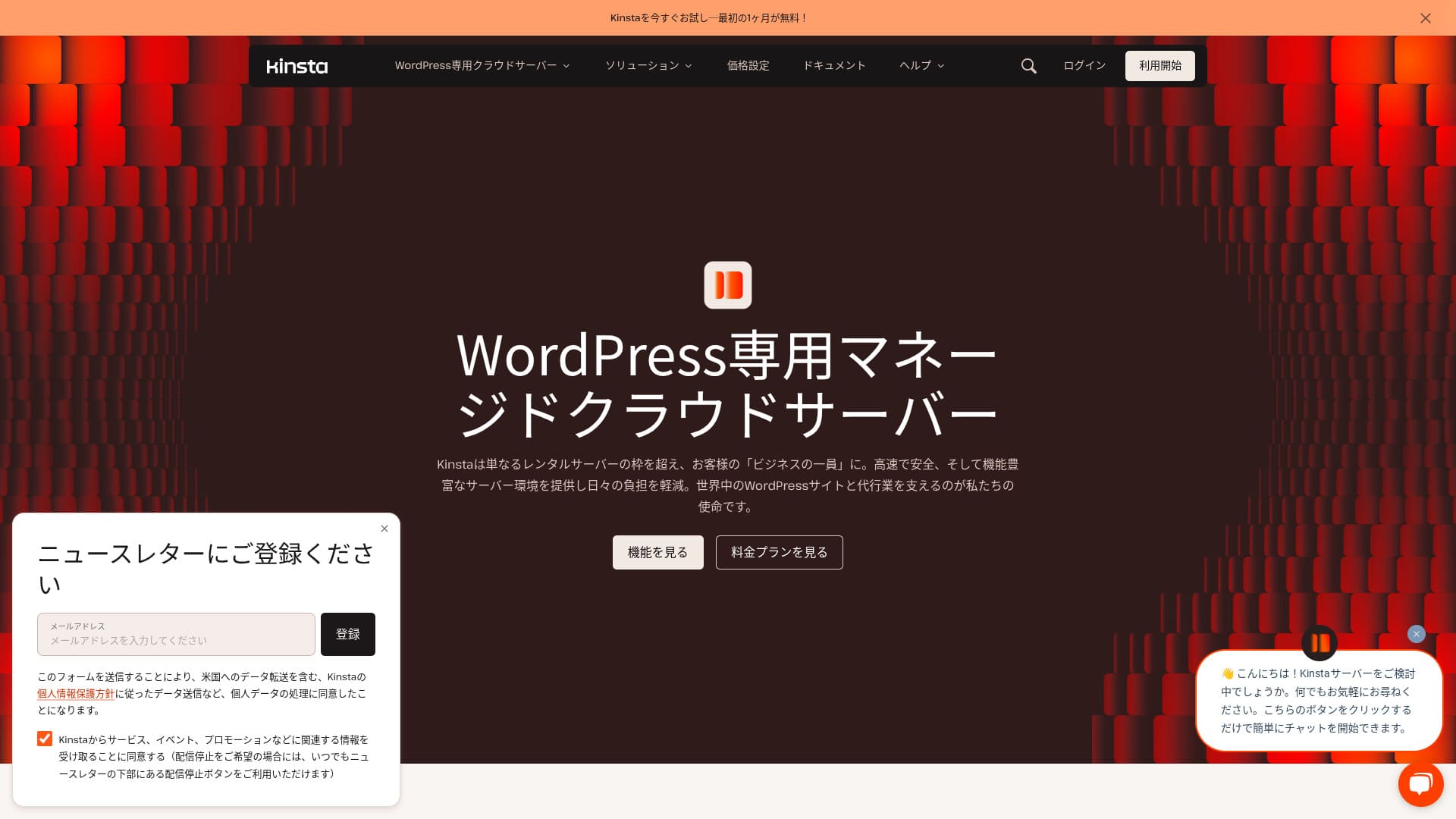
Kinsta är ett ultrasnabbt utländskt webbhotell som drivs av Kinsta Inc.Den är välkänd som en server som rekommenderas av Google.Det är byggt med stort fokus på snabba sidladdningstider.
| Servertyp | Dedikerad hanterad server |
| Visningshastighet (TTFB) | 30ms |
| Rekommenderad plan och faktureringsperiod | Single35k |
| Provperiod / pengarna-tillbaka-garanti | 30-dagars pengarna-tillbaka-garanti |
| Månadsavgift (12-månadersavtal) | 4 407 yen |
| Initial installationsavgift | Gratis |
| Gratis domän | Ingen |
| Kundsupport | Chattsupport dygnet runt (tillgänglig på japanska) och e-post |
| Drifttid | 99.9% |
| Serverlagring | 10GB |
| Antal databaser | 1 |
| Säkerhet | Skanning av skadlig kod, WAF, brandvägg, DDoS-skydd, Google Cloud-brandvägg |
| SSL | Gratis anpassat SSL |
| Säkerhetskopior | 14 dagars automatisk säkerhetskopiering |
| Antal e-postkonton | Ingen |
| E-postsäkerhetsfunktioner | Ingen |
| Flyttjänst för server / webbplats | Gratis |
| WordPress förinstallerat | Ja |
| CDN | Gratis (125GB) |
| Datacenters | Johannesburg, Sydafrika; Changhua County, Taiwan; Hongkong; Tokyo; Osaka; Seoul, Sydkorea; Mumbai, Indien; Delhi, Indien; Jurong West, Singapore; Jakarta, Indonesien; Sydney, Australien; Melbourne, Australien; Warszawa, Polen; Hamina, Finland; Madrid, Spanien; Saint-Ghislain, Belgien; London, Storbritannien; Frankfurt, Tyskland; Eemshaven, Nederländerna; Zürich, Schweiz; Milano, Italien; Paris, Frankrike; Dammam, Saudiarabien; Tel Aviv, Israel; Montreal, Kanada; Toronto, Kanada; São Paulo, Brasilien; Santiago, Chile; Council Bluffs, Iowa, USA; Moncks Corner, South Carolina, USA; Ashburn, Virginia, USA; Columbus, Ohio, USA; Dallas, Texas, USA; The Dalles, Oregon, USA; Los Angeles, Kalifornien, USA; Salt Lake City, Utah, USA; Las Vegas, Nevada, USA |

Hikaru Ono
Kinsta beskrivs ofta som en server i toppklass, och efter att faktiskt ha använt det kände jag att den beskrivningen var korrekt. Inte bara är det snabbt, utan kontrollpanelen är lätt att hantera och att komma igång med WordPress är också väldigt enkelt.
Det är een server fylld med fördelar som helt motiverar sitt pris.
- Nejvember 4, 2025 marknadsundersökningsdata, sorterade efter hastighet
- Månadsavgifterna avser det första årets kostnad för det billigaste paketet som kan köra WordPress
- Hastigheten är värdet för Time to First Byte på demowebbplatser uppmätt under samma förhållanden
"Kinsta” är ett webbhotell i toppklass, snabbast i sin klass med datacenter på 37 platser världen över. Det rankades som nummer 1 i våra egna mätningar. Det går inte att förneka att det är dyrt, men om du vill ha en server som helt prioriterar bekvämlighet och prestanda kan jag rekommendera det utan tvekan. Dess chattsupport är också tillgänglig på japanska.
Kinstas instrumentpanel: Enkel, snygg och lättläst
Kinstas kontrollpanel ärextremt enkel, snygg och lättläst.
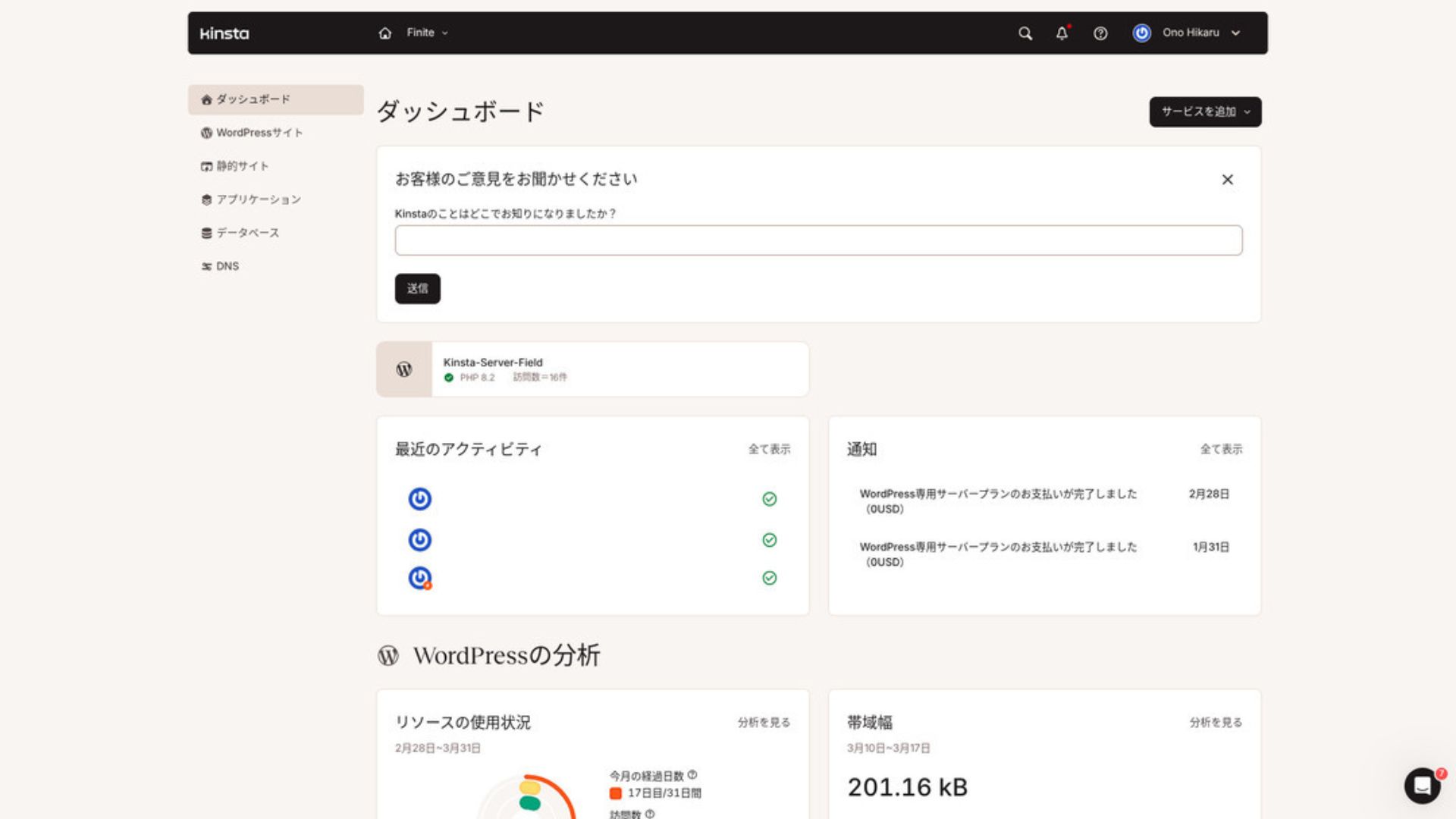
För att hantera WordPress, klicka på ”WordPress-webbplatser” i menyn.
Det är enkelt att skapa en ny WordPress-webbplats eller flytta en befintlig
Kinsta gör det enkelt att skapa en ny webbplats och hantera även flyttar. Det finns ingen anledning att oroa sig för att det ska vara svårt bara för att det är en utländsk server.
När du öppnar WordPress-webbplatser och klickar på ”Lägg till webbplats”,
- Skapa en ny webbplats
- Begär en webbplatsflytt
visas de alternativen. Att skapa en ny webbplats är också enkelt.
Skapa en ny WordPress-webbplats
- STEG 1Välj ”WordPress-webbplatser” i MyKinsta
Logga in på MyKinsta. Välj sedan ”WordPress-webbplatser” i menyn.
- STEG 2Skapa en ny webbplats
Klicka “Add Webbplats.” Then välja “Create new webbplats.”
- STEG 3Fortsätt med WordPress-inställningarna
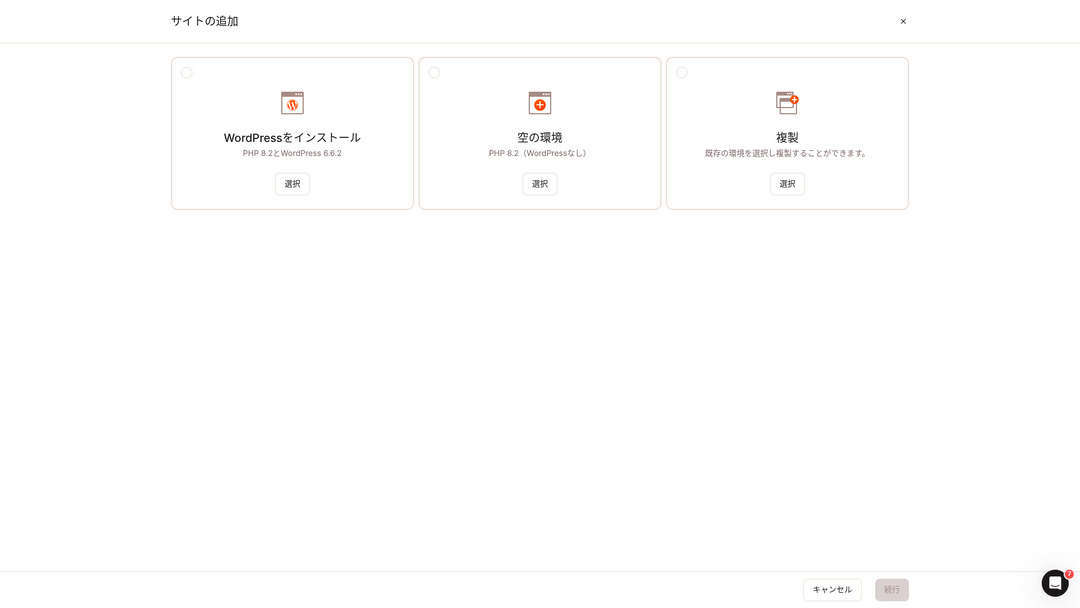
Välj ”Installera WordPress”.
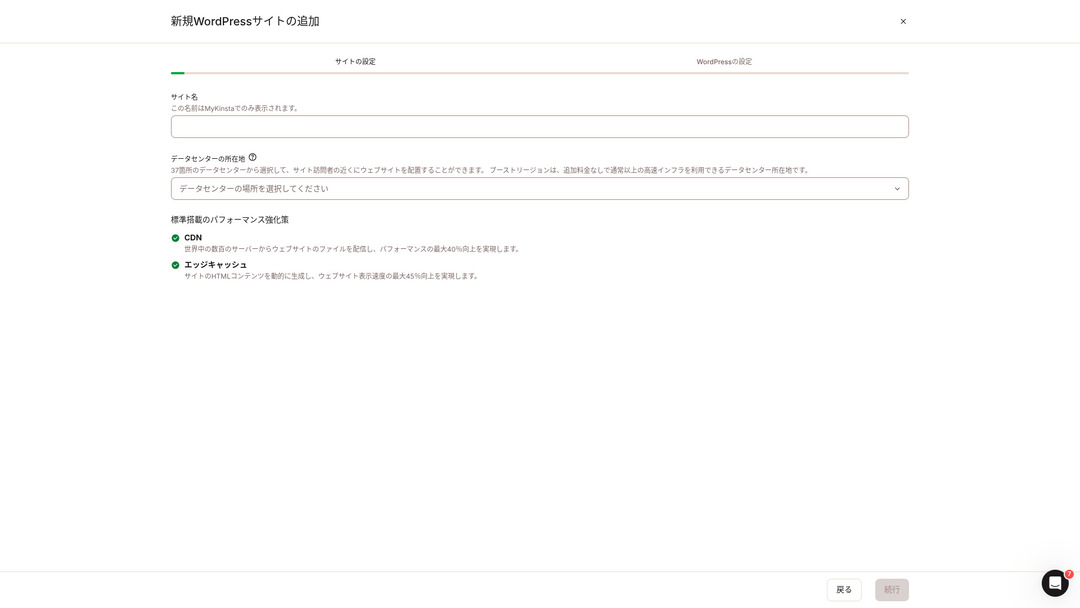
Välj webbplatsens namn och en datacenterplats. Du kan wybrać mellan 37 datacenter runt om i världen. Om de flesta av dina besökare finns i Japan är det säkrast att välja Tokyo eller Osaka.
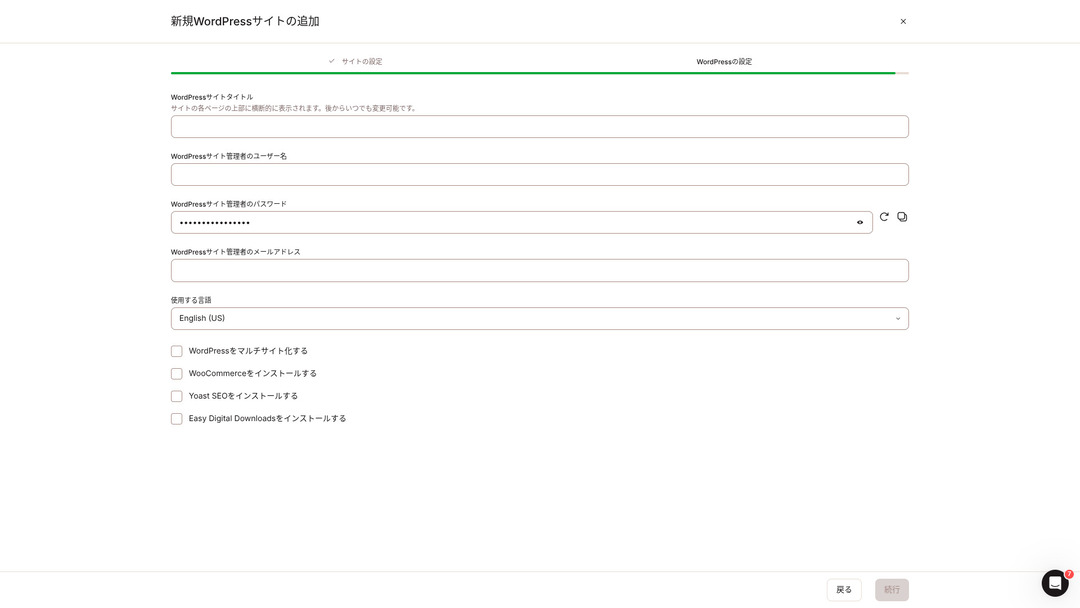
- Titel på WordPress-webbplatsen
- WordPress-administratörens användarnamn
- WordPress-administratörens lösenord
- WordPress-administratörens e-postadress
- Språk att använda
Ange dessa inställningar. När du klickar på ”Fortsätt” är installationen av din WordPress-webbplats klar.
Kinstas prisplaner: Det bästa valet är årsplanen för en webbplats
Kinsta har tre prisplaner, och varje plan kan betalas månadsvis eller årsvis. En av dem är ett byråprogram avsett för produktionsbyråer. För privatpersoner och företag är alternativen som kan användas
- Paket för en webbplats
- Paket för flera webbplatser
en av de två.
| Jämförelseobjekt | Paket för en webbplats | Paket för flera webbplatser |
|---|---|---|
| Månadsavgift | 4 459 yen (årlig fakturering) 5 202 yen (månatlig fakturering) | 8 769 yen (årlig fakturering) 10 404 yen (månatlig fakturering) |
| WordPress-webbplatser | 1 | 2 |
| Besök | 35,000 | 70,000 |
| Lagring | 10GB | 20GB |
| CDN | 125GB | 250GB |
Om du tänker ”Jag ska starta en blogg” rekommenderar jag paketet för en webbplats.
Kinsta-recensioner och fem nyckelfunktioner

WordPress är snabbt: Nr 1 i visningshastighet
Kinsta rankades som nummer 1 i visningshastighet i våra egna mätningar. Det är verkligen en snabb server.
Om du kämpar med serverhastigheten skulle jag rekommendera dig att välja Kinsta utan att tveka.
CDN finns tillgängligt
Kinstauses 37 datacenters as server bases around the world while also operating 260 CDN locations. By using a CDN, people viewing your webbplats receive data from the nearest CDN server, which helps sidor load faster.
★ Vad är ett CDN? Förbättra hastighet och prestanda med distribuerade servrar
Kinsta s billigaste WordPress-webbhotellalternativ, Starter-paketet, inkluderar fortfarande 100 GB CDN. Det ger mer än tillräcklig överföringskapacitet.
★ Vad är trafik och dataöverföring? Hantera och optimera webbtrafik
Levereras med 14 dagars automatisk säkerhetskopiering
Kinsta levereras med 14 dagars automatisk säkerhetskopieringsfunktion.
Säkerhetskopior är nödvändiga. Det finns alltid en risk att data raderas av misstag eller ändras genom en cyberattack. I sådana situationer gör säkerhetskopierad data att du kan återställa webbplatsen.
KinstaMed kan du återställa allt från upp till 14 dagar gammal säkerhetskopierad data även om något går fel, vilket ger verklig sinnesro.
24/7 support från ingenjörer
Kinstahar ett supportsystem dygnet runt bemannat av ingenjörer.
Du vet aldrig när en situation som kräver support kommer att uppstå. Om den inte löses snabbt kan det till och med påverka verksamhetens trovärdighet.
Kinsta ger trygghet eftersom ingenjörer alltid finns där för att hjälpa dig.Särskilt om du inte har ingenjörer internt i företaget, Kinstaär tryggheten att kunna kontakta ingenjörer när som helst, precis som du kan med Kinsta, extremt värdefull.
Gratis garanti för hackåterställning
Oavsett hur mycket arbete du lägger på säkerheten finns det aldrig någon 100-procentig garanti. Trots det Kinsta levereras med en kostnadsfri garanti för hackåterställning.
Om du blir hackad,Kinsta kommer att arbeta tillsammans med dig för att reparera skadan.
- Gratis inspektion av webbplatsen
- Detaljerade filgenomgångar för att identifiera skadlig kod
- Reparation av kärnfiler med en ny WordPress-installation
- Identifiering och borttagning av infekterade tillägg och teman
Eftersom åtgärden är så grundlig behöver du inte oroa dig för att samma hackningsskada ska hända igen.
Nackdelen med Kinsta är dess höga pris

Även om det är en server i toppklass, Kinsta är dyrt.
När det gäller pris hör det hemma i kategorin servrar som används av företag. Jag jämförde det med andra företagsinriktade servrar.
- Initial installationsavgift
- 12-månaders serveravtal
- Ett års domänkostnad
- Plan som stöder WordPress
KinstaDet finns servrar som kostar mer än Kinsta, men alla andra är servrar baserade i Japan. De erbjuder också support på japanska och ett stort antal företagsinriktade funktioner.
Så även om det verkligen är i absolut toppklass när det gäller serverhastighet, går det inte att förneka att det fortfarande känns dyrt.
Jämför Kinsta med konkurrerande servrar
Jag jämförde det med stora japanska webbhotell som, precis som Kinsta, lägger stort fokus på hastighet.
ConoHa WING
ConoHa WING är en server byggd med stort fokus på WordPress visningshastighet. Dess nyckelfunktion är hur enkelt det är att komma igång med WordPress. Uppgifter som att skaffa och konfigurera en domän, skapa en databas och installera WordPress är redan klara när du registrerar dig för servern, så de inställningar som krävs för att starta en WordPress-webbplats är färdiga samtidigt som serveravtalet tecknas.
Det gör att även om du inte har några serverkunskaper eller WordPress-färdigheter kan du starta din webbplats direkt.

ConoHa WING-recension: Varför 750 000 användare väljer det, plus ett test av dess hastighet, för- och nackdelar
ConoHa WING-recension: Varför 750 000 användare väljer det, plus ett test av dess hastighet, för- och nackdelar
serverfield.org
XServer
XServer har länge varit en populär höghastighetsserver i Japan. Det har den största användarandelen på den inhemska marknaden. Dess popularitet beror inte bara på serverhastigheten, utan också på dess stabilitet med 99,99 % drifttid och dess engagerade support.
Men när det gäller hastighet ligger Kinsta fortfarande före XServer.

XServer-recension [2025 senaste]: En grundlig guide till hastighet, prissättning, för- och nackdelar
XServer-recension [2025 senaste]: En grundlig guide till hastighet, prissättning, för- och nackdelar
serverfield.org
Starta en WordPress-webbplats med Kinsta i 7 steg
Här kommer vi att starta en WordPress-webbplats med Kinsta och MuuMuu Domain.
Låt oss starta en webbplats med Kinsta!
- STEG 1Få en egen domän med MuuMuu Domain
Registrera dig eller logga in på MuuMuu Domain.
Om du inte har något konto än, skapa ett nytt på MuuMuu Domains webbplats. Om du redan har ett konto loggar du bara in.
Sök efter och köp din egen domän.
Ange det önskade domännamnet i MuuMuu Domains sökfält och kontrollera om det är tillgängligt. Om det är tillgängligt, köp domänen.
- STEG 2Konfigurera en ny webbplats på Kinsta
Först, registrera dig för Kinsta. Lägg sedan till en ny webbplats.
Gå till Kinstas kontrollpanel och klicka på ”Lägg till webbplats”.
Välj webbplatsens namn och datacenterplats. Välj ”Installera WordPress” och ange sedan nödvändig information såsom webbplatsens titel, administratörens användarnamn, lösenord och e-postadress.
Installera vid behov tillägg som WooCommerce eller Yoast SEO.
- STEG 3Uppdatera DNS-inställningarna i MuuMuu Domain
Gå till MuuMuu Domains instrumentpanel, välj den domän du skaffat under avsnittet ”Domänhantering” och klicka på ”DNS-inställningar”.
Från Kinstas instrumentpanel kontrollerar du DNS-informationen för din webbplats, inklusive namnservrarna. Ange den informationen på sidan ”DNS-inställningar” i MuuMuu Domain och spara.
- STEG 4Ange din egen domän i Kinstas kontrollpanel
Gå till inställningssidan för den WordPress-webbplats du nyss använde.
Gå till avsnittet ”Domäner” och klicka på ”Lägg till domän”. Ange det egna domännamnet du köpt via MuuMuu Domain och lägg till det.
Gå sedan till avsnittet ”Verktyg” och klicka på ”Installera ett gratis Let’s Encrypt SSL-certifikat” för att installera SSL-certifikatet.
- STEG 5Anpassa din WordPress-webbplats
Logga in på WordPress-administratörspanelen från Kinstas instrumentpanel. Installera sedan teman och tillägg efter behov och anpassa din webbplats.
Vanliga frågor om Kinsta
Kan jag registrera en domän med Kinsta?
Nej, du kan inte registrera en domän via Kinsta. Registrera din domän via en domänregistreringstjänst som MuuMuu Domain. Därefter registrerar du den skaffade domänen i MyKinsta.
Är 10 GB lagring hos Kinsta för lite?
Om du driver en WordPress-webbplats är 10 GB inte alls något problem. I mars 2025 använde denna webbplats med över 90 artiklar endast 1,5 GB lagringsutrymme. Så länge du inte bygger något i stil med en portföljwebbplats med extremt många bilder finns det ingen anledning till oro.
Hur uttalar man “Kinsta”?
“Kinsta” uttalas “Kin-sta”.
Sammanfattning
"Kinsta” är det snabbaste hyrserveralternativet i toppklass med datacenter på 37 platser världen över. Det rankades som nummer 1 i våra egna mätningar. Det går inte att förneka det höga priset, men om du vill ha en server som fullt ut strävar efter komfort och prestanda är det utan tvekan ett utmärkt val. Japansk chattsupport finns också tillgänglig.
30-dagars pengarna-tillbaka-garanti
Kinsta är en server i toppklass. Om du vill förbättra din webbplats visningshastighet med tillförsikt, ge den ett försök.
Det erbjuder inte bara snabbhet, utan också ett utmärkt supportsystem, så att du kan använda det med sinnesro.
Jämförelse av 10 utländska webbhotell

När det gäller utländska webbhotell har många svårt att bestämma vilken server de ska välja på grund av språkbarriärer och kulturella skillnader.
I denna artikel jämför vi grundligt 10 noggrant utvalda utländska webbhotell från hela världen och förklarar varje tjänsts funktioner, prisplaner och faktiska användarupplevelse i detalj.
Du hittar information som täcker ett brett spektrum av behov, från urvalskriterier som nybörjare kan lita på till avancerade funktioner som ingenjörer letar efter.