30-day garantia de reembolso
PR
Servidores
Avaliação da Kinsta: prós e contras do servidor ultrarrápido recomendado pelo Google, além de um guia de configuração do WordPress
Publicado: 2025.07.13
Atualizado: 2025.07.13
Avaliação: 4.0
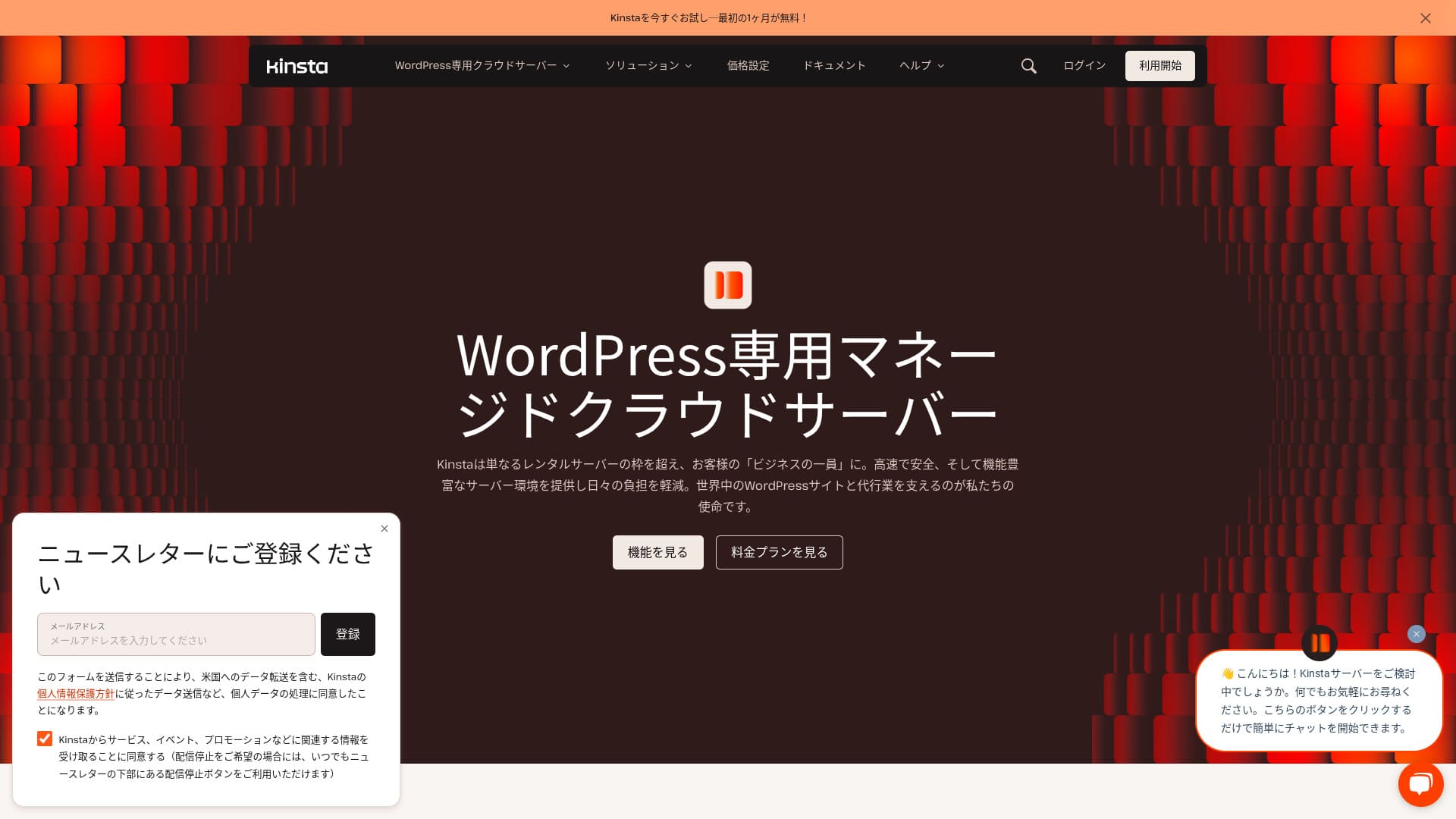
Kinstaé um serviço de hospedagem internacional ultrarrápido operado pela Kinsta Inc.Ela é conhecida por ser um servidor recomendado pelo Google.Ela foi criada com forte foco em velocidade de exibição de páginas.
| Tipo de servidor | Dedicated servidor gerenciado |
| Velocidade de exibição (TTFB) | 30ms |
| Plano e período de cobrança recomendados | Single35k |
| Teste / garantia de reembolso | 30-day garantia de reembolso |
| Mensalidade (plano de 12 meses) | 4,407 yen |
| Taxa de configuração inicial | Grátis |
| Domínio grátis | Nenhum |
| Suporte | Suporte de chat 24/7 (disponível em japonês)e e- mail |
| Disponibilidade | 99.9% |
| Armazenamento do servidor | 10GB |
| Número de bancos de dados | 1 |
| Segurança | Digitalização de malware, WAF, firewall, proteção DDoS, firewall do Google Cloud |
| SSL | Gratuito custom SSL |
| Cópias de segurança | 14 dias de backups automáticos |
| Número de contas de e-mail | Nenhum |
| Recursos de segurança de e-mail | Nenhum |
| Serviço de migração de servidor / site | Grátis |
| WordPress pré-instalado | Sim |
| CDN | Grátis (125GB) |
| Centros de dados | Joanesburgo, África do Sul; Condado de Changhua, Taiwan; Hong Kong; Tóquio; Osaka; Seul, Coreia do Sul; Mumbai, Índia; Délhi, Índia; Jurong West, Singapura; Jacarta, Indonésia; Sydney, Austrália; Melbourne, Austrália; Varsóvia, Polónia; Hamina, Finlândia; Madrid, Espanha; Saint-Ghislain, Bélgica; Londres, Reino Unido; Frankfurt, Alemanha; Eemshaven, Países Baixos; Zurique, Suíça; Milão, Itália; Paris, França; Dammam, Arábia Saudita; Tel Aviv, Israel; Montreal, Canadá; Toronto, Canadá; São Paulo, Brasil; Santiago, Chile; Council Bluffs, Iowa, EUA; Moncks Corner, Carolina do Sul, EUA; Ashburn, Virgínia, EUA; Columbus, Ohio, EUA; Dallas, Texas, EUA; The Dalles, Oregon, EUA; Los Angeles, Califórnia, EUA; Salt Lake City, Utah, EUA; Las Vegas, Nevada, EUA, EUA |

Hikaru Ono
A Kinsta é frequentemente descrita como um servidor de alto nível e, depois de usá-la de verdade, senti que essa descrição era precisa. Além de ser rápida, o painel de controle é fácil de usar, e começar com WordPress também é muito simples.
É um servidor cheio de atrativos que justifica plenamente o seu preço.
- 4 de novembro de 2025 market research data, arranged by speed
- Mensalidades are the first-year cost of the cheapest plan that can run WordPress
- Velocidade is the Time to First Byte value from demo sites measured under the same conditions
“Kinsta” é um serviço de hospedagem de primeira qualidade, mais rápido em classe com data centers em 37 locais em todo o mundo. Ele ficou no 1 em nossas próprias medidas. Não há como negar que é caro, mas se você quiser um servidor que prioriza totalmente o conforto e o desempenho, posso recomendá-lo sem hesitação. Seu suporte para chat também está disponível em japonês.
O painel da Kinsta: simples, elegante e fácil de ler
O painel da Kinsta éextremamente simples, elegante e fácil de ler.
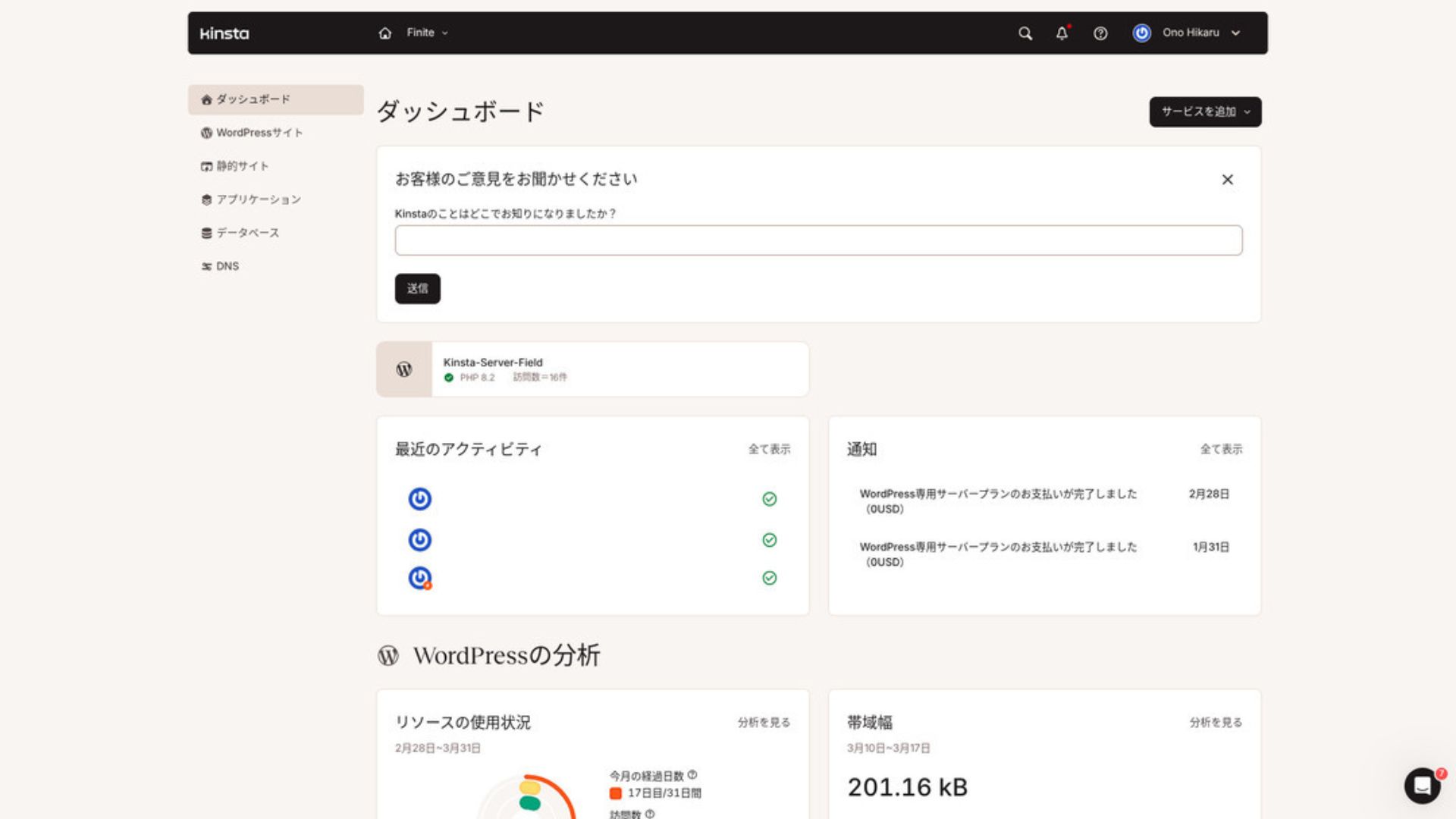
Para gerenciar o WordPress, clique em "WordPress Sites" no menu.
Criar um novo site WordPress ou migrar um já existente é fácil
Kinstatorna mais fácil criar um novo site e lidar com migrações também. Não há necessidade de se preocupar que será difícil apenas porque é um servidor no exterior.
Quando você abrir sites WordPress e clique em "Adicionar site,"
- Criar um novo site
- Solicitar uma migração do local
Essas opções aparecem. Criar um novo site também é fácil.
Criando um novo site WordPress
- PASSO.1Selecione "Sites WordPress" no MyKinsta
Entrar paraMyKinsta. Em seguida, selecione "WordPress Sites" no menu.
- PASSO.2Criar um novo site
Clique em "Adicionar site". Em seguida, escolha “Criar novo site.”
- PASSO.3Continue com as configurações do WordPress
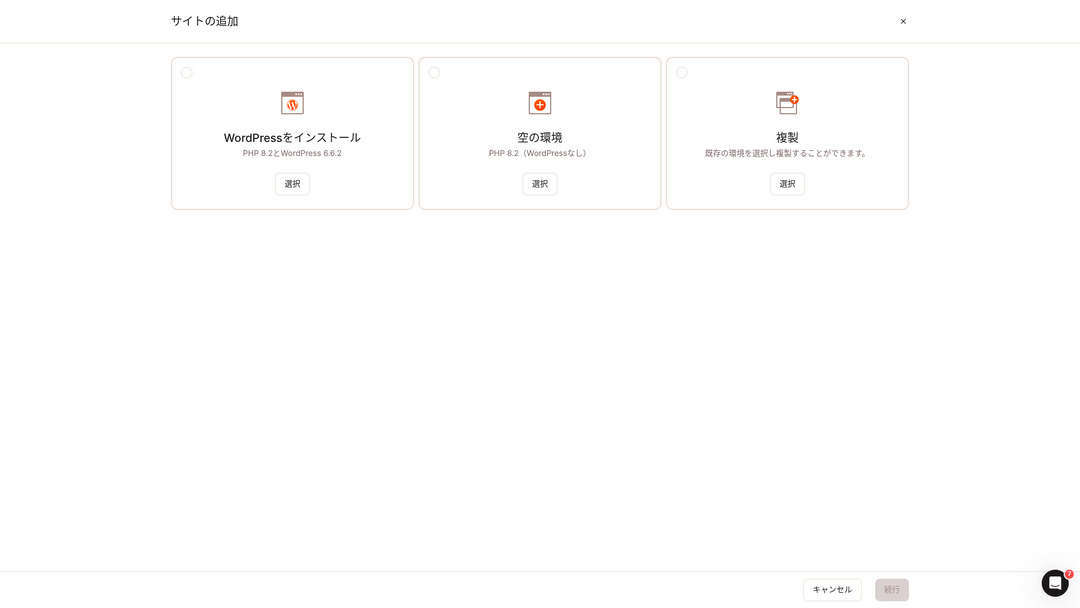
Selecione "Instalar WordPress."
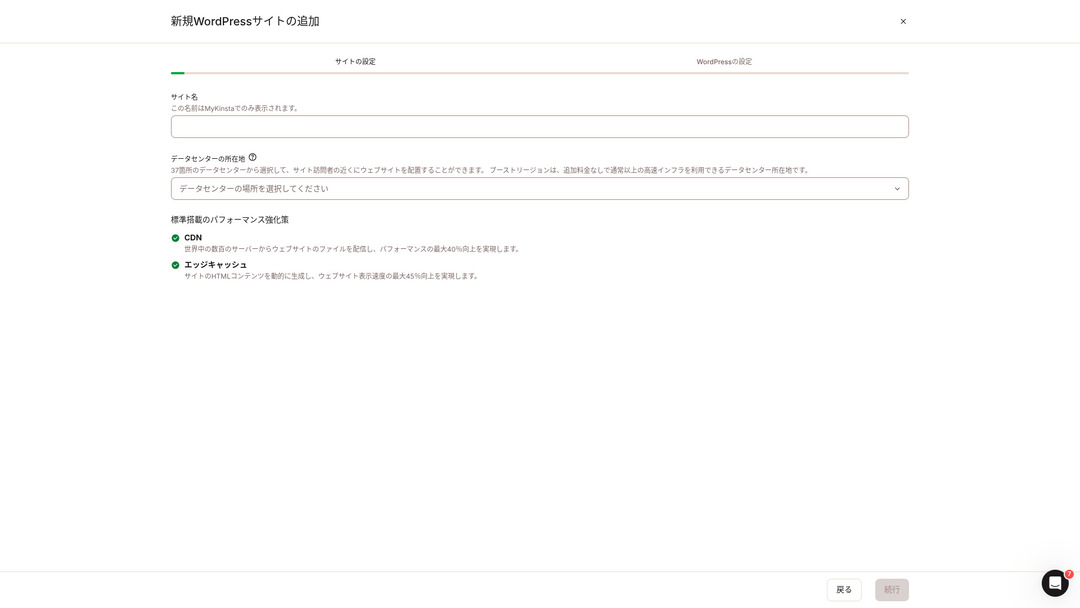
Escolha o nome do seu site e selecione um local de data center. Você pode escolher entre 37 data centers em todo o mundo. Se a maioria dos seus visitantes estiver no Japão, escolher Tóquio ou Osaka é a opção mais segura.
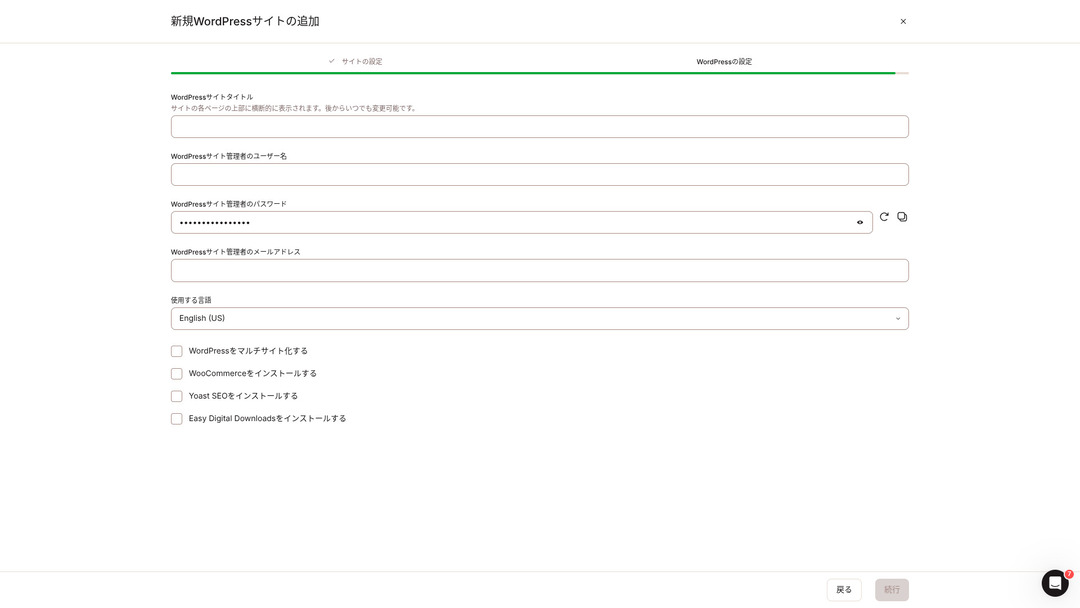
- Título do site WordPress
- Nome de usuário de administrador WordPress
- Senha de administrador WordPress
- Endereço de e-mail de administrador WordPress
- Língua a utilizar
Decida essas configurações. Uma vez que você clicar em "Continuar", sua configuração do site WordPress está completa.
Planos de preços da Kinsta: a melhor escolha é o plano anual para um site
Kinstatem três planos de preços, e cada um pode ser pago mensalmente ou anualmente. Um deles é um programa de agência destinado a agências de produção. Para indivíduos e empresas, as opções a utilizar são
- Plano para um único local
- Plano multi-site
Um desses dois.
| Ponto de comparação | Plano para um único local | Plano multi-site |
|---|---|---|
| Mensalidade | 4,459 yen (annual billing) 5,202 yen (monthly billing) | 8,769 yen (annual billing) 10,404 yen (monthly billing) |
| Sites WordPress | 1 | 2 |
| Visits | 35,000 | 70,000 |
| Armazenamento | 10GB | 20GB |
| CDN | 125GB | 250GB |
Se você está dizendo: “Estou prestes a começar um blog”, eu recomendo o plano de um único site.
Kinsta Comentários e Cinco Principais Características

WordPress Is Fast: No. 1 in Display Velocidade
Kinstaclassificado no. 1 em velocidade de exibição em nossas próprias medições. É realmente um servidor rápido.
Se você está lutando com a velocidade do servidor, eu diria para você escolherKinstasem hesitação.
Um CDN está disponível
Kinstautiliza 37 data centers como bases de servidores em todo o mundo, além de operar 260 locais de CDN. Ao utilizar um CDN, as pessoas que visualizam o seu site recebem dados doServidor CDN, que ajuda as páginas a carregar mais rápido.
★ What Is a CDN? Improve Velocidade and Performance with Distributed Servidores
KinstaMais barato opção de hospedagem WordPress, o plano Starter, ainda inclui 100GB de CDN. Isso proporciona capacidade de transferência mais do que suficiente.
★ O que são tráfego e transferência de dados? Como gerenciar e otimizar o tráfego da web
Vem com 14 dias de backups automáticos
Kinstavem com 14 dias de funcionalidade de backup automático.
Os backups são essenciais. Há sempre a possibilidade de que os dados possam ser apagados por engano ou alterados por um ciberataque. Em situações assim, os dados de backup permitem restaurar o site.
KinstaWith você pode restaurar tudo de até 14 dias de dados de backup, mesmo se algo der errado, o que dá verdadeira paz de espírito.
24/7 Suporte from Engineers
Kinstatem um sistema de suporte 24/7 com pessoal de engenheiros.
Nunca se sabe quando surgirá uma situação que exija apoio. Se não for resolvido rapidamente, pode até tornar-se uma questão de credibilidade comercial.
Kinsta dá paz de espírito porque os engenheiros estão sempre lá para apoiá-lo.Especialmente se você não tem engenheiros dentro de sua empresa,KinstaA garantia de ser capaz de contatar engenheiros a qualquer momento, como você pode com Kinsta, é extremamente valiosa.
Garantia livre Hack-Fix
Não importa quanto esforço você faça em segurança, nada é sempre 100% garantido. Ainda assim,Kinstavem com uma garantia livre hack-fix.
Se você for hackeado,Kinstatrabalhará em conjunto consigo para reparar os danos.
- Inspecção do local livre
- Análises detalhadas de arquivo para identificar malware
- Reparação de arquivos centrais usando uma nova instalação WordPress
- Identificação e remoção de plugins e temas infectados
Porque a resposta é tão completa, você não tem que se preocupar que o mesmo dano hacking vai acontecer novamente.
O empate de Kinsta é o seu alto preço

Mesmo que seja um servidor de topo,Kinsta é cara..
Em termos de preço, pertence à categoria de servidores utilizados pelas empresas. Comparei-o com outros servidores orientados para o negócio.
- Taxa de configuração inicial
- Contrato de servidor de 12 meses
- Um ano de custo de domínio
- Plano que suporta WordPress
KinstaExistem servidores que custam mais do que Kinsta, mas todos os outros são servidores baseados no Japão. Eles oferecem suporte em língua japonesa e um grande número de características orientadas para o negócio também.
Assim, embora seja realmente de topo na velocidade do servidor, não há como negar que ainda se sente caro.
Compare Kinsta with Competing Servidores
Comparei-o com os principais serviços de hospedagem japoneses que, como Kinsta, dão uma forte ênfase à velocidade.
ConoHa WING
ConoHa WING é um servidor construído com um forte foco na velocidade de exibição WordPress. Sua característica chave é como é fácil começar com WordPress. Tarefas como adquirir e configurar um domínio, criar um banco de dados e instalar o WordPress já estão concluídas quando você se inscrever para o servidor,assim, as configurações necessárias para lançar um site WordPress são concluídas no momento do contrato do servidor.
Como resultado, mesmo que você não tenha conhecimento de servidor ou habilidades WordPress, você pode começar seu site imediatamente.

ConoHa WING Review: Why 750,000 Users Choose It, Plus a Test of Its Velocidade, Pros, and Cons
ConoHa WING Review: Why 750,000 Users Choose It, Plus a Test of Its Velocidade, Pros, and Cons
serverfield.org
XServer
XServer tem sido um servidor popular de alta velocidade no Japão. Ele possui a quota de usuário no 1 no mercado interno. Sua popularidade vem não só da velocidade do servidor, mas também de sua estabilidade com 99,99% de tempo de funcionamento e seu apoio atento.
No entanto, quando se trata de velocidade, Kinsta ainda sai à frente do XServer.

XServer Review [2025 Latest]: A Thorough Guide to Velocidade, Pricing, Pros, and Cons
XServer Review [2025 Latest]: A Thorough Guide to Velocidade, Pricing, Pros, and Cons
serverfield.org
Iniciar um site WordPress com Kinsta em 7 etapas
Aqui, vamos iniciar um site WordPress usando Kinsta e MuuMuu Domínio.
Vamos iniciar um site com Kinsta!
- PASSO.1Obtenha um domínio personalizado com o Domínio MuuMuu
Inscreva-se ou faça login no Domínio MuuMuu.
Se você ainda não tem uma conta, crie uma nova no site do Domínio MuuMuu. Se você já tem uma conta, basta fazer login.
Procure e compre seu domínio personalizado.
Digite seu nome de domínio desejado na barra de pesquisa do domínio MuuMuu e verifique se ele está disponível. Se estiver disponível, compre esse domínio.
- PASSO.2Configurar um novo site no Kinsta
Primeiro, inscreva-se paraKinsta. Em seguida, adicione um novo site.
Acesse o painel Kinsta e clique em "Adicionar site".
Selecione o nome do site e a localização do data center. Escolha "Instalar WordPress", em seguida, insira as informações necessárias, como o título do site, nome de usuário do administrador, senha e endereço de e-mail.
Se necessário, instalar plugins como WooCommerce ou Yoast SEO.
- PASSO.3Atualizar as configurações de DNS no Domínio MuuMuu
Acesse o painel de Domínios MuuMuu, selecione o domínio que adquiriu na seção "Gestão de Domínios" e clique em "Configurações de DNS".
No painel Kinsta, verifique as informações DNS para o seu site, incluindo os servidores de nome. Digite essa informação na página “Configurações do DNS” no Domínio MuuMuu e salve-a.
- PASSO.4Definir seu domínio personalizado no painel Kinsta
Mover para a página de configurações para o site WordPress que você estava apenas usando.
Vá para a seção “Domínios” e clique em “Adicionar domínio”. Digite o nome de domínio personalizado que você adquiriu através do Domínio MuuMuu e adicione-o.
Em seguida, mova para a seção "Ferramentas" e clique em "Instalar um certificado grátis Let’s Criptyp SSL" para instalar o certificado SSL.
- PASSO.5Personalize seu site WordPress
Faça login na área de administração WordPress a partir do painel Kinsta. Em seguida, instalar temas e plugins, conforme necessário e personalizar o seu site.
Perguntas mais frequentes sobre Kinsta
Posso registrar um domínio com o Kinsta?
Não, você não pode registrar um domínio através do Kinsta. Por favor, registre seu domínio através de um serviço de registro de domínio, como MuuMuu Domain. Depois disso, registre o domínio adquirido no MyKinsta.
10GB de armazenamento em Kinsta é muito pouco?
Se você está executando um site WordPress, 10GB não é um problema em tudo. A partir de março de 2025, este site com mais de 90 artigos usa apenas 1,5GB de armazenamento. A menos que você esteja construindo algo como um site de portfólio com um número extremo de imagens, não há necessidade de se preocupar.
Como se pronuncia “Kinsta”?
“Kinsta” é pronunciado “Kin-sta.”
Resumo
“Kinsta” é o mais rápido servidor de aluguel de topo com data centers em 37 locais em todo o mundo. Ele ficou no 1 em nossas próprias medidas. Não há como negar o alto preço, mas se você quer um servidor que persegue totalmente conforto e desempenho, é uma excelente escolha sem dúvida. O suporte de chat japonês também está disponível.
30-day garantia de reembolso
Kinstaé um servidor de topo. Se você quiser melhorar a velocidade de exibição do seu site com confiança, por favor, dê-lhe uma tentativa.
Ele oferece não só velocidade, mas também um excelente sistema de suporte, para que você possa usá-lo com confiança.
Comparação de 10 Serviços de Hospedagem Ultramarinos

Com os serviços de hospedagem no exterior, muitas pessoas lutam para decidir qual servidor escolher por causa de barreiras linguísticas e diferenças culturais.
Neste artigo, comparamos cuidadosamente 10 serviços de hospedagem no exterior cuidadosamente selecionados de todo o mundo e explicamos as características de cada serviço, planos de preços eexperiência real do usuárioem pormenor.
Você encontrará informações que cobrem uma ampla gama de necessidades, desde critérios de seleção que os iniciantes podem contar com recursos avançados que os engenheiros procuram.