
10 dagers gratis prøveperiode
PR
Servers
Value Server-anmeldelse [siste oppdatering 2025]: Start WordPress til en lav pris
Publisert: 2025.04.18
Oppdatert: 2025.04.18
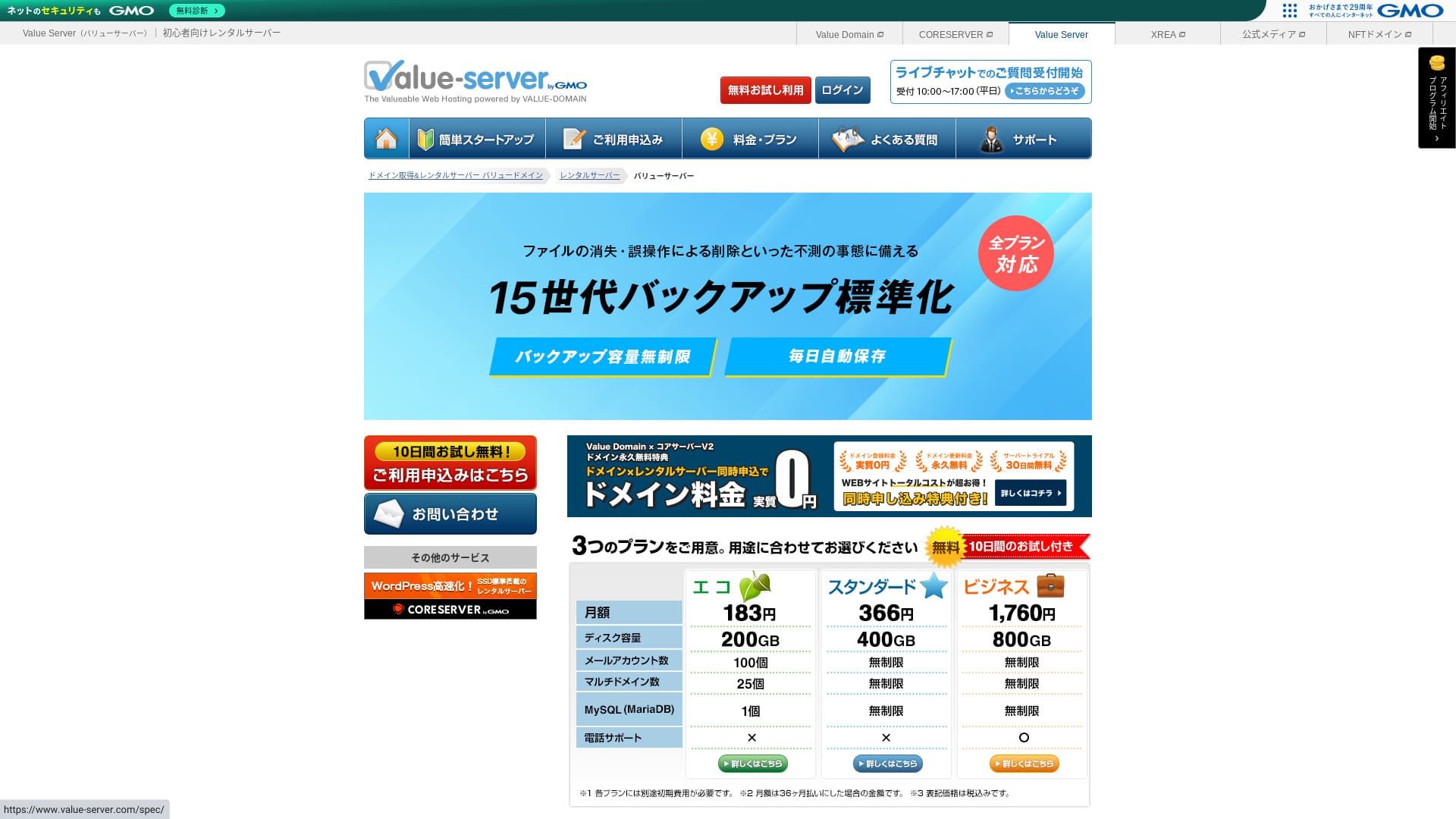
Value Server er en hostingtjeneste drevet av GMO Digirock, Inc., kjent for lave priser, spesielt Marutto-planen.

Value Server anbefales for folk som vil bruke den billigste serveren som finnes fordi:
- Blant de billigste i bransjen
- Serveren bruker SSD-lagring
- 15 generasjoner sikkerhetskopier gir trygghet
Derfor. Du vil sannsynligvis bli fornøyd. Du kan prøve den gratis i 10 dager.
En konkurrerende server er Star Rental Server. Den er enda sterkere enn Value Server ved at den også tilbyr en gratis plan. Vurder den også.
| Servertype | Delt server |
| Visningshastighet (TTFB) | Ikke målt |
| Anbefalt plan og avtaleperiode | Eco 12 måneder |
| Prøveperiode / pengene-tilbake-garanti | None |
| Månedsavgift (12 måneders kontrakt) | 220 yen |
| Oppstartsgebyr | Free |
| Gratis domene | None |
| Support | E-post og chat (hverdager 10:00-17:00) |
| Uptime | Ikke oppgitt |
| Storage | 200GB |
| Antall databaser | 1 |
| Sikkerhetstiltak | None |
| SSL | Gratis delt SSL, egendefinert SSL |
| Sikkerhetskopiering / gjenoppretting | 15 generasjoner sikkerhetskopier gratis, gjenoppretting gratis |
| Antall e-postkontoer | 3 |
| Sikkerhetstiltak for e-post | POP/POP3S, SMTP/SMTPS, IMAP/IMAPS, spamfilter, virusfilter, egendefinerte filtre |
| Tjeneste for migrering av server / nettsted | None |
| Forhåndsinstallasjon av WordPress | None |
| CDN | None |

Hikaru Ono
Value Server drives av GMO Digirock, Inc., et stort navn i bransjen, så selv om den er blant de billigste alternativene, er det ingen grunn til å bekymre seg for kvaliteten. Jeg hadde personlig ingen problemer mens jeg brukte den.
Når det er sagt, er det begrensninger på funksjoner og kapasitet fordi den er billig, så sørg for å gå gjennom dem nøye.
Value Server Compared with Other Servere
- TotalVurdering★★★☆☆
- Serverhastighet ★★★☆☆
- Priser ★★★★★
- Stabilitet ★★★☆☆
- Enkel oppstart med WordPress* ★★★☆☆
- Operasjoner som domenebehandling og SSL-oppsett* ★★★☆☆
* Basert på min faktiske erfaring med tjenesten.

Slik velger du blant 21 anbefalte WordPress-hostingtjenester for enkeltpersoner
Slik velger du blant 21 anbefalte WordPress-hostingtjenester for enkeltpersoner
serverfield.org
- November 4, 2025 markedsundersøkelsesdata, etter hastighet sorted
- Månedsprisene er førsteårskostnaden for den billigste planen som kan kjøre WordPress
- Hastighet er Time to First Byte målt på demosteder under de samme forholdene
“Value Server” er en rimelig hostingserver drevet av GMO Digirock, Inc. Selv om den er rimelig priset for enkeltpersoner, tilbyr den sterke funksjoner som gratis delt SSL og gratis sikkerhetskopier med 15 generasjoner.
Brukeranmeldelser av Value Server og fem viktige funksjoner

Med Marutto-planen kan du bygge et WordPress-nettsted for 3 060 yen per år
Value Server sin Marutto-plan lar deg ha et WordPress-nettsted for 3 060 yen per år. Det er svært billig.
La oss sammenligne den med store innenlandske servere under følgende betingelser.
- Oppstartsgebyr
- 12 måneders serverkontrakt
- Kostnad for ett års domeneavgifter
- Billigste plan som kan bruke WordPress
| Hostingselskap | Kostnad for ett år |
|---|---|
| Value Server | 2,310 yen |
| ConoHa WING | 11,292 yen |
| Xserver | 10,560 yen |
| Lolipop! | 5,940 yen |
| Sakura Rental Server | 6,600 yen |
Sammenlignet med serverne ovenfor er funksjonene og spesifikasjonene riktignok mindre imponerende. Likevel bør den fortsatt være et sterkt alternativ for dem som vil bygge et nettsted så billig som mulig.
SSD er inkludert i alle planer
Value Server includes SSD-lagring i alle planer selv om den er billig. Med svært rimelige servere er det vanlig å se treg innlasting av nettsteder fordi de bruker billige harddisker.
Visningshastigheten på nettstedet påvirker også SEO, så servervalg er ikke noe du bør ta lett på. Med SSD på plass kan du likevel føle deg tryggere.
Merk: Hva er SEO? Riktige trinn og metoder for søkemotoroptimalisering
Alle planer inkluderer 15 generasjoner automatiske sikkerhetskopier
Value Server er billig, men tilbyr likevel 15 generasjoner automatiske sikkerhetskopier i alle planer.
Hvis det ikke finnes noen sikkerhetskopifunksjon, kan du ikke gjenopprette nettstedet selv om data forsvinner på grunn av et angrep eller en feil. Med Value Server sikkerhetskopierer serveren dataene dine automatisk hver dag, noe som gir trygghet.
Disse 15 generasjonene med sikkerhetskopier er imponerende. Selv store servere som Lolipop! tilbyr ikke dette i sine lavprisplaner. Core Server, som også drives av GMO Digirock, Inc., inkluderer heller ikke sikkerhetskopifunksjoner i sin lavprisplan.
Sett i det lyset er Value Server bemerkelsesverdig serviceinnstilt for en lavprisleverandør, fordi den tilbyr så sterke sikkerhetskopier med 15 generasjoner.
Ulempene med Value Server og hvordan du håndterer dem, ærlig forklart

Selv om Value Server har fordeler, har den også ulemper. Sørg for at du forstår dem fullt ut før du bruker den.
Det finnes ingen avanserte sikkerhetstiltak som WAF
Value Server tilbyr ikke avanserte sikkerhetstiltak som WAF. Den tilbyr et visst beskyttelsesnivå, blant annet støtte for egendefinert SSL, men det er likevel litt bekymringsfullt at den ikke er spesielt sterk mot de nyeste angrepsmetodene.
Hvis du vil bruke WAF, bør du installere WordPress-plugins med sikkerhet som formål.
Merk: Hvordan velge fem WordPress-plugins som styrker sikkerheten
Oppetid er ikke oppgitt
Unfortunately, Value Server oppgir ikke oppetiden sin. Det betyr at det er umulig å kjenne serverens stabilitet i tall. Hvis pålitelighet er en prioritet, for eksempel for et bedriftsnettsted, kan denne usikkerheten få deg til å nøle.
Merk: En nybegynnerguide til å forstå oppetid og SLA-er for hosting
Hvis en server blir ustabil på grunn av problemer, kan nettstedet ditt slutte å vises eller bli ekstremt tregt å laste. I noen tilfeller kan det oppstå en 503-feil. Det er belastende for dem som besøker nettstedet ditt.
Merk: Hva er en 503-feil? Slik unngår du overbelastning på nettet og reagerer i en nødsituasjon
Fordi du ikke kan vite oppetiden, bør du bare bruke Value Server etter å ha forstått risikoen for at den kan være ustabil.
Marutto- og Eco-planene lar deg bare opprette ett WordPress-nettsted
Value Server sine Marutto- og Eco-planer lar deg bare opprette ett WordPress-nettsted.
- Jeg vil opprette et arrangementsnettsted i tillegg til hovednettstedet mitt
- Jeg vil opprette en blogg nummer to
Hvis du trenger et ekstra WordPress-nettsted av disse grunnene, må du klargjøre en annen server separat.
Compare Value Server with Two Similar Servere
La oss sammenligne Value Server med to konkurrerende servere som ligner når det gjelder lav pris. Selv om de ser like ut, finnes det forskjeller, så ta deg tid til å sammenligne dem nøye.
Core Server
Core Server drives av samme selskap. Den tilbyr høye spesifikasjoner samtidig som prisen fortsatt er lav. Du kan velge det som passer best blant syv fint inndelte planer. Det finnes en prisfokusert V1-serie og en ytelsesfokusert V2-serie.
Total, Core Server beats Value Server in features and specifications, so if price is not your top priority, Core Server is the better choice.

Core Server Review [2025 Latest]: Thorough Guide to Priser, Speed, Pros, and Cons
Core Server Review [2025 Latest]: Thorough Guide to Priser, Speed, Pros, and Cons
serverfield.org
Star Server
Star Rental Server er også billig. Samtidig ligner den Value Server i satsingen på hastighet, blant annet ved bruk av SSD-lagring. Den er noe dyrere enn Value Server, men større overføringskapasitet er et sterkt punkt fordi den kan henge med selv om trafikken på nettstedet ditt øker.
Star Server inkluderer ikke automatiske sikkerhetskopier. Det er ett område der Value Server kommer bedre ut.

Anmeldelse av Star Server [siste 2024]: utrolig rimelig og grundig testet
Anmeldelse av Star Server [siste 2024]: utrolig rimelig og grundig testet
serverfield.org
Start et WordPress-nettsted med Value Server i 6 trinn
La oss starte et nettsted med Value Server!
- STEP.1Gå til Value Servers offisielle nettsted
På toppsiden klikker du på «Prøv gratis».
- STEP.2Søk om serveren og få et domene
Velg en plan. Navnet på serverkontoen din (startdomenet) kan være hva som helst. Du kommer ikke til å bruke dette startdomenet som domene for nettstedet ditt. Det er mulig å bruke det, men jeg anbefaler det ikke.
På dette tidspunktet kan du ennå ikke velge samtidig WordPress-installasjon, men etter at du har valgt domene, kan du krysse av for det. Sørg for å bruke det. Det gjør det mye enklere å starte et WordPress-nettsted.
Under alternativet for også å søke om domenet du skal bruke på denne serveren, velger du “Get a domain for free.” Skriv deretter inn en valgfri tekststreng. Klikk på toppdomenet du ønsker blant tilgjengelige toppdomener som .com og .net.
Du kan velge rotdomener som “.com” og “.co.jp.” Gebyrer for registrering og fornyelse varierer etter rotdomene. Hvis du er usikker på hva du skal velge, anbefaler jeg “.co.jp” for selskaper når det er mulig. For enkeltpersoner er “.com” og “.net” gode valg. Mange kjenner disse domenene, så de virker mindre mistenkelige og er enklere for brukere å åpne.
Merk: Hva er et domene? Rollen som adresse på internett og hvordan du får et
Når du har valgt domenet, krysser du av for “Installer WordPress at the same time.”
Klikk på “Proceed.”
- STEP.3Skriv inn brukerinformasjon
Skjermen for brukerinformasjon vises. Klikk på “User Registration,” skriv inn informasjon som brukstype og navn, bekreft opplysningene og klikk på “Register and proceed.”
Fullfør den nødvendige SMS-verifiseringen, og klikk deretter på “Confirm application.”
Svar på spørreskjemaet eller hopp over det, og klikk deretter på “Go to the control panel.”
- STEP.4Installer WordPress
I administrasjonsinformasjonen i kontrollpanelet vises “Value Server (1)” som du søkte om tidligere. Klikk på den og gå videre til “New Control Panel.”
Velg deretter “App Installation” fra “Tools” og klikk på “WordPress Blog.”
Klikk på “+ Install this application” og velg et domene. Domenet du søkte om tidligere, vises i nedtrekksmenyen, så velg det.
Du kan la versjonsinnstillingene stå som de er.
Bruk følgende innstillinger for WordPress.
- Administratorbrukernavn: Hva som helst er greit.
- Administratorpassord: Gjør det så komplekst som mulig. Du kan enkelt endre det senere.
- Administrator-e-post: En e-postadresse du bruker regelmessig. For selskaper anbefaler jeg jobb-e-posten til personen som administrerer nettstedet.
- Nettstedstittel: Hva som helst er greit. Du kan enkelt endre det senere.
- Nettstedets slagord: Dette er undertittelen. Hva som helst er greit. Du kan enkelt endre det senere.
Administratorbrukernavnet og administratorpassordet brukes når du logger inn på WordPress. Sørg for å skrive dem ned.
Du kan la “Advanced”-innstillingene stå som de er.
Når du har skrevet inn alt, klikker du på “+ Install.” Etter at installasjonen er ferdig, klikker du på URL-en på skjermen som slutter med “wp-admin/”. Det er URL-en til administrasjonsskjermen for WordPress.
- STEP.5Første WordPress-oppsett
På WordPress-innloggingsskjermen som vises, skriver du inn brukernavnet og passordet du satte under installasjonen, og klikker deretter på “Log In.”
Hvis du ser en advarsel som sier “This site can’t be reached,” er DNS-innstillingene ennå ikke propagert. Det er ingenting annet å gjøre enn å vente, så prøv å logge inn igjen med noen timers mellomrom.
Merk: What Are DNS and Name Servere?
Etter at du har logget inn på WordPress, setter du permalenkene. I WordPress-administrasjonen går du til “Settings” og deretter “Permalinks.” Velg “Post name,” og klikk deretter på “Save Changes.”
Med “Post name” kan du skrive inn en valgfri tekststreng i URL-en når du publiserer en artikkel. Jeg anbefaler en kort tekst som hjelper leserne å forestille seg innholdet i artikkelen. Hvis den er for lang, kan noen bli bekymret for at nettstedet ser mistenkelig ut.
- STEP.6Installer plugins
Gå tilbake til WordPress-administrasjonen, åpne “Plugins” og deretter “Add New,” og installer pluginene du trenger.
Når du finner pluginen du vil ha via søk, klikker du på “Install Now” og deretter “Activate.” Følg deretter instruksjonene for hver plugin.
Sørg for å installere plugins for sikkerhet og sikkerhetskopiering.
- Hvordan velge fem WordPress-plugins som styrker sikkerheten
- 5 kraftige WordPress-plugins for sikkerhetskopiering som hjelper deg å gjenopprette dataene dine
Når du også har installert pluginene, er WordPress-nettstedet ditt helt klart til bruk!
Sammendrag
“Value Server” er en rimelig hostingserver drevet av GMO Digirock, Inc. Selv om prisene fortsatt er overkommelige også for enkeltpersoner, tilbyr den sterke funksjoner som gratis delt SSL og gratis sikkerhetskopier med 15 generasjoner.
10 dagers gratis prøveperiode
Value Server er en rimelig server. Selv om oppetiden ikke er oppgitt og sikkerhetsfunksjonene er på den svakere siden, betyr funksjonen for automatisk sikkerhetskopiering med 15 generasjoner at du som regel kan gjenopprette data til slutt. Hvis pris betyr mest for deg, bør du prøve den.
Full sammenligning av 32 WordPress-hostingtjenester: anbefalinger for enkeltpersoner, selskaper og bruk i utlandet

Når du tenker “jeg vil starte med WordPress” og søker etter “anbefalt WordPress-hosting,” finner du alle slags artikler, fra alternativer for enkeltpersoner og for selskaper eller små bedrifter til utenlandske servere og rimelige servere. Helt ærlig,
- Hvilket nettsted bør jeg se på?
- Jeg vil velge en server på en enkel og lett forståelig måte!
- Vis meg hvordan jeg starter WordPress med en gang.
Har du noen gang følt det slik? Derfor velger denne artikkelen nøye ut de beste alternativene blant 32 hostingtjenester for enkeltpersoner, selskaper, innenlands bruk og utenlands bruk og introduserer dem. Forklaringen kommer fra SEO-ansvarlig i et apputviklingsselskap som bruker hostingtjenester hver dag.