30 दिवसांची मनी-बॅक हमी
PR
सर्व्हर
Kinsta पुनरावलोकन: Google ने शिफारस केलेल्या अतिवेगवान सर्व्हरचे फायदे आणि तोटे, तसेच WordPress सेटअप मार्गदर्शक
प्रकाशित: 2025.07.13
अद्यतनित: 2025.07.13
रेटिंग: 4.0
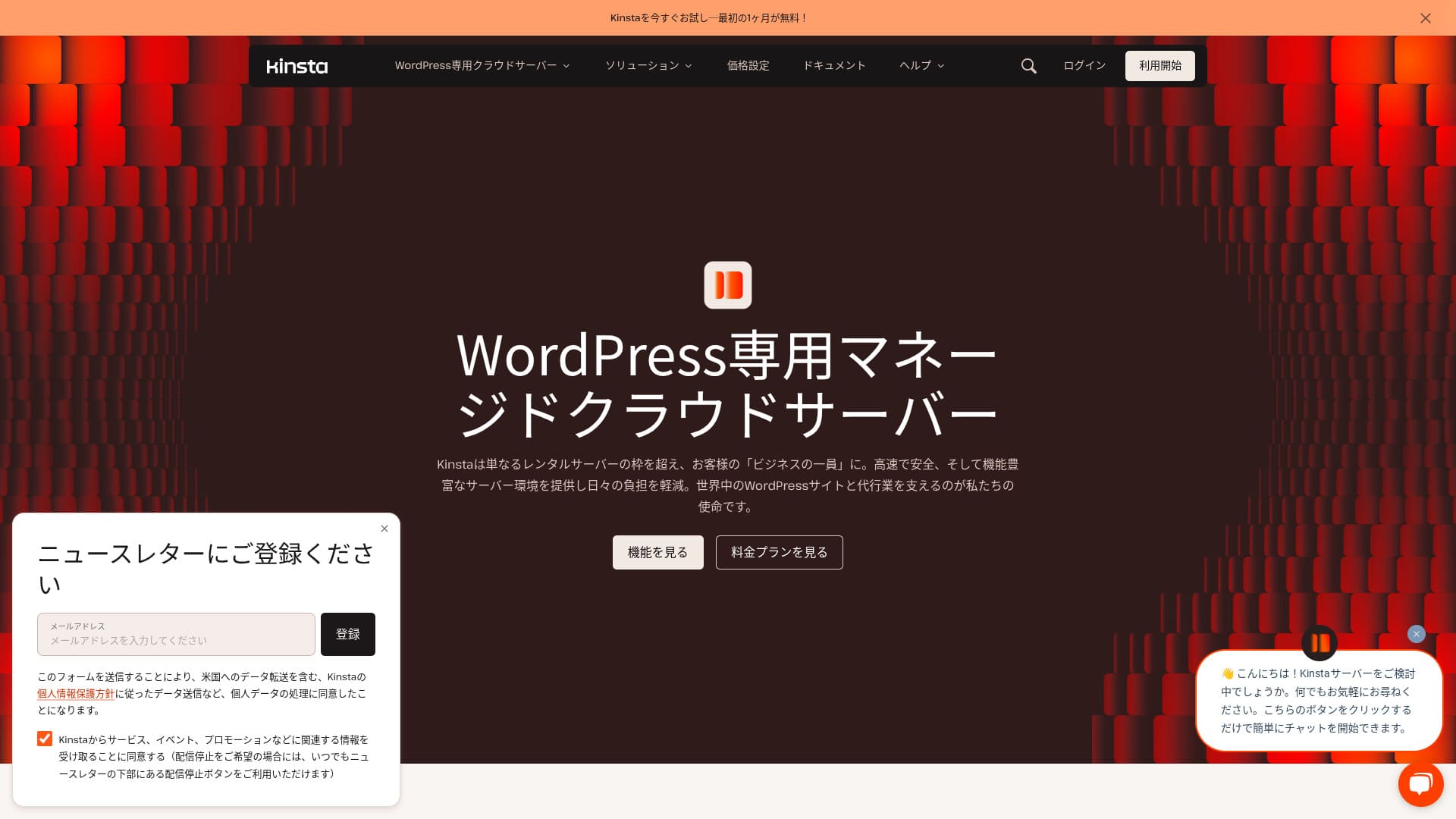
Kinsta हा Kinsta Inc. चालवणारा अतिवेगवान परदेशी होस्टिंग सेवा आहे.तो Google ने शिफारस केलेला सर्व्हर म्हणून ओळखला जातो. पेज प्रदर्शनाचा वेग अतिशय जलद ठेवण्यावर त्याचा भर आहे.
| सर्व्हर प्रकार | डेडिकेटेड मॅनेज्ड सर्व्हर |
| प्रदर्शन वेग (TTFB) | 30ms |
| शिफारस केलेला प्लॅन आणि बिलिंग कालावधी | Single35k |
| ट्रायल / मनी-बॅक हमी | 30 दिवसांची पैसे परत हमी |
| मासिक शुल्क (12 महिन्यांचा प्लॅन) | 4,407 yen |
| प्रारंभिक सेटअप शुल्क | मोफत |
| मोफत डोमेन | काही नाही |
| सपोर्ट | Kinsta बद्दल: 24/7 chat support (available in Japanese) आणि email |
| अपटाइम | 99.9% |
| सर्व्हर स्टोरेज | 10GB |
| डेटाबेसेसची संख्या | 1 |
| सुरक्षा | या विभागात Kinsta चा वेग, किंमत, WordPress सेटअप, सुरक्षा, बॅकअप आणि इतर सर्व्हरशी तुलना याबद्दल स्थानिक भाषेत माहिती दिली आहे. |
| SSL | Server type |
| बॅकअप्स | 14 दिवसांचे automatic backups |
| ईमेल खात्यांची संख्या | काही नाही |
| ईमेल सुरक्षा वैशिष्ट्ये | काही नाही |
| सर्व्हर / वेबसाइट स्थलांतर सेवा | मोफत |
| WordPress पूर्व-स्थापित | होय |
| CDN | Kinsta बद्दल: मोफत (125GB) |
| डेटा सेंटर्स | जोहान्सबर्ग, दक्षिण आफ्रिका; चांगहुआ, तैवान; हाँगकाँग; टोकियो; ओसाका; सोल; मुंबई; दिल्ली; सिंगापूर; जकार्ता; तसेच ऑस्ट्रेलिया, युरोप, मध्य पूर्व, कॅनडा, दक्षिण अमेरिका आणि अमेरिकेतील अनेक डेटा सेंटर |

Hikaru Ono
Kinsta ला अनेकदा टॉप-टियर सर्व्हर म्हणून वर्णन केले जाते, आणि प्रत्यक्ष वापरानंतर मला ते वर्णन अचूक वाटले. तो फक्त जलद नाही, तर कंट्रोल पॅनेलही वापरण्यास सोपा आहे, आणि WordPress सुरू करणेही अगदी सोपे आहे.
किंमत पूर्णपणे योग्य ठरवणाऱ्या आकर्षणांनी भरलेला हा सर्व्हर आहे.
- 4 नोव्हेंबर 2025 च्या बाजार संशोधन डेटावर आधारित, वेगानुसार
- मासिक शुल्क म्हणजे WordPress चालू शकणाऱ्या सर्वात स्वस्त प्लॅनचा पहिल्या वर्षाचा खर्च
- वेग म्हणजे समान परिस्थितींमध्ये मोजलेल्या demo sites च्या Time to First Byte चे मूल्य
एकट्या व्यक्तींसाठी शिफारस केलेल्या 21 WordPress होस्टिंग सेवा: तुलना आणि निवड कशी करावीKinstaया विभागात Kinsta चा वेग, किंमत, WordPress सेटअप, सुरक्षा, बॅकअप आणि इतर सर्व्हरशी तुलना याबद्दल स्थानिक भाषेत माहिती दिली आहे.
Kinsta डॅशबोर्ड: सोपा, स्टायलिश आणि वाचण्यास सहज
Kinsta बद्दल: Kinsta’s dashboard isअतिशय सोपे, आकर्षक आणि वाचण्यास सुलभ निर्माण होऊ शकते.
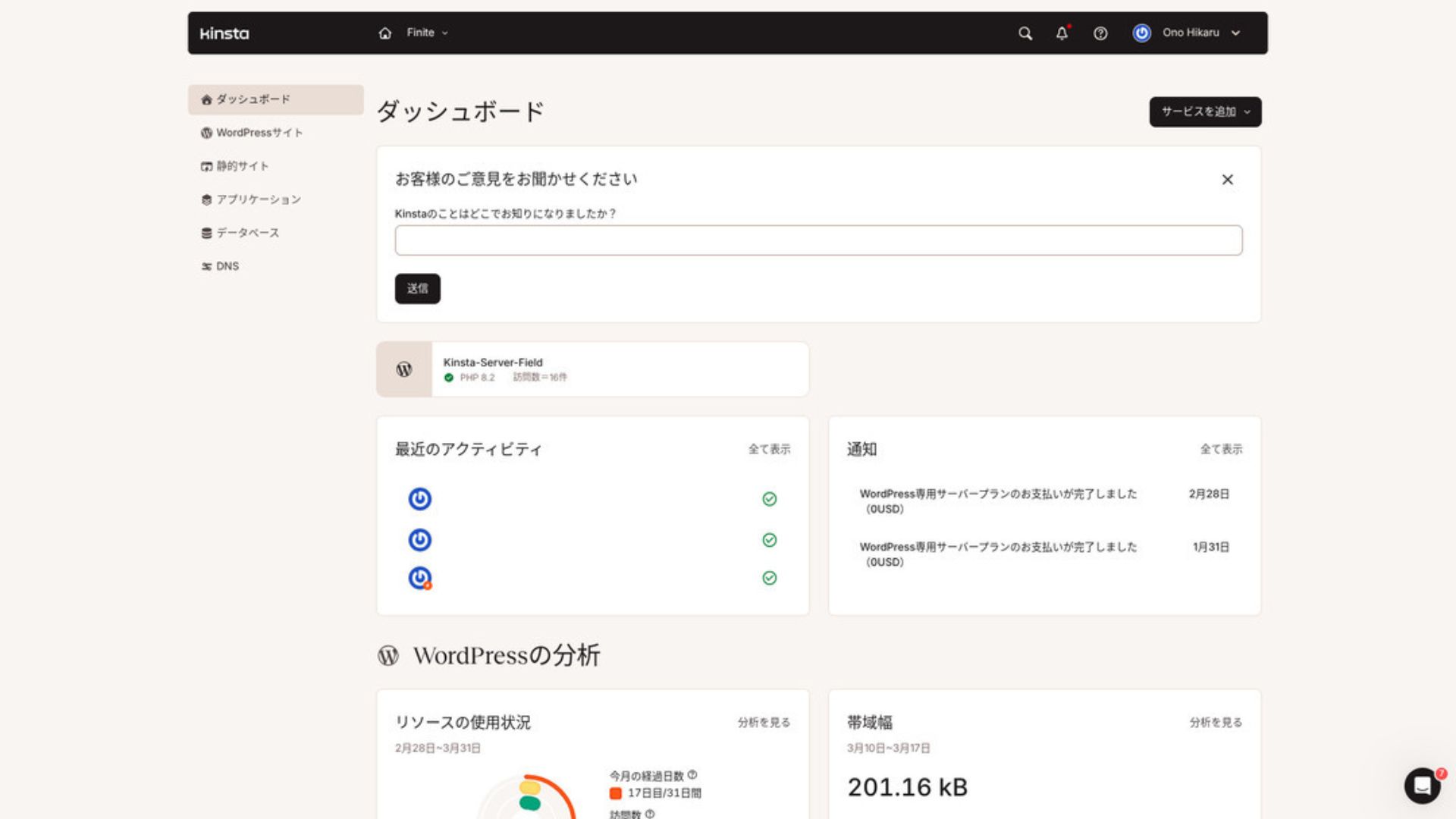
WordPress व्यवस्थापित करण्यासाठी मेनूमधील “WordPress Sites” वर क्लिक करा.
नवीन WordPress site तयार करणे किंवा migration करणे सोपे आहे
Kinstaके साथ नवीन site तयार करणे आणि migration handle करणे सोपे आहे. फक्त overseas server असल्यामुळे ते difficult मानण्याची गरज नाही.
जेव्हा तुम्ही WordPress Sites उघडता आणि “Add Site” क्लिक करता,
- नवीन site तयार करा
- site migration ची विनंती करा
ते पर्याय दिसतात. नवीन site तयार करणेही सोपे आहे.
Kinsta बद्दल: Creating a New WordPress Site
- STEP.1MyKinsta मध्ये “WordPress Sites” निवडा
मध्ये लॉगिन करा MyKinsta. मग मेनूमधून “WordPress Sites” निवडा.
- STEP.2नवीन site तयार करा
“Add Site” क्लिक करा. मग “Create new site” निवडा.
- STEP.3WordPress settings सोबत पुढे जा
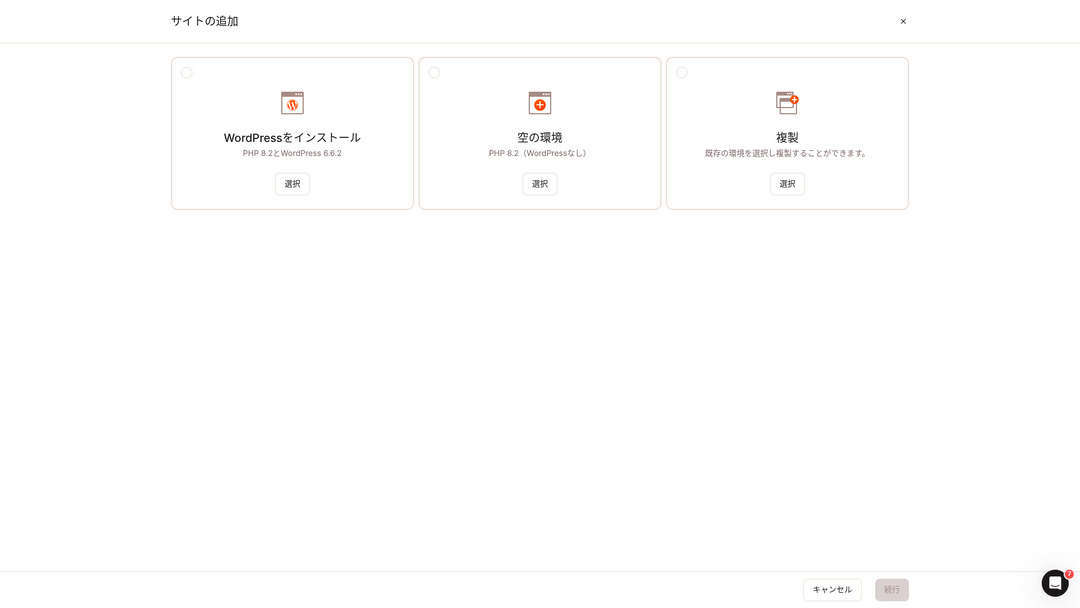
“Install WordPress” निवडा.
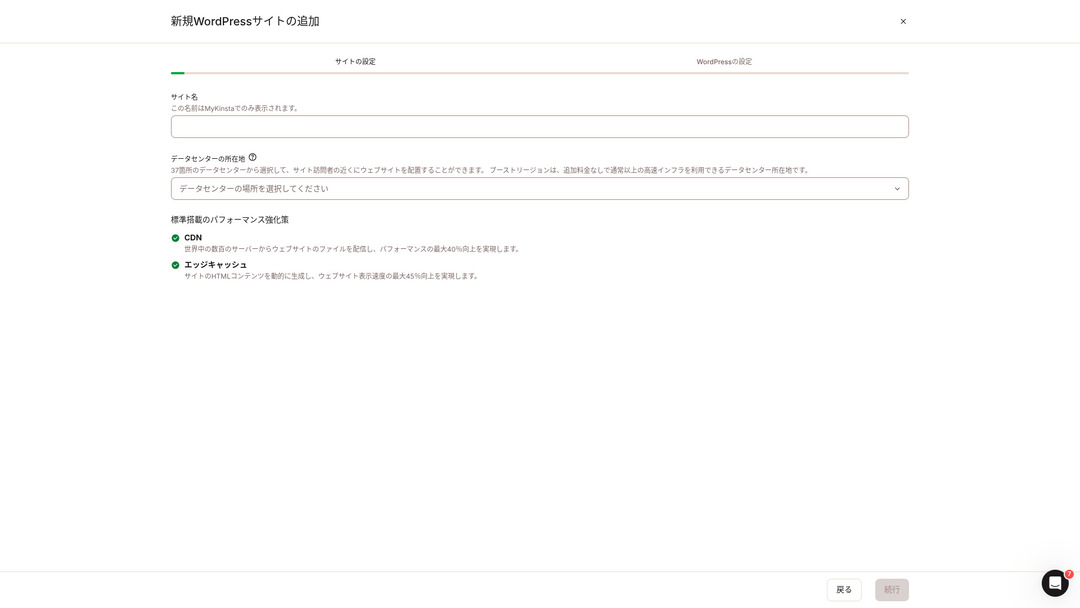
तुमचे site name निवडा आणि data center location निवडा. तुम्ही जगभरातील 37 data centers मधून निवड करू शकता. तुमचे बहुतेक visitors जपानमध्ये असतील, तर Tokyo किंवा Osaka निवडणे सर्वात सुरक्षित पर्याय आहे.
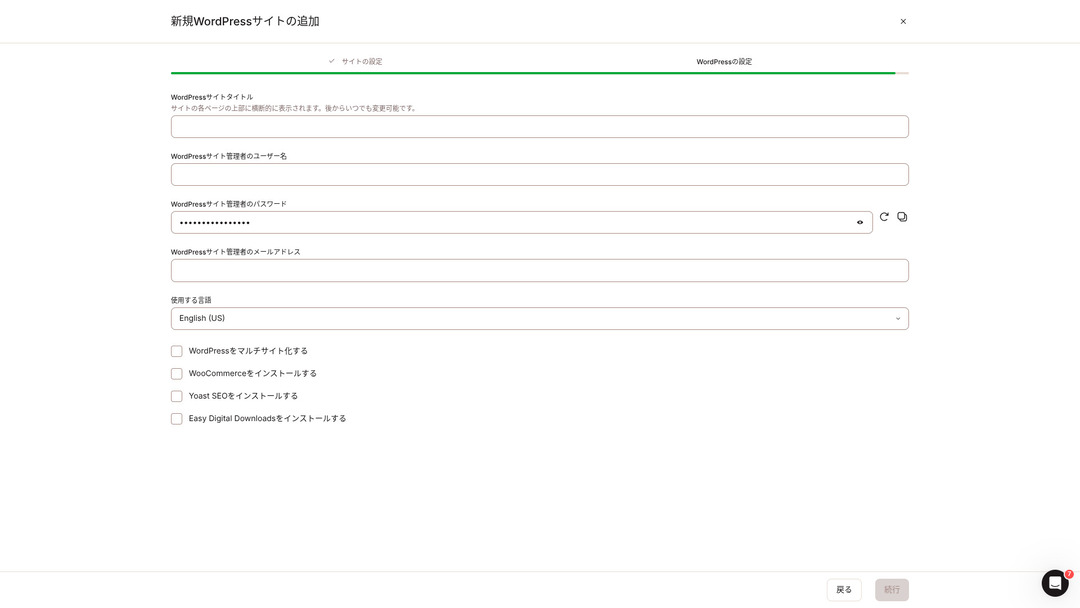
- Kinsta बद्दल: WordPress site title
- Kinsta बद्दल: WordPress admin username
- Kinsta बद्दल: WordPress admin password
- Kinsta बद्दल: WordPress admin email address
- वापरायची भाषा
ती सेटिंग्ज ठरवा. “Continue” क्लिक करताच तुमचे WordPress site setup पूर्ण होईल.
Kinsta किंमत योजना: एका site साठी वार्षिक प्लॅन सर्वोत्तम
Kinstaके तीन pricing plans आहेत, आणि प्रत्येक monthly किंवा annual billing वर घेतला जाऊ शकतो. त्यापैकी एक production agencies साठीचा agency program आहे. Individuals आणि companies साठी वापरण्यास योग्य पर्याय हे आहेत
- सिंगल-साइट प्लॅन
- मल्टी-साइट प्लॅन
Kinsta बद्दल: one of those two.
| Kinsta बद्दल: तुलना item | सिंगल-साइट प्लॅन | मल्टी-साइट प्लॅन |
|---|---|---|
| मासिक शुल्क | 4,459 yen (annual billing) 5,202 yen (monthly billing) | 8,769 yen (annual billing) 10,404 yen (monthly billing) |
| Kinsta बद्दल: WordPress sites | 1 | 2 |
| Visits | 35,000 | 70,000 |
| साठा | 10GB | 20GB |
| CDN | 125GB | 250GB |
या विभागात Kinsta चा वेग, किंमत, WordPress सेटअप, सुरक्षा, बॅकअप आणि इतर सर्व्हरशी तुलना याबद्दल स्थानिक भाषेत माहिती दिली आहे.
Kinsta पुनरावलोकन आणि पाच प्रमुख वैशिष्ट्ये

WordPress जलद आहे: display speed मध्ये क्रमांक 1
Kinstaया विभागात Kinsta चा वेग, किंमत, WordPress सेटअप, सुरक्षा, बॅकअप आणि इतर सर्व्हरशी तुलना याबद्दल स्थानिक भाषेत माहिती दिली आहे.
या विभागात Kinsta चा वेग, किंमत, WordPress सेटअप, सुरक्षा, बॅकअप आणि इतर सर्व्हरशी तुलना याबद्दल स्थानिक भाषेत माहिती दिली आहे.KinstaKinsta बद्दल: without hesitation.
CDN उपलब्ध आहे
Kinstaया विभागात Kinsta चा वेग, किंमत, WordPress सेटअप, सुरक्षा, बॅकअप आणि इतर सर्व्हरशी तुलना याबद्दल स्थानिक भाषेत माहिती दिली आहे.Kinsta बद्दल: CDN server, which helps pages load faster.
Kinstaया विभागात Kinsta चा वेग, किंमत, WordPress सेटअप, सुरक्षा, बॅकअप आणि इतर सर्व्हरशी तुलना याबद्दल स्थानिक भाषेत माहिती दिली आहे.
१४ दिवसांच्या स्वयंचलित बॅकअपसह येते
Kinstaया विभागात Kinsta चा वेग, किंमत, WordPress सेटअप, सुरक्षा, बॅकअप आणि इतर सर्व्हरशी तुलना याबद्दल स्थानिक भाषेत माहिती दिली आहे.
बॅकअप आवश्यक आहेत. चुकून डेटा हटवला जाण्याची किंवा सायबर हल्ल्यामुळे बदलला जाण्याची शक्यता नेहमीच असते. अशा परिस्थितीत, बॅकअप घेतलेला डेटा तुम्हाला साइट पूर्वस्थितीत आणण्यास मदत करतो.
Kinstaसह या विभागात Kinsta चा वेग, किंमत, WordPress सेटअप, सुरक्षा, बॅकअप आणि इतर सर्व्हरशी तुलना याबद्दल स्थानिक भाषेत माहिती दिली आहे.Kinsta बद्दल: , which gives real peace of mind.
इंजिनिअर्स कडून २४/७ सपोर्ट
Kinstaया विभागात Kinsta चा वेग, किंमत, WordPress सेटअप, सुरक्षा, बॅकअप आणि इतर सर्व्हरशी तुलना याबद्दल स्थानिक भाषेत माहिती दिली आहे.
या विभागात Kinsta चा वेग, किंमत, WordPress सेटअप, सुरक्षा, बॅकअप आणि इतर सर्व्हरशी तुलना याबद्दल स्थानिक भाषेत माहिती दिली आहे.
या विभागात Kinsta चा वेग, किंमत, WordPress सेटअप, सुरक्षा, बॅकअप आणि इतर सर्व्हरशी तुलना याबद्दल स्थानिक भाषेत माहिती दिली आहे.या विभागात Kinsta चा वेग, किंमत, WordPress सेटअप, सुरक्षा, बॅकअप आणि इतर सर्व्हरशी तुलना याबद्दल स्थानिक भाषेत माहिती दिली आहे.Kinstaया विभागात Kinsta चा वेग, किंमत, WordPress सेटअप, सुरक्षा, बॅकअप आणि इतर सर्व्हरशी तुलना याबद्दल स्थानिक भाषेत माहिती दिली आहे.
Kinsta बद्दल: मोफत Hack-Fix Guarantee
या विभागात Kinsta चा वेग, किंमत, WordPress सेटअप, सुरक्षा, बॅकअप आणि इतर सर्व्हरशी तुलना याबद्दल स्थानिक भाषेत माहिती दिली आहे.Kinsta मोफत हॅक-फिक्स गॅरंटीसह येतो.
Kinsta बद्दल: If you are hacked,Kinstaया विभागात Kinsta चा वेग, किंमत, WordPress सेटअप, सुरक्षा, बॅकअप आणि इतर सर्व्हरशी तुलना याबद्दल स्थानिक भाषेत माहिती दिली आहे.
- Kinsta बद्दल: मोफत site inspection
- Kinsta बद्दल: Detailed file scans to identify malware
- या विभागात Kinsta चा वेग, किंमत, WordPress सेटअप, सुरक्षा, बॅकअप आणि इतर सर्व्हरशी तुलना याबद्दल स्थानिक भाषेत माहिती दिली आहे.
- या विभागात Kinsta चा वेग, किंमत, WordPress सेटअप, सुरक्षा, बॅकअप आणि इतर सर्व्हरशी तुलना याबद्दल स्थानिक भाषेत माहिती दिली आहे.
या विभागात Kinsta चा वेग, किंमत, WordPress सेटअप, सुरक्षा, बॅकअप आणि इतर सर्व्हरशी तुलना याबद्दल स्थानिक भाषेत माहिती दिली आहे.
Kinsta चा तोटा म्हणजे त्याची जास्त किंमत

Kinsta बद्दल: Even though it is a top-tier server, Kinsta बद्दल: Kinsta is expensive निर्माण होऊ शकते.
या विभागात Kinsta चा वेग, किंमत, WordPress सेटअप, सुरक्षा, बॅकअप आणि इतर सर्व्हरशी तुलना याबद्दल स्थानिक भाषेत माहिती दिली आहे.
- प्रारंभिक सेटअप शुल्क
- 12 महिन्यांचा सर्व्हर करार
- Kinsta बद्दल: One year of domain cost
- Kinsta बद्दल: Plan that supports WordPress
Kinstaया विभागात Kinsta चा वेग, किंमत, WordPress सेटअप, सुरक्षा, बॅकअप आणि इतर सर्व्हरशी तुलना याबद्दल स्थानिक भाषेत माहिती दिली आहे.
या विभागात Kinsta चा वेग, किंमत, WordPress सेटअप, सुरक्षा, बॅकअप आणि इतर सर्व्हरशी तुलना याबद्दल स्थानिक भाषेत माहिती दिली आहे.
Kinsta ची स्पर्धक सर्व्हरशी तुलना
या विभागात Kinsta चा वेग, किंमत, WordPress सेटअप, सुरक्षा, बॅकअप आणि इतर सर्व्हरशी तुलना याबद्दल स्थानिक भाषेत माहिती दिली आहे.
ConoHa WING
या विभागात Kinsta चा वेग, किंमत, WordPress सेटअप, सुरक्षा, बॅकअप आणि इतर सर्व्हरशी तुलना याबद्दल स्थानिक भाषेत माहिती दिली आहे.या विभागात Kinsta चा वेग, किंमत, WordPress सेटअप, सुरक्षा, बॅकअप आणि इतर सर्व्हरशी तुलना याबद्दल स्थानिक भाषेत माहिती दिली आहे.
या विभागात Kinsta चा वेग, किंमत, WordPress सेटअप, सुरक्षा, बॅकअप आणि इतर सर्व्हरशी तुलना याबद्दल स्थानिक भाषेत माहिती दिली आहे.

या विभागात Kinsta चा वेग, किंमत, WordPress सेटअप, सुरक्षा, बॅकअप आणि इतर सर्व्हरशी तुलना याबद्दल स्थानिक भाषेत माहिती दिली आहे.
या विभागात Kinsta चा वेग, किंमत, WordPress सेटअप, सुरक्षा, बॅकअप आणि इतर सर्व्हरशी तुलना याबद्दल स्थानिक भाषेत माहिती दिली आहे.
serverfield.org
XServer
या विभागात Kinsta चा वेग, किंमत, WordPress सेटअप, सुरक्षा, बॅकअप आणि इतर सर्व्हरशी तुलना याबद्दल स्थानिक भाषेत माहिती दिली आहे.
या विभागात Kinsta चा वेग, किंमत, WordPress सेटअप, सुरक्षा, बॅकअप आणि इतर सर्व्हरशी तुलना याबद्दल स्थानिक भाषेत माहिती दिली आहे.

XServer पुनरावलोकन [2025 नवीनतम]: स्पीड, किंमत, फायदे आणि तोटे यांविषयीचे सविस्तर मार्गदर्शक
XServer पुनरावलोकन [2025 नवीनतम]: स्पीड, किंमत, फायदे आणि तोटे यांविषयीचे सविस्तर मार्गदर्शक
serverfield.org
Kinsta सह 7 पावलांमध्ये WordPress site सुरू करा
या विभागात Kinsta चा वेग, किंमत, WordPress सेटअप, सुरक्षा, बॅकअप आणि इतर सर्व्हरशी तुलना याबद्दल स्थानिक भाषेत माहिती दिली आहे.
चला, Kinsta च्या साहाय्याने वेबसाइट सुरू करूया!
- STEP.1MuuMuu Domain च्या माध्यमातून सानुकूल डोमेन मिळवा
Kinsta बद्दल: Sign up for or log in to MuuMuu Domain.
या विभागात Kinsta चा वेग, किंमत, WordPress सेटअप, सुरक्षा, बॅकअप आणि इतर सर्व्हरशी तुलना याबद्दल स्थानिक भाषेत माहिती दिली आहे.
तुमच्या सानुकूल डोमेनचा शोध घ्या आणि ते खरेदी करा.
या विभागात Kinsta चा वेग, किंमत, WordPress सेटअप, सुरक्षा, बॅकअप आणि इतर सर्व्हरशी तुलना याबद्दल स्थानिक भाषेत माहिती दिली आहे.
- STEP.2Kinsta बद्दल: Set up a new site on Kinsta
Kinsta बद्दल: First, sign up for KinstaKinsta बद्दल: . Then add a new site.
या विभागात Kinsta चा वेग, किंमत, WordPress सेटअप, सुरक्षा, बॅकअप आणि इतर सर्व्हरशी तुलना याबद्दल स्थानिक भाषेत माहिती दिली आहे.
साइटचे नाव आणि डेटा सेंटरचे स्थान निवडा. “Install WordPress” पर्याय निवडा, त्यानंतर आवश्यक माहिती जसे की साइटचे शीर्षक, ॲडमिन युझरनेम, पासवर्ड आणि ईमेल पत्ता प्रविष्ट करा.
या विभागात Kinsta चा वेग, किंमत, WordPress सेटअप, सुरक्षा, बॅकअप आणि इतर सर्व्हरशी तुलना याबद्दल स्थानिक भाषेत माहिती दिली आहे.
- STEP.3MuuMuu Domain मधील DNS सेटिंग्ज अपडेट करा
या विभागात Kinsta चा वेग, किंमत, WordPress सेटअप, सुरक्षा, बॅकअप आणि इतर सर्व्हरशी तुलना याबद्दल स्थानिक भाषेत माहिती दिली आहे.
या विभागात Kinsta चा वेग, किंमत, WordPress सेटअप, सुरक्षा, बॅकअप आणि इतर सर्व्हरशी तुलना याबद्दल स्थानिक भाषेत माहिती दिली आहे.
- STEP.4या विभागात Kinsta चा वेग, किंमत, WordPress सेटअप, सुरक्षा, बॅकअप आणि इतर सर्व्हरशी तुलना याबद्दल स्थानिक भाषेत माहिती दिली आहे.
या विभागात Kinsta चा वेग, किंमत, WordPress सेटअप, सुरक्षा, बॅकअप आणि इतर सर्व्हरशी तुलना याबद्दल स्थानिक भाषेत माहिती दिली आहे.
या विभागात Kinsta चा वेग, किंमत, WordPress सेटअप, सुरक्षा, बॅकअप आणि इतर सर्व्हरशी तुलना याबद्दल स्थानिक भाषेत माहिती दिली आहे.
या विभागात Kinsta चा वेग, किंमत, WordPress सेटअप, सुरक्षा, बॅकअप आणि इतर सर्व्हरशी तुलना याबद्दल स्थानिक भाषेत माहिती दिली आहे.
- STEP.5Kinsta बद्दल: Customize your WordPress site
Kinsta डॅशबोर्डवरून वर्डप्रेस ॲडमिन क्षेत्रात लॉग इन करा. त्यानंतर आवश्यकतेनुसार थीम्स आणि प्लगिन्स स्थापित करा आणि तुमची साइट कस्टमाइझ करा.
Kinsta बद्दल वारंवार विचारले जाणारे प्रश्न
मी Kinsta द्वारे डोमेनची नोंदणी करू शकतो का?
या विभागात Kinsta चा वेग, किंमत, WordPress सेटअप, सुरक्षा, बॅकअप आणि इतर सर्व्हरशी तुलना याबद्दल स्थानिक भाषेत माहिती दिली आहे.
Kinsta बद्दल: Is 10GB of storage on Kinsta too little?
या विभागात Kinsta चा वेग, किंमत, WordPress सेटअप, सुरक्षा, बॅकअप आणि इतर सर्व्हरशी तुलना याबद्दल स्थानिक भाषेत माहिती दिली आहे.
Kinsta बद्दल: How do you pronounce “Kinsta”?
Kinsta बद्दल: “Kinsta” is pronounced “Kin-sta.”
सारांश
एकट्या व्यक्तींसाठी शिफारस केलेल्या 21 WordPress होस्टिंग सेवा: तुलना आणि निवड कशी करावीKinstaया विभागात Kinsta चा वेग, किंमत, WordPress सेटअप, सुरक्षा, बॅकअप आणि इतर सर्व्हरशी तुलना याबद्दल स्थानिक भाषेत माहिती दिली आहे.
30 दिवसांची पैसे परत हमी
Kinstaया विभागात Kinsta चा वेग, किंमत, WordPress सेटअप, सुरक्षा, बॅकअप आणि इतर सर्व्हरशी तुलना याबद्दल स्थानिक भाषेत माहिती दिली आहे.
ते केवळ speed नाही, तर उत्कृष्ट support system देखील देते, त्यामुळे तुम्ही ते confidence ने वापरू शकता.
Kinsta बद्दल: तुलना of 10 Overseas Hosting Services

या विभागात Kinsta चा वेग, किंमत, WordPress सेटअप, सुरक्षा, बॅकअप आणि इतर सर्व्हरशी तुलना याबद्दल स्थानिक भाषेत माहिती दिली आहे.
या विभागात Kinsta चा वेग, किंमत, WordPress सेटअप, सुरक्षा, बॅकअप आणि इतर सर्व्हरशी तुलना याबद्दल स्थानिक भाषेत माहिती दिली आहे.Kinsta बद्दल: actual user experienceKinsta बद्दल: in detail.
या विभागात Kinsta चा वेग, किंमत, WordPress सेटअप, सुरक्षा, बॅकअप आणि इतर सर्व्हरशी तुलना याबद्दल स्थानिक भाषेत माहिती दिली आहे.