30-day money-back guarantee
PR
Serveri
Kinsta apskats: Google ieteikta īpaši ātra servera plusi un mīnusi, kā arī WordPress iestatīšanas ceļvedis
Publicēts: 2025.07.13
Atjaunināts: 2025.07.13
Vērtējums: 4.0
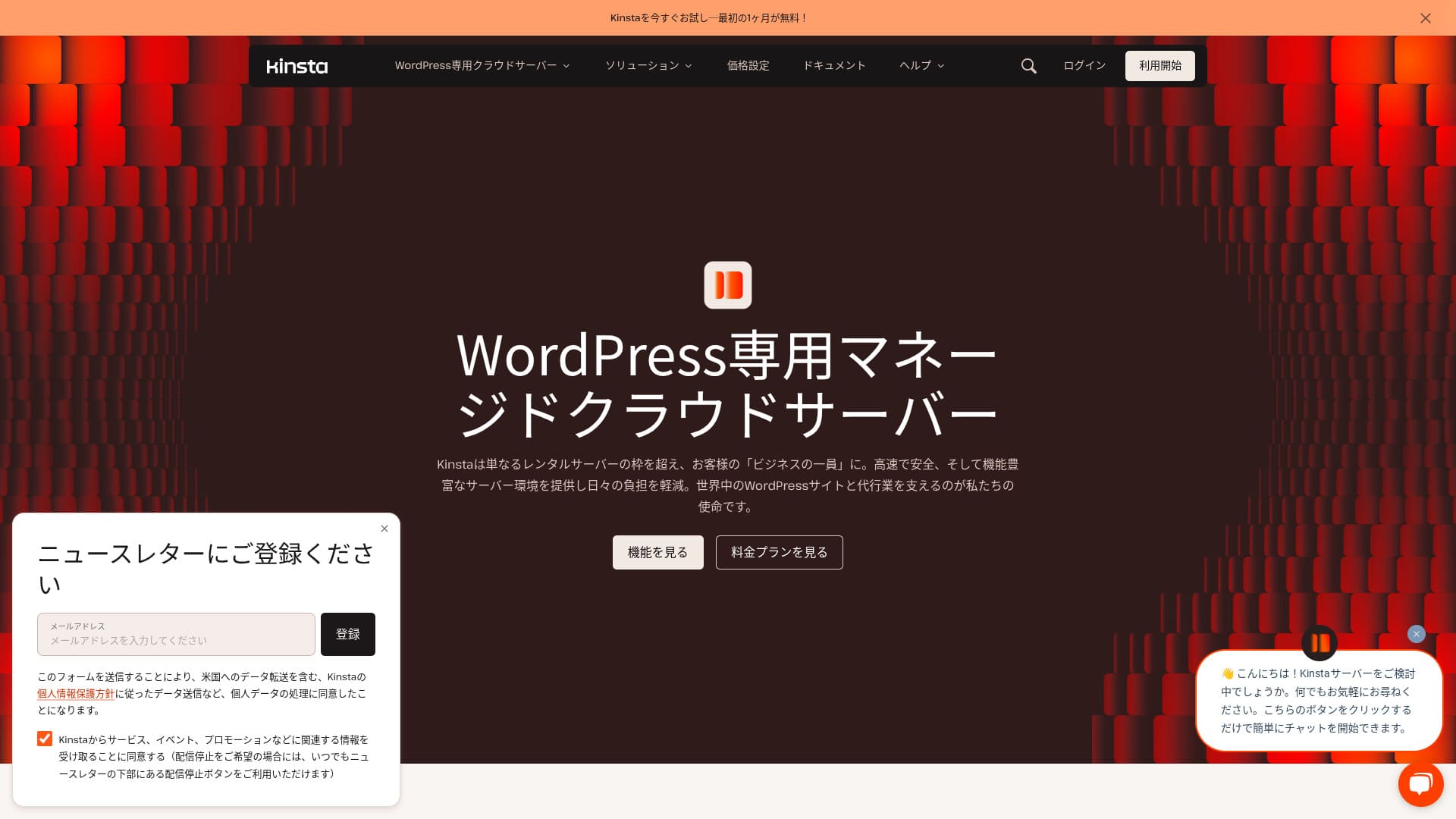
Kinstais an ultra-fast overseas hosting service operated by Kinsta Inc.Tas ir labi pazīstams kā Google ieteikts serveris.Tas ir veidots ar spēcīgu uzsvaru uz ātru lapu ielādi.
| Servera tips | Pārvaldīts dedicētais serveris |
| Display speed (TTFB) | 30ms |
| Ieteicamais plāns un norēķinu termiņš | Single35k |
| Trial / money-back guarantee | 30-day money-back guarantee |
| Mēneša maksa (12 mēnešu plāns) | 4,407 yen |
| Sākotnējā iestatīšanas maksa | Bezmaksas |
| Bezmaksas domēns | Nav |
| Atbalsts | 24/7 chat support (available in Japanese) and email |
| Darbspējas laiks | 99.9% |
| Servera krātuve | 10GB |
| Datu bāzu skaits | 1 |
| Drošība | Malware scanning, WAF, firewall, DDoS protection, Google Cloud firewall |
| SSL | Bezmaksas custom SSL |
| Rezerves kopijas | 14 days of automatic backups |
| Number of email accounts | Nav |
| E-pasta drošības funkcijas | Nav |
| Servera / vietnes migrācijas pakalpojums | Bezmaksas |
| WordPress iepriekšinstalēts | Jā |
| CDN | Bezmaksas (125GB) |
| Datu centri | Johannesburg, South Africa; Changhua County, Taiwan; Hong Kong; Tokyo; Osaka; Seoul, South Korea; Mumbai, India; Delhi, India; Jurong West, Singapore; Jakarta, Indonesia; Sydney, Australia; Melbourne, Australia; Warsaw, Poland; Hamina, Finland; Madrid, Spain; Saint-Ghislain, Belgium; London, United Kingdom; Frankfurt, Germany; Eemshaven, Netherlands; Zurich, Switzerland; Milan, Italy; Paris, France; Dammam, Saudi Arabia; Tel Aviv, Israel; Montreal, Canada; Toronto, Canada; Sao Paulo, Brazil; Santiago, Chile; Council Bluffs, Iowa, USA; Moncks Corner, South Carolina, USA; Ashburn, Virginia, USA; Columbus, Ohio, USA; Dallas, Texas, USA; The Dalles, Oregon, USA; Los Angeles, California, USA; Salt Lake City, Utah, USA; Las Vegas, Nevada, USA |

Hikaru Ono
Kinsta is often described as a top-tier server, and after actually using it, I felt that description was accurate. Not only is it fast, but the control panel is easy to operate, and getting started with WordPress is also very simple.
It is a server packed with appeal that fully justifies its price.
- November 4, 2025 market research data, arranged by speed
- Mēneša maksa ir pirmā gada izmaksas lētākajam plānam, kurā var darbināt WordPress
- Speed is the Time to First Byte value from demo sites measured under the same conditions
“Kinsta” ir augstākā līmeņa, savā klasē ātrākais hostinga pakalpojums ar datu centriem 37 vietās visā pasaulē. Mūsu pašu mērījumos tas ieņēma 1. vietu. Nevar noliegt, ka tas ir dārgs, taču, ja vēlaties serveri, kurā pilnībā tiek prioritizēts komforts un veiktspēja, varu to bez šaubām ieteikt. Tā tērzēšanas atbalsts ir pieejams arī japāņu valodā.
Kinsta panelis: vienkāršs, stilīgs un viegli pārskatāms
Kinsta’s dashboard isextremely simple, stylish, and easy to read.
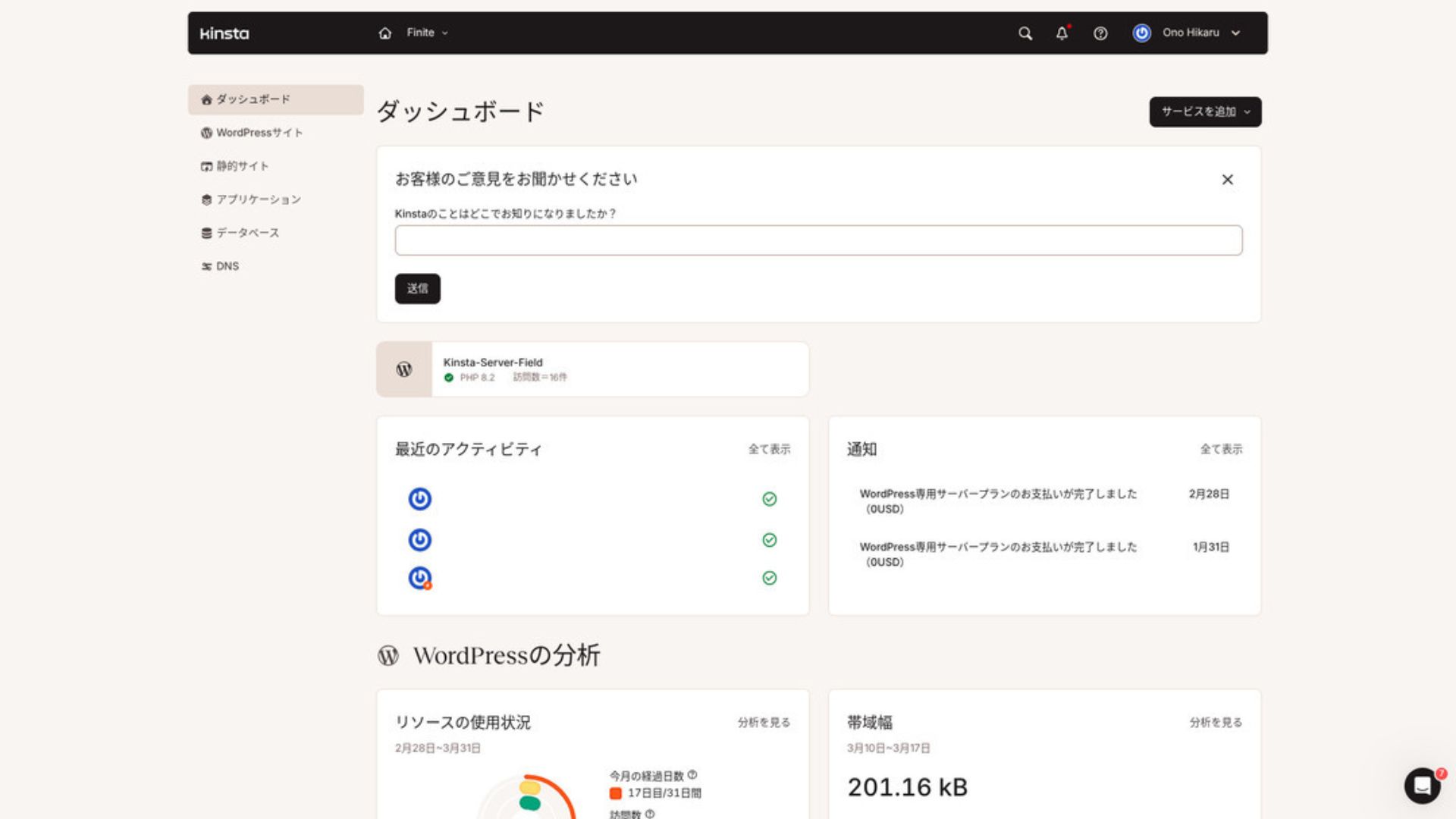
Lai pārvaldītu WordPress, izvēlnē noklikšķini uz “WordPress vietnes”.
Jaunas WordPress vietnes izveide vai migrācija ir vienkārša
Kinstamakes it easy to create a new site and handle migrations as well. There is no need to worry that it will be difficult just because it is an overseas server.
Atverot WordPress Sites un noklikšķinot “Add Site,”
- Izveido jaunu vietni
- Request a site migration
parādās šīs opcijas. Jaunas vietnes izveide ir arī vienkārša.
Creating a New WordPress Site
- STEP.1MyKinsta atlasiet “WordPress Sites”
Log in to MyKinsta. Pēc tam izvēlnē atlasiet “WordPress Sites”.
- STEP.2Izveido jaunu vietni
Noklikšķiniet “Add Site.” Pēc tam izvēlieties “Create new site.”
- STEP.3Turpini ar WordPress iestatījumiem
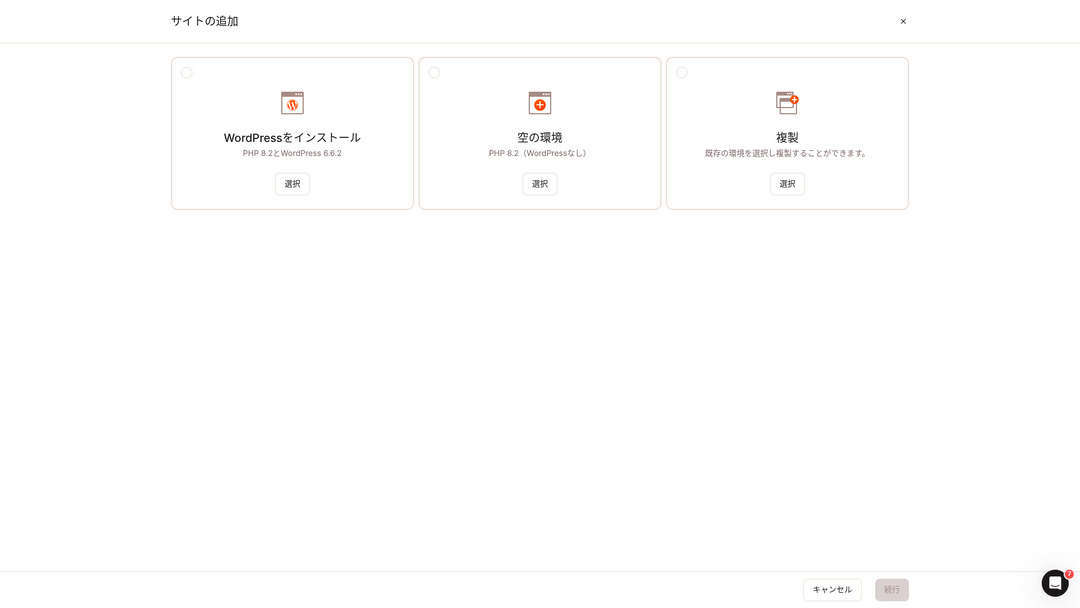
Izvēlies “Instalēt WordPress”.
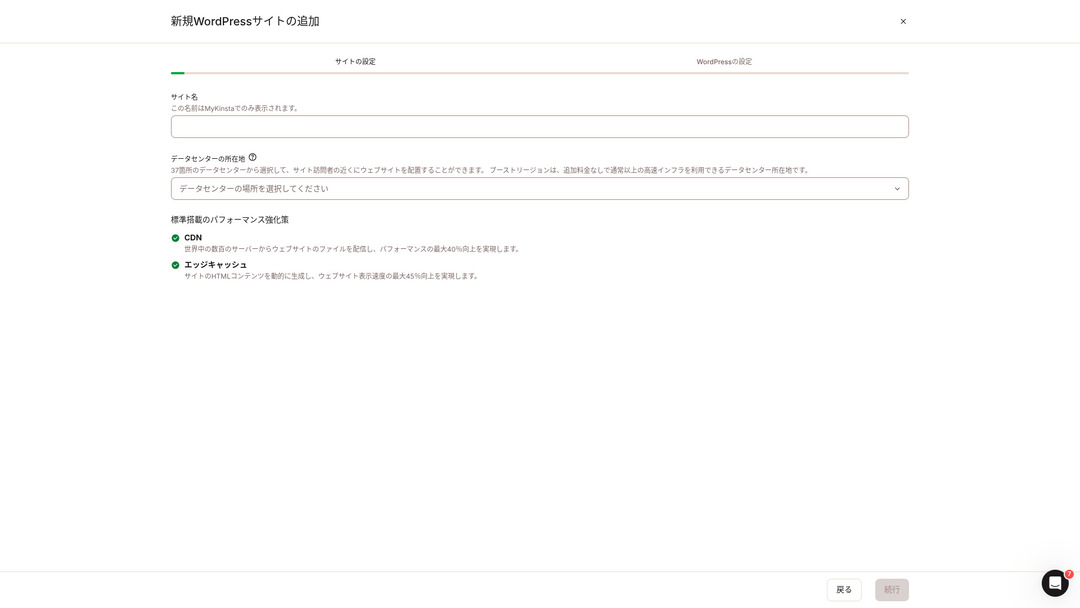
Izvēlies vietnes nosaukumu un datu centra atrašanās vietu. Vari izvēlēties no 37 datu centriem visā pasaulē. Ja lielākā daļa apmeklētāju ir Japānā, drošākā izvēle ir Tokija vai Osaka.
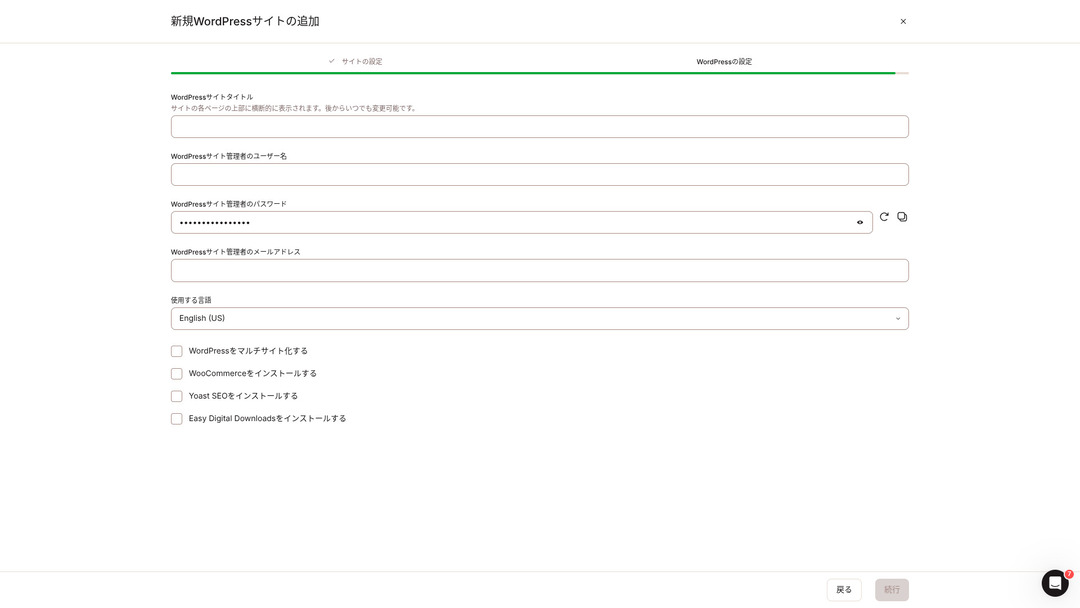
- WordPress vietnes nosaukums
- WordPress administratora lietotājvārds
- WordPress administratora parole
- WordPress administratora e-pasta adrese
- Izmantojamā valoda
Nosaki šos iestatījumus. Kad noklikšķināsi uz “Turpināt”, WordPress vietnes iestatīšana būs pabeigta.
Kinsta cenu plāni: labākā izvēle vienai vietnei ir gada plāns
Kinstahas three pricing plans, and each can be paid monthly or annually.One of them is an agency program intended for production agencies.For individuals and companies, the options to use are
- Single-site plan
- Multi-site plan
one of those two.
| Salīdzinājums item | Single-site plan | Multi-site plan |
|---|---|---|
| Mēneša maksa | 4,459 yen (annual billing) 5,202 yen (monthly billing) | 8,769 yen (annual billing) 10,404 yen (monthly billing) |
| WordPress sites | 1 | 2 |
| Visits | 35,000 | 70,000 |
| Krātuve | 10GB | 20GB |
| CDN | 125GB | 250GB |
If you are saying, “I’m about to start a blog,” I recommend the single-site plan.
Kinsta apskats un 5 galvenās funkcijas

WordPress ir ātrs: 1. vieta ielādes ātrumā
Kinstaranked Nav. 1 in display speed in our own measurements. It truly is a fast server.
If you are struggling with server speed, I would tell you to choose Kinsta without hesitation.
Pieejams CDN
Kinstauses 37 data centers as server bases around the world while also operating 260 CDN locations. By using a CDN, people viewing your website receive data from the nearest CDN server, which helps pages load faster.
★ Kas ir CDN? Uzlabojiet ātrumu un veiktspēju ar sadalītiem serveriem
Kinsta ’s cheapest WordPress hosting option, the Starter plan, still includes 100GB of CDN.That provides more than enough transfer capacity.
★ Kas ir datplūsma un datu pārsūtīšana? Tīmekļa datplūsmas pārvaldība un optimizēšana
Komplektā ir 14 dienu automātiskās rezerves kopijas
Kinstacomes with 14 days of automatic backup functionality.
Rezerves kopijas ir būtiskas. Vienmēr pastāv iespēja, ka dati var tikt izdzēsti kļūdas pēc vai mainīti kiberuzbrukumā. Šādās situācijās rezerves dati ļauj atjaunot vietni.
KinstaWith you can restore everything from up to 14 days of backup data even if something goes wrong, which gives real peace of mind.
24/7 atbalsts no inženieriem
Kinstahas a 24/7 support system staffed by engineers.
You never know when a situation requiring support will arise.If it is not resolved quickly, it may even become a matter of business credibility.
Kinstagives peace of mind because engineers are always there to support you.Especially if you do not have engineers inside your company, Kinstathe reassurance of being able to contact engineers at any time, as you can with Kinsta, is extremely valuable.
Bezmaksas Hack-Fix garantija
Nav matter how much effort you put into security, nothing is ever 100 percent guaranteed. Still, Kinsta comes with a free hack-fix guarantee.
If you are hacked,Kinsta will work together with you to repair the damage.
- Bezmaksas vietnes pārbaude
- Detailed file scans to identify malware
- Repair of core files using a fresh WordPress installation
- Identification and removal of infected plugins and themes
Because the response is so thorough, you do not have to worry that the same hacking damage will happen again.
Kinsta trūkums ir augstā cena

Even though it is a top-tier server, Kinsta is expensive.
In terms of price, it belongs in the category of servers used by businesses.I compared it with other business-oriented servers.
- Sākotnējā iestatīšanas maksa
- 12-month server contract
- One year of domain cost
- Plan that supports WordPress
KinstaThere are servers that cost more than Kinsta, but all of the others are servers based in Japan.They offer Japanese-language support and a large number of business-oriented features as well.
So although it is truly top-tier in server speed, there is no denying that it still feels expensive.
Salīdziniet Kinsta ar konkurējošiem serveriem
I compared it with major Japanese hosting services that, like Kinsta, place a strong emphasis on speed.
ConoHa WING
ConoHa WING is a server built with a strong focus on WordPress display speed. Its key feature is how easy it is to get started with WordPress. Tasks such as acquiring and configuring a domain, creating a database, and installing WordPress are already completed when you sign up for the server, so the settings needed to launch a WordPress website are finished at the time of the server contract.
As a result, even if you have no server knowledge or WordPress skills, you can start your website right away.

ConoHa WING apskats: kāpēc to izvēlas 750,000 lietotāju, plus ātruma, priekšrocību un trūkumu tests
ConoHa WING apskats: kāpēc to izvēlas 750,000 lietotāju, plus ātruma, priekšrocību un trūkumu tests
serverfield.org
XServer
XServer jau sen ir populārs augstas veiktspējas serveris Japānā. Tam ir Nr. 1 lietotāju daļa vietējā tirgū. Tā popularitāte nāk ne tikai no servera ātruma, bet arī no tā stabilitātes ar 99.99% darbības laiku un uzmanīgo atbalstu.
However, when it comes to speed, Kinsta still comes out ahead of XServer.

XServer apskats [2025 jaunākais]: Pilnīgs ceļvedis par ātrumu, cenu, priekšrocībām un trūkumiem
XServer apskats [2025 jaunākais]: Pilnīgs ceļvedis par ātrumu, cenu, priekšrocībām un trūkumiem
serverfield.org
Sāciet WordPress vietni ar Kinsta 7 soļos
Here, we will start a WordPress website using Kinsta and MuuMuu Domain.
Sāksim veidot vietni ar Kinsta!
- STEP.1Get a custom domain with MuuMuu Domain
Sign up for or log in to MuuMuu Domain.
If you do not yet have an account, create a new one on the MuuMuu Domain website. If you already have an account, just log in.
Search for and purchase your custom domain.
Enter your desired domain name into the MuuMuu Domain search bar and check whether it is available. If it is available, purchase that domain.
- STEP.2Set up a new site on Kinsta
First, sign up for Kinsta. Then add a new site.
Piekļūstiet Kinsta vadības panelim un noklikšķiniet uz “Pievienot vietni”.
Izvēlieties vietnes nosaukumu un datu centra atrašanās vietu. Izvēlieties “Instalēt WordPress”, pēc tam ievadiet nepieciešamo informāciju, piemēram, vietnes nosaukumu, administratora lietotājvārdu, paroli un e-pasta adresi.
If necessary, install plugins such as WooCommerce or Yoast SEO.
- STEP.3Update the DNS settings in MuuMuu Domain
Access the MuuMuu Domain dashboard, select the domain you acquired from the “Domain Management” section, and click “DNS Settings.”
From the Kinsta dashboard, check the DNS information for your site, including the name servers. Enter that information on the “DNS Settings” page in MuuMuu Domain and save it.
- STEP.4Set your custom domain in the Kinsta dashboard
Move to the settings page for the WordPress site you were just using.
Go to the “Domains” section and click “Add Domain.” Enter the custom domain name you acquired through MuuMuu Domain and add it.
Pēc tam pārejiet uz sadaļu “Rīki” un noklikšķiniet uz “Instalēt bezmaksas Let’s Encrypt SSL sertifikātu”, lai instalētu SSL sertifikātu.
- STEP.5Customize your WordPress site
Log in to the WordPress admin area from the Kinsta dashboard. Then install themes and plugins as needed and customize your site.
Biežāk uzdotie jautājumi par Kinsta
Vai varu reģistrēt domēnu caur Kinsta?
Nē, jūs nevarat reģistrēt domēnu caur Kinsta. Lūdzu, reģistrējiet savu domēnu ar domēna reģistrācijas pakalpojumu, piemēram, MuuMuu Domain. Pēc tam reģistrējiet iegūto domēnu MyKinsta.
Vai 10GB krātuves ir par maz?
If you are running a WordPress site, 10GB is not a problem at all.As of March 2025, this site with more than 90 articles uses only 1.5GB of storage.Unless you are building something like a portfolio site with an extreme number of images, there is no need to worry.
Kā izrunā “Kinsta”?
“Kinsta” is pronounced “Kin-sta.”
Kopsavilkums
“Kinsta” ir ātrākais augstākā līmeņa nomas serveris ar datu centriem 37 vietās visā pasaulē. Mūsu pašu mērījumos tas ieņēma 1. vietu. Nevar noliegt augsto cenu, taču, ja vēlaties serveri, kas pilnībā tiecas pēc komforta un veiktspējas, tā ir lieliska izvēle bez šaubām. Ir pieejams arī japāņu valodas tērzēšanas atbalsts.
30-day money-back guarantee
Kinsta is a top-tier server. If you want to improve your site’s display speed with confidence, please give it a try.
It offers not only speed, but also an excellent support system, so you can use it with confidence.
10 ārvalstu hostinga pakalpojumu salīdzinājums

With overseas hosting services, many people struggle to decide which server to choose because of language barriers and cultural differences.
In this article, we thoroughly compare 10 carefully selected overseas hosting services from around the world and explain each service’s features, pricing plans, and actual user experience in detail.
You will find information that covers a wide range of needs, from selection criteria beginners can rely on to advanced features that engineers look for.