
10-day акысыз сыноо
PR
Серверлер
Value Сервер сереби [2025 эң акыркы]: WordPressти арзан баада баштаңыз
Жарыяланды: 2025.04.18
Жаңыртылды: 2025.04.18
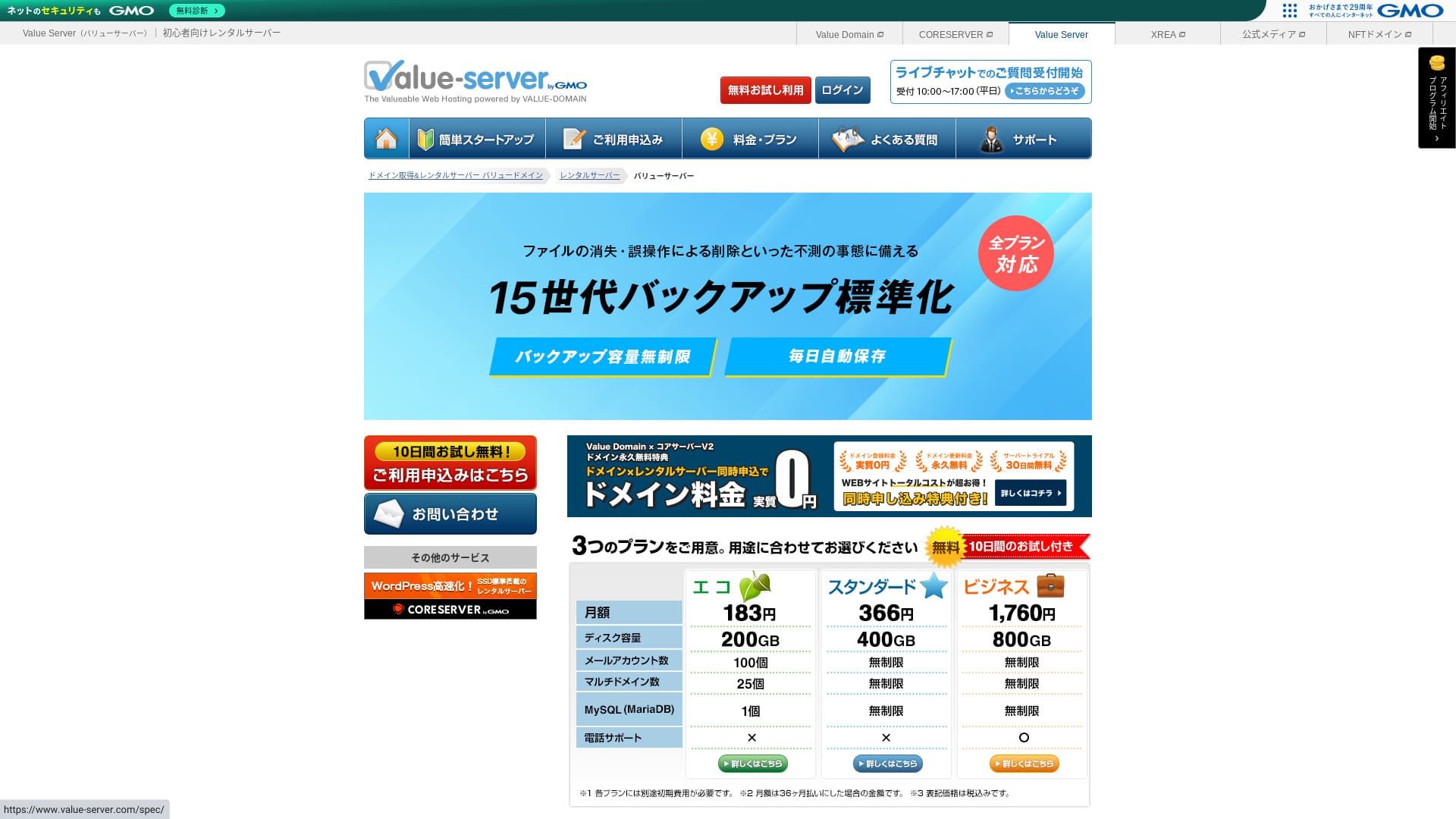
Value Server is a хостинг кызматы operated by GMO Digirock, Inc., known for its low баа коюу, especially its Marutto план.

Value Server is recommended for people who want to use the cheapest сервер possible because:
- Among the cheapest in the industry
- SSD storage is used on the сервер
- 15 generations of камдык көчүрмөлөр provide peace of mind
That is эмне үчүн. You will likely be satisfied. You can try it free for 10 days.
A competing сервер is Star Rental Server. It is even stronger than Value Server in that it also offers a free план. Please consider it as well.
| Сервер type | Shared сервер |
| Display ылдамдык (TTFB) | Not measured |
| Recommended план and contract term | Eco 12 months |
| Trial / акчаны кайтарып берүү кепилдиги | None |
| Monthly fee (12-month contract) | 220 yen |
| Initial setup fee | Free |
| Free домен | None |
| Support | Email and chat (weekdays 10:00-17:00) |
| Uptime | Not disclosed |
| Storage | 200GB |
| Number of databases | 1 |
| Коопсуздук measures | None |
| SSL | Free shared SSL, custom SSL |
| Backup / калыбына келтирүү | 15 generations of камдык көчүрмөлөр free, restoration free |
| Number of email accounts | 3 |
| Email коопсуздук measures | POP/POP3S, SMTP/SMTPS, IMAP/IMAPS, spam filter, virus filter, custom filters |
| Сервер / веб-сайт migration service | None |
| WordPress preinstallation | None |
| CDN | None |

Hikaru Ono
Value Сервер is operated by GMO Digirock, Inc., a major name in the industry, so even though it is among the cheapest options, there is no need to worry about quality. I personally had no problems while using it.
That said, because it is inexpensive, there are limits on features and capacity, so make sure to сереп them carefully.
Value Сервер Compared with Other Серверлер
- OverallБаалоо★★★☆☆
- Сервер ылдамдык ★★★☆☆
- Pricing ★★★★★
- Stability ★★★☆☆
- Ease of getting started with WordPress* ★★★☆☆
- Operations such as домен management and SSL setup* ★★★☆☆
* Based on my actual experience using it.

Жеке колдонуучулар үчүн сунушталган 21 WordPress хостинг кызматынан кантип тандоо керек
Жеке колдонуучулар үчүн сунушталган 21 WordPress хостинг кызматынан кантип тандоо керек
serverfield.org
- November 4, 2025 market-reиздөө data, by ылдамдык sorted
- Monthly fees are the first-year cost of the cheapest план that can run WordPress
- Speed is the Time to First Byte measured on demo сайттар under the same conditions
“Value Server” is a low-cost rental сервер operated by GMO Digirock, Inc. Even though it is affordably бааd for жеке колдонуучулар, it offers strong features such as free shared SSL and free 15-generation камдык көчүрмөлөр.
User Reviews of Value Сервер and Five Key Features

The Marutto Plan Lets You Build a WordPress Сайт for 3,060 Yen per Year
Value Server's Marutto план lets you have a WordPress веб-сайт for 3,060 yen per year. It is extremely inexpensive.
Let's compare it with major domestic серверлер under the following conditions.
- Initial setup fee
- 12-month сервер contract
- Cost of one year of домен fees
- Cheapest план that can use WordPress
| Hosting компания | Cost for one year |
|---|---|
| Value Server | 2,310 yen |
| ConoHa WING | 11,292 yen |
| Xserver | 10,560 yen |
| Lolipop! | 5,940 yen |
| Sakura Rental Server | 6,600 yen |
Of course, compared with the серверлер above, its features and specifications are less impressive. Even so, it should still be a strong option for people who want to build a веб-сайт as cheaply as possible.
SSD Is Included in Every Plan
Value Server includes SSD storage in every план even though it is inexpensive. With ultra-low-cost серверлер, it is common to see slow веб-сайт loading because they rely on cheap hard drives.
Веб-сайт display ылдамдык also affects SEO, so сервер choice is not something you can treat lightly. With SSDs in place, however, you can feel more at ease.
Note: What Is SEO? The Right Steps and Methods for Search Engine Optimization
Every Plan Includes 15 Generations of Automatic Backups
Value Server is inexpensive, yet it still provides 15 generations of automatic камдык көчүрмөлөр on every план.
If there is no камдык көчүрмө feature, you cannot калыбына келтирүү your сайт even if data disappears because of an attack or a mistake. With Value Сервер, the сервер backs up your data automatically every day, which gives peace of mind.
These 15 generations of камдык көчүрмөлөр are impressive. Even major серверлер like Lolipop! do not offer this on their low-cost пландар. Core Сервер, which is also operated by GMO Digirock, Inc., does not include камдык көчүрмө features on its low-cost план either.
Seen in that light, Value Сервер is remarkably service-minded for a low-cost provider because it offers such strong 15-generation камдык көчүрмөлөр.
The Drawbacks of Value Сервер and Кантип Handle Them, Honestly Stated

Even though it has advantages, Value Сервер also has drawbacks. Make sure you understand them fully before you use it.
There Are No Advanced Коопсуздук Measures Such as a WAF
Value Server does not provide advanced коопсуздук measures such as a WAF. It does offer a certain level of protection, including колдоо for custom SSL, but it is still someэмне concerning that it is not especially strong against the latest attack methods.
If you want to use a WAF, install коопсуздук-oriented WordPress plugins.
Note: Кантип Choose Five WordPress Plugins That Strengthen Коопсуздук
Uptime Is Not Disclosed
Unfortunately, Value Server does not disclose its uptime. That means it is impossible to know the сервер's stability in numerical terms. If reliability is a priority, such as for a corporate веб-сайт, that uncertainty may make you hesitate.
Note: A Beginner's Колдонмо to Understanding Hosting Uptime and SLAs
If a сервер becomes unstable because of trouble, your веб-сайт may fail to appear or become extremely slow to load. In some cases, a 503 error may occur. That is stressful for people visiting your сайт.
Note: What Is a 503 Error? Кантип Avoid Web Congestion and Respond in an Emergency
Because you cannot know the uptime, use Value Сервер only after understanding the risk that it may be unstable.
The Marutto and Eco Plans Let You Create Only One WordPress Сайт
Value Server's Marutto and Eco пландар let you create only one WordPress сайт.
- I want to create an event сайт in addition to my main веб-сайт
- I want to create a second blog
If you need a second WordPress сайт for those reasons, you will have to prepare another сервер separately.
Compare Value Сервер with Two Similar Серверлер
Let's compare Value Сервер with two competing серверлер that are similar in terms of low баа. Even if they look similar, there are differences, so take the time to compare them carefully.
Core Server
Core Server is run by the same компания. It offers high specifications while still being low бааd. You can choose the best fit from seven finely divided пландар. There is a баа-focused V1 lineup and a өндүрүмдүүлүк-focused V2 lineup.
Overall, Core Сервер beats Value Сервер in features and specifications, so if баа is not your top priority, Core Сервер is the better choice.

Core Сервер Review [2025 Latest]: Thorough Колдонмо to Pricing, Speed, Pros, and Cons
Core Сервер Review [2025 Latest]: Thorough Колдонмо to Pricing, Speed, Pros, and Cons
serverfield.org
Star Server
Star Rental Server is also inexpensive. At the same time, it resembles Value Сервер in its commitment to ылдамдык, including the use of SSD storage. It is someэмне more expensive than Value Сервер, but its greater transfer capacity is a strong point because it can keep up even if your веб-сайт трафик grows.
Star Сервер does not include automatic камдык көчүрмөлөр. That is one area where Value Сервер comes out ahead.

Star Сервер Review [2024 Latest]: Amazingly Low-Cost and Thoroughly Tested
Star Сервер Review [2024 Latest]: Amazingly Low-Cost and Thoroughly Tested
serverfield.org
Start a WordPress Веб-сайт on Value Сервер in 6 Steps
Let's start a веб-сайт with Value Сервер!
- STEP.1Access the official Value Сервер веб-сайт
On the top бет, click “Try for Free.”
- STEP.2Apply for the Сервер and Get a Домен
Choose a план. Your сервер account name (the initial домен) can be anything. You will not use this initial домен as the домен for your веб-сайт. You can use it, but I do not recommend it.
At this point, you cannot yet select simultaneous WordPress installation, but after choosing your домен, you will be able to check it. Be sure to use it. It makes starting a WordPress веб-сайт much easier.
Under the option to also apply for the домен you will use on this сервер, choose “Get a домен for free.” Then enter any string you like. From the available top-level доменs such as .com and .net, click the one you want.
You can choose root доменs such as “.com” and “.co.jp.” Acquisition and renewal fees vary depending on the root домен. If you are unsure which one to choose, I recommend “.co.jp” for компаниялар whenever possible. For жеке колдонуучулар, “.com” and “.net” are good choices. Many people are familiar with these доменs, so they are less likely to seem suspicious and easier for колдонуучулар to access.
Note: What Is a Домен? Its Role as an Address on the Internet and Кантип Get One
Once you have selected the домен, check “Install WordPress at the same time.”
Click “Proceed.”
- STEP.3Enter User Information
The колдонуучу information screen will appear. Click “User Registration,” enter information such as your usage type and name, confirm the details, and click “Register and proceed.”
Complete the required SMS verification, then click “Confirm application.”
Answer the questionnaire or skip it, then click “Go to the control panel.”
- STEP.4Install WordPress
In the management information of the control panel, the “Value Сервер (1)” you applied for earlier is displayed. Click it and proceed to the “New Control Panel.”
Then select “App Installation” from “Tools” and click “WordPress Blog.”
Click “+ Install this application” and choose a домен. The домен you applied for earlier will appear in the pull-down menu, so select it.
You can leave the version settings as they are.
Use the following settings for WordPress.
- Admin колдонуучуname: Anything is fine.
- Admin password: Make it as complex as possible. You can change it easily later.
- Administrator email: An email address you use regularly. For компаниялар, I recommend the business email of the person who manages the веб-сайт.
- Веб-сайт title: Anything is fine. You can change it easily later.
- Веб-сайт tagline: This is the subtitle. Anything is fine. You can change it easily later.
The admin колдонуучуname and admin password are used when logging in to WordPress. Be sure to write them down.
You can leave the “Advanced” settings as they are.
Once you have entered everything, click “+ Install.” After the installation finishes, click the URL on the screen that ends with “wp-admin/”. That is the URL of your WordPress admin screen.
- STEP.5Initial WordPress Setup
On the WordPress login screen that appears, enter the колдонуучуname and password you set during installation, then click “Log In.”
If you see a warning saying “This сайт can’t be reached,” the DNS settings have not propagated yet. There is nothing to do but wait, so try logging in again every few hours.
Note: What Are DNS and Name Серверлер?
After logging in to WordPress, set your permalinks. In the WordPress admin screen, go to “Settings” and then “Permalinks.” Choose “Post name,” then click “Save Changes.”
With “Post name,” you can enter any string you like in the URL when publishing an макала. I recommend using a short string that helps readers imagine the content of the макала. If it is too long, some people may worry that the сайт looks suspicious.
- STEP.6Install Plugins
Return to the WordPress admin screen, go to “Plugins” and then “Add New,” and install the plugins you need.
Once you find the plugin you want through издөө, click “Install Now” and then “Activate.” After that, follow the instructions for each plugin.
Be sure to install коопсуздук and камдык көчүрмө plugins.
- Кантип Choose Five WordPress Plugins That Strengthen Коопсуздук
- 5 Powerful WordPress Backup Plugins That Help You Recover Your Data
Once you have installed the plugins as well, your WordPress веб-сайт is fully ready to go!
Жыйынтык
“Value Server” is a low-cost rental сервер operated by GMO Digirock, Inc. While its баа коюу remains affordable even for жеке колдонуучулар, it offers strong features such as free shared SSL and free 15-generation камдык көчүрмөлөр.
10-day акысыз сыноо
Value Server is a low-cost сервер. Even though its uptime is not disclosed and its коопсуздук features are on the weaker side, the 15-generation automatic камдык көчүрмө feature means you can usually recover in the end. If баа matters most to you, give it a try.
Complete Comparison of 32 WordPress хостинг кызматтары: Recommendations for Individuals, Companies, and Overseas Use

When you think, “I want to start WordPress,” and издөө for “recommended WordPress хостинг,” you find all kinds of макалалар, from options for жеке колдонуучулар and for компаниялар or small businesses to overseas серверлер and inexpensive серверлер. Honestly speaking,
- Which сайт should I look at?
- I want to choose a сервер in a simple, easy-to-understand way!
- Please show me кантип start WordPress right away.
Have you ever felt that way? That is эмне үчүн this макала carefully selects the best choices from 32 хостинг кызматтары for жеке колдонуучулар, компаниялар, domestic use, and overseas use and introduces them. The exпланation comes from the SEO lead at an app development компания that uses хостинг кызматтары every day.