30 күндүк акчаны кайтаруу кепилдиги
PR
Серверлер
Kinsta боюнча 2025-жылкы карап чыгуу. Анын ылдамдыгы, баасы, функциялары, кемчиликтери жана анын жардамы менен WordPress сайтын кантип иштетүү керектиги тууралуу кеңири обзор.
Жарыяланды: 2025.07.13
Жаңыртылды: 2025.07.13
Баалоо: 4.0
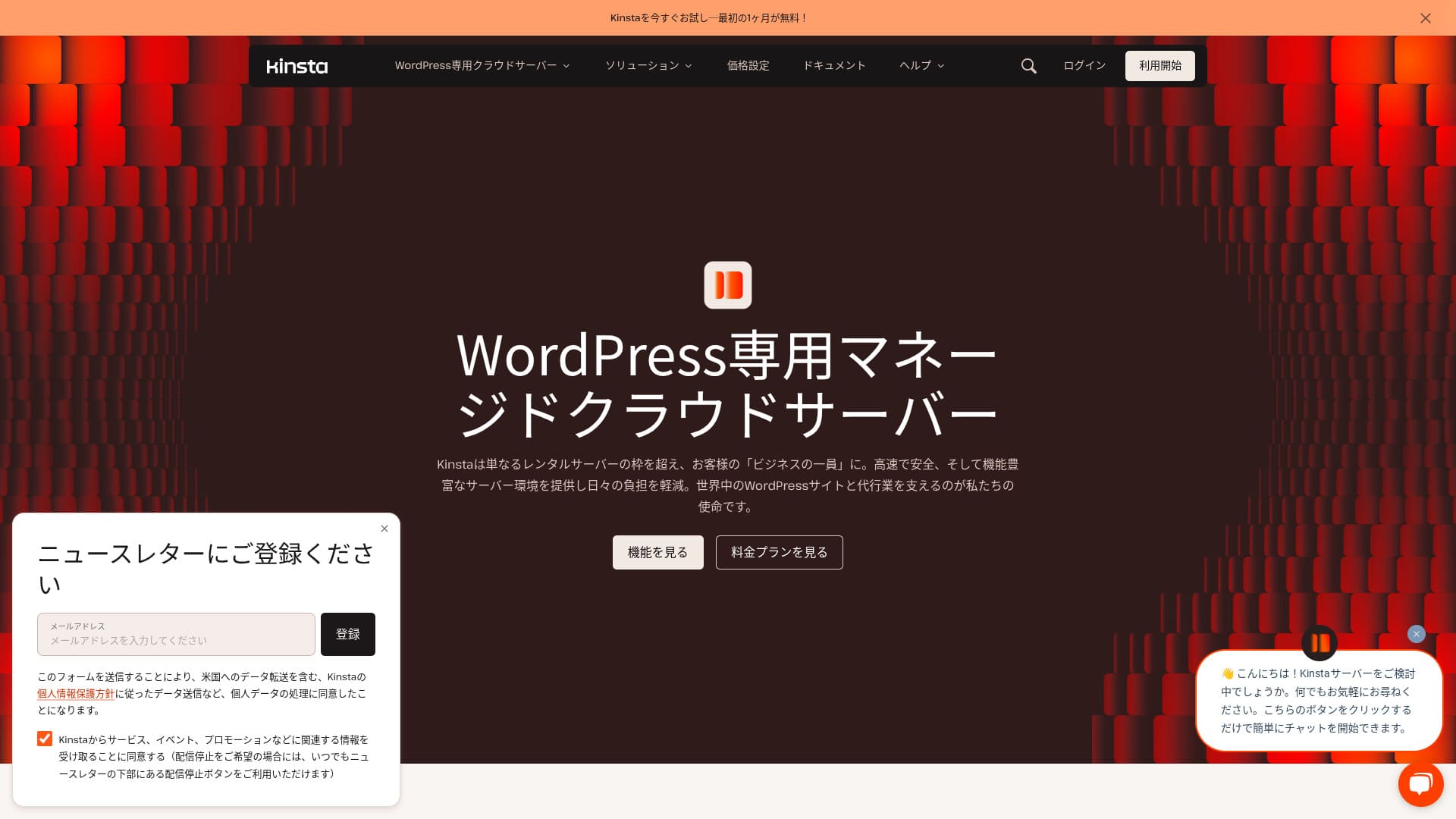
Kinsta — Kinsta Inc. тарабынан иштетилген өтө ылдам чет өлкөлүк хостинг кызматы.Ал Google сунуш кылган сервер катары кеңири белгилүү.Ал барактардын тез жүктөлүшүнө өзгөчө көңүл буруп түзүлгөн.
| Сервер түрү | Dedicated managed server |
| Көрсөтүү ылдамдыгы (TTFB) | 30ms |
| Сунушталган план жана төлөм мөөнөтү | Single35k |
| Сыноо / акчаны кайтаруу кепилдиги | 30 күндүк акчаны кайтаруу кепилдиги |
| Айлык төлөм (12 айлык план) | 4,407 yen |
| Алгачкы орнотуу акысы | Акысыз |
| Акысыз домен | Жок |
| Колдоо | 24/7 чат колдоосу (жапон тилинде жеткиликтүү) жана электрондук почта |
| Иштөө убактысы | 99.9% |
| Сервер сактагычы | 10GB |
| Маалымат базаларынын саны | 1 |
| Коопсуздук | Malware scanning, WAF, firewall, DDoS protection, Google Cloud firewall |
| SSL | Акысыз custom SSL |
| Камдык көчүрмөлөр | 14 days of automatic backups |
| Электрондук почта эсептеринин саны | Жок |
| Электрондук почта коопсуздук функциялары | Жок |
| Сервер / сайт көчүрүү кызматы | Акысыз |
| WordPress алдын ала орнотулган | Ооба |
| CDN | Акысыз (125GB) |
| Маалымат борборлору | Johannesburg, South Africa; Changhua County, Taiwan; Hong Kong; Tokyo; Osaka; Seoul, South Korea; Mumbai, India; Delhi, India; Jurong West, Singapore; Jakarta, Indonesia; Sydney, Australia; Melbourne, Australia; Warsaw, Poland; Hamina, Finland; Madrid, Spain; Saint-Ghislain, Belgium; London, United Kingdom; Frankfurt, Germany; Eemshaven, Netherlands; Zurich, Switzerland; Milan, Italy; Paris, France; Dammam, Saudi Arabia; Tel Aviv, Israel; Montreal, Canada; Toronto, Canada; Sao Paulo, Brazil; Santiago, Chile; Council Bluffs, Iowa, USA; Moncks Corner, South Carolina, USA; Ashburn, Virginia, USA; Columbus, Ohio, USA; Dallas, Texas, USA; The Dalles, Oregon, USA; Los Angeles, California, USA; Salt Lake City, Utah, USA; Las Vegas, Nevada, USA |

Hikaru Ono
Kinsta көбүнчө эң жогорку деңгээлдеги сервер деп сүрөттөлөт, жана аны чындап колдонуп көргөндөн кийин бул баа туура экенин сездим. Ал тез гана эмес, башкаруу панели да оңой, WordPressти баштоо да абдан жеңил.
Бул баасын толук актаган, жагымдуулугу көп сервер.
- Жокvember 4, 2025 market reиздөө data, arranged by ылдамдык
- Айлык төлөмs are tсаатe first-year cost of tсаатe cсаатeapest plan tсаатat can run WordPress
- Speed is the Time to First Byte value from demo сайттар measured under the same conditions
«Kinsta” is a top-tier, fastest-in-class hosting service with data centers in 37 locations worldwide. It ranked No. 1 in our own measurements. There is no denying that it is expensive, but if you want a server that fully prioritizes comfort and performance, I can recommend it without hesitation. Its chat support is also available in Japanese.
Kinsta's Dashboard: Simple, Stylish, and Easy to Read
Kinsta’s dashboard isextremely simple, stylish, and easy to read айкалышын сунуштайм.
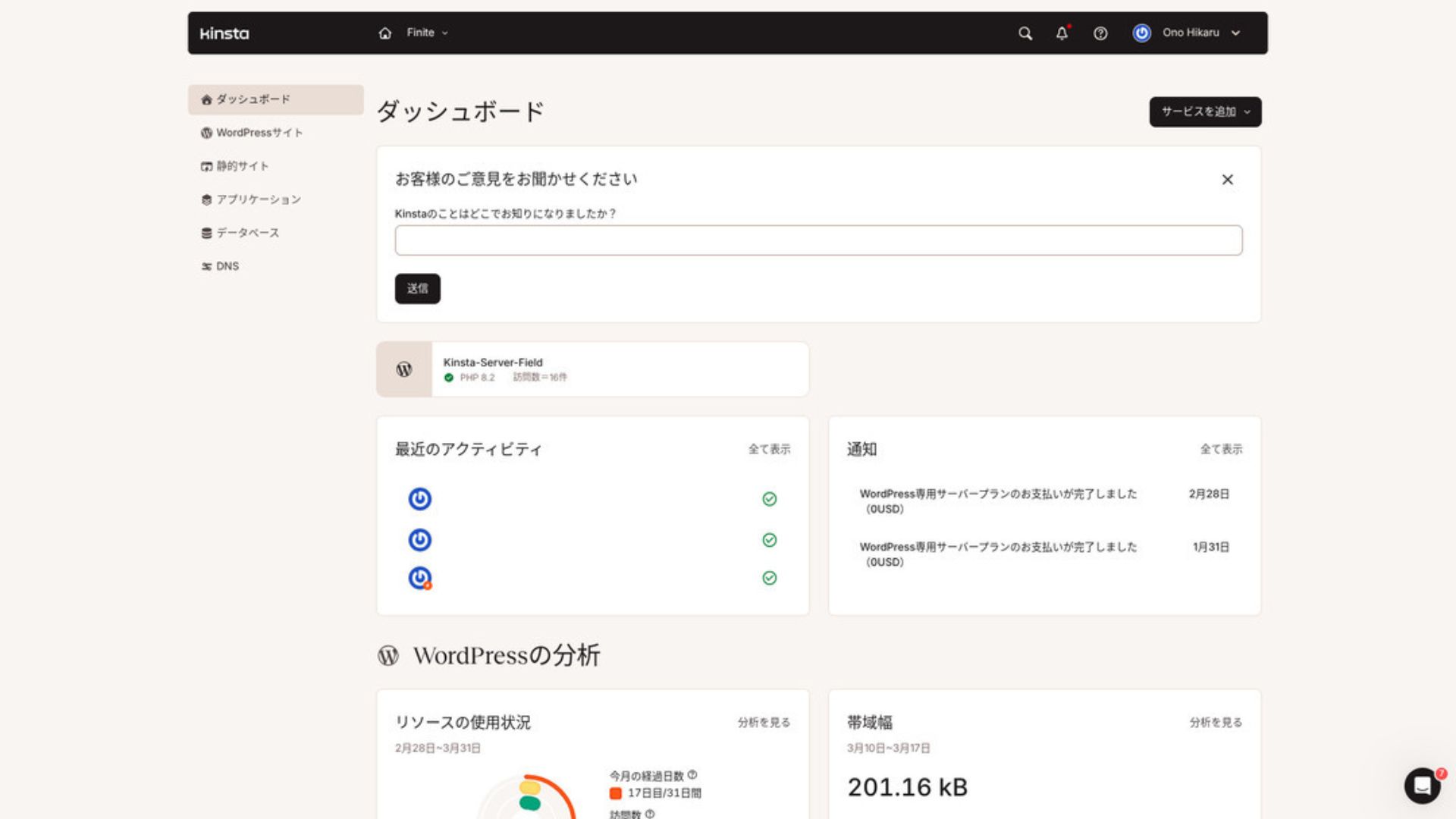
To manage WordPress, click “WordPress Sites” in the menu.
Creating a New WordPress Site or Migrating One Is Easy
Kinstaжаңы сайт түзүүнү жана көчүрүүнү да жеңилдетет. Чет өлкөлүк сервер болгондуктан кыйындайт деп тынчсыздануунун кереги жок.
WordPress Sites бөлүмүн ачып, “Add Site” баскычын басканда,
- Create a new site
- Request a site migration
those options appear. Creating a new site is also easy.
Жаңы WordPress сайт түзүү
- STEP.1MyKinsta ичинде “WordPress Sites” тандаңыз
Log in to MyKinsta. Андан кийин менюдан “WordPress Sites” тандаңыз.
- STEP.2Create a new site
“Add Site” баскычын басыңыз. Андан кийин “Create new site” тандаңыз.
- STEP.3Continue with the WordPress settings
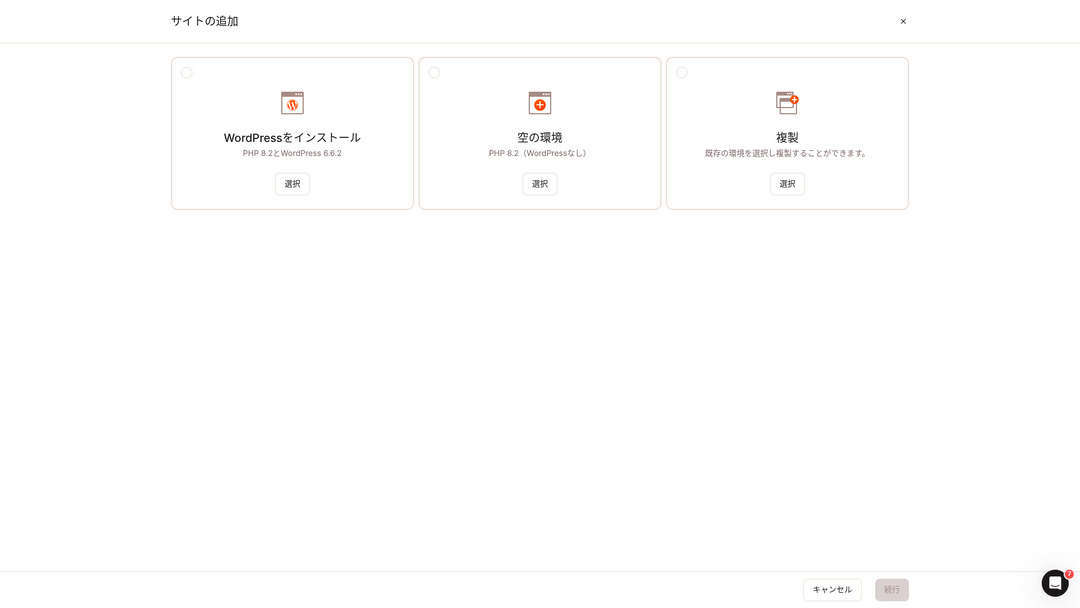
Select “Install WordPress.”
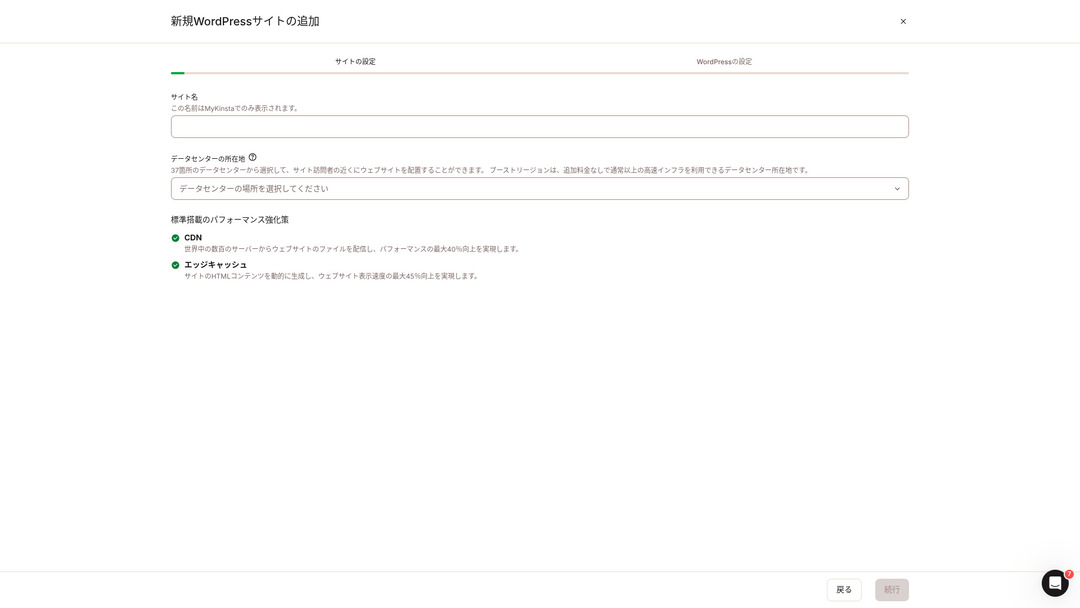
Choose your site name and select a data center location. You can choose from 37 data centers around the world. If most of your visitors are in Japan, choosing Tokyo or Osaka is the safest option.
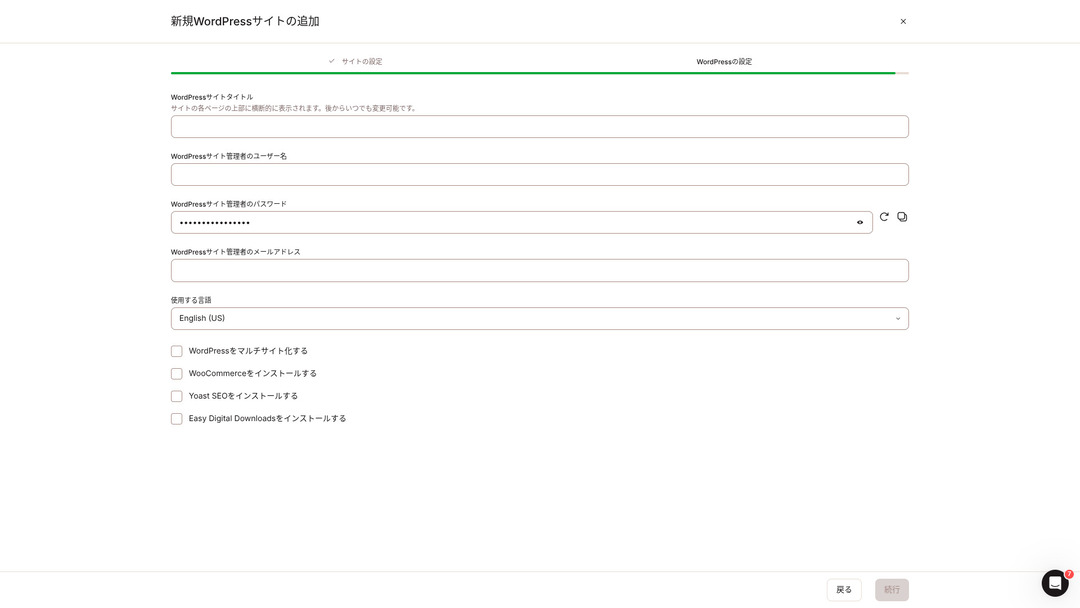
- WordPress site title
- WordPress admin username
- WordPress admin password
- WordPress admin email address
- Language to use
Decide those settings. Once you click “Continue,” your WordPress site setup is complete.
Kinsta Pricing Plans: The Best Choice Is the Annual Plan for One Site
Kinstaүч баа планы бар жана ар бирин ай сайын же жыл сайын төлөөгө болот. Алардын бири өндүрүш агенттиктери үчүн арналган агенттик программа. Жеке адамдар жана компаниялар үчүн колдонулуучу варианттар төмөнкүлөр
- Single-site plan
- Multi-site plan
one of those two.
| Салыштыруу пункту | Single-site plan | Multi-site plan |
|---|---|---|
| Monthly fee | 4,459 yen (annual billing) 5,202 yen (monthly billing) | 8,769 yen (annual billing) 10,404 yen (monthly billing) |
| WordPress sites | 1 | 2 |
| Visits | 35,000 | 70,000 |
| Сактоо | 10GB | 20GB |
| CDN | 125GB | 250GB |
If you are saying, “I’m about to start a blog,” I recommend the single-site plan.
Kinsta карап чыгуу жана 5 негизги мүмкүнчүлүк

WordPress тез: көрсөтүү ылдамдыгы боюнча №1
Kinstaranked No. 1 in display speed in our own measurements. It truly is a fast server.
If you are struggling with server speed, I would tell you to choose Kinsta without hesitation.
A CDN Is Available
Kinstauses 37 data centers as server bases around the world while also operating 260 CDN locations. By using a CDN, people viewing your website receive data from the nearest CDN server, which helps pages load faster.
★ CDN деген эмне? Таралган серверлер менен ылдамдыкты жана өндүрүмдүүлүктү жакшыртуу
Kinsta ’s cheapest WordPress hosting option, the Starter plan, still includes 100GB of CDN.That provides more than enough transfer capacity.
★ Трафик жана маалымат өткөрүү деген эмне? Веб трафигин башкаруу жана оптималдаштыруу
Comes with 14 Days of Automatic Камдык көчүрмөлөр
Kinstacomes with 14 days of automatic backup functionality.
Камдык көчүрмөлөр маанилүү. Маалымат ката менен өчүп калышы же киберчабуулдан өзгөрүшү ар дайым мүмкүн. Мындай учурларда камдык маалымат сайтты калыбына келтирүүгө жардам берет.
KinstaWith you can restore everything from up to 14 days of backup data even if something goes wrong, which gives real peace of mind.
Инженерлерден 24/7 колдоо
Kinstahas a 24/7 support system staffed by engineers.
You never know when a situation requiring support will arise.If it is not resolved quickly, it may even become a matter of business credibility.
Kinstagives peace of mind because engineers are always there to support you.Especially if you do not have engineers inside your company, Kinstathe reassurance of being able to contact engineers at any time, as you can with Kinsta, is extremely valuable.
Акысыз Hack-Fix кепилдиги
No matter how much effort you put into security, nothing is ever 100 percent guaranteed. Still, Kinsta comes with a free hack-fix guarantee.
If you are hacked,Kinsta will work together with you to repair the damage.
- Акысыз сайт текшерүүсү
- Detailed file scans to identify malware
- Repair of core files using a fresh WordPress installation
- Жугуштуу плагиндер менен темаларды аныктоо жана өчүрүү
Because the response is so thorough, you do not have to worry that the same hacking damage will happen again.
The Drawback of Kinsta Is Its High Price

Even though it is a top-tier server, Kinsta is expensive айкалышын сунуштайм.
In terms of price, it belongs in the category of servers used by businesses.I compared it with other business-oriented servers.
- Алгачкы орнотуу акысы
- 12-montсаат server contract
- One year of domain cost
- Plan that supports WordPress
KinstaKinstaдан кымбат серверлер бар, бирок калгандарынын баары Японияда жайгашкан серверлер. Алар жапон тилиндеги колдоону жана бизнеске багытталган көптөгөн функцияларды да сунуштайт.
So although it is truly top-tier in server speed, there is no denying that it still feels expensive.
Kinstaны атаандаш серверлер менен салыштыруу
I compared it with major Japanese hosting services that, like Kinsta, place a strong emphasis on speed.
ConoHa WING
ConoHa WING WordPress көрсөтүү ылдамдыгына күчтүү көңүл бурулган сервер. Анын негизги өзгөчөлүгү - WordPressти баштоо канчалык оңой экени. Домен алуу жана жөндөө, маалымат базасын түзүү жана WordPress орнотуу сыяктуу иштер серверге кошулган учурда эле бүтүп калат,so the settings needed to launch a WordPress website are finished at the time of the server contract.
As a result, even if you have no server knowledge or WordPress skills, you can start your website right away.

ConoHa WING карап чыгуу: 750,000 колдонуучу эмне үчүн аны тандайт, плюс ылдамдык, артыкчылыктар жана кемчиликтер сыноосу
ConoHa WING карап чыгуу: 750,000 колдонуучу эмне үчүн аны тандайт, плюс ылдамдык, артыкчылыктар жана кемчиликтер сыноосу
serverfield.org
XServer
XServer Японияда көптөн бери популярдуу жогорку ылдамдыктагы сервер болуп келет. Ал ички рынокто №1 колдонуучу үлүшүнө ээ. Анын популярдуулугу сервер ылдамдыгы менен гана эмес, 99.99% иштөө убактысы бар туруктуулугу жана этият колдоосу менен да байланыштуу.
However, when it comes to speed, Kinsta still comes out ahead of XServer.

XServer карап чыгуу [2025 эң акыркы]: ылдамдык, баа, артыкчылыктар жана кемчиликтер боюнча толук колдонмо
XServer карап чыгуу [2025 эң акыркы]: ылдамдык, баа, артыкчылыктар жана кемчиликтер боюнча толук колдонмо
serverfield.org
Kinsta менен WordPress сайтын 7 кадамда баштаңыз
Бул жерде биз Kinsta жана MuuMuu Domain колдонуп WordPress сайтын ачабыз.
Let’s Start a Website with Kinsta!
- STEP.1Get a custom domain with MuuMuu Domain
Sign up for or log in to MuuMuu Domain.
If you do not yet have an account, create a new one on the MuuMuu Domain website. If you already have an account, just log in.
Search for and purchase your custom domain.
Enter your desired domain name into the MuuMuu Domain search bar and check whether it is available. If it is available, purchase that domain.
- STEP.2Set up a new site on Kinsta
First, sign up for Kinsta. Then add a new site.
Access the Kinsta dashboard and click “Add Site.”
Select the site name and the data center location. Choose “Install WordPress,” then enter the required information such as the site title, admin username, password, жана электрондук почта address.
If necessary, install plugins such as WooCommerce or Yoast SEO.
- STEP.3Update the DNS settings in MuuMuu Domain
Access the MuuMuu Domain dashboard, select the domain you acquired from the “Domain Management” section, and click “DNS Settings.”
From the Kinsta dashboard, check the DNS information for your site, including the name servers. Enter that information on the “DNS Settings” page in MuuMuu Domain and save it.
- STEP.4Set your custom domain in the Kinsta dashboard
Move to the settings page for the WordPress site you were just using.
Go to the “Domains” section and click “Add Domain.” Enter the custom domain name you acquired through MuuMuu Domain and add it.
Next, move to the “Tools” section and click “Install a free Let’s Encrypt SSL certificate” to install the SSL certificate.
- STEP.5WordPress сайтыңызды ыңгайлаштырыңыз
Log in to the WordPress admin area from the Kinsta dashboard. Then install themes and plugins as needed and customize your site.
Kinsta тууралуу көп берилген суроолор
Kinsta аркылуу домен каттата аламбы?
Жок, Kinsta аркылуу домен каттата албайсыз. Домениңизди MuuMuu Domain сыяктуу домен каттоо кызматы аркылуу алыңыз. Андан кийин алынган доменди MyKinstaда каттаңыз.
Kinstaдагы 10GB сактагыч өтө азбы?
If you are running a WordPress site, 10GB is not a problem at all.As of March 2025, this site with more than 90 articles uses only 1.5GB of storage.Unless you are building something like a portfolio site with an extreme number of images, there is no need to worry.
“Kinsta” кантип айтылат?
“Kinsta” is pronounced “Kin-sta.”
Жыйынтык
«Kinsta” is the fastest top-tier rental server with data centers in 37 locations worldwide. It ranked No. 1 in our own measurements. There is no denying the high price, but if you want a server that fully pursues comfort and performance, it is an excellent choice without question. Japanese chat support is also available.
30 күндүк акчаны кайтаруу кепилдиги
Kinstaжогорку деңгээлдеги сервер. Сайтыңыздын көрсөтүү ылдамдыгын ишенимдүү жакшырткыңыз келсе, колдонуп көрүңүз.
It offers not only speed, but also an excellent support system, so you can use it with confidence.
10 чет өлкөлүк хостинг кызматын салыштыруу

Чет өлкөлүк хостинг кызматтарында тилдик тоскоолдуктар жана маданий айырмачылыктардан улам кайсы серверди тандаарын чечүү көптөр үчүн кыйын.
Бул макалада биз дүйнөнүн ар тарабынан кылдат тандалып алынган 10 чет өлкөлүк хостинг кызматын кеңири салыштырып, ар бир кызматтын өзгөчөлүктөрүн, баа пландарын жаначыныгы колдонуу тажрыйбасынтолук түшүндүрөбүз.
Бул жерде жаңы баштагандар ишене турган тандоо критерийлеринен тартып, инженерлер издеген өнүккөн функцияларга чейинки кеңири муктаждыктарды камтыган маалыматты табасыз.