XServer Review [2025 Latest]: A Thorough Guide to Speed, Pricing, Pros, and Cons
エックスサーバー
 is especially popular among the many hosting services available and holds the No. 1 share of the Japanese hosting market. It has been chosen for sites of all sizes, from personal blogs to corporate websites.

エックスサーバー
is what we recommend to individuals, corporations, and sole proprietors using WordPress for the first time because it offers:
- An easy way to get started with WordPress
- The reassurance and full support of the No. 1 service by market share in Japan
- A reasonable price despite its high-performance server environment
That is why. There is a good chance you will be satisfied. You can try it free for 10 days.
A major competitor is ConoHa WING
 . Its flexible pricing, which lets you get started on an hourly basis, is even stronger than エックスサーバー
in that respect. Consider both.
. Its flexible pricing, which lets you get started on an hourly basis, is even stronger than エックスサーバー
in that respect. Consider both.
| Server type | Shared hosting |
| Speed (TTFB) | 130ms |
| Recommended plan and contract term | Standard 12 months |
| Free trial / money-back guarantee | 10-day free trial |
| Monthly price (with a 12-month contract) | 880 yen |
| Initial administrative fee | Free |
| Free domains | 2 free forever |
| Support | Phone, email, and chat (weekdays 10:00-18:00) |
| Uptime | 99.99% |
| Server storage | 500GB |
| Number of databases | Unlimited |
| Security measures | Website defacement alerts, SECOM security diagnosis, and WAF, access restrictions from overseas IP addresses, limits on mass comments and trackbacks, restrictions on comments and trackbacks from overseas IP addresses, antivirus, spam filters, and high-performance spam filtering |
| SSL | Free dedicated SSL, optional dedicated SSL |
| Backup / restore | 14 days of automatic backups for free, and restoration is also free |
| Number of email accounts | Unlimited |
| Email security | POP over SSL, SMTP over SSL, IMAP over SSL, DKIM, DMARC |
| Server / website migration service | 33,000 yen |
| WordPress preinstalled | Yes |
| CDN | None |

XServer made it easy to get started with WordPress. On top of that, the control panel is easy to use, and the server is fast, stable, and spacious.
It is a high-quality hosting service you can keep using for a long time.
XServer compared with other companies
- Overall rating ★★★★★
- Server speed ★★★★☆
- Pricing ★★★★☆
- Stability ★★★★★
- Ease of getting started with WordPress* ★★★★★
- Operations such as domain management and SSL setup* ★★★★★
* These ratings reflect my own experience using the service.

- Data based on market research as of November 4, 2025, arranged in order of speed
- Monthly prices are the first-year cost of the cheapest plan that supports WordPress
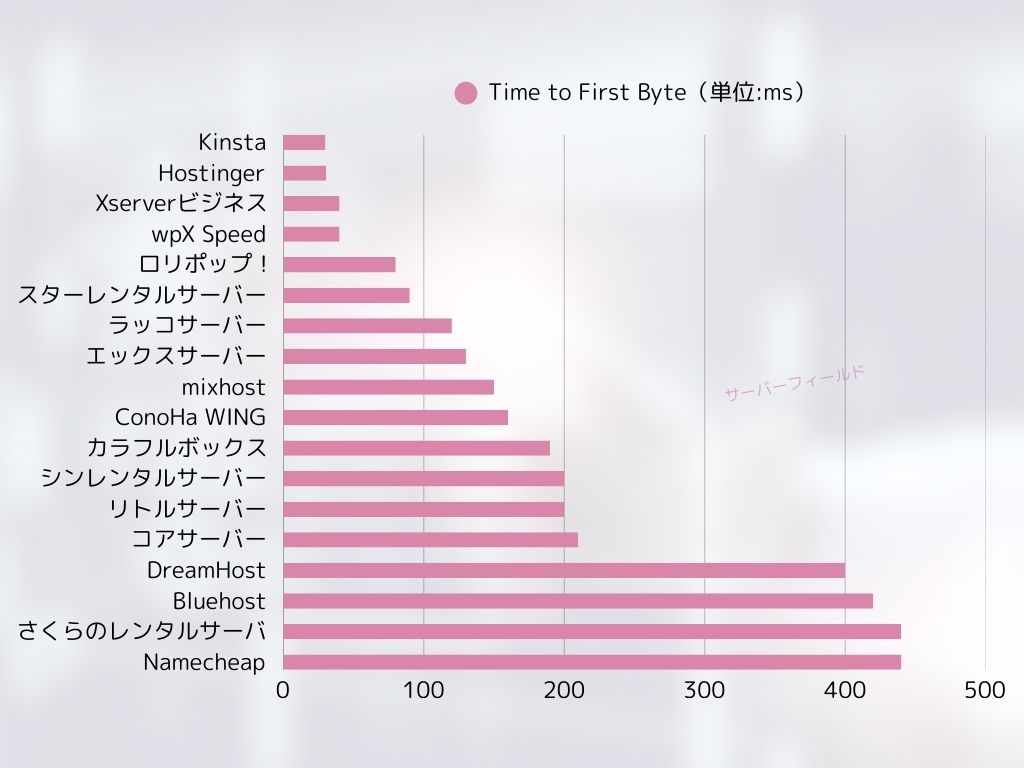
- Speed is the Time to First Byte measured on demo sites under the same conditions
| Hosting service (plan) | Speed | Monthly price | WordPress Preinstalled | Uptime | Support (hours) |
|---|---|---|---|---|---|
| Average and recommended | 222.2ms | 1,109 yen | Yes | 99.99%+ | 24/7 or better |
| Kinsta
| 30ms | 30 USD (4,525 yen) | Yes | 99.9% | Chat (Japanese support, 24/7) / Email |
【Hostinger】
 (Premium) (Premium) | 31ms | 439 yen | No | 99.9% | Chat (24/7) |
XServerビジネス
 (Shared hosting) (Shared hosting) | 40ms | 2,926 yen | Yes | 99.99% | Phone / Email (weekdays 10:00-18:00) |
wpX Speed
 (W1) (W1) | 40ms | 1,320 yen | No | Not disclosed | Phone / Email (10:00-18:00) |
LOLIPOP
 (Light) (Light) | 80ms | 495 yen | Yes | 99.99% | Email / Chat (weekdays 10:00-18:00) |
スターレンタルサーバー
 (Free) (Free) | 90ms | 418 yen | No | Not disclosed | No |
| Rakko Server(RK1) | 120ms | 440 yen | Yes | Not disclosed | Email (weekdays 10:00-19:00) |
| エックスサーバー
(Standard) | 130ms | 770 yen | Yes | 99.99% | Phone / Email / Chat (weekdays 10:00-18:00) |
mixhost
 (Light) (Light) | 150ms | 594 yen | Yes | 99.99% | Email (weekdays 10:00-18:00) |
| ConoHa WING
(Basic) | 160ms | 941 yen | Yes | 99.99% | Phone / Email / Chat (weekdays 10:00-18:00) |
ColorfulBox
 (BOX1) (BOX1) | 190ms | 383 yen | Yes | Not disclosed | Phone (24-hour reception) / Chat / LINE / Email (weekdays 09:30-12:00, 13:00-17:30) |
シンレンタルサーバー
 (Basic) (Basic) | 200ms | 985 yen | Yes | Not disclosed | Phone / Email (10:00-18:00) |
リトルサーバー
 (Mini) (Mini) | 200ms | 165 yen | No | Not disclosed | Email (business hours not disclosed) |
CORESERVER
 (MINI) (MINI) | 210ms | 264 yen | Yes | Not disclosed | Email / Chat (10:00-12:00, 13:00-17:00) |
| DreamHost(WordPress Starter) | 400ms | 2.99 USD (461 yen) | No | 100% | Chat (24/7) / Email / Phone callback |
| Bluehost(Basic) | 420ms | 4.99 USD (769 yen) | No | 100% | Chat (24/7) |
さくらのレンタルサーバ
 (Standard) (Standard) | 440ms | 550 yen | No | 99.99% | Chat / Email / Phone / Callback reservation (10:00-18:00) |
| Namecheap(EasyWP Supersonic) | 440ms | 9.88 USD (1,523 yen) | No | 99.9% | Chat (24/7) |
| Shin Free Server | — | Free | No | Not disclosed | No |
XREA
 (Free) (Free) | — | Free | No | Not disclosed | No |
Value Server
 (Eco) (Eco) | — | 220 yen | No | Not disclosed | Email / Chat (weekdays 10:00-17:00) |
| KAGOYA JAPAN(Grade 1) | — | 440 yen | Yes | 99.999% | Phone / Email (weekdays 10:00-17:00) |
| SiteGround(StartUp) | — | 3.99 USD (615 yen) | No | 99.99% | Chat (24/7) / Email / Phone |
| Hostgator(Baby) | — | 4.45 USD (686 yen) | No | 99.9% | Phone / Chat (24/7) |
| IONOS(Start) | — | 1.00 USD (154 yen) | No | 99.98% | Phone / Email / Chat (24/7) |
onamae.com Rental Server
 | — | 2,398 yen | No | 99.99% | Phone / Email / Chat (weekdays 10:00-18:00) |
ABLENET RentalServer
 (Light) (Light) | — | 830 yen | No | 99.99% | Email (business hours not disclosed) |
| Godaddy(Basic) | — | 899 yen | Yes | 99.9% | Chat (24/7) / Phone (weekdays 10:00-17:00) |
iCLUSTA+ byGMO
 (Mini) (Mini) | — | 1,027 yen | No | 100% | Phone (weekdays 10:00-18:00) Email support is available 24/7 |
ムームーサーバー
 | — | 1,430 yen | No | 99.99% | Email / Chat (9:30-13:00, 14:00-17:30) |
WADAX
 (WP Standard) (WP Standard) | — | 2,200 yen | No | 99.9% | weekdays 09:00-22:00, weekends 09:00-18:00 |
| WebARENA SuiteX | — | 1,997 yen | No | 100% | Email / Chat (weekdays 09:30-17:00) |
heteml
 | — | 2,035 yen | No | 99.99% | Phone / Email (weekdays 10:00-18:00) |
CPI
 (Shared) (Shared) | — | 4,840 yen | No | 100% | Phone / Email (weekdays 10:00-18:00) |
“エックスサーバー
” is a long-established high-speed hosting service with the No. 1 domestic market share. It is popular with both individuals and corporations. Honestly, it has no serious drawbacks, and it excels in stability, features, and support. With cashback, you can effectively use it from 495 yen.
- Introduction: Why XServer is chosen
- No. 1 domestic market share: the real strength of a hosting service trusted by everyone from individuals to large corporations
- 99.99% uptime: the reliability that supports stable site operation
- Fast page delivery that can also help SEO: speed that improves user experience
- Excellent compatibility with WordPress: easy setup even for beginners
- Five strengths of XServer: why it stands above competitors
- Outstanding server performance: comfortable site display and stable operation
- A strong support system: replies within 24 hours for peace of mind, even for beginners
- Strong compatibility with WordPress: Quick Start, easy installation, and dedicated features
- Robust security measures: protect your site from unauthorized access and DDoS attacks
- Flexible plan design: broad coverage from personal use to business use
- A thorough analysis of XServer's reputation: what reviews reveal
- A thorough check of XServer's drawbacks: what to know before signing up
- A thorough comparison of XServer and other hosts: finding the best fit
- Start your website with XServer right now in six steps
- Frequently asked questions about XServer
- Summary: what kind of people should choose XServer?
Introduction: Why XServer is chosen

No. 1 domestic market share: the real strength of a hosting service trusted by everyone from individuals to large corporations
エックスサーバー
has continued to lead the hosting industry for many years, and its track record and reliability are rock solid. It is used not only by individual users but also by corporate websites and large-scale e-commerce sites. That broad support itself can be seen as proof of エックスサーバー
's reliability.
Why is it chosen by so many users? The answer lies in the high-quality services that エックスサーバー
provides and its ongoing efforts to respond to user needs. Rather than being just another hosting service, it has earned trust from many users as a partner that supports the growth of their websites.
99.99% uptime: the reliability that supports stable site operation
One of the most important elements in running a website is stability. No matter how attractive your content is, if the server goes down, users cannot view your site. エックスサーバー
boasts an impressive uptime of 99.99%, making it possible to operate a site stably with almost no downtime.
This high uptime is supported by the latest technology and advanced system design. Thorough measures are in place to minimize server downtime, allowing users to focus on running their sites with peace of mind.

Fast page delivery that can also help SEO: speed that improves user experience

Website display speed has a major impact on user experience. If a site loads slowly, users leave, and the site's reputation also declines. エックスサーバー
delivers a comfortable browsing experience by providing a fast server environment.
This fast delivery is also effective for SEO. Search engines such as Google use site speed as one of their evaluation criteria. By using エックスサーバー
, you can run your site from a stronger position in SEO terms as well.
When we actually measured XServer, it proved to be very fast.
Excellent compatibility with WordPress: easy setup even for beginners
WordPress, the CMS essential for building blogs and websites, works extremely well with エックスサーバー
. With the easy installation feature, even beginners can set up WordPress in just a few clicks.
In addition, エックスサーバー
includes its own features for maximizing WordPress performance. The environment is set up so that WordPress sites can be run more comfortably, allowing even beginners to use it with confidence.
Five strengths of XServer: why it stands above competitors

The reason エックスサーバー
has led the industry for so many years and continues to be supported by so many users lies in its outstanding technical capabilities and its ongoing evolution to meet user needs. Here, we explain in detail the five strengths that allow エックスサーバー
to outperform other companies, using specific functions and specifications.
Outstanding server performance: comfortable site display and stable operation
One of the biggest strengths of エックスサーバー
is its overwhelming server performance. By combining the latest hardware with high-speed processing technology, it significantly improves website loading speed and gives users a comfortable browsing experience.
- Latest CPUs and large memory:
- エックスサーバー
is equipped with the latest generation of high-performance CPUs and a large amount of memory. This allows it to maintain stable processing power even when many accesses arrive at once and prevents site speed from dropping. It uses 4th-generation AMD EPYC processors and an all-NVMe environment.
- In particular, it can maintain responsive performance even during peak traffic periods.
- エックスサーバー
- High-speed storage:
- For storage, it uses fast NVMe. Compared with hosting environments marketed as all-SSD or pure-SSD, it delivers up to 32 times the read performance, greatly improving website display speed.
- Thanks to NVMe, even heavy content such as images and videos can be delivered quickly, which contributes to improving the overall performance of the website.
- High-speed network:
- エックスサーバー
uses high-speed network lines, allowing data to move smoothly between the server and users. As a result, websites can be viewed without stress even during traffic spikes.
- Its high-quality network infrastructure also supports global access and provides a comfortable browsing experience to users around the world.
- エックスサーバー
- WordPress acceleration with “KUSANAGI” technology:
- エックスサーバー
adopts “KUSANAGI,” a technology known for speeding up WordPress. KUSANAGI dramatically improves WordPress display speed and makes website operation more comfortable.
- By using KUSANAGI, you can not only make WordPress pages load faster but also reduce server load and maintain stable operation.
- エックスサーバー
A strong support system: replies within 24 hours for peace of mind, even for beginners
エックスサーバー
has a support system designed to respond within 24 hours. It accepts inquiries through phone, email, chat, and other methods, making it a service that even beginners can use with confidence.
- Email replies within 24 hours:
- エックスサーバー
answers email inquiries within 24 hours. Even when trouble occurs, you can quickly receive support aimed at solving the problem.
- エックスサーバー
- Phone, email, and chat support:
- It responds through multiple channels including phone, email, and chat, so users can receive support in the way that best suits them. Phone support is available on weekdays from 10:00 to 18:00.
- Clear and courteous assistance:
- The support staff are not only knowledgeable but also careful to explain things in a clear and easy-to-understand way. The environment is set up so that even beginners can ask questions comfortably.
- Long experience and accumulated know-how:
- エックスサーバー
has extensive know-how gained from many years of operation. Because of that, it can respond quickly and accurately to a wide variety of issues.
- It also offers a large FAQ section, so many problems can be solved by checking the FAQ first.
- エックスサーバー
Strong compatibility with WordPress: Quick Start, easy installation, and dedicated features
エックスサーバー
is highly compatible with WordPress and is equipped with abundant features for building and running WordPress sites.
- WordPress Quick Start:
- WordPress Quick Start is a feature available when signing up for a new server contract. If you enter the required information during the application process, WordPress will already be installed when the application is complete. Even complete beginners can start WordPress immediately.
- Easy WordPress installation:
- It includes an easy installation feature that completes the WordPress setup in just a few clicks. Even beginners can launch a WordPress site in very little time.
- Discount benefits for the XWRITE WordPress theme:
- エックスサーバー
subscribers can purchase the XWRITE WordPress theme at a special price. XWRITE is a high-quality theme developed and maintained by the in-house team, making it easy to create beautiful websites.
- エックスサーバー
- Proprietary features that maximize WordPress performance:
- エックスサーバー
includes proprietary features that maximize WordPress performance. Examples include X Accelerator, which optimizes caching, and XPageSpeed, which compresses files to speed things up. These features improve WordPress page speed and make site operation more comfortable.
- エックスサーバー

Robust security measures: protect your site from unauthorized access and DDoS attacks
エックスサーバー
takes a variety of security measures to ensure the safety of websites.
- Measures against unauthorized access:
- It has measures in place to detect and block unauthorized access. This reduces the risk of your website being damaged by malicious access.
- It also implements security measures such as firewalls and intrusion detection systems (IDS/IPS).
- WAF (Web Application Firewall):
- By adopting WAF, it can defend against attacks aimed at web applications. This helps protect websites from attacks that exploit vulnerabilities.
- DDoS protection:
- It has measures in place to detect and defend against DDoS attacks. This reduces the risk of your website going down because of a distributed denial-of-service attack.
- Automatic backup feature:
- To prepare for unexpected trouble, a 14-day automatic backup feature is included as standard. Using backup data, you can restore your website quickly.
Flexible plan design: broad coverage from personal use to business use
エックスサーバー
offers plans that cover a wide range of needs, from personal use to business use.
- Standard plan:
- This plan is ideal for operating small websites such as personal blogs and portfolio sites. It keeps costs down while still providing the necessary functions.
- Business plan:
- Because it provides a larger amount of server storage, this plan is ideal for running large websites such as corporate sites and e-commerce sites. It combines high performance and stability, making it suitable for business use.
- Flexible plan changes:
- You can change your plan after signing up. Both upgrades and downgrades are supported. Upgrades are reflected immediately. Downgrades can only be requested during the month in which the server usage term expires.
- Long-term contract discounts:
- It offers discounts that reduce the monthly fee when you sign a long-term contract. This makes it possible to use エックスサーバー
at a lower cost. In particular, the first contract period can become much cheaper when campaign pricing is available.
- It offers discounts that reduce the monthly fee when you sign a long-term contract. This makes it possible to use エックスサーバー
A thorough analysis of XServer's reputation: what reviews reveal

エックスサーバー
is a hosting service used by many people, but how do users actually feel about it? In this section, we thoroughly analyze online reviews and reputation to reveal the real picture of エックスサーバー
. We will look not only at positive reviews but also at negative ones and examine both its advantages and disadvantages objectively.
Positive reviews: the points users praise about XServer
The following points stand out especially often in positive reviews of エックスサーバー
.
- “The display speed is fast, and the site feels much smoother.” Many users praise エックスサーバー
for its page speed. In particular, users who migrated from other hosting services often say that “the site became dramatically faster.” Shorter page load times improve the user experience and can also lower bounce rates.
- Examples:
- “Even sites with lots of images now display without stress.”
- “Page loading became more than twice as fast as on the server I used before.”
- “I chose a fast server for SEO, and switching to エックスサーバー
turned out to be the right decision.”
- Examples:
- “The support is polite, so even beginners can use it with confidence.” The support system of エックスサーバー
is especially highly rated by beginners. Many users say they can use the server with peace of mind because inquiries are answered carefully even if they do not have specialized knowledge. The fact that it offers several ways to ask for help, such as phone, email, and chat, also makes it convenient.
- Examples:
- “I had absolutely no knowledge of hosting, but thanks to support I was able to configure everything without problems.”
- “When I contacted them because I did not know how to set something up, they explained it carefully.”
- “I am grateful that they are available 24/7, so I can ask questions even late at night.”
- Examples:
- “It runs stably, and the site almost never goes down.” The stability of エックスサーバー
is rated extremely highly by users. It boasts a strong 99.99% uptime, and because sites rarely go down, users can operate their sites with confidence.
- Examples:
- “The site never stops displaying, and I can run it stably.”
- “The site does not go down even during periods when traffic increases.”
- “On the server I used before, my site went down frequently, but that stopped after I moved to エックスサーバー
.”
- Examples:
- “WordPress was easy to install, and I could start a blog right away.” The easy WordPress installation feature is extremely convenient for beginners. Even without specialized knowledge, you can install WordPress in just a few clicks and start a blog or website immediately. In addition, エックスサーバー
includes WordPress acceleration features, making comfortable blog operation possible.
- Examples:
- “It was my first time using WordPress, but I installed it easily.”
- “Even without WordPress knowledge, I was able to start a blog immediately.”
- “WordPress also loads quickly, so I can write articles without stress.”
- Examples:
- “The price is high, but it offers value that justifies it.” The pricing of エックスサーバー
is somewhat higher than many other hosts, but many users feel that it delivers value equal to the price. People frequently say that the high performance, stability, and strong support system provide value that exceeds the monthly fee.
- Examples:
- “It costs more than other hosts, but it is worth it.”
- “It is a little expensive, but when I consider the stability and support, I am glad I chose エックスサーバー
.”
- “I recommend it to people who want to use a high-quality server even if it costs a bit more.”
- Examples:
Negative reviews: points where users still hope to see improvement
On the other hand, the following negative comments can also be found about エックスサーバー
.
- “The monthly fee is high compared with other hosts.” Some users say that the price of エックスサーバー
is somewhat high compared with other hosting services. However, that does not mean the price fails to match the quality. A more accurate statement is simply that there are cheaper hosts than エックスサーバー
. For users who want to keep costs as low as possible, the monthly fee may become a concern. That said, using long-term contract discounts can reduce the cost.
- Examples:
- “I think the pricing is on the high side compared with other hosting services.”
- “The initial cost is a bit painful.”
- “If it were a little cheaper, maybe even more people would use it.”
- Examples:
- “Plan changes can take time in some cases.” Some users say that changing plans can take time. For people who want a quick change, especially when traffic suddenly increases, that may be a source of frustration.
- Examples:
- “I requested a plan change, but it took time before it was reflected.”
- “When I wanted to change plans immediately, it felt a little inconvenient.”
- “I wish the plan change process were a bit smoother.”
- Examples:
- “Some plans may be more powerful than necessary.” エックスサーバー
provides high-performance hosting, but depending on the plan, it may be excessive for small websites. For sites with little traffic, such as personal blogs or small portfolio sites, a lower-cost plan may be enough. When choosing a plan, it is important to select one that matches the scale of your site.
- Examples:
- “For a personal blog, I ended up choosing a plan that was too high-spec.”
- “I chose an expensive plan, but I feel it is wasteful because I do not use many resources.”
- “For a small site, a cheaper plan would have been enough.”
- Examples:
A summary of XServer's strengths and weaknesses based on user reviews
Taking all of these reviews together, it is fair to say that エックスサーバー
has the following advantages and disadvantages.
- Advantages:
- Fast display speed
- Stable operation
- A strong support system
- Excellent compatibility with WordPress
- Strong security measures
- Disadvantages:
- Pricing is somewhat high
- Plan changes can take time in some cases
- Some plans may be more powerful than necessary
A thorough check of XServer's drawbacks: what to know before signing up

エックスサーバー
has many advantages, but it also comes with some drawbacks. Understanding those drawbacks in advance can help you avoid regrets after signing up and make a wiser choice. In this section, we examine XServer's weaknesses thoroughly and explain in detail the points you should know before entering into a contract.
Pricing: why you need to compare both the initial cost and monthly fees carefully
The pricing of エックスサーバー
is set somewhat higher than budget hosting services. In particular, initial costs and monthly fees are important elements when considering a contract, so it is necessary to compare them carefully in advance.
- Initial cost:
- Monthly fees:
- The monthly price of エックスサーバー
varies by plan. Even with the Standard plan for individuals, the monthly cost exceeds 1,000 yen if the contract term is short. Business-oriented plans can become even more expensive.
- To keep monthly costs down, you can use long-term contract discounts or choose a longer contract period. Also, during campaign periods, monthly charges may be discounted, so it is worth checking regularly.
- The monthly price of エックスサーバー
- Price comparison with other companies:
- The pricing of エックスサーバー
is somewhat high compared with other hosting services. The difference is especially noticeable when you compare it with lower-priced hosts such as Lolipop! or Sakura Rental Server.
- If price is your top priority, you need to compare it carefully with other hosts. That said, cheaper hosts can be weaker in performance, stability, or support, so the decision should be made on a total-value basis.
- Instead of looking only at price, compare server performance, stability, and support comprehensively so that you can choose the host that best fits you.
- The pricing of エックスサーバー
- Ways to keep costs down:
- Take full advantage of long-term contract discounts
- Sign up during campaign periods
- Choose a plan that matches the specifications you actually need and avoid overbuying
Plan changes: downgrading can take time
With エックスサーバー
, you can change your plan after signing up, but the procedure can take time in some cases. However, upgrades are reflected immediately, so if you urgently need to move up because traffic has increased, that generally will not be a problem.
- How to change plans:
- You can change your エックスサーバー
plan from your Xserver Account. Apply from the “Plan Change” menu in the service menu.
- You can change your エックスサーバー
- Points to watch when changing plans:
- When moving to a higher plan, you need to pay the difference in price at the time of application.
- When moving to a lower plan, submit the request between the 1st and the 20th of the month in which your usage term expires.
A thorough comparison of XServer and other hosts: finding the best fit

エックスサーバー
is popular as a high-performance and stable hosting service, but many other attractive options also exist. In this section, we compare XServer with two services that are often considered alongside it, ConoHa WING and HETEML, so that readers have clear criteria for deciding which host best suits them.
ConoHa WING: popular for speed and cost performance
ConoHa WING is a hosting service provided by the GMO Internet Group and is popular for its speed and cost performance. In particular, it is designed specifically with WordPress in mind, making it a good option for users who want faster WordPress sites.
- Advantages of ConoHa WING:
- Outstanding speed: ConoHa WING achieves excellent speed by combining a high-performance server environment with its own acceleration technology.
- No initial fee: ConoHa WING has no setup fee, so it is easy to start using.
- Regular plans billed by the hour: ConoHa WING offers plans that can be used on an hourly basis. Pricing starts from 2.2 yen per hour, making it easy to try at low cost.
- Designed specifically for WordPress: Because it is built with WordPress in mind, anyone can get a WordPress site started easily.
- WING Pack discount: If you use the WING Pack bundled with a WordPress theme, the theme price is discounted.
- Disadvantages of ConoHa WING:
- No free trial period: There is no free trial. Because you cannot test how it feels at no cost, some users may sign up and then feel it does not suit them.
- Support system: The support system of ConoHa WING is sometimes said to be somewhat weaker than that of エックスサーバー
.
- Comparison with XServer:
- Display speed: ConoHa WING delivers page speed that is on the same level as エックスサーバー
. However, in our own measurements, エックスサーバー
was faster.
★ Hosting Speed Comparison Across 15 Providers: Which One Is Really Fast? [2024 Latest] - Pricing: ConoHa WING can keep initial costs low if you use its hourly plan, but if you continue using that hourly plan for a long time, it may end up costing more than エックスサーバー
.
- Support system: エックスサーバー
offers phone and chat support in addition to email replies within 24 hours. ConoHa WING also has a solid support setup, but XServer's reputation in this area is stronger.
- Ease of use: As a long-established hosting service, エックスサーバー
has a large amount of information available online and is widely regarded as easy for beginners to use.
- Display speed: ConoHa WING delivers page speed that is on the same level as エックスサーバー

HETEML: appealing original features for creators
HETEML is a hosting service provided by GMO Pepabo, Inc., and it stands out for its wide range of features aimed at creators. It is particularly well suited to users who want to operate multiple domains or customize server settings in detail.
- Advantages of HETEML:
- The reassurance of a separated server structure: HETEML separates the web server from the mail server. Because of that, even if access increases on the web server that runs your website or blog, email service is not affected. This helps keep the sending and receiving of inquiry emails stable, which is reassuring for business use.
- A simple one-plan structure: HETEML has only one plan, so there is no need to worry about choosing among multiple options.
- Unlimited transfer volume: HETEML allows unlimited data transfer, so even sites with high traffic can be run with peace of mind. (Some plans have transfer limits.)
- Version control with Git: It supports Git-based version control, allowing you to manage the history of changes made to your website.
- Disadvantages of HETEML:
- The monthly fee is high: HETEML is simple because it has just one plan, but its monthly price is higher than エックスサーバー
.
- WordPress installation at signup: HETEML has a WordPress installation feature, but it does not offer a function that installs WordPress automatically at the time of a new contract. For users who are new to servers or WordPress, that can make starting a WordPress blog feel harder.
- The monthly fee is high: HETEML is simple because it has just one plan, but its monthly price is higher than エックスサーバー
- Comparison with XServer:
- Pricing: エックスサーバー
offers lower-priced plans than HETEML.
- Stability: HETEML feels stable because of its separated-server design. However, since both HETEML and エックスサーバー
achieve 99.99% uptime, the difference is not large.
- Ease of use: エックスサーバー
provides an interface that beginners can use more easily, while HETEML may require somewhat more specialized knowledge.
- Pricing: エックスサーバー

Comparison table: XServer, ConoHa WING, and HETEML
| Feature | エックスサーバー
| ConoHa WING
| heteml
|
| Display speed | Very fast | Very fast | Fast |
| Pricing | Somewhat high | From 2.2 yen per hour | High |
| Support system | Email reply within 24 hours, phone, chat | Email, phone, chat | Email, phone, chat |
| Compatibility with WordPress | Very high | Very high | High |
| Freedom of server settings | Standard | Standard | High |
| Custom domains | Multiple supported | Multiple supported | Multiple supported |
| Recommended for | People who value stability and reliability | Server beginners and people new to WordPress | Corporate sites that receive many inquiries |
Which should you choose? Pick based on your needs
After comparing the characteristics of エックスサーバー
, ConoHa WING, and HETEML, the best hosting service depends on your own needs.
- People who should choose XServer:
- People who value stability and reliability
- People who want generous support
- People who value quality more than price
- People who should choose ConoHa WING:
- People with no experience using servers or WordPress
- People who prioritize display speed
- People who want to try it casually on an hourly basis
- People who should choose HETEML:
- People who run sites that receive many inquiries
- People who want to use Git-based version control
Each hosting service has both advantages and disadvantages. Consider the size and purpose of your website as well as your budget, and choose the hosting service that fits you best.
Start your website with XServer right now in six steps
- STEP.1
Click “Try it first! 10 days free!”
From “First-time customers,” move on to “10-day free trial new application.”
- STEP.2Choose your application details
You can leave the server ID as it is.
Select a plan. The Standard plan is recommended. If traffic grows and you run short on resources, upgrade the plan later.
Be sure to check “Use” for WordPress Quick Start. If you do not use it, WordPress setup becomes more difficult. (You will no longer be able to use the 10-day free trial, but even so, using this option is the better choice.)
You will see “Please confirm before applying,” so check the details there. Then click “Confirmed.”
A 12-month contract is recommended. With a contract of 12 months or longer, you can also use a custom domain for free.
Enter the text for the custom domain you want to register. It can be any string you like. Changing a registered domain later costs money and makes setup harder, so choose your domain carefully.
★ What is a domain? Its role as an online address and how to get one
Enter your WordPress information.
- Blog title: anything is fine
- Username: anything is fine
- Password: make it as complex as possible
- Email address*: your everyday email address is convenient
The username and password are required when logging in to WordPress. Make a note of them. You will need them to log in to the website you create with WordPress.
The custom domain setting is the important domain that becomes your site URL. Choose the wording carefully.
You can change the site name later. If you have not decided yet, just enter a temporary name for now.
Choose a WordPress theme. For business websites, Lightning is recommended. For blogs, Cocoon is recommended. (This site uses Cocoon.)
- STEP.3Enter your Xserver Account information
Enter your email address, name, address, and other required details.
Prepare your credit card and enter the payment information.
Review the “Terms of Use” and “Handling of Personal Information.” If you agree, check the boxes and click “Next.”
Enter the verification code shown on the screen. A verification code has been sent to your registered email address, so check it there.
- STEP.4Confirm your application
Check the application details and your Xserver Account information again. If everything is correct, click “Proceed to SMS / phone verification.”
The application details will then be confirmed using your phone number.
Enter the phone number to use, choose SMS or automated voice call as the method for receiving the code, and click “Get verification code.” After receiving it, enter the code.
Once you receive the email titled “【Xserver】■Important■ Server account setup completed,” your application is complete.
Click “Apply,” and all application steps are finished. Your WordPress website will be created right away.
- STEP.5Initial WordPress setup
The email you just received contains your WordPress login information.
Click the admin dashboard URL. On the login screen that appears, enter the username and password you wrote down earlier, then click “Log in.”
* If you see the warning “This site cannot be reached,” the DNS settings have not propagated yet. In that case, all you can do is wait, so try logging in again every hour.
★ What are DNS and name servers?
Set your permalinks. In the WordPress admin screen, go to “Settings” and then “Permalinks.” Choose “Post name,” then click “Save Changes.”
If you choose “Post name,” you will be able to enter any string you like into the URL when publishing an article. We recommend using a short string that gives readers an idea of the content of the article. If it is too long, some readers may start to worry that the site looks suspicious.
- STEP.6Install plugins
Go back to the WordPress admin dashboard, open “Plugins,” then “Add New,” and install the plugins you need.
When you find the plugin you want by searching, click “Install Now” and then “Activate.” After that, follow the instructions for each plugin.
Be sure to install security and backup plugins.
- Five WordPress security plugins that strengthen protection and how to choose one
- Five powerful WordPress backup plugins that help you recover your data
Once the plugins are in place, your WordPress website is ready to go!
Frequently asked questions about XServer

When people consider using エックスサーバー
, they naturally have many questions and concerns. In this section, we summarize common questions and their answers in a clear way so that even beginners can use XServer with confidence.
Q1. How do I cancel XServer?
エックスサーバー
can be canceled by following the steps below.
- Log in to the XServer control panel.
- First, log in to your "Xserver Account" from the official エックスサーバー
website.
- First, log in to your "Xserver Account" from the official エックスサーバー
- Open "Contract Information."
- After logging in to your "Xserver Account," select "Contract Information" from the quick menu.
- Click "Cancel."
- Click "Cancel" at the bottom of the page.
- Click "Submit Cancellation Request."
- Make sure the server ID is correct. Then click "Submit Cancellation Request." After that, if the server field shows "Cancellation," the cancellation has been completed successfully.
Notes:
- Once you complete the cancellation procedure, the data stored on the server will be deleted. Back up any necessary data in advance.
- If you cancel during the contract term, the fee for the remaining period will not be refunded, but you can continue using the server until the end of the contract term.
Q2. Will I receive a refund or prorated billing when I cancel?
エックスサーバー
does not, as a general rule, provide refunds or prorated billing when you cancel.
- Cancellation during the contract term:
- Even if you cancel before the end of the contract term, the fee for the remaining period will not be refunded.
- Prorated monthly charges:
- Prorated monthly billing is also not available.
- For example, even if you cancel in the middle of a month, you will still be charged the full fee for that month.
Q3. What is the difference between XServer and XServer Business?
エックスサーバー
and XServerビジネス
are both hosting services provided by Xserver Inc., but they differ in their target users and service content.
- XServer:
- It is a hosting service aimed at a wide range of users, from individuals to small and midsize businesses.
- It includes plenty of features that make WordPress easy to start, such as easy installation and acceleration features.
- It is available at a relatively affordable price.
- XServer Business:
- It is a hosting service aimed mainly at large enterprises and users who operate large-scale websites.
- It offers even higher stability, stronger security measures, and more specialized support.
- Its pricing is set higher than XServer's.
Main differences:
| Feature | エックスサーバー
| XServerビジネス
|
| Target users | Individuals, small and midsize businesses | Large enterprises, large-scale site operators |
| Pricing | Relatively affordable | Higher |
| Stability | High | Higher |
| Security measures | Standard | More heavily strengthened |
| Support system | Email replies within 24 hours, etc. | Specialized support and free website creation |
| Features | Easy to use with WordPress | Emphasis on higher stability and security |
Which should you choose?
- XServer:
- You want to run a personal blog or a small website
- You want to get started with WordPress easily
- You want to use a service with relatively affordable pricing
- XServer Business:
- You want to operate a corporate website or a large-scale site
- You want stronger stability and security
- You want specialized support
Q4. How can I check the remaining storage in my current plan?
The remaining storage space (disk space) in your エックスサーバー
plan can be checked by following the steps below.
- Log in to the XServer "Server Panel."
- First, log in to the "Server Panel" from the official エックスサーバー
website.
- First, log in to the "Server Panel" from the official エックスサーバー
- Check the account data.
- Check the "Disk Usage" and "Available Space" shown in the account data section of the "Server Panel."
Notes:
- Disk space is used by website data, email data, and similar content.
- If usage exceeds the amount included in your contract, problems may occur, such as your website no longer displaying.
- Check disk usage regularly, and if it looks like you will run short of space, consider changing your plan.
Q5. Are there any hosting services you recommend besides XServer?
Besides エックスサーバー
, there are many other hosting services worth recommending.
- ConoHa WING:
- If you want very fast display speed, ConoHa WING is a strong choice.
- There is no initial fee, and hourly plans are also available.
- heteml:
- For sites such as corporate websites that receive many inquiries, heteml is recommended because it uses separated server environments.
- Lolipop!:
- If you want to use a hosting service at a low price, Lolipop! is recommended.
- It is easy to use even for beginners.
- mixhost:
- If you want a fast and stable server environment, mixhost is recommended.
- Because it also has servers overseas, it is a good choice if you are considering publishing a site for people outside Japan.
Points for choosing a hosting service:
- The size and purpose of your website:
- The best server differs depending on your purpose, such as whether it is a personal blog or a corporate website.
- The features you need:
- Check whether it includes the features you need, such as easy WordPress installation, SSL certificates, and backup functionality.
- Pricing:
- Compare initial costs, monthly fees, contract terms, and related conditions.
- Support system:
- If you are a beginner, it is reassuring to choose a hosting service with strong support.
- Display speed:
- Your website's display speed has a major impact on the user experience.
If you have questions or anything unclear beyond these items, check the official エックスサーバー
website or support pages, or contact them directly.
Summary: XServer is recommended for these people
"エックスサーバー
" is the No. 1 long-established high-speed hosting service in Japan by market share. It is popular with both individuals and businesses. To be honest, it has no real drawbacks, and its stability, features, and support are all excellent. With the cashback campaign, you can use it from an effective 495 yen.

エックスサーバー
is supported by many users as a high-performance and stable hosting service. Based on what we have covered so far, this section briefly summarizes the kinds of people for whom エックスサーバー
is especially well suited.
- Who XServer is recommended for:
- People who want a fast and stable server: XServer delivers fast display speed and stable operation through up-to-date technology and a high-quality server environment. It is recommended for people who value display speed and for people who want site stability.
- People who want to use WordPress comfortably: XServer works extremely well with WordPress and includes a wide range of features for comfortable WordPress use, such as easy installation and acceleration features. It is recommended for people who want to start a blog or website with WordPress.
- Beginners who want strong support: XServer has a strong support system, including replies within 24 hours. It is recommended for beginners who feel uneasy about server setup and for people who want support quickly when trouble occurs.
- People looking for a trustworthy server for business use: XServer offers high reliability and stability, so it can be used for corporate websites, e-commerce sites, and other business purposes with confidence. It is recommended for people looking for a server to use for business.
- People who want a high-quality server even if it costs a little more: XServer's pricing is somewhat high, but in return it provides high-performance, stable service. It is recommended for people who want a high-quality server even if the price is a little higher.
- On the other hand, who XServer is not recommended for
- People who want to keep costs as low as possible: XServer is somewhat expensive. If you want to keep monthly fees down, other low-cost hosting services are a better fit.
エックスサーバー
is an excellent hosting service with many advantages, but it will not necessarily be the best choice for everyone. Use the points explained in this article as a reference, and choose the hosting service that best fits you by considering your website's size, purpose, budget, and related factors.
Complete comparison of 32 WordPress hosting services: recommendations for individuals, corporations, and overseas use

When you think, "I want to start WordPress," and search for "WordPress recommendations," you really do find all kinds of articles, from options for individuals and corporations or small businesses to overseas servers and low-cost servers. To be honest,
- Which site should I read?
- I just want to choose a server in a simple, easy-to-understand way.
- Show me how to start WordPress right now.
Is that not exactly how you feel? That is why this article introduces a carefully selected set of recommendations from among 32 hosting services for individuals, corporations, and domestic and overseas use. It is explained by the SEO specialist of an app development company that uses hosting services every day.